

CSS代码检查工具stylelint的使用方法详解
stylelint是一款功能强大的CSS检测工具,拥有超过150条内置规则,可捕捉错误、统一代码风格。支持Vue框架,通过安装核心包与插件、创建配置文件即可运行校验,帮助保持样式表规范一致。
CSS虽然不能算是一门严格的编程语言,但在前端开发里,它的重要性一点不输给Ja vaScript。尤其是当项目规模变大,样式表写得乱七八糟,简直就是团队协作的定时冲击波——特别是对有强迫症的人来说。CSS入门容易,想写出漂亮、可维护的代码却相当难。所以,一套靠谱的校验规则势在必行。而stylelint正是这样一个强大的现代CSS检测工具,它能帮助开发者在样式表中保持一致的约定,避免低级错误,让代码风格统一、规范。下面就来详细聊聊它的用法。

概述
stylelint目前拥有超过150条规则,覆盖了错误捕捉、最佳实践、语言特性限制以及代码风格强制等方方面面。它支持最新的CSS语法,并且配置非常灵活,可以按需定制。
Vue
先看看在Vue框架下怎么安装和使用stylelint。
1、安装核心包和插件
npm install stylelint --sa ve-dev
npm install stylelint-config-standard --sa ve-dev
npm install stylelint-order --sa ve-dev
其中,stylelint是运行工具,stylelint-config-standard是官方推荐的配置,stylelint-order则用来控制CSS属性的书写顺序。
安装完成后,package.json中会自动添加如下字段:
"stylelint": "^9.1.3",
"stylelint-config-standard": "^18.2.0",
"stylelint-order": "^0.8.1",
2、创建配置文件
在项目根目录下新建.stylelintrc文件,内容如下:
{
  "extends": "stylelint-config-standard",
  "plugins": ["stylelint-order"],
  "rules": {
    "order/order": ["declarations","custom-properties","dollar-variables","rules","at-rules"],
    "order/properties-order": ["position","z-index",   "top","bottom","left",     "right","float","clear","columns","columns-width","columns-count","column-rule","column-rule-width","column-rule-style","column-rule-color","column-fill","column-p","column-gap",   "display","grid","grid-template-rows","grid-template-columns","grid-template-areas","grid-auto-rows","grid-auto-columns","grid-auto-flow","grid-column-gap","grid-row-gap","grid-template","grid-template-rows","grid-template-columns","grid-template-areas","grid-gap","grid-row-gap","grid-column-gap","grid-area","grid-row-start","grid-row-end","grid-column-start","grid-column-end","grid-column","grid-column-start","grid-column-end","grid-row","grid-row-start","grid-row-end",   "flex","flex-grow","flex-shrink","flex-basis","flex-flow","flex-direction","flex-wrap","justify-content","align-content","align-items","align-self","order","table-layout","empty-cells","caption-side","border-collapse","border-spacing","list-style","list-style-type","list-style-position","list-style-image","ruby-align","ruby-merge","ruby-position","box-sizing","width","min-width","max-width","height","min-height","max-height","padding","padding-top","padding-right","padding-bottom","padding-left","margin","margin-top","margin-right","margin-bottom","margin-left",   "border","border-width","border-top-width","border-right-width","border-bottom-width","border-left-width","border-style","border-top-style","border-right-style","border-bottom-style","border-left-style","border-color","border-top-color","border-right-color","border-bottom-color","border-left-color","border-image","border-image-source","border-image-slice","border-image-width","border-image-outset","border-image-repeat","border-top","border-top-width","border-top-style","border-top-color","border-top","border-right-width","border-right-style","border-right-color","border-bottom","border-bottom-width","border-bottom-style","border-bottom-color","border-left","border-left-width","border-left-style","border-left-color","border-radius","border-top-right-radius","border-bottom-right-radius","border-bottom-left-radius","border-top-left-radius","outline","outline-width","outline-color","outline-style","outline-offset","overflow","overflow-x","overflow-y","resize","visibility","font","font-style","font-variant","font-weight","font-stretch","font-size","font-family","font-synthesis","font-size-adjust","font-kerning",    "line-height","text-align","text-align-last","vertical-align",   "text-overflow","text-justify","text-transform","text-indent","text-emphasis","text-emphasis-style","text-emphasis-color","text-emphasis-position","text-decoration","text-decoration-color","text-decoration-style","text-decoration-line","text-underline-position","text-shadow",   "white-space","overflow-wrap","word-wrap","word-break","line-break","hyphens","letter-spacing","word-spacing","quotes","tab-size","orphans","writing-mode","text-combine-upright","unicode-bidi","text-orientation","direction","text-rendering","font-feature-settings","font-language-override","image-rendering","image-orientation","image-resolution","shape-image-threshold","shape-outside","shape-margin","color","background","background-image","background-position","background-size","background-repeat","background-origin","background-clip","background-attachment","background-color","background-blend-mode","isolation","clip-path","mask","mask-image","mask-mode","mask-position","mask-size","mask-repeat","mask-origin","mask-clip","mask-composite","mask-type","filter","box-shadow","opacity","transform-style","transform","transform-box","transform-origin","perspective","perspective-origin","backface-visibility","transition","transition-property","transition-duration","transition-timing-function","transition-delay","animation","animation-name","animation-duration","animation-timing-function","animation-delay","animation-iteration-count","animation-direction","animation-fill-mode","animation-play-state","scroll-beha vior","scroll-snap-type","scroll-snap-destination","scroll-snap-coordinate","cursor","touch-action","caret-color","ime-mode","object-fit","object-position","content","counter-reset","counter-increment","will-change","pointer-events","all","page-break-before","page-break-after","page-break-inside","widows"],
    "no-empty-source": null,
    "property-no-vendor-prefix": [true, {"ignoreProperties": ["background-clip"]}],
    "number-leading-zero": "never",
    "number-no-trailing-zeros": true,
    "length-zero-no-unit": true,
    "value-list-comma-space-after": "always",
    "declaration-colon-space-after": "always",
    "value-list-max-empty-lines": 0,
    "shorthand-property-no-redundant-values": true,
    "declaration-block-no-duplicate-properties": true,
    "declaration-block-no-redundant-longhand-properties": true,
    "declaration-block-semicolon-newline-after": "always",
    "block-closing-brace-newline-after": "always",
    "media-feature-colon-space-after": "always",
    "media-feature-range-operator-space-after": "always",
    "at-rule-name-space-after": "always",
    "indentation": 2,
    "no-eol-whitespace": true,
    "string-no-newline": null
  }
}
3、运行校验
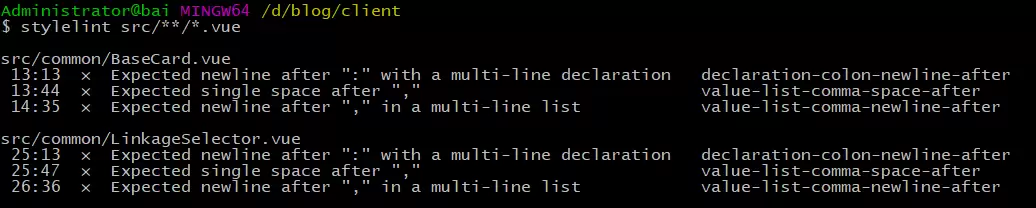
配置完成后,直接对src目录下的所有 Vue 文件执行校验即可:
react
在 React 项目中,很多人习惯用 styled-components 来写 CSS,stylelint 也提供了对应的插件来支持这种写法。
1、安装相关依赖
npm install --sa ve-dev stylelint@9.1.3
npm install --sa ve-dev stylelint-processor-styled-components
npm install --sa ve-dev stylelint-config-styled-components
npm install --sa ve-dev stylelint-config-recommended
npm install --sa ve-dev stylelint-order
注意:由于 stylelint 更新到 9.2 版本后,会导致 styled-components 中的 CSS 代码无法正常校验,所以稳妥起见,这里建议使用 9.1.3 版本。

2、创建配置文件
在根目录下新建 .stylelintrc 文件:
{
  "processors": ["stylelint-processor-styled-components"],
  "extends": [
    "stylelint-config-recommended",
    "stylelint-config-styled-components"
  ],
  "plugins": ["stylelint-order"],
  "rules": {
    "order/order": ["declarations","custom-properties","dollar-variables","rules","at-rules"],
    ...
  }
}
3、执行校验
同样使用 stylelint 命令即可。
注意事项
1、fix 命令要慎用
stylelint 的 --fix 参数可以自动修复部分规则,但这里有个坑——如果你对 JS 文件执行 stylelint '**/*.js' --fix,它可能会把整个文件里的代码清空,只保留能识别的 CSS 部分。曾经有开发者因此丢掉了所有 JS 逻辑,所以务必谨慎。
2、配置 scripts 快捷方式
可以在 package.json 中配置一个快捷命令:
"scripts": {
  "lintcss": "stylelint 'src/**/*.js'"
}
之后用 npm run lintcss 就能直接运行。
3、常见错误
如果遇到 Error: No configuration provided for 的提示,通常是因为根目录下没有找到 .stylelintrc 配置文件,检查一下文件是否存在即可。

详细分析链表删除节点的时间复杂度,深入探讨单链表与双向链表在不同已知前提下的查找与删除开销,并结合完整代码与清晰图解进行对比总结。

想知道如何让AI写出的代码更贴合你的习惯?本文手把手教你在VS Code中调整Codex相关模型参数,通过修改配置文件优化温度值和令牌限制,解决代码建议不准确或响应慢的问题。

通过实测展示Claude Code在终端中如何理解自然语言指令、自动修改代码文件并处理复杂编程任务,帮助开发者评估其实际辅助能力。

本教程详细讲解如何使用Visual Studio创建WinForms项目,通过添加按钮和标签控件并编写点击事件代码,实现一个基础的计数器功能,适合C#初学者快速上手Windows窗体应用开发。

详解Cursor编辑器中自动补全功能的开启与优化设置,涵盖Tab触发机制、上下文窗口调整及模型切换,帮助开发者解决补全延迟、干扰大等问题,提升编码流畅度。

详解Pandas中数据格式转换的核心方法,包括astype强制转换、to_numeric容错处理及日期解析技巧,解决常见类型错误并提升数据处理效率。
详细介绍在Visual Studio Code中安装Chinese (Simplified)语言包的方法,包括通过扩展市场搜索、安装及自动重启切换至简体中文界面的完整步骤,帮助开发者快速将编辑器本地化。
针对Cursor安装包默认锁定C盘且无路径选择界面的问题,提供通过手动移动文件并创建目录联结(Symbolic Link)的解决方案,实现将软件安装在其他磁盘分区。
详解Windows系统下Rust语言的安装步骤,重点解析rustup工具链管理机制,解决环境变量配置错误及MSVC链接器缺失问题,提供可复制的命令验证方法与常见报错的因果排查思路。
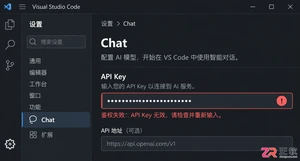
详解VS Code中Chat插件的安装与核心配置步骤,重点解决API连接失败、响应慢等常见问题,通过优化上下文设置提升代码生成质量,适合希望集成AI辅助工具的开发者阅读。




Photoshop 2026 是 Adobe 推出的专业图像处理与视觉设计软件,支持 Windows、macOS 和 iPad 等平台,广泛应用于摄影修图、电商设计、平面海报、数字绘画及视觉合成等创作场景。

Blender 是一款免费开源、跨平台的专业 3D 创作软件,集建模、动画、渲染、视频编辑与视觉合成等功能于一体,广泛应用于影视动画、游戏设计和建筑可视化等领域。软件支持 Cycles 物理渲染器与 Eevee 实时渲染引擎,并提供多边形建模、骨骼绑定、物理模拟等专业工具。Blender 兼容 Windows、macOS 和 Linux 系统,安装包轻巧、运行流畅,依托活跃的全球开发者社区持续更新,是从初学者到专业创作者都值得选择的正版 3D 创作工具。


Photoshop 2026 是 Adobe 推出的专业图像处理与视觉设计软件,支持 Windows、macOS 和 iPad 等平台,广泛应用于摄影修图、电商设计、平面海报、数字绘画及视觉合成等创作场景。
Blender 是一款免费开源、跨平台的专业 3D 创作软件,集建模、动画、渲染、视频编辑与视觉合成等功能于一体,广泛应用于影视动画、游戏设计和建筑可视化等领域。软件支持 Cycles 物理渲染器与 Eevee 实时渲染引擎,并提供多边形建模、骨骼绑定、物理模拟等专业工具。Blender 兼容 Windows、macOS 和 Linux 系统,安装包轻巧、运行流畅,依托活跃的全球开发者社区持续更新,是从初学者到专业创作者都值得选择的正版 3D 创作工具。