

使用display:none时隐藏DOM元素无法获取实际宽高的解决方法
display:none使DOM元素无物理尺寸,无法获取实际宽高。jQuery的actual方法临时将display改为block,结合visibility:hidden和position:absolute获取真实尺寸,获取后立即恢复原样,从而解决该问题。
你遇到过这种情况吗?一个好好的DOM元素,一旦被加上display: none;,就像人间蒸发了一样,用Ja vaScript怎么都拿不到它的真实宽高,返回的永远是个0。
这其实是个很经典的问题。我们来看一个具体的例子。我准备了一个父元素和一个子元素,通过一个按钮来控制父元素是否应用display: none;。
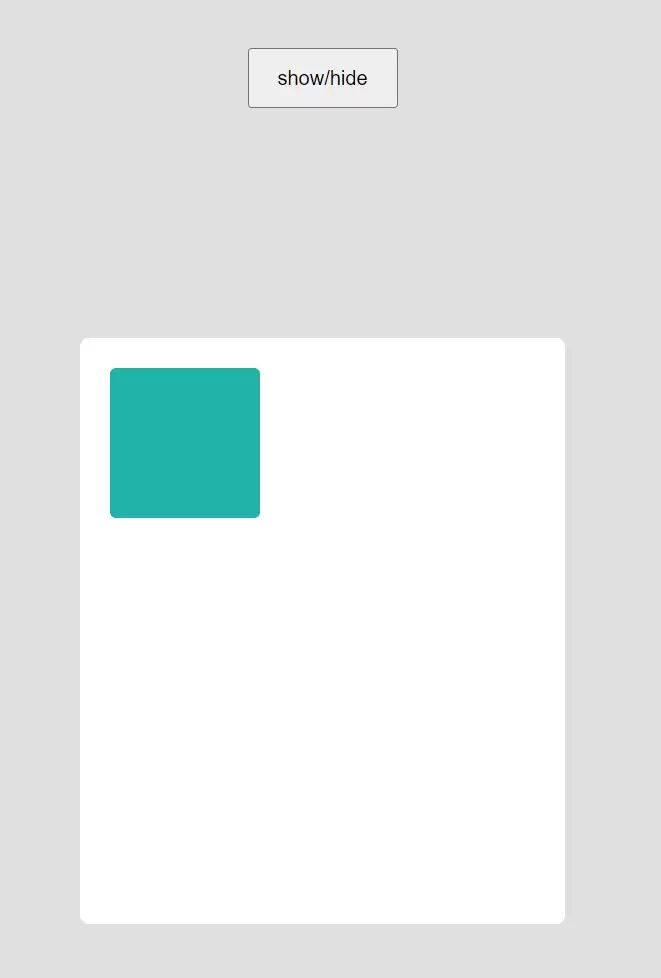
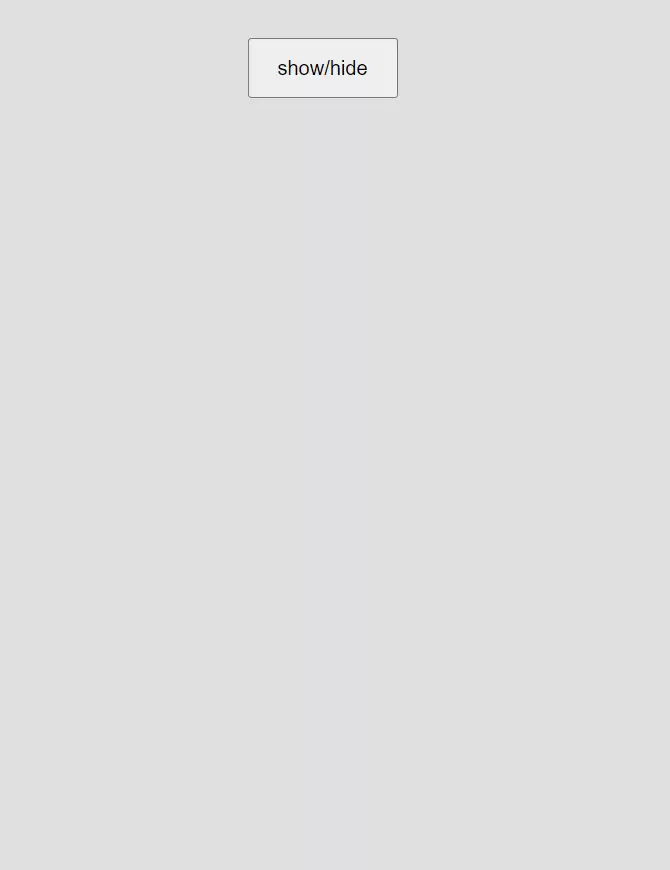
每次点击按钮后,我们都在控制台输出一下这两个元素的高度。结果很直观:
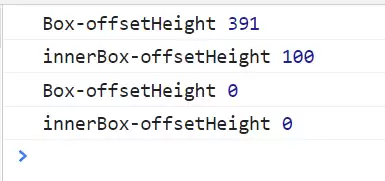
当元素正常显示时,一切安好,宽高数据准确无误。但只要加上display: none;,获取到的值立刻归零。
解决方法
要解决这个问题,jQuery社区其实早就提供了一个非常趁手的工具——actual方法。它的用法很简单,直接引入插件后,调用即可获取到元素的真实尺寸。
语法格式也一目了然:
// 获取带有.hidden类的元素的实际高度
$('.hidden').actual('height');使用actual方法后,效果立竿见影。无论元素是否被设置了display: none;,都能正确返回其实际高度。下面这张图里,两次输出的结果,一次是隐藏的,一次是显示的,都拿到了准确的高度。
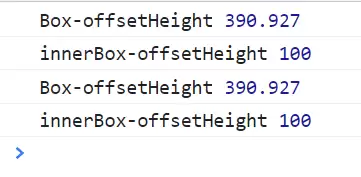
那么,它的原理是什么呢?其实并不复杂。
问题的根源在于,display: none;的元素根本没有物理尺寸,而另一个同样能实现“隐形”效果的属性visibility,元素是保留物理尺寸的。但显然,我们不能直接用visibility: hidden;来代替display: none;,因为前者会占据页面空间,破坏布局。
正确的思路是:在需要获取尺寸的那一刻,先把display: none;临时换成display: block;,然后通过visibility: hidden;让元素继续“隐形”,这样就能顺利拿到它的实际宽高了。需要注意的是,当元素变成块级元素后,可能会“推动”周围元素,导致页面抖动。更稳妥的做法是,在获取尺寸时,还要给它加上position: absolute;,完事后再恢复原样。
实际上,这正是jQuery actual方法的核心逻辑。下面是它的完整源码,来自GitHub项目 jquery.actual,如果你感兴趣,可以深入研究一下:
/*! Copyright 2012, Ben Lin (http://dreamerslab.com/) * Licensed under the MIT License (LICENSE.txt). * * Version: 1.0.19 * * Requires: jQuery >= 1.2.3 */;( function ( factory ) {if ( typeof define === 'function' && define.amd ) { // AMD. Register module depending on jQuery using requirejs define. define( ['jquery'], factory );} else { // No AMD. factory( jQuery );}}( function ( $ ){ $.fn.addBack = $.fn.addBack || $.fn.andSelf; $.fn.extend({ actual : function ( method, options ){ // check if the jQuery method exist if( !this[ method ]){ throw '$.actual => The jQuery method "' + method + '" you called does not exist'; } var defaults = { absolute : false, clone : false, includeMargin : false, display : 'block' }; var configs = $.extend( defaults, options ); var $target = this.eq( 0 ); var fix, restore; if( configs.clone === true ){ fix = function (){ var style = 'position: absolute !important; top: -1000 !important; '; // this is useful with css3pie $target = $target. clone(). attr( 'style', style ). appendTo( 'body' ); }; restore = function (){ // remove DOM element after getting the width $target.remove(); }; }else{ var tmp = []; var style = ''; var $hidden; fix = function (){ // get all hidden parents $hidden = $target.parents().addBack().filter( ':hidden' ); style += 'visibility: hidden !important; display: ' + configs.display + ' !important; '; if( configs.absolute === true ) style += 'position: absolute !important; '; // sa ve the origin style props // set the hidden el css to be got the actual value later $hidden.each( function (){ // Sa ve original style. If no style was set, attr() returns undefined var $this = $( this ); var thisStyle = $this.attr( 'style' ); tmp.push( thisStyle ); // Retain as much of the original style as possible, if there is one $this.attr( 'style', thisStyle ? thisStyle + ';' + style : style ); }); }; restore = function (){ // restore origin style values $hidden.each( function ( i ){ var $this = $( this ); var _tmp = tmp[ i ]; if( _tmp === undefined ){ $this.removeAttr( 'style' ); }else{ $this.attr( 'style', _tmp ); } }); }; } fix(); // get the actual value with user specific methed // it can be 'width', 'height', 'outerWidth', 'innerWidth'... etc // configs.includeMargin only works for 'outerWidth' and 'outerHeight' var actual = /(outer)/.test( method ) ? $target[ method ]( configs.includeMargin ) : $target[ method ](); restore(); // IMPORTANT, this plugin only return the value of the first element return actual; } });}));
actual方法的参数
这个actual方法非常灵活,支持多种参数配置,可以应对各种复杂场景。GitHub项目文档里给出了很清晰的示例,这里也一并列出来供你参考:
// 获取隐藏元素的实际宽度
$( '.hidden' ).actual( 'width' );

// 获取隐藏元素的实际 innerWidth
$( '.hidden' ).actual( 'innerWidth' );

// 获取隐藏元素的实际 outerWidth
$( '.hidden' ).actual( 'outerWidth' );

// 获取隐藏元素的实际 outerWidth,并设置 includeMargin 参数
$( '.hidden' ).actual( 'outerWidth', { includeMargin : true });

// 获取隐藏元素的实际高度
$( '.hidden' ).actual( 'height' );

// 获取隐藏元素的实际 innerHeight
$( '.hidden' ).actual( 'innerHeight' );

// 获取隐藏元素的实际 outerHeight
$( '.hidden' ).actual( 'outerHeight' );

// 获取隐藏元素的实际 outerHeight,并设置 includeMargin 参数
$( '.hidden' ).actual( 'outerHeight', { includeMargin : true });

// 如果页面在获取时发生跳动或闪烁,可以传入 { absolute : true }
// 但请注意,这可能会因你的HTML和CSS结构而产生错误结果
$( '.hidden' ).actual( 'height', { absolute : true });

// 如果你使用了CSS3Pie,并且配合浮动元素(例如圆角导航菜单)
// 可以尝试传入 { clone : true } 参数
$( '.hidden' ).actual( 'width', { clone : true });

// 如果不是块级元素,默认是 { display: 'block' }
// 例如,对于内联元素,可以这样设置
$( '.hidden' ).actual( 'width', { display: 'inline-block' }); 
详细分析链表删除节点的时间复杂度,深入探讨单链表与双向链表在不同已知前提下的查找与删除开销,并结合完整代码与清晰图解进行对比总结。

想知道如何让AI写出的代码更贴合你的习惯?本文手把手教你在VS Code中调整Codex相关模型参数,通过修改配置文件优化温度值和令牌限制,解决代码建议不准确或响应慢的问题。

通过实测展示Claude Code在终端中如何理解自然语言指令、自动修改代码文件并处理复杂编程任务,帮助开发者评估其实际辅助能力。

本教程详细讲解如何使用Visual Studio创建WinForms项目,通过添加按钮和标签控件并编写点击事件代码,实现一个基础的计数器功能,适合C#初学者快速上手Windows窗体应用开发。

详解Cursor编辑器中自动补全功能的开启与优化设置,涵盖Tab触发机制、上下文窗口调整及模型切换,帮助开发者解决补全延迟、干扰大等问题,提升编码流畅度。

详解Pandas中数据格式转换的核心方法,包括astype强制转换、to_numeric容错处理及日期解析技巧,解决常见类型错误并提升数据处理效率。
详细介绍在Visual Studio Code中安装Chinese (Simplified)语言包的方法,包括通过扩展市场搜索、安装及自动重启切换至简体中文界面的完整步骤,帮助开发者快速将编辑器本地化。

针对Cursor安装包默认锁定C盘且无路径选择界面的问题,提供通过手动移动文件并创建目录联结(Symbolic Link)的解决方案,实现将软件安装在其他磁盘分区。
详解Windows系统下Rust语言的安装步骤,重点解析rustup工具链管理机制,解决环境变量配置错误及MSVC链接器缺失问题,提供可复制的命令验证方法与常见报错的因果排查思路。
详解VS Code中Chat插件的安装与核心配置步骤,重点解决API连接失败、响应慢等常见问题,通过优化上下文设置提升代码生成质量,适合希望集成AI辅助工具的开发者阅读。




Photoshop 2026 是 Adobe 推出的专业图像处理与视觉设计软件,支持 Windows、macOS 和 iPad 等平台,广泛应用于摄影修图、电商设计、平面海报、数字绘画及视觉合成等创作场景。

Blender 是一款免费开源、跨平台的专业 3D 创作软件,集建模、动画、渲染、视频编辑与视觉合成等功能于一体,广泛应用于影视动画、游戏设计和建筑可视化等领域。软件支持 Cycles 物理渲染器与 Eevee 实时渲染引擎,并提供多边形建模、骨骼绑定、物理模拟等专业工具。Blender 兼容 Windows、macOS 和 Linux 系统,安装包轻巧、运行流畅,依托活跃的全球开发者社区持续更新,是从初学者到专业创作者都值得选择的正版 3D 创作工具。


Photoshop 2026 是 Adobe 推出的专业图像处理与视觉设计软件,支持 Windows、macOS 和 iPad 等平台,广泛应用于摄影修图、电商设计、平面海报、数字绘画及视觉合成等创作场景。
Blender 是一款免费开源、跨平台的专业 3D 创作软件,集建模、动画、渲染、视频编辑与视觉合成等功能于一体,广泛应用于影视动画、游戏设计和建筑可视化等领域。软件支持 Cycles 物理渲染器与 Eevee 实时渲染引擎,并提供多边形建模、骨骼绑定、物理模拟等专业工具。Blender 兼容 Windows、macOS 和 Linux 系统,安装包轻巧、运行流畅,依托活跃的全球开发者社区持续更新,是从初学者到专业创作者都值得选择的正版 3D 创作工具。