

Android系统应用蓝牙分享文件失败的分析解决方法
Android系统签名应用蓝牙分享文件失败,因UriGrantsManagerService安全校验限制系统应用使用临时URI。将目标URI加入白名单或去除系统UID判断即可解决,否则返回-1并报错。
一、前言
在最近开发蓝牙功能时,发现一个有意思的现象:Android系统签名应用进行蓝牙文件分享会失败,而普通应用却完全正常。这个问题在AML方案上确实存在,按道理安卓原生流程应该也有,但RK方案就没遇到——很可能是在某个环节做了特殊处理。这里就把分析过程和解决方案梳理一下。

二、分析解决
1、主要日志
先看报错日志,这里是关键线索:
07-02 22:57:31.376 937 2839 W UriGrantsManagerService: For security reasons, the system cannot issue a Uri permission grant to content://com.mobisystems.office.RemoteFiles/YXNzZXRzOi8vc2FtcGxlcy9HZXR0aW5nX1N0YXJ0ZWQucGRm/0 [user 0]; use startActivityAsCaller() instead 07-02 22:57:31.379 937 2839 W Bundle : Key android.intent.extra.STREAM expected ArrayListbut value was of a different type. The default value was returned. 07-02 22:57:31.380 937 2839 W Bundle : Attempt to cast generated internal exception: 07-02 22:57:31.380 937 2839 W Bundle : ja va.lang.ClassCastException: Cannot cast android.net.Uri$StringUri to ja va.util.ArrayList 07-02 22:57:31.380 937 2839 W UriGrantsManagerService: For security reasons, the system cannot issue a Uri permission grant to content://com.mobisystems.office.RemoteFiles/YXNzZXRzOi8vc2FtcGxlcy9HZXR0aW5nX1N0YXJ0ZWQucGRm/0 [user 0]; use startActivityAsCaller() instead 07-02 22:57:31.384 937 2839 V GrammaticalInflectionUtils: AttributionSource: AttributionSource { uid = 1002, packageName = null, attributionTag = null, token = android.os.Binder@8d82233, deviceId = 0, next = null } does not ha ve READ_SYSTEM_GRAMMATICAL_GENDER permission. 07-02 22:57:31.385 937 2839 W OptProp : Cannot read opt property android.window.PROPERTY_COMPAT_ALLOW_RESIZEABLE_ACTIVITY_OVERRIDES 07-02 22:57:31.385 937 2839 W OptProp : Cannot read opt property android.window.PROPERTY_COMPAT_ALLOW_MIN_ASPECT_RATIO_OVERRIDE
从日志看,很容易误以为是权限问题——比如“does not ha ve READ_SYSTEM_GRAMMATICAL_GENDER permission”这句。但实际尝试添加权限后,问题依然存在,而且应用本身是系统签名,权限理应足够大。
2、具体分析日志
真正的关键,其实是下面这段:
UriGrantsManagerService: For security reasons, the system cannot issue a Uri permission grant to content://com.mobisystems.office.RemoteFiles/YXNzZXRzOi8vc2FtcGxlcy9HZXR0aW5nX1N0YXJ0ZWQucGRm/0 [user 0]; use startActivityAsCaller() instead
定位到源码 frameworks/base/services/core/ja va/com/android/server/uri/UriGrantsManagerService.ja va,核心逻辑如下:
    private int checkGrantUriPermissionUnlocked(int callingUid, String targetPkg, GrantUri grantUri,
            int modeFlags, int lastTargetUid) {
        // ... 省略部分代码
        final int callingAppId = UserHandle.getAppId(callingUid);
        if ((callingAppId == SYSTEM_UID) || (callingAppId == ROOT_UID)) {
            if ("com.android.settings.files".equals(grantUri.uri.getAuthority())
                    || "com.android.settings.module_licenses".equals(grantUri.uri.getAuthority())
                    || "com.mobisystems.office.RemoteFiles".equals(grantUri.uri.getAuthority())
                    || "com.skg.filemanager.provider".equals(grantUri.uri.getAuthority())
                    || "com.debug.fastpass.fileprovider".equals(grantUri.uri.getAuthority())) {
                // 白名单——这些是豁免的
            } else {
                Slog.w(TAG, "For security reasons, the system cannot issue a Uri permission"
                        + " grant to " + grantUri + "; use startActivityAsCaller() instead");
                return -1;
            }
        }
        // ...
代码注释已经写得很清楚:如果调用者UID是系统或Root,且目标URI不在白名单内,就会直接返回-1并报错。这是出于安全考虑——系统签名应用权限太大,如果随意授权临时URI,可能会被恶意利用。
蓝牙分享、某些投屏场景,恰恰需要临时URI来控制文件访问,所以系统应用就被卡住了。解决方案也很直接:把需要授权的URI源加入白名单。比如上面代码中的 com.debug.fastpass.fileprovider 或 com.mobisystems.office.RemoteFiles,就是从报错信息中提取出来的。
如果不想逐个添加,也可以直接把 (callingAppId == SYSTEM_UID) || 这个判断去掉,让所有系统应用都通过——但需要留意,这样可能会影响EDLA认证。
至于RK方案为什么没这个问题?从代码看,它并没有修改 UriGrantsManagerService.ja va,很可能是在流程的前面或后面做了其他处理,这里就不展开了。
三、其他
1、小结
根本原因:Android Framework在 UriGrantsManagerService 中做了安全校验,限制了系统签名应用使用临时URI。适配修改这个文件,加入目标URI的白名单,就能解决问题。
2、普通应用蓝牙文件分享知识
Android蓝牙文件分享的实现,其实有一套成熟方案。通过蓝牙技术,可以在设备间快速传输图片、音频、文档等文件。本文基于实际项目经验,总结了单文件分享、多文件批量分享、权限配置、关键API使用及常见问题解决。如果感兴趣,可以查阅相关专题。
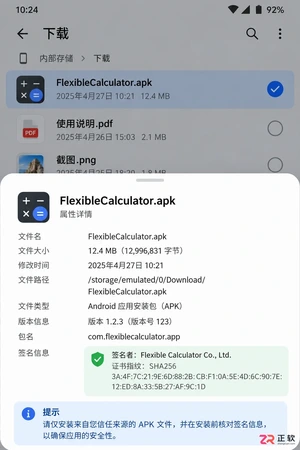
遇到灵活计算器APK无法打开或解析错误?本文详解Android侧载安装的排查逻辑,涵盖来源验证、权限配置、空间清理及旧版本冲突处理,帮助用户安全解决安装问题并正确恢复会员权益。
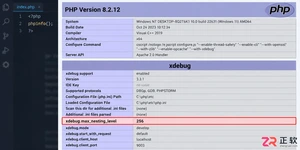
遇到PHP递归报错时,不要盲目调大max_nesting_level。本文教你区分Xdebug限制、内存耗尽和正则递归错误,提供代码级的终止条件优化与迭代替代方案,彻底解决栈溢出问题。
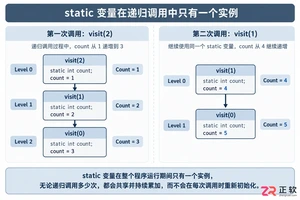
本文分析PHP递归中static变量导致的状态污染及引用传递引发的共享数据修改问题。提供具体的代码复现、缓存键设计建议及调试打印技巧,帮助开发者避免隐蔽的逻辑错误。
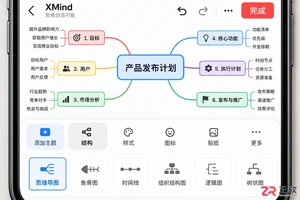
XMind iOS版和安卓版都能完成完整的思维导图编辑,但在文件保存、导出格式及系统分享流程上存在差异。本文详解两端在实际使用中的不同点,帮助跨平台用户优化工作流。
解析PHP递归函数在树形数据处理中的性能瓶颈,提供预加载数据消除I/O、使用显式栈替代深层递归的实战方案,帮助开发者在代码可读性与执行效率间做出合理取舍。
详细讲解在Java单元测试中如何使用Mockito模拟依赖对象,包括引入依赖、创建Mock、打桩返回值、行为验证以及Mock与Spy的核心差异和常见陷阱排查。

详细分析链表删除节点的时间复杂度,深入探讨单链表与双向链表在不同已知前提下的查找与删除开销,并结合完整代码与清晰图解进行对比总结。

想知道如何让AI写出的代码更贴合你的习惯?本文手把手教你在VS Code中调整Codex相关模型参数,通过修改配置文件优化温度值和令牌限制,解决代码建议不准确或响应慢的问题。

通过实测展示Claude Code在终端中如何理解自然语言指令、自动修改代码文件并处理复杂编程任务,帮助开发者评估其实际辅助能力。

本教程详细讲解如何使用Visual Studio创建WinForms项目,通过添加按钮和标签控件并编写点击事件代码,实现一个基础的计数器功能,适合C#初学者快速上手Windows窗体应用开发。




Photoshop 2026 是 Adobe 推出的专业图像处理与视觉设计软件,支持 Windows、macOS 和 iPad 等平台,广泛应用于摄影修图、电商设计、平面海报、数字绘画及视觉合成等创作场景。

Blender 是一款免费开源、跨平台的专业 3D 创作软件,集建模、动画、渲染、视频编辑与视觉合成等功能于一体,广泛应用于影视动画、游戏设计和建筑可视化等领域。软件支持 Cycles 物理渲染器与 Eevee 实时渲染引擎,并提供多边形建模、骨骼绑定、物理模拟等专业工具。Blender 兼容 Windows、macOS 和 Linux 系统,安装包轻巧、运行流畅,依托活跃的全球开发者社区持续更新,是从初学者到专业创作者都值得选择的正版 3D 创作工具。


Photoshop 2026 是 Adobe 推出的专业图像处理与视觉设计软件,支持 Windows、macOS 和 iPad 等平台,广泛应用于摄影修图、电商设计、平面海报、数字绘画及视觉合成等创作场景。
Blender 是一款免费开源、跨平台的专业 3D 创作软件,集建模、动画、渲染、视频编辑与视觉合成等功能于一体,广泛应用于影视动画、游戏设计和建筑可视化等领域。软件支持 Cycles 物理渲染器与 Eevee 实时渲染引擎,并提供多边形建模、骨骼绑定、物理模拟等专业工具。Blender 兼容 Windows、macOS 和 Linux 系统,安装包轻巧、运行流畅,依托活跃的全球开发者社区持续更新,是从初学者到专业创作者都值得选择的正版 3D 创作工具。