

SpringBoot集成Spring AI Alibaba实现工具调用实战教程
前言 简单来说,这篇教程讲的是如何让大模型在对话过程中,主动调用你写好的 Ja va 方法——比如查个时间、查个天气,完全不需要手动干预。大模型自己判断什么时候该调用哪个工具,然后把结果组织成自然语言回复给你。 版本信息 Spring Boot:3.4.5 spring-ai-alibaba-sta
前言
简单来说,这篇教程讲的是如何让大模型在对话过程中,主动调用你写好的 Ja va 方法——比如查个时间、查个天气,完全不需要手动干预。大模型自己判断什么时候该调用哪个工具,然后把结果组织成自然语言回复给你。
版本信息
- Spring Boot:
3.4.5 - spring-ai-alibaba-starter-dashscope:
1.1.2.1 - Ja va:
17
另外,Spring-ai 更新速度很快,建议始终以官方文档为准,这里给出的版本在写文时是稳定的。
一、依赖引入
首先,引入必要的 Ma ven 依赖。核心是 spring-ai-alibaba-starter-dashscope,它封装了阿里云 DashScope 的调用。另外需要留意 dashscope-sdk-ja va 可能带旧版 jsonschema-generator,与 Spring-ai 自带的版本冲突,所以最好在 dependencyManagement 里统一指定版本。同时,排除 slf4j-simple 避免与 Boot 自带的 logback 双绑。
    org.springframework.boot
    spring-boot-starter-web


    com.alibaba.cloud.ai
    spring-ai-alibaba-starter-dashscope
    1.1.2.1


            com.github.victools
            jsonschema-generator
            4.38.0


    com.alibaba
    dashscope-sdk-ja va
    2.22.18


            org.slf4j
            slf4j-simple
二、yml 配置
然后在 application.yml 中配置 DashScope 的 API Key 和模型参数。注意,Tool Calling 需要选择支持该能力的对话模型,比如 qwen-max。温度设为 0.7 是个比较平衡的取值。
spring:
  application:
    name: spring-tool-demo
  ai:
    dashscope:
      api-key: ${DASHSCOPE_API_KEY}
      chat:
        options:
          # 需支持 Tool Calling 的对话模型
          model: qwen-max
          temperature: 0.7
三、代码案例:声明式工具(@Tool)
1. 日期工具
核心思路是用 @Tool 注解标记一个方法,交给 Spring 管理,然后模型就能识别并调用它。这里第一个工具用来获取当前时间,description 属性非常关键——模型靠它判断“什么时候该调这个工具”。工具名默认就是方法名 getCurrentDateTime。
@Component  // 交给 Spring 管理,便于注入到 ChatClient
public class DateTool {

    /**
     * description 很重要:模型靠它判断「什么时候该调这个工具」。
     * 工具名默认是方法名 getCurrentDateTime。
     */
    @Tool(description = "Get the current date and time in the user's timezone")
    public String getCurrentDateTime() {
        // 返回给模型的真实数据;模型再组织成自然语言回复用户
        return DateFormatUtil.now(); // 例如 yyyy-MM-dd HH:mm:ss
    }
}
2. 天气工具(普通业务方法 + @Tool)
第二个工具演示如何查询指定城市的天气。这里用拼音作为参数(比如 beijing、shanghai),方便模型稳定传参。实际项目中,你可以换成调用第三方天气 API。
@Component
public class WeatherTool {

    /**
     * 查询指定城市天气。
     * district 建议用拼音,如 beijing / shanghai,方便模型稳定传参。
     */
    @Tool(description = "查询指定城市的天气情况")
    public String getWeather(String district) {
        // 这里用 switch 模拟业务;真实项目可调第三方天气 API
        return switch (district) {
            case "beijing" -> "天气清凉";
            case "shanghai" -> "天气炎热";
            case "guangzhou" -> "天气闷热";
            default -> "未知地区";
        };
    }
}
四、注册到 ChatClient(defaultTools)
工具写好后,需要注册到 ChatClient。这里使用 defaultTools 方法,将工具实例传入。这样每次对话,Client 都会自动携带这些工具,省去每次手动指定。注意,如果你已经在 defaultTools 注册了,就别在单次请求里再用 .tools() 重复传,否则会报“Multiple tools with the same name”的错误。
@Configuration
public class ClientConfig {

    /**
     * 构建带默认工具的 ChatClient。
     * defaultTools:该 Client 每次对话都可用这些工具。
     */
    @Bean(name = "toolClient")
    public ChatClient toolClient(DashScopeChatModel chatModel,
                                 DateTool dateTool,
                                 WeatherTool weatherTool) {
        return ChatClient.builder(chatModel)
                // 传入带 @Tool 方法的对象实例即可,框架会扫注解并生成 Schema
                .defaultTools(dateTool, weatherTool)
                .build();
    }
}
注意:若已在 defaultTools 注册,请求里不要再写 .tools(new DateTool()),否则会报:
Multiple tools with the same name (getCurrentDateTime) found
defaultTools 与单次 .tools() 二选一(或确保工具名不重复)。
五、Controller 调用
1. 查当前时间
先看一个最简单的调用:用户说“要当前时间”,模型就会自动调用 getCurrentDateTime,然后把返回的时间戳组织成自然语言回答。注意,这里不要再写 .tools(...),因为工具已经在 defaultTools 里注册好了。
@RestController
public class TestController {

    @Resource(name = "toolClient")
    private ChatClient toolClient;

    /**
     * GET /get/currenttime
     * 用户说「要当前时间」→ 模型决定调用 getCurrentDateTime → 把结果组织成回答
     */
    @GetMapping("/get/currenttime")
    public String getCurrentTime() {
        return toolClient.prompt()
                .system("You are a helpful assistant.")
                .user("Get the current date and time in the user's timezone")
                // 不要再 .tools(...),工具已在 defaultTools 里
                .call()
                .content();
    }
}
2. 查天气
天气查询稍微复杂一点,因为需要把中文城市名转成拼音参数。这里在 system 提示里明确告诉模型:“中文请转换成拼音作为调用工具的参数”。比如用户说“查一下上海的天气”,模型就会把“上海”转成 shanghai 传给 WeatherTool.getWeather。
@RestController
public class WeatherController {

    @Resource(name = "toolClient")
    private ChatClient toolClient;

    /**
     * GET /get/weather?district=上海
     * system 提示把中文城市转成拼音参数,和 WeatherTool 的 case 对齐
     */
    @GetMapping("/get/weather")
    public String getWeather(@RequestParam String district) {
        return toolClient.prompt()
                .system("你可以通过工具获取天气情况,"
                        + "中文请转换成拼音作为调用工具的参数,例如上海对应'shanghai'")
                .user("查一下" + district + "的天气")
                .call()
                .content();
    }
}
六、调用流程
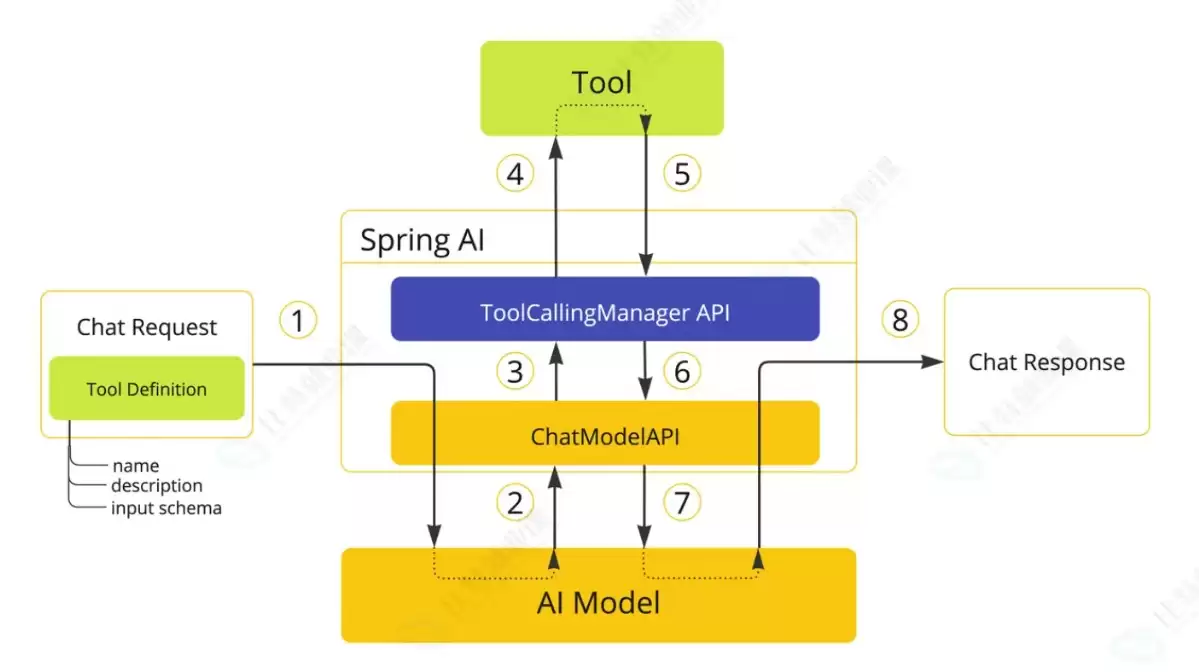
整个调用流程如下图所示:用户发起请求,模型判断需要调用哪个工具,执行对应方法,返回结果,模型再组织成自然语言回复给用户。
解析PHP递归函数在树形数据处理中的性能瓶颈,提供预加载数据消除I/O、使用显式栈替代深层递归的实战方案,帮助开发者在代码可读性与执行效率间做出合理取舍。
详细讲解在Java单元测试中如何使用Mockito模拟依赖对象,包括引入依赖、创建Mock、打桩返回值、行为验证以及Mock与Spy的核心差异和常见陷阱排查。

详细分析链表删除节点的时间复杂度,深入探讨单链表与双向链表在不同已知前提下的查找与删除开销,并结合完整代码与清晰图解进行对比总结。

想知道如何让AI写出的代码更贴合你的习惯?本文手把手教你在VS Code中调整Codex相关模型参数,通过修改配置文件优化温度值和令牌限制,解决代码建议不准确或响应慢的问题。

通过实测展示Claude Code在终端中如何理解自然语言指令、自动修改代码文件并处理复杂编程任务,帮助开发者评估其实际辅助能力。

本教程详细讲解如何使用Visual Studio创建WinForms项目,通过添加按钮和标签控件并编写点击事件代码,实现一个基础的计数器功能,适合C#初学者快速上手Windows窗体应用开发。

详解Cursor编辑器中自动补全功能的开启与优化设置,涵盖Tab触发机制、上下文窗口调整及模型切换,帮助开发者解决补全延迟、干扰大等问题,提升编码流畅度。

详解Pandas中数据格式转换的核心方法,包括astype强制转换、to_numeric容错处理及日期解析技巧,解决常见类型错误并提升数据处理效率。
详细介绍在Visual Studio Code中安装Chinese (Simplified)语言包的方法,包括通过扩展市场搜索、安装及自动重启切换至简体中文界面的完整步骤,帮助开发者快速将编辑器本地化。
针对Cursor安装包默认锁定C盘且无路径选择界面的问题,提供通过手动移动文件并创建目录联结(Symbolic Link)的解决方案,实现将软件安装在其他磁盘分区。




Photoshop 2026 是 Adobe 推出的专业图像处理与视觉设计软件,支持 Windows、macOS 和 iPad 等平台,广泛应用于摄影修图、电商设计、平面海报、数字绘画及视觉合成等创作场景。

Blender 是一款免费开源、跨平台的专业 3D 创作软件,集建模、动画、渲染、视频编辑与视觉合成等功能于一体,广泛应用于影视动画、游戏设计和建筑可视化等领域。软件支持 Cycles 物理渲染器与 Eevee 实时渲染引擎,并提供多边形建模、骨骼绑定、物理模拟等专业工具。Blender 兼容 Windows、macOS 和 Linux 系统,安装包轻巧、运行流畅,依托活跃的全球开发者社区持续更新,是从初学者到专业创作者都值得选择的正版 3D 创作工具。


Photoshop 2026 是 Adobe 推出的专业图像处理与视觉设计软件,支持 Windows、macOS 和 iPad 等平台,广泛应用于摄影修图、电商设计、平面海报、数字绘画及视觉合成等创作场景。
Blender 是一款免费开源、跨平台的专业 3D 创作软件,集建模、动画、渲染、视频编辑与视觉合成等功能于一体,广泛应用于影视动画、游戏设计和建筑可视化等领域。软件支持 Cycles 物理渲染器与 Eevee 实时渲染引擎,并提供多边形建模、骨骼绑定、物理模拟等专业工具。Blender 兼容 Windows、macOS 和 Linux 系统,安装包轻巧、运行流畅,依托活跃的全球开发者社区持续更新,是从初学者到专业创作者都值得选择的正版 3D 创作工具。