

ionic 对话框
$ionicPopup ionic 提供的对话框服务,可以让程序按需创建并显示弹窗。 $ionicPopup 一共提供了 3 个常用方法,分别是 alert()、prompt() 和 confirm()。 实例 HTML 代码 弹窗显示 确认对话框 警告框 Ja vaScript 代码 angula
$ionicPopup
ionic 提供的对话框服务,可以让程序按需创建并显示弹窗。

$ionicPopup 一共提供了 3 个常用方法,分别是 alert()、prompt() 和 confirm()。
实例
HTML 代码
Ja vaScript 代码
angular.module('mySuperApp', ['ionic'])
.controller('PopupCtrl',function($scope, $ionicPopup, $timeout) {
// Triggered on a button click, or some other target
 $scope.showPopup = function() {
   $scope.data = {}
// 自定义弹窗
   var myPopup = $ionicPopup.show({
     template: '',
     title: 'Enter Wi-Fi Password',
     subTitle: 'Please use normal things',
     scope: $scope,
     buttons: [
       { text: 'Cancel' },
       {
         text: 'Sa ve',
         type: 'button-positive',
         onTap: function(e) {
           if (!$scope.data.wifi) {
             // 不允许用户关闭,除非输入 wifi 密码
             e.preventDefault();
           } else {
             return $scope.data.wifi;
           }
         }
       },
     ]
   });
   myPopup.then(function(res) {
     console.log('Tapped!', res);
   });
   $timeout(function() {
      myPopup.close(); // 3秒后关闭弹窗
   }, 3000);
  };
   //  confirm 对话框
   $scope.showConfirm = function() {
     var confirmPopup = $ionicPopup.confirm({
       title: 'Consume Ice Cream',
       template: 'Are you sure you want to eat this ice cream?'
     });
     confirmPopup.then(function(res) {
       if(res) {
         console.log('You are sure');
       } else {
         console.log('You are not sure');
       }
     });
   };
//  alert(警告) 对话框
   $scope.showAlert = function() {
     var alertPopup = $ionicPopup.alert({
       title: 'Don't eat that!',
       template: 'It might taste good'
     });
     alertPopup.then(function(res) {
       console.log('Thank you for not eating my delicious ice cream cone');
     });
   };
});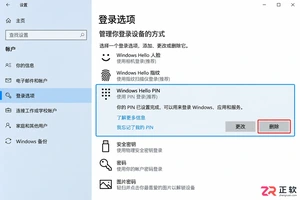
Win10关闭Windows Hello后开机仍要密码?本文详解如何删除PIN码、设置netplwiz自动登录以及清空本地账户密码,解决开机免密登录问题。
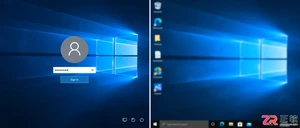
想取消Win10开机密码?先分清是启动登录还是屏保恢复。本文详解如何通过netplwiz设置自动登录,以及如何关闭屏幕保护恢复时的登录验证,同时保留睡眠唤醒的安全设置,确保操作准确且不影响电脑安全。
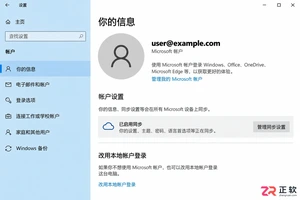
想在Win10开机时跳过密码直接进入桌面?本文详解Microsoft账户下的PIN设置、本地账户切换及netplwiz自动登录配置,并区分开机验证与锁屏恢复设置,助你安全高效地优化登录体验。
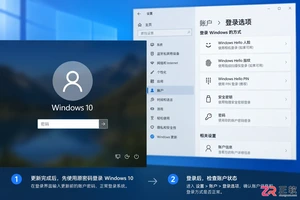
Win10系统更新后开机又要求输入密码?这通常不是密码被重置,而是自动登录设置或Windows Hello策略被更改。本文详解如何区分密码问题与登录配置问题,检查账户状态及组织策略,并安全恢复开机自动进入桌面的设置。
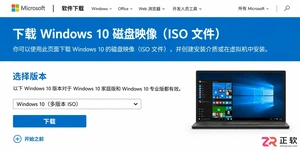
详解如何从微软官网获取纯净的Windows 10 64位ISO镜像文件,包括正确的下载入口、版本与语言选择技巧,以及下载后的完整性校验步骤,确保系统安装源安全可靠。

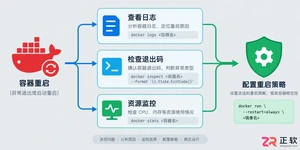
遇到Docker容器频繁自动重启?本文提供从查看容器日志、解读退出代码到配置Restart Policy的完整排查与修复方案,确保服务稳定性。
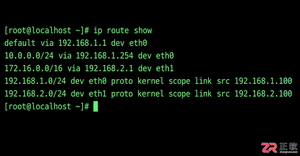
学习如何在Linux中使用命令行添加临时静态路由,并通过修改网络配置文件实现重启后依然有效的永久静态路由设置,涵盖CentOS和Ubuntu的不同配置方法。
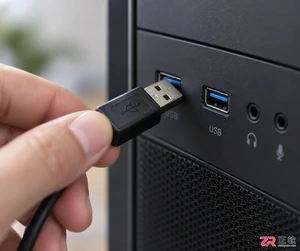
摄像头连接电脑后不知如何查看画面?本教程演示如何使用Windows自带的“相机”应用快速调取实时视频流,无需下载额外软件,步骤简单直观,适用于大多数USB及内置摄像头。
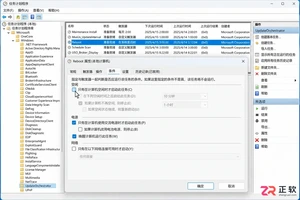
针对 Windows 11 电脑在无人操作时自动关机或重启的问题,本文详解如何通过任务计划程序禁用更新重启任务,并调整电源睡眠策略,从根源解决非预期的自动关机现象。




Photoshop 2026 是 Adobe 推出的专业图像处理与视觉设计软件,支持 Windows、macOS 和 iPad 等平台,广泛应用于摄影修图、电商设计、平面海报、数字绘画及视觉合成等创作场景。

Blender 是一款免费开源、跨平台的专业 3D 创作软件,集建模、动画、渲染、视频编辑与视觉合成等功能于一体,广泛应用于影视动画、游戏设计和建筑可视化等领域。软件支持 Cycles 物理渲染器与 Eevee 实时渲染引擎,并提供多边形建模、骨骼绑定、物理模拟等专业工具。Blender 兼容 Windows、macOS 和 Linux 系统,安装包轻巧、运行流畅,依托活跃的全球开发者社区持续更新,是从初学者到专业创作者都值得选择的正版 3D 创作工具。


Photoshop 2026 是 Adobe 推出的专业图像处理与视觉设计软件,支持 Windows、macOS 和 iPad 等平台,广泛应用于摄影修图、电商设计、平面海报、数字绘画及视觉合成等创作场景。
Blender 是一款免费开源、跨平台的专业 3D 创作软件,集建模、动画、渲染、视频编辑与视觉合成等功能于一体,广泛应用于影视动画、游戏设计和建筑可视化等领域。软件支持 Cycles 物理渲染器与 Eevee 实时渲染引擎,并提供多边形建模、骨骼绑定、物理模拟等专业工具。Blender 兼容 Windows、macOS 和 Linux 系统,安装包轻巧、运行流畅,依托活跃的全球开发者社区持续更新,是从初学者到专业创作者都值得选择的正版 3D 创作工具。