

ionic 浮动框
$ionicPopover $ionicPopover 本质上就是一个悬浮在 App 内容之上的视图容器。 可以实现以下功能点: 在当前页面显示更多信息。 选择一些工具或配置。 在页面提供一个操作列表。 方法 fromTemplate(templateString, options) 或 fromT
$ionicPopover
$ionicPopover 本质上就是一个悬浮在 App 内容之上的视图容器。

可以实现以下功能点:
- 在当前页面显示更多信息。
- 选择一些工具或配置。
- 在页面提供一个操作列表。
方法
fromTemplate(templateString, options)
或
fromTemplateUrl(templateUrl, options)
参数说明:
templateString: 模板字符串。
templateUrl: 载入的模板 URL。
options: 初始化选项。
实例
HTML 代码部分
fromTemplateUrl 方法
angular.module('ionicApp', ['ionic'])
.controller( 'AppCtrl',['$scope','$ionicPopover','$timeout',function($scope,$ionicPopover,$timeout){
$scope.popover = $ionicPopover.fromTemplateUrl('my-popover.html', {
    scope: $scope
  });
// .fromTemplateUrl() 方法
  $ionicPopover.fromTemplateUrl('my-popover.html', {
    scope: $scope
  }).then(function(popover) {
    $scope.popover = popover;
  });
$scope.openPopover = function($event) {
    $scope.popover.show($event);
  };
  $scope.closePopover = function() {
    $scope.popover.hide();
  };
  // 清除浮动框
  $scope.$on('$destroy', function() {
    $scope.popover.remove();
  });
  // 在隐藏浮动框后执行
  $scope.$on('popover.hidden', function() {
    // 执行代码
  });
  // 移除浮动框后执行
  $scope.$on('popover.removed', function() {
    // 执行代码
  });
}])
换个思路看,模板其实也能直接当成一个字符串来处理,这时通过 .fromTemplate() 方法,同样可以把弹框实现出来:
fromTemplate 方法
angular.module('ionicApp', ['ionic'])
.controller( 'AppCtrl',['$scope','$ionicPopover','$timeout',function($scope,$ionicPopover,$timeout){
$scope.popover = $ionicPopover.fromTemplateUrl('my-popover.html', {
scope: $scope
});
// .fromTemplate() 方法
var template = ' 我的浮动框标题
Hello! 
想在Win10开机时跳过密码直接进入桌面?本文详解Microsoft账户下的PIN设置、本地账户切换及netplwiz自动登录配置,并区分开机验证与锁屏恢复设置,助你安全高效地优化登录体验。
Win10系统更新后开机又要求输入密码?这通常不是密码被重置,而是自动登录设置或Windows Hello策略被更改。本文详解如何区分密码问题与登录配置问题,检查账户状态及组织策略,并安全恢复开机自动进入桌面的设置。
详解如何从微软官网获取纯净的Windows 10 64位ISO镜像文件,包括正确的下载入口、版本与语言选择技巧,以及下载后的完整性校验步骤,确保系统安装源安全可靠。
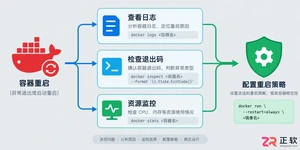
遇到Docker容器频繁自动重启?本文提供从查看容器日志、解读退出代码到配置Restart Policy的完整排查与修复方案,确保服务稳定性。
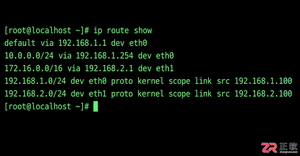
学习如何在Linux中使用命令行添加临时静态路由,并通过修改网络配置文件实现重启后依然有效的永久静态路由设置,涵盖CentOS和Ubuntu的不同配置方法。
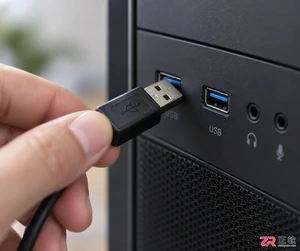
摄像头连接电脑后不知如何查看画面?本教程演示如何使用Windows自带的“相机”应用快速调取实时视频流,无需下载额外软件,步骤简单直观,适用于大多数USB及内置摄像头。
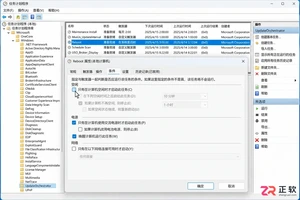
针对 Windows 11 电脑在无人操作时自动关机或重启的问题,本文详解如何通过任务计划程序禁用更新重启任务,并调整电源睡眠策略,从根源解决非预期的自动关机现象。
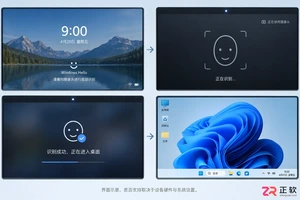
详细讲解在Windows电脑上测试摄像头人脸识别功能的步骤,包括开启Windows Hello、录入面部数据、不同环境下的效果验证及常见问题排查,帮助用户确认设备兼容性与识别准确率。
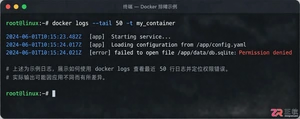
当 Docker 容器启动后立即退出时,不要盲目重启。本文详解如何通过 docker logs 查看标准输出错误,利用 docker inspect 检查挂载与网络配置,并修正入口点脚本权限问题,提供一套高效的因果排查流程。




Photoshop 2026 是 Adobe 推出的专业图像处理与视觉设计软件,支持 Windows、macOS 和 iPad 等平台,广泛应用于摄影修图、电商设计、平面海报、数字绘画及视觉合成等创作场景。

Blender 是一款免费开源、跨平台的专业 3D 创作软件,集建模、动画、渲染、视频编辑与视觉合成等功能于一体,广泛应用于影视动画、游戏设计和建筑可视化等领域。软件支持 Cycles 物理渲染器与 Eevee 实时渲染引擎,并提供多边形建模、骨骼绑定、物理模拟等专业工具。Blender 兼容 Windows、macOS 和 Linux 系统,安装包轻巧、运行流畅,依托活跃的全球开发者社区持续更新,是从初学者到专业创作者都值得选择的正版 3D 创作工具。


Photoshop 2026 是 Adobe 推出的专业图像处理与视觉设计软件,支持 Windows、macOS 和 iPad 等平台,广泛应用于摄影修图、电商设计、平面海报、数字绘画及视觉合成等创作场景。
Blender 是一款免费开源、跨平台的专业 3D 创作软件,集建模、动画、渲染、视频编辑与视觉合成等功能于一体,广泛应用于影视动画、游戏设计和建筑可视化等领域。软件支持 Cycles 物理渲染器与 Eevee 实时渲染引擎,并提供多边形建模、骨骼绑定、物理模拟等专业工具。Blender 兼容 Windows、macOS 和 Linux 系统,安装包轻巧、运行流畅,依托活跃的全球开发者社区持续更新,是从初学者到专业创作者都值得选择的正版 3D 创作工具。