

【Kubernetes增强】勿让DockerVolume引发TerminatingPod
Terminating Pod 是业务容器化后遇到的一个典型问题,诱因不一。本文记录了网易数帆-轻舟 Kubernetes 增强技术团队如何一步步排查,发现 Docker Volume 目录过多导致 Terminating Pod 问题的经历,并给出了解决方案。希望本文的分享对读者排查及规避同类问题
问题背景
最近用户的集群中又出现了某个节点上的 Pod 长时间处于 Terminating 状态的问题。起初我们以为是 18.06.3 版本的几个经典的 Docker 和 Containerd 问题导致的,但是登陆出现问题的节点后发现环境如下:
Terminating Pod 的元数据如下:
apiVersion: v1
kind: Pod
metadata:
  creationTimestamp: "2020-09-17T06:59:28Z"
  deletionGracePeriodSeconds: 60
  deletionTimestamp: "2020-10-09T07:33:11Z"
  name: face-compare-for-music-4-achieve-848f89dfdf-4v7p6
  namespace: ai-cv-team
  # ......
spec:
  # ......
status:
  # ......
  containerStatuses:
  - containerID: docker://de6d3812bfc8b6bef915d663c3d0e0cf5b3f95a41c2a98c867a1376dbccd30d3
    lastState: {}
    name: docker-image
    ready: false
    restartCount: 0
    state:
      running:
        startedAt: "2020-09-17T06:59:30Z"
  hostIP: 10.194.172.224
  phase: Running
  podIP: 10.178.132.136
  qosClass: Guaranteed
  startTime: "2020-09-17T06:59:28Z"
在节点上通过 docker 命令查看发现 Terminating Pod 下的业务容器 de6d3812bfc8 仍然未被删除:
$ docker ps -a | grep de6d3812bfc8
de6d3812bfc8        91f062eaa3a0        "ja va -Xms4096m -Xmx…"        3 weeks ago        Up 3 weeks        k8s_docker-image_face-compare-for-music-4-achieve-......
再通过 ctr 命令查看发现 Containerd 中仍然存有该容器的元数据:
$ ctr --address /var/run/containerd/containerd.sock --namespace moby container list | grep de6d3812bfc8
de6d3812bfc8b6bef915d663c3d0e0cf5b3f95a41c2a98c867a1376dbccd30d3    -        io.containerd.runtime.v1.linux
我们怀疑是 Shim 的进程回收出现了问题,通过 ps 命令查找 de6d3812bfc8 容器的 Shim 进程准备获取栈进行分析,但是此时无法找到该容器的 Shim 进程以及业务进程。日志中查看到 Docker 和 Containerd 已经处理容器退出:
Oct  9 15:46:36 ai-data-k8s-3 dockerd[10017]: time="2020-10-09T15:46:36.824919188+08:00" level=debug msg=event module=libcontainerd namespace=moby topic=/tasks/exit
Oct  9 15:46:36 ai-data-k8s-3 containerd[1965]: time="2020-10-09T15:46:36.863630606+08:00" level=info msg="shim reaped" id=de6d3812bfc8b6bef915d663c3d0e0cf5b3f95a41c2a98c867a1376dbccd30d3
Oct  9 15:46:36 ai-data-k8s-3 dockerd[10017]: time="2020-10-09T15:46:36.873487822+08:00" level=debug msg=event module=libcontainerd namespace=moby topic=/tasks/delete
Oct  9 15:46:36 ai-data-k8s-3 dockerd[10017]: time="2020-10-09T15:46:36.873531302+08:00" level=info msg="ignoring event" module=libcontainerd namespace=moby topic=/tasks/delete type="*events.TaskDelete"
此时又有多个新的业务 Pod 被调度到该节点上,新调度 Pod 的容器一直处于 Created 状态。该现象和我们已知的几个 Docker 和 Containerd 问题是不同的:
$ docker ps -a | grep Created
03fed51454c2        c2e6abc00a12        "ja va -Xms8092m -Xmx…"        3 minutes ago        Created        k8s_docker-image_dynamic-bg-service-cpu-28-achieve-......
......
综上所述,当前观察到的现象如下:
- Kubelet 删除 Pod 的逻辑已被触发。
- Docker 已经接收并处理 Kubelet 删除容器的请求。
- 该容器的 Shim 进程以及业务进程已经被清理。
- 某种原因导致 Docker 和 Containerd 中的元数据一直无法被删除。
- 此后创建的容器一直处于 Created 状态。
原因分析
通过查看监控我们发现出现问题时该节点的磁盘利用率非常高并且 CPU 负载异常:
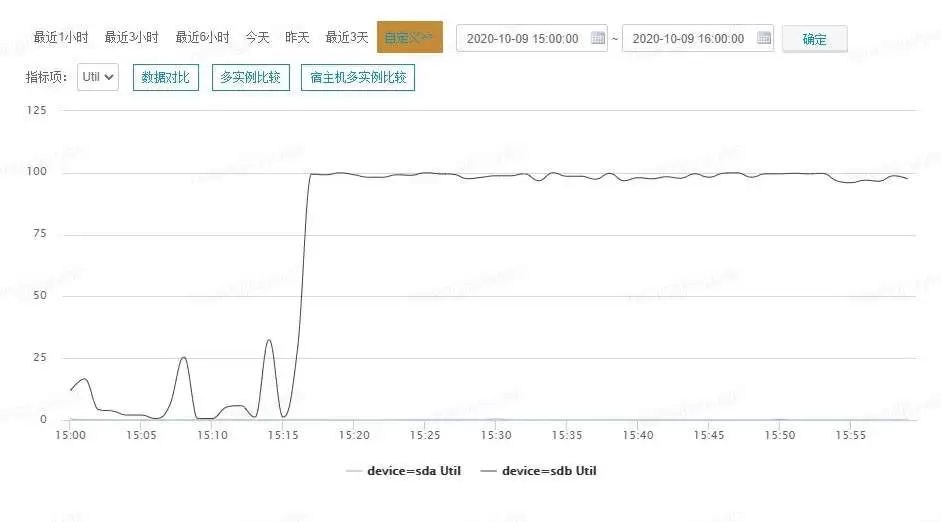
磁盘利用率非常高
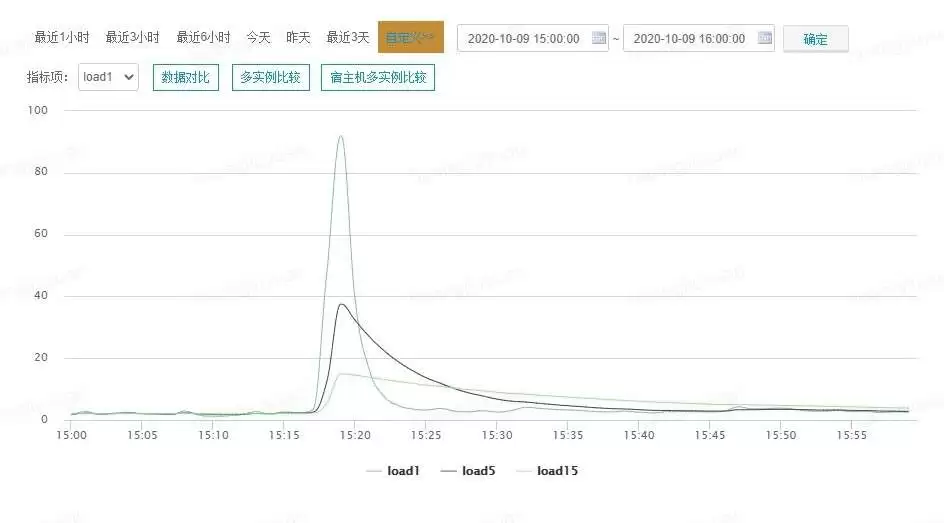
CPU 负载异常
我们初步猜测该问题和异常的节点磁盘利用率有关。
为什么新调度 Pod 的容器一直处于 Created 状态
新调度 Pod 的容器一直处于 Created 状态是我们在 Docker 版本为 18.09.9 的环境遇到的新现象。针对该现象入手,我们在 Docker 栈中发现多个阻塞在包含 github.com/docker/docker/daemon.(*Daemon).ContainerCreate 函数的 Goroutine,并且阻塞的原因是 semacquire。其中一个 Goroutine 内容如下:
goroutine 19962397 [semacquire, 8 minutes]:
sync.runtime_SemacquireMutex(0xc000aee824, 0xc0026e4600)
        /usr/local/go/src/runtime/sema.go:71 +0x3f
sync.(*Mutex).Lock(0xc000aee820)
        /usr/local/go/src/sync/mutex.go:134 +0x101
github.com/docker/docker/volume/local.(*Root).Get(0xc000aee820, 0xc003d1e3c0, 0x40, 0x1, 0x0, 0x0, 0x0)
        /go/src/github.com/docker/docker/volume/local/local.go:237 +0x33
github.com/docker/docker/volume/service.(*VolumeStore).getVolume(0xc000aeec80, 0x5597cbf18f40, 0xc00013e038, 0xc003d1e3c0, 0x40, 0x0, 0x0, 0x0, 0x0, 0x0, ...)
        /go/src/github.com/docker/docker/volume/service/store.go:717 +0x611
github.com/docker/docker/volume/service.(*VolumeStore).create(0xc000aeec80, 0x5597cbf18f40, 0xc00013e038, 0xc003d1e3c0, 0x40, 0x0, 0x0, 0x0, 0x0, 0x203000, ...)
        /go/src/github.com/docker/docker/volume/service/store.go:582 +0x950
github.com/docker/docker/volume/service.(*VolumeStore).Create(0xc000aeec80, 0x5597cbf18f40, 0xc00013e038, 0xc003d1e3c0, 0x40, 0x0, 0x0, 0xc002b0f090, 0x1, 0x1, ...)
        /go/src/github.com/docker/docker/volume/service/store.go:468 +0x1c2
github.com/docker/docker/volume/service.(*VolumesService).Create(0xc000a96540, 0x5597cbf18f40, 0xc00013e038, 0xc003d1e3c0, 0x40, 0x0, 0x0, 0xc002b0f090, 0x1, 0x1, ...)
        /go/src/github.com/docker/docker/volume/service/service.go:61 +0xc6
github.com/docker/docker/daemon.(*Daemon).createContainerOSSpecificSettings(0xc0009741e0, 0xc000c3a6c0, 0xc0024f2b40, 0xc00225bc00, 0x0, 0x0)
        /go/src/github.com/docker/docker/daemon/create_unix.go:62 +0x364
github.com/docker/docker/daemon.(*Daemon).create(0xc0009741e0, 0xc000ef8ca3, 0x74, 0xc0024f2b40, 0xc00225bc00, 0x0, 0x0, 0x0, 0x0, 0x0, ...)
        /go/src/github.com/docker/docker/daemon/create.go:177 +0x44f
github.com/docker/docker/daemon.(*Daemon).containerCreate(0xc0009741e0, 0xc000ef8ca3, 0x74, 0xc0024f2b40, 0xc00225bc00, 0x0, 0x0, 0x0, 0x0, 0x0, ...)
        /go/src/github.com/docker/docker/daemon/create.go:72 +0x1c8
github.com/docker/docker/daemon.(*Daemon).ContainerCreate(0xc0009741e0, 0xc000ef8ca3, 0x74, 0xc0024f2b40, 0xc00225bc00, 0x0, 0x0, 0x0, 0x0, 0x0, ...)
        /go/src/github.com/docker/docker/daemon/create.go:31 +0xa6
......
从栈内容来看,我们发现该Goroutine阻塞在了地址为 0xc000aee820 的Mutex上,而这个地址恰好与 github.com/docker/docker/volume/local.(*Root).Get 的Function Receiver相同。接下来,我们通过代码来一探究竟,看看这个 Root 到底是怎样的数据结构:
// Store is an in-memory store for volume drivers
type Store struct {
extensions map[string]volume.Driver
mu sync.Mutex
driverLock *locker.Locker
pluginGetter getter.PluginGetter
}
// Driver is for creating and removing volumes.
type Driver interface {
// Name returns the name of the volume driver.
Name() string
// Create makes a new volume with the given name.
Create(name string, opts map[string]string) (Volume, error)
// Remove deletes the volume.
Remove(vol Volume) (err error)
// List lists all the volumes the driver has
List() ([]Volume, error)
// Get retrieves the volume with the requested name
Get(name string) (Volume, error)
// Scope returns the scope of the driver (e.g. `global` or `local`).
// Scope determines how the driver is handled at a cluster level
Scope() string
}
// Root implements the Driver interface for the volume package and
// manages the creation/removal of volumes. It uses only standard vfs
// commands to create/remove dirs within its provided scope.
type Root struct {
m sync.Mutex
scope string
path string
volumes map[string]*localVolume
rootIdentity idtools.Identity
}Root作为Volume驱动的实现者,肩负着管理Volume生命周期的重任。它对所有的Volume进行缓存,并利用Mutex来保障缓存数据的安全性。github.com/docker/docker/volume/local.(*Root).Get在237行阻塞于等待Mutex的逻辑上,这就导致了节点上新创建的容器始终处于Created状态:
// Get looks up the volume for the given name and returns it if found
func (r *Root) Get(name string) (volume.Volume, error) {
    r.m.Lock() // Line 237
    v, exists := r.volumes[name]
    r.m.Unlock()
    if !exists {
        return nil, ErrNotFound
    }
    return v, nil
}
看来新创建的容器一直处于 Created 状态只是结果,那么是谁持有这个地址为 0xc000aee820 的 Mutex 呢?
谁持有阻塞其他 Goroutine 的 Mutex
通过搜索阻塞在地址为 0xc000aee820 的 Mutex,我们找到了持有该 Mutex 的 Goroutine:
goroutine 19822190 [syscall]:
syscall.Syscall(0x107, 0xffffffffffffff9c, 0xc0026a5710, 0x200, 0x0, 0x0, 0x15)
        /usr/local/go/src/syscall/asm_linux_amd64.s:18 +0x5
syscall.unlinkat(0xffffffffffffff9c, 0xc0026a55f0, 0x83, 0x200, 0x5597cbefb200, 0xc000c913e8)
        /usr/local/go/src/syscall/zsyscall_linux_amd64.go:126 +0x8d
syscall.Rmdir(0xc0026a55f0, 0x83, 0x5597cbefb200, 0xc000c913e8)
        /usr/local/go/src/syscall/syscall_linux.go:158 +0x49
os.Remove(0xc0026a55f0, 0x83, 0x24, 0x83)
        /usr/local/go/src/os/file_unix.go:310 +0x70
os.RemoveAll(0xc0026a55f0, 0x83, 0x5e, 0x5597cb0bebee)
        /usr/local/go/src/os/path.go:68 +0x4f
os.RemoveAll(0xc001b8b320, 0x5e, 0x2, 0xc000843620)
        /usr/local/go/src/os/path.go:109 +0x4f7
github.com/docker/docker/volume/local.removePath(0xc001b8b320, 0x5e, 0x5e, 0x1)
        /go/src/github.com/docker/docker/volume/local/local.go:226 +0x4f
github.com/docker/docker/volume/local.(*Root).Remove(0xc000aee820, 0x5597cbf258c0, 0xc001508e10, 0x0, 0x0)
        /go/src/github.com/docker/docker/volume/local/local.go:217 +0x1f8
github.com/docker/docker/volume/service.(*VolumeStore).Remove(0xc000aeec80, 0x5597cbf18f40, 0xc00013e038, 0x5597cbf25da0, 0xc002587b00, 0x0, 0x0, 0x0, 0x0, 0x0)
        /go/src/github.com/docker/docker/volume/service/store.go:796 +0x71f
github.com/docker/docker/volume/service.(*VolumesService).Remove(0xc000a96540, 0x5597cbf18f40, 0xc00013e038, 0xc002550c40, 0x40, 0x0, 0x0, 0x0, 0x0, 0x0)
        /go/src/github.com/docker/docker/volume/service/service.go:135 +0x1e8
github.com/docker/docker/daemon.(*Daemon).removeMountPoints(0xc0009741e0, 0xc000bba6c0, 0x1, 0x0, 0x0)
        /go/src/github.com/docker/docker/daemon/mounts.go:40 +0x239
github.com/docker/docker/daemon.(*Daemon).cleanupContainer(0xc0009741e0, 0xc000bba6c0, 0x101, 0xc000bba6c0, 0x0)
        /go/src/github.com/docker/docker/daemon/delete.go:141 +0x827
github.com/docker/docker/daemon.(*Daemon).ContainerRm(0xc0009741e0, 0xc000bb8089, 0x40, 0xc000998066, 0x0, 0x0)
        /go/src/github.com/docker/docker/daemon/delete.go:45 +0x272
......
从 Goroutine 栈中我们看到 github.com/docker/docker/volume/local.(*Root).Remove 函数持有地址为 0xc000aee820 的 Mutex,并且执行到了217行,该函数负责调用 os.RemoveAll 函数删除指定的 Volume 以及数据:
// Remove removes the specified volume and all underlying data. If the
// given volume does not belong to this driver and an error is
// returned. The volume is reference counted, if all references are
// not released then the volume is not removed.
func (r *Root) Remove(v volume.Volume) error {
r.m.Lock()
defer r.m.Unlock()
// ......
if err := removePath(realPath); err != nil { // Line 217
return err
}
delete(r.volumes, lv.name)
return removePath(filepath.Dir(lv.path))
}通过观察 Goroutine 栈可以发现,os.RemoveAll 函数在栈中间出现了两次,查看源码我们得知 os.RemoveAll 的实现采用了递归的方式。在109行包含递归调用的逻辑:
// RemoveAll removes path and any children it contains.
// It removes everything it can but returns the first error
// it encounters. If the path does not exist, RemoveAll
// returns nil (no error).
func RemoveAll(path string) error {
// Simple case: if Remove works, we're done.
err := Remove(path) // Line 68
if err == nil || IsNotExist(err) {
return nil
}
// ......
err = nil
for {
// ......
names, err1 := fd.Readdirnames(request)
// Removing files from the directory may ha ve caused
// the OS to reshuffle it. Simply calling Readdirnames
// again may skip some entries. The only reliable way
// to a void this is to close and re-open the
// directory. See issue 20841.
fd.Close()
for _, name := range names {
err1 := RemoveAll(path + string(PathSeparator) + name) // Line 109
if err == nil {
err = err1
}
}
// ......
}
// ......
}Goroutine 栈的最上层是 syscall.unlinkat 函数,即通过系统调用 unlinkat 删除容器的文件系统目录。我们发现了一个 Terminating Pod 的容器 Volume 有异常:
$ ls -l /var/lib/docker/volumes/0789a0f8cbfdc59de30726a7ea21a76dd36fea0e4e832c9f806cdf39c29197c5/
total 4
drwxr-xr-x 1 root root 512378124 Aug 26  2020 _data
该目录文件大小超过了 500MB 但是 Link 计数只有1,通过查看 ext4 文档发现以下内容:
dir_nlink
       Normally, ext4 allows an inode to ha ve no more than 65,000
       hard links.  This applies to regular files as well as
       directories, which means that there can be no more than
       64,998 subdirectories in a directory (because each of the
       '.' and '..' entries, as well as the directory entry for
       the directory in its parent directory counts as a hard
       link).  This feature lifts this limit by causing ext4 to
       use a link count of 1 to indicate that the number of hard
       links to a directory is not known when the link count
       might exceed the maximum count limit.
即当一个 ext4 文件系统下目录中的子目录个数超过64998时,该目录的 Link 会被置为1来表示硬链接计数已超过最大限制。对该目录下的文件进行遍历后我们发现有超过500万个空目录,已经远超过64998的限制。所以在第一次触发删除 Pod 逻辑后该节点的磁盘利用率一直居高不下并且 CPU 负载异常,Volume 文件删除过程非常缓慢导致所有相同业务的容器删除逻辑阻塞。通过查看相关代码可以确认在 Kubelet 删除容器时 Volume 也是一起被回收的:
// RemoveContainer removes the container.
func (ds *dockerService) RemoveContainer(_ context.Context, r *runtimeapi.RemoveContainerRequest) (*runtimeapi.RemoveContainerResponse, error) {
    // Ideally, log lifecycle should be independent of container lifecycle.
    // However, docker will remove container log after container is removed,
    // we can't prevent that now, so we also clean up the symlink here.
    err := ds.removeContainerLogSymlink(r.ContainerId)
    if err != nil {
        return nil, err
    }
    err = ds.client.RemoveContainer(r.ContainerId, dockertypes.ContainerRemoveOptions{RemoveVolumes: true, Force: true}) // Line 280
    if err != nil {
        return nil, fmt.Errorf("failed to remove container %q: %v", r.ContainerId, err)
    }
    return &runtimeapi.RemoveContainerResponse{}, nil
}
为什么 Containerd 中的元数据一直无法被删除
还有一个疑问,为什么 ctr 命令可以查到需要被删除的容器元数据呢?我们发现了另一类等待该 Mutex 的 Goroutine:
goroutine 19943568 [semacquire, 95 minutes]:
sync.runtime_SemacquireMutex(0xc000aee824, 0x5597c9ab7300)
        /usr/local/go/src/runtime/sema.go:71 +0x3f
sync.(*Mutex).Lock(0xc000aee820)
        /usr/local/go/src/sync/mutex.go:134 +0x101
github.com/docker/docker/volume/local.(*Root).Get(0xc000aee820, 0xc002b12180, 0x40, 0x5597cbf22080, 0xc000aee820, 0x0, 0x0)
        /go/src/github.com/docker/docker/volume/local/local.go:237 +0x33
github.com/docker/docker/volume/service.lookupVolume(0x5597cbf18f40, 0xc00013e038, 0xc000cc5500, 0xc000c914c8, 0x5, 0xc002b12180, 0x40, 0x0, 0x0, 0x0, ...)
        /go/src/github.com/docker/docker/volume/service/store.go:744 +0xc7
github.com/docker/docker/volume/service.(*VolumeStore).getVolume(0xc000aeec80, 0x5597cbf18f40, 0xc00013e038, 0xc002b12180, 0x40, 0x5597cb0c1541, 0x5, 0x5597c9a85bb5, 0x0, 0xc003deb198, ...)
        /go/src/github.com/docker/docker/volume/service/store.go:688 +0x299
github.com/docker/docker/volume/service.(*VolumeStore).Get(0xc000aeec80, 0x5597cbf18f40, 0xc00013e038, 0xc002b12180, 0x40, 0xc003deb240, 0x1, 0x1, 0x0, 0x0, ...)
        /go/src/github.com/docker/docker/volume/service/store.go:636 +0x173
github.com/docker/docker/volume/service.(*VolumesService).Unmount(0xc000a96540, 0x5597cbf18f40, 0xc00013e038, 0xc0016f1ce0, 0xc00381b040, 0x40, 0x5597c9a5bfeb, 0xc0018ced50)
        /go/src/github.com/docker/docker/volume/service/service.go:105 +0xc6
github.com/docker/docker/daemon.(*volumeWrapper).Unmount(0xc003cdede0, 0xc00381b040, 0x40, 0x0, 0x0)
        /go/src/github.com/docker/docker/daemon/volumes.go:414 +0x6a
github.com/docker/docker/volume/mounts.(*MountPoint).Cleanup(0xc001d89680, 0xc0013cbc50, 0xc003deb3f8)
        /go/src/github.com/docker/docker/volume/mounts/mounts.go:83 +0x7a
github.com/docker/docker/container.(*Container).UnmountVolumes(0xc000c3ad80, 0xc003deb4e0, 0x60, 0x0)
        /go/src/github.com/docker/docker/container/container.go:475 +0x102
github.com/docker/docker/daemon.(*Daemon).Cleanup(0xc0009741e0, 0xc000c3ad80)
        /go/src/github.com/docker/docker/daemon/start.go:257 +0x4ae
......
该 Goroutine 栈中包含 github.com/docker/docker/daemon.(*Daemon).Cleanup 函数并且执行到了257行,该函数负责释放容器网络资源并反挂载容器的文件系统:
// Cleanup releases any network resources allocated to the container along with any rules
// around how containers are linked together. It also unmounts the container's root filesystem.
func (daemon *Daemon) Cleanup(container *container.Container) {
// ......
if container.BaseFS != nil && container.BaseFS.Path() != "" {
if err := container.UnmountVolumes(daemon.LogVolumeEvent); err != nil { // Line 257
logrus.Warnf("%s cleanup: Failed to umount volumes: %v", container.ID, err)
}
}
container.CancelAttachContext()
if err := daemon.containerd.Delete(context.Background(), container.ID); err != nil {
logrus.Errorf("%s cleanup: failed to delete container from containerd: %v", container.ID, err)
}
}而该函数调用 Containerd 删除元数据在257行的 github.com/docker/docker/container.(*Container).UnmountVolumes 函数之后,这也解释了为什么通过 ctr 命令查看发现 Containerd 中仍然存有该容器的元数据。
真相大白
这些 Volume 多达 500MB 的容器是怎么来的呢?通过和用户沟通后我们得到了答案,原来用户没有理解 Docker Volume 的含义和使用场景,在 Dockerfile 中使用了 Volume:
# ......
VOLUME /app/images
VOLUME /app/logs
# ......
用户在业务逻辑中频繁的向 Volume 写入数据并且未进行有效的垃圾回收,导致一段时间后大量空目录泄漏而触发 Terminating Pod 的问题。至此我们问题的原因就清晰了,Terminating Pod 问题产生的流程如下:
- 某个业务的 Pod 中包含频繁的向 Volume 写入数据的逻辑导致文件硬链接计数超过最大限制。
- 用户进行了一次滚动更新,触发 Pod 删除的时间被记录到
.metadata.deletionTimestamp。 - 删除 Docker Volume 的逻辑被调用,因 Volume 中的空目录过多导致
unlinkat系统调用被大量执行。 - 函数
os.RemoveAll递归删除 Volume 目录时大量执行unlinkat系统调用导致该节点的磁盘利用率非常高并且 CPU 负载异常。 - 第一个执行 Volume 删除逻辑的 Goroutine 持有保护
Root缓存的 Mutex,因函数os.RemoveAll删除 Volume 目录时递归处理500万个文件过慢而无法返回,该节点上后续对 Volume 的操作均阻塞在等待 Mutex 的逻辑上。 - 使用 Volume 的容器无法被删除,此时集群中间出现多个 Terminating Pod。
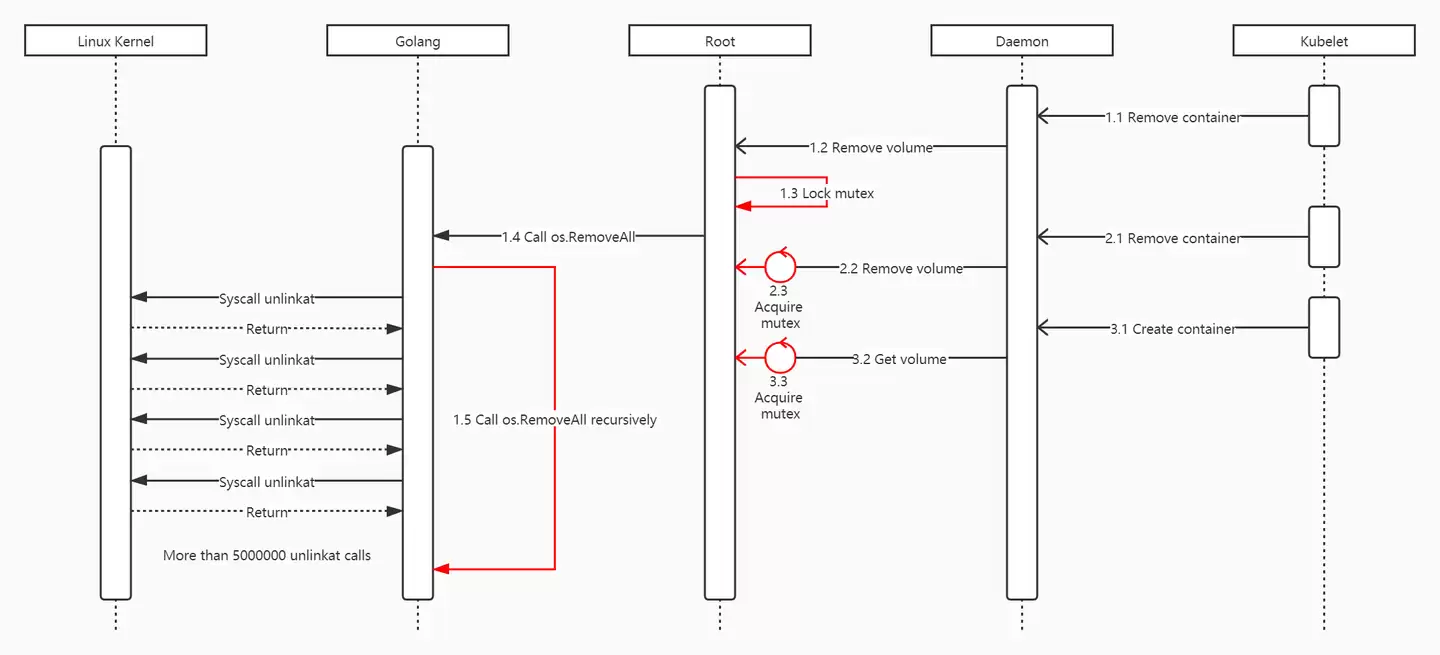
时序图
总结
最后我们在线上环境采用了节点下线进行磁盘格式化再重新上线的方案进行紧急恢复,并且建议用户尽快弃用 Docker Volume 而改用 Kubernetes 本地盘方案。用户在我们的建议下修改了 Dockerfile 和编排模板,并对业务代码中的逻辑进行了优化,杜绝了此类问题。
在此过程中,轻舟 Kubernetes 增强技术团队同样受益匪浅,从技术的角度去解决问题只是我们工作的一个维度,用户对云原生技术的认知与服务方推行规范之间的差距更值得关注。虽然当前我们解决了用户使用 Kubernetes 的基本问题,但是在帮助用户切实解决云原生落地过程中的痛点、加深用户对新技术的理解、降低用户的使用成本并让用户真正享受到技术红利的道路上,我们还有很长的路要走。
作者简介
黄久远,网易数帆资深开发工程师,专注于云原生以及分布式系统等领域,参与了网易云音乐、网易传媒、网易严选、考拉海购等多个用户的大规模容器化落地以及网易轻舟容器平台产品化工作,主要方向包括集群监控、智能运维体系建设、Kubernetes 以及 Docker 核心组件维护等。当前主要负责网易轻舟云原生故障自动诊断系统的设计、开发以及产品商业化工作。
Windows 11 家庭版和专业版在安装步骤上并无本质差异,主要区别在于产品密钥激活和功能解锁。本教程指导你如何检查硬件兼容性、使用官方媒体创建工具制作安装盘,以及在安装过程中正确选择版本。同时解析安装后如何验证激活状态,以及从家庭版升级到专业版的正规路径,确保系统稳定且合规。
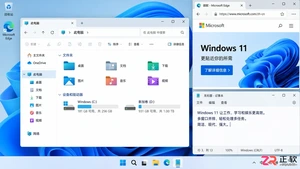
除了开始菜单的变化,Windows 11在TPM 2.0安全要求、窗口贴靠布局、驱动兼容性以及系统更新策略上与Windows 10有显著不同。本文详解两者实质差异,助你判断是否值得升级。
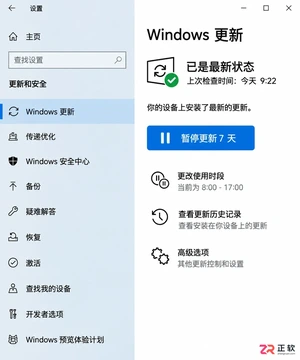
详解Windows 10家庭版和专业版在关闭或暂停自动更新时的操作区别。涵盖通用的暂停更新、活动时间设置,以及专业版独有的组策略管理入口,帮助不同版本用户合理控制更新节奏,避免系统安全风险。
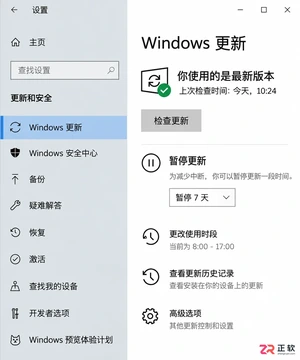
想知道Win10暂停更新最长能设多久?官方支持最长暂停35天。本文图文演示如何在设置中开启暂停、确认生效日期,以及到期后如何恢复更新或调整活动时间以避免打扰。
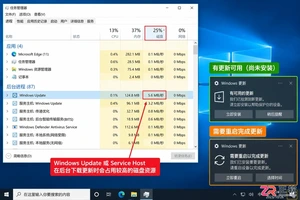
本教程介绍如何在Windows 10中通过暂停更新、设置活动时间及安排重启时间来减少更新弹窗提醒。包含通知隐藏技巧及更新失败排查步骤,帮助你在保持系统安全的同时减少工作打扰。
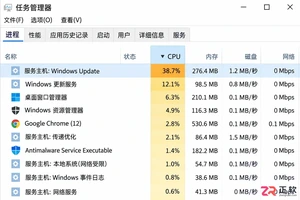
Windows 10 更新时 CPU 占用过高怎么办?本教程演示如何通过任务管理器确认更新进程,使用“暂停更新”功能临时停止后台活动,并设置“活动时间”防止自动重启干扰工作。提供安全的故障排查步骤,避免直接禁用系统服务带来的风险。
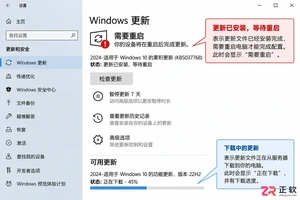
Win10玩游戏时突然弹出更新重启提示?不要强制关机。本文教你如何通过设置“活动时间”避免自动重启,利用“安排重启”规划空闲时间,以及合理使用“暂停更新”功能。区分不同状态下的应对策略,既保护游戏进度又维持系统安全。
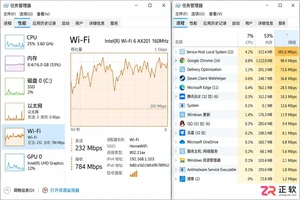
Win10自动更新抢占带宽导致游戏卡顿或网页打不开?本教程教你通过任务管理器确认更新进程,利用暂停更新、按流量计费连接和传递优化带宽限制,精准控制Windows Update下载速度,解决网络拥堵问题。

Win10家庭版用户常受强制更新困扰。本文详解如何利用系统自带的暂停更新、活动时间和安排重启功能,在不破坏系统稳定性的前提下减少更新打扰,并分析注册表修改的风险及系统支持现状。

Windows 10更新后开机突然要求输入密码?本文解析自动登录失效的真实原因,提供通过netplwiz重新保存凭据、关闭Windows Hello干扰及排查账户策略的完整步骤,助你恢复免密进入桌面。




Photoshop 2026 是 Adobe 推出的专业图像处理与视觉设计软件,支持 Windows、macOS 和 iPad 等平台,广泛应用于摄影修图、电商设计、平面海报、数字绘画及视觉合成等创作场景。

Blender 是一款免费开源、跨平台的专业 3D 创作软件,集建模、动画、渲染、视频编辑与视觉合成等功能于一体,广泛应用于影视动画、游戏设计和建筑可视化等领域。软件支持 Cycles 物理渲染器与 Eevee 实时渲染引擎,并提供多边形建模、骨骼绑定、物理模拟等专业工具。Blender 兼容 Windows、macOS 和 Linux 系统,安装包轻巧、运行流畅,依托活跃的全球开发者社区持续更新,是从初学者到专业创作者都值得选择的正版 3D 创作工具。


Photoshop 2026 是 Adobe 推出的专业图像处理与视觉设计软件,支持 Windows、macOS 和 iPad 等平台,广泛应用于摄影修图、电商设计、平面海报、数字绘画及视觉合成等创作场景。
Blender 是一款免费开源、跨平台的专业 3D 创作软件,集建模、动画、渲染、视频编辑与视觉合成等功能于一体,广泛应用于影视动画、游戏设计和建筑可视化等领域。软件支持 Cycles 物理渲染器与 Eevee 实时渲染引擎,并提供多边形建模、骨骼绑定、物理模拟等专业工具。Blender 兼容 Windows、macOS 和 Linux 系统,安装包轻巧、运行流畅,依托活跃的全球开发者社区持续更新,是从初学者到专业创作者都值得选择的正版 3D 创作工具。