

查看和更换网卡驱动的方法
一.查看网卡驱动要查看系统中网卡的驱动程序,您可以使用一些特定于您的操作系统的命令。以下是一些示例:Linux:使用lspci命令来列出PCI设备,然后查找网卡的相关信息:lspci|grepEthernetbin#lspci|grepEthernet0002:02:00.0Ethernetcontroller:Cavium,Inc.OcteonTx2RVUPhysicalFunction(rev54)0002:03:00.0Ethernetcontroller:Cavium,Inc.OcteonTx2R
一.查看网卡驱动
要查看系统中网卡的驱动程序,您可以使用一些特定于您的操作系统的命令。
以下是一些示例:
Linux:
使用 lspci 命令来列出 PCI 设备,然后查找网卡的相关信息:
lspci | grep Ethernet
bin# lspci | grep Ethernet
0002:02:00.0 Ethernet controller: Cavium, Inc. Octeon Tx2 RVU Physical Function (rev 54)
0002:03:00.0 Ethernet controller: Cavium, Inc. Octeon Tx2 RVU Physical Function (rev 54)
0002:04:00.0 Ethernet controller: Cavium, Inc. Octeon Tx2 RVU Physical Function (rev 54)
0002:05:00.0 Ethernet controller: Cavium, Inc. Octeon Tx2 RVU Physical Function (rev 54)
0008:01:00.0 Ethernet controller: Marvell Technology Group Ltd. Device 2141
然后,使用 lshw 或 ethtool 命令来获取更详细的信息:
sudo lshw -class network
bin# lshw -class network
*-network
 description: Network controller
 product: Octeon 10 RPM (MAC)
 vendor: Cavium, Inc.
 physical id: 10
 bus info: pci@0000:01:10.0
 version: 00
 width: 32 bits
 clock: 33MHz
 capabilities: pciexpress msix bus_master cap_list
 configuration: driver=Marvell-CGX!RPM latency=0
 resources: irq:0 memory:87e0e0000000-87e0e07fffff memory:87e0e0800000-87e0e0ffffff
或
sudo ethtool
bin# ethtool eth1
Settings for eth1:
Supported ports: []
Supported link modes: 10baseT/Half
10000baseSR/Full
Supported pause frame use: No
Supports auto-negotiation: No
Supported FEC modes: RS
Advertised link modes:Not reported
Advertised pause frame use: No
Advertised auto-negotiation: No
Advertised FEC modes: Not reported
Speed: 50000Mb/s
Duplex: Full
Auto-negotiation: off
Port: Twisted Pair
PHYAD: 0
Transceiver: internal
MDI-X: Unknown
Current message level: 0x00000000 (0)

Link detected: yes
Windows:
在 PowerShell 中,可以使用 Get-NetAdapter 命令来获取网络适配器信息:
Get-NetAdapter
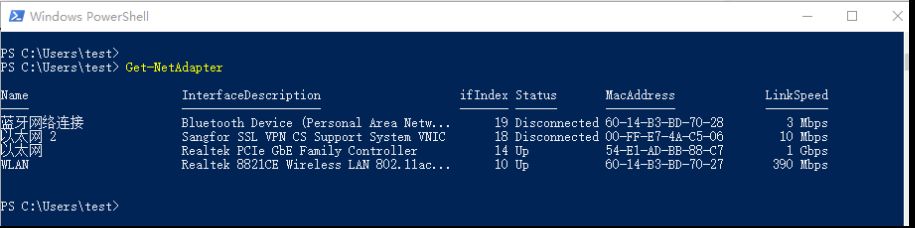 powershell
二.切换网卡驱动程序:
通常情况下,更新网卡驱动程序可能会比较复杂,因为涉及到操作系统内核模块或设备管理器。
这通常需要一些谨慎的操作,并且可能需要重新启动系统。
Linux:
lsmod | grep
~$ lsmod
ModuleSizeUsed by
vfio_pci 163840
vfio_pci_core942081 vfio_pci
vfio_iommu_type1 491520
vfio 614403 vfio_pci_core,vfio_iommu_type1,vfio_pci
iommufd737281 vfio
irqbypass163841 vfio_pci_core
nf_tables 3481600
libcrc32c163841 nf_tables
cpuid163840
nfnetlink245761 nf_tables
tls 1474560
binfmt_misc245761
nls_iso8859_1163841
intel_rapl_msr 204800

~$ lsmod |grep vfio
vfio_pci 163840
vfio_pci_core942081 vfio_pci
vfio_iommu_type1 491520
vfio 614403 vfio_pci_core,vfio_iommu_type1,vfio_pci
iommufd737281 vfio
irqbypass163841 vfio_pci_core
sudo modprobe -r
~$ sudo modprobe -rvfio-pci
~$ lsmod |grep vfio
vfio_iommu_type1 491520
vfio 614401 vfio_iommu_type1
iommufd737281 vfio
sudo modprobe
~$ sudo modprobe vfio-pci
~$ lsmod |grep vfio
vfio_pci 163840
vfio_pci_core942081 vfio_pci
irqbypass163841 vfio_pci_core
vfio_iommu_type1 491520
vfio 614403 vfio_pci_core,vfio_iommu_type1,vfio_pci
iommufd737281 vfio
Windows:
- 在 Windows 中,右键点击“此电脑”(或“计算机”),选择“管理”。
- 转到“设备管理器”。
- 在“网络适配器”下找到您的网卡。
- 右键点击网卡,选择“更新驱动程序”。
注意:更改驱动程序可能需要从制造商的网站下载适当的驱动程序,并确保它与您的硬件和操作系统兼容。
影响:
更改网卡驱动程序可能导致以下影响:
在进行任何更改之前,请确保备份系统数据,并仔细阅读相关的文档和支持信息。
最好在测试环境中先尝试更改,以便在生产环境中遇到问题时能够迅速进行修复。

先交代一个细节:在Solaris系统中,网络接口的配置信息由一组核心文件来定义。其中有一个不太起眼的文件——/etc/hostname.interface,命名方式简单直接:这个Interface代表网卡的型号。 比如le是十兆网卡,hme是百兆网卡。型号后面跟一个数字,第一个十兆网卡是le0,第二
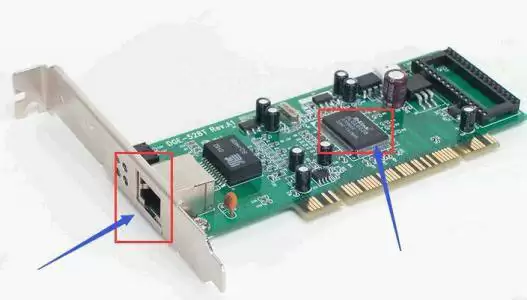
Linux网卡无法启动报错RTNETLINK answers: File exists怎么办? 在Linux服务器上调整完网卡配置,重启服务时踩坑是常有的事儿。其中,“RTNETLINK answers: File exists”这个报错就挺让人头疼的,明明配置看起来没问题,网卡就是起不来。这背后到
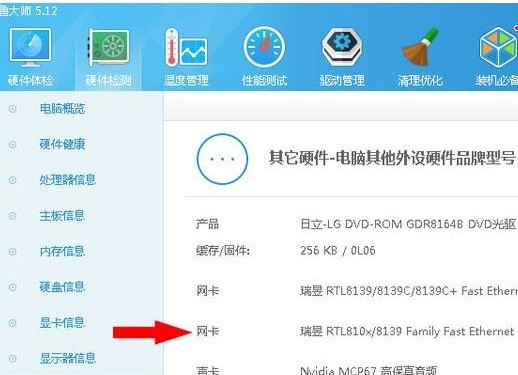

在使用Linux系统时,安装特定网卡驱动程序或相关程序后,可能会出现网卡漂移现象。可能的表象为:在安装某个网卡驱动程序后,可能会导致网卡顺序颠倒,例如之前网线连接的网口为eth0,但驱动安装后可能变为eth1或者其他名字。(2)网卡名字改变,这种情况倒不是eth0到eth1的改变,而是很诡异的变化,比如eth0找不到了,多了个网卡名字叫__tmp3183921382193__这种情况确实会让人感到烦恼。因为有些人可能需要使用ifconfig|grepeth命令来获取信息进行开发工作,如果网卡名称混乱不清,

连接路由器和电脑的线叫什么线在现代社会中,互联网的普及和发展已经成为我们日常生活中不可或缺的一部分。连接互联网的方式有很多种,其中一种常见的方式就是通过路由器将多台电脑连接在一起,以实现网络共享和互联互通。当我们要将电脑和路由器连接起来时,通常需要使用特定的线缆进行连接,这就引发了一个问题:连接路由器和电脑的线叫什么线呢?事实上,连接路由器和电脑的线叫做“以

一般指GNU/Linux,是一套免费使用和自由传播的类Unix操作系统,是一个遵循POSIX的多用户、多任务、支持多线程和多CPU的操作系统。而在Linux系统中,网络连接是至关重要的一部分,它是确保服务器或计算机能够与网络通信的关键。那么Linux中如何查看有几张网卡?一起来看看详细内容介绍。 在Linux中,可以使用以下几种方法来查看系统中有多少张网卡: 1、ifconfig命令ifconfig是一个用于管理网络接口信息的命令。可以通过运行ifconfig命令来查看系统中所有网络接口的详细信息

在Linux系统中,正确配置网卡是确保网络连接稳定的关键。本文将简要介绍如何配置Linux网卡,以确保网络的正常运行。首先,打开终端并输入命令ifconfig来查看当前的网卡配置。该命令会显示网卡的状态和详细配置信息。接下来,进入网卡配置路径。使用命令cd/etc/sysconfig/network-scripts/进入网卡配置文件所在的目录。然后,使用命令vimifcfg-eth1编辑网卡配置文件。其中,eth1是网卡名称。在编辑器中,输入以下内容来配置网卡:TYPE=Ethernet#设置网络类型BO

本站5月14日消息,腾达无线网卡新品U11AX900目前已经在京东现货开售,这款无线网卡主打“900M双频”、“免驱安装等特性”,首发价49.9元。据介绍,这款无线网卡兼容Wi-Fi6,可实现900Mbps最大速率、10ms延迟,搭配Wi-Fi6路由器号称可以100%发挥性能。同时,其采用双频技术,无线速率为600Mbps(5GHz)+286Mbps(2.4GHz)。此外,该网卡主打“免驱安装”,官方同时还介绍称其内置驱动,打开“我的电脑”之后双击驱动即可一键安装。兼容性方面,其兼容Windows7/10

本站7月15日消息,德宜智能Cervoz今天推出2.5GbEM.22230(A+EKey)PCIe有线网卡,这款网卡专为4K串流及高性能NAS需求打造。这款网卡型号为MEC-LAN-2631i,采用英特尔I226-IT主控,PCIex1总线,可提供一个10/100/1000/2500MbpsRJ45网口。本站注意到,Cervoz这款M.222302.5GbE网卡还支持宽温域运行,可在-40°C~85°C温度范围内正常工作。

如今我们要用到电脑的地方实在是越来越多了,而电脑如果没有网的话,就像一台没有太多用处的机器一样,新入手无线网卡连接电脑后安装驱动,并搜索无线信号,输入无线网络的接入秘钥后,无线网卡就可以正常使用了。下面,小编给大家带来了无线网卡的图文。无线网卡是终端无线网络的设备,是不通过有线连接,采用无线信号进行数据传输的终端。它的使用非常方便,可以随身携带,随时随地的上网,但也有网速较慢的缺点,那无线网卡如何使用?下面,小编跟大家介绍无线网卡的使用方法。无线网卡如何使用将无线网卡接入电脑,在电脑系统的桌面选中计算机图





火山引擎是字节跳动旗下企业级云与AI服务平台。聚焦大模型核心能力,依托字节自研豆包多模态大模型,凭借火山方舟一站式平台,提供模型精调、推理部署、智能应用搭建等全链路服务,结合高性能AI算力,助力各行业快速落地大模型数字化与智能化应用。



