
怎么使用Python+Pygame实现简单的单词小游戏
一、环境准备1)运行环境环境安装:python3.8:解释器、pycharm:代码编辑器、pygame、numpy、部分自带的模块直接安装Python就可以使用了。2)模块安装第三方库的安装方式如下:一般安装:pipinstall+模块名镜像源安装:pipinstall-ipypi.douban.com/simple/+模块名(还有很多国内镜像源,这里是豆瓣的用习惯了)3)图片文字素材等二、代码展示主程序——importpygameimportsysimporttracebacki
一、环境准备
1)运行环境
环境安装:python 3.8: 解释器、pycharm: 代码编辑器、pygame、numpy、部分自带的模块直接安装Python就可以使用了。
2)模块安装
第三方库的安装方式如下:
一般安装:pip install +模块名 镜像源安装:pip install -i
pypi.douban.com/simple/+模块名 (还有很多国内镜像源,这里是豆瓣的用习惯了)
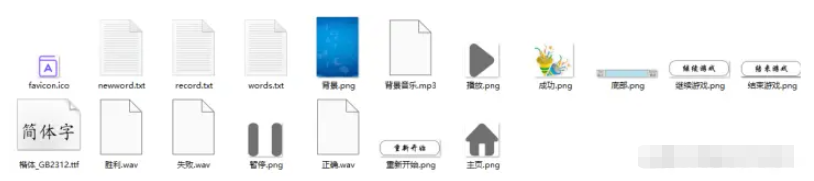
3)图片文字素材等
二、代码展示
主程序——
import pygame
import sys
import traceback
import os
from pygame.locals import *
from random import *
import numpy as np
import linecache

pygame.init()  # 游戏初始化
pygame.mixer.init()  # 音效初始化

bg_size = width, height = 480, 700  # 屏幕大小
screen = pygame.display.set_mode(bg_size)
pygame.display.set_caption("英语单词挑战")  # 标题

# 背景图片
background = pygame.image.load("source/背景.png")  # .convert()
BLACK = (0, 0, 0)
WHITE = (255, 255, 255)
GREEN = (0, 255, 0)
RED = (255, 0, 0)

# 游戏音乐
pygame.mixer.music.load("source/背景音乐.mp3")
pygame.mixer.music.set_volume(0.2)
success_sound = pygame.mixer.Sound("source/正确.wav")
success_sound.set_volume(0.2)
lost_sound = pygame.mixer.Sound("source/失败.wav")
lost_sound.set_volume(0.2)
win_sound = pygame.mixer.Sound("source/胜利.wav")
win_sound.set_volume(0.2)

class Word(pygame.sprite.Sprite):
    def __init__(self, bg_size, showword):
        pygame.sprite.Sprite.__init__(self)

        self.word = showword  # 获取单词
        self.length = len(self.word)  # 单词长度
        self.wordfont = pygame.font.SysFont("arial", 36)  # 使用系统字体
        self.wordtext = self.wordfont.render(self.word, True, WHITE, BLACK)  # 单词
        self.promptword = "*"*self.length
        self.showtext = self.wordfont.render(self.promptword, True, WHITE, BLACK)  # 隐藏单词
        self.succtext = self.wordfont.render("", True, WHITE)
        self.rect = self.wordtext.get_rect()  # 单词坐标
        self.width, self.height = bg_size[0], bg_size[1]
        self.rect.left, self.rect.top = (self.width - self.rect.width) // 2, 20  # 定义坐标
        self.speed = 1  # 下移速度
        # self.destroy_images = []
        # self.destroy_images.extend([pygame.image.load("爆炸小.png").convert_alpha()])
        self.active = True  # 活动标志
        self.success = False  # 正确标志

    # 判断输入字母是否正确,并显示
    def show(self, a):
        for i in range(self.length):
            if self.promptword[i] == "*":
                if self.word[i] == a:
                    self.promptword =self.promptword[:i] + a + self.promptword[i+1:]
                    self.showtext = self.wordfont.render(self.promptword, True, WHITE, BLACK)  # 隐藏单词
                if self.promptword == self.word:
                    self.success = True
                break
            else:
                continue

    # 单词移动
    def move(self):
        if self.rect.top < self.height - 50:
            self.rect.top += self.speed
        else:
            self.reset()

    # 单词重置
    def reset(self):
        self.active = True
        self.success = False
        self.rect.left, self.rect.top = (self.width - self.rect.width) // 2, 20

    # 中文提示
    def describe(self, prop):
        myprop = prop
        self.propfont = pygame.font.Font("source/楷体_GB2312.ttf", 20)  # 使用楷体字体
        # print(myprop)
        self.describetext = self.propfont.render(myprop, True, BLACK)  # 中文提示
        self.proprect = self.describetext.get_rect()  # 提示坐标
        self.proprect.left, self.proprect.top = (self.width - self.proprect.width) // 2, (self.height - 30 - self.proprect.height / 2)
        screen.blit(self.describetext, self.proprect)

# 获取单词,读取字典文件
def Getletters(filename):
    words = []  # 保存单词
    prompts = []  # 保存中文提示
    worddict = {}  # 单词字典
    f = open(filename, encoding='utf-8')  # 打开文本,定义格式,能够读取中文
    for line in f.readlines():  # 读取行
        line = line.strip()  # 去掉/n
        word = line.split(":")[0]  # 截取单词
        prompt = line.split(":")[1]  # .split(";")[0]  # 截取中文提示
        words.append(word)
        prompts.append(prompt)
        worddict.update({word : prompt})  # 字典添加元素
    f.close()
    return worddict

# 保存字典文件
def SaveDict(dict1, filename):
    # 打开字典文件
    with open(filename, mode='w', encoding='utf-8') as f:
        for k, v in dict1.items():
            str = f"{k}:{v}\n"
            f.write(str)
        f.close()


# 随机抽取字典的数据
def ChoseWord(dict1):
    n = len(dict1)
    random.choice(list(dict1.keys()))
    words = dict1.keys()
    prompts = dict1.values()
    i = randint(0, n)
    key = words[i]
    value = prompts[i]
    return key, value


# 主函数
def main():
    pygame.mixer.music.play(-1)  # 播放背景音乐
    running = True  # 判断运行状态
    clock = pygame.time.Clock()  # 时钟
    delay = 100
    olingefile = "source/words.txt"  # 原始单词文件
    myfile = "source/newword.txt"  # 使用单词文件
    historyfile = "source/record.txt"  # 最高记录文件
    olindict = Getletters(olingefile)  # 获取原始单词
    num = len(olindict)  # 总单词数量
    # getnum = 0
    # record_score = 0  # 最高得分记录
    # record_rate = 0.00  # 最高进度
    myfont_big = pygame.font.SysFont("arial", 36)  # 使用系统大字体
    myfont_small = pygame.font.SysFont("arial", 24)  # 使用系统小字体
    # 标志是否暂停游戏
    paused = False
    paused_image = pygame.image.load("source/暂停.png").convert_alpha()
    resume_image = pygame.image.load("source/播放.png").convert_alpha()
    paused_rect = paused_image.get_rect()
    paused_rect.left, paused_rect.top = width - paused_rect.width - 10, 10
    paused_show_image = paused_image
    # 主页
    mained = False  # 主页标志
    main_image = pygame.image.load("source/主页.png").convert_alpha()
    main_rect = main_image.get_rect()
    main_rect.left, main_rect.top = width - paused_rect.width - 70, 10
    # 成功页面
    success_image = pygame.image.load("source/成功.png").convert_alpha()
    # 底部页面
    bottom_image = pygame.image.load("source/底部.png").convert_alpha()
    # 统计得分
    # score = 0  # 当前得分
    # rate = 0.00  # 当前进度
    # 主页面
    goon_image = pygame.image.load("source/继续游戏.png").convert_alpha()
    goon_rect = goon_image.get_rect()
    restart_image = pygame.image.load("source/重新开始.png").convert_alpha()
    restart_rect = restart_image.get_rect()
    gameover_image = pygame.image.load("source/结束游戏.png").convert_alpha()
    gameover_rect = gameover_image.get_rect()
    flag = False  # 新单词标记
    promptflag = False  # 空格提示单词标记
    nextflag = False  # 回车下一个单词标记
    winflag = False  # 胜利标志
    keyvalue = ""  # 获取按键
    if os.path.exists(myfile) and os.path.exists(historyfile):  # 如果有记录
        mydict = Getletters(myfile)
        getnum = num - len(mydict)  # 完成数量
        mained = True
        with open(historyfile, mode='r', encoding='utf-8') as f:
            record_score = int(linecache.getline(historyfile, 1))  # 读取最高记录
            record_rate = float(linecache.getline(historyfile, 2))  # 读取最高进度
            score = int(linecache.getline(historyfile, 3))  # 读取上一次记录
            f.close()
        # print(record_score, record_rate)
    else:
        mydict = Getletters(olingefile)
        getnum = 0
        score = 0
        rate = 0.00
        record_score = score
        record_rate = rate
        mained = False

    while running:
        for event in pygame.event.get():
            if event.type == QUIT:  # 退出
                # 写入记录文件
                with open(historyfile, mode='w', encoding='utf-8') as f:
                    f.write(str(record_score))
                    f.write("\n")
                    f.write(str(record_rate))
                    f.write("\n")
                    f.write(str(score))
                    f.close()
                # 保存剩余单词
                SaveDict(mydict, myfile)
                pygame.quit()
                sys.exit()
            elif event.type == MOUSEBUTTONDOWN:  # 鼠标按下
                # 按下暂停键
                if event.button == 1 and paused_rect.collidepoint(event.pos):  # 检测鼠标是否在范围内
                    paused = not paused
                    if paused:
                        pygame.mixer.music.pause()  # 背景音乐暂停
                        pygame.mixer.pause()  # 音效暂停
                        paused_show_image = resume_image
                    else:
                        pygame.mixer.music.unpause()  # 背景音乐暂停
                        pygame.mixer.unpause()  # 音效暂停
                        paused_show_image = paused_image
                # 按下主页键
                if event.button == 1 and main_rect.collidepoint(event.pos):  # 检测鼠标是否在范围内
                    mained = True
                    if mained:
                        pygame.mixer.music.pause()  # 背景音乐暂停
                        pygame.mixer.pause()  # 音效暂停

            elif event.type == KEYDOWN:  # 按键
                if event.key == K_TAB:  # tab键
                    promptflag = True
                elif event.key == K_RETURN:  # 回车键
                    nextflag = True
                else:
                    keyvalue = chr(event.key)  # 获取ASCII码转字符串
        screen.blit(background, (0, 0))  # 载入背景图片
        screen.blit(bottom_image, (0, height - 60))  # 载入底部图片
        # 绘制得分
        score_text = myfont_big.render(f"score:{str(score)}", True, WHITE)
        screen.blit(score_text, (10, 5))
        # 暂停/播放
        screen.blit(paused_show_image, paused_rect)  # 暂停图片
        # 绘制主页
        screen.blit(main_image, main_rect)  # 主页图片
        # 绘制进度
        pygame.draw.rect(screen, WHITE, ((10, 60), (200, 20)), 2)  # 画矩形,坐标(10,60),长宽(200,20),线宽2

        # 当进度大于80%显示绿色,否则显示红色
        rate = getnum / num
        if rate > 0.8:
            rate_color = GREEN
        else:
            rate_color = RED
        pygame.draw.rect(screen, rate_color, ((10, 60), (200 * rate, 20)), 0)  # 填充
        remaintext = myfont_small.render(f"{rate*100:.2f}%", True, WHITE)
        screen.blit(remaintext, (220, 55))
        if not paused and not mained:
            if not flag:
                # 生成单词
                showword = np.random.choice(list(mydict.keys()))  # 随机选择单词
                showprompt = mydict[showword]  # 单词中文提示
                # print(showword, showprompt)
                myword = Word(bg_size, showword)  # 生成单词
                flag = True  # 新单词
            else:
                myword.move()  # 单词向下移动
                myword.describe(showprompt)
                myword.show(keyvalue)  # 获取键盘按键
                if promptflag:
                    screen.blit(myword.wordtext, myword.rect)
                else:
                    screen.blit(myword.showtext, myword.rect)
                    # 成功
                    if myword.success:
                        screen.blit(myword.succtext, myword.rect)  # 清空
                        screen.blit(success_image, myword.rect)  # 成功图片
                        success_sound.play()
                        if not (delay % 10):  # 延时
                            myword.reset()
                            flag = False
                            score += 5
                            getnum += 1
                            del mydict[showword]
                            if getnum == num:
                                winflag = True
                                mained = True
                if nextflag:
                    myword.reset()
                    flag = False
                    nextflag = False
                if myword.rect.top > height - 118:
                    lost_sound.play()
                    flag = False
                    score -= 2
        # 暂停时
        elif paused and not mained:
            myword.active = False
            screen.blit(myword.showtext, myword.rect)
            myword.describe(showprompt)
        # 显示主页
        elif mained and not winflag:
            # myword.active = False
            screen.blit(background, (0, 0))  # 载入背景图片
            # 绘制结束界面
            # 更新最高分
            if score > record_score:
                record_score = score
            # 更新进度
            if rate > record_rate:
                record_rate = rate
            # 最高分
            record_score_text = myfont_big.render(f"Highest Score:{record_score}", True, WHITE)
            screen.blit(record_score_text, (50, 50))
            # 最高进度
            record_rate_text = myfont_big.render(f"Highest Rate:{record_rate*100:.2f}%", True, WHITE)
            screen.blit(record_rate_text, (50, 100))
            # 当前得分
            nowscore_text1 = myfont_big.render("Your Score:", True, WHITE)
            nowscore_text1_rect = nowscore_text1.get_rect()
            nowscore_text1_rect.left, nowscore_text1_rect.top = 50, 150
            screen.blit(nowscore_text1, nowscore_text1_rect)
            nowscore_text2 = myfont_big.render(str(score), True, RED)
            nowscore_text2_rect = nowscore_text2.get_rect()
            nowscore_text2_rect.left, nowscore_text2_rect.top = 50 + nowscore_text1_rect.width, nowscore_text1_rect.top
            screen.blit(nowscore_text2, nowscore_text2_rect)
            # 当前进度
            nowrate_text1 = myfont_big.render("Your Rate:", True, WHITE)
            nowrate_text1_rect = nowrate_text1.get_rect()
            nowrate_text1_rect.left, nowrate_text1_rect.top = 50, 200
            screen.blit(nowrate_text1, nowrate_text1_rect)
            nowrate_text2 = myfont_big.render(f"{rate*100:.2f}%", True, RED)
            nowrate_text2_rect = nowrate_text2.get_rect()
            nowrate_text2_rect.left, nowrate_text2_rect.top = 50 + nowrate_text1_rect.width, nowrate_text1_rect.top
            screen.blit(nowrate_text2, nowrate_text2_rect)

            # 继续游戏
            goon_rect.left, goon_rect.top = (width - goon_rect.width) // 2, 300
            screen.blit(goon_image, goon_rect)
            # 重新开始
            restart_rect.left, restart_rect.top = (width - restart_rect.width) // 2, goon_rect.bottom + 20
            screen.blit(restart_image, restart_rect)
            # 结束游戏
            gameover_rect.left, gameover_rect.top = (width - gameover_rect.width) // 2, restart_rect.bottom + 20
            screen.blit(gameover_image, gameover_rect)

            # 检测用户鼠标操作
            # 如果用户按下鼠标左键
            if pygame.mouse.get_pressed()[0]:
                # 获取鼠标位置
                pos = pygame.mouse.get_pos()
                # 如果用户点击继续游戏
                if goon_rect.left < pos[0] < goon_rect.right and goon_rect.top < pos[1] < goon_rect.bottom:
                    # 跳出主页面
                    mained = False
                # 重新开始
                elif restart_rect.left < pos[0] < restart_rect.right and restart_rect.top < pos[1] < restart_rect.bottom:
                    # 判断最高记录是否更新,保存记录
                    if score > record_score:
                        record_score = score
                    # 写入记录文件
                    with open(historyfile, mode='w', encoding='utf-8') as f:
                        f.write(str(record_score))
                        f.write("\n")
                        f.write(str(record_rate))
                        f.close()
                    # 保存剩余单词
                    SaveDict(mydict, myfile)
                    # 退出主页
                    mained = False
                    score = 0
                    mydict = Getletters(olingefile)  # 获取原始单词
                    getnum = 0

                # 如果用户点击结束游戏
                elif gameover_rect.left < pos[0] < gameover_rect.right and gameover_rect.top < pos[1] < gameover_rect.bottom:
                    # 写入记录文件
                    with open(historyfile, mode='w', encoding='utf-8') as f:
                        f.write(str(record_score))
                        f.write("\n")
                        f.write(str(record_rate))
                        f.write("\n")
                        f.write(str(score))
                        f.close()
                    # 保存剩余单词
                    SaveDict(mydict, myfile)
                    # 退出游戏
                    pygame.quit()
                    sys.exit()
        else:
            # screen.blit(background, (0, 0))  # 载入背景图片
            pygame.mixer.music.pause()  # 背景音乐暂停
            win_sound.play()
            win_text = myfont_big.render("Congratulations! You WIN!!!", True, WHITE)
            screen.blit(win_text, (50, 300))


        # 时间间隔
        delay -= 1
        if not delay:
            delay = 50
            promptflag = False
        pygame.display.flip()  # 页面刷新

        clock.tick(60)


if __name__ == "__main__":
    try:
        main()
    except SystemExit:
        pass
    except:
        traceback.print_exc()
        pygame.quit()
input() 
学习如何使用Python高效删除列表中的重复元素。本文提供5种常见方法的代码示例,涵盖保持顺序与不保持顺序的场景,适合初学者和进阶开发者参考。
详细讲解使用Python编写Web接口的核心步骤与完整代码示例,涵盖环境准备、路由定义、数据校验、服务启动及调试测试方法。
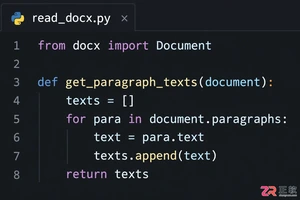
介绍如何利用编程工具读取和解析Word文档(docx格式),涵盖基础文本提取代码示例、结构化数据处理逻辑,以及处理复杂排版时的技术局限与替代方案。
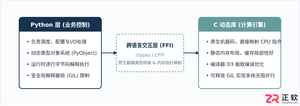
详细讲解在Python中调用C语言代码提升性能的完整实践指南,包含原理分析、编译步骤、ctypes与CFFI具体实现、性能对比及常见陷阱。
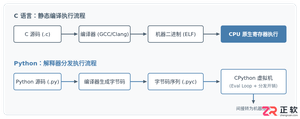
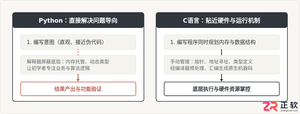
客观对比Python与C语言在心智负担、底层机制与学习反馈上的核心差异,提供清晰有据的选择标准与切实的入门学习路径。
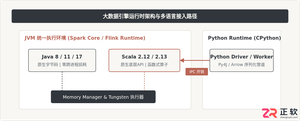
针对大数据工程场景,系统对比Java、Scala与Python在执行性能、生态结合、开发效率和维护成本上的核心差异,给出清晰的架构选型依据与落地方案。
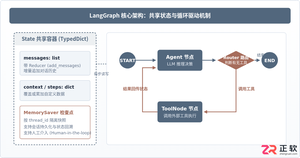
本篇LangGraph Python中文入门教程详解,系统梳理StateGraph状态机定义、节点编写、边与条件路由、检查点持久化(MemorySaver)等核心机制,提供从环境安装到完整循环智能体构建的代码示例与实操指导。
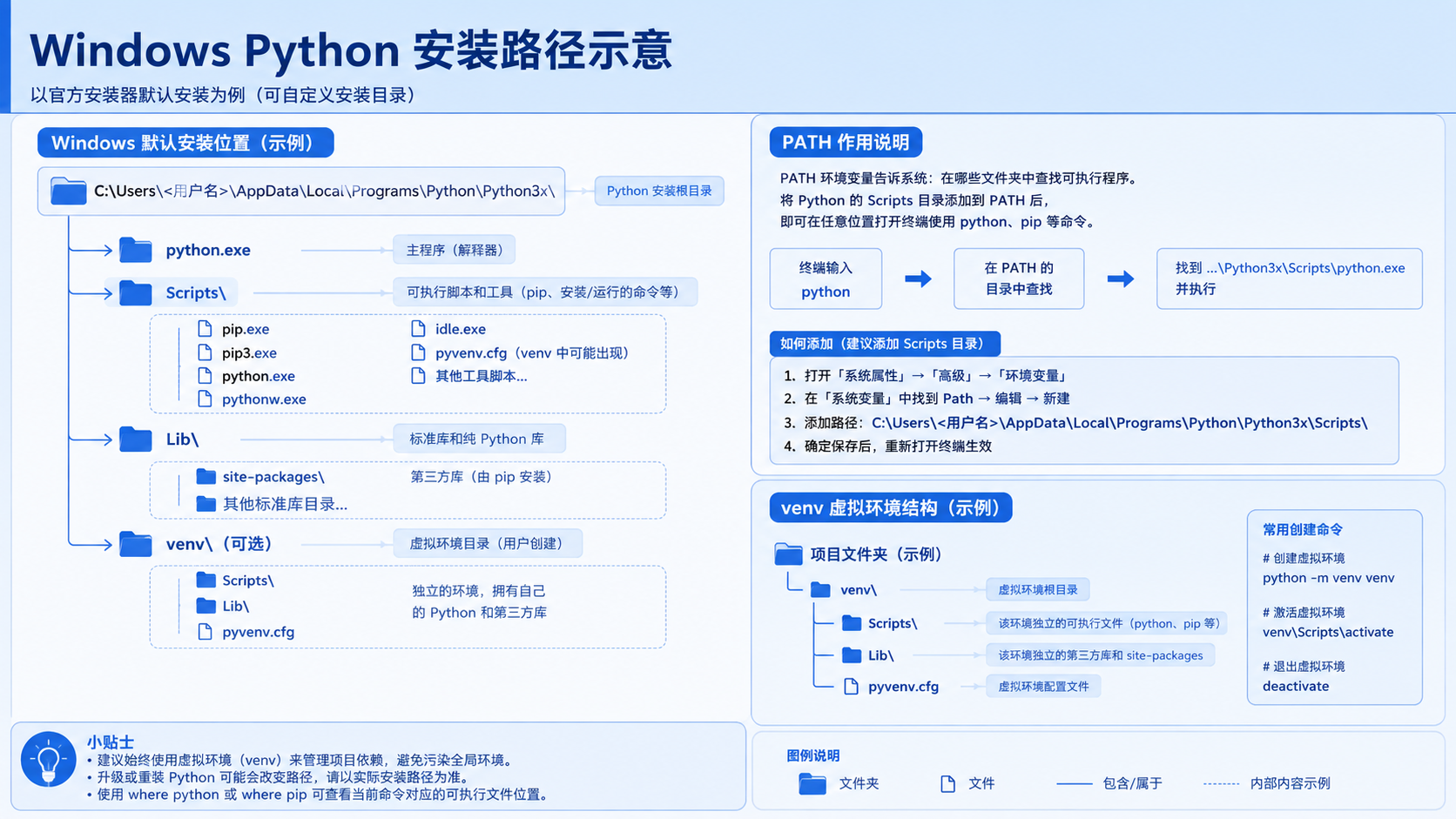
面向后端开发者,基于 Python 官方文档说明如何在 Windows 上安装 Python、创建 venv 虚拟环境及使用 pip 管理依赖。包含可复制命令、验证方法及工具选择边界,避免常见配置误区。