Java开发小技巧:如何调用阿里云短信服务
Java开发小技巧:如何调用阿里云短信服务引言:随着互联网的发展,短信服务越来越成为各类应用中重要的通信方式。而在Java开发中,如何调用阿里云的短信服务,成为一个值得关注的话题。本文将介绍如何使用Java代码调用阿里云短信服务的小技巧。一、准备工作在开始之前,我们需要先准备以下几个事项:获得阿里云的AccessKeyID和AccessKeySecr
Java开发小技巧:如何调用阿里云短信服务
引言:
随着互联网的发展,短信服务越来越成为各类应用中重要的通信方式。而在Java开发中,如何调用阿里云的短信服务,成为一个值得关注的话题。本文将介绍如何使用Java代码调用阿里云短信服务的小技巧。
一、准备工作
在开始之前,我们需要先准备以下几个事项:
- 获得阿里云的Access Key ID和Access Key Secret。这两个信息可在阿里云控制台上申请获得。
- 在阿里云控制台上开通短信服务,并获取短信服务的Endpoint(接入点)信息。
- 打开Java开发环境,确保已经导入Java SDK。
二、调用阿里云短信服务
下面是一个简单的Java代码示例,展示如何使用Java调用阿里云短信服务:
import com.aliyuncs.DefaultAcsClient;
import com.aliyuncs.IAcsClient;
import com.aliyuncs.exceptions.ClientException;
import com.aliyuncs.profile.DefaultProfile;
import com.aliyuncs.profile.IClientProfile;
import com.aliyuncs.sms.model.v20170525.*;

public class AliyunSmsDemo {

    public static void main(String[] args) {

        // 设置Access Key ID和Access Key Secret
        String accessKeyId = "your_access_key_id";
        String accessKeySecret = "your_access_key_secret";

        // 设置短信服务的Region ID和Endpoint
        String regionId = "your_region_id";
        String endpoint = "your_endpoint";

        // 初始化IAcsClient
        IClientProfile profile = DefaultProfile.getProfile(regionId, accessKeyId, accessKeySecret);
        DefaultProfile.addEndpoint(regionId, regionId, "Sms", endpoint);
        IAcsClient client = new DefaultAcsClient(profile);

        // 创建短信请求对象
        SendSmsRequest request = new SendSmsRequest();

        // 设置短信请求参数
        request.setSignName("your_sign_name");    // 设置短信签名
        request.setTemplateCode("your_template_code");    // 设置短信模板代码
        request.setPhoneNumbers("your_phone_numbers");    // 设置接收短信的手机号
        request.setTemplateParam("{"code":"123456"}");    // 设置短信模板参数,例如验证码

        try {
            // 发送短信
            SendSmsResponse response = client.getAcsResponse(request);
            System.out.println("短信发送结果:" + response.getCode());
        } catch (ClientException e) {
            System.out.println("短信发送失败:" + e.getErrMsg());
        }
    }
}
三、代码解析
- 引入必要的依赖:
    com.aliyun
    aliyun-java-sdk-core
    4.2.5


    com.aliyun
    aliyun-java-sdk-sms
    3.0.0
- 创建IAcsClient对象:
IClientProfile profile = DefaultProfile.getProfile(regionId, accessKeyId, accessKeySecret);
DefaultProfile.addEndpoint(regionId, regionId, "Sms", endpoint);
IAcsClient client = new DefaultAcsClient(profile);
通过DefaultProfile和DefaultAcsClient来创建IAcsClient对象,以便进行后续的短信发送操作。
- 创建SendSmsRequest对象,并设置短信请求参数:
SendSmsRequest request = new SendSmsRequest();
request.setSignName("your_sign_name");
request.setTemplateCode("your_template_code");
request.setPhoneNumbers("your_phone_numbers");
request.setTemplateParam("{"code":"123456"}");
设置发送短信需要的参数,例如短信签名、短信模板代码、接收短信的手机号,以及短信模板参数。
- 发送短信:
try {
    SendSmsResponse response = client.getAcsResponse(request);
    System.out.println("短信发送结果:" + response.getCode());
} catch (ClientException e) {
    System.out.println("短信发送失败:" + e.getErrMsg());
}
使用client.getAcsResponse(request)方法发送短信,并通过response.getCode()获得短信发送结果。
结论:
通过本文的代码示例,我们可以看到,使用Java调用阿里云短信服务是非常简单的。只需要准备好必要的Access Key ID、Access Key Secret和Endpoint信息,然后通过Java SDK的相关类和方法来完成短信发送操作。希望本文对您了解如何调用阿里云短信服务有所帮助。
参考链接:https://help.aliyun.com/document_detail/55284.html
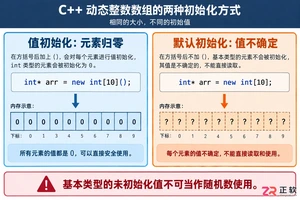
深入解析C++中动态数组的初始化机制,涵盖new操作符的不同用法、基本类型与类对象的初始化差异,以及为何在现代C++开发中应优先使用std::vector。

谷歌浏览器Mac版官方安装指南 谷歌浏览器Mac版官方安装入口是https://www.google.com/chrome/,需macOS 12+系统、500MB空间,下载.dmg后拖入应用程序安装,支持多设备同步、性能优化与隐私保护功能。 苹果电脑Chrome的安装入口究竟在哪里?这个问题最近可是

阿里云百炼推出企业级AgenticRAG服务,代号KnowledgeStudio,支持多模态搜索与AgenticSearch,可同时调用15个知识库进行联合检索与混合问答,提升复杂业务场景下的知识获取效率与精准度。
Chrome中JavaScript未执行需依次检查:一、移除站点级禁用并添加允许域名;二、开启全局JavaScript开关;三、禁用干扰扩展;四、在开发者工具中启用JavaScript;五、重置内容设置为默认。 有时在Chrome里打开网页,会发现交互按钮点了没反应,数据加载不出来,页面仿佛“静止”
IE浏览器怀旧版在线网址:一次精准的技术时光回溯 最近,不少老用户和怀旧爱好者在反复搜索一个问题:那个经典的Internet Explorer,如今还能在哪里原汁原味地体验到?答案指向一个特定的地址:https://ie.microsoft.com/legacy/。 这个网站远不止是一个简单的“皮肤


Chrome官方免验证入口为https://www.google.cn/chrome/,提供全平台安装包、免登录即用、本地化安全机制及引擎级性能优化。 到底该去哪里找正版、免费且无需繁琐验证的Chrome浏览器入口?这个问题困扰了不少网友。今天,我们就来直通核心,为大家详细拆解Chrome引擎的官方

阿里云企业邮箱配置:域名解析全流程详解 遇到这种情况确实让人着急:明明已经开通了阿里企业邮箱,域名也绑定了,可邮件就是发不出也收不到。十有八九,问题出在域名DNS解析这最后一步上。别担心,这事儿听起来技术,但只要按步骤来,其实是个标准化的操作。下面,我们就来手把手走一遍域名解析的完整流程。 一、从哪

Java堆是JVM存储对象的核心内存区域,配置需结合场景:单体应用适中设置;大数据处理需大堆并关注GC停顿;微服务强调快速启动;高并发需精细划分堆区域。关键参数-Xms和-Xmx建议等值以稳定性能。垃圾回收器选择影响效率,如G1适用于大堆,ZGC可实现低停顿。内存错误时需监控堆状态。

Java堆内存溢出错误通常因内存泄漏、数据处理需求过大或JVM参数配置不当引起。排查时可借助jmap、堆转储及MAT等工具定位问题。解决方案包括调整JVM内存参数(如-Xmx)、修复代码中的内存泄漏、优化大数据处理逻辑,并建立持续监控与预防机制,以保障应用稳定运行。





Windows 10 是一款微软推出的经典操作系统,拥有硬件兼容性与多任务处理能力。它更偏向把系统状态查看和常用调节动作放在一起,适合需要持续观察和微调设备状态的场景。

极度公式是一款跨平台专业LaTeX公式识别编辑软件,支持OCR公式识别和多平台编辑。和使用说明,避免使用,享受完整功能与稳定支持。做扫描整理、文字提取和表格转换时,它能把识别后的处理步骤接得更顺,资料录入这类场景会省下不少时间。