

Java中实现BMP和JPEG图片格式互转的方法
Bmp转JpegpublicstaticStringbmp2Jpeg(StringfilePath,StringoutPath){try{longstart=System.currentTimeMillis();//加载bmp图片Filefile=newFile(filePath);Imageimg=ImageIO.read(file);BufferedImagetag=newBufferedImage(img.getWidth(null),img.getHeight(null),BufferedImag
Bmp转Jpeg
public static String bmp2Jpeg(String filePath, String outPath) {
    try {
        long start = System.currentTimeMillis();
        // 加载bmp图片
        File file = new File(filePath);
        Image img = ImageIO.read(file);
        BufferedImage tag = new BufferedImage(img.getWidth(null), img.getHeight(null), BufferedImage.TYPE_INT_RGB);
        tag.getGraphics().drawImage(img.getScaledInstance(img.getWidth(null), img.getHeight(null), Image.SCALE_SMOOTH), 0, 0, null);

        // 输出为Jpeg
        FileOutputStream out = new FileOutputStream(outPath);
        // JPEGImageEncoder可适用于其他图片类型的转换
        JPEGImageEncoder encoder = JPEGCodec.createJPEGEncoder(out);
        encoder.encode(tag);
        out.close();

        log.info("bmp 转 JPEG,共耗时:  " + (System.currentTimeMillis() - start) + " 毫秒");
        return outPath;
    } catch (IOException e) {
        e.printStackTrace();
    }
        return outPath;
    }
Jpeg转Bmp
public static void jpeg2Bmp(String inputPath, String outputPath) {
    try {
        long start = System.currentTimeMillis();

        // 加载Jpeg图片资源
        FileImageInputStream fiis = new FileImageInputStream(new File(inputPath));
        FileImageOutputStream fios = new FileImageOutputStream(new File(outputPath));
        ImageReader jpegReader = null;
        Iterator it1 = ImageIO.getImageReadersByFormatName("jpeg");
        if (it1.hasNext()) {
            jpegReader = it1.next();
        }
        jpegReader.setInput(fiis);

        ImageWriter bmpWriter = null;
        Iterator it2 = ImageIO.getImageWritersByFormatName("bmp");
        if (it2.hasNext()) {
            bmpWriter = it2.next();
        }
        bmpWriter.setOutput(fios);
        BufferedImage br = jpegReader.read(0);
        bmpWriter.write(br);
        fiis.close();
        fios.close();

        log.info("jpeg 转 bmp,共耗时:" + (System.currentTimeMillis() - start) + " 毫秒");
    } catch (IOException e) {
        e.printStackTrace();
    }
} 
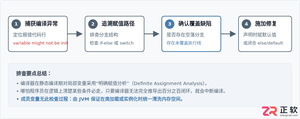
深入解析Java中局部变量未初始化编译报错与成员变量自动赋予默认值的机制差异,涵盖JVM内存分配、编译期确定性赋值检查与实际排查修复方案。

详细讲解在Java中获取当前系统时间并进行格式化输出的两种核心方案:基于Java 8全新日期时间API的DateTimeFormatter与传统遗留的SimpleDateFormat,包含完整代码示例、线程安全机制对比及生产选型建议。
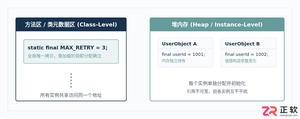
深入解析Java中final变量与static final常量的定义、内存语义、初始化时机及合法赋值路径,涵盖编译期常量优化与实战避坑指南。

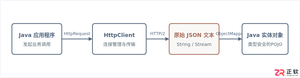
本文提供Java标准库HttpClient发起HTTP GET/POST请求并结合Jackson进行JSON数据反序列化与序列化的完整代码示例与工程实践指南。
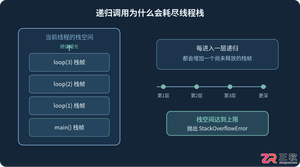
详细分析Java递归调用出现StackOverflowError的原因,结合代码说明线程栈、栈帧和递归深度之间的关系,并介绍终止条件排查、迭代改写、减少栈帧开销以及通过-Xss调整JVM栈空间的方法。
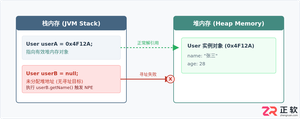
针对Java中常见的NullPointerException(NPE),本文从堆栈日志定位、典型代码触发场景、具体修复代码对比到防御体系进行系统讲解,提供实用且易上手的排查与修复方案。


针对大数据工程场景,系统对比Java、Scala与Python在执行性能、生态结合、开发效率和维护成本上的核心差异,给出清晰的架构选型依据与落地方案。





火山引擎是字节跳动旗下企业级云与AI服务平台。聚焦大模型核心能力,依托字节自研豆包多模态大模型,凭借火山方舟一站式平台,提供模型精调、推理部署、智能应用搭建等全链路服务,结合高性能AI算力,助力各行业快速落地大模型数字化与智能化应用。



