Java文件操作的方法
简介本程序主要采用了FileInputStream和FileOutputStream两类对文件进行操作。具体包括通过相对路径打开文件,三种方法读取文件,查看文件属性,追加文件数据等。效果图:完整代码:packageCode.a;importjava.io.*;publicclassFileInputStreamDemo{publicstaticvoidmain(String[]args){//获取当前目录;Filef=newFile(".");System.out.print("absolutepath:
简介
本程序主要采用了FileInputStream和FileOutputStream两类对文件进行操作。具体包括通过相对路径打开文件,三种方法读取文件,查看文件属性,追加文件数据等。
效果图:
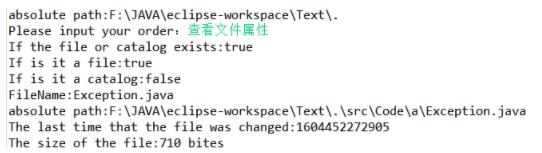
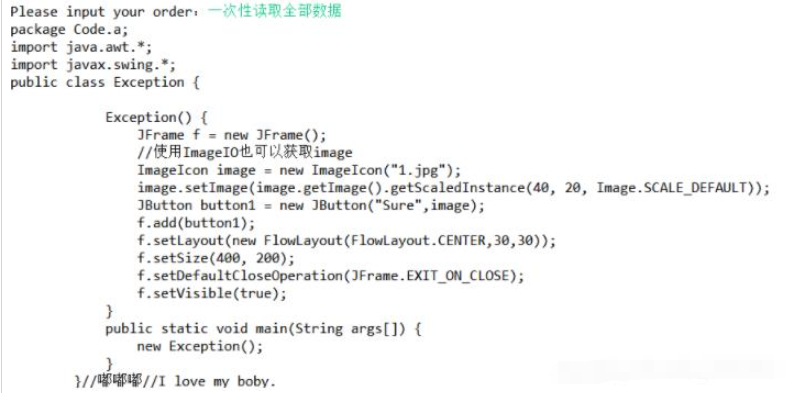

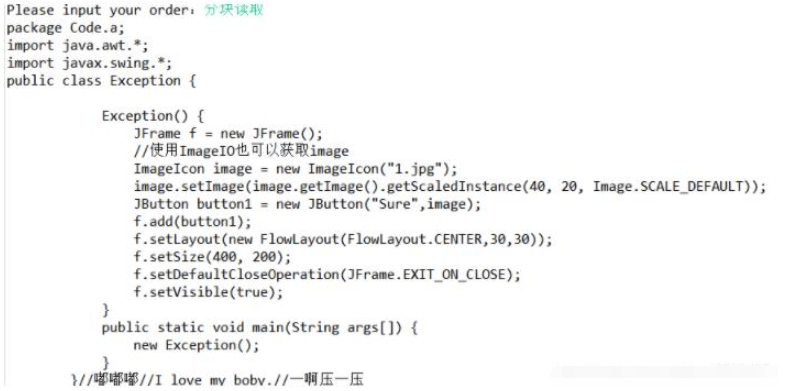
完整代码:
package Code.a;
import java.io.*;
public class FileInputStreamDemo {


    public static void main(String[] args) {
        //获取当前目录;
        File f = new File(".");
        System.out.print("absolute path:"+f.getAbsolutePath()+"\n");
        while(true)
        {
            try {
                //输入命令;
                System.out.print("Please input your order:");
                BufferedReader stdinBufferedReader;
                String str1 = null;
                stdinBufferedReader = new BufferedReader(new InputStreamReader(System.in));
                str1 = stdinBufferedReader.readLine();
                //相对路径打开文件;
                File file2 = new File(".\\src\\Code\\a\\Exception.java");
                FileInputStream fis2 = new FileInputStream(file2);

                根据不同的命令,执行不同操作;
                //一次性读取全部数据
                if(str1.equals("一次性读取全部数据"))
                {
                    byte[] buf = new byte[(int)(file2.length())];
                    fis2.read(buf);
                    String str = new String(buf);
                    System.out.print(str);
                    System.out.print("\n");
                }
                //分块读取
                else if(str1.equals("分块读取"))
                {
                    int n = 1024,count;
                    byte[] buf = new byte[n];
                    while((count = fis2.read(buf)) != -1)
                    {
                        System.out.print(new String(buf,0,count));
                    }
                    System.out.print("\n");
                }
                //逐字读取数据
                else if(str1.equals("逐字读取数据"))
                {
                    for(int i = 0; i < file2.length(); i++)
                    {
                        char ch = (char)(fis2.read());
                        System.out.print(ch);
                    }
                    System.out.print("\n");
                }
                //退出
                else if(str1.equals("退出"))
                {
                    System.out.print("已退出\n");
                    break;
                }
                //查看文件属性
                else if(str1.equals("查看文件属性"))
                {
                    System.out.print("If the file or catalog exists:"+file2.exists()+"\n");
                    System.out.print("If is it a file:"+file2.isFile()+"\n");
                    System.out.print("If is it a catalog:"+file2.isDirectory()+"\n");
                    System.out.print("FileName:"+file2.getName()+"\n");
                    System.out.print("absolute path:"+file2.getAbsolutePath()+"\n");
                    System.out.print("The last time that the file was changed:"+file2.lastModified()+"\n");
                    System.out.print("The size of the file:"+file2.length()+" bites\n");
                }
                //向文件追加数据
                else if(str1.equals("文件追加数据"))
                {
                    FileOutputStream fos2 = new FileOutputStream(file2,true);
                    System.out.println("Please input the content: ");
                    BufferedReader ContentReader;
                    String str2 = null;
                    ContentReader = new BufferedReader(new InputStreamReader(System.in));
                    str2 = ContentReader.readLine();
                    fos2.write(str2.getBytes());
                    fos2.close();
                }
                //关闭流对象;
                fis2.close();
            }
            //处理异常;
            catch(FileNotFoundException fnfe) {
                System.out.print("The file open unsuccessfully.");
            }catch(IOException ioe) {
                ioe.printStackTrace();
            }
        }
    }

} 
深入解析C++中动态数组的初始化机制,涵盖new操作符的不同用法、基本类型与类对象的初始化差异,以及为何在现代C++开发中应优先使用std::vector。

谷歌浏览器Mac版官方安装指南 谷歌浏览器Mac版官方安装入口是https://www.google.com/chrome/,需macOS 12+系统、500MB空间,下载.dmg后拖入应用程序安装,支持多设备同步、性能优化与隐私保护功能。 苹果电脑Chrome的安装入口究竟在哪里?这个问题最近可是

Chrome中JavaScript未执行需依次检查:一、移除站点级禁用并添加允许域名;二、开启全局JavaScript开关;三、禁用干扰扩展;四、在开发者工具中启用JavaScript;五、重置内容设置为默认。 有时在Chrome里打开网页,会发现交互按钮点了没反应,数据加载不出来,页面仿佛“静止”

IE浏览器怀旧版在线网址:一次精准的技术时光回溯 最近,不少老用户和怀旧爱好者在反复搜索一个问题:那个经典的Internet Explorer,如今还能在哪里原汁原味地体验到?答案指向一个特定的地址:https://ie.microsoft.com/legacy/。 这个网站远不止是一个简单的“皮肤


Chrome官方免验证入口为https://www.google.cn/chrome/,提供全平台安装包、免登录即用、本地化安全机制及引擎级性能优化。 到底该去哪里找正版、免费且无需繁琐验证的Chrome浏览器入口?这个问题困扰了不少网友。今天,我们就来直通核心,为大家详细拆解Chrome引擎的官方

Java堆是JVM存储对象的核心内存区域,配置需结合场景:单体应用适中设置;大数据处理需大堆并关注GC停顿;微服务强调快速启动;高并发需精细划分堆区域。关键参数-Xms和-Xmx建议等值以稳定性能。垃圾回收器选择影响效率,如G1适用于大堆,ZGC可实现低停顿。内存错误时需监控堆状态。

Java堆内存溢出错误通常因内存泄漏、数据处理需求过大或JVM参数配置不当引起。排查时可借助jmap、堆转储及MAT等工具定位问题。解决方案包括调整JVM内存参数(如-Xmx)、修复代码中的内存泄漏、优化大数据处理逻辑,并建立持续监控与预防机制,以保障应用稳定运行。
XML在Java开发中用于配置、数据交换等场景。解析方式主要有DOM、SAX、StAX及第三方库。DOM适合操作小文件,SAX/StAX适合处理大文件流,JAXB用于对象与XML映射。选型需结合数据大小、内存、性能及团队熟悉度,现代框架常封装底层解析。
命名空间的基本概念与常见引入问题在C++等编程语言中,命名空间(namespace)是一种将代码标识符(如变量、函数、类名)封装在特定名称下的机制,其主要目的是避免命名冲突,尤其是在大型项目或使用多个第三方库时。使用“using namespace”指令可以将指定命名空间中的所有名称引入当前作用域,






Windows 10 是一款微软推出的经典操作系统,拥有硬件兼容性与多任务处理能力。它更偏向把系统状态查看和常用调节动作放在一起,适合需要持续观察和微调设备状态的场景。

极度公式是一款跨平台专业LaTeX公式识别编辑软件,支持OCR公式识别和多平台编辑。和使用说明,避免使用,享受完整功能与稳定支持。做扫描整理、文字提取和表格转换时,它能把识别后的处理步骤接得更顺,资料录入这类场景会省下不少时间。