

Python基于Google Bard怎么实现交互式聊天机器人
用Python基于GoogleBard做一个交互式的聊天机器人之前已经通过浏览器试过了GoogleBard,更多细节请看:TryoutGoogleBard,WillGoogleBardbeattheChatGPT?.现在我们想实现自动化,所以我用Python做一个交互式的聊天机器人。获取SessionID通过浏览器先拿到SessionID,它是一个cookie,名为__Secure-1PSID,然后复制一下对应的值:Python代码先做一些初始化,主要是一些请求头和请求参数:def__init__(sel
用Python基于Google Bard做一个交互式的聊天机器人
之前已经通过浏览器试过了 Google Bard ,更多细节请看: Try out Google Bard, Will Google Bard beat the ChatGPT?.
现在我们想实现自动化,所以我用Python做一个交互式的聊天机器人。
获取Session ID
通过浏览器先拿到SessionID,它是一个cookie,名为 __Secure-1PSID,然后复制一下对应的值:
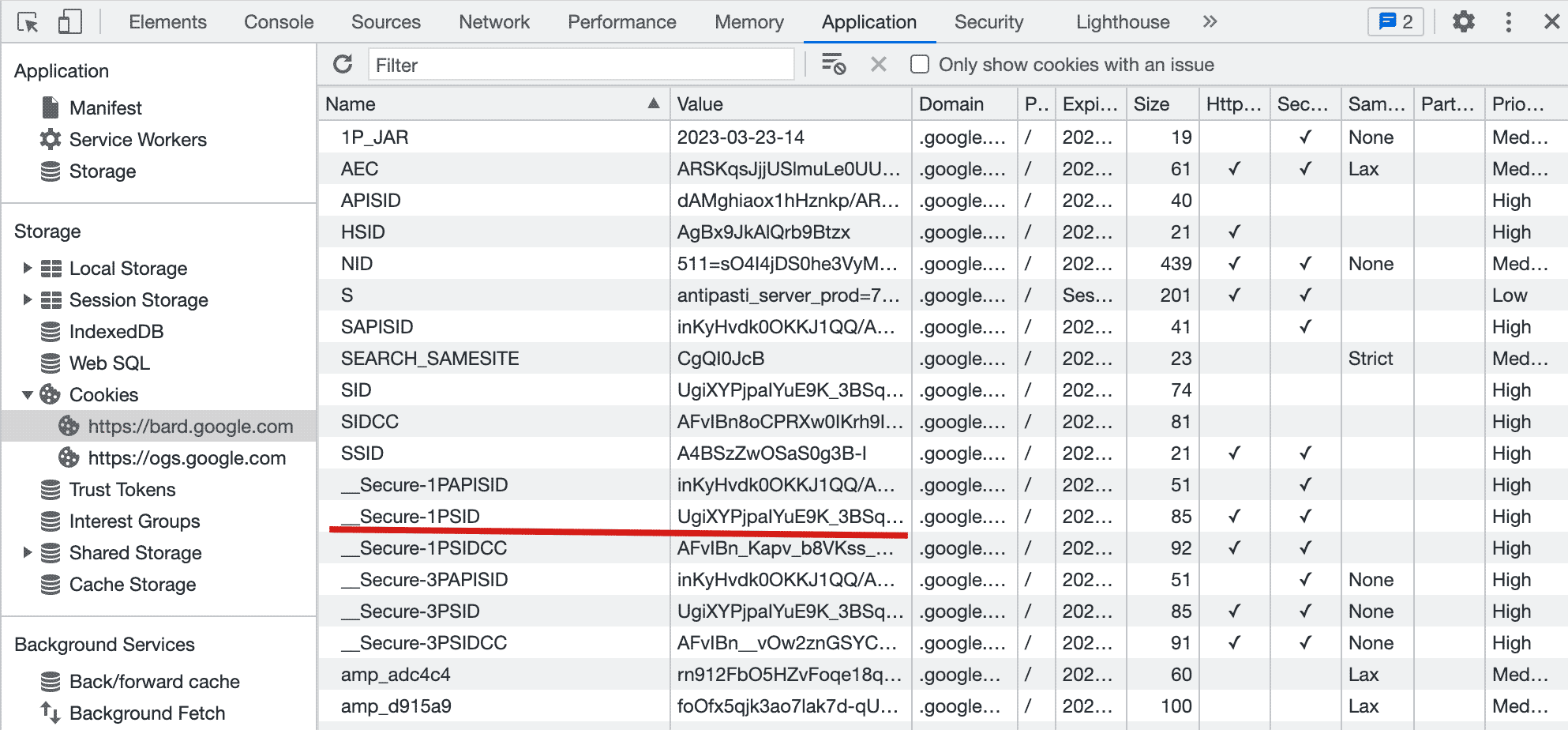
Python代码
先做一些初始化,主要是一些请求头和请求参数:
def __init__(self, session_id):
  headers = {
    "Host": "bard.google.com",
    "X-Same-Domain": "1",
    "User-Agent": "Mozilla/5.0 (Windows NT 10.0; WOW64) AppleWebKit/537.36 (KHTML, like Gecko) Chrome/91.0.4472.114 Safari/537.36",
    "Content-Type": "application/x-www-form-urlencoded;charset=UTF-8",
    "Origin": "https://bard.google.com",
    "Referer": "https://bard.google.com/",
  }
  self._reqid = int("".join(random.choices(string.digits, k=4)))
  self.conversation_id = ""
  self.response_id = ""
  self.choice_id = ""
  self.session = requests.Session()
  self.session.headers = headers
  self.session.cookies.set("__Secure-1PSID", session_id)
  self.SNlM0e = self.__get_snlm0e()
发送请求的时候,把之前准备的参数和数据发一个POST请求到 bard.google.com:
resp = self.session.post(
  "https://bard.google.com/_/BardChatUi/data/assistant.lamda.BardFrontendService/StreamGenerate",
  params=params,
  data=data,
  timeout=120,
)
返回了之后,需要解析消息体,获取我们所需要的信息:
chat_data = json.loads(resp.content.splitlines()[3])[0][2]
if not chat_data:
  return {"content": f"Google Bard encountered an error: {resp.content}."}
json_chat_data = json.loads(chat_data)
results = {
  "content": json_chat_data[0][0],
  "conversation_id": json_chat_data[1][0],
  "response_id": json_chat_data[1][1],
  "factualityQueries": json_chat_data[3],
  "textQuery": json_chat_data[2][0] if json_chat_data[2] is not None else "",
  "choices": [{"id": i[0], "content": i[1]} for i in json_chat_data[4]],
}
运行与尝试
python Bard.py --session 'UgiXYPjpaIYuE9K_3BSxxxxxxxxxxxxxxxxxxxxxxxxxxxxxxxxx'
它一个交互式的终端,我随便问了几个问题:
ChatGPT - A command-line interface to Google's Bard (https://bard.google.com/)
You:
What is terrible-two?
Google Bard:
Terrible-two is a term used to describe the behavior of a child around the age of 2. It is a normal developmental phase that all children go through. During this time, children
are learning to assert their independence and explore the world around them. This can lead to tantrums, defiance, and other challenging behavior.
There are a few things that parents can do to help manage the terrible twos:
 • Be patient and understanding. Remember that this is a normal phase and that your child is not trying to be difficult.
 • Set clear boundaries and expectations. Children need to know what is expected of them.
 • Be consistent with your discipline. If you are not consistent, your child will not learn what is right and wrong.
 • Offer positive reinforcement. Praise your child for good behavior and help them feel good about themselves.
 • Talk to your child's doctor if you are concerned about their behavior. Your doctor can offer advice and support.
The terrible twos can be a challenging time for parents, but it is important to remember that this is a normal phase and that your child will eventually grow out of it.
You:
how far is the moon?
Google Bard:
The Moon is an average of 238,855 miles (384,400 km) away from Earth. This distance varies slightly because the Moon's orbit is not a perfect circle. The Moon is closest to Earth
at perigee, which is when it is about 225,623 miles (363,104 km) away. It is farthest from Earth at apogee, which is when it is about 252,088 miles (405,696 km) away.
You:
how far is the sun?
Google Bard:
The Sun is about 93 million miles (150 million kilometers) away from Earth. That's about 1 Astronomical Unit (AU).
The Sun is the center of our solar system. All of the planets and other objects in our solar system orbit around the Sun. The Sun is a very large star. It is about 109 times the
diameter of Earth and about 330,000 times more massive than Earth. The Sun is made up of mostly hydrogen and helium. It is so hot that the hydrogen and helium are constantly
fusing together to create heavier elements. This process is called nuclear fusion. Nuclear fusion releases a lot of energy, which is what powers the Sun.
You:
how to cure a flu?
Google Bard:
There is no cure for the flu, but there are treatments that can help relieve symptoms and prevent complications. The most effective way to prevent the flu is to get a flu vaccine
every year.
If you get the flu, there are a few things you can do to feel better:
 • Rest. Get plenty of sleep and avoid strenuous activity.
 • Drink plenty of fluids. Water, juice, and soup are all good choices.
 • Take over-the-counter pain relievers like acetaminophen or ibuprofen.
 • Use a humidifier. The moisture can help soothe your throat and make it easier to breathe.
 • See a doctor if you have severe symptoms or are at high risk of complications.
Here are some tips to help you prevent the flu:
 • Get a flu vaccine every year. The flu vaccine is the best way to prevent the flu.
 • Wash your hands often with soap and water. This helps to prevent the spread of germs.
 • Avoid close contact with people who are sick. If you must be around someone who is sick, wear a mask.
 • Clean and disinfect surfaces that may be contaminated with germs.
 • Stay home from work or school if you are sick. This will help to prevent the spread of the flu.
 • Eat a healthy diet and exercise regularly. A healthy immune system is better able to fight off infection.
You:
Exiting...

学习如何使用Python高效删除列表中的重复元素。本文提供5种常见方法的代码示例,涵盖保持顺序与不保持顺序的场景,适合初学者和进阶开发者参考。

详细讲解使用Python编写Web接口的核心步骤与完整代码示例,涵盖环境准备、路由定义、数据校验、服务启动及调试测试方法。

介绍如何利用编程工具读取和解析Word文档(docx格式),涵盖基础文本提取代码示例、结构化数据处理逻辑,以及处理复杂排版时的技术局限与替代方案。

详细讲解在Python中调用C语言代码提升性能的完整实践指南,包含原理分析、编译步骤、ctypes与CFFI具体实现、性能对比及常见陷阱。


客观对比Python与C语言在心智负担、底层机制与学习反馈上的核心差异,提供清晰有据的选择标准与切实的入门学习路径。


针对大数据工程场景,系统对比Java、Scala与Python在执行性能、生态结合、开发效率和维护成本上的核心差异,给出清晰的架构选型依据与落地方案。

本篇LangGraph Python中文入门教程详解,系统梳理StateGraph状态机定义、节点编写、边与条件路由、检查点持久化(MemorySaver)等核心机制,提供从环境安装到完整循环智能体构建的代码示例与实操指导。

面向后端开发者,基于 Python 官方文档说明如何在 Windows 上安装 Python、创建 venv 虚拟环境及使用 pip 管理依赖。包含可复制命令、验证方法及工具选择边界,避免常见配置误区。





火山引擎是字节跳动旗下企业级云与AI服务平台。聚焦大模型核心能力,依托字节自研豆包多模态大模型,凭借火山方舟一站式平台,提供模型精调、推理部署、智能应用搭建等全链路服务,结合高性能AI算力,助力各行业快速落地大模型数字化与智能化应用。



