

如何使用Python编写一个射击游戏
项目功能地图编辑器:可以实现玩家自己定义每一关卡的样式和难易程度运行界面:实现了玩家的移动,跳跃,发射子弹,投掷手雷,以及敌人的AL(移动,发射子弹,扔手雷),同时游戏中有一系列的道具(生命值药箱,子弹补给,手雷补给)以及各种动画和音乐音效,还有各种花草岩石装饰品,以及悬崖和水涡危险地方,更多未知,自己体验就能感受到!总代码累计1100行左右!地图编辑器importpygameimportsysimportcsvimportbuttonpygame.init()#定义一个时钟clock=pygame.ti
项目功能
地图编辑器:可以实现玩家自己定义每一关卡的样式和难易程度
运行界面:实现了玩家的移动,跳跃,发射子弹,投掷手雷,以及敌人的AL(移动,发射子弹,扔手雷),同时游戏中有一系列的道具(生命值药箱,子弹补给,手雷补给)以及各种动画和音乐音效,还有各种花草岩石装饰品,以及悬崖和水涡危险地方,更多未知,自己体验就能感受到!
总代码累计1100行左右!
地图编辑器
import pygame
import sys
import csv
import button

pygame.init()
# 定义一个时钟
clock = pygame.time.Clock()
FPS = 60

# 游戏窗口
SCREEN_WIDTH = 800
SCREEN_HEIGHT = 560
LOWER_MARGIN = 100
SIDE_MAGTIN = 300
screen = pygame.display.set_mode((SCREEN_WIDTH + SIDE_MAGTIN, SCREEN_HEIGHT + LOWER_MARGIN))
pygame.display.set_caption("级别编辑器")

# 定义游戏变量
ROWS = 16
MAX_COLS = 150
TILE_SIZE = SCREEN_HEIGHT // ROWS
TILE_TYPES = 21
level = 1
current_tile = 0
scroll_left = False
scroll_right = False
scroll = 0
scroll_speed = 1

# 加载背景图片
pine1_img = pygame.image.load("img/Background/pine1.png").convert_alpha()
pine2_img = pygame.image.load("img/Background/pine2.png").convert_alpha()
mountain_img = pygame.image.load("img/Background/mountain.png").convert_alpha()
sky_img = pygame.image.load("img/Background/sky_cloud.png").convert_alpha()
# 瓷砖瓦片列表
img_list = []
for x in range(TILE_TYPES):
    img = pygame.image.load(f"img/tile/{x}.png")
    img = pygame.transform.scale(img, (TILE_SIZE, TILE_SIZE))
    img_list.append(img)

# 创建保存按钮
save_img = pygame.image.load("img/save_btn.png").convert_alpha()
load_img = pygame.image.load("img/load_btn.png").convert_alpha()

# 定义颜色
GREEN = (144, 201, 120)
WHITE = (255, 255, 255)
RED = (200, 25, 25)

#定义字体
font = pygame.font.SysFont("Futura", 30)

# 创建空的瓷砖列表(二维)
world_data = []
for row in range(ROWS):
    r = [-1] * MAX_COLS
    world_data.append(r)

# 创建一个组
for tile in range(0, MAX_COLS):
    world_data[ROWS - 1][tile] = 0

# 在屏幕上显示下一级定义文本显示函数
def draw_text(text, font, text_color, x, y):
    img = font.render(text, True, text_color)
    screen.blit(img, (x, y))


# 创建背景函数
def draw_bg():
    screen.fill(GREEN)
    width = sky_img.get_width()
    for x in range(4):
        screen.blit(sky_img, ((x * width) - scroll * 0.5, 0))
        screen.blit(mountain_img, ((x * width) - scroll * 0.6, SCREEN_HEIGHT - mountain_img.get_height() - 300))
        screen.blit(pine1_img, ((x * width) - scroll * 0.7, SCREEN_HEIGHT - pine1_img.get_height() - 150))
        screen.blit(pine2_img, ((x * width) - scroll * 0.8, SCREEN_HEIGHT - pine2_img.get_height()))

# 绘制格子
def draw_grid():
    # 垂直的线
    for c in range(MAX_COLS + 1):
        pygame.draw.line(screen, WHITE, (c * TILE_SIZE - scroll, 0), (c * TILE_SIZE - scroll, SCREEN_HEIGHT))
    # 水平的线
    for c in range(ROWS + 1):
        pygame.draw.line(screen, WHITE, (0, c * TILE_SIZE), (SCREEN_WIDTH, c * TILE_SIZE))

# 在地图中绘制瓷砖
def draw_world():
    for y, row in enumerate(world_data):
        for x, tile in enumerate(row):
            if tile >= 0:
                screen.blit(img_list[tile], (x * TILE_SIZE - scroll, y * TILE_SIZE))
# 创建按钮
# 创建保存和加载数据按钮
save_button = button.Button(SCREEN_WIDTH // 2, SCREEN_HEIGHT + LOWER_MARGIN - 50, save_img, 1)
load_button = button.Button(SCREEN_WIDTH // 2 + 200, SCREEN_HEIGHT + LOWER_MARGIN - 50, load_img, 1)

# 制作一个按钮瓷片列表
button_list = []
button_col = 0
button_row = 0
for i in range(len(img_list)):
    tile_button = button.Button(SCREEN_WIDTH + (75 * button_col) + 50, 75 * button_row + 50, img_list[i], 1)
    button_list.append(tile_button)
    button_col += 1
    if button_col == 3:
        button_row += 1
        button_col = 0

run = True
while run:
    clock.tick(FPS)
    draw_bg()
    draw_grid()
    draw_world()

    draw_text(f"Level: {level}", font, WHITE, 10, SCREEN_HEIGHT + LOWER_MARGIN - 90)
    draw_text("Press up or Down to change level", font, WHITE, 10, SCREEN_HEIGHT + LOWER_MARGIN - 60)

    # 保存和加载地图数据
    if save_button.draw(screen):
        # 保存级别数据
        with open(f"level{level}_data.csv", "w", newline="") as csvfile:
            writer = csv.writer(csvfile, delimiter = ",")
            for row in world_data:
                writer.writerow(row)
        # with open(f"level{level}_data.csv", "wb") as pickle_out:
        #     pickle.dump(world_data, pickle_out)
    if load_button.draw(screen):
        # 加载地图级别数据
        # 重置滚动scroll为起始位置0
        scroll = 0
        with open(f"level{level}_data.csv", "r", newline="") as csvfile:
            reader = csv.reader(csvfile, delimiter=",")
            for y, row in enumerate(reader):
                for x, tile in enumerate(row):
                    world_data[y][x] = int(tile)


    # 画面板和瓷砖
    pygame.draw.rect(screen, GREEN, (SCREEN_WIDTH, 0, SIDE_MAGTIN, SCREEN_HEIGHT))
    # 选择一种瓷砖,获取右侧瓷砖列表的具体
    button_count = 0
    for button_count, i in enumerate(button_list):
        if i.draw(screen):
            current_tile = button_count
    # 高亮显示选中的瓷砖
    pygame.draw.rect(screen, RED, button_list[current_tile].rect, 3)

    # 滚动地图
    if scroll_left == True and scroll > 0:
        scroll -= 5 * scroll_speed
    if scroll_right == True and scroll < (MAX_COLS * TILE_SIZE) - SCREEN_WIDTH: # 检测最右边的边缘
        scroll += 5 * scroll_speed

    # 在窗口中增加新的瓷砖
    # 获取鼠标的位置
    pos = pygame.mouse.get_pos()
    x = (pos[0] + scroll) // TILE_SIZE
    y = pos[1] // TILE_SIZE

    # 检测点击的区域,把右侧获取的瓷片放在地图中
    if pos[0] < SCREEN_WIDTH and pos[1] < SCREEN_HEIGHT:
        # 更新瓷砖的值
        if pygame.mouse.get_pressed()[0] == 1:
            if world_data[y][x] != current_tile:
                world_data[y][x] = current_tile
        # 删除选中的
        if pygame.mouse.get_pressed()[2] == 1:
            world_data[y][x] = -1

    for event in pygame.event.get():
        if event.type == pygame.QUIT:
            run = False
            pygame.quit()
            sys.exit()
        # 键盘按键
        if event.type == pygame.KEYDOWN:
            if event.key == pygame.K_UP:
                level += 1
            if event.key == pygame.K_DOWN and level > 0:
                level -= 1
            if event.key == pygame.K_LEFT:
                scroll_left = True
            if event.key == pygame.K_RIGHT:
                scroll_right = True
            if event.key == pygame.K_LSHIFT:
                scroll_speed = 5
        if event.type == pygame.KEYUP:
            if event.key == pygame.K_LEFT:
                scroll_left = False
            if event.key == pygame.K_RIGHT:
                scroll_right = False
            if event.key == pygame.K_LSHIFT:
                scroll_speed = 1
    pygame.display.update()
游戏主运行程序
import pygame
from pygame import mixer
import sys
import os
import random
import csv
import button
import math
mixer.init()
pygame.init()
# 画布元素
SCREEN_WIDTH = 800
SCREEN_HEIGHT = int(SCREEN_WIDTH * 0.8)
screen = pygame.display.set_mode((SCREEN_WIDTH, SCREEN_HEIGHT))
pygame.display.set_caption("射击游戏")
# 设置帧
clock = pygame.time.Clock()
FPS = 60
# 定义游戏变量
GRAVITY = 0.75
SCROLL_THRESH = 200
ROWS = 16
COLS = 150
TILE_SIZE = SCREEN_HEIGHT // ROWS
TILE_TYPES = 21
MAX_LEVELS = 3
screen_scroll = 0
bg_scroll = 0
level = 1
# 定义游戏状态
start_game = False
# 定义是否淡入进入游戏画面
start_intro = False
# 定义玩家状态变量
moving_left = False
moving_right = False
shoot = False
grenade = False
grenade_thrown = False
#加载音乐和声音
pygame.mixer.music.load("audio/music2.mp3")
pygame.mixer.music.set_volume(0.3)
pygame.mixer.music.play(-1, 0.0, 3000)
jump_fx = pygame.mixer.Sound("audio/jump.wav")
jump_fx.set_volume(0.5)
shot_fx = pygame.mixer.Sound("audio/shot.wav")
shot_fx.set_volume(0.9)
grenade_fx = pygame.mixer.Sound("audio/grenade.wav")
grenade_fx.set_volume(0.9)
# 加载背景图片
pine1_img = pygame.image.load("img/Background/pine1.png").convert_alpha()
pine2_img = pygame.image.load("img/Background/pine2.png").convert_alpha()
mountain_img = pygame.image.load("img/Background/mountain.png").convert_alpha()
sky_img = pygame.image.load("img/Background/sky_cloud.png").convert_alpha()
# 加载按钮图像
start_img = pygame.image.load("img/start_btn.png").convert_alpha()
exit_img = pygame.image.load("img/exit_btn.png").convert_alpha()
restart_img = pygame.image.load("img/restart_btn.png").convert_alpha()
# 加载21种瓷砖图像放在瓷砖图像列表中
img_list = []
for x in range(TILE_TYPES):
img = pygame.image.load(f"img/Tile/{x}.png")
img = pygame.transform.scale(img, (TILE_SIZE, TILE_SIZE))
img_list.append(img)
# 加载子弹
bullet_img = pygame.image.load("img/icons/bullet.png").convert_alpha()
grenade_img = pygame.image.load("img/icons/grenade.png").convert_alpha()
# 加载物品
health_box_img = pygame.image.load("img/icons/health_box.png").convert_alpha()
ammo_box_img = pygame.image.load("img/icons/ammo_box.png").convert_alpha()
grenade_box_img = pygame.image.load("img/icons/grenade_box.png").convert_alpha()
item_boxes = {
"Health": health_box_img,
"Ammo": ammo_box_img,
"Grenade": grenade_box_img
}
# 定义颜色
BG = (144, 201, 120)
RED = (255, 0, 0)
WHITE = (255, 255, 255)
GREEN = (0, 255, 0)
BLACK = (0, 0, 0)
PINK = (235, 65, 54)
# 定义字体
font = pygame.font.SysFont("Futura", 30)
# 定义一个显示文本函数,用来显示玩家的相关属性
def draw_text(text, font, text_color, x, y):
img = font.render(text, True, text_color)
screen.blit(img, (x, y))
# 刷新背景函数,for循环重复背景,刷新背景中不同的照片的x坐标,以此达到背景动态效果
def draw_bg():
screen.fill(BG)
width = sky_img.get_width()
for x in range(5):
screen.blit(sky_img, ((x * width) - bg_scroll * 0.5, 0))
screen.blit(mountain_img, ((x * width) - bg_scroll * 0.6, SCREEN_HEIGHT - mountain_img.get_height() - 300))
screen.blit(pine1_img, ((x * width) - bg_scroll * 0.7, SCREEN_HEIGHT - pine1_img.get_height() - 150))
screen.blit(pine2_img, ((x * width) - bg_scroll * 0.8, SCREEN_HEIGHT - pine2_img.get_height()))
# 重置游戏函数定义,碰撞”通关“瓷片时,清空本关的所有显示元素
def reset_level():
enemy_group.empty()
bullet_group.empty()
grenade_group.empty()
explosion_group.empty()
item_box_group.empty()
decoration_group.empty()
water_group.empty()
exit_group.empty()
# 创建空的瓷砖列表。二维列表行列
data = []
for row in range(ROWS):
r = [-1] * COLS
data.append(r)
return data
# 创建士兵类(敌人和玩家)
class Soldier(pygame.sprite.Sprite):
def __init__(self, char_type, x, y, scale, speed, ammo, grenades):
super().__init__()
self.alive = True # 定义或者还是死亡变量
self.char_type = char_type # 获取文件类型样式
self.speed = speed # 速度
self.ammo = ammo # 子弹
self.start_ammo = ammo
self.shoot_cooldown = 0 # 冷却
self.grenades = grenades # 手雷
self.health = 100 # 生命值
self.max_health = self.health
self.direction = 1 # 默认方向右
self.vel_y = 0 # 垂直
self.jump = False # 跳跃
self.in_air = True # 是否在空中
self.flip = False # 默认左为false
self.animation_list = [] # 动画列表
self.frame_index = 0 # 索引
self.action = 0 # 选择动作变量
self.update_time = pygame.time.get_ticks() # 以毫秒为单位获取时间
# 创建AI特定变量
self.move_counter = 0 # 移动计数,对应下文敌人来回徘徊
self.vision = pygame.Rect(0, 0, 150, 20) # 搜索玩家在玩家视线之内
self.idling = False # 闲置状态,对应下文AI开枪和扔手雷的状态
self.idling_counter = 0 # 闲置计数
self.grenade_time = pygame.time.get_ticks() # 对应下文手雷爆炸时间
# 加载玩家是所有的图片类型
animation_types = ["Idle", "Run", "Jump", "Death"]
for animation in animation_types:
# 重置临时列表
temp_list = []
# 统计每种动画帧数量
num_of_frames = len(os.listdir(f"img/{char_type}/{animation}"))
for i in range(num_of_frames):
img = pygame.image.load(f"img/{char_type}/{animation}/{i}.png").convert_alpha()
img = pygame.transform.scale(img, (int(img.get_width() * scale), int(img.get_height() * scale)))
temp_list.append(img)
self.animation_list.append(temp_list)
self.image = self.animation_list[self.action][self.frame_index]
self.rect = self.image.get_rect()
self.rect.center = (x, y)# rect=(x,y,w,h)
self.width = self.image.get_width()
self.height = self.image.get_height()
def update(self):
self.update_animation()
self.check_alive()
# 更新冷却时间
if self.shoot_cooldown > 0:
self.shoot_cooldown -= 1
def move(self, moving_left, moving_right):
# 重置移动变量
screen_scroll = 0
dx = 0
dy = 0
# 根据移动变量判断向左还是向右移动
if moving_left:
dx = -self.speed
self.flip = True
self.direction = -1
if moving_right:
dx = self.speed
self.flip = False
self.direction = 1
# 跳跃
if self.jump == True and self.in_air == False:
self.vel_y = -11
self.jump = False
self.in_air = True
# 使用重力,让其在y方向跳跃高度进行限制
self.vel_y += GRAVITY
if self.vel_y > 10:
self.vel_y
dy += self.vel_y
# 检测与地面的碰撞
for tile in world.obstacle_list:
# 检测玩家与每个地面瓷砖x方向上的碰撞
if tile[1].colliderect(self.rect.x + dx, self.rect.y, self.width, self.height):
dx = 0
# 检测如果是ai机器人碰到墙就返回
if self.char_type == "enemy":
self.direction *= -1
self.move_counter = 0
# 检车玩家与瓷砖y方向上的碰撞
if tile[1].colliderect(self.rect.x, self.rect.y + dy, self.width, self.height):
# 检测与地面底部的碰撞
if self.vel_y < 0:
self.vel_y = 0
dy = tile[1].bottom - self.rect.top
# 检测与地面顶部的碰撞
elif self.vel_y >= 0:
self.vel_y = 0
self.in_air = False
dy = tile[1].top - self.rect.bottom
# 检测与水面的碰撞
if pygame.sprite.spritecollide(self, water_group, False):
self.health = 0
# 检车与出口标志碰撞
level_complete = False
if pygame.sprite.spritecollide(self, exit_group, False):
level_complete = True
# 检测从地图上坠落下来
if self.rect.bottom > SCREEN_HEIGHT:
self.health = 0
# 检测是否走到窗口的边缘,如果走到窗口边缘就不让再走了
if self.char_type == "player":
if self.rect.left + dx < 0 or self.rect.right + dx > SCREEN_WIDTH:
dx = 0
# 更新矩形的位置
self.rect.x += dx
self.rect.y += dy
# 在玩家位置的基础上更新滚动平台 rect.right 对应矩形的左,以此类推
if self.char_type == "player":
if (self.rect.right > SCREEN_WIDTH - SCROLL_THRESH and bg_scroll < world.level_length * TILE_SIZE - SCREEN_WIDTH)\
or (self .rect.left < SCROLL_THRESH and bg_scroll > abs(dx)):
self.rect.x -= dx
screen_scroll = -dx
return screen_scroll, level_complete
def shoot(self):
if self.shoot_cooldown == 0 and self.ammo > 0:
self.shoot_cooldown = 20
bullet = Bullet(self.rect.centerx + (0.75 * self.rect.size[0] * self.direction), self.rect.centery,
self.direction)
bullet_group.add(bullet)
#减少弹药
self.ammo -= 1
shot_fx.play()
def ai(self):
if self.alive and player.alive:
if self.idling == False and random.randint(1, 100) == 1:
self.update_action(0) # 选择闲置动作
self.idling = True
# ai检测到我方士兵在附近
if self.vision.colliderect(player.rect):
# 停止奔跑并面向玩家的时候
self.update_action(0)
# 并射击
self.shoot()
else:
# 不定时扔手雷
now_time = pygame.time.get_ticks()
if math.sqrt(math.pow(abs(self.rect.centerx - player.rect.centerx), 2) + math.pow(
abs(self.rect.centery - player.rect.centery), 2)) < TILE_SIZE * 5:
if self.grenades > 0:
if now_time - self.grenade_time > random.randint(2000, 3000):
# 停止奔跑并面向玩家的时候
self.update_action(0)
self.grenade_time = pygame.time.get_ticks()
grenade = Grenade(self.rect.centerx, self.rect.centery, self.direction)
grenade_group.add(grenade)
self.grenades -= 1
if self.idling == False:
if self.direction == 1:
ai_moving_right = True
self.idling_counter = 50
else:
ai_moving_right = False
ai_moving_left = not ai_moving_right
self.move(ai_moving_left, ai_moving_right)
self.update_action(1) # 选择运动动作
self.move_counter += 1
# 更新ai视觉范围作为移动范围
self.vision.center = (self.rect.centerx + 75 * self.direction, self.rect.centery)
# pygame.draw.rect(screen, RED, self.vision)
if self.move_counter > TILE_SIZE:
self.direction *= -1
self.move_counter *= -1
else:
self.idling_counter -= 1
if self.idling_counter <= 0:
self.idling = False
# 滚动
self.rect.x += screen_scroll
def update_animation(self):
# 更新动画
ANIMATION_COOLDOWN= 100
# 更新当前的帧
self.image = self.animation_list[self.action][self.frame_index]
# 检测现在的时间更新时间
if pygame.time.get_ticks() - self.update_time > ANIMATION_COOLDOWN:
self.update_time = pygame.time.get_ticks()
self.frame_index += 1
# 检测如果列表索引超出了动画帧数
if self.frame_index >= len(self.animation_list[self.action]):
if self.action == 3:
self.frame_index = len(self.animation_list[self.action]) - 1
else:
self.frame_index = 0
def update_action(self, new_action):
# 判断不同的行动播放不同的动画
if new_action != self.action:
self.action = new_action
# 更新动画设置
self.frame_index = 0
self.update_time = pygame.time.get_ticks()
def check_alive(self):
if self.health <= 0:
self.health = 0
self.speed = 0
self.alive = False
self.update_action(3)
def draw(self):
screen.blit(pygame.transform.flip(self.image, self.flip, False), self.rect)
# 收集物品类
class ItemBox(pygame.sprite.Sprite):
def __init__(self, item_type, x, y):
super().__init__()
self.item_type = item_type
self.image = item_boxes.get(self.item_type)
self.rect = self.image.get_rect()
self.rect.midtop = (x + TILE_SIZE // 2, y + (TILE_SIZE - self.image.get_height()))
def update(self):
# 滚动
self.rect.x += screen_scroll
# 检车士兵与物品的碰撞
if pygame.sprite.collide_rect(self, player):
# 检测获取箱子的种类
if self.item_type == "Health":
player.health += 25
if player.health > player.max_health:
player.health = player.max_health
elif self.item_type == "Ammo":
player.ammo += 15
elif self.item_type == "Grenade":
player.grenades += 3
# 删除物品
self.kill()
# 创建血条类
class HealthBar():
def __init__(self, x, y, health, max_health):
self.x = x
self.y = y
self.health = health
self.max_health = max_health
def draw(self, health):
# 更新最新血条
self.health = health
# 计算血条的比率
ratio = self.health / self.max_health
pygame.draw.rect(screen, BLACK, (self.x - 2, self.y - 2, 154, 24))
pygame.draw.rect(screen, RED, (self.x, self.y, 150, 20))
pygame.draw.rect(screen, GREEN, (self.x, self.y, 150 * ratio, 20))
class Bullet(pygame.sprite.Sprite):
def __init__(self, x, y, direction):
super().__init__()
self.speed = 10
self.image = bullet_img
self.rect = self.image.get_rect()
self.rect.center = (x, y)
self.direction = direction
def update(self):
# 移动子弹
self.rect.x += (self.direction * self.speed) + screen_scroll # 子弹射出也要一起移动
# 检测子弹与地面瓷砖的碰撞
for tile in world.obstacle_list:
if tile[1].colliderect(self.rect):
self.kill()
# 检测子弹的碰撞
if pygame.sprite.spritecollide(player, bullet_group, False):
if player.alive:
player.health -= 5
self.kill()
for enemy in enemy_group:
if pygame.sprite.spritecollide(enemy, bullet_group, False):
if enemy.alive:
enemy.health -= 25
self.kill()
# 创建手雷
class Grenade(pygame.sprite.Sprite):
def __init__(self, x, y, direction):
super().__init__()
self.timer = 90
self.vel_y = -11
self.speed = 7
self.image = grenade_img
self.rect = self.image.get_rect()
self.rect.center = (x, y)
self.direction = direction
self.width = self.image.get_width()
self.height = self.image.get_height()
def update(self):
self.vel_y += GRAVITY
dx = self.direction * self.speed
dy = self.vel_y
# 检测手雷与每个瓷砖的碰撞
for tile in world.obstacle_list:
# 检测与瓷砖墙壁的碰撞
if tile[1].colliderect(self.rect.x + dx, self.rect.y, self.width, self.height):
self.direction *= -1
dx = self.direction * self.speed
# 检测与y方向上的碰撞
if tile[1].colliderect(self.rect.x, self.rect.y + dy, self.width, self.height):
self.speed = 0
# 检测与地面底部的碰撞向下反弹
if self.vel_y < 0:
self.vel_y = 0
dy = tile[1].bottom - self.rect.top
# 检测与地面顶部的碰撞
elif self.vel_y >= 0:
self.vel_y = 0
self.in_air = False
dy = tile[1].top - self.rect.bottom
# 更新受累的位置
self.rect.x += dx + screen_scroll # 手雷扔出也需要加上滚动的量
self.rect.y += dy
# 手雷爆炸冷却时间
self.timer -= 1
if self.timer <= 0:
self.kill()
grenade_fx.play()
explosion = Explosion(self.rect.x, self.rect.y, 0.8)
explosion_group.add(explosion)
# 爆炸后对任何人在一定的范围内都有伤害
if abs(self.rect.centerx - player.rect.centerx) < TILE_SIZE * 2 and \
abs(self.rect.centery - player.rect.centery) < TILE_SIZE * 2:
player.health -= 10
for enemy in enemy_group:
# if abs(self.rect.centerx - enemy.rect.centerx) < TILE_SIZE and \
# abs(self.rect.centery - enemy.rect.centery) < TILE_SIZE:
# enemy.health -= 100
if abs(self.rect.centerx - enemy.rect.centerx) < TILE_SIZE * 2 and \
abs(self.rect.centery - enemy.rect.centery) < TILE_SIZE * 2:
enemy.health -= 50
# 创建地图的类
class World():
def __init__(self):
self.obstacle_list = [] # 障碍列表
def process_data(self, data1):
self.level_length = len(data1[0])
# 迭代加载数据的每个值
for y, row in enumerate(data1):
for x, tile in enumerate(row):
if tile >= 0:
img = img_list[tile]
img_rect = img.get_rect()
img_rect.x = x * TILE_SIZE
img_rect.y = y * TILE_SIZE
tile_data = (img, img_rect)
if tile >= 0 and tile <= 8: # 地面泥块
self.obstacle_list.append(tile_data)
elif tile >= 9 and tile <= 10: # 水
water = Water(img, x * TILE_SIZE, y * TILE_SIZE)
water_group.add(water)
elif tile >= 11 and tile <= 14: # 装饰类型的
decoration = Decoration(img, x * TILE_SIZE, y * TILE_SIZE)
decoration_group.add(decoration)
elif tile == 15: # 创建玩家自己
player = Soldier("player", x * TILE_SIZE, y * TILE_SIZE, 1.65, 5, 30, 10)
health_bar = HealthBar(10, 10, player.health, player.health)
elif tile == 16: # 创建敌人
enemy = Soldier("enemy", x * TILE_SIZE, y * TILE_SIZE, 1.65, 2, 20, 5)
enemy_group.add(enemy)
elif tile == 17:
# 收集弹药
item_box = ItemBox("Ammo", x * TILE_SIZE, y * TILE_SIZE)
item_box_group.add(item_box)
elif tile == 18:
# 收集手雷
item_box = ItemBox("Grenade", x * TILE_SIZE, y * TILE_SIZE)
item_box_group.add(item_box)
elif tile == 19:
# 收集医药
item_box = ItemBox("Health", x * TILE_SIZE, y * TILE_SIZE)
item_box_group.add(item_box)
elif tile == 20: # 出口
exit = Exit(img, x * TILE_SIZE, y * TILE_SIZE)
exit_group.add(exit)
return player, health_bar
def draw(self):
for tile in self.obstacle_list:
tile[1][0] += screen_scroll
screen.blit(tile[0], tile[1])
# 装饰品类
class Decoration(pygame.sprite.Sprite):
def __init__(self, img, x, y):
super().__init__()
self.image = img
self.rect = self.image.get_rect()
self.rect.midtop = (x + TILE_SIZE // 2, y + (TILE_SIZE - self.image.get_height()))
def update(self):
self.rect.x += screen_scroll
# 创建水类
class Water(pygame.sprite.Sprite):
def __init__(self, img, x, y):
super().__init__()
self.image = img
self.rect = self.image.get_rect()
self.rect.midtop = (x + TILE_SIZE // 2, y + (TILE_SIZE - self.image.get_height()))
def update(self):
self.rect.x += screen_scroll
# 创建出口
class Exit(pygame.sprite.Sprite):
def __init__(self, img, x, y):
super().__init__()
self.image = img
self.rect = self.image.get_rect()
self.rect.midtop = (x + TILE_SIZE // 2, y + (TILE_SIZE - self.image.get_height()))
def update(self):
self.rect.x += screen_scroll
# 创建爆炸类
class Explosion(pygame.sprite.Sprite):
def __init__(self, x, y, scale):
super().__init__()
self.images = []
for num in range(1, 6):
img = pygame.image.load(f"img/explosion/exp{num}.png").convert_alpha()
img = pygame.transform.scale(img, (int(img.get_width() * scale), int(img.get_height() * scale)))
self.images.append(img)
self.frame_index = 0
self.image = self.images[self.frame_index]
self.rect = self.image.get_rect()
self.rect.center = (x, y)
self.counter = 0
def update(self):
# 爆炸加滚动
self.rect.x += screen_scroll
EXPLOSION_SPEED = 4
# 更新爆炸动画
self.counter += 1
if self.counter >= EXPLOSION_SPEED:
self.counter = 0
self.frame_index += 1
# 检测爆炸完成后删除爆炸
if self.frame_index >= len(self.images):
self.kill()
else:
self.image = self.images[self.frame_index]
class ScreenFade():
def __init__(self, direction, color, speed):
self.direction = direction
self.color = color
self.speed = speed
self.fade_counter = 0
def fade(self):
fade_complete = False # 定义判断是否完成覆盖
self.fade_counter += self.speed
if self.direction == 1: #所有类型的淡入淡出
pygame.draw.rect(screen, self.color, (0 - self.fade_counter, 0, SCREEN_WIDTH // 2, SCREEN_HEIGHT)) # 向左拉开序幕
pygame.draw.rect(screen, self.color, (SCREEN_WIDTH // 2 + self.fade_counter, 0, SCREEN_WIDTH, SCREEN_HEIGHT)) # 向右拉开序幕
pygame.draw.rect(screen, self.color, (0, 0 - self.fade_counter, SCREEN_WIDTH, SCREEN_HEIGHT // 2))
pygame.draw.rect(screen, self.color, (0, SCREEN_HEIGHT // 2 + self.fade_counter, SCREEN_WIDTH, SCREEN_HEIGHT))
if self.direction == 2: # 垂直向下淡入
pygame.draw.rect(screen, self.color, (0, 0, SCREEN_WIDTH, 0 + self.fade_counter))
if self.fade_counter >= SCREEN_WIDTH:
fade_complete = True
return fade_complete
# 创建淡入淡出
intro_fade = ScreenFade(1, BLACK, 4)
death_fade = ScreenFade(2, PINK, 4)
#创建开始、退出、重置菜单按钮
start_button = button.Button(SCREEN_WIDTH // 2 - 130, SCREEN_HEIGHT // 2 - 150, start_img, 1)
exit_button = button.Button(SCREEN_WIDTH // 2 - 110, SCREEN_HEIGHT // 2 + 50, exit_img, 1)
restart_button = button.Button(SCREEN_WIDTH // 2 - 70, SCREEN_HEIGHT // 2 - 50, restart_img, 1)
#创建群组
enemy_group = pygame.sprite.Group()
bullet_group = pygame.sprite.Group()
grenade_group = pygame.sprite.Group()
explosion_group = pygame.sprite.Group()
item_box_group = pygame.sprite.Group()
decoration_group = pygame.sprite.Group()
water_group = pygame.sprite.Group()
exit_group = pygame.sprite.Group()
# 创建空的瓷砖列表
world_data = []
for row in range(ROWS):
r = [-1] * COLS
world_data.append(r)
# 加载级别数据创建地图
with open(f"level{level}_data.csv", newline="") as csvfile:
reader = csv.reader(csvfile, delimiter=",")
for y, row in enumerate(reader):
for x, tile in enumerate(row):
world_data[y][x] = int(tile)
world = World()
player, health_bar = world.process_data(world_data)
run = True
while run:
clock.tick(FPS)
if start_game == False:
# 显示主菜单
# 画菜单
screen.fill(BG)
# 增加按钮
if start_button.draw(screen):
start_game = True
start_intro = True
if exit_button.draw(screen):
run = False
else:
draw_bg()
# 显示地图
world.draw()
# 显示血条
health_bar.draw(player.health)
# 显示弹药量
draw_text("AMMO: ", font, WHITE, 10, 35)
for x in range(player.ammo):
screen.blit(bullet_img, (90 + (x * 10), 40))
# 显示手雷量
draw_text("GRENADES: ", font, WHITE, 10, 60)
for x in range(player.grenades):
screen.blit(grenade_img, (135 + (x * 15), 60))
# 显示血条量
# draw_text(f"AMMO: {player.ammo}", font, WHITE, 10, 35)
player.update()
player.draw()
for enemy in enemy_group:
enemy.ai()
enemy.update()
enemy.draw()
# 更新和画组
bullet_group.update()
grenade_group.update()
explosion_group.update()
item_box_group.update()
decoration_group.update()
water_group.update()
exit_group.update()
bullet_group.draw(screen)
grenade_group.draw(screen)
explosion_group.draw(screen)
item_box_group.draw(screen)
decoration_group.draw(screen)
water_group.draw(screen)
exit_group.draw(screen)
# 显示淡入
if start_intro:
if intro_fade.fade():
start_intro = False
intro_fade.fade_counter = 0
# 更新玩家的动作
if player.alive:
# 发射子弹
if shoot:
player.shoot()
# 扔手雷
elif grenade and grenade_thrown == False and player.grenades > 0:
grenade = Grenade(player.rect.centerx + (0.5 * player.rect.size[0] * player.direction),
player.rect.top, player.direction)
grenade_group.add(grenade)
player.grenades -= 1
grenade_thrown = True
if player.in_air:
player.update_action(2)
elif moving_left or moving_right:
player.update_action(1)
else:
player.update_action(0)
screen_scroll, level_complete = player.move(moving_left, moving_right)
bg_scroll -= screen_scroll
# 检测玩家是否通过该级别,把二位列表的具体位置(某一行的某一列)赋值
if level_complete:
start_intro = True
level += 1
bg_scroll = 0
world_data = reset_level()
if level <= MAX_LEVELS:
# 加载级别数据创建地图
with open(f"level{level}_data.csv", newline="") as csvfile:
reader = csv.reader(csvfile, delimiter=",")
for y, row in enumerate(reader):
for x, tile in enumerate(row):
world_data[y][x] = int(tile)
world = World()
player, health_bar = world.process_data(world_data)
else:
screen_scroll = 0
if death_fade.fade(): # 完成覆盖后才出现按钮中间时间过渡
if restart_button.draw(screen):
death_fade.fade_counter = 0 # 计数清零
start_intro = True
bg_scroll = 0
world_data = reset_level()
# 加载级别数据创建地图
with open(f"level{level}_data.csv", newline="") as csvfile:
reader = csv.reader(csvfile, delimiter=",")
for y, row in enumerate(reader):
for x, tile in enumerate(row):
world_data[y][x] = int(tile)
world = World()
player, health_bar = world.process_data(world_data)
for event in pygame.event.get():
# 退出游戏
if event.type == pygame.QUIT:
run = False
pygame.quit()
sys.exit()
# 键盘按键
if event.type == pygame.KEYDOWN:
if event.key == pygame.K_a:
moving_left = True
if event.key == pygame.K_d:
moving_right = True
if event.key == pygame.K_SPACE:
shoot = True
if event.key == pygame.K_q:
grenade = True
if event.key == pygame.K_w and player.alive:
player.jump = True
jump_fx.play()
if event.key == pygame.K_ESCAPE:
run = False
# 按键释放
if event.type == pygame.KEYUP:
if event.key == pygame.K_a:
moving_left = False
if event.key == pygame.K_d:
moving_right = False
if event.key == pygame.K_SPACE:
shoot = False
if event.key == pygame.K_q:
grenade = False
grenade_thrown = False
pygame.display.update() 
学习如何使用Python高效删除列表中的重复元素。本文提供5种常见方法的代码示例,涵盖保持顺序与不保持顺序的场景,适合初学者和进阶开发者参考。
详细讲解使用Python编写Web接口的核心步骤与完整代码示例,涵盖环境准备、路由定义、数据校验、服务启动及调试测试方法。
介绍如何利用编程工具读取和解析Word文档(docx格式),涵盖基础文本提取代码示例、结构化数据处理逻辑,以及处理复杂排版时的技术局限与替代方案。
详细讲解在Python中调用C语言代码提升性能的完整实践指南,包含原理分析、编译步骤、ctypes与CFFI具体实现、性能对比及常见陷阱。
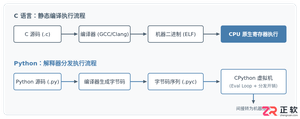
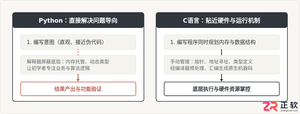
客观对比Python与C语言在心智负担、底层机制与学习反馈上的核心差异,提供清晰有据的选择标准与切实的入门学习路径。
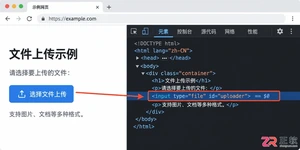

针对大数据工程场景,系统对比Java、Scala与Python在执行性能、生态结合、开发效率和维护成本上的核心差异,给出清晰的架构选型依据与落地方案。
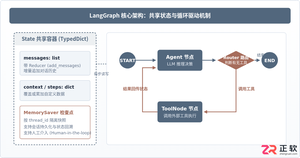
本篇LangGraph Python中文入门教程详解,系统梳理StateGraph状态机定义、节点编写、边与条件路由、检查点持久化(MemorySaver)等核心机制,提供从环境安装到完整循环智能体构建的代码示例与实操指导。
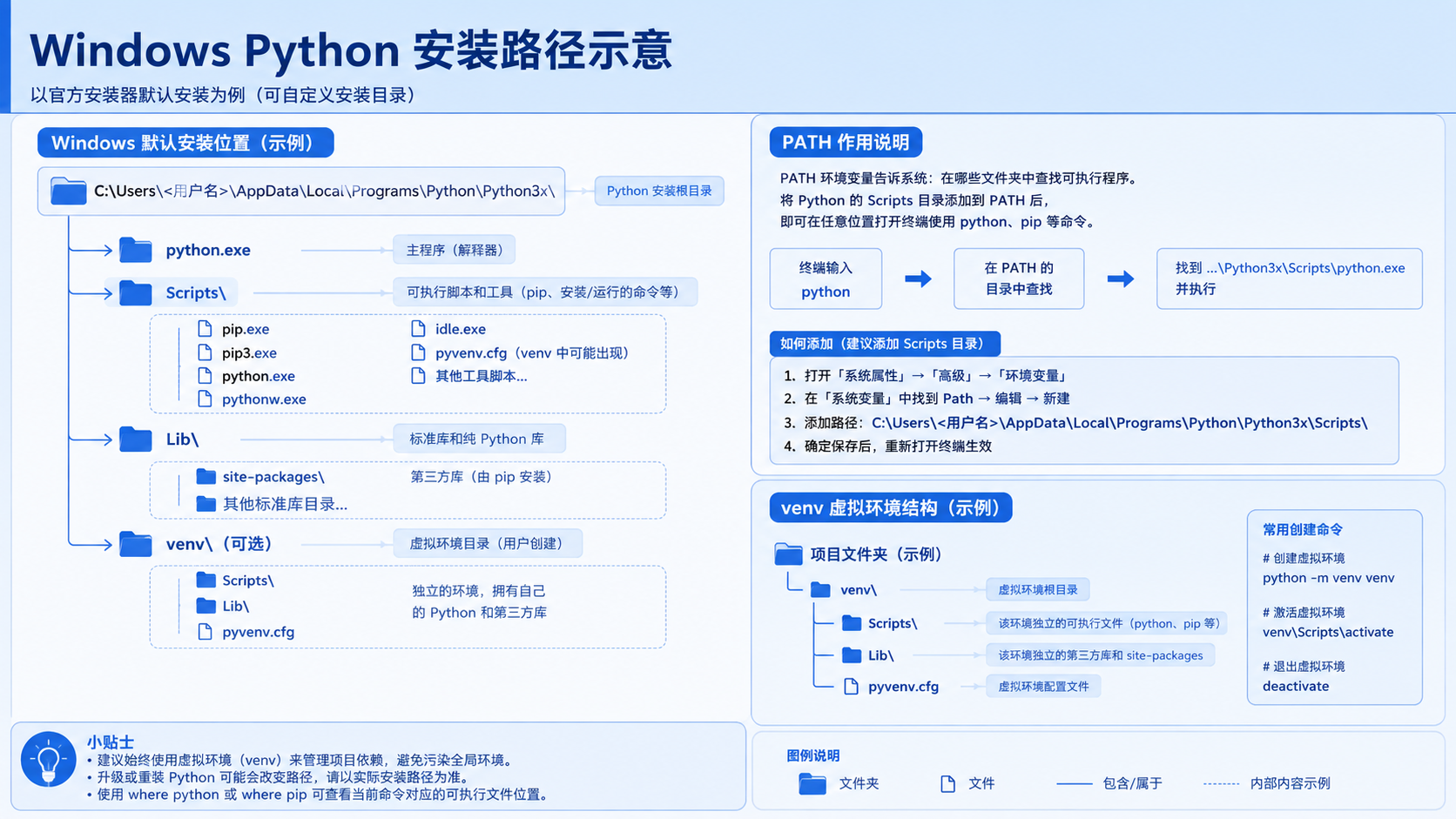
面向后端开发者,基于 Python 官方文档说明如何在 Windows 上安装 Python、创建 venv 虚拟环境及使用 pip 管理依赖。包含可复制命令、验证方法及工具选择边界,避免常见配置误区。





火山引擎是字节跳动旗下企业级云与AI服务平台。聚焦大模型核心能力,依托字节自研豆包多模态大模型,凭借火山方舟一站式平台,提供模型精调、推理部署、智能应用搭建等全链路服务,结合高性能AI算力,助力各行业快速落地大模型数字化与智能化应用。



