

Python 实现三子棋游戏教程
一、基本流程三子棋游戏实现逻辑如下:1、创建初始化3*3棋盘;2、玩家执U子,先进行落子;3、胜负判定【胜、负、和棋】,若胜负未分,则继续如下4、电脑执T子,进行落子;5、胜负判定,若胜负未分,则从步骤2继续执行二、基本步骤1、菜单界面选择1是开始游戏,选择2是退出游戏defmenu():print('-'*20)print('1---------------begin')print('2---------------exit')print('ple
一、基本流程
三子棋游戏实现逻辑如下:
1、创建初始化3*3棋盘;
2、玩家执U子,先进行落子;
3、胜负判定【胜、负、和棋】,若胜负未分,则继续如下
4、电脑执T子,进行落子;
5、胜负判定,若胜负未分,则从步骤2继续执行
二、基本步骤
1、菜单界面
选择1是开始游戏,选择2是退出游戏
def menu():
    print('-'*20)
    print('1---------------begin')
    print('2---------------exit')
    print('please select begin or exit')
    print('-' * 20)
    while(1):
        select = input('please input:')
        if select == '1':
            begin_games()
            pass
        elif select == '2':
            print('exit the game')
            break
            #pass
    pass
2、初始化棋盘、打印棋盘
三子棋棋盘是3*3的方阵,在python中用列表来进行存储。
chess_board = [[0, 0, 0], [0, 0, 0], [0, 0, 0]]
那么如何将这个存储列表打印出来,成为棋盘呢?
def init_cheaa_board(chess_board): #先对列表进行初始化
    for i in range(MAX_ROW):
        for j in range(MAX_COL):
            chess_board[i][j] = ' '
    pass

def print_chess_board(chess_board): #棋盘打印
    print('*'+'-'*7+'*'+'-'*7+'*'+'-'*7+'*')
    for i in range(MAX_ROW):
        print('|'+' '*3+chess_board[i][0]+' '*3+'|'+' '*3+chess_board[i][1]+' '*3+'|'+' '*3+chess_board[i][2]+' '*3+'|')
        print('*' + '-' * 7 + '*' + '-' * 7 + '*' + '-' * 7 + '*')
        pass
    pass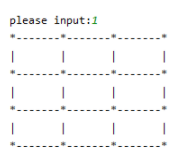
3、玩家落子
玩家在3*3的棋盘中选择落子的横纵坐标。坐标点需要满足:1、该点在棋盘内;2、该点还未置子。
def player_first(chess_board):
    while(1):
        x = int(input('please input x:'))
        y = int(input('please input y:'))
        if(chess_board[x][y] != ' '): #若已被置子,则重新选择坐标
            print('This position is already occupied!')
            pass
        elif(x >= MAX_ROW or y >= MAX_COL or x < 0 or y < 0): #所选坐标超出棋盘范围,重新选择坐标
            print('This position is beyond the chessboard!')
            pass
        else: #若坐标可以落子,则将该坐标置为玩家的棋子U
            chess_board[x][y] = 'U'
            print_chess_board(chess_board)
            #return x,y
            break
            pass
    pass
4、电脑落子
电脑落子算法:
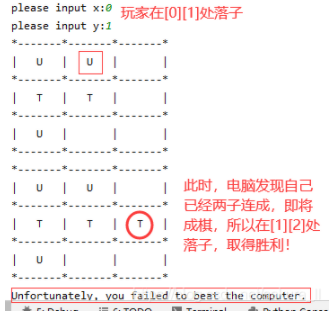
4.1、先检查一下棋盘,看电脑已占有棋面中是否已经有两子连成、即将成棋的状态。若已有,则获取可以促成胜利的坐标点,进行落子T;
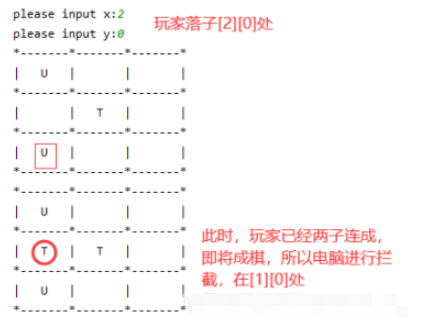
4.2、若4.1不满足,则再去检查一下棋盘,看玩家已占有棋面中是否已经有两子连成、即将成棋的状态。若已有,则获取玩家即将胜利的坐标点,落子T进行拦截;
4.3、若4.1、4.2均不满足,则在棋面中选择电脑端有利的点进行落子;
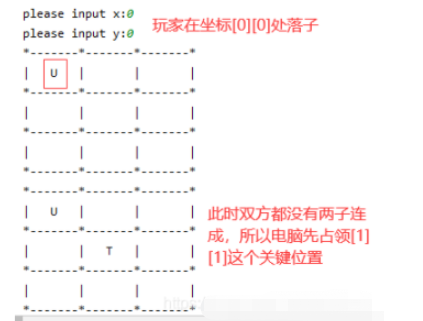
A、先判断中心位置[1][1]处是否被占领,若未被占领,则这是最有利点。当占领[1][1]点时,则阻断了玩家的横、纵、正对角线、副对角线四条线路;
B、次有利点则是3*3棋盘的四个角,每占领一个角,则会阻断玩家的三条线路;
C、最后有利的点则是每条边的中心位置,会阻断玩家的两条线路;
def Intercept_player(chess_board,key):
    count2 = 0
    index2 = []
    intercept_index = {'x':-1,'y':-1}
    for i in range(MAX_ROW):
        index = []
        count = 0
        count1 = 0
        index1 = []
        allindex = [0,1,2]
        for j in range(MAX_ROW):
            if(chess_board[i][j] == key): #每一行的玩家落子情况
                count += 1
                index.append(j)
            if(chess_board[j][i] == key): #每一列的玩家落子情况
                #print('j'+str(j)+',i'+str(i)+'='+chess_board[j][i])
                count1 += 1
                index1.append(j)
            if (i == j and chess_board[j][i] == key):  # 在主对角线中的玩家落子情况
                count2 += 1
                index2.append(j)
        if(count == 2):    #在每一行中  获取具体的可以拦截的位置坐标  需要排除掉已经填充的位置
            result = list(set(allindex).difference(set(index)))
            result = result[0]
            if(chess_board[i][result] == ' '): #当这个位置可以进行拦截时,进行坐标返回
                #return i,result
                intercept_index['x'] = i
                intercept_index['y'] = result
                return intercept_index
        #print(count1,'------->',index1)
        if (count1 == 2):  # 在每一列中 获取具体的可以拦截的位置坐标  需要排除掉已经填充的位置
            result = list(set(allindex).difference(set(index1)))
            result = result[0]
            #print('count1==2,result:',result)
            if (chess_board[result][i] == ' '):  # 当这个位置可以进行拦截时,进行坐标返回
                intercept_index['x'] = result
                intercept_index['y'] = i
                return intercept_index
                #return i, result
        if (count2 == 2):  # 在主对角线上 获取具体的可以拦截的位置坐标  需要排除掉已经填充的位置
            result = list(set(allindex).difference(set(index2)))
            result = result[0]
            if (chess_board[i][result] == ' '):  # 当这个位置可以进行拦截时,进行坐标返回
                intercept_index['x'] = i
                intercept_index['y'] = result
                return intercept_index
                #return i, result
    count3 = 0
    if(chess_board[0][2] == key):
        count3 += 1
    if (chess_board[1][1] == key):
        count3 += 1
    if (chess_board[2][0] == key):
        count3 += 1
    if(count3 == 2):
        if(chess_board[0][2] == ' '):
            intercept_index['x'] = 0
            intercept_index['y'] = 2

        elif (chess_board[1][1] == ' '):
            intercept_index['x'] = 1
            intercept_index['y'] = 1

        elif (chess_board[2][0] == ' '):
            intercept_index['x'] = 2
            intercept_index['y'] = 0
    return intercept_index

def computer_second(chess_board):  #电脑智能出棋
    #1、先检查一下电脑是否两子成棋  若已有,则获取空位置坐标 自己先成棋
    intercept_index = Intercept_player(chess_board, 'T')
    if (intercept_index['x'] == -1 and intercept_index['y'] == -1):
        pass
    else:  # 电脑可落子
        x = intercept_index['x']
        y = intercept_index['y']
        chess_board[x][y] = 'T'
        return
    #2、若玩家快成棋   则先进行拦截
    intercept_index = Intercept_player(chess_board,'U')   #若玩家已经两子成棋  则获取空位置的坐标
    #print('intercept_index---:')
    #print(intercept_index)
    if(intercept_index['x'] == -1 and intercept_index['y'] == -1):
        pass
    else:  #电脑可落子
        x = intercept_index['x']
        y = intercept_index['y']
        chess_board[x][y] = 'T'
        return
    #3、如果没有,则电脑端排棋  以促进成棋
    #3.1、 占领中心位置  如若中心位置[1,1]未被占领
    if(chess_board[1][1] == ' '):
        chess_board[1][1] = 'T'
        return
    #3.2、 占领四角位置  若[0,0]  [0,2]  [2,0]  [2,2]未被占领
    if (chess_board[0][0] == ' '):
        chess_board[0][0] = 'T'
        return
    if (chess_board[0][2] == ' '):
        chess_board[0][2] = 'T'
        return
    if (chess_board[2][0] == ' '):
        chess_board[2][0] = 'T'
        return
    if (chess_board[2][2] == ' '):
        chess_board[2][2] = 'T'
        return
    # 3.3、 占领每一边中心位置  若[0,1]  [1,0]  [1,2]  [2,1]未被占领
    if (chess_board[0][1] == ' '):
        chess_board[0][1] = 'T'
        return
    if (chess_board[1][0] == ' '):
        chess_board[1][0] = 'T'
        return
    if (chess_board[1][2] == ' '):
        chess_board[1][2] = 'T'
        return
    if (chess_board[2][1] == ' '):
        chess_board[2][1] = 'T'
        return
5、输赢判定
最终的结果:输、赢、和棋D
判定流程:判断每个横线、纵线、对角线上是否有玩家U或电脑T连成三子的,若有则是该方胜出;当整个棋面都被占满,但玩家和电脑都未成棋时,则说明和棋。
def chess_board_isfull(chess_board):   #判断棋盘是否填充满
    for i in range(MAX_ROW):
        if (' ' in chess_board[i]):
            return 0
    return 1
    pass

def Win_or_lose(chess_board):
    isfull = chess_board_isfull(chess_board)
    for i in range(MAX_ROW):  #每一列的判断
        if( chess_board[0][i] == chess_board[1][i] == chess_board[2][i]):
            return chess_board[0][i]
            pass
        pass

    for i in range(MAX_ROW):  # 每一行的判断
        if( chess_board[i][0] == chess_board[i][1] == chess_board[i][2]):
            return chess_board[i][0]
            pass
        pass

    if (chess_board[0][0] == chess_board[1][1] == chess_board[2][2]):  # 判断棋盘正对角线
        return chess_board[0][0]

    if (chess_board[0][2] == chess_board[1][1] == chess_board[2][0]):  # 判断棋盘反对角线
        return chess_board[0][2]

    if isfull:
        return 'D'  # 经过以上的判断,都不满足(既没赢也没输),但是棋盘也已经填充满,则说明和棋
    else:
        return ' '
三、整体代码
# coding=utf-8import random
MAX_ROW = 3
MAX_COL = 3
#array = ['0','0','0']
chess_board = [[0, 0, 0], [0, 0, 0], [0, 0, 0]] #[array] * 3

def init_cheaa_board(chess_board):
    for i in range(MAX_ROW):
        for j in range(MAX_COL):
            chess_board[i][j] = ' '
    pass

def print_chess_board(chess_board):
    print('*'+'-'*7+'*'+'-'*7+'*'+'-'*7+'*')
    for i in range(MAX_ROW):
        print('|'+' '*3+chess_board[i][0]+' '*3+'|'+' '*3+chess_board[i][1]+' '*3+'|'+' '*3+chess_board[i][2]+' '*3+'|')
        print('*' + '-' * 7 + '*' + '-' * 7 + '*' + '-' * 7 + '*')
        pass
    pass


def player_first(chess_board):
    while(1):
        x = int(input('please input x:'))
        y = int(input('please input y:'))
        if(chess_board[x][y] != ' '):
            print('This position is already occupied!')
            pass
        elif(x >= MAX_ROW or y >= MAX_COL or x < 0 or y < 0):
            print('This position is beyond the chessboard!')
            pass
        else:
            chess_board[x][y] = 'U'
            print_chess_board(chess_board)
            #return x,y
            break
            pass
    pass

def chess_board_isfull(chess_board):   #判断棋盘是否填充满
    for i in range(MAX_ROW):
        if (' ' in chess_board[i]):
            return 0
    return 1
    pass

def Win_or_lose(chess_board):
    isfull = chess_board_isfull(chess_board)
    for i in range(MAX_ROW):  #每一列的判断
        if( chess_board[0][i] == chess_board[1][i] == chess_board[2][i]):
            return chess_board[0][i]
            pass
        pass

    for i in range(MAX_ROW):  # 每一行的判断
        if( chess_board[i][0] == chess_board[i][1] == chess_board[i][2]):
            return chess_board[i][0]
            pass
        pass

    if (chess_board[0][0] == chess_board[1][1] == chess_board[2][2]):  # 判断棋盘正对角线
        return chess_board[0][0]

    if (chess_board[0][2] == chess_board[1][1] == chess_board[2][0]):  # 判断棋盘反对角线
        return chess_board[0][2]

    if isfull:
        return 'D'  # 经过以上的判断,都不满足(既没赢也没输),但是棋盘也已经填充满,则说明和棋
    else:
        return ' '

def computer_second_random(chess_board):    #电脑随机出棋
    while(1):
        x = random.randint(0,2)
        y = random.randint(0,2)
        if(chess_board[x][y] != ' '):
            continue
        else:
            chess_board[x][y] = 'T'
            break

def Intercept_player(chess_board,key):
    count2 = 0
    index2 = []
    intercept_index = {'x':-1,'y':-1}
    for i in range(MAX_ROW):
        index = []
        count = 0
        count1 = 0
        index1 = []
        allindex = [0,1,2]
        for j in range(MAX_ROW):
            if(chess_board[i][j] == key): #每一行的玩家落子情况
                count += 1
                index.append(j)
            if(chess_board[j][i] == key): #每一列的玩家落子情况
                #print('j'+str(j)+',i'+str(i)+'='+chess_board[j][i])
                count1 += 1
                index1.append(j)
            if (i == j and chess_board[j][i] == key):  # 在主对角线中的玩家落子情况
                count2 += 1
                index2.append(j)
        if(count == 2):    #在每一行中  获取具体的可以拦截的位置坐标  需要排除掉已经填充的位置
            result = list(set(allindex).difference(set(index)))
            result = result[0]
            if(chess_board[i][result] == ' '): #当这个位置可以进行拦截时,进行坐标返回
                #return i,result
                intercept_index['x'] = i
                intercept_index['y'] = result
                return intercept_index
        #print(count1,'------->',index1)
        if (count1 == 2):  # 在每一列中 获取具体的可以拦截的位置坐标  需要排除掉已经填充的位置
            result = list(set(allindex).difference(set(index1)))
            result = result[0]
            #print('count1==2,result:',result)
            if (chess_board[result][i] == ' '):  # 当这个位置可以进行拦截时,进行坐标返回
                intercept_index['x'] = result
                intercept_index['y'] = i
                return intercept_index
                #return i, result
        if (count2 == 2):  # 在主对角线上 获取具体的可以拦截的位置坐标  需要排除掉已经填充的位置
            result = list(set(allindex).difference(set(index2)))
            result = result[0]
            if (chess_board[i][result] == ' '):  # 当这个位置可以进行拦截时,进行坐标返回
                intercept_index['x'] = i
                intercept_index['y'] = result
                return intercept_index
                #return i, result
    count3 = 0
    if(chess_board[0][2] == key):
        count3 += 1
    if (chess_board[1][1] == key):
        count3 += 1
    if (chess_board[2][0] == key):
        count3 += 1
    if(count3 == 2):
        if(chess_board[0][2] == ' '):
            intercept_index['x'] = 0
            intercept_index['y'] = 2

        elif (chess_board[1][1] == ' '):
            intercept_index['x'] = 1
            intercept_index['y'] = 1

        elif (chess_board[2][0] == ' '):
            intercept_index['x'] = 2
            intercept_index['y'] = 0
    return intercept_index


def computer_second(chess_board):  #电脑智能出棋
    #1、先检查一下电脑是否两子成棋  若已有,则获取空位置坐标 自己先成棋
    intercept_index = Intercept_player(chess_board, 'T')
    if (intercept_index['x'] == -1 and intercept_index['y'] == -1):
        pass
    else:  # 电脑可落子
        x = intercept_index['x']
        y = intercept_index['y']
        chess_board[x][y] = 'T'
        return
    #2、若玩家快成棋   则先进行拦截
    intercept_index = Intercept_player(chess_board,'U')   #若玩家已经两子成棋  则获取空位置的坐标
    #print('intercept_index---:')
    #print(intercept_index)
    if(intercept_index['x'] == -1 and intercept_index['y'] == -1):
        pass
    else:  #电脑可落子
        x = intercept_index['x']
        y = intercept_index['y']
        chess_board[x][y] = 'T'
        return
    #3、如果没有,则电脑端排棋  以促进成棋
    #3.1、 占领中心位置  如若中心位置[1,1]未被占领
    if(chess_board[1][1] == ' '):
        chess_board[1][1] = 'T'
        return
    #3.2、 占领四角位置  若[0,0]  [0,2]  [2,0]  [2,2]未被占领
    if (chess_board[0][0] == ' '):
        chess_board[0][0] = 'T'
        return
    if (chess_board[0][2] == ' '):
        chess_board[0][2] = 'T'
        return
    if (chess_board[2][0] == ' '):
        chess_board[2][0] = 'T'
        return
    if (chess_board[2][2] == ' '):
        chess_board[2][2] = 'T'
        return
    # 3.3、 占领每一边中心位置  若[0,1]  [1,0]  [1,2]  [2,1]未被占领
    if (chess_board[0][1] == ' '):
        chess_board[0][1] = 'T'
        return
    if (chess_board[1][0] == ' '):
        chess_board[1][0] = 'T'
        return
    if (chess_board[1][2] == ' '):
        chess_board[1][2] = 'T'
        return
    if (chess_board[2][1] == ' '):
        chess_board[2][1] = 'T'
        return

def begin_games():
    global chess_board
    init_cheaa_board(chess_board)
    result = ' '
    while(1):
        print_chess_board(chess_board)
        player_first(chess_board)
        result = Win_or_lose(chess_board)
        if(result != ' '):
            break
        else: #棋盘还没满,该电脑出棋
            #computer_second_random(chess_board)
            computer_second(chess_board)
            result = Win_or_lose(chess_board)
            if (result != ' '):
                break
    print_chess_board(chess_board)
    if (result == 'U'):
        print('Congratulations on your victory!')
    elif (result == 'T'):
        print('Unfortunately, you failed to beat the computer.')
    elif (result == 'D'):
        print('The two sides broke even.')


def menu():
    print('-'*20)
    print('1---------------begin')
    print('2---------------exit')
    print('please select begin or exit')
    print('-' * 20)
    while(1):
        select = input('please input:')
        if select == '1':
            begin_games()
            pass
        elif select == '2':
            print('exit the game')
            break
            #pass
    pass


if __name__ == "__main__":

    menu()
    pass
四、结果展示
4.1 在以下截图中,展示了电脑拦截、占据有利位置、并率先成棋的过程

学习如何使用Python高效删除列表中的重复元素。本文提供5种常见方法的代码示例,涵盖保持顺序与不保持顺序的场景,适合初学者和进阶开发者参考。

详细讲解使用Python编写Web接口的核心步骤与完整代码示例,涵盖环境准备、路由定义、数据校验、服务启动及调试测试方法。

介绍如何利用编程工具读取和解析Word文档(docx格式),涵盖基础文本提取代码示例、结构化数据处理逻辑,以及处理复杂排版时的技术局限与替代方案。

详细讲解在Python中调用C语言代码提升性能的完整实践指南,包含原理分析、编译步骤、ctypes与CFFI具体实现、性能对比及常见陷阱。


客观对比Python与C语言在心智负担、底层机制与学习反馈上的核心差异,提供清晰有据的选择标准与切实的入门学习路径。


针对大数据工程场景,系统对比Java、Scala与Python在执行性能、生态结合、开发效率和维护成本上的核心差异,给出清晰的架构选型依据与落地方案。

本篇LangGraph Python中文入门教程详解,系统梳理StateGraph状态机定义、节点编写、边与条件路由、检查点持久化(MemorySaver)等核心机制,提供从环境安装到完整循环智能体构建的代码示例与实操指导。

面向后端开发者,基于 Python 官方文档说明如何在 Windows 上安装 Python、创建 venv 虚拟环境及使用 pip 管理依赖。包含可复制命令、验证方法及工具选择边界,避免常见配置误区。





火山引擎是字节跳动旗下企业级云与AI服务平台。聚焦大模型核心能力,依托字节自研豆包多模态大模型,凭借火山方舟一站式平台,提供模型精调、推理部署、智能应用搭建等全链路服务,结合高性能AI算力,助力各行业快速落地大模型数字化与智能化应用。



