

Python实例开发代码分析指南
#Singlelinecommentsstartwithahash.#单行注释由一个井号开头。"""Multilinestringscanbewrittenusingthree"'s,andareoftenusedascomments三个双引号(或单引号)之间可以写多行字符串,通常用来写注释。"""######################################################1\.PrimitiveDatatypesandOperators##1\.基本数据类型和操作
# Single line comments start with a hash.

# 单行注释由一个井号开头。

""" Multiline strings can be written

    using three "'s, and are often used

    as comments

    三个双引号(或单引号)之间可以写多行字符串,

    通常用来写注释。

"""

####################################################

## 1\. Primitive Datatypes and Operators

## 1\. 基本数据类型和操作符

####################################################

# You have numbers

# 数字就是数字

3  #=> 3

# Math is what you would expect

# 四则运算也是你所期望的那样

1  +  1  #=> 2

8  -  1  #=> 7

10  *  2  #=> 20

35  /  5  #=> 7

# Division is a bit tricky. It is integer division and floors the results

# automatically.

# 除法有一点棘手。

# 对于整数除法来说,计算结果会自动取整。

5  /  2  #=> 2

# To fix division we need to learn about floats.

# 为了修正除法的问题,我们需要先学习浮点数。

2.0 # This is a float

2.0 # 这是一个浮点数

11.0  /  4.0  #=> 2.75 ahhh...much better

11.0  /  4.0  #=> 2.75 啊……这样就好多了

# Enforce precedence with parentheses

# 使用小括号来强制计算的优先顺序

(1  +  3)  *  2  #=> 8

# Boolean values are primitives

# 布尔值也是基本数据类型

True

False

# negate with not

# 使用 not 来取反

not  True  #=> False

not  False  #=> True

# Equality is ==

# 等式判断用 ==

1  ==  1  #=> True

2  ==  1  #=> False

# Inequality is !=

# 不等式判断是用 !=

1  !=  1  #=> False

2  !=  1  #=> True

# More comparisons

# 还有更多的比较运算

1  <  10  #=> True

1  >  10  #=> False

2  <=  2  #=> True

2  >=  2  #=> True

# Comparisons can be chained!

# 居然可以把比较运算串连起来!

1  <  2  <  3  #=> True

2  <  3  <  2  #=> False

# Strings are created with " or '

# 使用 " 或 ' 来创建字符串

"This is a string."

'This is also a string.'

# Strings can be added too!

# 字符串也可以相加!

"Hello "  +  "world!"  #=> "Hello world!"

# A string can be treated like a list of characters

# 一个字符串可以视为一个字符的列表

# (译注:后面会讲到“列表”。)

"This is a string"[0]  #=> 'T'

# % can be used to format strings, like this:

# % 可以用来格式化字符串,就像这样:

"%s can be %s"  %  ("strings",  "interpolated")

# A newer way to format strings is the format method.

# This method is the preferred way

# 后来又有一种格式化字符串的新方法:format 方法。

# 我们推荐使用这个方法。

"{0} can be {1}".format("strings",  "formatted")

# You can use keywords if you don't want to count.

# 如果你不喜欢数数的话,可以使用关键字(变量)。

"{name} wants to eat {food}".format(name="Bob",  food="lasagna")

# None is an object

# None 是一个对象

None  #=> None

# Don't use the equality `==` symbol to compare objects to None

# Use `is` instead

# 不要使用相等符号 `==` 来把对象和 None 进行比较,

# 而要用 `is`。

"etc"  is  None  #=> False

None  is  None  #=> True

# The 'is' operator tests for object identity. This isn't

# very useful when dealing with primitive values, but is

# very useful when dealing with objects.

# 这个 `is` 操作符用于比较两个对象的标识。

# (译注:对象一旦建立,其标识就不会改变,可以认为它就是对象的内存地址。)

# 在处理基本数据类型时基本用不上,

# 但它在处理对象时很有用。

# None, 0, and empty strings/lists all eval(1)    #li is now [1]

                #li 现在是 [1]

li.append(2)    #li is now [1, 2]

                #li 现在是 [1, 2]

li.append(4)    #li is now [1, 2, 4]

                #li 现在是 [1, 2, 4]

li.append(3)    #li is now [1, 2, 4, 3]

                #li 现在是 [1, 2, 4, 3]

# Remove from the end with pop

# 使用 pop 来移除最后一个元素

li.pop()        #=> 3 and li is now [1, 2, 4]

                #=> 3,然后 li 现在是 [1, 2, 4]

# Let's put it back

# 我们再把它放回去

li.append(3)    # li is now [1, 2, 4, 3] again.

                # li 现在又是 [1, 2, 4, 3] 了

# Access a list like you would any array

# 像访问其它语言的数组那样访问列表

li[0]  #=> 1

# Look at the last element

# 查询最后一个元素

li[-1]  #=> 3

# Looking out of bounds is an IndexError

# 越界查询会产生一个索引错误

li[4]  # Raises an IndexError

      # 抛出一个索引错误

# You can look at ranges with slice syntax.

# (It's a closed/open range for you mathy types.)

# 你可以使用切片语法来查询列表的一个范围。

# (这个范围相当于数学中的左闭右开区间。)

li[1:3]  #=> [2, 4]

# Omit the beginning

# 省略开头

li[2:]  #=> [4, 3]

# Omit the end

# 省略结尾

li[:3]  #=> [1, 2, 4]

# Remove arbitrary elements from a list with del

# 使用 del 来删除列表中的任意元素

del  li[2]  # li is now [1, 2, 3]

          # li 现在是 [1, 2, 3]

# You can add lists

# 可以把列表相加

li  +  other_li  #=> [1, 2, 3, 4, 5, 6] - Note: li and other_li is left alone

              #=> [1, 2, 3, 4, 5, 6] - 请留意 li 和 other_li 并不会被修改

# Concatenate lists with extend

# 使用 extend 来合并列表

li.extend(other_li)  # Now li is [1, 2, 3, 4, 5, 6]

                    # 现在 li 是 [1, 2, 3, 4, 5, 6]

# Check for existence in a list with in

# 用 in 来检查是否存在于某个列表中

1  in  li  #=> True

# Examine the length with len

# 用 len 来检测列表的长度

len(li)  #=> 6

# Tuples are like lists but are immutable.

# 元组很像列表,但它是“不可变”的。

tup  =  (1,  2,  3)

tup[0]  #=> 1

tup[0]  =  3  # Raises a TypeError

            # 抛出一个类型错误

# You can do all those list thingies on tuples too

# 操作列表的方式通常也能用在元组身上

len(tup)  #=> 3

tup  +  (4,  5,  6)  #=> (1, 2, 3, 4, 5, 6)

tup[:2]  #=> (1, 2)

2  in  tup  #=> True

# You can unpack tuples (or lists) into variables

# 你可以把元组(或列表)中的元素解包赋值给多个变量

a,  b,  c  =  (1,  2,  3) # a is now 1, b is now 2 and c is now 3

                        # 现在 a 是 1,b 是 2,c 是 3

# Tuples are created by default if you leave out the parentheses

# 如果你省去了小括号,那么元组会被自动创建

d,  e,  f  =  4,  5,  6

# Now look how easy it is to swap two values

# 再来看看交换两个值是多么简单。

e,  d  =  d,  e # d is now 5 and e is now 4

                # 现在 d 是 5 而 e 是 4

# Dictionaries store mappings

# 字典用于存储映射关系

empty_dict  =  {}

# Here is a prefilled dictionary

# 这是一个预先填充的字典

filled_dict  =  {"one":  1,  "two":  2,  "three":  3}

# Look up values with []

# 使用 [] 来查询键值

filled_dict["one"]  #=> 1

# Get all keys as a list

# 将字典的所有键名获取为一个列表

filled_dict.keys()  #=> ["three", "two", "one"]

# Note - Dictionary key ordering is not guaranteed.

# Your results might not match this exactly.

# 请注意:无法保证字典键名的顺序如何排列。

# 你得到的结果可能跟上面的示例不一致。

# Get all values as a list

# 将字典的所有键值获取为一个列表

filled_dict.values()  #=> [3, 2, 1]

# Note - Same as above regarding key ordering.

# 请注意:顺序的问题和上面一样。

# Check for existence of keys in a dictionary with in

# 使用 in 来检查一个字典是否包含某个键名

"one"  in  filled_dict  #=> True

1  in  filled_dict  #=> False

# Looking up a non-existing key is a KeyError

# 查询一个不存在的键名会产生一个键名错误

filled_dict["four"]  # KeyError

                    # 键名错误

# Use get method to avoid the KeyError

# 所以要使用 get 方法来避免键名错误

filled_dict.get("one")  #=> 1

filled_dict.get("four")  #=> None

# The get method supports a default argument when the value is missing

# get 方法支持传入一个默认值参数,将在取不到值时返回。

filled_dict.get("one",  4)  #=> 1

filled_dict.get("four",  4)  #=> 4

# Setdefault method is a safe way to add new key-value pair into dictionary

# Setdefault 方法可以安全地把新的名值对添加到字典里

filled_dict.setdefault("five",  5)  #filled_dict["five"] is set to 5

                                  #filled_dict["five"] 被设置为 5

filled_dict.setdefault("five",  6)  #filled_dict["five"] is still 5

                                  #filled_dict["five"] 仍然为 5

# Sets store ... well sets

# set 用于保存集合

empty_set  =  set()

# Initialize a set with a bunch of values

# 使用一堆值来初始化一个集合

some_set  =  set([1,2,2,3,4])  # some_set is now set([1, 2, 3, 4])

                            # some_set 现在是 set([1, 2, 3, 4])

# Since Python 2.7, {} can be used to declare a set

# 从 Python 2.7 开始,{} 可以用来声明一个集合

filled_set  =  {1,  2,  2,  3,  4}  # => {1, 2, 3, 4}

 # (译注:集合是种无序不重复的元素集,因此重复的 2 被滤除了。)

 # (译注:{} 不会创建一个空集合,只会创建一个空字典。)

# Add more items to a set

# 把更多的元素添加进一个集合

filled_set.add(5)  # filled_set is now {1, 2, 3, 4, 5}

                  # filled_set 现在是 {1, 2, 3, 4, 5}

# Do set intersection with &

# 使用 & 来获取交集

other_set  =  {3,  4,  5,  6}

filled_set  &  other_set  #=> {3, 4, 5}

# Do set union with |

# 使用 | 来获取并集

filled_set  |  other_set  #=> {1, 2, 3, 4, 5, 6}

# Do set difference with -

# 使用 - 来获取补集

{1,2,3,4}  -  {2,3,5}  #=> {1, 4}

# Check for existence in a set with in

# 使用 in 来检查是否存在于某个集合中

2  in  filled_set  #=> True

10  in  filled_set  #=> False

####################################################

## 3\. Control Flow

## 3\. 控制流

####################################################

# Let's just make a variable

# 我们先创建一个变量

some_var  =  5

# Here is an if statement. Indentation is significant in python!

# prints "some_var is smaller than 10"

# 这里有一个条件语句。缩进在 Python 中可是很重要的哦!

# 程序会打印出 "some_var is smaller than 10"

# (译注:意为“some_var 比 10 小”。)

if  some_var  >  10:

    print  "some_var is totally bigger than 10."

    # (译注:意为“some_var 完全比 10 大”。)

elif  some_var  <  10:    # This elif clause is optional.

 # 这里的 elif 子句是可选的

    print  "some_var is smaller than 10."

    # (译注:意为“some_var 比 10 小”。)

else: # This is optional too.

                # 这一句也是可选的

    print  "some_var is indeed 10."

    # (译注:意为“some_var 就是 10”。)

"""

For loops iterate over lists

for 循环可以遍历列表

prints:

如果要打印出:

    dog is a mammal

    cat is a mammal

    mouse is a mammal

"""

for  animal in  ["dog",  "cat",  "mouse"]:

    # You can use % to interpolate formatted strings

    # 别忘了你可以使用 % 来格式化字符串

    print  "%s is a mammal"  %  animal

    # (译注:意为“%s 是哺乳动物”。)

"""

`range(number)` returns a list of numbers

from zero to the given number

`range(数字)` 会返回一个数字列表,

这个列表将包含从零到给定的数字。

prints:

如果要打印出:

    0

    1

    2

    3

"""

for  i  in  range(4):

    print  i

"""

While loops go until a condition is no longer met.

while 循环会一直继续,直到条件不再满足。

prints:

如果要打印出:

    0

    1

    2

    3

"""

x  =  0

while  x  <  4:

    print  x

    x  +=  1  # Shorthand for x = x + 1

            # 这是 x = x + 1 的简写方式

# Handle exceptions with a try/except block

# 使用 try/except 代码块来处理异常

# Works on Python 2.6 and up:

# 适用于 Python 2.6 及以上版本:

try:

    # Use raise to raise an error

    # 使用 raise 来抛出一个错误

    raise  IndexError("This is an index error")

    # 抛出一个索引错误:“这是一个索引错误”。

except  IndexError  as  e:

    pass    # Pass is just a no-op. Usually you would do recovery here.

            # pass 只是一个空操作。通常你应该在这里做一些恢复工作。

####################################################

## 4\. Functions

## 4\. 函数

####################################################

# Use def to create new functions

# 使用 def 来创建新函数

def  add(x,  y):

    print  "x is %s and y is %s"  %  (x,  y)

    # (译注:意为“x 是 %s 而且 y 是 %s”。)

    return  x  +  y    # Return values with a return statement

                    # 使用 return 语句来返回值

# Calling functions with parameters

# 调用函数并传入参数

add(5,  6)  #=> prints out "x is 5 and y is 6" and returns 11

          # (译注:意为“x 是 5 而且 y 是 6”,并返回 11)

# Another way to call functions is with keyword arguments

# 调用函数的另一种方式是传入关键字参数

add(y=6,  x=5) # Keyword arguments can arrive in any order.

                # 关键字参数可以以任意顺序传入

# You can define functions that take a variable number of

# positional arguments

# 你可以定义一个函数,并让它接受可变数量的定位参数。

def  varargs(*args):

    return  args

varargs(1,  2,  3)  #=> (1,2,3)

# You can define functions that take a variable number of

# keyword arguments, as well

# 你也可以定义一个函数,并让它接受可变数量的关键字参数。

def  keyword_args(**kwargs):

    return  kwargs

# Let's call it to see what happens

# 我们试着调用它,看看会发生什么:

keyword_args(big="foot",  loch="ness")  #=> {"big": "foot", "loch": "ness"}

# You can do both at once, if you like

# 你还可以同时使用这两类参数,只要你愿意:

def  all_the_args(*args,  **kwargs):

    print  args

    print  kwargs

"""

all_the_args(1, 2, a=3, b=4) prints:

    (1, 2)

    {"a": 3, "b": 4}

"""

# When calling functions, you can do the opposite of varargs/kwargs!

# Use * to expand tuples and use ** to expand kwargs.

# 在调用函数时,定位参数和关键字参数还可以反过来用。

# 使用 * 来展开元组,使用 ** 来展开关键字参数。

args  =  (1,  2,  3,  4)

kwargs  =  {"a":  3,  "b":  4}

all_the_args(*args)  # equivalent to foo(1, 2, 3, 4)

                    # 相当于 all_the_args(1, 2, 3, 4)

all_the_args(**kwargs)  # equivalent to foo(a=3, b=4)

 # 相当于 all_the_args(a=3, b=4)

all_the_args(*args,  **kwargs)  # equivalent to foo(1, 2, 3, 4, a=3, b=4)

                              # 相当于 all_the_args(1, 2, 3, 4, a=3, b=4)

# Python has first class functions

# 函数在 Python 中是一等公民

def  create_adder(x):

    def  adder(y):

        return  x  +  y

    return  adder

add_10  =  create_adder(10)

add_10(3)  #=> 13

# There are also anonymous functions

# 还有匿名函数

(lambda  x:  x  >  2)(3)  #=> True

# There are built-in higher order functions

# 还有一些内建的高阶函数

map(add_10,  [1,2,3])  #=> [11, 12, 13]

filter(lambda  x:  x  >  5,  [3,  4,  5,  6,  7])  #=> [6, 7]

# We can use list comprehensions for nice maps and filters

# 我们可以使用列表推导式来模拟 map 和 filter

[add_10(i)  for  i  in  [1,  2,  3]]  #=> [11, 12, 13]

[x  for  x  in  [3,  4,  5,  6,  7]  if  x  >  5]  #=> [6, 7]

####################################################

## 5\. Classes

## 5\. 类

####################################################

# We subclass from object to get a class.

# 我们可以从对象中继承,来得到一个类。

class  Human(object):

    # A class attribute. It is shared by all instances of this class

    # 下面是一个类属性。它将被这个类的所有实例共享。

    species  =  "H. sapiens"

    # Basic initializer

    # 基本的初始化函数(构造函数)

    def  __init__(self,  name):

        # Assign the argument to the instance's name attribute

        # 把参数赋值为实例的 name 属性

        self.name  =  name

    # An instance method. All methods take self as the first argument

    # 下面是一个实例方法。所有方法都以 self 作为第一个参数。

    def  say(self,  msg):

 return  "%s: %s"  %  (self.name,  msg)

    # A class method is shared among all instances

    # They are called with the calling class as the first argument

    # 类方法会被所有实例共享。

    # 类方法在调用时,会将类本身作为第一个函数传入。

    @classmethod

    def  get_species(cls):

        return  cls.species

    # A static method is called without a class or instance reference

    # 静态方法在调用时,不会传入类或实例的引用。

    @staticmethod

    def  grunt():

        return  "*grunt*"

# Instantiate a class

# 实例化一个类

i  =  Human(name="Ian")

print  i.say("hi") # prints out "Ian: hi"

                      # 打印出 "Ian: hi"

j  =  Human("Joel")

print  j.say("hello")  # prints out "Joel: hello"

                      # 打印出 "Joel: hello"

# Call our class method

# 调用我们的类方法

i.get_species()  #=> "H. sapiens"

# Change the shared attribute

# 修改共享属性

Human.species  =  "H. neanderthalensis"

i.get_species()  #=> "H. neanderthalensis"

j.get_species()  #=> "H. neanderthalensis"

# Call the static method

# 调用静态方法

Human.grunt()  #=> "*grunt*"

####################################################

## 6\. Modules

## 6\. 模块

####################################################

# You can import modules

# 你可以导入模块

import  math

print  math.sqrt(16)  #=> 4

# You can get specific functions from a module

# 也可以从一个模块中获取指定的函数

from  math  import  ceil,  floor

print  ceil(3.7)  #=> 4.0

print  floor(3.7)  #=> 3.0

# You can import all functions from a module.

# Warning: this is not recommended

# 你可以从一个模块中导入所有函数

# 警告:不建议使用这种方式

from  math  import  *

# You can shorten module names

# 你可以缩短模块的名称

import  math  as  m

math.sqrt(16)  ==  m.sqrt(16)  #=> True

# Python modules are just ordinary python files. You

# can write your own, and import them. The name of the

# module is the same as the name of the file.

# Python 模块就是普通的 Python 文件。

# 你可以编写你自己的模块,然后导入它们。

# 模块的名称与文件名相同。

# You can find out which functions and attributes

# defines a module.

# 你可以查出一个模块里有哪些函数和属性

import  math

dir(math) 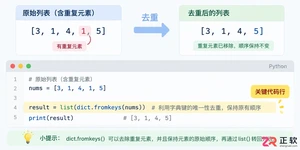
学习如何使用Python高效删除列表中的重复元素。本文提供5种常见方法的代码示例,涵盖保持顺序与不保持顺序的场景,适合初学者和进阶开发者参考。
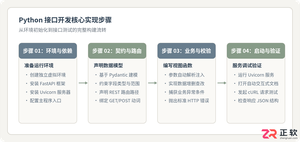
详细讲解使用Python编写Web接口的核心步骤与完整代码示例,涵盖环境准备、路由定义、数据校验、服务启动及调试测试方法。
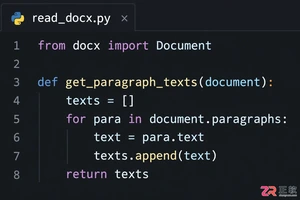
介绍如何利用编程工具读取和解析Word文档(docx格式),涵盖基础文本提取代码示例、结构化数据处理逻辑,以及处理复杂排版时的技术局限与替代方案。
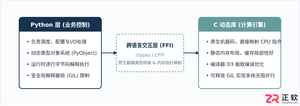
详细讲解在Python中调用C语言代码提升性能的完整实践指南,包含原理分析、编译步骤、ctypes与CFFI具体实现、性能对比及常见陷阱。
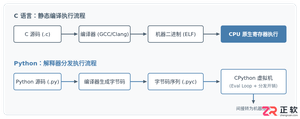
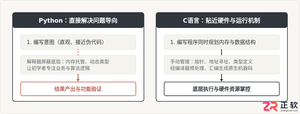
客观对比Python与C语言在心智负担、底层机制与学习反馈上的核心差异,提供清晰有据的选择标准与切实的入门学习路径。
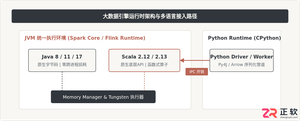
针对大数据工程场景,系统对比Java、Scala与Python在执行性能、生态结合、开发效率和维护成本上的核心差异,给出清晰的架构选型依据与落地方案。
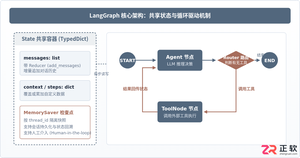
本篇LangGraph Python中文入门教程详解,系统梳理StateGraph状态机定义、节点编写、边与条件路由、检查点持久化(MemorySaver)等核心机制,提供从环境安装到完整循环智能体构建的代码示例与实操指导。
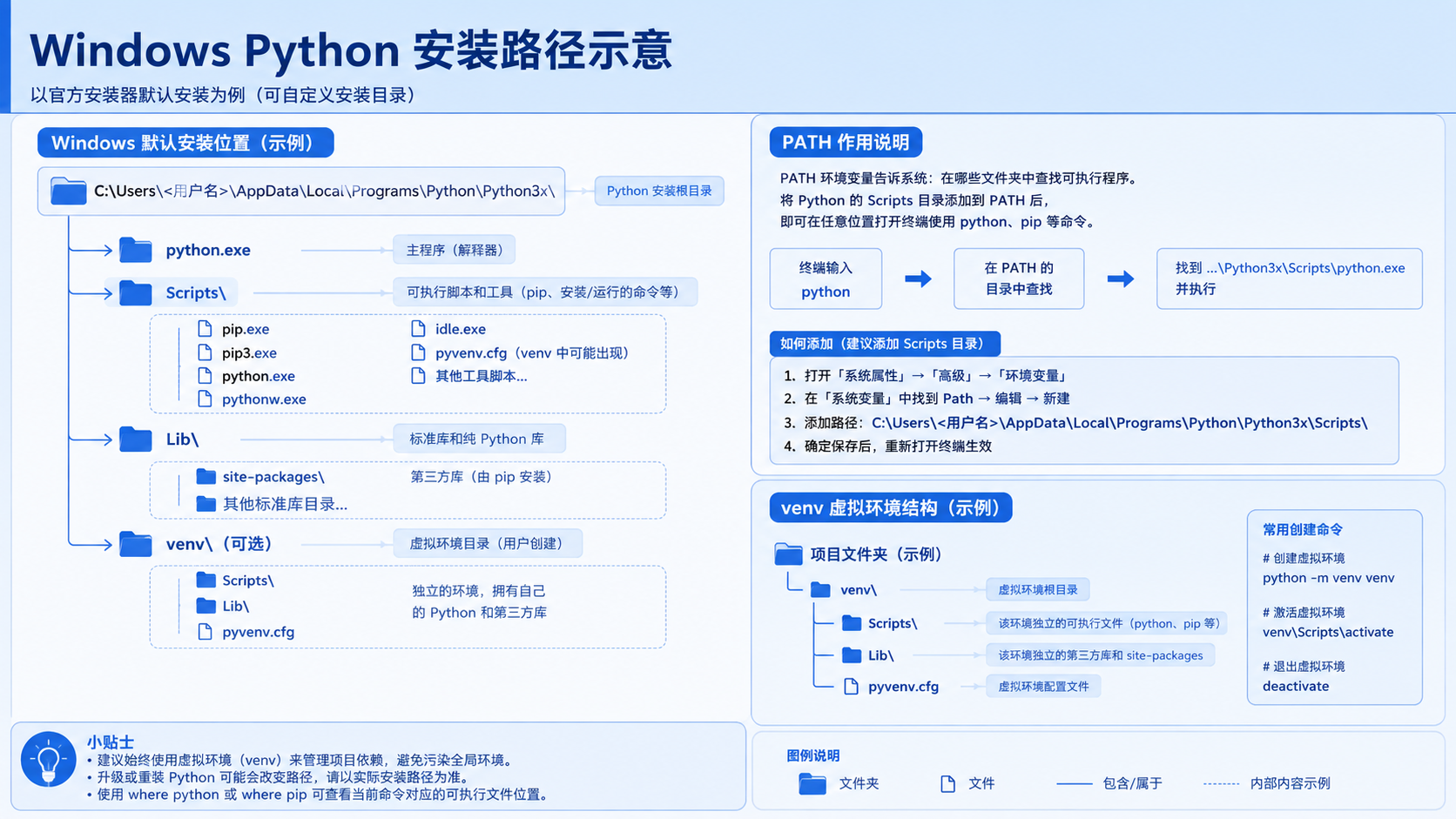
面向后端开发者,基于 Python 官方文档说明如何在 Windows 上安装 Python、创建 venv 虚拟环境及使用 pip 管理依赖。包含可复制命令、验证方法及工具选择边界,避免常见配置误区。





火山引擎是字节跳动旗下企业级云与AI服务平台。聚焦大模型核心能力,依托字节自研豆包多模态大模型,凭借火山方舟一站式平台,提供模型精调、推理部署、智能应用搭建等全链路服务,结合高性能AI算力,助力各行业快速落地大模型数字化与智能化应用。



