SpringBoot+Elasticsearch如何实现数据搜索
一、简介SpringBoot连接ElasticSearch,主流的方式有以下四种方式方式一:通过ElasticTransportClient客户端连接es服务器,底层基于TCP协议通过transport模块和远程ES服务端通信,不过,从V7.0开始官方不建议使用,V8.0开始正式移除。方式二:通过ElasticJavaLowLevelRestClient客户端连接es服务器,底层基于HTTP协议通过restfulAPI来和远程ES服务端通信,只提供了最简单最基本的API,类似于上篇文章中给大家介绍的API
一、简介
SpringBoot 连接 ElasticSearch,主流的方式有以下四种方式
方式一:通过Elastic Transport Client客户端连接 es 服务器,底层基于 TCP 协议通过 transport 模块和远程 ES 服务端通信,不过,从 V7.0 开始官方不建议使用,V8.0开始正式移除。
方式二:通过Elastic Java Low Level Rest Client客户端连接 es 服务器,底层基于 HTTP 协议通过 restful API 来和远程 ES 服务端通信,只提供了最简单最基本的 API,类似于上篇文章中给大家介绍的 API 操作逻辑。
方式三:通过Elastic Java High Level Rest Client客户端连接 es 服务器,底层基于Elastic Java Low Level Rest Client客户端做了一层封装,提供了更高级得 API 且和Elastic Transport Client接口及参数保持一致,官方推荐的 es 客户端。
方式四:通过JestClient客户端连接 es 服务器,这是开源社区基于 HTTP 协议开发的一款 es 客户端,官方宣称接口及代码设计比 ES 官方提供的 Rest 客户端更简洁、更合理,更好用,具有一定的 ES 服务端版本兼容性,但是更新速度不是很快,目前 ES 版本已经出到 V7.9,但是JestClient只支持 V1.0~V6.X 版 本的 ES。
还有一个需要大家注意的地方,那就是版本号的兼容!
在开发过程中,大家尤其需要关注一下客户端和服务端的版本号,要尽可能保持一致,比如服务端 es 的版本号是6.8.2,那么连接 es 的客户端版本号,最好也是6.8.2,即使因项目的原因不能保持一致,客户端的版本号必须在6.0.0 ~6.8.2,不要超过服务器的版本号,这样客户端才能保持正常工作,否则会出现很多意想不到的问题,假如客户端是7.0.4的版本号,此时的程序会各种报错,甚至没办法用!
为什么要这样做呢?主要原因就是 es 的服务端,高版本不兼容低版本;es6 和 es7 的某些 API 请求参数结构有着很大的区别,所以客户端和服务端版本号尽量保持一致。
废话也不多说了,直接上代码!
二、代码实践
本文采用的SpringBoot版本号是2.1.0.RELEASE,服务端 es 的版本号是6.8.2,客户端采用的是官方推荐的Elastic Java High Level Rest Client版本号是6.4.2,方便与SpringBoot的版本兼容。
2.1、导入依赖
    org.elasticsearch
    elasticsearch
    6.4.2


    org.elasticsearch.client
    elasticsearch-rest-client
    6.4.2


    org.elasticsearch.client
    elasticsearch-rest-high-level-client
    6.4.2
2.2、配置环境变量
在application.properties全局配置文件中,配置elasticsearch自定义环境变量。
elasticsearch.scheme=http
elasticsearch.address=127.0.0.1:9200
elasticsearch.userName=
elasticsearch.userPwd=
elasticsearch.socketTimeout=5000
elasticsearch.connectTimeout=5000
elasticsearch.connectionRequestTimeout=5000
2.3、创建 elasticsearch 的 config 类
@Configuration
public class ElasticsearchConfiguration {

    private static final Logger log = LoggerFactory.getLogger(ElasticsearchConfiguration.class);


    private static final int ADDRESS_LENGTH = 2;

    @Value("${elasticsearch.scheme:http}")
    private String scheme;

    @Value("${elasticsearch.address}")
    private String address;

    @Value("${elasticsearch.userName}")
    private String userName;

    @Value("${elasticsearch.userPwd}")
    private String userPwd;

    @Value("${elasticsearch.socketTimeout:5000}")
    private Integer socketTimeout;

    @Value("${elasticsearch.connectTimeout:5000}")
    private Integer connectTimeout;

    @Value("${elasticsearch.connectionRequestTimeout:5000}")
    private Integer connectionRequestTimeout;

    /**
     * 初始化客户端
     * @return
     */
    @Bean(name = "restHighLevelClient")
    public RestHighLevelClient restClientBuilder() {
        HttpHost[] hosts = Arrays.stream(address.split(","))
                .map(this::buildHttpHost)
                .filter(Objects::nonNull)
                .toArray(HttpHost[]::new);
        RestClientBuilder restClientBuilder = RestClient.builder(hosts);
        // 异步参数配置
        restClientBuilder.setHttpClientConfigCallback(httpClientBuilder -> {
            httpClientBuilder.setDefaultCredentialsProvider(buildCredentialsProvider());
            return httpClientBuilder;
        });

        // 异步连接延时配置
        restClientBuilder.setRequestConfigCallback(requestConfigBuilder -> {
            requestConfigBuilder.setConnectionRequestTimeout(connectionRequestTimeout);
            requestConfigBuilder.setSocketTimeout(socketTimeout);
            requestConfigBuilder.setConnectTimeout(connectTimeout);
            return requestConfigBuilder;
        });

        return new RestHighLevelClient(restClientBuilder);
    }


    /**
     * 根据配置创建HttpHost
     * @param s
     * @return
     */
    private HttpHost buildHttpHost(String s) {
        String[] address = s.split(":");
        if (address.length == ADDRESS_LENGTH) {
            String ip = address[0];
            int port = Integer.parseInt(address[1]);
            return new HttpHost(ip, port, scheme);
        } else {
            return null;
        }
    }

    /**
     * 构建认证服务
     * @return
     */
    private CredentialsProvider buildCredentialsProvider(){
        final CredentialsProvider credentialsProvider = new BasicCredentialsProvider();
        credentialsProvider.setCredentials(AuthScope.ANY, new UsernamePasswordCredentials(userName,
                userPwd));
        return credentialsProvider;
    }
}
至此,客户端配置完毕,项目启动的时候,会自动注入到Spring的ioc容器里面。
2.4、索引管理
es 中最重要的就是索引库,客户端如何创建呢?请看下文!
创建索引
@RunWith(SpringJUnit4ClassRunner.class)
@SpringBootTest(classes = ElasticSearchApplication.class)
public class IndexJunit {


    @Autowired
    private RestHighLevelClient client;

    /**
     * 创建索引(简单模式)
     * @throws IOException
     */
    @Test
    public void createIndex() throws IOException {
        CreateIndexRequest request = new CreateIndexRequest("cs_index");
        CreateIndexResponse response = client.indices().create(request, RequestOptions.DEFAULT);
        System.out.println(response.isAcknowledged());
    }


    /**
     * 创建索引(复杂模式)
     * 可以直接把对应的文档结构也一并初始化
     * @throws IOException
     */
    @Test
    public void createIndexComplete() throws IOException {
        CreateIndexRequest request = new CreateIndexRequest();
        //索引名称
        request.index("cs_index");
        //索引配置
        Settings settings = Settings.builder()
                .put("index.number_of_shards", 3)
                .put("index.number_of_replicas", 1)
                .build();
        request.settings(settings);

        //映射结构字段
        Map properties = new HashMap();
        properties.put("id", ImmutableBiMap.of("type", "text"));
        properties.put("name", ImmutableBiMap.of("type", "text"));
        properties.put("sex", ImmutableBiMap.of("type", "text"));
        properties.put("age", ImmutableBiMap.of("type", "long"));
        properties.put("city", ImmutableBiMap.of("type", "text"));
        properties.put("createTime", ImmutableBiMap.of("type", "long"));
        Map mapping = new HashMap<>();
        mapping.put("properties", properties);
        //添加一个默认类型
        System.out.println(JSON.toJSONString(request));
        request.mapping("_doc",mapping);
        CreateIndexResponse response = client.indices().create(request, RequestOptions.DEFAULT);
        System.out.println(response.isAcknowledged());
    }

}
删除索引
@RunWith(SpringJUnit4ClassRunner.class)
@SpringBootTest(classes = ElasticSearchApplication.class)
public class IndexJunit {


    @Autowired
    private RestHighLevelClient client;

    /**
     * 删除索引
     * @throws IOException
     */
    @Test
    public void deleteIndex() throws IOException {
        DeleteIndexRequest request = new DeleteIndexRequest("cs_index1");
        AcknowledgedResponse response = client.indices().delete(request, RequestOptions.DEFAULT);
        System.out.println(response.isAcknowledged());
    }


}
查询索引
@RunWith(SpringJUnit4ClassRunner.class)
@SpringBootTest(classes = ElasticSearchApplication.class)
public class IndexJunit {


    @Autowired
    private RestHighLevelClient client;

    /**
     * 查询索引
     * @throws IOException
     */
    @Test
    public void getIndex() throws IOException {
        // 创建请求
        GetIndexRequest request = new GetIndexRequest();
        request.indices("cs_index");
        // 执行请求,获取响应
        GetIndexResponse response = client.indices().get(request, RequestOptions.DEFAULT);
        System.out.println(response.toString());
    }

}
查询索引是否存在
@RunWith(SpringJUnit4ClassRunner.class)
@SpringBootTest(classes = ElasticSearchApplication.class)
public class IndexJunit {


    @Autowired
    private RestHighLevelClient client;

    /**
     * 检查索引是否存在
     * @throws IOException
     */
    @Test
    public void exists() throws IOException {
        // 创建请求
        GetIndexRequest request = new GetIndexRequest();
        request.indices("cs_index");
        // 执行请求,获取响应
        boolean response = client.indices().exists(request, RequestOptions.DEFAULT);
        System.out.println(response);
    }

}
查询所有的索引名称
@RunWith(SpringJUnit4ClassRunner.class)
@SpringBootTest(classes = ElasticSearchApplication.class)
public class IndexJunit {


    @Autowired
    private RestHighLevelClient client;

    /**
     * 查询所有的索引名称
     * @throws IOException
     */
    @Test
    public void getAllIndices() throws IOException {
        GetAliasesRequest request = new GetAliasesRequest();
        GetAliasesResponse response =  client.indices().getAlias(request,RequestOptions.DEFAULT);
        Map> map = response.getAliases();
        Set indices = map.keySet();
        for (String key : indices) {
            System.out.println(key);
        }
    }

}
查询索引映射字段
@RunWith(SpringJUnit4ClassRunner.class)
@SpringBootTest(classes = ElasticSearchApplication.class)
public class IndexJunit {


    @Autowired
    private RestHighLevelClient client;

    /**
     * 查询索引映射字段
     * @throws IOException
     */
    @Test
    public void getMapping() throws IOException {
        GetMappingsRequest request = new GetMappingsRequest();
        request.indices("cs_index");
        request.types("_doc");
        GetMappingsResponse response = client.indices().getMapping(request, RequestOptions.DEFAULT);
        System.out.println(response.toString());
    }


}
添加索引映射字段
@RunWith(SpringJUnit4ClassRunner.class)
@SpringBootTest(classes = ElasticSearchApplication.class)
public class IndexJunit {


    @Autowired
    private RestHighLevelClient client;

    /**
     * 添加索引映射字段
     * @throws IOException
     */
    @Test
    public void addMapping() throws IOException {
        PutMappingRequest request = new PutMappingRequest();
        request.indices("cs_index");
        request.type("_doc");

        //添加字段
        Map properties = new HashMap();
        properties.put("accountName", ImmutableBiMap.of("type", "keyword"));
        Map mapping = new HashMap<>();
        mapping.put("properties", properties);
        request.source(mapping);
        PutMappingResponse response = client.indices().putMapping(request, RequestOptions.DEFAULT);
        System.out.println(response.isAcknowledged());
    }


}
2.5、文档管理
所谓文档,就是向索引里面添加数据,方便进行数据查询,详细操作内容,请看下文!
添加文档
ublic class UserDocument {

    private String id;
    private String name;
    private String sex;
    private Integer age;
    private String city;
    private Date createTime;

    //省略get、set...
}
@RunWith(SpringJUnit4ClassRunner.class)
@SpringBootTest(classes = ElasticSearchApplication.class)
public class DocJunit {
@Autowired
private RestHighLevelClient client;
/**
* 添加文档
* @throws IOException
*/
@Test
public void addDocument() throws IOException {
// 创建对象
UserDocument user = new UserDocument();
user.setId("1");
user.setName("里斯");
user.setCity("武汉");
user.setSex("男");
user.setAge(20);
user.setCreateTime(new Date());
// 创建索引,即获取索引
IndexRequest request = new IndexRequest();
// 外层参数
request.id("1");
request.index("cs_index");
request.type("_doc");
request.timeout(TimeValue.timeValueSeconds(1));
// 存入对象
request.source(JSON.toJSONString(user), XContentType.JSON);
// 发送请求
System.out.println(request.toString());
IndexResponse response = client.index(request, RequestOptions.DEFAULT);
System.out.println(response.toString());
}
}更新文档
@RunWith(SpringJUnit4ClassRunner.class)
@SpringBootTest(classes = ElasticSearchApplication.class)
public class DocJunit {

    @Autowired
    private RestHighLevelClient client;


    /**
     * 更新文档(按需修改)
     * @throws IOException
     */
    @Test
    public void updateDocument() throws IOException {
        // 创建对象
        UserDocument user = new UserDocument();
        user.setId("2");
        user.setName("程咬金");
        user.setCreateTime(new Date());
        // 创建索引,即获取索引
        UpdateRequest request = new UpdateRequest();
        // 外层参数
        request.id("2");
        request.index("cs_index");
        request.type("_doc");
        request.timeout(TimeValue.timeValueSeconds(1));
        // 存入对象
        request.doc(JSON.toJSONString(user), XContentType.JSON);
        // 发送请求
        System.out.println(request.toString());
        UpdateResponse response = client.update(request, RequestOptions.DEFAULT);
        System.out.println(response.toString());
    }


}
删除文档
@RunWith(SpringJUnit4ClassRunner.class)
@SpringBootTest(classes = ElasticSearchApplication.class)
public class DocJunit {

    @Autowired
    private RestHighLevelClient client;


    /**
     * 删除文档
     * @throws IOException
     */
    @Test
    public void deleteDocument() throws IOException {
        // 创建索引,即获取索引
        DeleteRequest request = new DeleteRequest();
        // 外层参数
        request.id("1");
        request.index("cs_index");
        request.type("_doc");
        request.timeout(TimeValue.timeValueSeconds(1));
        // 发送请求
        System.out.println(request.toString());
        DeleteResponse response = client.delete(request, RequestOptions.DEFAULT);
        System.out.println(response.toString());
    }


}
查询文档是不是存在
@RunWith(SpringJUnit4ClassRunner.class)
@SpringBootTest(classes = ElasticSearchApplication.class)
public class DocJunit {

    @Autowired
    private RestHighLevelClient client;


    /**
     * 查询文档是不是存在
     * @throws IOException
     */
    @Test
    public void exists() throws IOException {
        // 创建索引,即获取索引
        GetRequest request = new GetRequest();
        // 外层参数
        request.id("3");
        request.index("cs_index");
        request.type("_doc");
        // 发送请求
        System.out.println(request.toString());
        boolean response = client.exists(request, RequestOptions.DEFAULT);
        System.out.println(response);
    }
}
通过 ID 查询指定文档
@RunWith(SpringJUnit4ClassRunner.class)
@SpringBootTest(classes = ElasticSearchApplication.class)
public class DocJunit {

    @Autowired
    private RestHighLevelClient client;


    /**
     * 通过ID,查询指定文档
     * @throws IOException
     */
    @Test
    public void getById() throws IOException {
        // 创建索引,即获取索引
        GetRequest request = new GetRequest();
        // 外层参数
        request.id("1");
        request.index("cs_index");
        request.type("_doc");
        // 发送请求
        System.out.println(request.toString());
        GetResponse response = client.get(request, RequestOptions.DEFAULT);
        System.out.println(response.toString());
    }
}
批量添加文档
@RunWith(SpringJUnit4ClassRunner.class)
@SpringBootTest(classes = ElasticSearchApplication.class)
public class DocJunit {

    @Autowired
    private RestHighLevelClient client;


    /**
     * 批量添加文档
     * @throws IOException
     */
    @Test
    public void batchAddDocument() throws IOException {
        // 批量请求
        BulkRequest bulkRequest = new BulkRequest();
        bulkRequest.timeout(TimeValue.timeValueSeconds(10));
        // 创建对象
        List userArrayList = new ArrayList<>();
        userArrayList.add(new UserDocument("张三", "男", 30, "武汉"));
        userArrayList.add(new UserDocument("里斯", "女", 31, "北京"));
        userArrayList.add(new UserDocument("王五", "男", 32, "武汉"));
        userArrayList.add(new UserDocument("赵六", "女", 33, "长沙"));
        userArrayList.add(new UserDocument("七七", "男", 34, "武汉"));
        // 添加请求
        for (int i = 0; i < userArrayList.size(); i++) {
            userArrayList.get(i).setId(String.valueOf(i));
            IndexRequest indexRequest = new IndexRequest();
            // 外层参数
            indexRequest.id(String.valueOf(i));
            indexRequest.index("cs_index");
            indexRequest.type("_doc");
            indexRequest.timeout(TimeValue.timeValueSeconds(1));
            indexRequest.source(JSON.toJSONString(userArrayList.get(i)), XContentType.JSON);
            bulkRequest.add(indexRequest);
        }
        // 执行请求
        BulkResponse response = client.bulk(bulkRequest, RequestOptions.DEFAULT);
        System.out.println(response.status());
    }

} 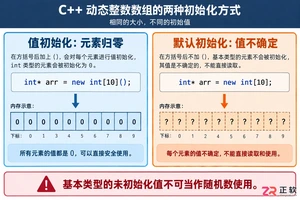
深入解析C++中动态数组的初始化机制,涵盖new操作符的不同用法、基本类型与类对象的初始化差异,以及为何在现代C++开发中应优先使用std::vector。
命名空间的基本概念与常见引入问题在C++等编程语言中,命名空间(namespace)是一种将代码标识符(如变量、函数、类名)封装在特定名称下的机制,其主要目的是避免命名冲突,尤其是在大型项目或使用多个第三方库时。使用“using namespace”指令可以将指定命名空间中的所有名称引入当前作用域,

理解递归的基本原理在C语言中,递归是一种函数调用自身的编程技术。要掌握它,首先需要理解其核心思想:将一个复杂的大问题,分解为一个或几个与原问题相似但规模更小的子问题,直到子问题足够简单,可以直接求解。这个过程通常包含两个关键部分:递归出口和递归体。递归出口定义了问题何时不再继续分解,即最简单、可直接

递归函数的基本概念与适用场景在C语言编程中,递归是一种函数调用自身的编程技巧。它并非适用于所有问题,但在处理某些具有自相似结构的问题时,能提供极其清晰和优雅的解决方案。递归的核心思想是将一个大规模问题分解为一个或多个同类型但规模更小的子问题,直到子问题简单到可以直接求解。典型的适用场景包括树形结构的
理解内存管理的基石在Objective-C的编程世界中,内存管理是开发者必须掌握的核心技能之一。它直接关系到应用的性能、稳定性与资源利用效率。与一些采用自动垃圾回收机制的语言不同,Objective-C在很长一段时间里,依赖一套基于引用计数的、需要开发者部分介入的管理规则。这套规则的核心思想是明确的
理解 dealloc 的角色与时机在 iOS 应用开发中,内存管理是保障应用性能与稳定性的基石。dealloc 方法是 Objective-C 中对象生命周期结束时的关键回调,它标志着对象即将被系统回收内存。正确理解其触发时机至关重要:当一个对象的引用计数降为零时,运行时系统会自动调用该对象的 de
内存管理的基石在Objective-C的世界里,内存管理是开发者必须掌握的核心技能之一。作为一门在手动引用计数(MRC)时代诞生的语言,Objective-C要求程序员对对象的生命周期有清晰的认识。dealloc方法正是这一生命周期中至关重要的终点站。它是一个实例方法,当对象的引用计数降为零时,系统

native2ascii 工具的基本定位在Ja va应用程序的国际化与本地化开发过程中,处理非拉丁字符集是一个常见且关键的环节。Ja va内部使用Unicode字符集来统一表示全球各种语言的文字,但其属性文件(.properties)在历史上要求使用ASCII编码,或者更准确地说,要求非ASCII字

理解 native2ascii 工具的基本用途在软件开发,特别是涉及国际化处理的场景中,开发者常常需要处理不同编码的文本资源。native2ascii 是 Ja va 开发工具包(JDK)中提供的一个命令行实用程序,其主要功能是将包含本地字符编码(非ASCII字符)的文件,转换为包含 Unicode

native2ascii 命令的由来与作用在Ja va开发中,处理国际化资源文件是一个常见需求。资源文件通常以.properties格式存储,用于支持多语言界面。然而,Ja va属性文件默认采用ISO-8859-1字符集编码,这导致了一个直接的问题:当文件中包含非拉丁字符(如中文、日文、韩文等)时,






Windows 10 是一款微软推出的经典操作系统,拥有硬件兼容性与多任务处理能力。它更偏向把系统状态查看和常用调节动作放在一起,适合需要持续观察和微调设备状态的场景。

极度公式是一款跨平台专业LaTeX公式识别编辑软件,支持OCR公式识别和多平台编辑。和使用说明,避免使用,享受完整功能与稳定支持。做扫描整理、文字提取和表格转换时,它能把识别后的处理步骤接得更顺,资料录入这类场景会省下不少时间。