

springboot怎么运行jar包读取外部配置文件
方法一:相对路径设置配置文件(1)在jar包同级目录创建配置文件conf.properties并写入配置数据:confData=data(2)开始写入自动化测试代码//fromwww.fhadmin.cnpublicclassTest{publicStringgetData()throwsIOException{//读取配置文件Propertiesproperties=newProperties();Filefile=newFile("conf.properties");FileInputStreamfi
方法一:相对路径设置配置文件
(1)在jar包同级目录创建配置文件conf.properties并写入配置数据:
confData=data
(2)开始写入自动化测试代码
//from www.fhadmin.cn
public class Test{
    public String getData() throws IOException {
        //读取配置文件
        Properties properties = new Properties();
        File file = new File("conf.properties");
        FileInputStream fis = new FileInputStream(file);
        properties.load(fis);
        fis.close();

        //获取配置文件数据
        String confData = properties.getProperty("confData");
        System.out.println(confData);
    }
}
(3)执行jar包
java -jar jarNanexxx
方法二:绝对路径设置配置文件
解决问题:使用相对路径的方法在jar包同级目录手动执行jar包时没有问题,但使用linux系统的crontab文件定时调度时报错,原因:因为我们手动执行某个脚本时,是在当前shell环境下进行的,程序能找到环境变量;而系统自动执行任务调度时,除了默认的环境,是不会加载任何其他环境变量的。因此就需要在crontab文件中指定任务运行所需的所有环境变量,或者在程序中使用绝对路径。
(1)在jar包同级目录创建配置文件conf.properties并写入配置数据:
confData=data
(2)开始写入自动化测试代码
//from www.fhadmin.cn
public class Test{
    public String getData() throws IOException {
       //获取jar包同级目录
        String path = this.getClass().getProtectionDomain().getCodeSource().getLocation().getPath();
        String[] pathSplit = path.split("/");
        String jarName = pathSplit[pathSplit.length - 1];
        String jarPath = path.replace(jarName, "");
        String pathName=jarPath+"minhang.properties";
        System.out.println("配置文件路径:"+jarPath);

        //读取配置文件
        Properties properties = new Properties();
        File file = new File(pathName);
        FileInputStream fis = new FileInputStream(file);
        properties.load(fis);
        fis.close();

        //获取配置文件数据
        String confData = properties.getProperty("confData");
        System.out.println(confData);
    }
}
(3)执行jar包
java -jar jarNanexxx

ApacheHttpClient是处理HTTP通信的强大工具库,能简化网络操作并提升效率。首先需配置HttpClient实例,设置超时和连接池以优化性能。通过各类请求对象发送GET或POST等请求,并正确处理响应状态码和响应体,注意使用try-with-resources管理资源。高级功能包括连接池管理、重试机制和拦截器,有助于增强健壮性。实践中应复用客户端
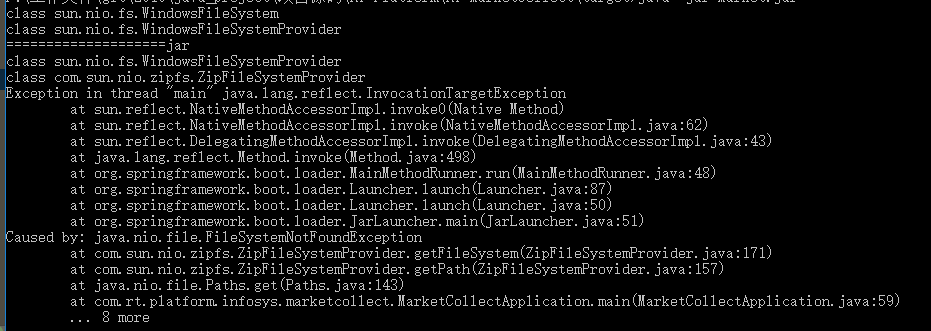
在使用nio加载文件时,在idea中运行没有问题,但打成jar包后在windows和linux下都有问题:代码语言:javascript代码运行次数:0运行复制publicstaticvoidmain(String[]args)throwsException{//SpringApplication.run(MarketCollectApplication.class,args);URIuri=MarketCollectApplication.cla
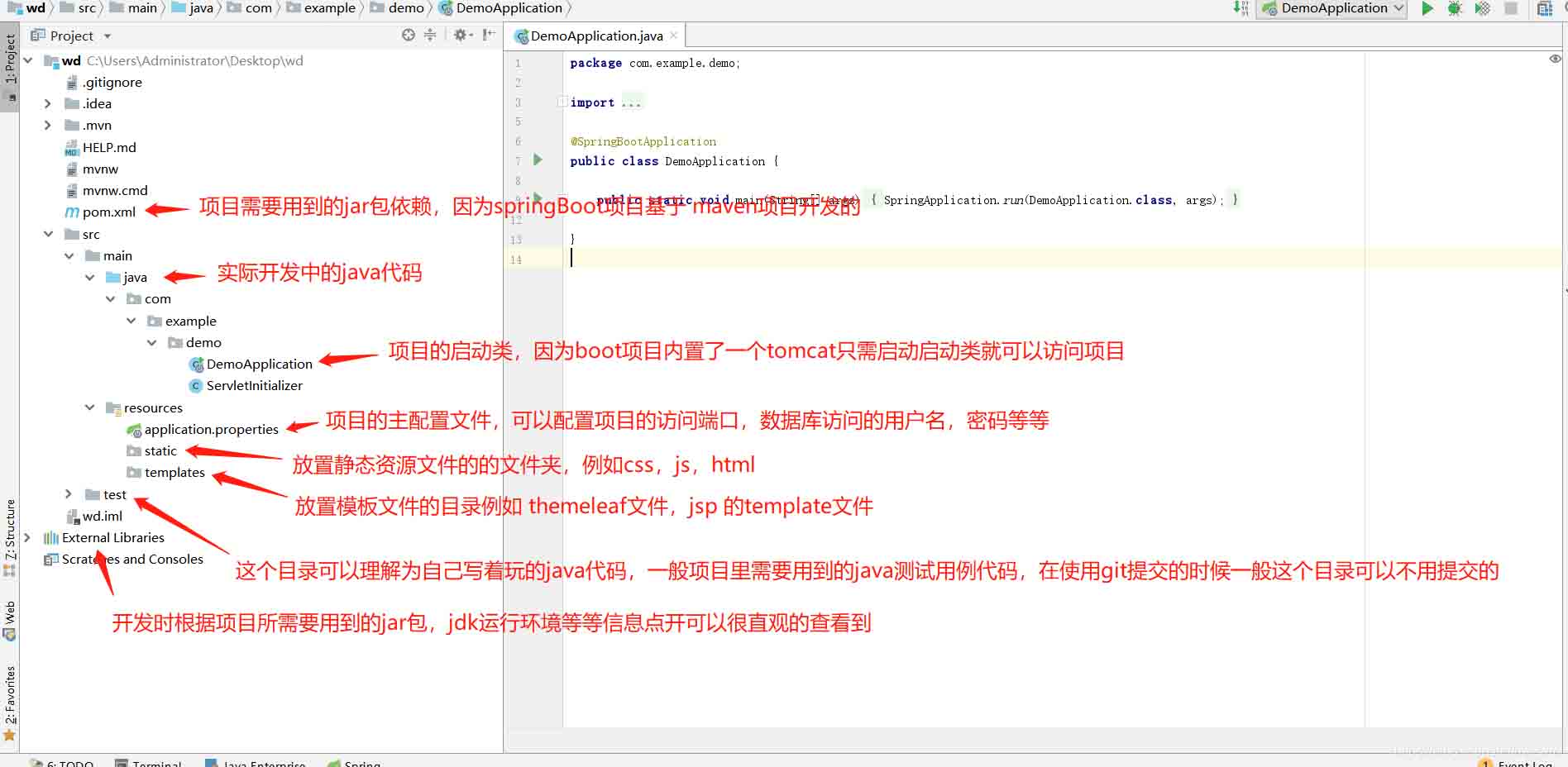
springBoot项目常用目录springBoot项目的目录结构及名规范介绍基于SpringBoot开发时的目录结构及命名规范,通过介绍能够为你解决,在实际项目中如何规划目录结构?如何命名目录更规范?各个目录分别代表什么含义?等三个问题。目录说明servicex//项目名|-admin-ui//管理服务前端代码(一般将UI和SERVICE放到一个工程中,便于管理)|-servicex-auth//模块1|-servicex-common//模块2|-servicex-gateway//模块3|-serv

运行JAR文件的先决条件在Linux系统上运行JAR文件需要安装Java运行时环境(JRE),它是执行Java应用程序所需的基本组件,包括Java虚拟机(JVM)、核心类库等。许多主流Linux发行版,如Ubuntu、Debian、Fedora、openSUSE等,都提供了JRE包的软件库,方便用户进行安装。后文将详细介绍在流行的发行版上安装JRE的步骤。设置完JRE后,可以根据个人喜好选择使用命令行终端或图形用户界面来启动JAR文件。您的选择可能取决于对Linuxshell的熟悉程度和个人偏好。在Lin

Maven实战指南:轻松导入Jar包的实用技巧Maven是Java项目管理工具中使用广泛的一个工具,通过它可以有效管理项目的构建、依赖等。在Java开发中,经常会遇到需要导入第三方Jar包的情况,而Maven可以帮助我们高效地管理这些依赖。本文将介绍几种实用的技巧,帮助读者轻松导入Jar包,并附带具体的代码示例。技巧一:在pom.xml文件中添加依赖在Mav
解析SpringBoot和SpringMVC之间的异同SpringBoot和SpringMVC是Java领域中非常重要的开发框架。虽然它们都属于Spring框架的一部分,但是在使用和功能上有一些明显的区别。本文将对SpringBoot和SpringMVC进行比较,解析它们之间的异同。首先,让我们来了解一下SpringBoot。SpringBo
近年来,随着云计算和分布式架构的兴起,微服务架构的应用越来越广泛。而SpringCloud和SpringBoot作为Java开发中的两个重要框架,对于微服务的实现起到了重要的作用。然而,很多人对于它们在微服务领域的不同应用方式还存在一定的疑惑。本文将从不同的角度探索SpringCloud和SpringBoot在微服务中的应用方式。首先,我们来了解一下Spri
SpringBoot与SpringMVC的不同之处在哪里?SpringBoot和SpringMVC是两个非常流行的Java开发框架,用于构建Web应用程序。尽管它们经常分别被使用,但它们之间的不同之处也是很明显的。首先,SpringBoot可以被看作是一个Spring框架的扩展或者增强版。它旨在简化Spring应用程序的初始化和配置过程,以帮助开发人
SpringBoot和SpringMVC都是Java开发中常用的框架,但它们之间有一些明显的差异。本文将探究这两个框架的特点和用途,并对它们的差异进行比较。首先,我们来了解一下SpringBoot。SpringBoot是由Pivotal团队开发的,它旨在简化基于Spring框架的应用程序的创建和部署。它提供了一种快速、轻量级的方式来构建独立的、可执行
SpringBoot和SpringMVC是Java开发中常用的两个框架,它们都是由Spring框架所提供的,但在功能和使用方式上有着一些区别。本文将分别介绍SpringBoot和SpringMVC的特点和区别。一、SpringBoot的特点:简化配置:SpringBoot通过约定优于配置的原则,大大简化了项目的配置过程。它可以自动配置项目所需要的参数,开发人





火山引擎是字节跳动旗下企业级云与AI服务平台。聚焦大模型核心能力,依托字节自研豆包多模态大模型,凭借火山方舟一站式平台,提供模型精调、推理部署、智能应用搭建等全链路服务,结合高性能AI算力,助力各行业快速落地大模型数字化与智能化应用。



