如何使用Docker部署mysql数据库
一、检查系统版本[root@node~]#cat/etc/os-releaseNAME="CentOSLinux"VERSION="7(Core)"ID="centos"ID_LIKE="rhelfedora"VERSION_ID="7"PRETTY_NAME="CentOSLinux7(Core)"ANSI_COLOR="0;31"CPE_NAME="cpe:/o:centos:centos:7"HOME_URL="https://www.centos.org/"BUG_REPORT_URL="http
一、检查系统版本
[root@node ~]# cat /etc/os-release
NAME="CentOS Linux"
VERSION="7 (Core)"
ID="centos"
ID_LIKE="rhel fedora"
VERSION_ID="7"
PRETTY_NAME="CentOS Linux 7 (Core)"
ANSI_COLOR="0;31"
CPE_NAME="cpe:/o:centos:centos:7"
HOME_URL="https://www.centos.org/"
BUG_REPORT_URL="https://bugs.centos.org/"

CENTOS_MANTISBT_PROJECT="CentOS-7"
CENTOS_MANTISBT_PROJECT_VERSION="7"
REDHAT_SUPPORT_PRODUCT="centos"
REDHAT_SUPPORT_PRODUCT_VERSION="7"
二、检查docker状态
1.检查docker版本
[root@node ~]#
[root@node ~]# docker version
Client: Docker Engine - Community
 Version:           20.10.17
 API version:       1.41
 Go version:        go1.17.11
 Git commit:        100c701
 Built:             Mon Jun  6 23:05:12 2022
 OS/Arch:           linux/amd64
 Context:           default
 Experimental:      true

Server: Docker Engine - Community
 Engine:
  Version:          20.10.17
  API version:      1.41 (minimum version 1.12)
  Go version:       go1.17.11
  Git commit:       a89b842
  Built:            Mon Jun  6 23:03:33 2022
  OS/Arch:          linux/amd64
  Experimental:     false
 containerd:
  Version:          1.6.6
  GitCommit:        10c12954828e7c7c9b6e0ea9b0c02b01407d3ae1
 runc:
  Version:          1.1.2
  GitCommit:        v1.1.2-0-ga916309
 docker-init:
  Version:          0.19.0
  GitCommit:        de40ad0
2.检查docker状态
[root@node ~]# systemctl status docker
● docker.service - Docker Application Container Engine
   Loaded: loaded (/usr/lib/systemd/system/docker.service; enabled; vendor preset: disabled)
   Active: active (running) since Mon 2022-10-31 03:28:51 CST; 3 days ago
     Docs: https://docs.docker.com
 Main PID: 11884 (dockerd)
    Tasks: 32
   Memory: 3.4G
   CGroup: /system.slice/docker.service
           ├─11884 /usr/bin/dockerd -H fd:// --containerd=/run/containerd/containerd.sock
           ├─89868 /usr/bin/docker-proxy -proto tcp -host-ip 0.0.0.0 -host-port 8100 -container-ip 172.17.0.2 -container-port 8100
           └─89875 /usr/bin/docker-proxy -proto tcp -host-ip :: -host-port 8100 -container-ip 172.17.0.2 -container-port 8100

Nov 03 01:23:55 node dockerd[11884]: time="2022-11-03T01:23:55.090581806+08:00" level=info msg="ignoring event" container=d9f4cabef3539e...kDelete"
Nov 03 01:25:19 node dockerd[11884]: time="2022-11-03T01:25:19.911516515+08:00" level=info msg="ignoring event" container=e7556e1f3cd741...kDelete"
Nov 03 01:25:20 node dockerd[11884]: time="2022-11-03T01:25:20.514390808+08:00" level=info msg="ignoring event" container=cb68026ad986be...kDelete"
Nov 03 01:25:20 node dockerd[11884]: time="2022-11-03T01:25:20.907601037+08:00" level=info msg="ignoring event" container=3fccd6f474f242...kDelete"
Nov 03 01:28:08 node dockerd[11884]: time="2022-11-03T01:28:08.318850188+08:00" level=info msg="ignoring event" container=c40d1656d49185...kDelete"
Nov 03 01:29:44 node dockerd[11884]: time="2022-11-03T01:29:44.687790759+08:00" level=info msg="ignoring event" container=aaa5856375e071...kDelete"
Nov 03 01:29:49 node dockerd[11884]: time="2022-11-03T01:29:49.913701227+08:00" level=info msg="ignoring event" container=4df40876d4fdc5...kDelete"
Nov 03 01:29:50 node dockerd[11884]: time="2022-11-03T01:29:50.273656357+08:00" level=info msg="Layer sha256:7c05c40a224c88646a3c06ee539...aned up"
Nov 03 01:29:50 node dockerd[11884]: time="2022-11-03T01:29:50.341692050+08:00" level=info msg="Layer sha256:7c05c40a224c88646a3c06ee539...aned up"
Nov 03 01:29:50 node dockerd[11884]: time="2022-11-03T01:29:50.411279167+08:00" level=info msg="Layer sha256:7c05c40a224c88646a3c06ee539...aned up"
Hint: Some lines were ellipsized, use -l to show in full.
三、在docker hub搜索mysql
[root@node ~]# docker search mysql
NAME                            DESCRIPTION                                     STARS     OFFICIAL   AUTOMATED
mysql                           MySQL is a widely used, open-source relation…   13426     [OK]
mariadb                         MariaDB Server is a high performing open sou…   5119      [OK]
phpmyadmin                      phpMyAdmin - A web interface for MySQL and M…   674       [OK]
percona                         Percona Server is a fork of the MySQL relati…   592       [OK]
bitnami/mysql                   Bitnami MySQL Docker Image                      78                   [OK]
databack/mysql-backup           Back up mysql databases to... anywhere!         74
linuxserver/mysql-workbench                                                     45
ubuntu/mysql                    MySQL open source fast, stable, multi-thread…   38
linuxserver/mysql               A Mysql container, brought to you by LinuxSe…   37
circleci/mysql                  MySQL is a widely used, open-source relation…   28
google/mysql                    MySQL server for Google Compute Engine          21                   [OK]
rapidfort/mysql                 RapidFort optimized, hardened image for MySQL   13
bitnami/mysqld-exporter                                                         4
ibmcom/mysql-s390x              Docker image for mysql-s390x                    2
newrelic/mysql-plugin           New Relic Plugin for monitoring MySQL databa…   1                    [OK]
vitess/mysqlctld                vitess/mysqlctld                                1                    [OK]
hashicorp/mysql-portworx-demo                                                   0
docksal/mysql                   MySQL service images for Docksal - https://d…   0
rapidfort/mysql8-ib             RapidFort optimized, hardened image for MySQ…   0
mirantis/mysql                                                                  0
cimg/mysql                                                                      0
drud/mysql                                                                      0
silintl/mysql-backup-restore    Simple docker image to perform mysql backups…   0                    [OK]
corpusops/mysql                 https://github.com/corpusops/docker-images/     0
drud/mysql-local-57             ddev mysql local container                      0
四、下载mysql镜像
[root@node ~]# docker pull mysql:5.7
5.7: Pulling from library/mysql
Digest: sha256:f2ad209efe9c67104167fc609cca6973c8422939491c9345270175a300419f94
Status: Image is up to date for mysql:5.7
docker.io/library/mysql:5.7
五、创建mysql容器
1.创建数据目录
[root@node ~]# mkdir -p /data/mysql
[root@node ~]# cd /data/mysql/
[root@node mysql]# ls
2.运行mysql容器
[root@node mysql]# docker run -d --name mysql_01 --restart always -v /data/mysql/db:/var/lib/mysql -p 3541:3306 -e MYSQL_ROOT_PASSWORD=admin -e MYSQL_DATABASE=data mysql:5.7
aa36de70b1ae62ed3e123c504e6a6ad28aae1c399ca94fd5c507d3ed5c1a51f4
3.查看mysql容器状态
[root@node mysql]# docker ps
CONTAINER ID   IMAGE               COMMAND                  CREATED         STATUS         PORTS                                                  NAMES
aa36de70b1ae   mysql:5.7           "docker-entrypoint.s…"   2 seconds ago   Up 2 seconds   33060/tcp, 0.0.0.0:3541->3306/tcp, :::3541->3306/tcp   mysql_01
4.查看mysql容器运行日志
[root@node mysql]# docker logs mysql_01
2022-11-03 03:31:49+00:00 [Note] [Entrypoint]: Entrypoint script for MySQL Server 5.7.36-1debian10 started.
2022-11-03 03:31:49+00:00 [Note] [Entrypoint]: Switching to dedicated user 'mysql'
2022-11-03 03:31:49+00:00 [Note] [Entrypoint]: Entrypoint script for MySQL Server 5.7.36-1debian10 started.
2022-11-03 03:31:49+00:00 [Note] [Entrypoint]: Initializing database files
2022-11-03T03:31:49.635196Z 0 [Warning] TIMESTAMP with implicit DEFAULT value is deprecated. Please use --explicit_defaults_for_timestamp server option (see documentation for more details).
2022-11-03T03:31:49.898761Z 0 [Warning] InnoDB: New log files created, LSN=45790
2022-11-03T03:31:49.931888Z 0 [Warning] InnoDB: Creating foreign key constraint system tables.
2022-11-03T03:31:50.006756Z 0 [Warning] No existing UUID has been found, so we assume that this is the first time that this server has been started. Generating a new UUID: 0d679e67-5b28-11ed-a3e5-0242ac110003.
2022-11-03T03:31:50.007982Z 0 [Warning] Gtid table is not ready to be used. Table 'mysql.gtid_executed' cannot be opened.
2022-11-03T03:31:50.887041Z 0 [Warning] A deprecated TLS version TLSv1 is enabled. Please use TLSv1.2 or higher.
2022-11-03T03:31:50.887076Z 0 [Warning] A deprecated TLS version TLSv1.1 is enabled. Please use TLSv1.2 or higher.
2022-11-03T03:31:50.887861Z 0 [Warning] CA certificate ca.pem is self signed.
2022-11-03T03:31:51.230064Z 1 [Warning] root@localhost is created with an empty password ! Please consider switching off the --initialize-insecure option.
2022-11-03 03:31:53+00:00 [Note] [Entrypoint]: Database files initialized
2022-11-03 03:31:53+00:00 [Note] [Entrypoint]: Starting temporary server
2022-11-03 03:31:53+00:00 [Note] [Entrypoint]: Waiting for server startup
2022-11-03T03:31:54.067334Z 0 [Warning] TIMESTAMP with implicit DEFAULT value is deprecated. Please use --explicit_defaults_for_timestamp server option (see documentation for more details).
2022-11-03T03:31:54.070294Z 0 [Note] mysqld (mysqld 5.7.36) starting as process 76 ...
2022-11-03T03:31:54.073329Z 0 [Note] InnoDB: PUNCH HOLE support available
2022-11-03T03:31:54.073358Z 0 [Note] InnoDB: Mutexes and rw_locks use GCC atomic builtins
2022-11-03T03:31:54.073361Z 0 [Note] InnoDB: Uses event mutexes
2022-11-03T03:31:54.073363Z 0 [Note] InnoDB: GCC builtin __atomic_thread_fence() is used for memory barrier
2022-11-03T03:31:54.073365Z 0 [Note] InnoDB: Compressed tables use zlib 1.2.11
2022-11-03T03:31:54.073369Z 0 [Note] InnoDB: Using Linux native AIO
2022-11-03T03:31:54.073598Z 0 [Note] InnoDB: Number of pools: 1
2022-11-03T03:31:54.073680Z 0 [Note] InnoDB: Using CPU crc32 instructions
2022-11-03T03:31:54.076833Z 0 [Note] InnoDB: Initializing buffer pool, total size = 128M, instances = 1, chunk size = 128M
2022-11-03T03:31:54.086060Z 0 [Note] InnoDB: Completed initialization of buffer pool
2022-11-03T03:31:54.088952Z 0 [Note] InnoDB: If the mysqld execution user is authorized, page cleaner thread priority can be changed. See the man page of setpriority().
2022-11-03T03:31:54.101612Z 0 [Note] InnoDB: Highest supported file format is Barracuda.
2022-11-03T03:31:54.108731Z 0 [Note] InnoDB: Creating shared tablespace for temporary tables
2022-11-03T03:31:54.108809Z 0 [Note] InnoDB: Setting file './ibtmp1' size to 12 MB. Physically writing the file full; Please wait ...
2022-11-03T03:31:54.133108Z 0 [Note] InnoDB: File './ibtmp1' size is now 12 MB.
2022-11-03T03:31:54.133793Z 0 [Note] InnoDB: 96 redo rollback segment(s) found. 96 redo rollback segment(s) are active.
2022-11-03T03:31:54.133813Z 0 [Note] InnoDB: 32 non-redo rollback segment(s) are active.
2022-11-03T03:31:54.134160Z 0 [Note] InnoDB: Waiting for purge to start
2022-11-03T03:31:54.184549Z 0 [Note] InnoDB: 5.7.36 started; log sequence number 2749723
2022-11-03T03:31:54.184906Z 0 [Note] Plugin 'FEDERATED' is disabled.
2022-11-03T03:31:54.186366Z 0 [Note] InnoDB: Loading buffer pool(s) from /var/lib/mysql/ib_buffer_pool
2022-11-03T03:31:54.188246Z 0 [Note] InnoDB: Buffer pool(s) load completed at 221103  3:31:54
2022-11-03T03:31:54.191804Z 0 [Note] Found ca.pem, server-cert.pem and server-key.pem in data directory. Trying to enable SSL support using them.
2022-11-03T03:31:54.191834Z 0 [Note] Skipping generation of SSL certificates as certificate files are present in data directory.
2022-11-03T03:31:54.191837Z 0 [Warning] A deprecated TLS version TLSv1 is enabled. Please use TLSv1.2 or higher.
2022-11-03T03:31:54.191840Z 0 [Warning] A deprecated TLS version TLSv1.1 is enabled. Please use TLSv1.2 or higher.
2022-11-03T03:31:54.192296Z 0 [Warning] CA certificate ca.pem is self signed.
2022-11-03T03:31:54.192354Z 0 [Note] Skipping generation of RSA key pair as key files are present in data directory.
2022-11-03T03:31:54.193128Z 0 [Warning] Insecure configuration for --pid-file: Location '/var/run/mysqld' in the path is accessible to all OS users. Consider choosing a different directory.
2022-11-03T03:31:54.199094Z 0 [Note] Event Scheduler: Loaded 0 events
2022-11-03T03:31:54.199272Z 0 [Note] mysqld: ready for connections.
Version: '5.7.36'  socket: '/var/run/mysqld/mysqld.sock'  port: 0  MySQL Community Server (GPL)
2022-11-03 03:31:54+00:00 [Note] [Entrypoint]: Temporary server started.
Warning: Unable to load '/usr/share/zoneinfo/iso3166.tab' as time zone. Skipping it.
Warning: Unable to load '/usr/share/zoneinfo/leap-seconds.list' as time zone. Skipping it.
Warning: Unable to load '/usr/share/zoneinfo/zone.tab' as time zone. Skipping it.
Warning: Unable to load '/usr/share/zoneinfo/zone1970.tab' as time zone. Skipping it.
2022-11-03 03:31:56+00:00 [Note] [Entrypoint]: Creating database data

2022-11-03 03:31:56+00:00 [Note] [Entrypoint]: Stopping temporary server
2022-11-03T03:31:56.656015Z 0 [Note] Giving 0 client threads a chance to die gracefully
2022-11-03T03:31:56.656041Z 0 [Note] Shutting down slave threads
2022-11-03T03:31:56.656046Z 0 [Note] Forcefully disconnecting 0 remaining clients
2022-11-03T03:31:56.656050Z 0 [Note] Event Scheduler: Purging the queue. 0 events
2022-11-03T03:31:56.656102Z 0 [Note] Binlog end
2022-11-03T03:31:56.656573Z 0 [Note] Shutting down plugin 'ngram'
2022-11-03T03:31:56.656591Z 0 [Note] Shutting down plugin 'partition'
2022-11-03T03:31:56.656593Z 0 [Note] Shutting down plugin 'BLACKHOLE'
2022-11-03T03:31:56.656596Z 0 [Note] Shutting down plugin 'ARCHIVE'
2022-11-03T03:31:56.656598Z 0 [Note] Shutting down plugin 'PERFORMANCE_SCHEMA'
2022-11-03T03:31:56.656627Z 0 [Note] Shutting down plugin 'MRG_MYISAM'
2022-11-03T03:31:56.656631Z 0 [Note] Shutting down plugin 'MyISAM'
2022-11-03T03:31:56.656639Z 0 [Note] Shutting down plugin 'INNODB_SYS_VIRTUAL'
2022-11-03T03:31:56.656654Z 0 [Note] Shutting down plugin 'INNODB_SYS_DATAFILES'
2022-11-03T03:31:56.656658Z 0 [Note] Shutting down plugin 'INNODB_SYS_TABLESPACES'
2022-11-03T03:31:56.656662Z 0 [Note] Shutting down plugin 'INNODB_SYS_FOREIGN_COLS'
2022-11-03T03:31:56.656665Z 0 [Note] Shutting down plugin 'INNODB_SYS_FOREIGN'
2022-11-03T03:31:56.656667Z 0 [Note] Shutting down plugin 'INNODB_SYS_FIELDS'
2022-11-03T03:31:56.656669Z 0 [Note] Shutting down plugin 'INNODB_SYS_COLUMNS'
2022-11-03T03:31:56.656670Z 0 [Note] Shutting down plugin 'INNODB_SYS_INDEXES'
2022-11-03T03:31:56.656672Z 0 [Note] Shutting down plugin 'INNODB_SYS_TABLESTATS'
2022-11-03T03:31:56.656674Z 0 [Note] Shutting down plugin 'INNODB_SYS_TABLES'
2022-11-03T03:31:56.656676Z 0 [Note] Shutting down plugin 'INNODB_FT_INDEX_TABLE'
2022-11-03T03:31:56.656677Z 0 [Note] Shutting down plugin 'INNODB_FT_INDEX_CACHE'
2022-11-03T03:31:56.656679Z 0 [Note] Shutting down plugin 'INNODB_FT_CONFIG'
2022-11-03T03:31:56.656680Z 0 [Note] Shutting down plugin 'INNODB_FT_BEING_DELETED'
2022-11-03T03:31:56.656681Z 0 [Note] Shutting down plugin 'INNODB_FT_DELETED'
2022-11-03T03:31:56.656682Z 0 [Note] Shutting down plugin 'INNODB_FT_DEFAULT_STOPWORD'
2022-11-03T03:31:56.656683Z 0 [Note] Shutting down plugin 'INNODB_METRICS'
2022-11-03T03:31:56.656685Z 0 [Note] Shutting down plugin 'INNODB_TEMP_TABLE_INFO'
2022-11-03T03:31:56.656686Z 0 [Note] Shutting down plugin 'INNODB_BUFFER_POOL_STATS'
2022-11-03T03:31:56.656687Z 0 [Note] Shutting down plugin 'INNODB_BUFFER_PAGE_LRU'
2022-11-03T03:31:56.656688Z 0 [Note] Shutting down plugin 'INNODB_BUFFER_PAGE'
2022-11-03T03:31:56.656690Z 0 [Note] Shutting down plugin 'INNODB_CMP_PER_INDEX_RESET'
2022-11-03T03:31:56.656691Z 0 [Note] Shutting down plugin 'INNODB_CMP_PER_INDEX'
2022-11-03T03:31:56.656692Z 0 [Note] Shutting down plugin 'INNODB_CMPMEM_RESET'
2022-11-03T03:31:56.656693Z 0 [Note] Shutting down plugin 'INNODB_CMPMEM'
2022-11-03T03:31:56.656695Z 0 [Note] Shutting down plugin 'INNODB_CMP_RESET'
2022-11-03T03:31:56.656696Z 0 [Note] Shutting down plugin 'INNODB_CMP'
2022-11-03T03:31:56.656697Z 0 [Note] Shutting down plugin 'INNODB_LOCK_WAITS'
2022-11-03T03:31:56.656699Z 0 [Note] Shutting down plugin 'INNODB_LOCKS'
2022-11-03T03:31:56.656701Z 0 [Note] Shutting down plugin 'INNODB_TRX'
2022-11-03T03:31:56.656702Z 0 [Note] Shutting down plugin 'InnoDB'
2022-11-03T03:31:56.656806Z 0 [Note] InnoDB: FTS optimize thread exiting.
2022-11-03T03:31:56.656919Z 0 [Note] InnoDB: Starting shutdown...
2022-11-03T03:31:56.757522Z 0 [Note] InnoDB: Dumping buffer pool(s) to /var/lib/mysql/ib_buffer_pool
2022-11-03T03:31:56.757787Z 0 [Note] InnoDB: Buffer pool(s) dump completed at 221103  3:31:56
2022-11-03T03:31:57.970526Z 0 [Note] InnoDB: Shutdown completed; log sequence number 12659645
2022-11-03T03:31:57.972238Z 0 [Note] InnoDB: Removed temporary tablespace data file: "ibtmp1"
2022-11-03T03:31:57.972276Z 0 [Note] Shutting down plugin 'MEMORY'
2022-11-03T03:31:57.972287Z 0 [Note] Shutting down plugin 'CSV'
2022-11-03T03:31:57.972292Z 0 [Note] Shutting down plugin 'sha256_password'
2022-11-03T03:31:57.972294Z 0 [Note] Shutting down plugin 'mysql_native_password'
2022-11-03T03:31:57.972417Z 0 [Note] Shutting down plugin 'binlog'
2022-11-03T03:31:57.972905Z 0 [Note] mysqld: Shutdown complete

2022-11-03 03:31:58+00:00 [Note] [Entrypoint]: Temporary server stopped

2022-11-03 03:31:58+00:00 [Note] [Entrypoint]: MySQL init process done. Ready for start up.

2022-11-03T03:31:58.915733Z 0 [Warning] TIMESTAMP with implicit DEFAULT value is deprecated. Please use --explicit_defaults_for_timestamp server option (see documentation for more details).
2022-11-03T03:31:58.917521Z 0 [Note] mysqld (mysqld 5.7.36) starting as process 1 ...
2022-11-03T03:31:58.920218Z 0 [Note] InnoDB: PUNCH HOLE support available
2022-11-03T03:31:58.920244Z 0 [Note] InnoDB: Mutexes and rw_locks use GCC atomic builtins
2022-11-03T03:31:58.920247Z 0 [Note] InnoDB: Uses event mutexes
2022-11-03T03:31:58.920249Z 0 [Note] InnoDB: GCC builtin __atomic_thread_fence() is used for memory barrier
2022-11-03T03:31:58.920251Z 0 [Note] InnoDB: Compressed tables use zlib 1.2.11
2022-11-03T03:31:58.920254Z 0 [Note] InnoDB: Using Linux native AIO
2022-11-03T03:31:58.920601Z 0 [Note] InnoDB: Number of pools: 1
2022-11-03T03:31:58.920689Z 0 [Note] InnoDB: Using CPU crc32 instructions
2022-11-03T03:31:58.921871Z 0 [Note] InnoDB: Initializing buffer pool, total size = 128M, instances = 1, chunk size = 128M
2022-11-03T03:31:58.927295Z 0 [Note] InnoDB: Completed initialization of buffer pool
2022-11-03T03:31:58.928789Z 0 [Note] InnoDB: If the mysqld execution user is authorized, page cleaner thread priority can be changed. See the man page of setpriority().
2022-11-03T03:31:58.940579Z 0 [Note] InnoDB: Highest supported file format is Barracuda.
2022-11-03T03:31:58.945797Z 0 [Note] InnoDB: Creating shared tablespace for temporary tables
2022-11-03T03:31:58.945895Z 0 [Note] InnoDB: Setting file './ibtmp1' size to 12 MB. Physically writing the file full; Please wait ...
2022-11-03T03:31:58.963248Z 0 [Note] InnoDB: File './ibtmp1' size is now 12 MB.
2022-11-03T03:31:58.963976Z 0 [Note] InnoDB: 96 redo rollback segment(s) found. 96 redo rollback segment(s) are active.
2022-11-03T03:31:58.963996Z 0 [Note] InnoDB: 32 non-redo rollback segment(s) are active.
2022-11-03T03:31:58.964510Z 0 [Note] InnoDB: Waiting for purge to start
2022-11-03T03:31:59.015352Z 0 [Note] InnoDB: 5.7.36 started; log sequence number 12659645
2022-11-03T03:31:59.015611Z 0 [Note] Plugin 'FEDERATED' is disabled.
2022-11-03T03:31:59.015717Z 0 [Note] InnoDB: Loading buffer pool(s) from /var/lib/mysql/ib_buffer_pool
2022-11-03T03:31:59.018506Z 0 [Note] InnoDB: Buffer pool(s) load completed at 221103  3:31:59
2022-11-03T03:31:59.019449Z 0 [Note] Found ca.pem, server-cert.pem and server-key.pem in data directory. Trying to enable SSL support using them.
2022-11-03T03:31:59.019472Z 0 [Note] Skipping generation of SSL certificates as certificate files are present in data directory.
2022-11-03T03:31:59.019476Z 0 [Warning] A deprecated TLS version TLSv1 is enabled. Please use TLSv1.2 or higher.
2022-11-03T03:31:59.019478Z 0 [Warning] A deprecated TLS version TLSv1.1 is enabled. Please use TLSv1.2 or higher.
2022-11-03T03:31:59.019855Z 0 [Warning] CA certificate ca.pem is self signed.
2022-11-03T03:31:59.019905Z 0 [Note] Skipping generation of RSA key pair as key files are present in data directory.
2022-11-03T03:31:59.020329Z 0 [Note] Server hostname (bind-address): '*'; port: 3306
2022-11-03T03:31:59.020457Z 0 [Note] IPv6 is available.
2022-11-03T03:31:59.020506Z 0 [Note]   - '::' resolves to '::';
2022-11-03T03:31:59.020528Z 0 [Note] Server socket created on IP: '::'.
2022-11-03T03:31:59.021431Z 0 [Warning] Insecure configuration for --pid-file: Location '/var/run/mysqld' in the path is accessible to all OS users. Consider choosing a different directory.
2022-11-03T03:31:59.027266Z 0 [Note] Event Scheduler: Loaded 0 events
2022-11-03T03:31:59.027407Z 0 [Note] mysqld: ready for connections.
六、进入mysql容器
1.进入mysql容器
[root@node mysql]# docker exec -it mysql_01 /bin/bash
root@aa36de70b1ae:/# pwd
/
2.进入mysql数据库
root@aa36de70b1ae:/# mysql -h 127.0.0.1 -P3306 -uroot -padmin
mysql: [Warning] Using a password on the command line interface can be insecure.
Welcome to the MySQL monitor.  Commands end with ; or \g.
Your MySQL connection id is 4
Server version: 5.7.36 MySQL Community Server (GPL)

Copyright (c) 2000, 2021, Oracle and/or its affiliates.

Oracle is a registered trademark of Oracle Corporation and/or its
affiliates. Other names may be trademarks of their respective
owners.

Type 'help;' or '\h' for help. Type '\c' to clear the current input statement.

mysql> show databases;
+--------------------+
| Database           |
+--------------------+
| information_schema |
| data               |
| mysql              |
| performance_schema |
| sys                |
+--------------------+
5 rows in set (0.00 sec)

mysql>
七、远程连接mysql容器
1.客户端安装mariadb
yum -y install mariadb
2.启动mariadb服务
[root@node mysql]# systemctl enable  --now mariadb
Created symlink from /etc/systemd/system/multi-user.target.wants/mariadb.service to /usr/lib/systemd/system/mariadb.service.
3.远程连接mysql容器
[root@node mysql]# mysql -h 192.168.3.166 -P3541 -proot -padmin
Welcome to the MariaDB monitor.  Commands end with ; or \g.
Your MySQL connection id is 5
Server version: 5.7.36 MySQL Community Server (GPL)

Copyright (c) 2000, 2018, Oracle, MariaDB Corporation Ab and others.

Type 'help;' or '\h' for help. Type '\c' to clear the current input statement.
MySQL [(none)]> show databases;
+--------------------+
| Database           |
+--------------------+
| information_schema |
| data               |
| mysql              |
| performance_schema |
| sys                |
+--------------------+
5 rows in set (0.00 sec)

MySQL [(none)]>
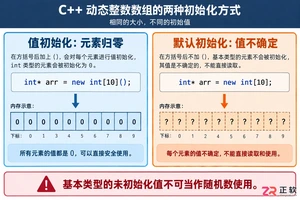
深入解析C++中动态数组的初始化机制,涵盖new操作符的不同用法、基本类型与类对象的初始化差异,以及为何在现代C++开发中应优先使用std::vector。
命名空间的基本概念与常见引入问题在C++等编程语言中,命名空间(namespace)是一种将代码标识符(如变量、函数、类名)封装在特定名称下的机制,其主要目的是避免命名冲突,尤其是在大型项目或使用多个第三方库时。使用“using namespace”指令可以将指定命名空间中的所有名称引入当前作用域,

理解递归的基本原理在C语言中,递归是一种函数调用自身的编程技术。要掌握它,首先需要理解其核心思想:将一个复杂的大问题,分解为一个或几个与原问题相似但规模更小的子问题,直到子问题足够简单,可以直接求解。这个过程通常包含两个关键部分:递归出口和递归体。递归出口定义了问题何时不再继续分解,即最简单、可直接

递归函数的基本概念与适用场景在C语言编程中,递归是一种函数调用自身的编程技巧。它并非适用于所有问题,但在处理某些具有自相似结构的问题时,能提供极其清晰和优雅的解决方案。递归的核心思想是将一个大规模问题分解为一个或多个同类型但规模更小的子问题,直到子问题简单到可以直接求解。典型的适用场景包括树形结构的
理解内存管理的基石在Objective-C的编程世界中,内存管理是开发者必须掌握的核心技能之一。它直接关系到应用的性能、稳定性与资源利用效率。与一些采用自动垃圾回收机制的语言不同,Objective-C在很长一段时间里,依赖一套基于引用计数的、需要开发者部分介入的管理规则。这套规则的核心思想是明确的
理解 dealloc 的角色与时机在 iOS 应用开发中,内存管理是保障应用性能与稳定性的基石。dealloc 方法是 Objective-C 中对象生命周期结束时的关键回调,它标志着对象即将被系统回收内存。正确理解其触发时机至关重要:当一个对象的引用计数降为零时,运行时系统会自动调用该对象的 de
内存管理的基石在Objective-C的世界里,内存管理是开发者必须掌握的核心技能之一。作为一门在手动引用计数(MRC)时代诞生的语言,Objective-C要求程序员对对象的生命周期有清晰的认识。dealloc方法正是这一生命周期中至关重要的终点站。它是一个实例方法,当对象的引用计数降为零时,系统

native2ascii 工具的基本定位在Ja va应用程序的国际化与本地化开发过程中,处理非拉丁字符集是一个常见且关键的环节。Ja va内部使用Unicode字符集来统一表示全球各种语言的文字,但其属性文件(.properties)在历史上要求使用ASCII编码,或者更准确地说,要求非ASCII字

理解 native2ascii 工具的基本用途在软件开发,特别是涉及国际化处理的场景中,开发者常常需要处理不同编码的文本资源。native2ascii 是 Ja va 开发工具包(JDK)中提供的一个命令行实用程序,其主要功能是将包含本地字符编码(非ASCII字符)的文件,转换为包含 Unicode

native2ascii 命令的由来与作用在Ja va开发中,处理国际化资源文件是一个常见需求。资源文件通常以.properties格式存储,用于支持多语言界面。然而,Ja va属性文件默认采用ISO-8859-1字符集编码,这导致了一个直接的问题:当文件中包含非拉丁字符(如中文、日文、韩文等)时,






Windows 10 是一款微软推出的经典操作系统,拥有硬件兼容性与多任务处理能力。它更偏向把系统状态查看和常用调节动作放在一起,适合需要持续观察和微调设备状态的场景。

极度公式是一款跨平台专业LaTeX公式识别编辑软件,支持OCR公式识别和多平台编辑。和使用说明,避免使用,享受完整功能与稳定支持。做扫描整理、文字提取和表格转换时,它能把识别后的处理步骤接得更顺,资料录入这类场景会省下不少时间。