

Java学生选课管理系统开发实战
学生选课管理系统通过Student、Course和CourseManager类实现,支持学生与课程的增删查及选课退课功能,利用集合存储数据并进行关联操作,最后通过测试类验证核心逻辑正确性。
学生选课管理系统通过Student、Course和CourseManager类实现,支持学生与课程的增删查及选课退课功能,利用集合存储数据并进行关联操作,最后通过测试类验证核心逻辑正确性。

学生选课管理系统是Java初学者常见的实战项目,能综合运用面向对象编程、集合框架、文件读写等核心知识。下面从需求分析到代码实现,带你一步步完成一个基础但完整的系统。
系统功能设计
一个基本的学生选课管理系统应包含以下功能:
- 学生管理:添加、查询学生信息
- 课程管理:添加、查看课程
- 选课操作:学生选择课程,支持退课
- 查询选课情况:查看某学生所选课程或某课程的选课学生
类结构设计
根据功能划分,系统主要需要三个类:
- Student:包含学号、姓名等属性
- Course:包含课程编号、名称、最大容量等
- CourseManager:负责管理学生、课程和选课关系
Student类
public class Student {
    private String id;
    private String name;

    public Student(String id, String name) {
        this.id = id;
        this.name = name;
    }

    // getter方法
    public String getId() { return id; }
    public String getName() { return name; }

    @Override
    public String toString() {
        return "Student{" + "id='" + id + '\'' + ", name='" + name + '\'' + '}';
    }
}
Course类
public class Course {
    private String courseId;
    private String courseName;
    private int maxStudents;
    private int currentCount;

    public Course(String courseId, String courseName, int maxStudents) {
        this.courseId = courseId;
        this.courseName = courseName;
        this.maxStudents = maxStudents;
        this.currentCount = 0;
    }

    public boolean isFull() {
        return currentCount >= maxStudents;
    }

    public void enroll() {
        if (!isFull()) {
            currentCount++;
        }
    }

    public void drop() {
        if (currentCount > 0) {
            currentCount--;
        }
    }

    // getter方法
    public String getCourseId() { return courseId; }
    public String getCourseName() { return courseName; }

    @Override
    public String toString() {
        return "Course{" + "courseId='" + courseId + '\'' +
               ", courseName='" + courseName + '\'' +
               ", capacity=" + currentCount + "/" + maxStudents + '}';
    }
}
CourseManager类(核心逻辑)
import java.util.*;

public class CourseManager {
    private Map students = new HashMap<>();
    private Map courses = new HashMap<>();
    private Map> studentEnrollments = new HashMap<>(); // 学生ID -> 课程ID列表

    public void addStudent(Student student) {
        students.put(student.getId(), student);
        studentEnrollments.put(student.getId(), new ArrayList<>());
    }

    public void addCourse(Course course) {
        courses.put(course.getCourseId(), course);
    }

    public boolean selectCourse(String studentId, String courseId) {
        if (!students.containsKey(studentId)) {
            System.out.println("学生不存在");
            return false;
        }
        if (!courses.containsKey(courseId)) {
            System.out.println("课程不存在");
            return false;
        }

        Course course = courses.get(courseId);
        if (course.isFull()) {
            System.out.println("课程已满");
            return false;
        }

        List studentCourses = studentEnrollments.get(studentId);
        if (studentCourses.contains(courseId)) {
            System.out.println("该学生已选此课程");
            return false;
        }

        studentCourses.add(courseId);
        course.enroll();
        System.out.println("选课成功");
        return true;
    }

    public void dropCourse(String studentId, String courseId) {
        List studentCourses = studentEnrollments.get(studentId);
        if (studentCourses != null && studentCourses.remove(courseId)) {
            Course course = courses.get(courseId);
            if (course != null) {
                course.drop();
            }
            System.out.println("退课成功");
        } else {
            System.out.println("未找到该选课记录");
        }
    }

    public void printStudentCourses(String studentId) {
        Student student = students.get(studentId);
        if (student == null) {
            System.out.println("学生不存在");
            return;
        }
        List courseIds = studentEnrollments.get(studentId);
        System.out.println(student.getName() + " 的选课列表:");
        for (String cid : courseIds) {
            Course c = courses.get(cid);
            if (c != null) {
                System.out.println("  " + c);
            }
        }
    }

    public void printCourseStudents(String courseId) {
        Course course = courses.get(courseId);
        if (course == null) {
            System.out.println("课程不存在");
            return;
        }
        System.out.println(course.getCourseName() + " 的学生列表:");
        for (Map.Entry> entry : studentEnrollments.entrySet()) {
            if (entry.getValue().contains(courseId)) {
                Student s = students.get(entry.getKey());
                System.out.println("  " + s);
            }
        }
    }
}
测试与运行
编写main方法进行测试:
public class Main {
    public static void main(String[] args) {
        CourseManager cm = new CourseManager();

        // 添加学生
        cm.addStudent(new Student("S001", "张三"));
        cm.addStudent(new Student("S002", "李四"));

        // 添加课程
        cm.addCourse(new Course("C001", "Java编程", 2));
        cm.addCourse(new Course("C002", "数据结构", 1));

        // 选课
        cm.selectCourse("S001", "C001");
        cm.selectCourse("S002", "C001");
        cm.selectCourse("S001", "C002"); // 张三再选一门

        // 查看结果
        cm.printStudentCourses("S001");
        cm.printCourseStudents("C001");
    }
}
这个系统虽然简单,但涵盖了Java开发中常见的设计思路和编码技巧。你可以在此基础上扩展功能,比如加入文件持久化、图形界面、异常处理等。基本上就这些,动手试试吧。
解析六个GitHub AI开源项目的具体用途,包括软件静态分析、智能体回答检查、多语言配音、求职材料生成、本地代码检索及动态歌词展示,帮助开发者根据实际需求筛选工具并正确验证结果。
遇到OpenCode Skills无法加载或配置无效?本文手把手教你完成Skills的安装、环境变量设置及本地调试,避开常见坑点,让AI助手更懂你的代码习惯。
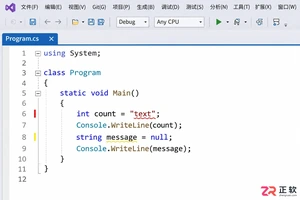
解决 Visual Studio 2022 编辑时不显示代码分析警告的问题。指南涵盖 .NET 项目实时分析设置、Roslyn 分析器范围调整及错误列表来源筛选,确保开发者能高效利用实时代码诊断功能。
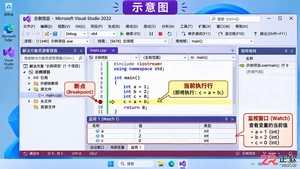
详解 Visual Studio 2022 调试技巧:包括断点设置、监视窗口开启方法、变量添加步骤以及通过 F10 单步执行观察变量值变化的全过程。
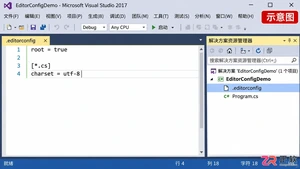
针对 Visual Studio 2017 缺乏全局默认编码选项的情况,详解如何利用 .editorconfig 设定项目级 UTF-8 无 BOM 规则,以及手动转换现有文件并校验字节的方法。
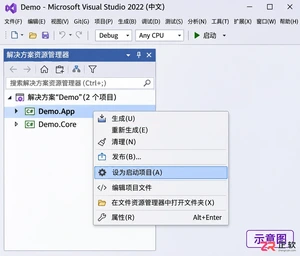
解决 Visual Studio 2022 F5 调试报错问题,通过设置启动项目、检查解决方案属性及正确区分类库与应用项目,快速恢复调试功能。
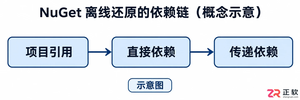
解决Visual Studio 2022离线环境中NuGet包还原失败的难题,涵盖依赖链分析、本地源配置、包集收集及隔离验证步骤,帮助开发者构建稳定的离线开发环境。

解决Visual Studio 2017大型项目加载慢的实用指南。涵盖性能监测、扩展管理、文档恢复优化及版本兼容性检查,帮助开发者精准定位瓶颈并提升工作效率。
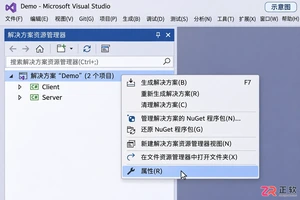
详解 Visual Studio 2022 多启动项目配置方法,包括启动动作选择、顺序调整及调试技巧,帮助开发者高效调试分布式或前后端分离应用。
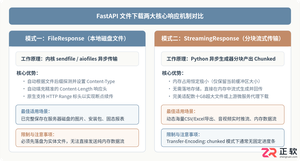
深入解析在FastAPI框架中实现文件下载接口的完整方案,涵盖基于FileResponse的本地静态文件传输、基于StreamingResponse的分块流式传输、RFC 5987中文文件名编码规范、路径穿越安全防御及BackgroundTasks临时文件清理,并配备详细代码示例与架构解析图。





火山引擎是字节跳动旗下企业级云与AI服务平台。聚焦大模型核心能力,依托字节自研豆包多模态大模型,凭借火山方舟一站式平台,提供模型精调、推理部署、智能应用搭建等全链路服务,结合高性能AI算力,助力各行业快速落地大模型数字化与智能化应用。



