

3个让你提前下班的Python自动化办公实用脚本
前言 在开发工作中,你是否也常常被那些重复、琐碎的事务性任务缠住手脚?比如整理杂乱的下载文件夹、清洗格式不一的Excel数据,或者给成百上千个文件统一改名。这些工作本身技术含量不高,却实实在在地消耗着我们的时间和精力。 今天,我们就来聊聊如何用Python脚本将这些“体力活”自动化。下面分享的三个脚
前言
在开发工作中,你是否也常常被那些重复、琐碎的事务性任务缠住手脚?比如整理杂乱的下载文件夹、清洗格式不一的Excel数据,或者给成百上千个文件统一改名。这些工作本身技术含量不高,却实实在在地消耗着我们的时间和精力。
今天,我们就来聊聊如何用Python脚本将这些“体力活”自动化。下面分享的三个脚本,分别针对文件整理、数据清洗和批量重命名这三个高频场景,它们都经过实际项目检验,可以直接拿来用,或者稍作修改就能融入你的工作流。

一、智能文件整理器:告别桌面混乱
面对一个塞满各种文件的下载目录或桌面,手动分类简直是一场噩梦。这个脚本的核心思路很简单:自动识别文件类型,然后按预设规则将它们移动到对应的文件夹里,整个过程还支持按日期二次归档和重名处理。
import os
import shutil
from pathlib import Path
from datetime import datetime

class SmartOrganizer:
    """智能文件分类器,支持自定义规则与日志记录"""

    # 文件类型映射规则(可扩展)
    FILE_TYPES = {
        '图片': ['.jpg', '.jpeg', '.png', '.gif', '.bmp', '.svg', '.webp'],
        '文档': ['.pdf', '.doc', '.docx', '.txt', '.md', '.xls', '.xlsx', '.ppt', '.pptx'],
        '视频': ['.mp4', '.a vi', '.mkv', '.mov', '.wmv', '.flv'],
        '音频': ['.mp3', '.wa v', '.flac', '.aac', '.ogg'],
        '压缩包': ['.zip', '.rar', '.7z', '.tar', '.gz'],
        '代码': ['.py', '.js', '.html', '.css', '.ja va', '.cpp', '.c', '.go', '.rs'],
        '软件包': ['.exe', '.msi', '.dmg', '.pkg', '.deb']
    }

    def __init__(self, source_dir: str, target_dir: str = None):
        self.source = Path(source_dir)
        self.target = Path(target_dir) if target_dir else self.source / '已整理'
        self.stats = {'moved': 0, 'skipped': 0, 'errors': []}

    def get_category(self, filename: str) -> str:
        """根据扩展名判断文件类别"""
        ext = Path(filename).suffix.lower()
        for category, extensions in self.FILE_TYPES.items():
            if ext in extensions:
                return category
        return '其他'

    def organize(self, group_by_date: bool = True):
        """
        执行整理
        :param group_by_date: 是否按日期子文件夹分组
        """
        if not self.source.exists():
            raise FileNotFoundError(f"源目录不存在: {self.source}")

        self.target.mkdir(parents=True, exist_ok=True)

        for file_path in self.source.iterdir():
            if file_path.is_file() and file_path != Path(__file__):
                try:
                    self._process_file(file_path, group_by_date)
                except Exception as e:
                    self.stats['errors'].append(f"{file_path.name}: {str(e)}")

        self._generate_report()

    def _process_file(self, file_path: Path, group_by_date: bool):
        """处理单个文件"""
        category = self.get_category(file_path.name)

        # 构建目标路径
        dest_dir = self.target / category
        if group_by_date:
            # 按修改日期分组:2026-04/10
            mtime = datetime.fromtimestamp(file_path.stat().st_mtime)
            date_folder = f"{mtime.year}-{mtime.month:02d}"
            dest_dir = dest_dir / date_folder

        dest_dir.mkdir(parents=True, exist_ok=True)
        dest_path = dest_dir / file_path.name

        # 处理重名文件
        counter = 1
        original_dest = dest_path
        while dest_path.exists():
            stem = original_dest.stem
            suffix = original_dest.suffix
            dest_path = original_dest.with_name(f"{stem}_{counter}{suffix}")
            counter += 1

        shutil.move(str(file_path), str(dest_path))
        self.stats['moved'] += 1
        print(f"✓ {file_path.name} -> {category}/")

    def _generate_report(self):
        """生成整理报告"""
        report = f"""
        整理完成报告
        =================
        已移动文件: {self.stats['moved']}
        跳过文件:   {self.stats['skipped']}
        错误数量:   {len(self.stats['errors'])}
        输出目录:   {self.target.absolute()}
        """
        print(report)

        if self.stats['errors']:
            print("n⚠️  错误详情:")
            for error in self.stats['errors']:
                print(f"  - {error}")

# 使用示例
if __name__ == "__main__":
    # 整理下载文件夹
    organizer = SmartOrganizer(
        source_dir=os.path.expanduser("~/Downloads"),
        target_dir=os.path.expanduser("~/Downloads/已整理")
    )
    organizer.organize(group_by_date=True)
这个脚本的亮点在于它的可扩展性和健壮性。`FILE_TYPES`字典可以轻松添加新的文件类型规则。`group_by_date`参数让你能按年月创建子文件夹,方便后期追溯。脚本还内置了重名文件处理逻辑(自动添加序号)和完整的执行报告,用起来心里有底。
二、Excel数据清洗助手:数据处理不再头疼
从数据库导出的、从不同系统收集来的Excel数据,往往带着各种“毛病”:空行空列、格式混乱、重复记录、缺失值……手动处理这些脏数据既繁琐又容易出错。下面这个`ExcelCleaner`类,把常见的清洗步骤封装成了一条可配置的流水线。
import pandas as pd
import numpy as np
from typing import List, Dict, Callable
import re

class ExcelCleaner:
    """Excel数据清洗流水线"""

    def __init__(self, file_path: str):
        self.df = pd.read_excel(file_path)
        self.original_shape = self.df.shape
        self.operations_log = []

    def clean_pipeline(self, config: Dict) -> pd.DataFrame:
        """
        执行清洗流水线
        :param config: 配置字典,控制各步骤是否执行
        """
        steps = [
            ('去除完全空行', self.remove_empty_rows, config.get('remove_empty_rows', True)),
            ('去除完全空列', self.remove_empty_cols, config.get('remove_empty_cols', True)),
            ('去除重复行', self.remove_duplicates, config.get('remove_duplicates', True)),
            ('标准化列名', self.standardize_columns, config.get('standardize_columns', True)),
            ('处理缺失值', self.handle_missing, config.get('handle_missing', 'fill')),
            ('数据类型转换', self.convert_types, config.get('convert_types', {})),
            ('字符串清理', self.clean_strings, config.get('clean_strings', True)),
        ]

        for desc, func, enabled in steps:
            if enabled:
                try:
                    func() if not isinstance(enabled, dict) else func(**enabled)
                    self.operations_log.append(f"✓ {desc}")
                except Exception as e:
                    self.operations_log.append(f"✗ {desc}: {str(e)}")

        return self.df

    def remove_empty_rows(self):
        """去除完全为空的行"""
        self.df.dropna(how='all', inplace=True)

    def remove_empty_cols(self):
        """去除完全为空的列"""
        self.df.dropna(axis=1, how='all', inplace=True)

    def remove_duplicates(self, subset: List[str] = None, keep: str = 'first'):
        """
        去除重复行
        :param subset: 基于哪些列判断重复,None表示所有列
        :param keep: 'first'(保留首次)/'last'(保留末次)/False(全部删除)
        """
        before = len(self.df)
        self.df.drop_duplicates(subset=subset, keep=keep, inplace=True)
        removed = before - len(self.df)
        if removed > 0:
            self.operations_log.append(f"  移除 {removed} 行重复数据")

    def standardize_columns(self):
        """标准化列名:去空格、转小写、替换特殊字符"""
        def clean_col(name):
            name = str(name).strip().lower()
            name = re.sub(r's+', '_', name)  # 空格转下划线
            name = re.sub(r'[^w]', '', name)  # 去除特殊字符
            return name

        self.df.columns = [clean_col(col) for col in self.df.columns]

    def handle_missing(self, strategy: str = 'fill', fill_value = 'N/A'):
        """
        处理缺失值
        :param strategy: 'drop'(删除)/'fill'(填充)/'interpolate'(插值)
        """
        if strategy == 'drop':
            self.df.dropna(inplace=True)
        elif strategy == 'fill':
            # 针对不同类型填充不同值
            for col in self.df.columns:
                if self.df[col].dtype == 'object':
                    self.df[col].fillna(fill_value, inplace=True)
                else:
                    self.df[col].fillna(0, inplace=True)
        elif strategy == 'interpolate':
            self.df.interpolate(method='linear', inplace=True)

    def convert_types(self, type_map: Dict[str, str]):
        """
        转换数据类型
        :param type_map: {'列名': '目标类型', ...}
        """
        for col, dtype in type_map.items():
            if col in self.df.columns:
                try:
                    if dtype == 'datetime':
                        self.df[col] = pd.to_datetime(self.df[col], errors='coerce')
                    elif dtype == 'numeric':
                        self.df[col] = pd.to_numeric(self.df[col], errors='coerce')
                    elif dtype == 'category':
                        self.df[col] = self.df[col].astype('category')
                    else:
                        self.df[col] = self.df[col].astype(dtype)
                except Exception as e:
                    print(f"类型转换失败 {col}: {e}")

    def clean_strings(self):
        """清理字符串:去除首尾空格、统一换行符"""
        for col in self.df.select_dtypes(include=['object']).columns:
            self.df[col] = self.df[col].astype(str).str.strip()
            self.df[col] = self.df[col].str.replace(r'rn|r|n', ' ', regex=True)

    def add_calculated_column(self, name: str, formula: Callable):
        """添加计算列"""
        self.df[name] = self.df.apply(formula, axis=1)
        self.operations_log.append(f"✓ 添加计算列: {name}")

    def export(self, output_path: str, sheet_name: str = '清洗后数据'):
        """导出结果"""
        with pd.ExcelWriter(output_path, engine='openpyxl') as writer:
            self.df.to_excel(writer, sheet_name=sheet_name, index=False)

            # 添加清洗报告sheet
            report_df = pd.DataFrame({
                '项目': ['原始行数', '原始列数', '处理后行数', '处理后列数', '操作记录'],
                '值': [
                    self.original_shape[0],
                    self.original_shape[1],
                    self.df.shape[0],
                    self.df.shape[1],
                    'n'.join(self.operations_log)
                ]
            })
            report_df.to_excel(writer, sheet_name='清洗报告', index=False)

        print(f"✓ 已导出至: {output_path}")
        print(f"清洗报告:n" + "n".join(self.operations_log))

# 使用示例
if __name__ == "__main__":
    # 假设有一个销售数据Excel,包含脏数据
    cleaner = ExcelCleaner("raw_sales_data.xlsx")

    config = {
        'remove_empty_rows': True,
        'remove_duplicates': True,
        'standardize_columns': True,
        'handle_missing': 'fill',  # 填充缺失值
        'convert_types': {
            'order_date': 'datetime',
            'amount': 'numeric',
            'customer_id': 'category'
        },
        'clean_strings': True
    }

    # 执行清洗
    clean_df = cleaner.clean_pipeline(config)

    # 添加计算列示例:计算折扣后金额
    if 'amount' in clean_df.columns and 'discount' in clean_df.columns:
        cleaner.add_calculated_column(
            'final_amount',
            lambda row: row['amount'] * (1 - row['discount']) if pd.notna(row['discount']) else row['amount']
        )

    # 导出
    cleaner.export("cleaned_sales_data.xlsx")
这个工具的强大之处在于它的模块化和可追溯性。通过一个`config`字典,你可以自由组合清洗步骤。更贴心的是,它会在导出的Excel文件中自动生成一个“清洗报告”工作表,里面详细记录了数据前后的变化以及每一步操作的结果,这对于需要交付或审计的工作场景来说非常实用。
三、批量重命名文件:告别手残党
整理照片、规范日志文件、统一项目文档命名……批量重命名的需求几乎无处不在。手动操作不仅效率低下,还容易出错。下面这个函数虽然代码不长,但利用正则表达式的强大匹配和替换能力,足以应对绝大多数复杂的重命名规则。
import os
import re
from pathlib import Path

def batch_rename(directory, old_pattern, new_pattern, dry_run=True):
    """
    批量重命名文件
    :param directory: 目标目录
    :param old_pattern: 旧文件名匹配模式(正则)
    :param new_pattern: 新文件名替换模板,可用 \1, \2 引用捕获组
    :param dry_run: 是否为试运行模式(默认True,只打印不执行)
    """
    path = Path(directory)
    if not path.exists():
        print(f"❌ 目录不存在: {directory}")
        return

    renamed_count = 0

    for file in path.iterdir():
        if file.is_file():
            new_name = re.sub(old_pattern, new_pattern, file.name)
            if new_name != file.name:
                new_path = file.parent / new_name
                if dry_run:
                    print(f"[试运行] {file.name} -> {new_name}")
                else:
                    file.rename(new_path)
                    print(f"✅ 已重命名: {file.name} -> {new_name}")
                renamed_count += 1

    print(f"n总计: {renamed_count} 个文件")
    if dry_run:
        print(" 这是试运行模式,添加 dry_run=False 参数以实际执行")

# 使用示例:将 "IMG_2026410_123456.jpg" 重命名为 "2026-04-10_123456.jpg"
if __name__ == "__main__":
    batch_rename(
        directory="./photos",
        old_pattern=r"IMG_(d{4})(d{2})(d{2})_(d+).jpg",
        new_pattern=r"1-2-3_4.jpg",
        dry_run=True  # 先试运行,确认无误后改为 False
    )
这个脚本的精髓在于`dry_run`(试运行)模式。在真正执行重命名操作前,你可以先预览所有即将发生的更改,确认规则无误后再关闭试运行。这就像手术前的安全核查,能有效避免因正则表达式写错而导致的大规模“误伤”。示例中将`IMG_2026410_123456.jpg`转换为`2026-04-10_123456.jpg`的用法,清晰地展示了如何利用正则捕获组来重组文件名。
总结
说到底,自动化脚本的价值不在于炫技,而在于解决实际问题,把我们从重复劳动中解放出来。上面这三个脚本覆盖了办公自动化的几个典型痛点,它们都遵循着同样的设计哲学:功能专注、使用简单、留有扩展空间。
你可以直接复制代码使用,也可以以此为蓝本,加入更符合自己业务逻辑的规则。比如,给文件整理器加上基于内容的分类(用机器学习识别图片主题),或者为数据清洗助手集成数据库写入功能。当这些工具成为你工作流的一部分时,你会发现,节省下来的远不止是时间,还有那份因为处理琐事而消耗掉的专注力。
详解Windows环境下安装OpenAI Codex CLI的步骤,包括WSL环境检查、Node.js/npm配置、npm全局安装命令及首次启动验证,适合开发者快速上手。
学习如何配置 NativeRest REST API 客户端。涵盖 Windows/macOS/Linux 安装后的工作区创建、环境变量管理、请求编辑及响应查看步骤,帮助开发者快速完成基础环境搭建与连通性测试。
深入解析CSS中设置透明度的核心属性opacity,剖析子元素继承、事件穿透、层叠上下文等关键注意事项,并提供与rgba、hsla的实用选型对比。
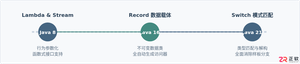
本文通过具体的旧版与新版代码对比,详细剖析Java 8引入的Lambda表达式、Java 14/16引入的Record类,以及Java 12至21逐步演进完善的Switch表达式与模式匹配,展示代码简化路径与避坑要点。
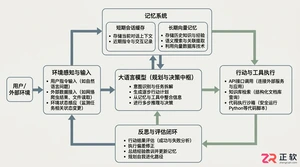
系统梳理AI智能体开发培训的核心知识模块、技术栈选型与典型实战项目,解析低代码平台与纯代码框架的差异,提供从零构建可落地智能体的完整学习与实施路径。
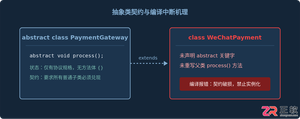
针对Java开发中常见的“子类未实现抽象方法”编译错误,深入分析报错原因,提供重写实现、声明抽象子类两种标准修复路径,并总结参数签名、访问修饰符等典型避坑要点。
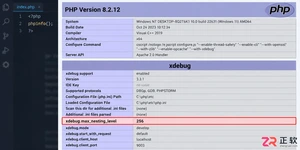
遇到PHP递归报错时,不要盲目调大max_nesting_level。本文教你区分Xdebug限制、内存耗尽和正则递归错误,提供代码级的终止条件优化与迭代替代方案,彻底解决栈溢出问题。
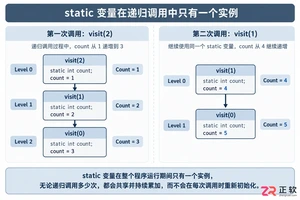
本文分析PHP递归中static变量导致的状态污染及引用传递引发的共享数据修改问题。提供具体的代码复现、缓存键设计建议及调试打印技巧,帮助开发者避免隐蔽的逻辑错误。
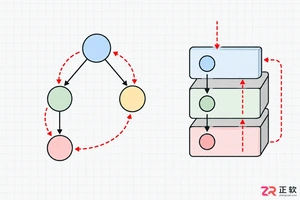
解析PHP递归函数在树形数据处理中的性能瓶颈,提供预加载数据消除I/O、使用显式栈替代深层递归的实战方案,帮助开发者在代码可读性与执行效率间做出合理取舍。




Photoshop 2026 是 Adobe 推出的专业图像处理与视觉设计软件,支持 Windows、macOS 和 iPad 等平台,广泛应用于摄影修图、电商设计、平面海报、数字绘画及视觉合成等创作场景。

Blender 是一款免费开源、跨平台的专业 3D 创作软件,集建模、动画、渲染、视频编辑与视觉合成等功能于一体,广泛应用于影视动画、游戏设计和建筑可视化等领域。软件支持 Cycles 物理渲染器与 Eevee 实时渲染引擎,并提供多边形建模、骨骼绑定、物理模拟等专业工具。Blender 兼容 Windows、macOS 和 Linux 系统,安装包轻巧、运行流畅,依托活跃的全球开发者社区持续更新,是从初学者到专业创作者都值得选择的正版 3D 创作工具。


Photoshop 2026 是 Adobe 推出的专业图像处理与视觉设计软件,支持 Windows、macOS 和 iPad 等平台,广泛应用于摄影修图、电商设计、平面海报、数字绘画及视觉合成等创作场景。
Blender 是一款免费开源、跨平台的专业 3D 创作软件,集建模、动画、渲染、视频编辑与视觉合成等功能于一体,广泛应用于影视动画、游戏设计和建筑可视化等领域。软件支持 Cycles 物理渲染器与 Eevee 实时渲染引擎,并提供多边形建模、骨骼绑定、物理模拟等专业工具。Blender 兼容 Windows、macOS 和 Linux 系统,安装包轻巧、运行流畅,依托活跃的全球开发者社区持续更新,是从初学者到专业创作者都值得选择的正版 3D 创作工具。