

修改solaris的默认语言
一款文字处理软件,一种订阅式的跨平台办公软件,基于云平台提供多种服务,通过将 Excel 和 Outlook 等应用与 OneDrive 和 Microsoft Teams 等强大的云服务相结合,Office 365 可让任何人使用任何设备随时随地创建和共享内容。
使用Solaris中文版安装后,不少朋友会遇到一个头疼的问题——通过SSH远程连接时,终端里显示的中文全是乱码,根本没法正常工作。其实问题的根源在于系统的默认语言设置,把locale切回英文模式就能搞定。下面直接上操作,干净利落。 先把配置文件的写权限打开,因为默认是只读的: #chmod u+w
使用Solaris中文版安装后,不少朋友会遇到一个头疼的问题——通过SSH远程连接时,终端里显示的中文全是乱码,根本没法正常工作。其实问题的根源在于系统的默认语言设置,把locale切回英文模式就能搞定。下面直接上操作,干净利落。
先把配置文件的写权限打开,因为默认是只读的:
#chmod u+w /etc/default/init
接着用vi编辑这个文件:
#vi /etc/default/init
文件内容大致如下(版本注释之类的不用管,关键看后面几行):
#
# Copyright 1992, 1999-2002 Sun Microsystems, Inc.  All rights reserved.
# Use is subject to license terms.
#
#ident  "@(#)init.dfl   1.7     02/12/03 SMI"
#
# This file is /etc/default/init.  /etc/TIMEZONE is a symlink to this file.
# This file looks like a shell script, but it is not.  To maintain
# compatibility with old versions of /etc/TIMEZONE, some shell constructs
# (i.e., export commands) are allowed in this file, but are ignored.
#
# Lines of this file should be of the form VAR=value, where VAR is one of
# TZ, LANG, CMASK, or any of the LC_* environment variables.  value may
# be enclosed in double quotes (") or single quotes (').
#
TZ=PRC
CMASK=022
LANG=EN //使用英文字体
#LANG=zh_CN.UTF-8  //原来默认的中文,注解掉
核心改动就两处:把 LANG 的值设为 EN(表示英文),同时把原来默认的 zh_CN.UTF-8 那一行注释掉。保存文件后重启系统,再通过SSH连接,中文乱码的问题自然就消失了。
这个小技巧在很多Sun/Oracle老系统上依然有效,尤其是那些还跑着Solaris 10甚至更早版本的环境。实测下来,修改后所有终端输出都变成了英文,既避免了编码混乱,也方便远程管理。当然,如果你需要保留中文界面但解决乱码,那就要另外配置SSH客户端的编码了,但那是另一个话题。
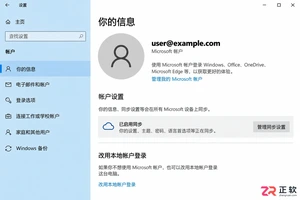
想在Win10开机时跳过密码直接进入桌面?本文详解Microsoft账户下的PIN设置、本地账户切换及netplwiz自动登录配置,并区分开机验证与锁屏恢复设置,助你安全高效地优化登录体验。
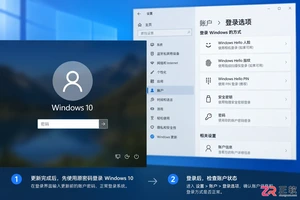
Win10系统更新后开机又要求输入密码?这通常不是密码被重置,而是自动登录设置或Windows Hello策略被更改。本文详解如何区分密码问题与登录配置问题,检查账户状态及组织策略,并安全恢复开机自动进入桌面的设置。
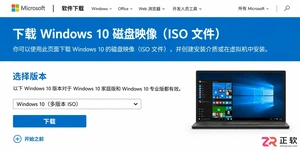
详解如何从微软官网获取纯净的Windows 10 64位ISO镜像文件,包括正确的下载入口、版本与语言选择技巧,以及下载后的完整性校验步骤,确保系统安装源安全可靠。

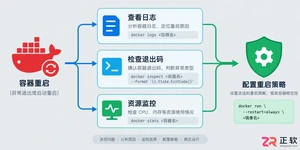
遇到Docker容器频繁自动重启?本文提供从查看容器日志、解读退出代码到配置Restart Policy的完整排查与修复方案,确保服务稳定性。
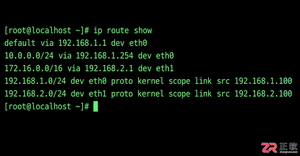
学习如何在Linux中使用命令行添加临时静态路由,并通过修改网络配置文件实现重启后依然有效的永久静态路由设置,涵盖CentOS和Ubuntu的不同配置方法。
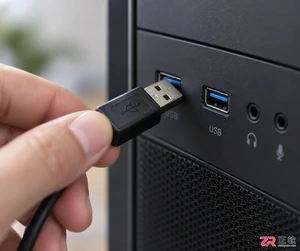
摄像头连接电脑后不知如何查看画面?本教程演示如何使用Windows自带的“相机”应用快速调取实时视频流,无需下载额外软件,步骤简单直观,适用于大多数USB及内置摄像头。
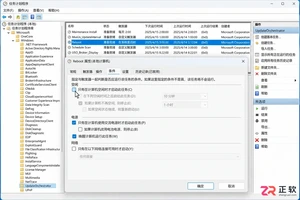
针对 Windows 11 电脑在无人操作时自动关机或重启的问题,本文详解如何通过任务计划程序禁用更新重启任务,并调整电源睡眠策略,从根源解决非预期的自动关机现象。
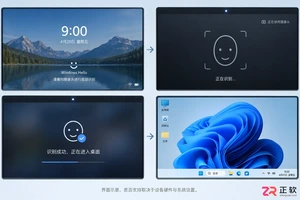
详细讲解在Windows电脑上测试摄像头人脸识别功能的步骤,包括开启Windows Hello、录入面部数据、不同环境下的效果验证及常见问题排查,帮助用户确认设备兼容性与识别准确率。
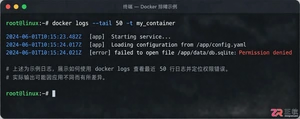
当 Docker 容器启动后立即退出时,不要盲目重启。本文详解如何通过 docker logs 查看标准输出错误,利用 docker inspect 检查挂载与网络配置,并修正入口点脚本权限问题,提供一套高效的因果排查流程。




Photoshop 2026 是 Adobe 推出的专业图像处理与视觉设计软件,支持 Windows、macOS 和 iPad 等平台,广泛应用于摄影修图、电商设计、平面海报、数字绘画及视觉合成等创作场景。

Blender 是一款免费开源、跨平台的专业 3D 创作软件,集建模、动画、渲染、视频编辑与视觉合成等功能于一体,广泛应用于影视动画、游戏设计和建筑可视化等领域。软件支持 Cycles 物理渲染器与 Eevee 实时渲染引擎,并提供多边形建模、骨骼绑定、物理模拟等专业工具。Blender 兼容 Windows、macOS 和 Linux 系统,安装包轻巧、运行流畅,依托活跃的全球开发者社区持续更新,是从初学者到专业创作者都值得选择的正版 3D 创作工具。


Photoshop 2026 是 Adobe 推出的专业图像处理与视觉设计软件,支持 Windows、macOS 和 iPad 等平台,广泛应用于摄影修图、电商设计、平面海报、数字绘画及视觉合成等创作场景。
Blender 是一款免费开源、跨平台的专业 3D 创作软件,集建模、动画、渲染、视频编辑与视觉合成等功能于一体,广泛应用于影视动画、游戏设计和建筑可视化等领域。软件支持 Cycles 物理渲染器与 Eevee 实时渲染引擎,并提供多边形建模、骨骼绑定、物理模拟等专业工具。Blender 兼容 Windows、macOS 和 Linux 系统,安装包轻巧、运行流畅,依托活跃的全球开发者社区持续更新,是从初学者到专业创作者都值得选择的正版 3D 创作工具。