

lua日志文件处理代码
一个基于Lua的日志搜索工具,允许用户自定义搜索后的处理函数,实现字段提取、条件过滤与汇总统计,省去手动复制到Excel的环节。虽搜索速度较慢,但日常使用已显著提升效率。
在日常开发中,日志搜索几乎是每个技术人都会碰到的家常便饭。市面上那些文件夹搜索工具,单行检索还行,可一旦涉及到对搜索结果做自定义处理——比如提取关键字段、按条件过滤、再汇总统计——就有点力不从心了。常见做法是先搜出来,粘到 Excel 里再折腾一番,既费时又容易出错。
于是,直接用 Lua 搓了一个小工具,核心思路就是让使用者自定义搜索后的处理函数,省掉中间手动搬运数据的环节。下面直接看代码。
-- search_log.lua

tbResult = {};
tbCmdResult = {};

local szTmpFolderPath = os.getenv("temp");
if not szTmpFolderPath then
 os.execute("md c:\temp")
 szTmpFolderPath = "c:\temp";
end

local tbSpecialWorld =
{
 ["("] = "%(", [")"] = "%)", ["."] = "%.", ["%"] = "%%",
 ["+"] = "%+", ["-"] = "%-", ["*"] = "%*", ["?"] = "%?",
 ["["] = "%[", ["]"] = "%]", ["^"] = "%^", ["$"] = "%$",
};
function FormatCmd(szCmd)
 return string.gsub(szCmd, ".", function(s) return tbSpecialWorld[s] or s; end)
end

function FormatPath(szPath)
 string.gsub(szPath, "[\/]$", "");
 return string.gsub(szPath, "/", "\");
end

function CheckFile(szFilePath)
 local file = io.open(szFilePath, "rb");
 if not file then
   return;
 end
 file:close();
 return true;
end

function OpenFile(szFilePath)
 if not CheckFile(szFilePath) then
   return;
 end

 local tbFile = {};
 for line in io.lines(szFilePath) do
   table.insert(tbFile, line);
 end

 return tbFile;
end

function SearchFile(szFilePath, szCmd, fnCmd2Line, fnFileName)
 local tbFile = OpenFile(szFilePath);
 if not tbFile then
   return;
 end

 tbResult[szFilePath] = tbResult[szFilePath] or {};
 local szCmdResult = "";
 for nLine, szLine in ipairs(tbFile) do
   if string.match(szLine, szCmd) then
     szCmdResult = fnCmd2Line(szLine);
     if szCmdResult and szCmdResult ~= "" then
       table.insert(tbCmdResult, szCmdResult);
     end
     table.insert(tbResult[szFilePath], nLine .. ":" .. szLine);
   end
 end

 return 1;
end

function Cmd2Line(szLine)
 return;
end

function CheckName(szFileName)
 return true;
end

function SearchDir(szFolderPath, szCmd, fnCmd2Line, fnCheckName, nIdx)
 if not szCmd or szCmd == "" then
   return;
 end

 local fnCmd2Line = fnCmd2Line or Cmd2Line;
 local fnCheckName = fnCheckName or CheckName;
 local nIdx = nIdx or 0;

 local szTmpFileName = szTmpFolderPath .. "\SearchDirTemp" .. nIdx .. ".tmp";
 os.execute("dir /b ".. szFolderPath .." >" .. szTmpFileName);

 local tbFile = OpenFile(szTmpFileName);
 if not tbFile or #tbFile == 0 then
   return;
 end

 local szPath = "";
 for _, szFileName in ipairs(tbFile) do
   szPath = szFolderPath .. "\" .. szFileName;
   if not CheckFile(szPath) then
     SearchDir(szPath, szCmd, fnCmd2Line, nIdx + 1);
    else
      if CheckName(szFileName) then
        SearchFile(szPath, szCmd, fnCmd2Line);
      end
    end
  end
end

function Write2File(szInfo, szFilePath)
  local file = io.open(szFilePath, "w");
  if not file then
    print(szInfo);
    print("Write2File ERR ?? not file " .. szFilePath);
    return;
  end

  file:write(szInfo);
  file:close();
end

function DoSearchDir(szFolderPath, szCmd, tbParam)
  if not szFolderPath or szFolderPath == "" or not szCmd or szCmd == "" then
    return;
  end

  tbParam = tbParam or {};

  szFolderPath = FormatPath(szFolderPath);
  if tbParam.bIsMatch then
    szCmd = FormatCmd(szCmd);
  end
  local nTime = os.time();
  SearchDir(szFolderPath, szCmd, tbParam.fnCmd2Line or Cmd2Line, tbParam.fnCheckName or CheckName, 0);
  nTime = os.time() - nTime;
  print("搜索用时:" .. nTime);

  local szResultPath = tbParam.szResultPath or (szTmpFolderPath .. "\result.tab.tmp");
  local szResult = "";
  for szFilePath, tbInfo in pairs(tbResult) do
    szResult = szResult .. szFilePath .. "n";
    for _, szLine in pairs(tbInfo) do
      szResult = szResult .. szLine .. "n";
    end
  end
  Write2File(szResult, szResultPath);

  local szCmdResult = "";
  for _, szLine in pairs(tbCmdResult) do
    szCmdResult = szCmdResult .. szLine .. "n";
  end
  Write2File(szCmdResult, tbParam.szCmdResultPath or (szTmpFolderPath .. "\cmd_result.tab.tmp"));
end

--tbParam =
--{
--  bIsMatch = false;  -- 是否使用正则方式搜索
--  fnCmd2Line = function () end; -- 自定义搜索行内容处理函数
--  fnCheckName = function () end; -- 文件名限定函数
--  szResultPath = "e:\result.tab"; -- 文件搜索内容输出路径
--  szCmdResultPath = "e:\cmd_result.tab"; -- 自定义处理函数返回内容储存路径
--}
使用起来也很直观,下面的示例展示了如何从日志中提取玩家 ID 和最大次数,并且看起来是支持网络路径的:
dofile("e:\search_log.lua");
tbTmpInfo = {};
function CheckInfo(szLine)
 local szPlayerName, nPlayerId, nCount = string.match(szLine, "^.*szType = finalt[^t]+t%d+t([^t]+)t(%d+)t(%d+).*$");
 nPlayerId = tonumber(nPlayerId);
 nCount = tonumber(nCount);
 if nCount > tbTmpInfo[nPlayerId] then
   tbTmpInfo[nPlayerId] = nCount;
    return "" .. nPlayerId .. "t" .. nCount;
  end
  return;
end
tbParam =
{
  bIsMatch = false;
  fnCmd2Line = CheckInfo;
  fnCheckName = function () return true; end;
  szResultPath = "e:\result.tab";
  szCmdResultPath = "e:\cmd_result.tab";
}
DoSearchDir("d:\logs", "szType = final", tbParam);
for _, szInfo in pairs(tbTmpInfo) do
  print(szInfo);
end
目前还称不上完美——搜索速度偏慢,尤其在文件量大的时候感受比较明显。后续有时间再针对遍历和匹配效率做优化,不过眼下这个版本应付日常已经比来回倒腾 Excel 方便太多了。


Lua编程语言轻量级且小巧,可用io.popen执行系统命令获取指定路径下所有文件夹:在Windows系统下使用dir/b/s命令,在Unix系统下使用find-typef命令。然而官方更推荐使用lfs库进行递归遍历,通过lfs.dir和lfs.attributes函数筛选目录,此法避免系统命令依赖,代码简洁且跨平台效果更佳。

Lua通过虚拟栈与C/C++交互,将C函数封装为接口供其调用。调用时,C从栈中获取参数并返回结果,参数传递与结果返回均通过栈操作完成,从而实现了Lua对C能力的高效、便捷调用,使得Lua能无缝利用C语言的高性能库。

一、元表 元表是Lua中一个挺有意思的机制——它允许我们在一个值遇到未知操作时,给出自定义的行为。本质上,元表也是用table来承载的,所以熟悉了table,也就掌握了元表的基本用法。 不过得注意,元表只能针对一组预先定义好的操作集合做扩展,比面向对象中的类要受限得多。最典型的一点:元表不支持继承。
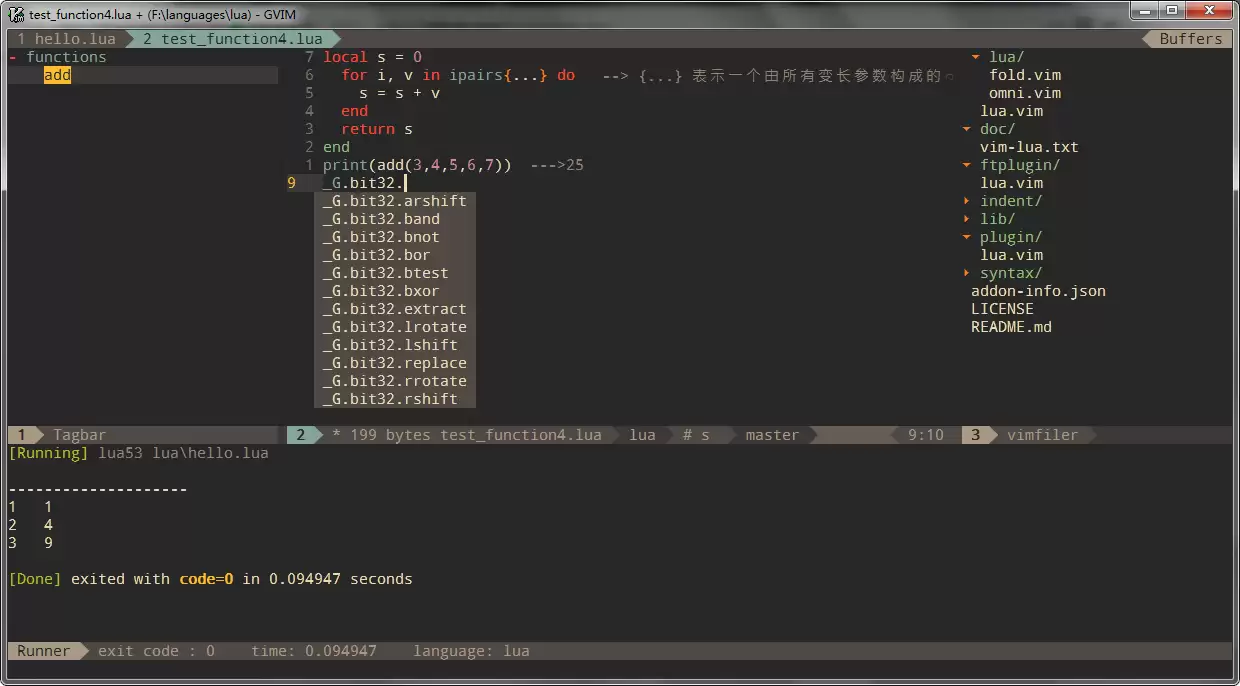
基于SpaceVim搭建Lua开发环境,需先安装Neovim、Nerd字体及支持真色的终端,启用lang#lua模块后,即可获得全面的代码补全、语法检查、工程文件跳转、一键运行、代码格式化及交互式编程等高效开发功能,大幅提升编程效率与体验。

先问个问题:如果你是一个Lua开发者,手头刚好有异步I/O的需求,你会怎么办?传统方案当然有,但要说最接近Node.js体验的,还得是Luvit。简单来说,它就是Lua界的Node.js——把Lua和libUV撮合在一起,再加上JIT加持,用项目自己的话说:Lua + libUV + JIT = p
Lua的流程控制,if和if else是基础。和C语言很像,if语句支持嵌套,也能和循环配合——比如在循环体内根据条件决定是否跳出,这在日常开发中非常实用。 1、if语句 先看最基本的if语法结构: if(布尔表达式) then --[ 在布尔表达式为 true 时执行的语句 --] end 来看一

最近在写一个流量转发的东西,用到了 nginx_lua_module 这个模块,需要根据 Header、Body 和 Cookie,按照流量比例把请求转发到其他地方。翻看前人留下的代码,发现循环遍历时,有时候用 pairs,有时候用 ipairs,风格并不统一,读起来让人有点困惑。 好在 Lua 官
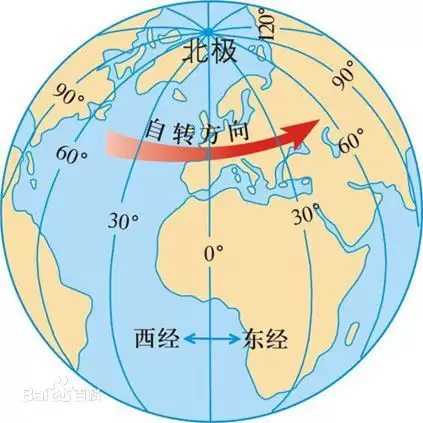
通过Lua的os.date("!*t")获取UTC时间,结合服务器时区差值,可将游戏内时间统一显示为服务器所在地时间。计算活动倒计时时,需考虑本地时区与服务器时区的差异,转换时间戳后得到准确剩余时间。正确处理时区问题能解决多语种发行中的显示同步难题。

Lua中的table可作为字典、数组、环境、模块、对象和类使用。字典支持任意非nil键类型,遍历无序;数组索引从1开始,#对空洞处理需谨慎。table掌管全局环境_G和局部环境_ENV,模块本质为table。对象通过闭包实现私有成员,冒号语法糖简化self传递;类借助元表__index实现继承。





火山引擎是字节跳动旗下企业级云与AI服务平台。聚焦大模型核心能力,依托字节自研豆包多模态大模型,凭借火山方舟一站式平台,提供模型精调、推理部署、智能应用搭建等全链路服务,结合高性能AI算力,助力各行业快速落地大模型数字化与智能化应用。



