

使用Perl生成随机密码
使用Perl编写脚本,通过命令行参数控制密码的字符种类(大小写字母、数字、特殊符号)和长度,确保每种指定类型至少出现一次,并支持唯一字符模式避免重复,默认密码长度为9。
生成一个随机密码,听起来简单,但真要满足特定规则——比如必须包含大写字母、小写字母、数字,甚至特殊符号,还得保证不重复——手动拼凑往往容易出错。其实,用Perl写一个灵活的参数化脚本,就能一次性搞定这些需求。下面这个脚本就做到了:通过命令行参数自由控制密码的字符种类和长度,还可以开启“唯一字符”模式,避免重复。
#!/usr/bin/perl

use strict;
use warnings;
use Getopt::Std;

sub show_help {
  print "Useage:n";
  print "newp -aAnsln";
  print "-att the password contains lower case letters(a-z)n";
  print "-Att the password contains upper case letters(A-Z)n";
  print "-ntt the password contains numerical character(0-9)n";
  print "-stt the password contains special symbolsn";
  print "-utt the password contains only unique charactersn";
  print "-l lengtht set the password length(default: 6)n";

  exit 0;
}

sub show_version {
  print "Version: 0.2.1 Changed the default option: -l 9 -Ana. 2016-4-15n";

  exit 0;
}

### main program

use vars qw($opt_a $opt_A $opt_h $opt_l $opt_n $opt_s $opt_u $opt_v);
getopts('aAhl:nsuv');

&show_version if $opt_v;
&show_help if $opt_h;

my $len = $opt_l || 9;  # default length 9
my $opt_cnt = 0;
my @rand_str = ();

# store all the characters
my @num = qw(0 1 2 3 4 5 6 7 8 9);
my @ABC = qw(A B C D E F G H I J K L M N O P Q R S T U V W X Y Z);
my @abc = qw(a b c d e f g h i j k l m n o p q r s t u v w x y z);
# my @sym = qw(! " $ % & ' * + - . / : ; < = > ? @ [  ] ^ _ ` { | } ~);
my @sym = qw(! $ % & * + - . / : ; < = > ? @ [ ] ^ _ ` { | } ~); # no " '
unshift (@sym, '(', ')', '#', ','); # to prevent perl's complains or warnings.
my @all_sym = (@num, @ABC, @abc, @sym);
my @ch_src = ();

if ((!$opt_a) && (!$opt_A) && (!$opt_n) && (!$opt_s)) {
  $opt_a++;
  $opt_A++;
  $opt_n++;
}

if ($opt_a) {
  $opt_cnt++;
  my $i = rand @abc;
  unshift @rand_str, $abc[$i];

  if ($opt_u) {
    if ($i>=1) {
      $abc[$i-1] = shift @abc;
    } else {
      shift @abc;
    }
  }

  unshift (@ch_src, @abc);
}

if ($opt_A) {
  $opt_cnt++;
  my $i = rand @ABC;
  unshift @rand_str, $ABC[$i];

  if ($opt_u) {
    if ($i>=1) {
      $ABC[$i-1] = shift @ABC;
    } else {
      shift @ABC;
    }
  }

  unshift (@ch_src, @ABC);
}

if ($opt_n) {
  $opt_cnt++;
  my $i = rand @num;
  unshift @rand_str, $num[$i];

  if ($opt_u) {
    if ($i>=1) {
      $num[$i-1] = shift @num;
    } else {
      shift @num;
    }
  }

  unshift (@ch_src, @num);
}

if ($opt_s) {
  $opt_cnt++;
  my $i = rand @sym;
  unshift @rand_str, $sym[$i];

  if ($opt_u) {
    if ($i>=1) {
      $sym[$i-1] = shift @sym;
    } else {
      shift @sym;
    }
  }

  unshift (@ch_src, @sym);
}

if ($len < $opt_cnt) {
  print "The count of characters[$len] should not be smaller " .
     "than count of character types[$opt_cnt].n";
  exit -1;
}

if ($opt_u && $len > (@ch_src + @rand_str)) {
  print "The total number of characters[".(@ch_src + @rand_str).
     "] which could be contained " .
     "in password is smaller than the length[$len] of it.n";
  exit -1;
}

foreach (1..$len-$opt_cnt) {
  my $i = rand @ch_src;
  unshift @rand_str, $ch_src[$i];

  if ($opt_u) {
    if ($i>=1) {
      $ch_src[$i-1] = shift @ch_src;
    } else {
      shift @ch_src;
    }
  }
}

foreach (1..$len) {
  my $i = rand @rand_str;
  print $rand_str[$i];

  if ($i>=1) {
    $rand_str[$i-1] = shift @rand_str;
  } else {
    shift @rand_str;
  }
}

print "n";
exit 0;
这段脚本的核心逻辑其实很清晰:先根据参数(-a小写、-A大写、-n数字、-s特殊符号)从对应字符池中随机抽取一个作为“保底”,确保每种要求的字符类型至少出现一次;剩下的长度再从所有已启用的字符池中随机填充。如果开启了-u唯一字符模式,每次抽取后还会从原池中移除该字符,避免重复。默认密码长度为9,当然你也可以通过-l随意调整。有了这个脚本,无论是生成临时登录密码,还是批量创建安全密钥,都能一键搞定。
Perl子程序通过sub关键字定义,参数存于@_数组,支持签名特性增强可读性。错误处理包括die抛出异常、warn发出警告、eval块捕获异常并检查$@,系统错误由$!提供描述。条件判断if/unless及Carp模块可精准报告错误位置。
Perl是一种高级通用解释型动态语言,支持面向过程和面向对象编程,具有强悍字符串处理能力和丰富CPAN模块。交叉编译流程包括下载perl源码及perl-cross补丁,解压整合,指定交叉编译器,然后配置、编译并安装到目标平台。
Perl中print直接输出列表或文件,printf支持格式化输出,sprintf仅返回格式化字符串而不输出。三种函数均可指定文件句柄,省略时默认使用标准输出。sprintf可通过参数索引调整输出顺序,常用于变量赋值和字符串的拼接。
脚本遍历指定目录,用-h检测符号链接、-e判断目标文件是否存在,筛选失效链接并输出路径,结合xargsrm可批量清理,省去手动查找删除的麻烦。
Perl6采用可达性分析与垃圾收集替代Perl5的引用计数,解决了循环引用和多线程同步难题,但牺牲了及时销毁特性。它通过相位器管理外部资源,如END和LEAVE,确保程序退出或作用域结束时释放数据库句柄等有限资源,避免了引用计数固有的缺陷。

Perl正则表达式以核心元字符为基础,通过组合实现复杂匹配。实例涵盖IP地址、邮箱、数字、温度、空白行、版本号等常见模式。元字符如^、$、*、+、?、.、()、[]、\d、\s等详细说明,并给出匹配中文、URL、账号、电话、邮政编码等实用表达式。
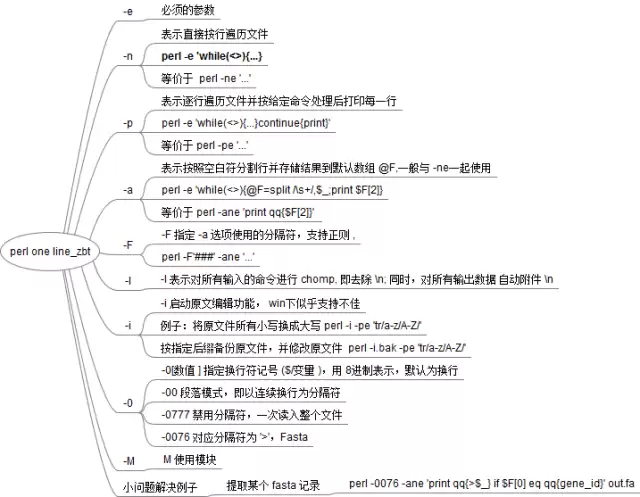
Perl单行命令是命令行文本处理的利器,利用核心参数如-a、-F、-l、-n、-e、-p可快速完成替换、统计、模块调用等任务。正则能力与极简语法使一行命令替代多行脚本,尤其适合临时文本处理场景,掌握这些参数能大幅提升效率。

在 Django 里,自定义过滤器本质上就是一个普通的 Python 函数,它接受一到两个参数。来看下面这张图,它帮你直观理解这个结构: 



Postman是一套面向API全生命周期的开发与测试平台,可在Mac上发送和调试多种协议请求,管理集合、环境及认证信息,并完成脚本测试、模拟服务、监控、文档发布和团队协作。它适合开发、测试及运维人员使用,提供个人免费方案。
Docker Desktop 是 Docker 官方为 Mac 提供的容器开发环境,集成 Docker Engine、命令行工具、Compose、Build、Kubernetes 与图形化管理界面。

Android Studio 是 Google 面向安卓应用开发提供的官方集成开发环境,基于 IntelliJ IDEA 构建。它整合智能代码编辑、Gradle 构建、界面预览、设备模拟、性能分析、调试测试及 APK 分析等工具。

PixPix 是面向品牌、卖家和内容团队的在线 AI 图片视频创作平台,提供图视频 Agent、无限画布、图片生成、视频生成、自然语言编辑及商品套图、产品精修和带货视频等电商工具。

Postman 是面向 API 全生命周期的开发与协作平台。Windows 桌面版可用于构建和发送 HTTP、GraphQL、gRPC、WebSocket、MQTT 等请求,并提供环境变量、集合、脚本测试、模拟服务、监控、文档及团队工作区等

Docker Desktop 为 Windows 开发者提供集成式容器环境,内置 Docker Engine、命令行工具、Compose、Build 与 Kubernetes 等组件,可在本机完成镜像构建、容器运行、日志查看和资源管理。