

Python中最常用的三种文件读取方法详解
Python文件读取的三种常用方法:`read()`一次性读取全部内容,适合小文件;`readline()`逐行读取,节省内存,适合大文件;`readlines()`将所有行存入列表,内存占用较大。推荐使用上下文管理器确保文件自动关闭。
引言
在Python编程的世界里,文件操作绝对算得上基本功中的基本功。无论是处理日志、读取配置,还是分析数据集,每天都要跟文件打交道。今天,咱们就来好好聊聊Python里最常用的三种文件读取方法:read()、readline()和readlines()。

文件读取的基础知识
在深入细节之前,先理清一个基本概念。Python中的文件操作通常遵循“打开-操作-关闭”的节奏:
# 基本的文件操作流程
file = open('example.txt', 'r')  # 打开文件
content = file.read()            # 读取内容
file.close()                     # 关闭文件
不过,更推荐用上下文管理器,省心又安全:
# 推荐的文件操作方式
with open('example.txt', 'r') as file:
    content = file.read()
# 文件会自动关闭
这种方式的妙处在于,哪怕读取过程中间出了异常,文件也会被正确关闭,不用操心手动清理。
read() 方法详解
基本用法
read()是最简单粗暴的文件读取方法——一次性把整个文件内容读到内存里,返回一个字符串。
# 创建一个示例文件
with open('sample.txt', 'w', encoding='utf-8') as f:
    f.write("这是第一行文本n")
    f.write("这是第二行文本n")
    f.write("这是第三行文本n")

# 使用read()方法读取整个文件
with open('sample.txt', 'r', encoding='utf-8') as file:
    content = file.read()
    print(content)
输出结果:
这是第一行文本
这是第二行文本
这是第三行文本
带参数的read()
read()还可以接受一个可选的整数参数,表示要读取的最大字符数。比如只读前10个字符:
with open('sample.txt', 'r', encoding='utf-8') as file:
    # 只读取前10个字符
    partial_content = file.read(10)
    print(f"前10个字符: {partial_content}")

    # 继续读取剩余内容
    remaining_content = file.read()
    print(f"剩余内容: {remaining_content}")
实际应用场景
read()适合这些场景:
- 文件较小,能完全加载到内存中
- 需要对整个文件内容做统一处理
- 简单的文本处理任务
# 统计文件中的单词数量
def count_words(filename):
    with open(filename, 'r', encoding='utf-8') as file:
        content = file.read()
        words = content.split()
        return len(words)

# 使用示例
word_count = count_words('sample.txt')
print(f"文件中共有 {word_count} 个单词")
readline() 方法详解
基本概念
readline()每次只读一行,包括行末的换行符。读到文件末尾时返回空字符串。
with open('sample.txt', 'r', encoding='utf-8') as file:
    line1 = file.readline()
    line2 = file.readline()
    line3 = file.readline()
    line4 = file.readline()  # 这一行应该是空的

    print(f"第一行: {repr(line1)}")
    print(f"第二行: {repr(line2)}")
    print(f"第三行: {repr(line3)}")
    print(f"第四行: {repr(line4)}")
输出结果:
第一行: '这是第一行文本n'
第二行: '这是第二行文本n'
第三行: '这是第三行文本n'
第四行: ''
循环读取所有行
最常见的用法是配合循环,逐行读完整个文件:
with open('sample.txt', 'r', encoding='utf-8') as file:
    line_number = 1
    while True:
        line = file.readline()
        if not line:  # 到达文件末尾
            break
        print(f"第{line_number}行: {line.strip()}")  # strip()去除换行符
        line_number += 1
for循环读取
Python还提供了更优雅的方式——直接迭代文件对象:
with open('sample.txt', 'r', encoding='utf-8') as file:
    for line_number, line in enumerate(file, 1):
        print(f"第{line_number}行: {line.strip()}")
处理大文件的优势
readline()在处理大型文件时尤其给力,因为它不会一次性吞掉整个文件内存:
# 处理大文件的示例
def process_large_file(filename):
    line_count = 0
    word_count = 0

    with open(filename, 'r', encoding='utf-8') as file:
        while True:
            line = file.readline()
            if not line:
                break

            line_count += 1
            words = line.split()
            word_count += len(words)

            # 每处理1000行显示一次进度
            if line_count % 1000 == 0:
                print(f"已处理 {line_count} 行...")

    return line_count, word_count

# 创建一个较大的测试文件
with open('large_sample.txt', 'w', encoding='utf-8') as f:
    for i in range(5000):
        f.write(f"这是第{i+1}行文本,包含一些示例内容。n")

# 处理大文件
lines, words = process_large_file('large_sample.txt')
print(f"总共处理了 {lines} 行,包含 {words} 个单词")
readlines() 方法详解
基本功能
readlines()会一次性读取所有行,返回一个列表,每个元素是一行内容:
with open('sample.txt', 'r', encoding='utf-8') as file:
    lines = file.readlines()
    print(f"类型: {type(lines)}")
    print(f"行数: {len(lines)}")
    for i, line in enumerate(lines, 1):
        print(f"第{i}行: {repr(line)}")
输出结果:
类型:行数: 3 第1行: '这是第一行文本n' 第2行: '这是第二行文本n' 第3行: '这是第三行文本n'
列表推导式的应用
配合列表推导式,可以轻松处理读取的行:
with open('sample.txt', 'r', encoding='utf-8') as file:
    # 读取所有行并去除换行符
    clean_lines = [line.strip() for line in file.readlines()]
    print(clean_lines)

# 或者直接在for循环中处理
with open('sample.txt', 'r', encoding='utf-8') as file:
    for line in file.readlines():
        processed_line = line.strip().upper()  # 转换为大写
        print(processed_line)
内存考虑
需要注意的是,readlines()会把整个文件塞进内存,大文件下要小心:
import sys

def compare_memory_usage(filename):
    # 使用readlines()
    with open(filename, 'r', encoding='utf-8') as file:
        lines = file.readlines()
        memory_with_readlines = sys.getsizeof(lines)
        print(f"readlines()使用的内存: {memory_with_readlines} 字节")

    # 使用readline()逐行读取
    memory_with_readline = 0
    with open(filename, 'r', encoding='utf-8') as file:
        while True:
            line = file.readline()
            if not line:
                break
            memory_with_readline += sys.getsizeof(line)
    print(f"readline()使用的内存: {memory_with_readline} 字节")

# 测试内存使用情况
compare_memory_usage('large_sample.txt')
三种方法的对比分析
为了更直观地理解三者的区别,我们可以画个图表(不过这里渲染出了点小插曲):
渲染错误: Mermaid 渲染失败: Parse error on line 2: ...A[文件读取方法] --> B[read()] A --> C[read -----------------------^ Expecting 'SQE', 'DOUBLECIRCLEEND', 'PE', '-)', 'STADIUMEND', 'SUBROUTINEEND', 'PIPE', 'CYLINDEREND', 'DIAMOND_STOP', 'TAGEND', 'TRAPEND', 'INVTRAPEND', 'UNICODE_TEXT', 'TEXT', 'TAGSTART', got 'PS'
性能比较
口说无凭,咱们直接跑个性能测试:
import time

def performance_test(filename):
    # 测试read()方法
    start_time = time.time()
    with open(filename, 'r', encoding='utf-8') as file:
        content = file.read()
    read_time = time.time() - start_time

    # 测试readline()方法
    start_time = time.time()
    lines = []
    with open(filename, 'r', encoding='utf-8') as file:
        while True:
            line = file.readline()
            if not line:
                break
            lines.append(line)
    readline_time = time.time() - start_time

    # 测试readlines()方法
    start_time = time.time()
    with open(filename, 'r', encoding='utf-8') as file:
        lines = file.readlines()
    readlines_time = time.time() - start_time

    print(f"read()方法耗时: {read_time:.6f} 秒")
    print(f"readline()方法耗时: {readline_time:.6f} 秒")
    print(f"readlines()方法耗时: {readlines_time:.6f} 秒")

# 进行性能测试
performance_test('large_sample.txt')
实际应用案例
日志文件分析
实际工作中,日志分析是常见的场景。来看看不同方法怎么用:
# 创建模拟日志文件
log_entries = [
    "2023-10-01 10:00:01 INFO 用户登录成功",
    "2023-10-01 10:05:23 WARNING 内存使用率超过80%",
    "2023-10-01 10:10:45 ERROR 数据库连接失败",
    "2023-10-01 10:15:12 INFO 系统重启完成",
    "2023-10-01 10:20:33 ERROR 权限验证失败"
]

with open('app.log', 'w', encoding='utf-8') as f:
    for entry in log_entries:
        f.write(entry + 'n')

# 分析错误日志
def analyze_error_logs(filename):
    error_count = 0
    warning_count = 0

    with open(filename, 'r', encoding='utf-8') as file:
        for line in file:  # 使用迭代器方式读取
            if 'ERROR' in line:
                error_count += 1
                print(f"发现错误: {line.strip()}")
            elif 'WARNING' in line:
                warning_count += 1
                print(f"发现警告: {line.strip()}")

    print(f"n统计结果:")
    print(f"错误数量: {error_count}")
    print(f"警告数量: {warning_count}")

analyze_error_logs('app.log')
CSV文件处理
CSV是数据处理中常见的格式,下面演示如何用readline()逐行解析:
# 创建示例CSV文件
csv_data = [
    "姓名,年龄,城市",
    "张三,25,北京",
    "李四,30,上海",
    "王五,28,广州",
    "赵六,35,深圳"
]

with open('users.csv', 'w', encoding='utf-8') as f:
    for line in csv_data:
        f.write(line + 'n')

# 读取CSV文件
def read_csv_simple(filename):
    users = []

    with open(filename, 'r', encoding='utf-8') as file:
        headers = file.readline().strip().split(',')  # 读取标题行

        while True:
            line = file.readline()
            if not line:
                break

            values = line.strip().split(',')
            user_dict = dict(zip(headers, values))
            users.append(user_dict)

    return users

# 使用示例
users = read_csv_simple('users.csv')
for user in users:
    print(user)
配置文件解析
应用程序常使用配置文件,下面是一个简单的解析例子:
# 创建配置文件
config_content = """
# 应用程序配置文件
database.host=localhost
database.port=5432
database.name=myapp
server.port=8080
debug=true
"""

with open('config.ini', 'w', encoding='utf-8') as f:
    f.write(config_content)

# 解析配置文件
def parse_config(filename):
    config = {}

    with open(filename, 'r', encoding='utf-8') as file:
        for line in file.readlines():  # 使用readlines()
            line = line.strip()
            # 跳过注释和空行
            if line.startswith('#') or not line:
                continue

            if '=' in line:
                key, value = line.split('=', 1)
                config[key.strip()] = value.strip()

    return config

# 使用示例
config = parse_config('config.ini')
print("配置信息:")
for key, value in config.items():
    print(f"{key}: {value}")
高级技巧和最佳实践
编码处理
编码问题是文件操作中的常见坑,看如何正确处理:
# 创建不同编码的文件
text_content = "你好,世界!Hello World!"

# UTF-8编码
with open('utf8_file.txt', 'w', encoding='utf-8') as f:
    f.write(text_content)

# GBK编码
with open('gbk_file.txt', 'w', encoding='gbk') as f:
    f.write(text_content)

# 正确读取不同编码的文件
def read_with_encoding(filename, encoding):
    try:
        with open(filename, 'r', encoding=encoding) as file:
            content = file.read()
            print(f"{encoding}编码文件内容: {content}")
    except UnicodeDecodeError as e:
        print(f"解码错误: {e}")

read_with_encoding('utf8_file.txt', 'utf-8')
read_with_encoding('gbk_file.txt', 'gbk')
异常处理
文件操作中异常处理必不可少,优雅地处理各种情况:
def safe_file_read(filename, method='read'):
    try:
        with open(filename, 'r', encoding='utf-8') as file:
            if method == 'read':
                return file.read()
            elif method == 'readline':
                return file.readline()
            elif method == 'readlines':
                return file.readlines()
    except FileNotFoundError:
        print(f"❌ 错误: 文件 '{filename}' 不存在")
        return None
    except PermissionError:
        print(f"❌ 错误: 没有权限读取文件 '{filename}'")
        return None
    except UnicodeDecodeError:
        print(f"❌ 错误: 文件 '{filename}' 编码不正确")
        return None
    except Exception as e:
        print(f"❌ 未知错误: {e}")
        return None

# 测试异常处理
result = safe_file_read('nonexistent.txt')
if result is not None:
    print(result)
else:
    print("文件读取失败")
上下文管理器的自定义实现
除了内置的文件对象,我们也可以自己写一个上下文管理器:
class FileProcessor:
    def __init__(self, filename, mode='r'):
        self.filename = filename
        self.mode = mode
        self.file = None

    def __enter__(self):
        print(f"? 打开文件: {self.filename}")
        self.file = open(self.filename, self.mode, encoding='utf-8')
        return self.file

    def __exit__(self, exc_type, exc_val, exc_tb):
        if self.file:
            self.file.close()
            print(f"✅ 关闭文件: {self.filename}")
        if exc_type:
            print(f"⚠️ 发生异常: {exc_val}")
        return False  # 不抑制异常

# 使用自定义上下文管理器
try:
    with FileProcessor('sample.txt') as file:
        content = file.read()
        print(content)
except Exception as e:
    print(f"处理文件时出错: {e}")
性能优化建议
选择合适的读取方法
根据文件大小来选:
import os

def choose_reading_method(filename):
    # 获取文件大小
    file_size = os.path.getsize(filename)
    size_mb = file_size / (1024 * 1024)

    print(f"文件大小: {size_mb:.2f} MB")

    if size_mb < 1:  # 小于1MB的文件
        print("? 建议使用 read() 或 readlines()")
        return 'small'
    elif size_mb < 100:  # 1MB到100MB的文件
        print("? 建议使用 readline() 逐行处理")
        return 'medium'
    else:  # 大于100MB的文件
        print("? 建议使用 readline() 并考虑分块处理")
        return 'large'

# 测试文件大小判断
file_type = choose_reading_method('large_sample.txt')
缓冲区优化
调整缓冲区大小也能影响性能:
def buffered_reading_test(filename):
    import time

    # 默认缓冲区
    start_time = time.time()
    with open(filename, 'r', encoding='utf-8') as file:
        content = file.read()
    default_time = time.time() - start_time

    # 自定义缓冲区大小
    start_time = time.time()
    with open(filename, 'r', encoding='utf-8', buffering=8192) as file:
        content = file.read()
    custom_time = time.time() - start_time

    print(f"默认缓冲区耗时: {default_time:.6f} 秒")
    print(f"自定义缓冲区耗时: {custom_time:.6f} 秒")

buffered_reading_test('large_sample.txt')
实用工具函数
基于前面学到的知识,整理几个实用的工具函数:
def read_file_lines(filename, start_line=1, end_line=None):
    """
    读取文件指定范围的行

    Args:
        filename: 文件名
        start_line: 开始行号(从1开始)
        end_line: 结束行号(包含),None表示读取到文件末尾

    Returns:
        list: 指定范围的行列表
    """
    lines = []
    current_line = 0

    with open(filename, 'r', encoding='utf-8') as file:
        while True:
            line = file.readline()
            if not line:
                break

            current_line += 1

            # 跳过开始行之前的行
            if current_line < start_line:
                continue

            # 如果指定了结束行且已达到,则停止
            if end_line and current_line > end_line:
                break

            lines.append(line.rstrip('n'))

    return lines

# 使用示例
middle_lines = read_file_lines('large_sample.txt', 1000, 1010)
print("第1000到1010行的内容:")
for i, line in enumerate(middle_lines, 1000):
    print(f"{i}: {line}")
def find_in_file(filename, search_term, case_sensitive=True):
    """
    在文件中搜索指定的文本

    Args:
        filename: 文件名
        search_term: 搜索词
        case_sensitive: 是否区分大小写

    Returns:
        list: 包含搜索词的行及其行号
    """
    results = []

    with open(filename, 'r', encoding='utf-8') as file:
        for line_num, line in enumerate(file, 1):
            search_text = line if case_sensitive else line.lower()
            search_term_check = search_term if case_sensitive else search_term.lower()

            if search_term_check in search_text:
                results.append((line_num, line.rstrip('n')))

    return results

# 使用示例
search_results = find_in_file('large_sample.txt', '第100')
print(f"找到 {len(search_results)} 个匹配项:")
for line_num, line in search_results[:5]:  # 只显示前5个
    print(f"第{line_num}行: {line}")
与其他技术的结合
与正则表达式的结合
文件处理经常需要配合正则表达式进行复杂匹配:
import re

def extract_emails_from_file(filename):
    """
    从文件中提取电子邮件地址
    """
    email_pattern = r'b[A-Za-z0-9._%+-]+@[A-Za-z0-9.-]+.[A-Z|a-z]{2,}b'
    emails = set()  # 使用集合避免重复

    with open(filename, 'r', encoding='utf-8') as file:
        for line in file:
            found_emails = re.findall(email_pattern, line)
            emails.update(found_emails)

    return list(emails)

# 创建包含邮箱的测试文件
email_content = """
联系我们:
技术支持: support@example.com
销售咨询: sales@company.org
客户服务: service@test-domain.net
紧急联系: emergency@help.co.uk
"""

with open('contacts.txt', 'w', encoding='utf-8') as f:
    f.write(email_content)

# 提取邮箱
emails = extract_emails_from_file('contacts.txt')
print("找到的邮箱地址:")
for email in emails:
    print(f"? {email}")
与JSON处理的结合
现代应用经常处理JSON格式的数据文件:
import json

# 创建JSON格式的配置文件
config_data = {
    "database": {
        "host": "localhost",
        "port": 5432,
        "name": "myapp"
    },
    "server": {
        "port": 8080,
        "debug": True
    },
    "features": ["auth", "logging", "monitoring"]
}

with open('config.json', 'w', encoding='utf-8') as f:
    json.dump(config_data, f, ensure_ascii=False, indent=2)

# 读取和处理JSON文件
def read_json_config(filename):
    try:
        with open(filename, 'r', encoding='utf-8') as file:
            # 对于JSON文件,通常使用read()方法读取完整内容
            content = file.read()
            config = json.loads(content)
            return config
    except json.JSONDecodeError as e:
        print(f"JSON解析错误: {e}")
        return None
    except Exception as e:
        print(f"文件读取错误: {e}")
        return None

# 使用示例
config = read_json_config('config.json')
if config:
    print("配置信息:")
    print(json.dumps(config, ensure_ascii=False, indent=2))
最佳实践总结
1. 优先使用上下文管理器
始终用with语句,确保文件正确关闭:
# ✅ 推荐做法
with open('file.txt', 'r') as f:
    content = f.read()

# ❌ 不推荐做法
f = open('file.txt', 'r')
content = f.read()
f.close()
2. 根据文件大小选择合适的方法
- 小文件 (< 1MB): 可以使用
read()或readlines() - 中等文件 (1MB - 100MB): 推荐使用
readline()逐行处理 - 大文件 (> 100MB): 必须使用
readline(),并考虑分块处理
3. 注意编码问题
始终明确指定文件编码,特别是处理中文或其他非ASCII字符时:
# ✅ 明确指定编码
with open('file.txt', 'r', encoding='utf-8') as f:
    content = f.read()

# ❌ 可能导致编码问题
with open('file.txt', 'r') as f:
    content = f.read()
4. 合理处理异常
文件操作可能遇到各种异常,应该妥善处理:
def robust_file_operation(filename):
    try:
        with open(filename, 'r', encoding='utf-8') as f:
            return f.read()
    except FileNotFoundError:
        print(f"文件 {filename} 不存在")
    except PermissionError:
        print(f"没有权限访问文件 {filename}")
    except UnicodeDecodeError:
        print(f"文件 {filename} 编码错误")
    except Exception as e:
        print(f"未知错误: {e}")
    return None
5. 考虑内存使用
对于大文件,避免使用 read() 和 readlines(),而应该使用 readline() 逐行处理:
# ✅ 处理大文件的正确方式
def process_large_file(filename):
    with open(filename, 'r', encoding='utf-8') as f:
        while True:
            line = f.readline()
            if not line:
                break
            # 处理每一行
            process_line(line)

# ❌ 可能导致内存溢出
def process_large_file_wrong(filename):
    with open(filename, 'r', encoding='utf-8') as f:
        lines = f.readlines()  # 危险!可能占用大量内存
        for line in lines:
            process_line(line)
总结与展望
通过本文,我们深入了解了Python中三种主要的文件读取方法:read()、readline()和readlines()。每种方法都有其特定的使用场景和优缺点:
read(): 适合小文件,一次性读取全部内容readline(): 适合大文件,逐行读取节省内存readlines(): 返回行列表,便于批量处理
实际开发中,根据具体需求选择合适的方法,并遵循最佳实践,如使用上下文管理器、正确处理编码和异常等。
随着Python的发展,文件处理也在不断演进。例如,Python 3.8引入了赋值表达式(海象运算符),可以让某些文件处理代码更加简洁:
# 使用海象运算符简化while循环
with open('sample.txt', 'r', encoding='utf-8') as f:
    while (line := f.readline()):
        print(line.strip())
此外,对于更复杂的数据处理需求,还可以考虑使用pandas等第三方库来处理结构化数据文件,或者使用asyncio来处理异步文件操作。
希望本文能帮助你更好地理解和使用Python的文件读取功能。掌握这些基础知识,是成为优秀Python开发者的重要一步。

针对大数据工程场景,系统对比Java、Scala与Python在执行性能、生态结合、开发效率和维护成本上的核心差异,给出清晰的架构选型依据与落地方案。

本篇LangGraph Python中文入门教程详解,系统梳理StateGraph状态机定义、节点编写、边与条件路由、检查点持久化(MemorySaver)等核心机制,提供从环境安装到完整循环智能体构建的代码示例与实操指导。
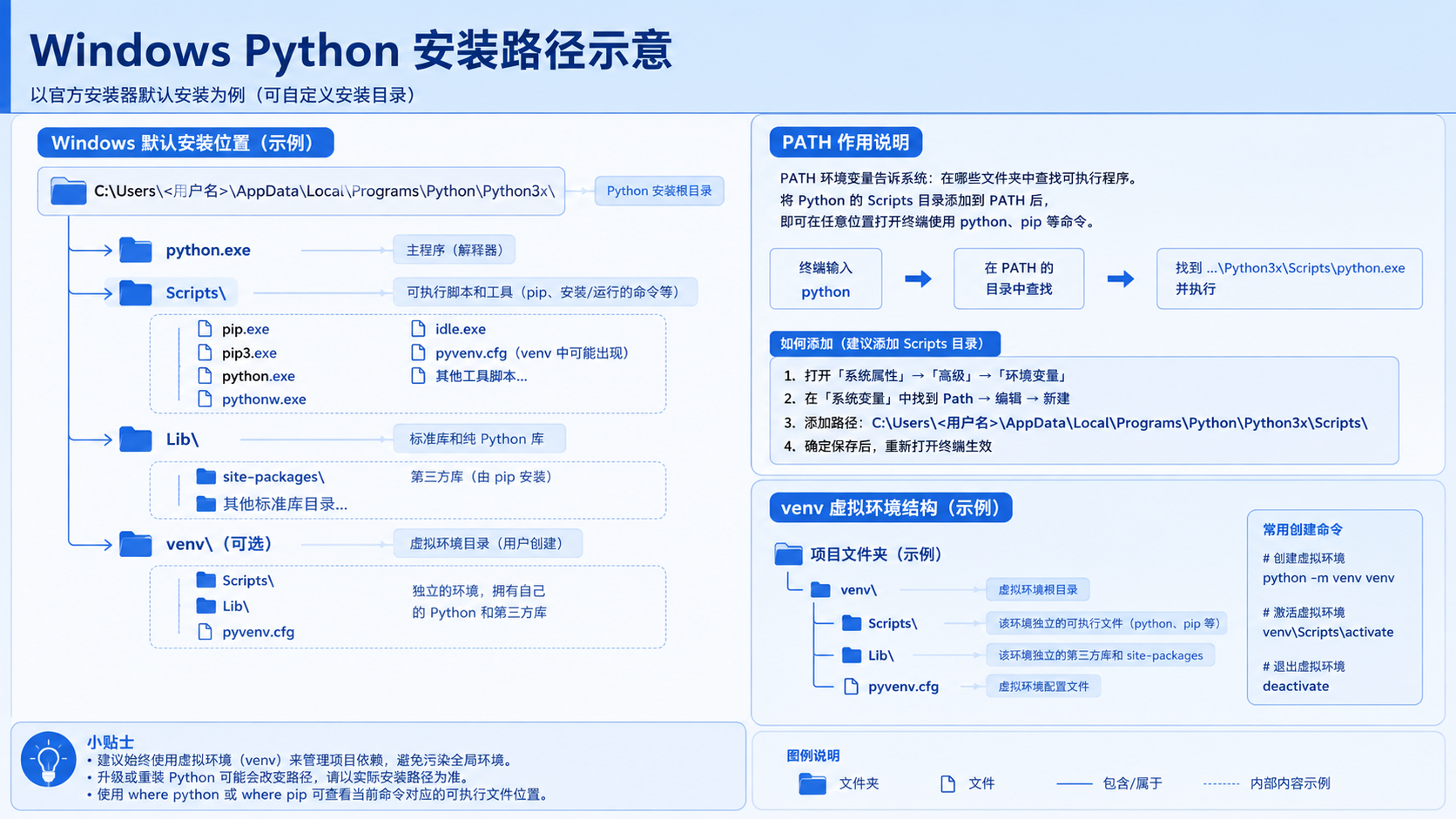
面向后端开发者,基于 Python 官方文档说明如何在 Windows 上安装 Python、创建 venv 虚拟环境及使用 pip 管理依赖。包含可复制命令、验证方法及工具选择边界,避免常见配置误区。
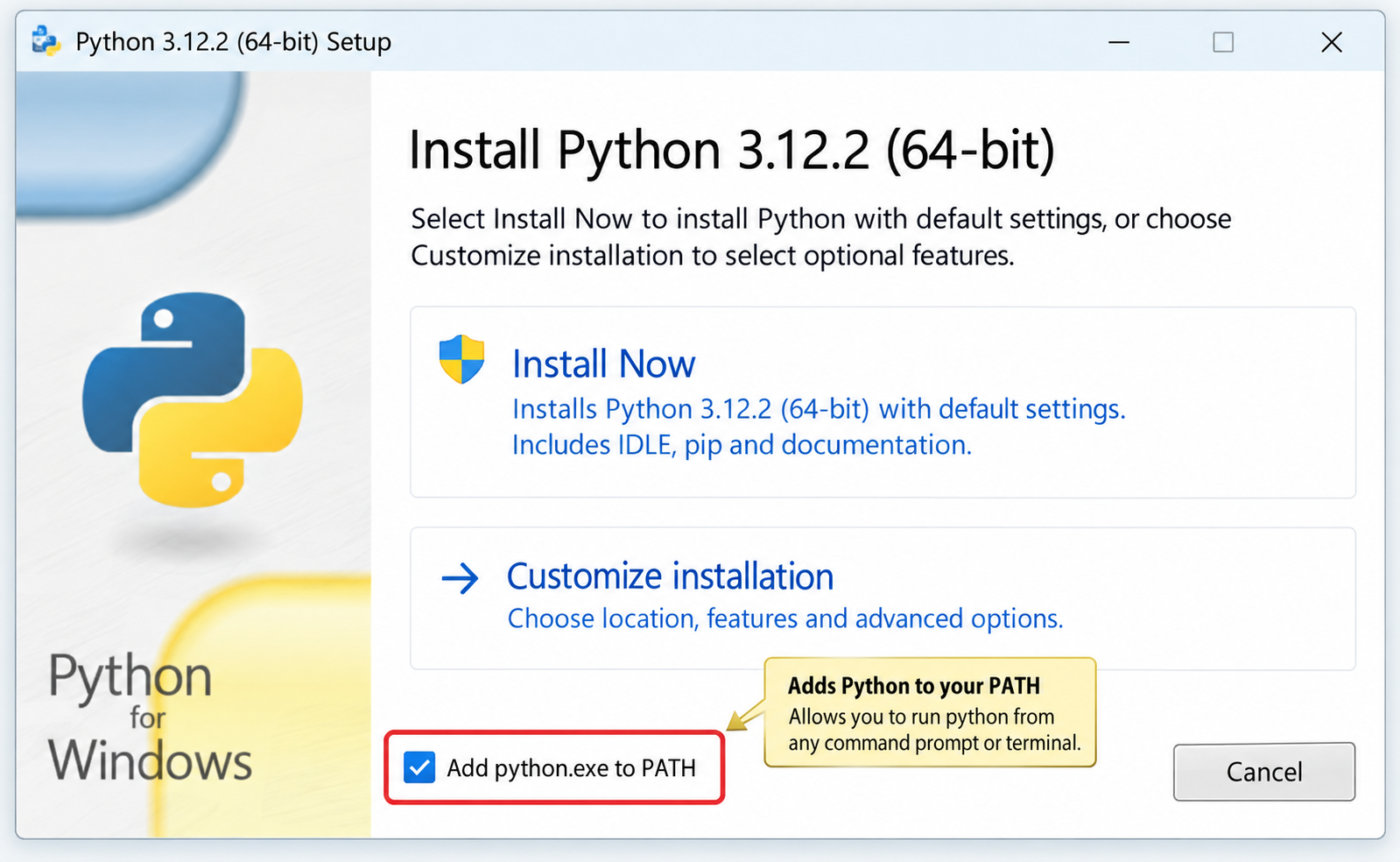
针对Windows初学者的Python安装实战指南。详细讲解如何从Python官网下载匹配架构的安装包,重点演示安装首屏勾选“Add python.exe to PATH”的关键操作,并提供使用python --version和py命令验证环境变量的具体步骤,帮助新手快速搭建开发环境并排查路径问题。
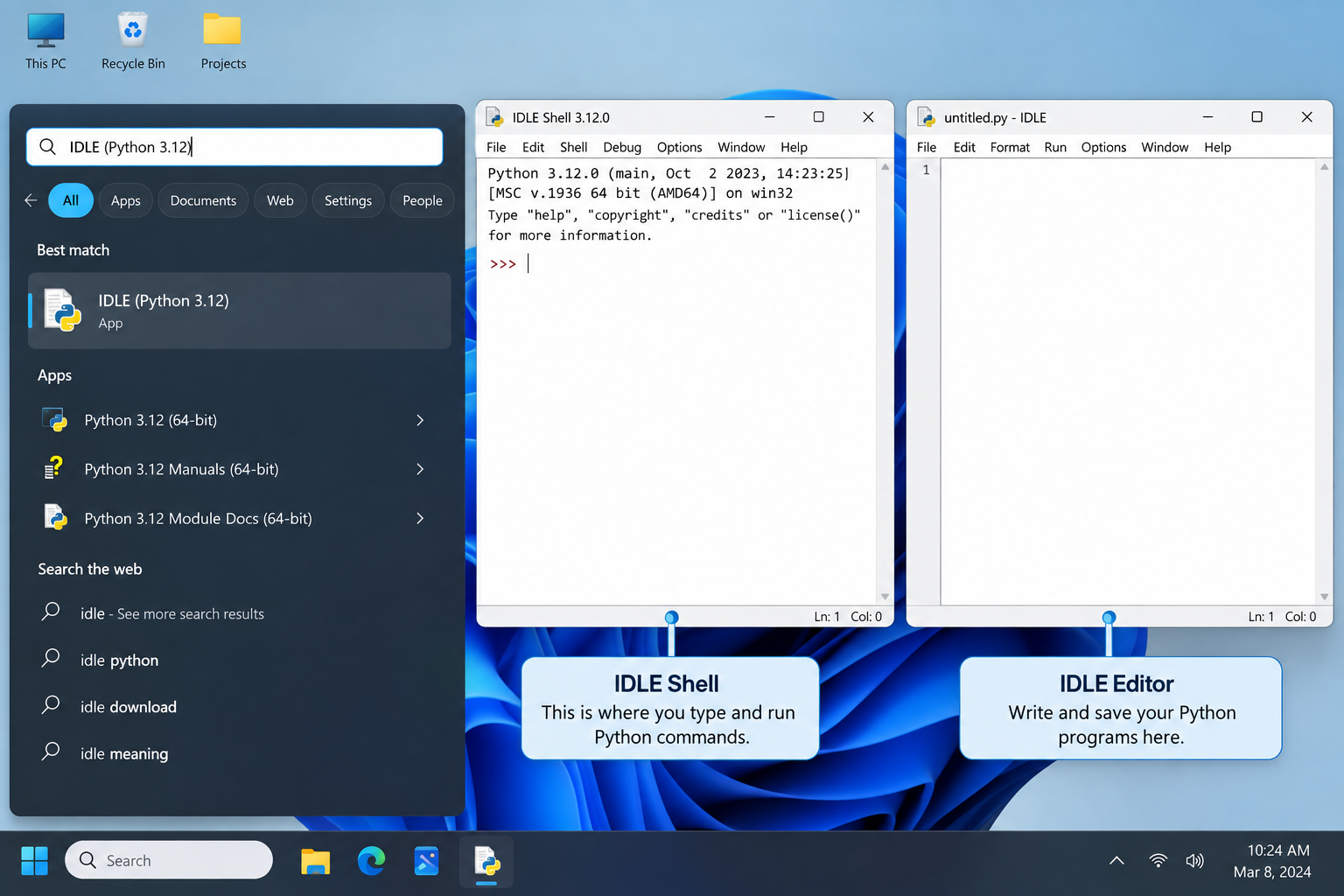
刚在Windows安装好Python却不知道如何启动?本文详细演示如何通过开始菜单找到并打开IDLE集成开发环境,以及如何在PowerShell或命令提示符中使用python和py命令启动交互式解释器、运行.py脚本文件。包含退出解释器的方法及常见启动问题排查,帮助初学者快速验证安装成功并开始编写代码。

了解Python编程领域中最好的就业行业导语:近年来,Python作为一种易学易用的编程语言,越来越受到企业和开发者的青睐。在Python编程领域中,有许多就业机会,涵盖了各个行业。本文将介绍一些Python编程领域中最好的就业行业,并提供相应的代码示例。数据科学和机器学习数据科学和机器学习是Python编程领域中最热门的行业之一。Python在数据科学和机
针对Python处理CSV文件时常见的编码报错、内存溢出和数据类型错误,本文对比标准库csv与Pandas库的适用场景,提供可复制的代码示例和因果排查思路,帮助开发者选择最优处理方案。
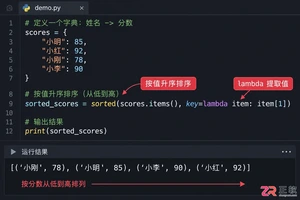
本文介绍如何使用Python的sorted函数对字典按值进行升序和降序排序,结合具体代码示例和应用场景,帮助读者理解排序逻辑及其在数据处理中的实际价值。
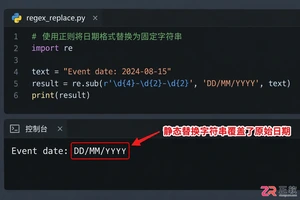
深入讲解Python中使用re.sub进行正则匹配与替换的技巧,涵盖基础语法、分组引用及回调函数应用,帮助开发者解决复杂字符串修改需求,提升代码效率与可维护性。





IntelliJ IDEA 是 JetBrains 推出的专业集成开发环境,重点服务于 Java、Kotlin 与 JVM 项目开发。软件集成代码补全、静态检查、重构、调试、测试、版本控制及构建工具,并可借助插件扩展语言和框架支持。

JetBrains PyCharm 是面向 Python 开发者的集成开发环境,提供智能补全、代码检查、重构、调试、测试、版本控制及虚拟环境管理功能。Mac 版兼容 Intel 与 Apple 芯片,核心功能可免费使用。

JetBrains WebStorm 是面向 JavaScript、TypeScript 和现代 Web 技术的专业集成开发环境,可智能理解项目结构,提供代码补全、重构、错误检查、运行调试、测试及 Git 工具。

JetBrains IntelliJ IDEA 是以 Java、Kotlin 和 JVM 项目为核心的专业集成开发环境,提供智能补全、代码检查、安全重构、调试、测试、版本控制及构建工具集成。统一发行版的核心功能可免费用于商业和非商业项目,

PhpStorm 是 JetBrains 面向 PHP 与现代 Web 开发打造的专业集成开发环境,提供代码补全、静态检查、重构、调试、测试、数据库、版本控制及前端语言支持。Windows 用户可直接下载安装程序,

PyCharm 是 JetBrains 推出的 Python 集成开发环境,提供智能代码补全、错误检查、重构、调试、测试、Git、终端及 Jupyter Notebook 支持。统一版安装后可体验 30 天 Pro 功能,


