

SpringBoot集成MyBatis-Plus的完整教程
SpringBoot集成MyBatis-Plus教程覆盖项目初始化、数据源配置、实体类与Mapper创建、CRUD操作及分页插件。MyBatis-Plus通过BaseMapper封装单表增删改查,省去大量重复XML编写,实现开箱即用,显著提升开发效率。
说起 Ja va 后端开发中的 ORM 工具,MyBatis-Plus 近几年几乎成了很多项目的标配。它的优势在于把单表 CRUD 做成了开箱即用的“懒人包”,省去了大量重复的 XML 编写工作。今天我们不谈虚的,直接上手搭一个 Spring Boot + MyBatis-Plus 的完整项目,涵盖了从项目初始化到分页查询的整个流程。

一、创建项目
这一步最简单——用 Spring Initializr 或者你惯用的 IDE 直接创建一个 Spring Boot 项目。记得勾选下面几个模块:
- Spring Web
- MySQL Driver
- Lombok(非必需,但能省掉不少 getter/setter 代码)
二、引入 MyBatis-Plus 依赖
项目骨架搭好后,在 pom.xml 里加上 MyBatis-Plus 的 starter。目前最新的稳定版是 3.5.5:
    com.baomidou
    mybatis-plus-boot-starter
    3.5.5
三、配置数据源
在 application.yml 中配置数据库连接信息,顺便把 MyBatis-Plus 的 SQL 日志打印打开,方便调试:
spring:
  datasource:
    url: jdbc:mysql://localhost:3306/test_db?useUnicode=true&characterEncoding=utf-8
    username: root
    password: 123456
    driver-class-name: com.mysql.cj.jdbc.Driver

mybatis-plus:
  configuration:
    log-impl: org.apache.ibatis.logging.stdout.StdOutImpl  # 打印SQL日志
四、创建实体类
建一张 user 表,然后写实体类。用 @TableName 指定表名,@TableId 指定主键策略:
@Data
@TableName("user")
public class User {
    @TableId(type = IdType.AUTO)
    private Long id;
    private String name;
    private Integer age;
    private String email;
}
五、创建 Mapper 接口
这才是体现 MyBatis-Plus 便捷性的地方——写一个接口继承 BaseMapper,什么 SQL 都不用写,基本的增删改查就已经内置了:
@Mapper public interface UserMapper extends BaseMapper{ // BaseMapper 已经提供了CRUD方法,不需要写SQL }
六、测试
写几个简单的测试用例,跑一下看看效果。通常我们习惯在 Spring Boot 的测试模块里操作:
@SpringBootTest
class UserMapperTests {

    @Autowired
    private UserMapper userMapper;

    @Test
    void testSelect() {
        List users = userMapper.selectList(null);
        System.out.println(users);
    }

    @Test
    void testInsert() {
        User user = new User();
        user.setName("张三");
        user.setAge(20);
        user.setEmail("zhangsan@example.com");
        int rows = userMapper.insert(user);
        System.out.println("插入成功:" + rows);
    }
}
运行 testSelect,控制台会打印出数据库中的所有用户数据;testInsert 则会验证插入是否正常。这一步走通了,后面的操作就顺理成章了。
七、常用CRUD操作
除了最简单的全表查询,日常开发中更常用的是带条件查询、分页、更新和删除。下面列举几个典型场景:
// 根据ID查询 User user = userMapper.selectById(1L); // 条件查询:用 LambdaQueryWrapper 构造条件,既安全又直观 Listusers = userMapper.selectList( new LambdaQueryWrapper () .eq(User::getAge, 20) .like(User::getName, "张") ); // 分页查询(需要先配置分页插件,见下一节) Page page = userMapper.selectPage( new Page<>(1, 10), null ); // 更新:直接传入有主键的实体即可 userMapper.updateById(user); // 删除 userMapper.deleteById(1L);
可以看到,除了表结构变化时需要调整实体类,几乎不会再碰 XML 文件。尤其是 LambdaQueryWrapper,避免了硬编码字段名,重构时非常省心。
八、配置分页插件
如果项目里要用分页,需要单独注册一个 MyBatis-Plus 的拦截器。很简单,加个配置类就行:
@Configuration
public class MyBatisPlusConfig {
    @Bean
    public MybatisPlusInterceptor mybatisPlusInterceptor() {
        MybatisPlusInterceptor interceptor = new MybatisPlusInterceptor();
        interceptor.addInnerInterceptor(new PaginationInnerInterceptor());
        return interceptor;
    }
}
配置好之后,前面的分页查询就能正常工作了。实际上 MyBatis-Plus 还提供了许多其他实用的拦截器,比如乐观锁插件、防止全表更新插件等,不过那是进阶话题了。
总结
回头来看,MyBatis-Plus 最核心的价值就是单表操作不用写 SQL。BaseMapper 帮你封装了几乎所有常用的增删改查,日常开发中至少能省掉 70% 的重复代码。如果你还在手工写大量的 insert 和 selectById 的 XML,确实值得给项目换上这个工具,体验一下“开箱即用”的爽快感。
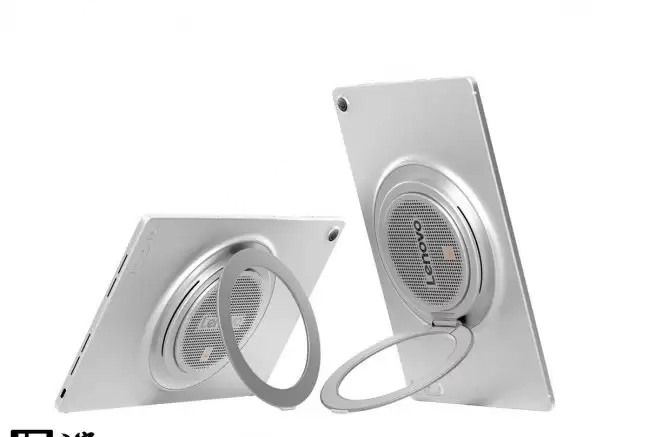
联想TabPlusGen2海外上市,12.1英寸2.5K120HzIPS屏,天玑7400芯片,后盖集成JBL九单元扬声器及杜比全景声,圆形支架可自立,内置10200mAh电池+45W快充,预装Android16,8+128GB约3367元。

酷态科6月24日将推出CP模块风扇Plus磁吸底座,通过Power-Pin接口使风扇支持充放电。风扇搭载30000RPM无刷电机,风速11m/s,内置双5000mAh电池,续航37小时,支持33W快充。
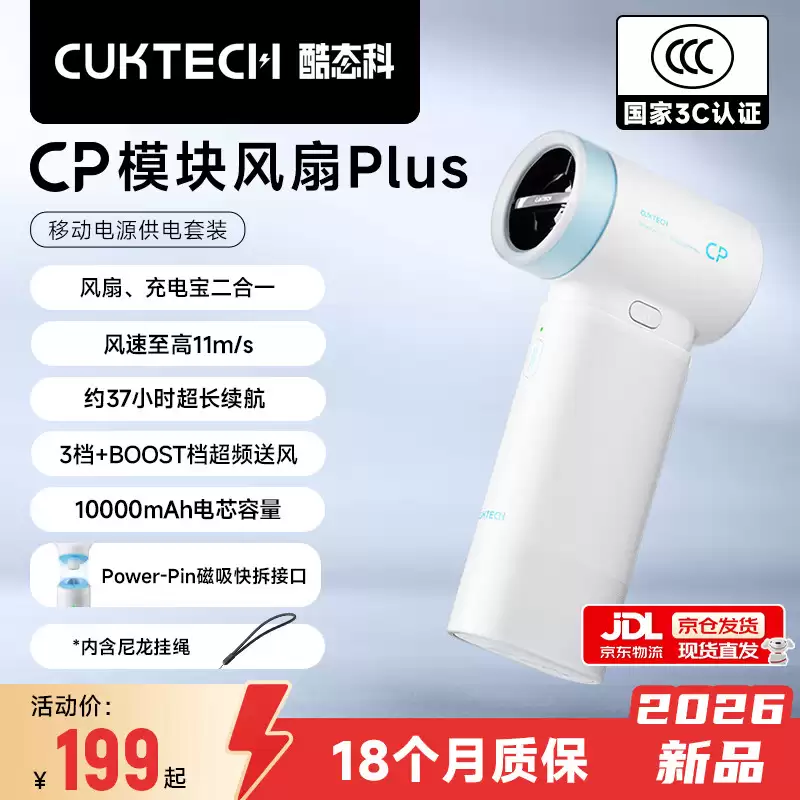
酷态科6月24日将推出神秘新品,有望为CP模块风扇Plus的桌面底座。该风扇采用30000RPM电机,风速达11m/s,内置两块5000mAh电池,续航37小时,支持充放电及主流快充协议。新品或使风扇兼具吹风与充电功能。
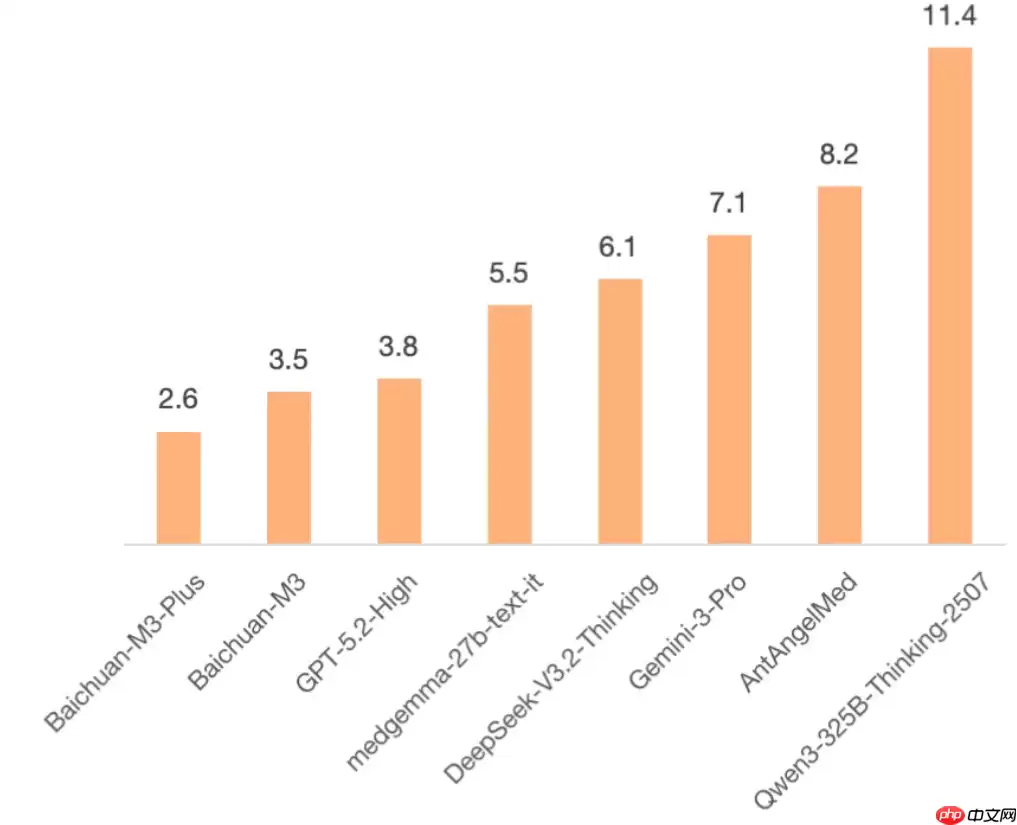
百川智能发布医疗大模型Baichuan-M3Plus,事实性幻觉率降至2.6%,创下全球最低纪录。首创“证据锚定”技术,实现医学结论可验证、可追溯。多项国际评测中超越GPT-5.2等领先模型,API调用成本较前代下降70%,性能表现卓越,堪称行业里程碑。

联想TabPlus2代在韩国发布,搭载联发科天玑7400芯片,12.1英寸120Hz600尼特屏幕,9个JBL扬声器支持杜比全景声和蓝牙音箱模式。内置10200mAh电池,预装安卓16,承诺升级至安卓18。配备联想AI实时转写、智能阅读和AI笔记等功能。

全新戴尔2026款灵越Plus16英寸笔记本正式发布,其搭载酷睿Ultra5-225U处理器,性能强劲,起售价为7004元,可享受国家补贴后最低仅需5698元。机身重1.94千克,配备1920×1200分辨率60HzIPS屏幕,接口含雷电4、HDMI2.1和RJ45网口,且扩展性强,非常适合办公与学习。

酷态科今天正式开售了CP模块风扇Plus的「曜石黑」版本,定价199元。电商平台上的券后价格大概在184.3元,有兴趣的可以留意一下。 这款新品最大的亮点就是模块化可扩展设计,内部搭载一颗30000 RPM的新一代高速三相无刷电机,技术原理和高速吹风机用的电机类似。实测风速最高能到11m/s,配合T

酷态科CP模块风扇Plus曜石黑配色正式开售,到手价仅184.3元。搭载30000RPM高速三相无刷电机与涡流增压技术,最大风速可达11m/s。内置两块5000mAh电池,续航时间长达37小时,支持33W输出及多种快充协议,还可当作移动电源使用。

中兴畅行70Plus已正式发售,定价为两千零九十九元,搭载了展锐T9100处理器、8GB运存与256GB存储。配备了6.75英寸120Hz高刷新率LCD打孔屏,内置了6050mAh大容量电池并支持45W快充,后置了一千三百万像素主摄,还提供了AI键、红外遥控及无网通信功能。

SQLPlus 是 Oracle 数据库的一个命令行工具,用于执行 SQL 查询、PL/SQL 程序以及管理数据库。以下是一些基本的 SQLPlus 命令和用法,用于数据库管理:开启SQLPlus:打开命令行界面(在Windows系统上为CMD或PowerShell,在Unix/Linux系统上为T




Postman是一套面向API全生命周期的开发与测试平台,可在Mac上发送和调试多种协议请求,管理集合、环境及认证信息,并完成脚本测试、模拟服务、监控、文档发布和团队协作。它适合开发、测试及运维人员使用,提供个人免费方案。

Docker Desktop 是 Docker 官方为 Mac 提供的容器开发环境,集成 Docker Engine、命令行工具、Compose、Build、Kubernetes 与图形化管理界面。

Android Studio 是 Google 面向安卓应用开发提供的官方集成开发环境,基于 IntelliJ IDEA 构建。它整合智能代码编辑、Gradle 构建、界面预览、设备模拟、性能分析、调试测试及 APK 分析等工具。

PixPix 是面向品牌、卖家和内容团队的在线 AI 图片视频创作平台,提供图视频 Agent、无限画布、图片生成、视频生成、自然语言编辑及商品套图、产品精修和带货视频等电商工具。

Postman 是面向 API 全生命周期的开发与协作平台。Windows 桌面版可用于构建和发送 HTTP、GraphQL、gRPC、WebSocket、MQTT 等请求,并提供环境变量、集合、脚本测试、模拟服务、监控、文档及团队工作区等

Docker Desktop 为 Windows 开发者提供集成式容器环境,内置 Docker Engine、命令行工具、Compose、Build 与 Kubernetes 等组件,可在本机完成镜像构建、容器运行、日志查看和资源管理。