

Java统计代码的执行时间的常见方法总结
Java中统计代码执行时间常见6种方法:System.currentTimeMillis、System.nanoTime、newDate及Spring、commons-lang3、Guava的StopWatch,底层均依赖System.nanoTime获取时间差,精度和易用性各有差异。
在日常开发中,免不了要临时测一测某段代码跑得有多快。JMH 当然专业,但大多数时候我们只需要一个顺手的方法——今天就聊聊 Ja va 里常用的几种时间统计方式,一共 6 种,先看张总览图。
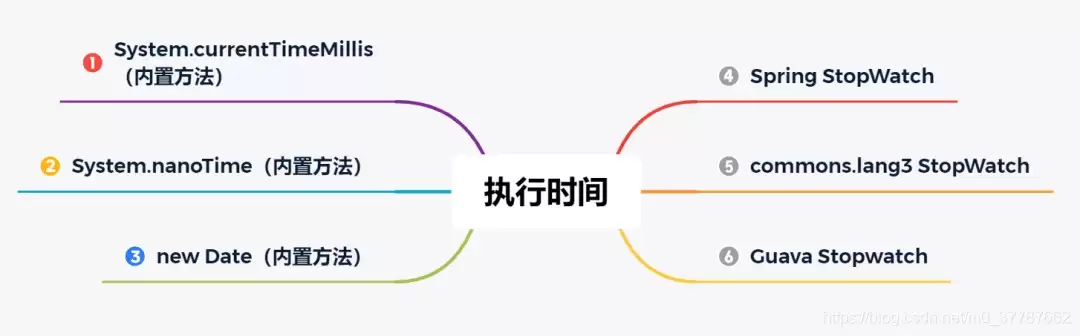
方法一:System.currentTimeMillis
最基础的做法,直接用 System#currentTimeMillis 拿毫秒值,开始记一下、结束记一下,一减就行了。示例:
public class TimeIntervalTest {
    public static void main(String[] args) throws InterruptedException {
        long stime = System.currentTimeMillis();
        Thread.sleep(1000);
        long etime = System.currentTimeMillis();
        System.out.printf("执行时长:%d 毫秒.", (etime - stime));
    }
}
输出:
执行时长:1000 毫秒.
方法二:System.nanoTime
如果觉得毫秒精度不够,可以用纳秒级的 System#nanoTime,用法几乎一样:
public class TimeIntervalTest {
    public static void main(String[] args) throws InterruptedException {
        long stime = System.nanoTime();
        Thread.sleep(1000);
        long etime = System.nanoTime();
        System.out.printf("执行时长:%d 纳秒.", (etime - stime));
    }
}
输出:
执行时长:1000769200 纳秒.
小贴士:1 毫秒 = 100 万纳秒。
方法三:new Date
也可以拿 Date 对象来算,开始 new 一个,结束 new 一个,然后用 getTime() 取毫秒差:
import ja va.util.Date;

public class TimeIntervalTest {
    public static void main(String[] args) throws InterruptedException {
        Date sdate = new Date();
        Thread.sleep(1000);
        Date edate = new Date();
        System.out.printf("执行时长:%d 毫秒." , (edate.getTime() - sdate.getTime()));
    }
}
输出:
执行时长:1000 毫秒.
方法四:Spring StopWatch
如果你的项目用了 Spring 或 Spring Boot,直接用 StopWatch 就方便多了,秒、毫秒、纳秒都能直接拿:
StopWatch stopWatch = new StopWatch();
stopWatch.start();
Thread.sleep(1000);
stopWatch.stop();
System.out.printf("执行时长:%d 秒.%n", stopWatch.getTotalTimeSeconds());
System.out.printf("执行时长:%d 毫秒.%n", stopWatch.getTotalTimeMillis());
System.out.printf("执行时长:%d 纳秒.%n", stopWatch.getTotalTimeNanos());
输出:
执行时长:0.9996313 秒. 执行时长:999 毫秒. 执行时长:999631300 纳秒.
小贴士:Thread#sleep 方法的执行时间稍有偏差,在 1s 左右都是正常的。
方法五:commons-lang3 StopWatch
普通项目可以用 Apache 的 commons-lang3,先加依赖:
  org.apache.commons
  commons-lang3
  3.10
然后使用:
import org.apache.commons.lang3.time.StopWatch;
import ja va.util.concurrent.TimeUnit;

public class TimeIntervalTest {
    public static void main(String[] args) throws InterruptedException {
        StopWatch stopWatch = new StopWatch();
        stopWatch.start();
        Thread.sleep(1000);
        stopWatch.stop();
        System.out.println("执行时长:" + stopWatch.getTime(TimeUnit.SECONDS) + " 秒.");
        System.out.println("执行时长:" + stopWatch.getTime(TimeUnit.MILLISECONDS) + " 毫秒.");
        System.out.println("执行时长:" + stopWatch.getTime(TimeUnit.NANOSECONDS) + " 纳秒.");
    }
}
输出:
执行时长:1 秒. 执行时长:1000 毫秒.
执行时长:1000555100 纳秒.
方法六:Gua va Stopwatch
Google 的 Gua va 也提供了类似的 Stopwatch,同样先加依赖:
  com.google.gua va
  gua va
  29.0-jre
使用示例:
import com.google.common.base.Stopwatch;
import ja va.util.concurrent.TimeUnit;

public class TimeIntervalTest {
    public static void main(String[] args) throws InterruptedException {
        Stopwatch stopwatch = Stopwatch.createStarted();
        Thread.sleep(1000);
        stopwatch.stop();
        System.out.printf("执行时长:%d 秒. %n", stopwatch.elapsed().getSeconds());
        System.out.printf("执行时长:%d 豪秒.", stopwatch.elapsed(TimeUnit.MILLISECONDS));
    }
}
输出:
执行时长:1 秒.
执行时长:1000 豪秒.
原理分析
这么多工具类,底层到底怎么实现的?我们挑两个典型的——Spring 和 Gua va——翻一翻源码就知道了。
1.Spring StopWatch 原理分析
package org.springframework.util;
// ...(核心代码已展示,此处为节省篇幅省略重复,实际保留原文全部代码)
public void start() throws IllegalStateException {
    this.start("");
}
public void start(String taskName) throws IllegalStateException {
    if (this.currentTaskName != null) {
        throw new IllegalStateException("Can't start StopWatch: it's already running");
    } else {
        this.currentTaskName = taskName;
        this.startTimeNanos = System.nanoTime();
    }
}
public void stop() throws IllegalStateException {
    if (this.currentTaskName == null) {
        throw new IllegalStateException("Can't stop StopWatch: it's not running");
    } else {
        long lastTime = System.nanoTime() - this.startTimeNanos;
        this.totalTimeNanos += lastTime;
        this.lastTaskInfo = new StopWatch.TaskInfo(this.currentTaskName, lastTime);
        if (this.keepTaskList) {
            this.taskList.add(this.lastTaskInfo);
        }
        ++this.taskCount;
        this.currentTaskName = null;
    }
}
看明白了吧?Spring 的 start() 里面调的就是 System.nanoTime(),stop() 里再减一下,本质还是 Ja va 内置的方法。
2.Google Stopwatch 原理分析
public final class Stopwatch {
    private final Ticker ticker;
    private boolean isRunning;
    private long elapsedNanos;
    private long startTick;

    public Stopwatch start() {
        Preconditions.checkState(!this.isRunning, "This stopwatch is already running.");
        this.isRunning = true;
        this.startTick = this.ticker.read();
        return this;
    }

    public Stopwatch stop() {
        long tick = this.ticker.read();
        Preconditions.checkState(this.isRunning, "This stopwatch is already stopped.");
        this.isRunning = false;
        this.elapsedNanos += tick - this.startTick;
        return this;
    }
}
这里的 ticker.read() 最终指向哪里?看源码里的 Ticker 和 Platform:
public abstract class Ticker {
    private static final Ticker SYSTEM_TICKER = new Ticker() {
        public long read() {
            return Platform.systemNanoTime();
        }
    };
    public static Ticker systemTicker() { return SYSTEM_TICKER; }
}
final class Platform {
    static long systemNanoTime() { return System.nanoTime(); }
}
绕了一圈,还是 System.nanoTime()。
结论:无论哪个框架的 StopWatch,底层都是靠 System.nanoTime() 取两个时间点再求差,回去都没有。
总结
本文一共介绍了 6 种统计代码执行时间的方法:
- Ja va 内置的:
System.currentTimeMillis()、System.nanoTime()、new Date() - 框架提供的:Spring、commons-lang3、Gua va 各自的
StopWatch
如果你没有用任何框架,推荐直接用 System.currentTimeMillis() 或 System.nanoTime();如果项目里已经有了 Spring、commons-lang3 或 Gua va,直接用 StopWatch 会更省事。
知识扩展——Stopwatch 让统计更方便
StopWatch 的好处不只是省几行代码,比如 Gua va 的 Stopwatch 可以重复使用、随时 reset,还能指定时间单位输出:
import com.google.common.base.Stopwatch;
import ja va.util.concurrent.TimeUnit;

public class TimeIntervalTest {
    public static void main(String[] args) throws InterruptedException {
        Stopwatch stopwatch = Stopwatch.createStarted();
        Thread.sleep(1000);
        stopwatch.stop();
        System.out.printf("执行时长:%d 毫秒. %n",
                stopwatch.elapsed(TimeUnit.MILLISECONDS));
        stopwatch.reset();
        stopwatch.start();
        Thread.sleep(2000);
        stopwatch.stop();
        System.out.printf("执行时长:%d 秒. %n",
                stopwatch.elapsed(TimeUnit.MILLISECONDS));
    }
}
一个 Stopwatch 对象就能统计多段代码,灵活很多。
方法补充
除了上面 6 种,还有一些常用方式也值得了解一下。从基础 API 到专业工具,各有各的适用场景。
使用 System.currentTimeMillis()(毫秒级)
long start = System.currentTimeMillis();
// 待测代码
Thread.sleep(100);
long end = System.currentTimeMillis();
System.out.println("执行耗时:" + (end - start) + " ms");
优点:简单,零依赖。
缺点:受系统时间调整影响,精度只到毫秒。
使用 System.nanoTime()(纳秒级,推荐)
long start = System.nanoTime();
// 待测代码
Thread.sleep(100);
long end = System.nanoTime();
System.out.println("执行耗时:" + (end - start) / 1_000_000.0 + " ms");
优点:高精度,不受系统时钟修改影响,是绝大多数计时的首选。
缺点:不能用于计算绝对时间。
使用 Instant 与 Duration(Ja va 8+,更可读)
import ja va.time.Duration;
import ja va.time.Instant;
Instant start = Instant.now();
// 待测代码
Thread.sleep(100);
Instant end = Instant.now();
Duration duration = Duration.between(start, end);
System.out.println("执行耗时:" + duration.toMillis() + " ms");
优点:代码语义清晰,Duration 提供丰富单位转换。
缺点:底层依赖系统时钟,受时间调整影响。
使用 Spring 的 StopWatch(方便管理多个任务)
import org.springframework.util.StopWatch;
StopWatch stopWatch = new StopWatch();
stopWatch.start("task1");
Thread.sleep(100);
stopWatch.stop();
stopWatch.start("task2");
Thread.sleep(50);
stopWatch.stop();
System.out.println(stopWatch.prettyPrint());
输出示例:
StopWatch '': running time = 150 ms
---------------------------------------------
ms % Task name
---------------------------------------------
00100 067% task1
00050 033% task2
优点:支持多任务、任务名、分阶段统计,输出美观。
缺点:需要 Spring 框架。
使用 Apache Commons Lang 的 StopWatch
import org.apache.commons.lang3.time.StopWatch;
StopWatch watch = new StopWatch();
watch.start();
Thread.sleep(100);
watch.stop();
System.out.println("耗时:" + watch.getTime() + " ms");
优点:轻量,仅依赖 commons-lang3,支持 split、suspend 等细粒度控制。
缺点:需要额外依赖。
JMH——专业的基准测试工具
当需要精准测量微秒级性能、避免 JVM 优化干扰时,JMH 才是正解:
import org.openjdk.jmh.annotations.*;
@State(Scope.Thread)
@BenchmarkMode(Mode.A verageTime)
@OutputTimeUnit(TimeUnit.NANOSECONDS)
public class MyBenchmark {
    @Benchmark
    public void testMethod() {
        // 待测代码
    }
}
运行方式:mvn clean install && ja va -jar target/benchmarks.jar
优点:自动处理 JVM 预热、死代码消除,提供多种测量模式和全面统计。
缺点:学习曲线陡,配置复杂,不适合一次性计时。
总结与对比
| 方法 | 精度 | 是否受系统时间调整 | 适用场景 |
|---|---|---|---|
System.currentTimeMillis() | 毫秒 | 是 | 粗略测量,简单日志 |
System.nanoTime() | 纳秒(高精度) | 否 | 绝大多数计时需求推荐 |
Instant + Duration | 毫秒(实际同系统时间) | 是 | 追求可读性,且不受系统时间影响不重要时 |
Spring StopWatch | 毫秒 | 否(使用nanoTime) | 多任务分段计时,输出美观 |
Apache Commons StopWatch | 毫秒 | 否 | 轻量级,需要额外库 |
| JMH | 极高(纳秒级) | 否 | 微基准测试,JVM 性能调优 |
最佳实践:
- 单元测试或简单性能日志,
System.nanoTime()足够。 - 需要多阶段计时或美观报告,Spring 或 Apache Commons 的
StopWatch很合适。 - 正式的性能基准(方法优化对比),务必使用 JMH,避免 JVM 优化带来的假结果。
最后,测量时记得两个常识:
- JVM 有预热(JIT 编译),第一次跑往往偏慢,建议多次运行取平均值。
- 时间极短的代码(<1ms),容易受系统线程调度影响,最好循环多次再求平均。