

SpringBoot/SpringCloud使用jasypt-spring-boot实现配置文件加密
使用Jasypt库可对SpringBoot及Cloud配置文件中的敏感信息(如密码、密钥)进行加密。通过ENC()标记加密值,应用启动时自动解密。加密密钥需通过环境变量等安全方式传递,避免硬编码,确保系统安全。
一、引言:为什么需要配置文件加密?
在现代软件开发和部署中,应用程序的配置文件(如 application.properties 或 application.yml)常常包含敏感信息,例如:

- 数据库用户名和密码
- 第三方服务的 API Key 或 Secret
- 消息队列的连接凭证
- Redis、MongoDB 等中间件的访问密码
- 加密密钥或证书路径
这些敏感信息如果以明文形式存储在配置文件中,无论是在代码仓库、服务器文件系统还是容器镜像里,都存在极大的安全风险。一旦泄露,可能导致数据被窃取、服务被滥用或系统被攻击。因此,对配置文件中的敏感信息进行加密处理是保障应用安全的重要环节。
本文将详细介绍如何使用 jasypt-spring-boot 库,在 Spring Boot 和 Spring Cloud 项目中实现配置文件内容的加密与解密。
二、核心工具:jasypt-spring-boot
jasypt-spring-boot 是一个集成 Jasypt (Ja va Simplified Encryption) 的 Spring Boot Starter,它极大地简化了在 Spring Boot 应用中进行属性加密和解密的过程。
- Jasypt: 一个强大的 Ja va 加密库,提供简单的 API 来加密、解密密码、文本、数字等。
- jasypt-spring-boot: 将 Jasypt 无缝集成到 Spring Boot 的
Environment抽象层中,允许开发者使用特定的格式(如ENC(encrypted_value))来标记加密后的属性值。Spring Boot 在启动时会自动识别并解密这些值,使应用代码无需关心解密过程。
三、安装与依赖
首先,需要在你的 Spring Boot 项目的 pom.xml(Ma ven)或 build.gradle(Gradle)文件中添加 jasypt-spring-boot-starter 依赖。
Ma ven (pom.xml)
    com.github.ulisesbocchio
    jasypt-spring-boot-starter
    3.0.5
Gradle (build.gradle)
dependencies {
    implementation 'com.github.ulisesbocchio:jasypt-spring-boot-starter:3.0.5'
    // ... 其他依赖
}
注意:jasypt-spring-boot 的版本通常需要与你的 Spring Boot 版本兼容。建议查阅 GitHub Releases 页面选择正确的版本。
四、加密密钥(Password)管理
Jasypt 加密和解密都需要一个共享的加密密钥(Password)。这个密钥必须被安全地传递给应用。常见的设置方式有:
- 命令行参数:
ja va -jar myapp.jar --jasypt.encryptor.password=myStrongPassword - 环境变量:
export JASYPT_ENCRYPTOR_PASSWORD=myStrongPassword && ja va -jar myapp.jar - 配置文件: 在
application.properties或application.yml中设置(强烈不推荐,因为这样失去了加密的意义,但可用于测试)。例如:
# application.properties
jasypt.encryptor.password=myStrongPassword
# application.yml
jasypt:
  encryptor:
    password: myStrongPassword
最佳实践:将 jasypt.encryptor.password 通过环境变量或命令行参数的方式传入,避免将其硬编码在配置文件中。
五、执行加密
加密操作可以通过多种方式进行,最常用的是使用命令行工具或编写一个简单的 Ja va 工具类。
方法一:命令行工具(使用 jasypt CLI)
下载 Jasypt 的发行包,解压后在 bin 目录下有各种脚本(encrypt.bat, encrypt.sh 等)。
执行命令:
./encrypt.sh input="your-sensitive-value" password="myStrongPassword"
(Windows 用户使用 encrypt.bat)
输出示例:
----ENVIRONMENT-----------------
Runtime: Oracle Corporation Ja va HotSpot(TM) 64-Bit Server VM 25.201-b09
... (其他环境信息)
----ARGUMENTS-------------------
input: your-sensitive-value
password: myStrongPassword
...
----OUTPUT----------------------
UyBtaXNzaW5nIHlvdSB0aGVyZQ== # 这是加密后的值
方法二:Ja va 工具类
创建一个简单的 Ja va 类来执行加密:
import org.jasypt.encryption.StringEncryptor;
import org.jasypt.encryption.pbe.StandardPBEStringEncryptor;
import org.jasypt.encryption.pbe.config.EnvironmentStringPBEConfig;

public class JasyptEncryptionUtil {

    public static void main(String[] args) {
        if (args.length != 1) {
            System.err.println("Usage: ja va JasyptEncryptionUtil ");
            System.exit(1);
        }
        String valueToEncrypt = args[0];
        String password = System.getenv("JASYPT_ENCRYPTOR_PASSWORD"); // 从环境变量读取密码
        if (password == null || password.isEmpty()) {
             System.err.println("Error: JASYPT_ENCRYPTOR_PASSWORD environment variable is not set.");
             System.exit(2);
        }

        StandardPBEStringEncryptor encryptor = new StandardPBEStringEncryptor();
        EnvironmentStringPBEConfig config = new EnvironmentStringPBEConfig();
        config.setPassword(password); // 设置加密密码
        // 可选:设置算法、迭代次数等
        // config.setAlgorithm("PBEWithMD5AndDES");
        encryptor.setConfig(config);

        String encryptedValue = encryptor.encrypt(valueToEncrypt);
        System.out.println("Encrypted Value: " + encryptedValue);
    }
}
编译并运行:
ja vac -cp "path/to/jasypt-*.jar" JasyptEncryptionUtil.ja va
export JASYPT_ENCRYPTOR_PASSWORD=myStrongPassword
ja va -cp ".:path/to/jasypt-*.jar" JasyptEncryptionUtil "your-sensitive-value"
方法三:使用 jasypt-spring-boot 提供的工具(需要将库引入到测试或单独的工具模块)
如果你的应用已经包含了 jasypt-spring-boot-starter,你可以利用其内部的 StringEncryptor bean 来加密,但这通常不如前两种方法直接。
六、在配置文件中使用加密值
获得加密后的字符串后,你需要将其放入你的 Spring Boot 配置文件中。jasypt-spring-boot 会自动识别 ENC(encrypted_value) 格式的属性值并进行解密。
application.yml 示例:
spring:
  datasource:
    url: jdbc:mysql://localhost:3306/mydb
    username: ENC(U2FsdGVkX1+...) # 加密后的用户名
    password: ENC(U2FsdGVkX1+...) # 加密后的密码
    driver-class-name: com.mysql.cj.jdbc.Driver
myapp:
  api:
    key: ENC(V2FsdGVkX1+...) # 加密后的API Key
application.properties 示例:
spring.datasource.url=jdbc:mysql://localhost:3306/mydb
spring.datasource.username=ENC(U2FsdGVkX1+...)
spring.datasource.password=ENC(U2FsdEVkX1+...)
spring.datasource.driver-class-name=com.mysql.cj.jdbc.Driver
myapp.api.key=ENC(V2FsdGVkX1+...)
当 Spring Boot 应用启动时,jasypt-spring-boot 会拦截这些属性的读取请求,检测到 ENC(...) 标记,然后使用配置的密码对其进行解密,并将解密后的原始值注入到相应的 Bean 属性或通过 @Value 注解注入到变量中。
七、EncryptablePropertyResolver
EncryptablePropertyResolver 是 jasypt-spring-boot 内部使用的一个关键接口,用于解析包含 ENC() 标记的属性值。它扩展了 Spring 的 org.springframework.core.env.PropertyResolver 接口。
- 当
Environment尝试解析一个属性时(例如environment.getProperty("spring.datasource.password")), jasypt-spring-boot会提供一个实现了EncryptablePropertyResolver的包装器。- 这个包装器检查属性值是否以
ENC(开头且以)结尾。 - 如果是,则提取括号内的加密字符串,使用
StringEncryptor解密,并返回解密后的结果。 - 如果不是,则直接返回原始值。
开发者通常不需要直接与 EncryptablePropertyResolver 交互,jasypt-spring-boot-starter 会自动完成这一过程。
八、进阶配置与注意事项
- 自定义加密器: 可以通过配置
jasypt.encryptor.*属性来自定义加密算法、迭代次数、盐值生成器等。
jasypt:
  encryptor:
    algorithm: PBEWITHHMACSHA512ANDAES_256 # 更强的算法
    iv-generator-classname: org.jasypt.iv.RandomIvGenerator # 使用随机IV
    # ... 其他配置
- 性能: 加密/解密操作在应用启动时发生,对于运行时性能影响很小。但如果需要频繁读取大量加密属性,可能会有微小开销。
- 安全性: 确保加密密钥
jasypt.encryptor.password的安全性至关重要。不要将其硬编码在代码或配置文件中。使用环境变量、Kubernetes Secrets、HashiCorp Vault 等外部化、安全的密钥管理方案是更好的选择。 - Spring Cloud Config: 如果你使用 Spring Cloud Config 作为配置中心,同样可以在 Config Server 端或 Client 端启用
jasypt-spring-boot来加密和解密从 Config Server 获取的配置。
九、总结
通过 jasypt-spring-boot,可以非常方便地在 Spring Boot 和 Spring Cloud 项目中实现配置文件的加密。其核心在于使用 ENC() 标记加密后的值,并通过 jasypt.encryptor.password 来解密。EncryptablePropertyResolver 在后台自动完成了识别、解密和替换的过程。正确管理和保护加密密钥是确保此安全措施有效性的关键。
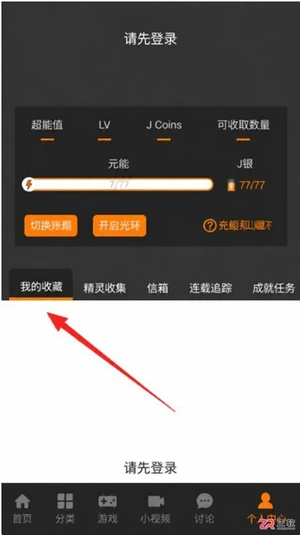
JM漫画app最新版入口是https://www.jmmanhua.top/,这里有免费观看、离线下载及极简操作优势。针对隐私保护需求,详细解析在设置中通过“隐私设置”与“我收藏的漫画”界面实现内容完全隐藏的具体步骤。同时解答新手关于操作流程、离线功能及适用性的常见疑问,帮助用户快速上手并享受无广告干扰的阅读体验。

面向希望获取丰富漫画资源并实现离线阅读的移动端用户,漫蛙3Manwa3(https://www.manwamh.top/)提供快速更新与多设备支持。针对网络不稳定或流量受限痛点,本文详解官方正版下载后的核心操作:包括通过详情页批量缓存章节、利用关键词与榜单精准检索韩漫、切换横竖屏及夜间模式优化体验,以及账号登录实现跨安卓设备进度同步,帮助用户高效管理本地资源库。

面向二次元漫画爱好者,漫蛙漫画(https://www.manwamh.top/)提供丰富的全彩漫画资源及多国语言阅读支持。针对用户寻找稳定入口、高效检索及舒适阅读的需求,本文介绍漫蛙漫画的线路选择、防走失网址收藏方法,详解从“最近更新”查找韩漫、一键搜索到离线下载的操作流程,并涵盖日间/夜间模式切换、书架管理等新手必备技巧,帮助用户快速上手享受流畅的追漫体验。

漫蛙Manwa3 APP最新版下载地址:https://www.manwamh.top/,这里包含核心功能与操作流程。针对账号注册、VIP开通及阅读设置等关键环节,本文详细梳理了从手机号注册登录、浏览热门榜单到开启高清无广告阅读的具体步骤。涵盖多语言切换、云同步、断点续传及多种阅读模式调整方法,帮助用户快速掌握软件用法,享受流畅的追漫体验。

iSlide设计工具侧边栏不见了怎么办?本教程详解在Windows版PPT中通过【设计工具】按钮恢复侧边栏的方法,涵盖面板拖拽、模块隐藏检查及插件加载异常的处理,同时提供macOS用户的使用指引。
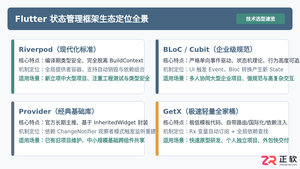
全面盘点Flutter主流状态管理框架,深度解析Provider、Riverpod、Bloc与GetX的核心机制、优缺点及适用场景,提供系统化的状态管理选型指南。
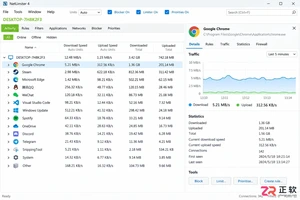
新手入门 NetLimiter 必读指南。详解 Activity 实时监控、DL/UL Limit 限速设置、Blocker 阻止规则及 Stats 流量统计功能。图文结合展示规则编辑器操作,助你轻松管理 Windows 应用网络带宽。
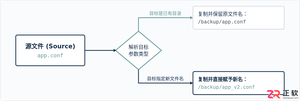
在Linux系统中,复制文件并改名并没有单独的独立命令,而是通过标准复制命令cp在指定目标路径时直接写上新文件名来完成。本文详解cp命令复制并重命名的操作语法、同目录与跨目录示例、常用安全参数及目录复制实践。

学习如何将Blender中的动态材质导出为图片序列。涵盖输出路径设置、PNG格式选择、帧范围确认及Image Sequence贴图的重新载入方法,适合需要保留透明通道或后期处理的动画贴图工作流。

想在iPhone或iPad上实现锁屏一键直达?本文详解“锁屏启动”的安装前检查清单、系统权限配置步骤及小组件添加方法,解决组件不显示、点击无反应等常见问题,确保快捷指令、网页和App快速启动。




Postman是一套面向API全生命周期的开发与测试平台,可在Mac上发送和调试多种协议请求,管理集合、环境及认证信息,并完成脚本测试、模拟服务、监控、文档发布和团队协作。它适合开发、测试及运维人员使用,提供个人免费方案。

Docker Desktop 是 Docker 官方为 Mac 提供的容器开发环境,集成 Docker Engine、命令行工具、Compose、Build、Kubernetes 与图形化管理界面。

Android Studio 是 Google 面向安卓应用开发提供的官方集成开发环境,基于 IntelliJ IDEA 构建。它整合智能代码编辑、Gradle 构建、界面预览、设备模拟、性能分析、调试测试及 APK 分析等工具。

PixPix 是面向品牌、卖家和内容团队的在线 AI 图片视频创作平台,提供图视频 Agent、无限画布、图片生成、视频生成、自然语言编辑及商品套图、产品精修和带货视频等电商工具。

Postman 是面向 API 全生命周期的开发与协作平台。Windows 桌面版可用于构建和发送 HTTP、GraphQL、gRPC、WebSocket、MQTT 等请求,并提供环境变量、集合、脚本测试、模拟服务、监控、文档及团队工作区等

Docker Desktop 为 Windows 开发者提供集成式容器环境,内置 Docker Engine、命令行工具、Compose、Build 与 Kubernetes 等组件,可在本机完成镜像构建、容器运行、日志查看和资源管理。