

JavaWeb程序设计之JSP实现购物车功能全过程
一、结合之前所学的相关技术,编写代码实现以下购物车功能 1. 编写一个页面,展现商品列表(静态页面),页面右上方有登陆、结账和查看购物车三个按钮,下方展示网站历史访问的人数 2. 用户点击商品后,可以将商品加入购物车 3. 用户点击登陆,跳转到登陆页面 4. 用户点击结账,若已登陆跳转至结账页面,否
一、结合之前所学的相关技术,编写代码实现以下购物车功能
1. 编写一个页面,展现商品列表(静态页面),页面右上方有登陆、结账和查看购物车三个按钮,下方展示网站历史访问的人数
2. 用户点击商品后,可以将商品加入购物车
3. 用户点击登陆,跳转到登陆页面
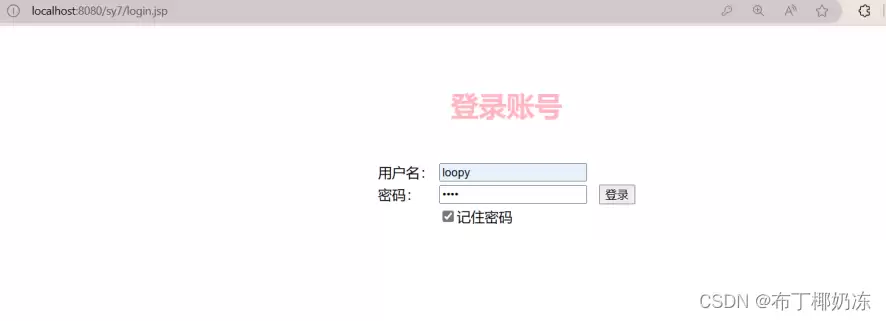
4. 用户点击结账,若已登陆跳转至结账页面,否则跳转到登陆页面登陆后再跳转到结账页。
5. 用户点击查看购物车按钮,跳转至购物车页面,可查看购物车列表、增加商品数量或者删除商品
要实现一个完整的购物车功能,其实涉及到的技术点还挺多的,从前端页面展示到后端数据库交互,再到Session管理,每一步都得衔接上。下面就把整个实现过程拆解开来,一步步看。
1. 实现的功能运行截图如下
(1)商品列表页面home.jsp
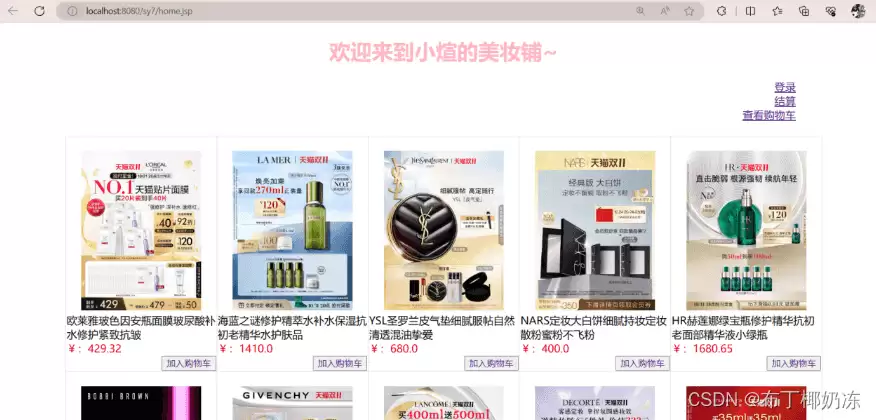
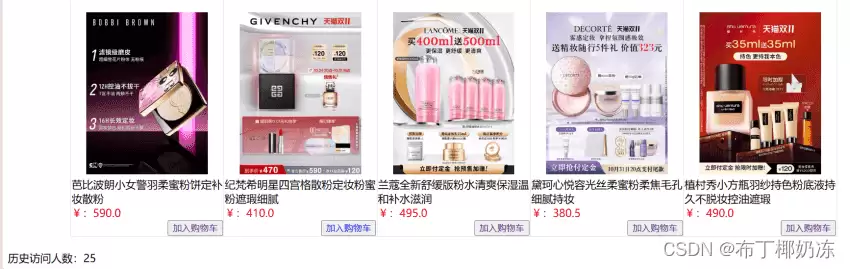
(2)登录账号页面/未登录点击结账页面
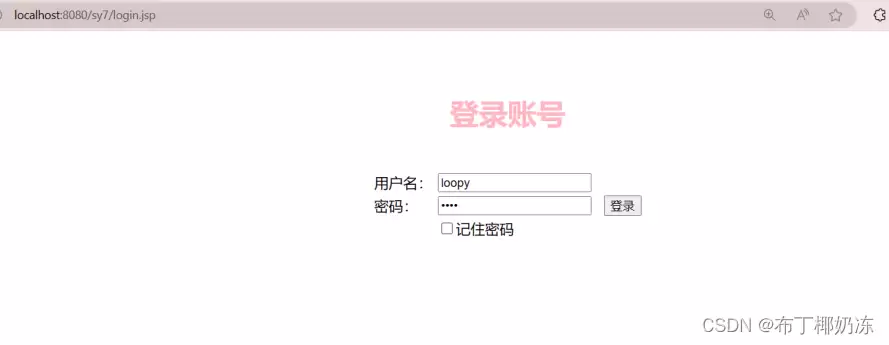
(3)重新登录页面(记住上次登录的用户名和密码)
(4)点击任意商品加入购物车之后查看购物车
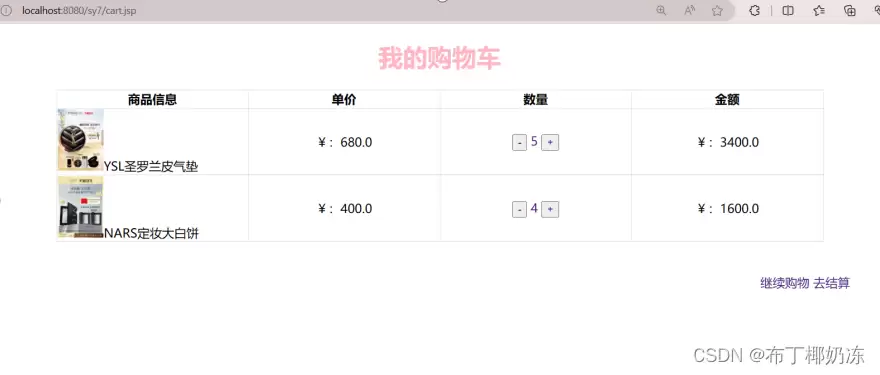
(5)增加或减少商品
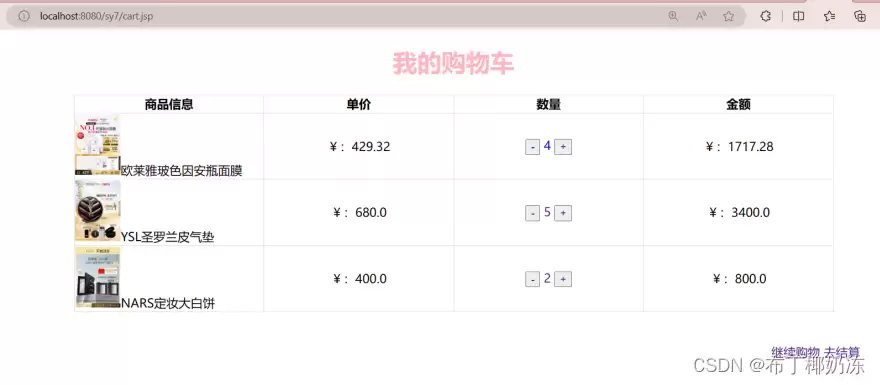
(6)商品数量减为0时移除
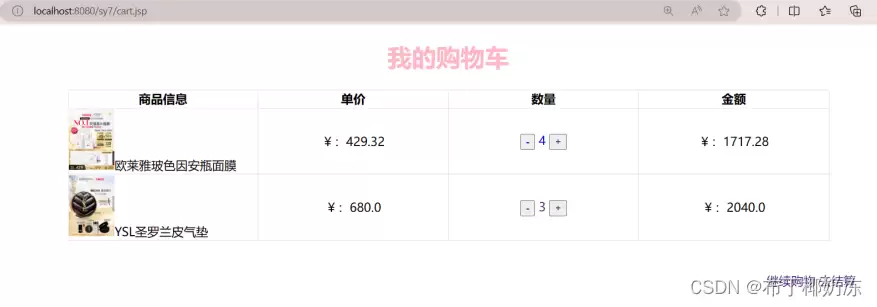
(7)点击去结算,展示总金额
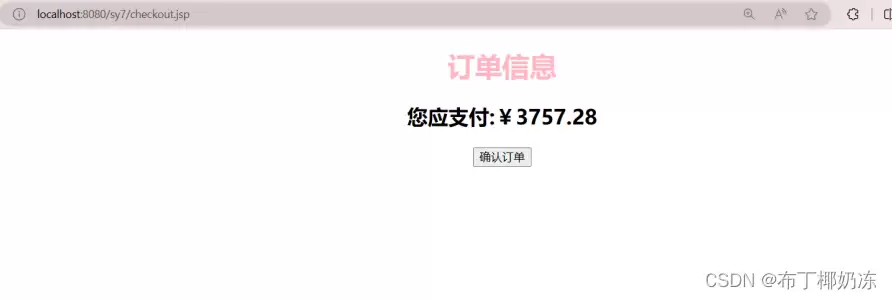
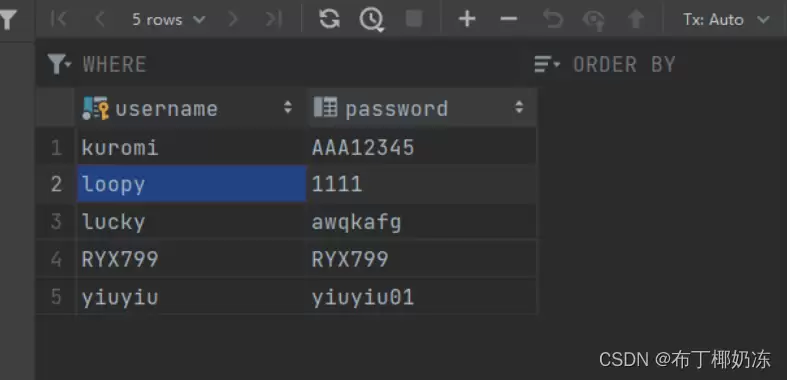
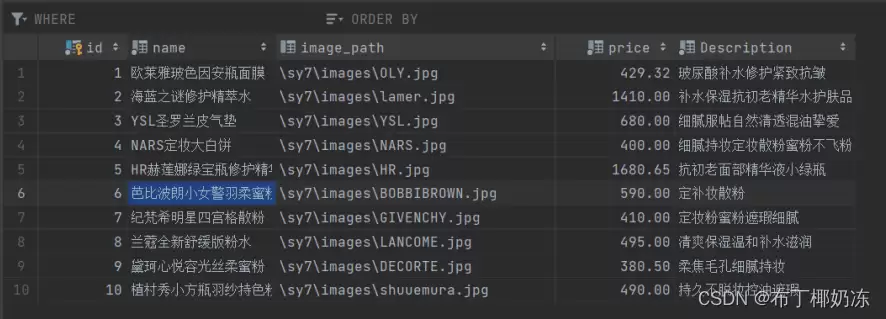
2. 数据库test存放的表格
(1)user表
(2)product表
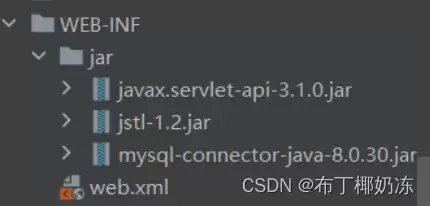
导入jar包
3. 实体类
(1)User
package com.ryx.web.sy7;

import lombok.AllArgsConstructor;
import lombok.Builder;
import lombok.Data;
import lombok.NoArgsConstructor;

@NoArgsConstructor
@AllArgsConstructor
@Data
@Builder
public class User {
    private String username;
    private String password;
}
(2)Product.ja va
package com.ryx.web.sy7;

import lombok.AllArgsConstructor;
import lombok.Builder;
import lombok.Data;
import lombok.NoArgsConstructor;

import ja va.math.BigDecimal;

@Data
@Builder
@NoArgsConstructor
@AllArgsConstructor
public class Product {
    Integer id;
    String name;
    String imagePath;
    BigDecimal price;
    String description;
}
(3)ProductVo
package com.ryx.web.sy7;

import lombok.Getter;
import lombok.Setter;

import ja va.math.BigDecimal;

public class ProductVo extends Product {
    @Getter
    @Setter
    Integer count; //统计数量

    public ProductVo(Integer id, Integer count, String name, double price, String imagePath) {
        super();
        this.id = id;
        this.count = count;
        this.name = name;
        this.price = BigDecimal.valueOf(price);
        this.imagePath=imagePath;
    }
}
4. CartController.ja va
package com.ryx.web.sy7;

import lombok.SneakyThrows;
import org.springframework.util.ObjectUtils;

import ja vax.servlet.ServletException;
import ja vax.servlet.annotation.WebServlet;
import ja vax.servlet.http.HttpServlet;
import ja vax.servlet.http.HttpServletRequest;
import ja vax.servlet.http.HttpServletResponse;
import ja vax.servlet.http.HttpSession;
import ja va.io.IOException;
import ja va.sql.*;
import ja va.util.HashMap;
import ja va.util.Map;

@WebServlet(name = "shoppingCart", value = "/shoppingCart")
public class CartController extends HttpServlet {

//    连接数据库
    private static final String DB_URL = "jdbc:mysql://localhost:3306/test";
    private static final String DB_USERNAME = "root";
    private static final String DB_PASSWORD = "abc1234";

    @SneakyThrows
    protected void doGet(HttpServletRequest request, HttpServletResponse response) throws ServletException, IOException {
        Integer id = Integer.valueOf(request.getParameter("id"));
        String op = request.getParameter("op");
        String whereCome = request.getHeader("Referer");
        String redirectPath = null;

//        如果在主页点击加入购物车超链接,不跳转
        if (whereCome.equals("http://localhost:8080/sy7/home.jsp")) {
            redirectPath = request.getContextPath() + "/sy7/home.jsp";
        } else {
//            如果在购物车页面增加或删除商品也不跳转
            redirectPath = request.getContextPath() + "/sy7/cart.jsp";
        }

        HttpSession session = request.getSession();
        Map cart = (Map) session.getAttribute("cart");
        if (ObjectUtils.isEmpty(cart)) {
            cart = new HashMap();
        }

        switch (op) {
//            添加商品
            case "add":
                if (!ObjectUtils.isEmpty(cart.get(id))) {
                    ProductVo productVo = cart.get(id);
                    productVo.setCount(productVo.getCount() + 1);
                    cart.put(id, productVo);
                } else {
                    Class.forName("com.mysql.jdbc.Driver");
                    try (Connection conn = DriverManager.getConnection(DB_URL, DB_USERNAME, DB_PASSWORD)) {
                        String query = "SELECT * FROM product WHERE id = ?";
                        try (PreparedStatement stmt = conn.prepareStatement(query)) {
                            stmt.setInt(1, id);
                            try (ResultSet rs = stmt.executeQuery()) {
                                if (rs.next()) {
                                    String name = rs.getString("name");
                                    double price = rs.getDouble("price");
                                    String imagePath = rs.getString("image_path");
                                    Integer iid = rs.getInt("id");
                                    ProductVo productVo = new ProductVo(iid, 1, name, price, imagePath);
                                    cart.put(id, productVo);
                                }
                            }
                        }
                    } catch (SQLException e) {
                        e.printStackTrace();
                    }
                }
                break;

//          减少商品
            case "sub":
                if (!ObjectUtils.isEmpty(cart.get(id))) {
                    ProductVo productVo = cart.get(id);
//                    防止出现负数
                    if (productVo.getCount() > 1) {
                        productVo.setCount(productVo.getCount() - 1);
                        cart.put(id, productVo);
                    } else {
//                        如果小于1则移除商品
                        cart.remove(id);
                    }
                }
                break;
        }

        session.setAttribute("cart", cart);
        response.sendRedirect(redirectPath);
    }
}
5. JSP页面
(1)展现商品列表(home.jsp)
CSS
table {
    border-collapse: collapse;
    width: 86%;
}
table, th, td {
    border: 1px solid gainsboro;
}
td {
    width: 200px;
}
.redText {
    color: #FF0000;
}
.pinkTest {
    color: lightpink;
}
<%@ page import="ja va.sql.Connection" %>
<%@ page import="ja va.sql.PreparedStatement" %>
<%@ page import="ja va.sql.ResultSet" %>
<%@ page import="ja va.sql.DriverManager" %>
<%--
Created by IntelliJ IDEA.
User: 86189
Date: 2023/10/23
主页面展示商品
--%>
<%@ page language="ja va" contentType="text/html; charset=UTF-8" pageEncoding="UTF-8" %>
小煊的美妆铺
欢迎来到小煊的美妆铺~
<%--------------------------图片-----------------------%> <%=name%><%=description%>
<%--------------------------价格-----------------------%>
¥:<%=price%>
<%--------------------------加购-----------------------%>
|
<%
//闭合标签
if (count % 5 == 4) {
out.println("
<% // 初始化历史访问人数 Integer accessCount = (Integer) session.getAttribute("accessCount"); if (accessCount == null) { accessCount = new Integer(0); } else { accessCount = new Integer(accessCount.intValue() + 1); } session.setAttribute("accessCount", accessCount); %>
(2)登陆页面(login.jsp)
JSP程序段+JS代码
<%-----------------------JSP程序段---------------------------%>
<%
request.setCharacterEncoding("UTF-8");
//一次性登录
String msg = request.getParameter("msg");
%>
<%
if (msg != null) {
String errorMessage = "账号或密码有误,请重新输入!";
%>
<%
}
%>
<%-- 读取Cookie --%>
<%
Cookie[] cookies = request.getCookies();
String sa vedUsername = null;
String sa vedPassword = null;
if (cookies != null) {
for (Cookie cookie : cookies) {
if (cookie.getName().equals("username")) {
sa vedUsername = cookie.getValue();
} else if (cookie.getName().equals("password")) {
sa vedPassword = cookie.getValue();
}
}
}
%>
HTML
<%--
Created by IntelliJ IDEA.
User: 86189
Date: 2023/10/13
登录页面
--%>
<%@ page contentType="text/html;charset=UTF-8" language="ja va" pageEncoding="UTF-8" %>
登录页面
<%-----------------------登录表单--------------------------%>
(3)登录后台处理页面(loginAction.jsp)
<%@ page import="com.ryx.web.sy7.User" %>
<%@ page import="ja va.sql.*" %>
<%--
  Created by IntelliJ IDEA.
  User: 86189
  Date: 2023/10/13
  判断输入的用户信息是否存在数据库
--%>
<%@ page contentType="text/html;charset=UTF-8" language="ja va" %>
<%!
    public boolean validateUser(String username, String password) {
        // 使用JDBC连接数据库
        Connection connection = null;
        PreparedStatement statement = null;
        ResultSet resultSet = null;
        String driver = "com.mysql.cj.jdbc.Driver";
        String url = "jdbc:mysql://localhost:3306/test";  //数据库
        String user = "root"; //账户
        String psword = "abc1234"; //密码
        try {
            try {
                try {
                    Class.forName(driver);
                } catch (ClassNotFoundException e) {
                    throw new RuntimeException(e);
                }
                // 获取数据库连接
                connection = DriverManager.getConnection(url, user, psword);
            } catch (SQLException e) {
                e.printStackTrace();
            }
            try {
                // 构造查询语句
                String query = "SELECT * FROM test.user WHERE username =  ? ";
                // 创建PreparedStatement对象,并设置参数
                statement = connection.prepareStatement(query);
                statement.setString(1, username);
                // 执行查询
                resultSet = statement.executeQuery();
                // 验证用户名和密码
                if (resultSet.next()) {
                    String storedPassword = resultSet.getString("password");
                    if (storedPassword.equals(password)) {
                        return true;
                    }
                }
            } catch (SQLException e) {
                e.printStackTrace();
            }
        } finally {
            // 关闭连接和释放资源
            try {
                if (resultSet != null) {
                    resultSet.close();
                }
                if (statement != null) {
                    statement.close();
                }
                if (connection != null) {
                    connection.close();
                }
            } catch (SQLException e) {
                e.printStackTrace();
            }
        }
        return false;
    }
 %>
<%
    request.setCharacterEncoding("UTF-8");
    String username = request.getParameter("username");
    String password = request.getParameter("password");
    boolean isValidUser = validateUser(username, password);
    //验证成功
    if (isValidUser) {
        // 创建形 Builder 构造者模式,链式编程
        User user = User.builder()
                    .username(username)
                    .password(password)
                    .build();
        String remember = request.getParameter("remember");
        if (remember != null && remember.equals("member")) {
            // 创建存储用户名和密码的Cookie对象
            Cookie usernameCookie = new Cookie("username", username);
            Cookie passwordCookie = new Cookie("password", password);
            // 设置Cookie的有效期(设置为7天)
            usernameCookie.setMaxAge(7 * 24 * 60 * 60); // 7天
            passwordCookie.setMaxAge(7 * 24 * 60 * 60); // 7天
            // 将Cookie添加到响应中
            response.addCookie(usernameCookie);
            response.addCookie(passwordCookie);
        } else {
            // 删除之前保存的Cookie
            Cookie[] cookies = request.getCookies();
            if (cookies != null) {
                for (Cookie cookie : cookies) {
                    if (cookie.getName().equals("username") || cookie.getName().equals("password")) {
                        cookie.setMaxAge(0); // 设置有效期为0,即立即删除
                        response.addCookie(cookie);
                    }
                }
            }
        }
        session.setAttribute("user", user);
        //跳转到其他页面
        response.sendRedirect("home.jsp");
    } else {
        //验证失败,提示出错
        response.sendRedirect("login.jsp?msg=failed");
    }
 %>
(4)结账页面(checkout.jsp)
HTML+JSP+JSTL
<%@ taglib prefix="c" uri="http://ja va.sun.com/jsp/jstl/core" %>
<%@ page import="com.ryx.web.sy7.User" %>
<%@ page import="ja va.util.Map" %>
<%--
Created by IntelliJ IDEA.
User: 86189
Date: 2023/10/21
结算页面
--%>
<%@ page contentType="text/html;charset=UTF-8" language="ja va" pageEncoding="UTF-8" %>
<%--------------------判断用户是否登录-----------------------%>
<%
//存储变量
User user = (User) session.getAttribute("user");
// 未登录用户跳转到登录页面
if (user == null) {
response.sendRedirect("login.jsp");
}
%>
结算
<%----------------- 获取购物车中的商品 ------------------------%>
订单信息
<%
session = request.getSession();
Map cart = (Map) session.getAttribute("cart");
if (cart == null) {
out.println("购物车为空");
return;
}
%>
<%--计算总价钱--%>
您应支付:¥${totalAmount}
(5)购物车页面(cart.jsp)
CSS
table {
    border-collapse: collapse;
}
table, th, td {
    border: 1px solid gainsboro;
}
.titleTest {
    color: lightpink;
}
td {
    width: 20%;
}
a {
   text-decoration: none;
}
HTML
<%@ page language="ja va" contentType="text/html; charset=UTF-8" pageEncoding="UTF-8" %>
<%@ taglib prefix="c" uri="http://ja va.sun.com/jsp/jstl/core" %>
<%@ taglib prefix="fn" uri="http://ja va.sun.com/jsp/jstl/functions" %>
<%--
Created by IntelliJ IDEA.
User: 86189
Date: 2023/10/21
购物车页面
--%>
购物车
我的购物车
商品信息
单价
数量
金额
 ${product.name}
¥:${product.price}
<%----------------------数量-/+--------------------%>
${product.count}
<%----------------------金额--------------------%>
¥:${product.count*product.price}
解析PHP递归函数在树形数据处理中的性能瓶颈,提供预加载数据消除I/O、使用显式栈替代深层递归的实战方案,帮助开发者在代码可读性与执行效率间做出合理取舍。
详细讲解在Java单元测试中如何使用Mockito模拟依赖对象,包括引入依赖、创建Mock、打桩返回值、行为验证以及Mock与Spy的核心差异和常见陷阱排查。

详细分析链表删除节点的时间复杂度,深入探讨单链表与双向链表在不同已知前提下的查找与删除开销,并结合完整代码与清晰图解进行对比总结。

想知道如何让AI写出的代码更贴合你的习惯?本文手把手教你在VS Code中调整Codex相关模型参数,通过修改配置文件优化温度值和令牌限制,解决代码建议不准确或响应慢的问题。

通过实测展示Claude Code在终端中如何理解自然语言指令、自动修改代码文件并处理复杂编程任务,帮助开发者评估其实际辅助能力。

本教程详细讲解如何使用Visual Studio创建WinForms项目,通过添加按钮和标签控件并编写点击事件代码,实现一个基础的计数器功能,适合C#初学者快速上手Windows窗体应用开发。

详解Cursor编辑器中自动补全功能的开启与优化设置,涵盖Tab触发机制、上下文窗口调整及模型切换,帮助开发者解决补全延迟、干扰大等问题,提升编码流畅度。

详解Pandas中数据格式转换的核心方法,包括astype强制转换、to_numeric容错处理及日期解析技巧,解决常见类型错误并提升数据处理效率。
详细介绍在Visual Studio Code中安装Chinese (Simplified)语言包的方法,包括通过扩展市场搜索、安装及自动重启切换至简体中文界面的完整步骤,帮助开发者快速将编辑器本地化。
针对Cursor安装包默认锁定C盘且无路径选择界面的问题,提供通过手动移动文件并创建目录联结(Symbolic Link)的解决方案,实现将软件安装在其他磁盘分区。




Photoshop 2026 是 Adobe 推出的专业图像处理与视觉设计软件,支持 Windows、macOS 和 iPad 等平台,广泛应用于摄影修图、电商设计、平面海报、数字绘画及视觉合成等创作场景。

Blender 是一款免费开源、跨平台的专业 3D 创作软件,集建模、动画、渲染、视频编辑与视觉合成等功能于一体,广泛应用于影视动画、游戏设计和建筑可视化等领域。软件支持 Cycles 物理渲染器与 Eevee 实时渲染引擎,并提供多边形建模、骨骼绑定、物理模拟等专业工具。Blender 兼容 Windows、macOS 和 Linux 系统,安装包轻巧、运行流畅,依托活跃的全球开发者社区持续更新,是从初学者到专业创作者都值得选择的正版 3D 创作工具。


Photoshop 2026 是 Adobe 推出的专业图像处理与视觉设计软件,支持 Windows、macOS 和 iPad 等平台,广泛应用于摄影修图、电商设计、平面海报、数字绘画及视觉合成等创作场景。
Blender 是一款免费开源、跨平台的专业 3D 创作软件,集建模、动画、渲染、视频编辑与视觉合成等功能于一体,广泛应用于影视动画、游戏设计和建筑可视化等领域。软件支持 Cycles 物理渲染器与 Eevee 实时渲染引擎,并提供多边形建模、骨骼绑定、物理模拟等专业工具。Blender 兼容 Windows、macOS 和 Linux 系统,安装包轻巧、运行流畅,依托活跃的全球开发者社区持续更新,是从初学者到专业创作者都值得选择的正版 3D 创作工具。