

.NETFramework4.8多线程编程最佳实践
.NETFramework4.8多线程编程涵盖线程、任务、异步等待、并行、并行LINQ及数据流。需按场景选择:I/O操作优先异步等待,CPU密集任务使用并行,注意配置等待避免死锁,并考虑线程安全、取消令牌及上下文切换、资源竞争优化实践。
.NET Framework 4.8 多线程编程
多线程编程一直是.NET开发中的核心话题,尤其是到了Framework 4.8这个版本,微软几乎把能给的并发工具都塞进来了——从底层Thread到高级的async/await,再到TPL Dataflow和PLINQ,选择多得让人眼花缭乱。很多开发者面对这些技术时容易陷入一个误区:总觉得“新的一定更好”,但实际项目中往往需要根据场景匹配最合适的方案。这篇文章会从基础到进阶,把.NET Framework 4.8里多线程和异步编程的常用工具、使用场景和注意事项捋一遍,希望能帮你快速建立起一个清晰的技术选型框架。
1.Task基础编程
- Task的多种创建方式(Task.Run、Task.Factory.StartNew等)
- 连续任务(ContinueWith)和任务链
- Task异常处理机制
- Task的状态管理
2.Async/Await模式
- 基础async/await使用方法
- 异步方法的返回值处理
- 并发执行多个异步操作(Task.WhenAll、Task.WhenAny)
- 异步异常处理
- CancellationToken取消机制
3.高级异步模式
- TaskCompletionSource创建自定义异步操作
- 异步信号量(SemaphoreSlim)
- 自定义异步锁实现
- 异步生产者-消费者模式
- 限流的批量异步操作
4.并行编程(Parallel和PLINQ)
- Parallel.For和Parallel.ForEach循环
- Parallel.Invoke并行执行多个操作
- ParallelOptions控制并行度
- PLINQ查询和数据处理
- 并行聚合操作
- 性能对比示例
5.数据流(TPL Dataflow)
- TransformBlock、ActionBlock等数据流块
- 构建数据处理管道
- BroadcastBlock一对多广播
- BatchBlock批处理
- JoinBlock数据合并
6.异步编程最佳实践
- 避免async void(除事件处理器外)
- ConfigureAwait的正确使用
- 避免阻塞异步代码(防死锁)
- ValueTask性能优化
- 正确处理多个异步操作
- IAsyncDisposable资源清理
关键技术对比:
传统Thread vs 现代Task
| 特性 | Thread | Task |
|---|---|---|
| 创建开销 | 高 | 低(使用线程池) |
| 返回值 | 不支持 | Task支持 |
| 异常处理 | 困难 | 内置支持 |
| 组合操作 | 手动实现 | WhenAll/WhenAny |
| 取消机制 | 手动实现 | CancellationToken |
同步 vs 异步编程模式
| 场景 | 同步(Thread/Lock) | 异步(async/await) |
|---|---|---|
| I/O操作 | 阻塞线程 | 不阻塞,高效 |
| CPU密集 | 适合 | 配合Task.Run |
| 可读性 | 复杂 | 简洁 |
| 调试 | 困难 | 相对简单 |
| 性能 | 线程开销大 | 资源利用率高 |
使用场景建议:
使用async/await的场景:
- Web API调用
- 数据库操作
- 文件I/O
- 网络通信
- UI响应性要求高的应用
使用Parallel/PLINQ的场景:
- 大数据集处理
- CPU密集型计算
- 批量数据转换
- 并行算法实现
使用传统Thread的场景:
- 需要精确控制线程属性
- 长时间运行的后台任务
- 与旧代码库集成
- 特殊的线程优先级需求
性能优化建议:
- 优先使用async/await:避免阻塞线程,提高资源利用率
- 使用ConfigureAwait(false):在库代码中避免捕获上下文
- 控制并发度:使用SemaphoreSlim或ParallelOptions限制并发
- 选择合适的数据结构:使用Concurrent集合处理并发访问
- 避免过度并行化:评估并行化的收益是否大于开销
这份完整的指南现在涵盖了.NET Framework 4.8中从基础Thread到现代async/await的全部并发编程技术
一、线程基础概念
在.NET Framework 4.8中,多线程编程主要涉及以下几个核心类:
Thread- 线程的基本类ThreadPool- 线程池Task- 任务并行库(TPL)- 各种同步原语(
lock、Monitor、Mutex、Semaphore等)
二、线程的生命周期控制
1. 线程的创建与启动
using System;using System.Threading;public class ThreadLifecycleExample{ // 线程工作方法 private static void WorkerMethod(object state) { string threadName = (string)state; Console.WriteLine($"[{threadName}] 线程开始执行,线程ID: {Thread.CurrentThread.ManagedThreadId}"); for (int i = 0; i < 5; i++) { Console.WriteLine($"[{threadName}] 工作中... {i}"); Thread.Sleep(1000); } Console.WriteLine($"[{threadName}] 线程执行完成"); } public static void BasicThreadExample() { // 创建线程的几种方式 // 方式1:使用ThreadStart委托 Thread thread1 = new Thread(new ThreadStart(() => WorkerMethod("Thread1"))); // 方式2:使用ParameterizedThreadStart委托 Thread thread2 = new Thread(new ParameterizedThreadStart(WorkerMethod)); // 方式3:直接传递方法 Thread thread3 = new Thread(() => WorkerMethod("Thread3")); // 设置线程属性 thread1.Name = "Worker-1"; thread1.IsBackground = false; // 前台线程 thread2.Name = "Worker-2"; thread2.IsBackground = true; // 后台线程 // 启动线程 thread1.Start(); thread2.Start("Thread2"); thread3.Start(); // 等待线程完成 thread1.Join(); thread2.Join(); thread3.Join(); }}
2. 线程的暂停、继续与停止
using System;using System.Threading;public class ThreadControlExample{ private static ManualResetEvent pauseEvent = new ManualResetEvent(true); private static ManualResetEvent shutdownEvent = new ManualResetEvent(false); private static CancellationTokenSource cancellationTokenSource = new CancellationTokenSource(); // 可控制的工作线程 private static void ControllableWorker(object state) { string workerName = (string)state; CancellationToken token = cancellationTokenSource.Token; Console.WriteLine($"[{workerName}] 线程启动"); try { while (!token.IsCancellationRequested) { // 等待暂停信号 pauseEvent.WaitOne(); // 检查是否需要退出 if (token.IsCancellationRequested) break; // 执行工作 Console.WriteLine($"[{workerName}] 正在工作... 时间: {DateTime.Now:HH:mm:ss}"); // 模拟工作负载 Thread.Sleep(1000); // 检查停止信号 if (WaitHandle.WaitAny(new WaitHandle[] { shutdownEvent }, 0) == 0) { Console.WriteLine($"[{workerName}] 收到停止信号"); break; } } } catch (OperationCanceledException) { Console.WriteLine($"[{workerName}] 操作被取消"); } finally { Console.WriteLine($"[{workerName}] 线程退出"); } } public static void ThreadControlDemo() { Thread workerThread = new Thread(ControllableWorker) { Name = "ControlledWorker", IsBackground = false }; // 启动线程 workerThread.Start("Worker"); // 让线程运行3秒 Thread.Sleep(3000); // 暂停线程 Console.WriteLine("\n[主线程] 暂停工作线程..."); pauseEvent.Reset(); Thread.Sleep(2000); // 继续线程 Console.WriteLine("[主线程] 恢复工作线程..."); pauseEvent.Set(); Thread.Sleep(3000); // 停止线程(推荐方式:使用CancellationToken) Console.WriteLine("\n[主线程] 停止工作线程..."); cancellationTokenSource.Cancel(); // 等待线程结束 workerThread.Join(5000); if (workerThread.IsAlive) { Console.WriteLine("[主线程] 强制终止线程"); workerThread.Abort(); // 注意:不推荐使用,仅作为最后手段 } }}
三、线程间通信机制
1. 共享内存通信
using System;using System.Threading;using System.Collections.Concurrent;public class SharedMemoryCommunication{ // 共享数据结构 private static readonly ConcurrentQueue messageQueue = new ConcurrentQueue(); private static readonly object lockObject = new object(); private static int sharedCounter = 0; // 生产者线程 private static void Producer(object state) { string producerName = (string)state; Random random = new Random(); for (int i = 0; i < 10; i++) { string message = $"{producerName}-Message-{i}"; messageQueue.Enqueue(message); // 使用lock保护共享变量 lock (lockObject) { sharedCounter++; Console.WriteLine($"[生产者 {producerName}] 发送: {message}, 总计数: {sharedCounter}"); } Thread.Sleep(random.Next(100, 500)); } } // 消费者线程 private static void Consumer(object state) { string consumerName = (string)state; while (true) { if (messageQueue.TryDequeue(out string message)) { Console.WriteLine($"[消费者 {consumerName}] 接收: {message}"); Thread.Sleep(200); } else { // 队列为空时等待 Thread.Sleep(100); // 检查是否所有生产者都完成了 lock (lockObject) { if (sharedCounter >= 20 && messageQueue.IsEmpty) break; } } } Console.WriteLine($"[消费者 {consumerName}] 退出"); } public static void RunSharedMemoryExample() { Thread producer1 = new Thread(Producer) { Name = "Producer1" }; Thread producer2 = new Thread(Producer) { Name = "Producer2" }; Thread consumer1 = new Thread(Consumer) { Name = "Consumer1" }; Thread consumer2 = new Thread(Consumer) { Name = "Consumer2" }; producer1.Start("P1"); producer2.Start("P2"); consumer1.Start("C1"); consumer2.Start("C2"); producer1.Join(); producer2.Join(); consumer1.Join(); consumer2.Join(); }}
2. 事件通信机制
using System;using System.Threading;public class EventCommunication{ // 自动重置事件 private static AutoResetEvent autoEvent = new AutoResetEvent(false); // 手动重置事件 private static ManualResetEvent manualEvent = new ManualResetEvent(false); // 倒计时事件 private static CountdownEvent countdownEvent = new CountdownEvent(3); // 等待事件的工作线程 private static void WaitingWorker(object state) { string workerName = (string)state; Console.WriteLine($"[{workerName}] 等待事件信号..."); // 等待自动重置事件 autoEvent.WaitOne(); Console.WriteLine($"[{workerName}] 收到自动重置事件信号"); // 等待手动重置事件 manualEvent.WaitOne(); Console.WriteLine($"[{workerName}] 收到手动重置事件信号"); // 通知倒计时事件 countdownEvent.Signal(); Console.WriteLine($"[{workerName}] 完成工作"); } public static void RunEventExample() { Thread[] workers = new Thread[3]; for (int i = 0; i < 3; i++) { workers[i] = new Thread(WaitingWorker); workers[i].Start($"Worker{i + 1}"); } Thread.Sleep(1000); // 触发自动重置事件(只有一个线程会收到信号) Console.WriteLine("\n[主线程] 触发自动重置事件"); autoEvent.Set(); Thread.Sleep(500); autoEvent.Set(); Thread.Sleep(500); autoEvent.Set(); Thread.Sleep(1000); // 触发手动重置事件(所有等待的线程都会收到信号) Console.WriteLine("\n[主线程] 触发手动重置事件"); manualEvent.Set(); // 等待所有线程完成 countdownEvent.Wait(); Console.WriteLine("\n[主线程] 所有工作线程已完成"); }}
3. 信号量通信
using System;using System.Threading;public class SemaphoreCommunication{ // 信号量:最多允许3个线程同时访问 private static Semaphore semaphore = new Semaphore(3, 3); // 互斥量 private static Mutex mutex = new Mutex(); // 使用信号量控制的工作方法 private static void SemaphoreWorker(object state) { string workerName = (string)state; Console.WriteLine($"[{workerName}] 等待进入临界区..."); semaphore.WaitOne(); try { Console.WriteLine($"[{workerName}] 进入临界区,开始工作"); Thread.Sleep(2000); // 模拟工作 Console.WriteLine($"[{workerName}] 完成工作"); } finally { Console.WriteLine($"[{workerName}] 离开临界区"); semaphore.Release(); } } // 使用互斥量的工作方法 private static void MutexWorker(object state) { string workerName = (string)state; Console.WriteLine($"[{workerName}] 尝试获取互斥量..."); mutex.WaitOne(); try { Console.WriteLine($"[{workerName}] 获得互斥量,独占访问资源"); Thread.Sleep(1000); Console.WriteLine($"[{workerName}] 完成独占访问"); } finally { mutex.ReleaseMutex(); Console.WriteLine($"[{workerName}] 释放互斥量"); } } public static void RunSemaphoreExample() { Console.WriteLine("=== 信号量示例 ==="); Thread[] semaphoreThreads = new Thread[6]; for (int i = 0; i < 6; i++) { semaphoreThreads[i] = new Thread(SemaphoreWorker); semaphoreThreads[i].Start($"SemWorker{i + 1}"); } foreach (var thread in semaphoreThreads) thread.Join(); Console.WriteLine("\n=== 互斥量示例 ==="); Thread[] mutexThreads = new Thread[3]; for (int i = 0; i < 3; i++) { mutexThreads[i] = new Thread(MutexWorker); mutexThreads[i].Start($"MutexWorker{i + 1}"); } foreach (var thread in mutexThreads) thread.Join(); }}
四、线程保护与同步
1. Lock和Monitor
using System;using System.Threading;public class ThreadSynchronization{ private static readonly object lockObject = new object(); private static int balance = 1000; // 使用lock语句 private static void TransferWithLock(int amount, string from, string to) { lock (lockObject) { Console.WriteLine($"[{Thread.CurrentThread.Name}] 转账开始: {from} -> {to}, 金额: {amount}"); if (balance >= amount) { balance -= amount; Thread.Sleep(100); // 模拟处理时间 Console.WriteLine($"[{Thread.CurrentThread.Name}] 转账成功,余额: {balance}"); } else { Console.WriteLine($"[{Thread.CurrentThread.Name}] 余额不足,转账失败"); } } } // 使用Monitor类(更灵活的控制) private static void TransferWithMonitor(int amount, string from, string to) { bool lockTaken = false; try { Monitor.TryEnter(lockObject, TimeSpan.FromSeconds(1), ref lockTaken); if (lockTaken) { Console.WriteLine($"[{Thread.CurrentThread.Name}] 获得锁,执行转账"); if (balance >= amount) { balance -= amount; Thread.Sleep(100); Console.WriteLine($"[{Thread.CurrentThread.Name}] 转账成功,余额: {balance}"); // 通知等待的线程 Monitor.Pulse(lockObject); } else { Console.WriteLine($"[{Thread.CurrentThread.Name}] 余额不足,等待..."); Monitor.Wait(lockObject, 1000); // 等待最多1秒 } } else { Console.WriteLine($"[{Thread.CurrentThread.Name}] 无法获得锁"); } } finally { if (lockTaken) { Monitor.Exit(lockObject); } } } public static void RunSynchronizationExample() { Thread[] threads = new Thread[5]; for (int i = 0; i < 5; i++) { int amount = (i + 1) * 100; threads[i] = new Thread(() => TransferWithLock(amount, "AccountA", "AccountB")) { Name = $"Transfer-Thread-{i + 1}" }; } foreach (var thread in threads) thread.Start(); foreach (var thread in threads) thread.Join(); Console.WriteLine($"\n最终余额: {balance}"); }}
2. ReaderWriterLock(读写锁)
using System;using System.Threading;using System.Collections.Generic;public class ReaderWriterExample{ private static ReaderWriterLockSlim rwLock = new ReaderWriterLockSlim(); private static Dictionary cache = new Dictionary(); private static Random random = new Random(); // 读操作 private static void ReadData(object state) { string readerName = (string)state; for (int i = 0; i < 5; i++) { rwLock.EnterReadLock(); try { Console.WriteLine($"[{readerName}] 读取数据开始"); foreach (var item in cache) { Console.WriteLine($"[{readerName}] 读取: {item.Key} = {item.Value}"); } Thread.Sleep(100); } finally { Console.WriteLine($"[{readerName}] 读取完成"); rwLock.ExitReadLock(); } Thread.Sleep(random.Next(100, 300)); } } // 写操作 private static void WriteData(object state) { string writerName = (string)state; for (int i = 0; i < 3; i++) { rwLock.EnterWriteLock(); try { string key = $"Data-{random.Next(100)}"; int value = random.Next(1000); Console.WriteLine($"[{writerName}] 写入数据: {key} = {value}"); cache[key] = value; Thread.Sleep(200); } finally { Console.WriteLine($"[{writerName}] 写入完成"); rwLock.ExitWriteLock(); } Thread.Sleep(random.Next(200, 500)); } } // 可升级读锁示例 private static void UpgradeableReadExample() { rwLock.EnterUpgradeableReadLock(); try { Console.WriteLine("[UpgradeableReader] 进入可升级读锁"); // 先读取 foreach (var item in cache) { Console.WriteLine($"[UpgradeableReader] 读取: {item.Key} = {item.Value}"); } // 根据条件升级为写锁 if (cache.Count < 5) { rwLock.EnterWriteLock(); try { Console.WriteLine("[UpgradeableReader] 升级为写锁"); cache[$"Upgraded-{DateTime.Now.Ticks}"] = random.Next(1000); } finally { rwLock.ExitWriteLock(); } } } finally { rwLock.ExitUpgradeableReadLock(); } } public static void RunReaderWriterExample() { // 初始化一些数据 cache["Initial1"] = 100; cache["Initial2"] = 200; Thread reader1 = new Thread(ReadData) { Name = "Reader1" }; Thread reader2 = new Thread(ReadData) { Name = "Reader2" }; Thread writer1 = new Thread(WriteData) { Name = "Writer1" }; Thread writer2 = new Thread(WriteData) { Name = "Writer2" }; Thread upgrader = new Thread(UpgradeableReadExample) { Name = "Upgrader" }; reader1.Start("Reader1"); reader2.Start("Reader2"); writer1.Start("Writer1"); writer2.Start("Writer2"); Thread.Sleep(500); upgrader.Start(); reader1.Join(); reader2.Join(); writer1.Join(); writer2.Join(); upgrader.Join(); Console.WriteLine("\n最终缓存内容:"); foreach (var item in cache) { Console.WriteLine($"{item.Key} = {item.Value}"); } }}
3. 线程安全集合
using System;using System.Threading;using System.Collections.Concurrent;using System.Threading.Tasks;public class ThreadSafeCollections{ // 线程安全的集合 private static ConcurrentDictionary concurrentDict = new ConcurrentDictionary(); private static ConcurrentQueue concurrentQueue = new ConcurrentQueue(); private static ConcurrentStack concurrentStack = new ConcurrentStack(); private static ConcurrentBag concurrentBag = new ConcurrentBag(); private static BlockingCollection blockingCollection = new BlockingCollection(10); // 使用BlockingCollection的生产者-消费者模式 private static void BlockingProducer() { for (int i = 0; i < 20; i++) { string item = $"Item-{i}"; if (blockingCollection.TryAdd(item, TimeSpan.FromSeconds(1))) { Console.WriteLine($"[生产者] 添加: {item}"); } else { Console.WriteLine($"[生产者] 添加失败(超时): {item}"); } Thread.Sleep(100); } blockingCollection.CompleteAdding(); Console.WriteLine("[生产者] 完成添加"); } private static void BlockingConsumer(object state) { string consumerName = (string)state; try { foreach (var item in blockingCollection.GetConsumingEnumerable()) { Console.WriteLine($"[{consumerName}] 消费: {item}"); Thread.Sleep(200); } } catch (InvalidOperationException) { Console.WriteLine($"[{consumerName}] 集合已完成"); } Console.WriteLine($"[{consumerName}] 退出"); } // 并发字典操作示例 private static void ConcurrentDictionaryExample() { // 添加或更新 concurrentDict.AddOrUpdate("key1", 1, (key, oldValue) => oldValue + 1); // 获取或添加 int value = concurrentDict.GetOrAdd("key2", 2); // 尝试获取 if (concurrentDict.TryGetValue("key1", out int result)) { Console.WriteLine($"获取值: key1 = {result}"); } // 尝试移除 if (concurrentDict.TryRemove("key1", out int removed)) { Console.WriteLine($"移除值: key1 = {removed}"); } } public static void RunThreadSafeCollectionExample() { Console.WriteLine("=== BlockingCollection 示例 ==="); Thread producer = new Thread(BlockingProducer); Thread consumer1 = new Thread(BlockingConsumer); Thread consumer2 = new Thread(BlockingConsumer); producer.Start(); consumer1.Start("Consumer1"); consumer2.Start("Consumer2"); producer.Join(); consumer1.Join(); consumer2.Join(); Console.WriteLine("\n=== ConcurrentDictionary 示例 ==="); ConcurrentDictionaryExample(); }}
五、高级线程同步:Barrier和SpinLock
using System;using System.Threading;using System.Threading.Tasks;public class AdvancedSynchronization{ // Barrier:同步多个线程的执行阶段 private static Barrier barrier = new Barrier(3, (b) => { Console.WriteLine($"\n[Barrier] 阶段 {b.CurrentPhaseNumber} 完成,所有线程已同步\n"); }); // SpinLock:自旋锁(适用于短时间的锁定) private static SpinLock spinLock = new SpinLock(); private static int spinLockCounter = 0; // 使用Barrier的多阶段任务 private static void BarrierTask(object state) { string taskName = (string)state; for (int phase = 0; phase < 3; phase++) { Console.WriteLine($"[{taskName}] 阶段 {phase} 开始工作"); Thread.Sleep(new Random().Next(1000, 3000)); Console.WriteLine($"[{taskName}] 阶段 {phase} 工作完成,等待其他线程..."); // 等待所有线程完成当前阶段 barrier.SignalAndWait(); } Console.WriteLine($"[{taskName}] 所有阶段完成"); } // 使用SpinLock的快速操作 private static void SpinLockTask(object state) { string taskName = (string)state; bool lockTaken = false; for (int i = 0; i < 1000; i++) { try { spinLock.Enter(ref lockTaken); // 快速的临界区操作 spinLockCounter++; if (i % 100 == 0) { Console.WriteLine($"[{taskName}] 计数器: {spinLockCounter}"); } } finally { if (lockTaken) { spinLock.Exit(); lockTaken = false; } } // 模拟其他工作 if (i % 10 == 0) Thread.Yield(); } } public static void RunAdvancedSynchronizationExample() { Console.WriteLine("=== Barrier 示例 ==="); Thread[] barrierThreads = new Thread[3]; for (int i = 0; i < 3; i++) { barrierThreads[i] = new Thread(BarrierTask); barrierThreads[i].Start($"Task{i + 1}"); } foreach (var thread in barrierThreads) thread.Join(); Console.WriteLine("\n=== SpinLock 示例 ==="); Thread[] spinThreads = new Thread[4]; for (int i = 0; i < 4; i++) { spinThreads[i] = new Thread(SpinLockTask); spinThreads[i].Start($"SpinTask{i + 1}"); } foreach (var thread in spinThreads) thread.Join(); Console.WriteLine($"\n最终计数器值: {spinLockCounter}"); }}
六、完整示例程序
using System;using System.Threading;public class Program{ public static void Main(string[] args) { while (true) { Console.Clear(); Console.WriteLine("===== .NET Framework 4.8 多线程编程示例 ====="); Console.WriteLine("1. 基础线程操作"); Console.WriteLine("2. 线程控制(暂停/继续/停止)"); Console.WriteLine("3. 共享内存通信"); Console.WriteLine("4. 事件通信机制"); Console.WriteLine("5. 信号量和互斥量"); Console.WriteLine("6. 线程同步(Lock/Monitor)"); Console.WriteLine("7. 读写锁示例"); Console.WriteLine("8. 线程安全集合"); Console.WriteLine("9. 高级同步(Barrier/SpinLock)"); Console.WriteLine("0. 退出"); Console.Write("\n请选择示例 (0-9): "); string choice = Console.ReadLine(); Console.Clear(); switch (choice) { case "1": ThreadLifecycleExample.BasicThreadExample(); break; case "2": ThreadControlExample.ThreadControlDemo(); break; case "3": SharedMemoryCommunication.RunSharedMemoryExample(); break; case "4": EventCommunication.RunEventExample(); break; case "5": SemaphoreCommunication.RunSemaphoreExample(); break; case "6": ThreadSynchronization.RunSynchronizationExample(); break; case "7": ReaderWriterExample.RunReaderWriterExample(); break; case "8": ThreadSafeCollections.RunThreadSafeCollectionExample(); break; case "9": AdvancedSynchronization.RunAdvancedSynchronizationExample(); break; case "0": return; default: Console.WriteLine("无效选择"); break; } Console.WriteLine("\n按任意键继续..."); Console.ReadKey(); } }}
七、最佳实践与注意事项
1. 线程安全最佳实践
- 优先使用高级同步原语:Task、async/await比直接使用Thread更安全
- 避免死锁:始终以相同的顺序获取多个锁
- 最小化锁的范围:只在必要的代码段使用锁
- 使用不可变对象:减少同步需求
- 优先使用线程安全集合:ConcurrentCollection系列
2. 性能优化建议
- 使用线程池:避免频繁创建销毁线程
- 合理设置线程数量:通常为CPU核心数的1-2倍
- 避免过度同步:评估是否真的需要线程保护
- 使用SpinLock处理短时间锁定:减少上下文切换
- 使用ReaderWriterLock处理读多写少场景
3. 避免的常见错误
- 不要使用Thread.Abort():可能导致资源泄漏
- 避免使用Thread.Suspend/Resume:已过时且不安全
- 不要忽略线程异常:使用try-catch保护线程代码
- 避免在锁内调用未知代码:可能导致死锁
- 不要在构造函数中启动线程:对象可能未完全初始化
4. 调试技巧
// 使用线程名称便于调试Thread.CurrentThread.Name = "WorkerThread";// 使用Trace输出线程信息System.Diagnostics.Trace.WriteLine($"Thread {Thread.CurrentThread.ManagedThreadId}: Starting work");// 使用条件断点调试特定线程if (Thread.CurrentThread.Name == "SpecificThread"){ System.Diagnostics.Debugger.Break();}
八、异步编程(Async/Await)
1. Task基础
using System;using System.Threading;using System.Threading.Tasks;using System.Net.Http;using System.IO;public class TaskBasics{ // 创建和运行Task的不同方式 public static void TaskCreationExamples() { Console.WriteLine("=== Task创建示例 ==="); // 方式1:使用Task.Run Task task1 = Task.Run(() => { Console.WriteLine($"Task1 运行在线程 {Thread.CurrentThread.ManagedThreadId}"); Thread.Sleep(1000); Console.WriteLine("Task1 完成"); }); // 方式2:使用Task.Factory.StartNew(更多控制选项) Task task2 = Task.Factory.StartNew(() => { Console.WriteLine($"Task2 运行在线程 {Thread.CurrentThread.ManagedThreadId}"); Thread.Sleep(500); }, CancellationToken.None, TaskCreationOptions.LongRunning, TaskScheduler.Default); // 方式3:使用new Task(需要手动启动) Task task3 = new Task(() => { Console.WriteLine($"Task3 运行在线程 {Thread.CurrentThread.ManagedThreadId}"); }); task3.Start(); // 方式4:返回结果的Task Task task4 = Task.Run(() => { Console.WriteLine("Task4 计算中..."); Thread.Sleep(1000); return 42; }); // 等待所有任务完成 Task.WaitAll(task1, task2, task3, task4); Console.WriteLine($"Task4 结果: {task4.Result}"); } // Task的连续任务(ContinueWith) public static void TaskContinuationExample() { Console.WriteLine("\n=== Task连续任务示例 ==="); Task firstTask = Task.Run(() => { Console.WriteLine("第一个任务执行中..."); Thread.Sleep(1000); return 10; }); // 单个连续任务 Task continuationTask = firstTask.ContinueWith(antecedent => { Console.WriteLine($"第一个任务结果: {antecedent.Result}"); return antecedent.Result * 2; }); // 多个连续任务链 continuationTask .ContinueWith(t => { Console.WriteLine($"第二个连续任务,结果: {t.Result}"); return t.Result + 5; }) .ContinueWith(t => { Console.WriteLine($"最终结果: {t.Result}"); }); // 条件连续任务 Task faultedTask = Task.Run(() => { throw new Exception("任务失败"); }); faultedTask.ContinueWith(t => { Console.WriteLine($"任务失败: {t.Exception?.GetBaseException().Message}"); }, TaskContinuationOptions.OnlyOnFaulted); faultedTask.ContinueWith(t => { Console.WriteLine("任务成功完成"); }, TaskContinuationOptions.OnlyOnRanToCompletion); Thread.Sleep(3000); } // Task异常处理 public static void TaskExceptionHandling() { Console.WriteLine("\n=== Task异常处理示例 ==="); // 方式1:使用Wait或Result捕获异常 Task taskWithError = Task.Run(() => { throw new InvalidOperationException("任务中的异常"); }); try { taskWithError.Wait(); } catch (AggregateException ae) { foreach (var ex in ae.InnerExceptions) { Console.WriteLine($"捕获异常: {ex.Message}"); } } // 方式2:使用ContinueWith处理异常 Task.Run(() => { throw new Exception("另一个异常"); }).ContinueWith(t => { if (t.IsFaulted) { Console.WriteLine($"任务失败: {t.Exception?.Flatten().InnerException?.Message}"); } }); Thread.Sleep(1000); }}
2. Async/Await模式
using System;using System.Threading;using System.Threading.Tasks;using System.Collections.Generic;using System.Diagnostics;public class AsyncAwaitPatterns{ // 基础async/await使用 public static async Task BasicAsyncExample() { Console.WriteLine("=== 基础Async/Await示例 ==="); Console.WriteLine($"开始方法,线程: {Thread.CurrentThread.ManagedThreadId}"); // 异步延迟 await Task.Delay(1000); Console.WriteLine($"延迟后,线程: {Thread.CurrentThread.ManagedThreadId}"); // 异步运行CPU密集型任务 int result = await Task.Run(() => { Console.WriteLine($"Task.Run内部,线程: {Thread.CurrentThread.ManagedThreadId}"); Thread.Sleep(500); return 42; }); Console.WriteLine($"结果: {result}"); } // 异步方法返回值 public static async Task GetDataAsync(string input) { Console.WriteLine($"获取数据: {input}"); await Task.Delay(1000); return $"处理结果: {input.ToUpper()}"; } // 并发执行多个异步操作 public static async Task ConcurrentAsyncOperations() { Console.WriteLine("\n=== 并发异步操作示例 ==="); Stopwatch sw = Stopwatch.StartNew(); // 顺序执行(较慢) string result1 = await GetDataAsync("first"); string result2 = await GetDataAsync("second"); string result3 = await GetDataAsync("third"); sw.Stop(); Console.WriteLine($"顺序执行耗时: {sw.ElapsedMilliseconds}ms"); sw.Restart(); // 并发执行(较快) Task task1 = GetDataAsync("first"); Task task2 = GetDataAsync("second"); Task task3 = GetDataAsync("third"); string[] results = await Task.WhenAll(task1, task2, task3); sw.Stop(); Console.WriteLine($"并发执行耗时: {sw.ElapsedMilliseconds}ms"); Console.WriteLine($"结果: {string.Join(", ", results)}"); } // 异步流处理(使用IAsyncEnumerable需要.NET Core 3.0+,这里使用Task模拟) public static async Task> GetNumbersAsync() { List numbers = new List(); for (int i = 0; i < 5; i++) { await Task.Delay(200); numbers.Add(i); Console.WriteLine($"生成数字: {i}"); } return numbers; } // 异步异常处理 public static async Task AsyncExceptionHandling() { Console.WriteLine("\n=== 异步异常处理示例 ==="); try { await ThrowExceptionAsync(); } catch (InvalidOperationException ex) { Console.WriteLine($"捕获异步异常: {ex.Message}"); } // 处理多个任务的异常 Task failedTask1 = ThrowExceptionAsync(); Task failedTask2 = ThrowExceptionAsync(); Task successTask = Task.Delay(100); try { await Task.WhenAll(failedTask1, failedTask2, successTask); } catch (Exception ex) { Console.WriteLine($"WhenAll异常: {ex.Message}"); // 获取所有异常 if (failedTask1.IsFaulted) Console.WriteLine($"Task1异常: {failedTask1.Exception?.GetBaseException().Message}"); if (failedTask2.IsFaulted) Console.WriteLine($"Task2异常: {failedTask2.Exception?.GetBaseException().Message}"); } } private static async Task ThrowExceptionAsync() { await Task.Delay(100); throw new InvalidOperationException("异步方法中的异常"); } // 取消异步操作 public static async Task CancellationExample() { Console.WriteLine("\n=== 异步取消示例 ==="); CancellationTokenSource cts = new CancellationTokenSource(); // 设置超时 cts.CancelAfter(2000); try { await LongRunningOperationAsync(cts.Token); } catch (OperationCanceledException) { Console.WriteLine("操作被取消"); } // 手动取消 CancellationTokenSource manualCts = new CancellationTokenSource(); Task longTask = LongRunningOperationAsync(manualCts.Token); await Task.Delay(500); Console.WriteLine("手动取消操作..."); manualCts.Cancel(); try { await longTask; } catch (OperationCanceledException) { Console.WriteLine("操作被手动取消"); } } private static async Task LongRunningOperationAsync(CancellationToken cancellationToken) { for (int i = 0; i < 10; i++) { cancellationToken.ThrowIfCancellationRequested(); Console.WriteLine($"工作进度: {i + 1}/10"); await Task.Delay(500, cancellationToken); } Console.WriteLine("操作完成"); }}
3. 高级异步模式
using System;using System.Threading;using System.Threading.Tasks;using System.Threading.Tasks.Dataflow;using System.Collections.Generic;using System.Linq;public class AdvancedAsyncPatterns{ // 使用TaskCompletionSource创建自定义异步操作 public static Task CreateCustomAsyncOperation() { TaskCompletionSource tcs = new TaskCompletionSource(); // 模拟异步操作 Timer timer = null; timer = new Timer(_ => { tcs.SetResult(42); timer?.Dispose(); }, null, 1000, Timeout.Infinite); return tcs.Task; } // 异步信号量(SemaphoreSlim) private static SemaphoreSlim semaphore = new SemaphoreSlim(2, 2); public static async Task AsyncSemaphoreExample() { Console.WriteLine("=== 异步信号量示例 ==="); List tasks = new List(); for (int i = 0; i < 5; i++) { int taskId = i; tasks.Add(Task.Run(async () => { await semaphore.WaitAsync(); try { Console.WriteLine($"任务 {taskId} 进入临界区"); await Task.Delay(2000); Console.WriteLine($"任务 {taskId} 离开临界区"); } finally { semaphore.Release(); } })); } await Task.WhenAll(tasks); } // 异步锁(AsyncLock实现) public class AsyncLock { private readonly SemaphoreSlim semaphore = new SemaphoreSlim(1, 1); public async Task LockAsync() { await semaphore.WaitAsync(); return new LockReleaser(semaphore); } private class LockReleaser : IDisposable { private readonly SemaphoreSlim semaphore; public LockReleaser(SemaphoreSlim semaphore) { this.semaphore = semaphore; } public void Dispose() { semaphore.Release(); } } } // 使用异步锁 private static AsyncLock asyncLock = new AsyncLock(); private static int sharedResource = 0; public static async Task AsyncLockExample() { Console.WriteLine("\n=== 异步锁示例 ==="); List tasks = new List(); for (int i = 0; i < 10; i++) { tasks.Add(Task.Run(async () => { using (await asyncLock.LockAsync()) { int temp = sharedResource; await Task.Delay(10); sharedResource = temp + 1; Console.WriteLine($"共享资源值: {sharedResource}"); } })); } await Task.WhenAll(tasks); Console.WriteLine($"最终值: {sharedResource}"); } // 异步生产者-消费者模式 public static async Task ProducerConsumerAsync() { Console.WriteLine("\n=== 异步生产者-消费者模式 ==="); // 使用Channel作为队列(.NET Core 3.0+) // 这里使用BlockingCollection模拟 var queue = new System.Collections.Concurrent.BlockingCollection(10); // 生产者 Task producer = Task.Run(async () => { for (int i = 0; i < 20; i++) { queue.Add(i); Console.WriteLine($"生产: {i}"); await Task.Delay(100); } queue.CompleteAdding(); }); // 消费者 Task consumer = Task.Run(async () => { while (!queue.IsCompleted) { if (queue.TryTake(out int item, 100)) { Console.WriteLine($"消费: {item}"); await Task.Delay(200); } } }); await Task.WhenAll(producer, consumer); } // 批量异步操作with限流 public static async Task ThrottledAsyncOperations() { Console.WriteLine("\n=== 限流异步操作示例 ==="); // 要处理的数据 List data = Enumerable.Range(1, 20).ToList(); // 最大并发数 int maxConcurrency = 3; SemaphoreSlim throttler = new SemaphoreSlim(maxConcurrency); List tasks = new List(); foreach (var item in data) { tasks.Add(Task.Run(async () => { await throttler.WaitAsync(); try { Console.WriteLine($"开始处理: {item}"); await ProcessItemAsync(item); Console.WriteLine($"完成处理: {item}"); } finally { throttler.Release(); } })); } await Task.WhenAll(tasks); } private static async Task ProcessItemAsync(int item) { await Task.Delay(1000); }}
4. 并行编程(Parallel类和PLINQ)
using System;using System.Threading;using System.Threading.Tasks;using System.Collections.Generic;using System.Linq;using System.Collections.Concurrent;using System.Diagnostics;public class ParallelProgramming{ // Parallel.For和Parallel.ForEach public static void ParallelLoops() { Console.WriteLine("=== Parallel循环示例 ==="); // Parallel.For Console.WriteLine("\nParallel.For示例:"); Parallel.For(0, 10, i => { Console.WriteLine($"处理索引 {i}, 线程: {Thread.CurrentThread.ManagedThreadId}"); Thread.Sleep(100); }); // Parallel.ForEach Console.WriteLine("\nParallel.ForEach示例:"); List items = new List { "A", "B", "C", "D", "E", "F", "G", "H" }; Parallel.ForEach(items, item => { Console.WriteLine($"处理项目 {item}, 线程: {Thread.CurrentThread.ManagedThreadId}"); Thread.Sleep(200); }); // 带有ParallelOptions的控制 Console.WriteLine("\n带选项的Parallel.ForEach:"); ParallelOptions options = new ParallelOptions { MaxDegreeOfParallelism = 2, CancellationToken = CancellationToken.None }; Parallel.ForEach(items, options, item => { Console.WriteLine($"限制并发处理 {item}, 线程: {Thread.CurrentThread.ManagedThreadId}"); Thread.Sleep(500); }); } // Parallel.Invoke public static void ParallelInvoke() { Console.WriteLine("\n=== Parallel.Invoke示例 ==="); Parallel.Invoke( () => DoWork("任务1", 1000), () => DoWork("任务2", 1500), () => DoWork("任务3", 800), () => DoWork("任务4", 1200) ); Console.WriteLine("所有并行任务完成"); } private static void DoWork(string taskName, int delay) { Console.WriteLine($"{taskName} 开始, 线程: {Thread.CurrentThread.ManagedThreadId}"); Thread.Sleep(delay); Console.WriteLine($"{taskName} 完成"); } // PLINQ(并行LINQ) public static void PLINQExamples() { Console.WriteLine("\n=== PLINQ示例 ==="); // 生成测试数据 List numbers = Enumerable.Range(1, 100).ToList(); // 基本PLINQ查询 var parallelQuery = numbers .AsParallel() .Where(n => n % 2 == 0) .Select(n => n * n) .ToList(); Console.WriteLine($"偶数平方结果数量: {parallelQuery.Count}"); // 控制并行度 var controlledQuery = numbers .AsParallel() .WithDegreeOfParallelism(2) .Where(n => IsPrime(n)) .ToList(); Console.WriteLine($"质数数量: {controlledQuery.Count}"); // 保持顺序 var orderedQuery = numbers .AsParallel() .AsOrdered() .Where(n => n > 50) .Select(n => n * 2) .Take(10) .ToList(); Console.WriteLine($"有序结果: {string.Join(", ", orderedQuery)}"); // 聚合操作 int sum = numbers .AsParallel() .Where(n => n % 3 == 0) .Sum(); Console.WriteLine($"能被3整除的数之和: {sum}"); // 性能比较 Stopwatch sw = Stopwatch.StartNew(); // 顺序执行 var sequentialResult = numbers .Where(n => ExpensiveOperation(n)) .ToList(); sw.Stop(); Console.WriteLine($"顺序执行时间: {sw.ElapsedMilliseconds}ms"); sw.Restart(); // 并行执行 var parallelResult = numbers .AsParallel() .Where(n => ExpensiveOperation(n)) .ToList(); sw.Stop(); Console.WriteLine($"并行执行时间: {sw.ElapsedMilliseconds}ms"); } private static bool IsPrime(int number) { if (number <= 1) return false; if (number == 2) return true; if (number % 2 == 0) return false; for (int i = 3; i * i <= number; i += 2) { if (number % i == 0) return false; } return true; } private static bool ExpensiveOperation(int number) { Thread.Sleep(10); return number % 7 == 0; } // 并行聚合 public static void ParallelAggregation() { Console.WriteLine("\n=== 并行聚合示例 ==="); int[] numbers = Enumerable.Range(1, 1000000).ToArray(); object lockObj = new object(); double total = 0; // 使用Parallel.ForEach with local state Parallel.ForEach( numbers, () => 0.0, // 局部初始值 (number, loop, localTotal) => // 局部计算 { return localTotal + Math.Sqrt(number); }, localTotal => // 合并局部结果 { lock (lockObj) { total += localTotal; } } ); Console.WriteLine($"并行聚合结果: {total:F2}"); // 使用PLINQ聚合 double plinqTotal = numbers .AsParallel() .Select(n => Math.Sqrt(n)) .Sum(); Console.WriteLine($"PLINQ聚合结果: {plinqTotal:F2}"); }}
5. 数据流(Dataflow)和管道模式
using System;using System.Threading;using System.Threading.Tasks;using System.Threading.Tasks.Dataflow;using System.Collections.Generic;public class DataflowPipeline{ // 简单的数据流管道 public static async Task SimpleDataflowExample() { Console.WriteLine("=== 数据流管道示例 ==="); // 创建数据流块 var transformBlock = new TransformBlock( async n => { await Task.Delay(100); Console.WriteLine($"转换: {n} -> {n * n}"); return $"Result: {n * n}"; }, new ExecutionDataflowBlockOptions { MaxDegreeOfParallelism = 2 } ); var actionBlock = new ActionBlock( async s => { await Task.Delay(50); Console.WriteLine($"处理: {s}"); } ); // 链接块 transformBlock.LinkTo(actionBlock, new DataflowLinkOptions { PropagateCompletion = true }); // 发送数据 for (int i = 1; i <= 10; i++) { await transformBlock.SendAsync(i); } // 标记完成 transformBlock.Complete(); // 等待完成 await actionBlock.Completion; Console.WriteLine("数据流管道完成"); } // 复杂的数据处理管道 public static async Task ComplexPipelineExample() { Console.WriteLine("\n=== 复杂数据处理管道 ==="); // 广播块(一对多) var broadcastBlock = new BroadcastBlock(n => n); // 批处理块 var batchBlock = new BatchBlock(3); // 转换块 var multiplyBlock = new TransformBlock(n => n * 2); var addBlock = new TransformBlock(n => n + 100); // 合并块 var joinBlock = new JoinBlock(); // 动作块 var finalBlock = new ActionBlock>( tuple => Console.WriteLine($"结果: {tuple.Item1}, {tuple.Item2}") ); var batchPrintBlock = new ActionBlock( batch => Console.WriteLine($"批次: [{string.Join(", ", batch)}]") ); // 构建管道 broadcastBlock.LinkTo(multiplyBlock); broadcastBlock.LinkTo(addBlock); broadcastBlock.LinkTo(batchBlock); multiplyBlock.LinkTo(joinBlock.Target1); addBlock.LinkTo(joinBlock.Target2); joinBlock.LinkTo(finalBlock); batchBlock.LinkTo(batchPrintBlock); // 发送数据 for (int i = 1; i <= 9; i++) { await broadcastBlock.SendAsync(i); } broadcastBlock.Complete(); await Task.Delay(2000); }}
6. 异步编程最佳实践
using System;using System.Threading;using System.Threading.Tasks;using System.IO;using System.Net.Http;public class AsyncBestPractices{ // 避免async void(除了事件处理器) // 错误示例 public async void BadAsyncMethod() { await Task.Delay(1000); throw new Exception("无法捕获的异常"); } // 正确示例 public async Task GoodAsyncMethod() { await Task.Delay(1000); throw new Exception("可以捕获的异常"); } // 配置await public async Task ConfigureAwaitExample() { // 不需要捕获上下文时使用ConfigureAwait(false) await Task.Delay(1000).ConfigureAwait(false); // 这在库代码中特别重要,可以提高性能 await SomeLibraryMethodAsync().ConfigureAwait(false); } private Task SomeLibraryMethodAsync() => Task.CompletedTask; // 避免阻塞异步代码 public class A voidBlockingExample { // 错误:可能导致死锁 public void BadExample() { var result = GetDataAsync().Result; // 避免这样做 GetDataAsync().Wait(); // 也要避免这样 } // 正确:使用async/await public async Task GoodExample() { var result = await GetDataAsync(); } private async Task GetDataAsync() { await Task.Delay(100); return "data"; } } // 使用ValueTask优化性能 public async ValueTask GetCachedValueAsync() { // 如果有缓存值,直接返回(没有分配) if (_cache.ContainsKey("key")) return _cache["key"]; // 否则异步获取 var value = await ComputeValueAsync(); _cache["key"] = value; return value; } private Dictionary _cache = new Dictionary(); private async Task ComputeValueAsync() { await Task.Delay(1000); return 42; } // 正确处理多个异步操作 public async Task HandleMultipleOperationsCorrectly() { // 错误:顺序等待(慢) var result1 = await Operation1Async(); var result2 = await Operation2Async(); var result3 = await Operation3Async(); // 正确:并发执行(快) var task1 = Operation1Async(); var task2 = Operation2Async(); var task3 = Operation3Async(); await Task.WhenAll(task1, task2, task3); var results = new[] { task1.Result, task2.Result, task3.Result }; } private Task Operation1Async() => Task.FromResult(1); private Task Operation2Async() => Task.FromResult(2); private Task Operation3Async() => Task.FromResult(3); // 使用IAsyncDisposable(.NET Standard 2.1+) public class AsyncDisposableExample : IDisposable { private readonly HttpClient httpClient = new HttpClient(); private readonly FileStream fileStream; public AsyncDisposableExample(string filePath) { fileStream = new FileStream(filePath, FileMode.Create); } public async Task WriteAsync(byte[] data) { await fileStream.WriteAsync(data, 0, data.Length); } // 异步清理资源 public async ValueTask DisposeAsync() { if (fileStream != null) { await fileStream.FlushAsync(); fileStream.Dispose(); } httpClient?.Dispose(); } public void Dispose() { fileStream?.Dispose(); httpClient?.Dispose(); } }}
7. 完整的异步编程示例程序
public class AsyncProgrammingDemo{ public static async Task Main(string[] args) { while (true) { Console.Clear(); Console.WriteLine("===== .NET异步编程示例 ====="); Console.WriteLine("1. Task基础操作"); Console.WriteLine("2. Task连续和异常处理"); Console.WriteLine("3. 基础Async/Await"); Console.WriteLine("4. 并发异步操作"); Console.WriteLine("5. 异步取消操作"); Console.WriteLine("6. 高级异步模式"); Console.WriteLine("7. Parallel循环"); Console.WriteLine("8. PLINQ示例"); Console.WriteLine("9. 数据流管道"); Console.WriteLine("0. 返回主菜单"); Console.Write("\n请选择 (0-9): "); string choice = Console.ReadLine(); Console.Clear(); try { switch (choice) { case "1": TaskBasics.TaskCreationExamples(); break; case "2": TaskBasics.TaskContinuationExample(); TaskBasics.TaskExceptionHandling(); break; case "3": await AsyncAwaitPatterns.BasicAsyncExample(); break; case "4": await AsyncAwaitPatterns.ConcurrentAsyncOperations(); break; case "5": await AsyncAwaitPatterns.CancellationExample(); break; case "6": await AdvancedAsyncPatterns.AsyncSemaphoreExample(); await AdvancedAsyncPatterns.AsyncLockExample(); break; case "7": ParallelProgramming.ParallelLoops(); ParallelProgramming.ParallelInvoke(); break; case "8": ParallelProgramming.PLINQExamples(); break; case "9": await DataflowPipeline.SimpleDataflowExample(); await DataflowPipeline.ComplexPipelineExample(); break; case "0": return; default: Console.WriteLine("无效选择"); break; } } catch (Exception ex) { Console.WriteLine($"发生错误: {ex.Message}"); } Console.WriteLine("\n按任意键继续..."); Console.ReadKey(); } }}
总结
.NET Framework 4.8提供了丰富的多线程和异步编程工具:
传统多线程编程
- 基础控制:Thread类提供了线程的创建、启动、暂停、继续和停止
- 线程间通信:通过共享内存、事件、信号量等多种机制实现
- 线程保护:Lock、Monitor、Mutex等确保线程安全
- 高级特性:Barrier、SpinLock、线程安全集合等提供更精细的控制
现代异步编程
- Task和Task:更高级的线程抽象,支持连续任务和异常处理
- Async/Await:简化异步编程,使代码更易读写和维护
- 并行编程:Parallel类和PLINQ提供数据并行和任务并行
- 数据流:TPL Dataflow提供构建复杂数据处理管道的能力
- 异步同步原语:SemaphoreSlim、异步锁等支持异步场景
选择建议
- 优先使用Task和async/await:更现代、更安全、性能更好
- 使用Thread类的场景:需要精细控制线程属性或与旧代码集成
- 使用Parallel和PLINQ:处理数据并行和CPU密集型任务
- 使用Dataflow:构建复杂的数据处理管道
选择合适的技术对于构建高效、可靠的多线程应用程序至关重要。建议从async/await开始,逐步掌握各种并发编程模式。
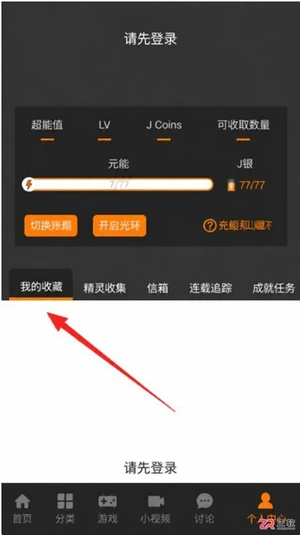
JM漫画app最新版入口是https://www.jmmanhua.top/,这里有免费观看、离线下载及极简操作优势。针对隐私保护需求,详细解析在设置中通过“隐私设置”与“我收藏的漫画”界面实现内容完全隐藏的具体步骤。同时解答新手关于操作流程、离线功能及适用性的常见疑问,帮助用户快速上手并享受无广告干扰的阅读体验。

面向希望获取丰富漫画资源并实现离线阅读的移动端用户,漫蛙3Manwa3(https://www.manwamh.top/)提供快速更新与多设备支持。针对网络不稳定或流量受限痛点,本文详解官方正版下载后的核心操作:包括通过详情页批量缓存章节、利用关键词与榜单精准检索韩漫、切换横竖屏及夜间模式优化体验,以及账号登录实现跨安卓设备进度同步,帮助用户高效管理本地资源库。

面向二次元漫画爱好者,漫蛙漫画(https://www.manwamh.top/)提供丰富的全彩漫画资源及多国语言阅读支持。针对用户寻找稳定入口、高效检索及舒适阅读的需求,本文介绍漫蛙漫画的线路选择、防走失网址收藏方法,详解从“最近更新”查找韩漫、一键搜索到离线下载的操作流程,并涵盖日间/夜间模式切换、书架管理等新手必备技巧,帮助用户快速上手享受流畅的追漫体验。

漫蛙Manwa3 APP最新版下载地址:https://www.manwamh.top/,这里包含核心功能与操作流程。针对账号注册、VIP开通及阅读设置等关键环节,本文详细梳理了从手机号注册登录、浏览热门榜单到开启高清无广告阅读的具体步骤。涵盖多语言切换、云同步、断点续传及多种阅读模式调整方法,帮助用户快速掌握软件用法,享受流畅的追漫体验。
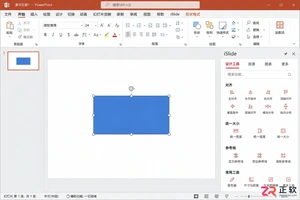
iSlide设计工具侧边栏不见了怎么办?本教程详解在Windows版PPT中通过【设计工具】按钮恢复侧边栏的方法,涵盖面板拖拽、模块隐藏检查及插件加载异常的处理,同时提供macOS用户的使用指引。
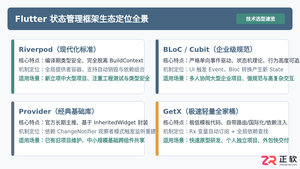
全面盘点Flutter主流状态管理框架,深度解析Provider、Riverpod、Bloc与GetX的核心机制、优缺点及适用场景,提供系统化的状态管理选型指南。
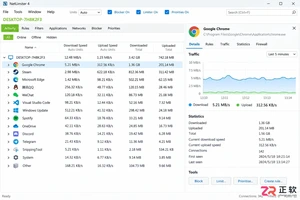
新手入门 NetLimiter 必读指南。详解 Activity 实时监控、DL/UL Limit 限速设置、Blocker 阻止规则及 Stats 流量统计功能。图文结合展示规则编辑器操作,助你轻松管理 Windows 应用网络带宽。
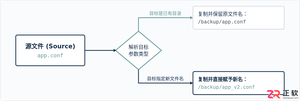
在Linux系统中,复制文件并改名并没有单独的独立命令,而是通过标准复制命令cp在指定目标路径时直接写上新文件名来完成。本文详解cp命令复制并重命名的操作语法、同目录与跨目录示例、常用安全参数及目录复制实践。
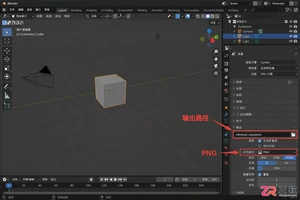
学习如何将Blender中的动态材质导出为图片序列。涵盖输出路径设置、PNG格式选择、帧范围确认及Image Sequence贴图的重新载入方法,适合需要保留透明通道或后期处理的动画贴图工作流。

想在iPhone或iPad上实现锁屏一键直达?本文详解“锁屏启动”的安装前检查清单、系统权限配置步骤及小组件添加方法,解决组件不显示、点击无反应等常见问题,确保快捷指令、网页和App快速启动。




Postman是一套面向API全生命周期的开发与测试平台,可在Mac上发送和调试多种协议请求,管理集合、环境及认证信息,并完成脚本测试、模拟服务、监控、文档发布和团队协作。它适合开发、测试及运维人员使用,提供个人免费方案。
Docker Desktop 是 Docker 官方为 Mac 提供的容器开发环境,集成 Docker Engine、命令行工具、Compose、Build、Kubernetes 与图形化管理界面。

Android Studio 是 Google 面向安卓应用开发提供的官方集成开发环境,基于 IntelliJ IDEA 构建。它整合智能代码编辑、Gradle 构建、界面预览、设备模拟、性能分析、调试测试及 APK 分析等工具。

PixPix 是面向品牌、卖家和内容团队的在线 AI 图片视频创作平台,提供图视频 Agent、无限画布、图片生成、视频生成、自然语言编辑及商品套图、产品精修和带货视频等电商工具。

Postman 是面向 API 全生命周期的开发与协作平台。Windows 桌面版可用于构建和发送 HTTP、GraphQL、gRPC、WebSocket、MQTT 等请求,并提供环境变量、集合、脚本测试、模拟服务、监控、文档及团队工作区等
Docker Desktop 为 Windows 开发者提供集成式容器环境,内置 Docker Engine、命令行工具、Compose、Build 与 Kubernetes 等组件,可在本机完成镜像构建、容器运行、日志查看和资源管理。