

CentOS怎么关闭系统防火墙
如果只是临时停掉 firewalld,可以执行 sudo systemctl stop firewalld,这会立刻生效,不过系统一旦重启,它通常还会自己恢复;要想彻底禁用,还得继续执行 sudo systemctl disable firewalld,并确认 systemctl is-enable
如果只是临时停掉 firewalld,可以执行 sudo systemctl stop firewalld,这会立刻生效,不过系统一旦重启,它通常还会自己恢复;要想彻底禁用,还得继续执行 sudo systemctl disable firewalld,并确认 systemctl is-enabled firewalld 的返回结果是 disabled;至于是否真的关干净了,还需要再核对一遍:firewall-cmd --state 应该报错,同时 iptables -L -n 里也不应再有残留的拦截规则。

CentOS 7 及以上版本默认用 firewalld,关防火墙不是“停一个服务”就完事——得区分临时关闭、永久禁用、以及是否清空规则,否则重启后又自动开了,或者服务停了但残留规则还在干扰网络通信。
怎么临时停止 firewalld(重启后恢复)
适用于调试、部署测试、快速验证端口连通性等短时场景。执行后立即生效,但系统重启就会自动拉起服务:
sudo systemctl stop firewalld—— 停止当前运行的 firewalld 进程sudo systemctl status firewalld—— 查看输出中是否含inactive (dead)- 注意:
firewall-cmd --state会报错或返回not running,这是正常现象
怎么永久禁用 firewalld(避免开机自启)
只停服务不等于“永久关闭”,必须同时禁用开机启动,否则 reboot 后它又活了:
sudo systemctl disable firewalld—— 移除开机启动链接,但不删配置文件sudo systemctl is-enabled firewalld—— 应返回disabled,不是enabled或static- 常见错误:漏掉这步,只执行
stop,结果第二天发现服务又 running 了 - 集群环境需逐台确认,不能只在一台机器上操作
怎么确认 firewalld 真的关干净了
光看 systemctl status 不够,firewalld 停了,但内核 netfilter 规则可能还挂着旧策略,尤其之前开过端口或设过 zone:
sudo firewall-cmd --list-all—— 如果报错FirewallD is not running,说明服务已停;若返回规则列表,说明没真正停掉sudo iptables -L -n | head -10—— 检查底层 iptables 链是否还有REJECT或DROP规则(firewalld 停后,这些规则通常会被清空,但某些异常状态可能残留)- 更稳妥做法:停 + 禁用后,再执行一次
sudo systemctl daemon-reload,防止 unit 文件缓存干扰
CentOS 6 怎么关(别用错命令)
如果你误把 CentOS 7 的命令套到 CentOS 6 上,systemctl 会报错——因为 CentOS 6 用的是 iptables 服务,管理方式完全不同:
sudo service iptables stop—— 临时停止sudo chkconfig iptables off—— 永久禁用开机启动sudo iptables -F—— 清空当前所有规则(仅内存,不改配置文件)- 配置文件在
/etc/sysconfig/iptables,清空前建议先备份:sudo cp /etc/sysconfig/iptables /etc/sysconfig/iptables.bak
最常被忽略的一点:有些脚本或容器平台(比如 Docker)会自己往 iptables 里加规则,即使 firewalld 停了,它们仍可能拦截流量。关防火墙后连不通,别急着骂系统,先 iptables -L -n 看一眼底层链有没有“幽灵规则”。
装系统时选家庭版还是专业版?本文通过日常办公、开发虚拟化、数据加密等具体场景,解析Windows 10两个版本的真实差异,帮你避免为不用的功能付费,并明确激活与授权的关键注意事项。
全面解析Linux终端中终止进程的核心快捷键(Ctrl+C、Ctrl+Z、Ctrl+\)的原理、区别与具体使用方法,附后台恢复与强制终止全流程指南。
详解使用微软官方媒体创建工具制作 Windows 10 安装U盘的步骤,包括直接写入和ISO备份两种方式,并提供启动验证与故障排查建议。
想在 Windows 11 中干净地卸载软件?本教程详解通过开始菜单、系统设置及控制面板移除应用的步骤,涵盖卸载失败处理与残留检查,避免直接删除文件夹带来的隐患。
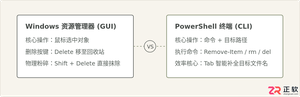
详细解答PowerShell中删除文件的快捷键与核心命令,澄清图形界面与命令行交互差异,提供Tab补全操作流、安全参数及防误删方法。

详解Windows软件安装全流程,包括下载校验、UAC权限确认、安装向导设置及首次启动验证。提供安装失败排查与规范卸载建议,确保软件环境安全稳定。
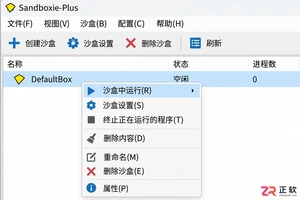
学习如何使用Sandboxie-Plus进行程序多开。教程详解创建独立沙盒、在指定沙盒中启动程序、区分使用环境以及安全清理数据的完整流程,适合需要隔离测试或多账号管理的用户。

详解如何使用微软官方媒体创建工具制作 Windows 10 安装介质。包括下载运行、配置选项、U盘写入及ISO保存步骤,助你轻松搞定系统重装准备。
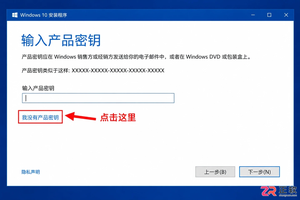
介绍Windows 10安装过程中跳过产品密钥输入的正规方法,包括界面选项识别、版本匹配原则、安装后数字许可证自动激活机制及未激活状态的功能限制,避免使用非法破解工具。
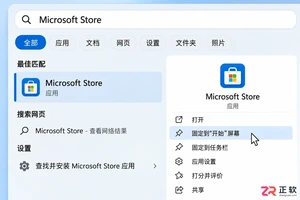
了解如何在Windows 10/11中打开和使用Microsoft Store。本文详解开始菜单入口、应用搜索、库管理及更新操作,并提供安装异常时的排查思路与缓存重置方法。




IntelliJ IDEA 是 JetBrains 推出的专业集成开发环境,重点服务于 Java、Kotlin 与 JVM 项目开发。软件集成代码补全、静态检查、重构、调试、测试、版本控制及构建工具,并可借助插件扩展语言和框架支持。

JetBrains PyCharm 是面向 Python 开发者的集成开发环境,提供智能补全、代码检查、重构、调试、测试、版本控制及虚拟环境管理功能。Mac 版兼容 Intel 与 Apple 芯片,核心功能可免费使用。

JetBrains WebStorm 是面向 JavaScript、TypeScript 和现代 Web 技术的专业集成开发环境,可智能理解项目结构,提供代码补全、重构、错误检查、运行调试、测试及 Git 工具。

JetBrains IntelliJ IDEA 是以 Java、Kotlin 和 JVM 项目为核心的专业集成开发环境,提供智能补全、代码检查、安全重构、调试、测试、版本控制及构建工具集成。统一发行版的核心功能可免费用于商业和非商业项目,

PhpStorm 是 JetBrains 面向 PHP 与现代 Web 开发打造的专业集成开发环境,提供代码补全、静态检查、重构、调试、测试、数据库、版本控制及前端语言支持。Windows 用户可直接下载安装程序,

PyCharm 是 JetBrains 推出的 Python 集成开发环境,提供智能代码补全、错误检查、重构、调试、测试、Git、终端及 Jupyter Notebook 支持。统一版安装后可体验 30 天 Pro 功能,


