使用PHP开发钉钉接口实现考勤签到应用的指南
钉钉接口与PHP的考勤签到应用开发指南引言:随着现代工作方式的改变,越来越多的企业开始使用数字化考勤系统来管理员工的工作时间和出勤情况。钉钉作为一个领先的企业级通信与协作平台,为开发者提供了丰富的开放接口,使得开发基于钉钉的考勤签到应用成为一种需要更多企业的需求。在本文中,我们将介绍如何结合钉钉提供的接口和PHP语言来开发一个简单的考勤签到应用。一、准备工作
钉钉接口与PHP的考勤签到应用开发指南
引言:
随着现代工作方式的改变,越来越多的企业开始使用数字化考勤系统来管理员工的工作时间和出勤情况。钉钉作为一个领先的企业级通信与协作平台,为开发者提供了丰富的开放接口,使得开发基于钉钉的考勤签到应用成为一种需要更多企业的需求。
在本文中,我们将介绍如何结合钉钉提供的接口和PHP语言来开发一个简单的考勤签到应用。
一、准备工作
- 注册钉钉开放平台账号,并且创建一个企业自建应用。在创建企业自建应用时,需要选择考勤权限相关的接口权限。
- 下载并安装PHP开发环境,确保能够运行PHP脚本。
- 使用Composer来管理我们的依赖库。在命令行中执行以下命令来安装第三方库:
composer require guzzlehttp/guzzle
二、获取access_token
要访问钉钉的开放接口,我们首先需要获取一个access_token。可以使用以下代码来获取:
get("https://oapi.dingtalk.com/gettoken?corpid={$corpid}&corpsecret={$corpsecret}");
$result = json_decode($response->getBody()->getContents(), true);

if ($result['errcode'] === 0) {
    $access_token = $result['access_token'];
} else {
    throw new Exception("获取access_token失败: " . $result['errmsg']);
}其中,your_corpid是你的钉钉企业ID,your_corpsecret是你的企业自建应用的密钥。
三、获取考勤组信息
我们需要获取考勤组的ID来进行后续的签到操作。以下是获取考勤组信息的代码示例:
get("https://oapi.dingtalk.com/attendance/list?access_token={$access_token}");
$result = json_decode($response->getBody()->getContents(), true);

if ($result['errcode'] === 0) {
    $groups = $result['recordresult'];
} else {
    throw new Exception("获取考勤组信息失败: " . $result['errmsg']);
}
四、进行签到操作
我们可以使用以下代码来进行考勤签到:
post("https://oapi.dingtalk.com/attendance/list?access_token={$access_token}", [
    'json' => [
        'user_id' => 'userId',
        'group_id' => 'groupId',
        // 其他考勤信息
    ]
]);
$result = json_decode($response->getBody()->getContents(), true);

if ($result['errcode'] === 0) {
    // 签到成功
} else {
    throw new Exception("签到失败: " . $result['errmsg']);
}其中,userId和groupId分别是需要签到的员工ID和考勤组ID。需要根据实际情况传入对应的值。
五、总结
通过以上步骤,我们可以基于钉钉接口和PHP开发一个简单的考勤签到应用。当然,以上只是一个简单的示例,实际应用中还需要考虑更多的异常情况和具体业务需求。希望本文能够给开发者带来一些启发和帮助,更好地利用钉钉接口来开发企业级应用。
参考资料:
- [钉钉开放平台文档](https://ding-doc.dingtalk.com/doc#/serverapi2/uguild/yecg75)
- [Guzzle文档](http://docs.guzzlephp.org/en/stable/)
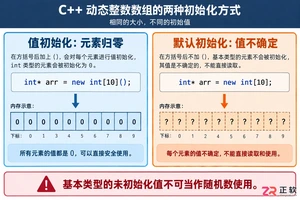
深入解析C++中动态数组的初始化机制,涵盖new操作符的不同用法、基本类型与类对象的初始化差异,以及为何在现代C++开发中应优先使用std::vector。
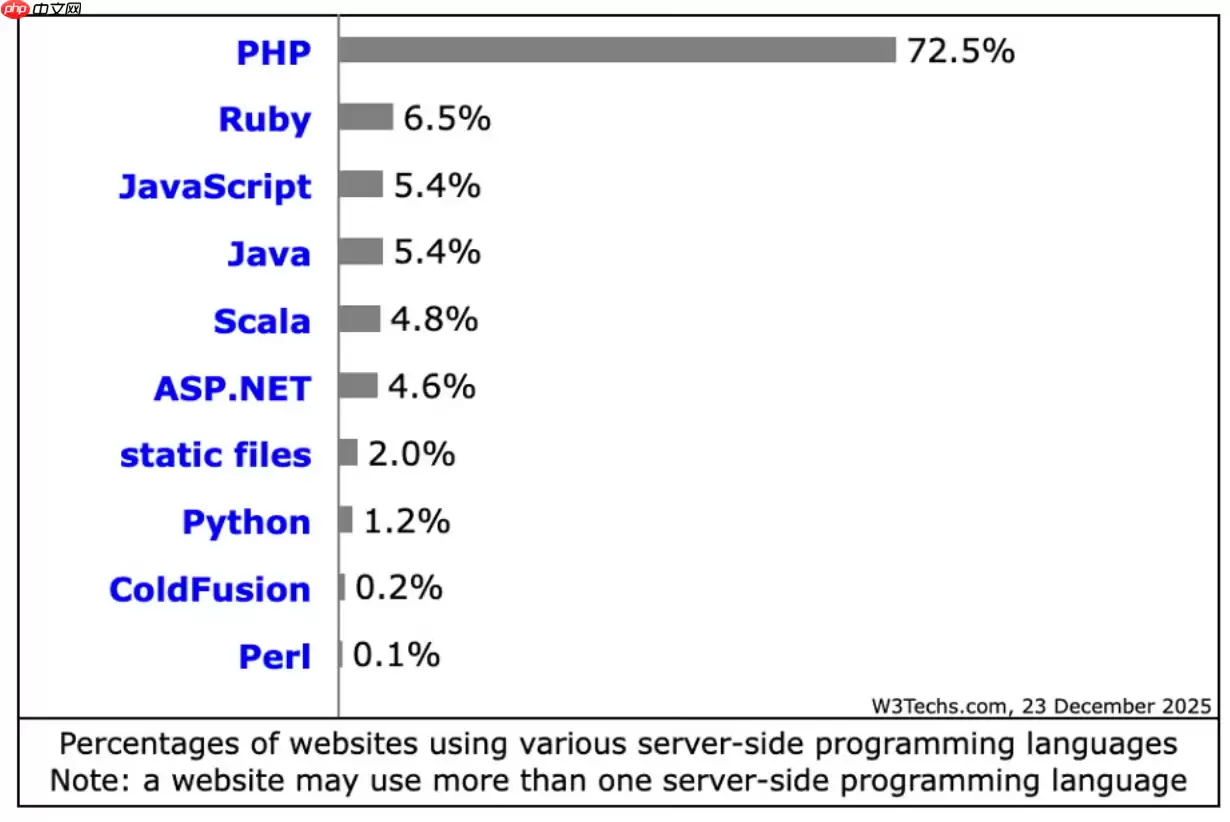
PHP在2026年仍适用于现代网站构建,在常规Web服务和内容密集型站点中较Python、Java等保持优势。其JIT编译优化性能,安全补丁及时,全面支持云原生,拥有成熟框架生态,整体成本较低。

在Debian系统上为PHP配置SSL加密,通常涉及以下几个步骤:安装SSL证书:首先,你需要一个SSL证书。你可以从Let’s Encrypt免费获取,或者购买一个商业证书。使用Let’s Encrypt:sudo apt updatesudo apt install certbotsudo ce

在Linux服务器上,若要使用ThinkPHP框架进行备份,一般会涉及到以下这些方面:数据库备份:使用mysqldump或mysql命令行工具来备份数据库。示例命令:mysqldump -u username -p database_name > backup_database.sql这将生成一个S
在Linux服务器上查看PHP错误日志的方法如下:首先,得找到PHP错误日志文件所在的位置。一般来说,它会在/var/log/php或者/var/log/apache2目录下。当然啦,你也可以通过下面这个命令来找到它:php --ini在输出的信息中,找到"ErrorLog"一行,它会显示错误日志文
在Linux系统下配置PHP以支持SSL,通常需要以下几个步骤:1. 安装PHP和SSL模块首先,确保你已经安装了PHP以及相关的SSL模块。你可以使用包管理器来安装这些软件包。在Debian/Ubuntu上:sudo apt updatesudo apt install php php-ssl在C
在Linux下配置PHP连接MySQL,你需要确保已经安装了PHP和MySQL,并且它们都在运行。接下来,请按照以下步骤操作:安装PHP MySQL扩展:对于PHP 7.x,你需要安装php-mysql扩展。在终端中运行以下命令:sudo apt-get updatesudo apt-get ins
想要通过配置PHP-FPM(FastCGI进程管理器)来加快网站响应速度,需要从多个方面入手,比如调整进程管理参数、优化PHP代码、启用OPcache等等。下面就为大家详细介绍一些关键步骤和实用建议。1. 调整PHP-FPM进程管理参数1.1 增加进程数根据服务器的CPU和内存资源,适当增加PHP-

手把手教你在Linux服务器上配置PHP一 安装与基础检查更新索引并安装所需组件(以 Ubuntu/Debian 为例):安装 Web 与 PHP:sudo apt update && sudo apt install nginx php-fpm php-mysql php-cli php-gd p
Veitool后台框架ThinkPHP版v2.3.5发布,核心升级至ThinkPHP8.1.4,性能与兼容性提升。集成JWT认证,自动生成令牌及RSA密钥对;新增可选RSA加密传输,增强数据安全;fileLibrary增加复制所选文件链接功能。






Windows 10 是一款微软推出的经典操作系统,拥有硬件兼容性与多任务处理能力。它更偏向把系统状态查看和常用调节动作放在一起,适合需要持续观察和微调设备状态的场景。

极度公式是一款跨平台专业LaTeX公式识别编辑软件,支持OCR公式识别和多平台编辑。和使用说明,避免使用,享受完整功能与稳定支持。做扫描整理、文字提取和表格转换时,它能把识别后的处理步骤接得更顺,资料录入这类场景会省下不少时间。