Java实现PDF文件分割与加密的方法
加密文件/***加密文件测试*@fromfhadmin.cn*/@TestpublicvoidencryptTest(){try{StringfilePath="D:\\test\\像李开复一样思考人生.pdf";Stringpassword="1234";PDDocumentdocument=PDDocument.load(newFile(filePath));StandardProtectionPolicyspp=newStandardProtectionPolicy(password,passwor
加密文件
/**
     * 加密文件测试
     * @from fhadmin.cn
     */
    @Test
    public void encryptTest(){
        try {
            String filePath = "D:\\test\\像李开复一样思考人生.pdf";
            String password = "1234";
            PDDocument document = PDDocument.load(new File(filePath));
            StandardProtectionPolicy spp = new StandardProtectionPolicy(password, password,new AccessPermission());
            document.protect(spp);
            String newFilePath = "D:\\test\\像李开复一样思考人生2.pdf";
            document.save(newFilePath);
            document.close();
        } catch (IOException e) {
            e.printStackTrace();
        }
    }
切割文件
/**
     * 切割文件测试
     * @from fhadmin.cn
     */
    @Test
    public void extractTest(){
        try {
            String newFilePath = "D:\\test\\像李开复一样思考人生2.pdf";
            String password = "1234";
            PDDocument document = PDDocument.load(new File(newFilePath), password);//带密码读取
            //从第一页截取到第二页
            PageExtractor pageExtractor = new PageExtractor(document, 1, 2);
            PDDocument extract = pageExtractor.extract();
            extract.save("D:\\test\\像李开复一样思考人生free.pdf");
            extract.close();
            document.close();
            } catch (IOException e) {
                e.printStackTrace();
            }
    }
生成封面图
/**
     * 切割文件测试
     * @from fhadmin.cn
     */
    @Test
    public void createCoverPicTest(){
        try {
            String pdfPath = "D:\\test\\像李开复一样思考人生.pdf";
            File file = new File(pdfPath);
            //order目录
            String orderPath = file.getParent();
            //转换后的img目录
            String bookName = file.getName().substring(0,file.getName().lastIndexOf("."));
            String imgPath = orderPath + File.separator +bookName+".png";
            log.debug("pdf封面图生成成功:{}", imgPath);
            PDDocument pdDocument = PDDocument.load(new File(pdfPath));
            PDFRenderer renderer = new PDFRenderer(pdDocument);
            /* 第二位参数越大转换后越清晰,相对转换速度越慢 */
            BufferedImage image = renderer.renderImageWithDPI(0, 150);
            ImageIO.write(image, "png", new File(imgPath));

        } catch (IOException e) {
            e.printStackTrace();
        }
    }
总结一下,现在的工具都比较丰富了,不需要自己去造轮子,
step-1 去maven仓库检索同类型的包,比较一下热度和使用人数
step-2 下载对应包的source源代码,看一下框架整体结构,里面都有哪些package和类,不知道类是干什么的,可以看一下类上面的注释,一般都是比较简单的英文
step-3 动手写单元测试进行验证。
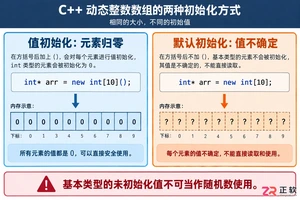
深入解析C++中动态数组的初始化机制,涵盖new操作符的不同用法、基本类型与类对象的初始化差异,以及为何在现代C++开发中应优先使用std::vector。

PDF文件加密后无法编辑或打印?本文整理4种高效解锁方法:使用在线PDF解锁工具快速处理、本地PDF转换器离线操作、Adobe Acrobat Reader导出以及PDF Password Remover专用工具。详细步骤指导如何备份文件、选择工具并验证解锁结果,确保文档安全可用。

本文介绍使用pdf.cn在线工具为PDF添加文字水印的操作流程。核心步骤包括:进入工具页、上传PDF文件、设置水印内容与位置、执行处理及下载结果。适用于临时办公赶工或提交材料前的预处理,无需安装复杂软件。

本文详解三种在线PDF加密工具的使用方法,涵盖极轻PDF、PDF Candy和Sejda。通过分步图解,指导用户如何上传文件、设置密码并验证加密效果,确保文档安全不外泄。

蓝海书屋查看阅读时长的五种专业方法 “蓝海书屋的阅读时长到底在哪看?”最近这个问题确实被问得挺多。其实,掌握阅读时长不仅能帮你回顾自己的阅读旅程,更是管理阅读习惯、完成目标的好帮手。下面,咱们就系统梳理一下在蓝海书屋查看阅读时长的五种方式,操作清晰,一目了然。 官方入口在这里,有需要的可以先行访问:

谷歌浏览器Mac版官方安装指南 谷歌浏览器Mac版官方安装入口是https://www.google.com/chrome/,需macOS 12+系统、500MB空间,下载.dmg后拖入应用程序安装,支持多设备同步、性能优化与隐私保护功能。 苹果电脑Chrome的安装入口究竟在哪里?这个问题最近可是

在夸克浏览器中轻松查阅PDF:三种核心方法详解 遇到网页上的PDF文档,却不知道如何让夸克浏览器直接打开它?这通常不是功能缺失,而是一两个关键设置没到位。今天,我们就来详细拆解几种行之有效的打开方式,帮你实现无缝浏览。 (*本文操作基于小米14,Android 14系统环境) 一、通过文件下载后自动

企查查网页版官方入口与核心功能解析 企查查网页版官方入口是https://www.qcc.com,提供企业信息检索、关联图谱、行业分析及数据服务四大核心功能。 关于企查查网页版如何进入,以及它能提供哪些关键服务,不少朋友都希望获得一个清晰的指引。接下来,我们就系统地梳理一下企查查的官方入口及其几项核

好分数学生查成绩入口与使用全指南 好分数学生查成绩入口是https://hfs.yunxiao.com/,需用手机号注册并绑定真实姓名及考试证件号后,方可查看近三次校级考试成绩、可视化分析图表、错题本及个性化学习推送。 好分数的查分入口究竟在哪儿?这问题困扰着不少学生和家长。别急,下面这份详细的官网







Windows 10 是一款微软推出的经典操作系统,拥有硬件兼容性与多任务处理能力。它更偏向把系统状态查看和常用调节动作放在一起,适合需要持续观察和微调设备状态的场景。

极度公式是一款跨平台专业LaTeX公式识别编辑软件,支持OCR公式识别和多平台编辑。和使用说明,避免使用,享受完整功能与稳定支持。做扫描整理、文字提取和表格转换时,它能把识别后的处理步骤接得更顺,资料录入这类场景会省下不少时间。