

Tkinter 多键同时按实现平滑响应方法
本文详解Tkinter游戏开发中处理多键重叠按下(如持续移动时触发射击)的核心原理与实践方案:摒弃依赖系统级按键重复,改用「按键状态追踪+主循环驱动」机制,确保行为跨平台一致、可预测且高性能。
本文详解 Tkinter 游戏开发中处理多键重叠按下(如持续移动时触发射击)的核心原理与实践方案:摒弃依赖系统级按键重复,改用「按键状态追踪 + 主循环驱动」机制,确保行为跨平台一致、可预测且高性能。
本文详解 Tkinter 游戏开发中处理**多键重叠按下**(如持续移动时触发射击)的核心原理与实践方案:摒弃依赖系统级按键重复,改用「按键状态追踪 + 主循环驱动」机制,确保行为跨平台一致、可预测且高性能。
在使用 Tkinter 开发类似《Space Invaders》的实时游戏时,一个常见却易被忽视的问题是:按键事件无法真正“并发”响应。例如,当玩家按住 A 键持续左移,再按下空格键射击时,角色常会突然停止移动——这并非代码逻辑错误,而是源于 Tkinter 事件模型的本质限制:
✅ 正确解法:状态驱动 + 统一主循环
核心思想是将输入处理从「事件驱动」升级为「状态驱动」:
- 使用字典(如 self.keys_pressed = {})实时记录每个关心按键的当前物理状态(True/False);
- 绑定
和 事件仅用于更新该状态表,不做实际逻辑; - 所有游戏逻辑(移动、射击、碰撞、渲染)统一在单个高频 after() 循环中执行,每次循环读取状态表并决策。
以下是针对原问题代码的重构关键片段(已修复边界判断、坐标同步与状态管理):
import tkinter as tk

class Projectile:
    def __init__(self, x, y):
        self.x, self.y = x, y

    def move(self):
        self.y -= 7.5

class Player:
    def __init__(self, x, y):
        self.x, self.y = x, y

class World:
    def __init__(self):
        self.root = tk.Tk()
        self.root.title("Space Invaders - State-Driven Input")
        self.canvas = tk.Canvas(self.root, width=800, height=800, bg="black")
        self.canvas.pack()

class Game:
    def __init__(self):
        self.world = World()
        self.player = Player(400, 700)
        self.projectile_list = []
        self.shooting_allowed = True
        self.keys_pressed = {}  # ✅ 核心:按键状态字典

        # ✅ 绑定状态监听器(只更新字典)
        self.world.root.bind_all("", self.on_key_press)
        self.world.root.bind_all("", self.on_key_release)

        # ✅ 初始化玩家图形
        self.rendered_player = self.world.canvas.create_rectangle(
            self.player.x, self.player.y,
            self.player.x + 20, self.player.y + 20,
            fill="red"
        )

    def on_key_press(self, event):
        self.keys_pressed[event.keysym] = True

    def on_key_release(self, event):
        self.keys_pressed.pop(event.keysym, None)  # 安全移除,避免 KeyError

    def update_player(self):
        # ✅ 每帧读取状态,独立处理移动
        speed = 10
        if self.keys_pressed.get('a', False):
            self.player.x = max(10, self.player.x - speed)  # 左边界防护
        if self.keys_pressed.get('d', False):
            self.player.x = min(770, self.player.x + speed)  # 右边界防护

        # ✅ 同步更新画布坐标(避免多次 coords 调用)
        self.world.canvas.coords(
            self.rendered_player,
            self.player.x, self.player.y,
            self.player.x + 20, self.player.y + 20
        )

    def handle_shooting(self):
        # ✅ 空格键按下且允许射击时发射(支持长按连发,可加冷却)
        if self.keys_pressed.get('space', False) and self.shooting_allowed:
            x = self.player.x + 8  # 居中发射点
            y = self.player.y - 10
            proj = Projectile(x, y)
            rect_id = self.world.canvas.create_rectangle(
                x, y, x + 4, y + 20, fill="yellow"
            )
            self.projectile_list.append([proj, rect_id])
            self.shooting_allowed = False
            # ? 可选:添加射击冷却(如 300ms 后恢复)
            self.world.root.after(300, lambda: setattr(self, 'shooting_allowed', True))

    def update_projectiles(self):
        to_remove = []
        for i, (proj, rect_id) in enumerate(self.projectile_list):
            proj.move()
            if proj.y < -20:  # 飞出画布顶部
                to_remove.append(i)
                self.world.canvas.delete(rect_id)
            else:
                self.world.canvas.coords(
                    rect_id,
                    proj.x, proj.y,
                    proj.x + 4, proj.y + 20
                )
        # 倒序删除避免索引错位
        for i in reversed(to_remove):
            self.projectile_list.pop(i)

    def run(self):
        self.update_player()      # ✅ 每帧处理移动
        self.handle_shooting()  # ✅ 每帧检查射击
        self.update_projectiles()  # ✅ 每帧更新子弹
        self.world.root.after(16, self.run)  # ≈60 FPS(1000/16)

# 启动游戏
if __name__ == "__main__":
    game = Game()
    game.run()
    game.world.root.mainloop()
⚠️ 关键注意事项
- 不要混用事件回调与循环逻辑:原代码中 move() 直接在
中执行坐标更新,会导致长按时帧率受系统重复延迟控制(不可控),且与其他键冲突;新方案中所有更新均由 run() 统一调度,彻底解耦。 - 状态清理必须健壮:on_key_release 使用 pop(key, default) 防止因快速连按/失焦导致状态残留。
- 性能与精度平衡:after(16) 提供约 60 FPS 流畅体验;若需更高精度(如物理模拟),可降至 after(8),但需注意 CPU 占用。
- 扩展性强:该模式天然支持任意组合键(如 W+A 斜向移动)、方向键+功能键(如 ↑+Ctrl 释放大招),只需扩展状态字典与 update_player() 中的判断分支即可。
✨ 总结:Tkinter 本身不提供“按键持续按下”的原生事件,但通过显式维护按键状态 + 主循环轮询,你就能构建出专业级的游戏输入系统——它稳定、可预测、跨平台,并为你后续加入动画插值、输入缓冲、手柄支持等高级特性打下坚实基础。
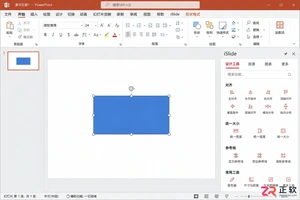
iSlide设计工具侧边栏不见了怎么办?本教程详解在Windows版PPT中通过【设计工具】按钮恢复侧边栏的方法,涵盖面板拖拽、模块隐藏检查及插件加载异常的处理,同时提供macOS用户的使用指引。
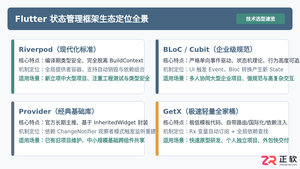
全面盘点Flutter主流状态管理框架,深度解析Provider、Riverpod、Bloc与GetX的核心机制、优缺点及适用场景,提供系统化的状态管理选型指南。
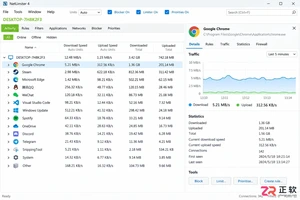
新手入门 NetLimiter 必读指南。详解 Activity 实时监控、DL/UL Limit 限速设置、Blocker 阻止规则及 Stats 流量统计功能。图文结合展示规则编辑器操作,助你轻松管理 Windows 应用网络带宽。
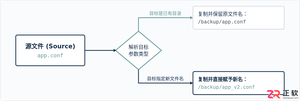
在Linux系统中,复制文件并改名并没有单独的独立命令,而是通过标准复制命令cp在指定目标路径时直接写上新文件名来完成。本文详解cp命令复制并重命名的操作语法、同目录与跨目录示例、常用安全参数及目录复制实践。
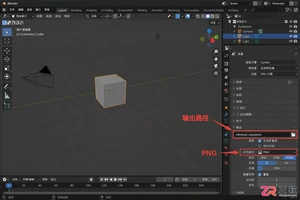
学习如何将Blender中的动态材质导出为图片序列。涵盖输出路径设置、PNG格式选择、帧范围确认及Image Sequence贴图的重新载入方法,适合需要保留透明通道或后期处理的动画贴图工作流。
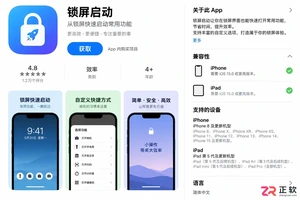
想在iPhone或iPad上实现锁屏一键直达?本文详解“锁屏启动”的安装前检查清单、系统权限配置步骤及小组件添加方法,解决组件不显示、点击无反应等常见问题,确保快捷指令、网页和App快速启动。
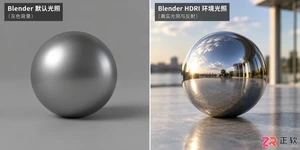
学习如何在Blender中使用HDRI进行渲染。通过World着色器连接Environment Texture节点,调整光照强度与环境方向,解决背景显示与曝光问题,快速提升场景真实感。
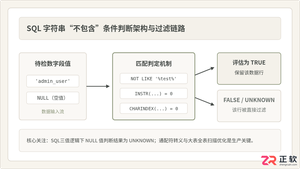
深入详解在SQL中进行条件判断字符串不包含某个子串的方法,涵盖标准NOT LIKE、各主流数据库(MySQL、PostgreSQL、SQL Server、Oracle)专有位置函数、正则表达式判断,剖析NULL值三值逻辑陷阱及全表扫描性能优化策略。
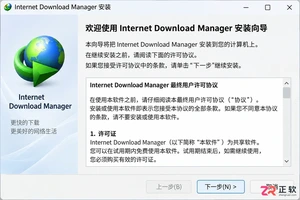
新手必读的IDM安装配置教程。从官方下载开始,逐步讲解如何完成Windows安装、启用Chrome/Edge/Firefox浏览器扩展、设置默认保存目录及调整连接线程,解决IDM不弹窗接管下载的常见问题。
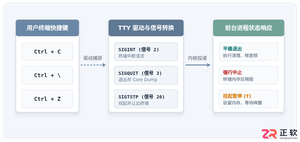
全面解析Linux终端中终止进程的核心快捷键(Ctrl+C、Ctrl+Z、Ctrl+\)的原理、区别与具体使用方法,附后台恢复与强制终止全流程指南。




Postman是一套面向API全生命周期的开发与测试平台,可在Mac上发送和调试多种协议请求,管理集合、环境及认证信息,并完成脚本测试、模拟服务、监控、文档发布和团队协作。它适合开发、测试及运维人员使用,提供个人免费方案。
Docker Desktop 是 Docker 官方为 Mac 提供的容器开发环境,集成 Docker Engine、命令行工具、Compose、Build、Kubernetes 与图形化管理界面。

Android Studio 是 Google 面向安卓应用开发提供的官方集成开发环境,基于 IntelliJ IDEA 构建。它整合智能代码编辑、Gradle 构建、界面预览、设备模拟、性能分析、调试测试及 APK 分析等工具。

Postman 是面向 API 全生命周期的开发与协作平台。Windows 桌面版可用于构建和发送 HTTP、GraphQL、gRPC、WebSocket、MQTT 等请求,并提供环境变量、集合、脚本测试、模拟服务、监控、文档及团队工作区等

Docker Desktop 为 Windows 开发者提供集成式容器环境,内置 Docker Engine、命令行工具、Compose、Build 与 Kubernetes 等组件,可在本机完成镜像构建、容器运行、日志查看和资源管理。

Android Studio 是 Google 面向 Android 应用开发提供的官方集成开发环境,以 IntelliJ IDEA 为基础,集成智能代码编辑、Gradle 构建、设备模拟、界面预览、调试测试及性能分析工具,