

SpringBoot如何查看与SpringCloud的对应版本
1、访问Spring官方网站 要获取最权威的版本对应信息,最直接的办法就是访问Spring的官方项目网站。通常,你只需要在页面上找到并点击查看版本的链接即可。 2、解读返回的JSON元数据 访问后,网站会返回一份结构清晰的JSON数据,里面包含了构建信息、Git提交记录,以及我们最关心的——各个组件
1、访问Spring官方网站
要获取最权威的版本对应信息,最直接的办法就是访问Spring的官方项目网站。通常,你只需要在页面上找到并点击查看版本的链接即可。
2、解读返回的JSON元数据
访问后,网站会返回一份结构清晰的JSON数据,里面包含了构建信息、Git提交记录,以及我们最关心的——各个组件与Spring Boot版本的对应关系。这份数据是动态生成的,可以说是最准确的参考依据。
{
	"git": {
		"branch": "f108974763241b29b1ccca808fb51b845aef6872",
		"commit": {
			"id": "f108974",
			"time": "2022-11-18T17:14:23Z"
		}
	},
	"build": {
		"version": "0.0.1-SNAPSHOT",
		"artifact": "start-site",
		"versions": {
			"spring-boot": "2.7.5",
			"initializr": "0.20.0-SNAPSHOT"
		},
		"name": "start.spring.io website",
		"time": "2022-11-18T17:26:09.482Z",
		"group": "io.spring.start"
	},
	"bom-ranges": {
		"codecentric-spring-boot-admin": {
			"2.4.3": "Spring Boot >=2.3.0.M1 and <2.5.0-M1",
			"2.5.6": "Spring Boot >=2.5.0.M1 and <2.6.0-M1",
			"2.6.8": "Spring Boot >=2.6.0.M1 and <2.7.0-M1",
			"2.7.4": "Spring Boot >=2.7.0.M1 and <3.0.0-M1",
			"3.0.0-M4": "Spring Boot >=3.0.0-M1 and <3.1.0-M1"
		},
		"solace-spring-boot": {
			"1.1.0": "Spring Boot >=2.3.0.M1 and <2.6.0-M1",
			"1.2.2": "Spring Boot >=2.6.0.M1 and <3.0.0-M1"
		},
		"solace-spring-cloud": {
			"1.1.1": "Spring Boot >=2.3.0.M1 and <2.4.0-M1",
			"2.1.0": "Spring Boot >=2.4.0.M1 and <2.6.0-M1",
			"2.3.2": "Spring Boot >=2.6.0.M1 and <3.0.0-M1"
		},
		"spring-cloud": {
			"Hoxton.SR12": "Spring Boot >=2.2.0.RELEASE and <2.4.0.M1",
			"2020.0.6": "Spring Boot >=2.4.0.M1 and <2.6.0-M1",
			"2021.0.0-M1": "Spring Boot >=2.6.0-M1 and <2.6.0-M3",
			"2021.0.0-M3": "Spring Boot >=2.6.0-M3 and <2.6.0-RC1",
			"2021.0.0-RC1": "Spring Boot >=2.6.0-RC1 and <2.6.1",
			"2021.0.5": "Spring Boot >=2.6.1 and <3.0.0-M1",
			"2022.0.0-M1": "Spring Boot >=3.0.0-M1 and <3.0.0-M2",
			"2022.0.0-M2": "Spring Boot >=3.0.0-M2 and <3.0.0-M3",
			"2022.0.0-M3": "Spring Boot >=3.0.0-M3 and <3.0.0-M4",
			"2022.0.0-M4": "Spring Boot >=3.0.0-M4 and <3.0.0-M5",
			"2022.0.0-M5": "Spring Boot >=3.0.0-M5 and <3.0.0-RC1",
			"2022.0.0-RC1": "Spring Boot >=3.0.0-RC1 and <3.1.0-M1"
		},
		"spring-cloud-azure": {
			"4.3.0": "Spring Boot >=2.5.0.M1 and <2.7.0-M1",
			"4.4.1": "Spring Boot >=2.7.0-M1 and <3.0.0-M1",
			"6.0.0-beta.3": "Spring Boot >=3.0.0-M1 and <3.1.0-M1"
		},
		"spring-cloud-gcp": {
			"2.0.11": "Spring Boot >=2.4.0-M1 and <2.6.0-M1",
			"3.4.0": "Spring Boot >=2.6.0-M1 and <3.0.0-M1"
		},
		"spring-cloud-services": {
			"2.3.0.RELEASE": "Spring Boot >=2.3.0.RELEASE and <2.4.0-M1",
			"2.4.1": "Spring Boot >=2.4.0-M1 and <2.5.0-M1",
			"3.3.0": "Spring Boot >=2.5.0-M1 and <2.6.0-M1",
			"3.4.0": "Spring Boot >=2.6.0-M1 and <2.7.0-M1",
			"3.5.0": "Spring Boot >=2.7.0-M1 and <3.0.0-M1"
		},
		"spring-shell": {
			"2.1.3": "Spring Boot >=2.7.0 and <3.0.0-M1",
			"3.0.0-M2": "Spring Boot >=3.0.0-M1 and <3.1.0-M1"
		},
		"vaadin": {
			"14.9.1": "Spring Boot >=2.1.0.RELEASE and <2.6.0-M1",
			"23.2.7": "Spring Boot >=2.6.0-M1 and <2.8.0-M1"
		},
		"wa vefront": {
			"2.0.2": "Spring Boot >=2.1.0.RELEASE and <2.4.0-M1",
			"2.1.1": "Spring Boot >=2.4.0-M1 and <2.5.0-M1",
			"2.2.2": "Spring Boot >=2.5.0-M1 and <2.7.0-M1",
			"2.3.1": "Spring Boot >=2.7.0-M1 and <3.0.0-M1"
		}
	},
	"dependency-ranges": {
		"native": {
			"0.9.0": "Spring Boot >=2.4.3 and <2.4.4",
			"0.9.1": "Spring Boot >=2.4.4 and <2.4.5",
			"0.9.2": "Spring Boot >=2.4.5 and <2.5.0-M1",
			"0.10.0": "Spring Boot >=2.5.0-M1 and <2.5.2",
			"0.10.1": "Spring Boot >=2.5.2 and <2.5.3",
			"0.10.2": "Spring Boot >=2.5.3 and <2.5.4",
			"0.10.3": "Spring Boot >=2.5.4 and <2.5.5",
			"0.10.4": "Spring Boot >=2.5.5 and <2.5.6",
			"0.10.5": "Spring Boot >=2.5.6 and <2.5.9",
			"0.10.6": "Spring Boot >=2.5.9 and <2.6.0-M1",
			"0.11.0-M1": "Spring Boot >=2.6.0-M1 and <2.6.0-RC1",
			"0.11.0-M2": "Spring Boot >=2.6.0-RC1 and <2.6.0",
			"0.11.0-RC1": "Spring Boot >=2.6.0 and <2.6.1",
			"0.11.0": "Spring Boot >=2.6.1 and <2.6.2",
			"0.11.1": "Spring Boot >=2.6.2 and <2.6.3",
			"0.11.2": "Spring Boot >=2.6.3 and <2.6.4",
			"0.11.3": "Spring Boot >=2.6.4 and <2.6.6",
			"0.11.5": "Spring Boot >=2.6.6 and <2.7.0-M1",
			"0.12.0": "Spring Boot >=2.7.0-M1 and <2.7.1",
			"0.12.1": "Spring Boot >=2.7.1 and <3.0.0-M1"
		},
		"okta": {
			"1.4.0": "Spring Boot >=2.2.0.RELEASE and <2.4.0-M1",
			"1.5.1": "Spring Boot >=2.4.0-M1 and <2.4.1",
			"2.0.1": "Spring Boot >=2.4.1 and <2.5.0-M1",
			"2.1.6": "Spring Boot >=2.5.0-M1 and <3.0.0-M1"
		},
		"mybatis": {
			"2.1.4": "Spring Boot >=2.1.0.RELEASE and <2.5.0-M1",
			"2.2.2": "Spring Boot >=2.5.0-M1"
		},
		"camel": {
			"3.5.0": "Spring Boot >=2.3.0.M1 and <2.4.0-M1",
			"3.10.0": "Spring Boot >=2.4.0-M1 and <2.5.0-M1",
			"3.13.0": "Spring Boot >=2.5.0.M1 and <2.6.0-M1",
			"3.17.0": "Spring Boot >=2.6.0.M1 and <2.7.0-M1",
			"3.19.0": "Spring Boot >=2.7.0.M1 and <3.0.0-M1"
		},
		"picocli": {
			"4.6.3": "Spring Boot >=2.4.0.RELEASE and <3.0.0-M1"
		},
		"open-service-broker": {
			"3.2.0": "Spring Boot >=2.3.0.M1 and <2.4.0-M1",
			"3.3.1": "Spring Boot >=2.4.0-M1 and <2.5.0-M1",
			"3.4.1": "Spring Boot >=2.5.0-M1 and <2.6.0-M1",
			"3.5.0": "Spring Boot >=2.6.0-M1 and <2.7.0-M1"
		}
	}
}
3、如何解读具体的对应关系
关键在于看懂JSON结构。以最常用的 `spring-cloud` 为例,我们来看具体怎么解读:
"spring-cloud": {
			"Hoxton.SR12": "Spring Boot >=2.2.0.RELEASE and <2.4.0.M1",
			"2020.0.6": "Spring Boot >=2.4.0.M1 and <2.6.0-M1",
			"2021.0.0-M1": "Spring Boot >=2.6.0-M1 and <2.6.0-M3",
			"2021.0.0-M3": "Spring Boot >=2.6.0-M3 and <2.6.0-RC1",
			"2021.0.0-RC1": "Spring Boot >=2.6.0-RC1 and <2.6.1",
			"2021.0.5": "Spring Boot >=2.6.1 and <3.0.0-M1",
			"2022.0.0-M1": "Spring Boot >=3.0.0-M1 and <3.0.0-M2",
			"2022.0.0-M2": "Spring Boot >=3.0.0-M2 and <3.0.0-M3",
			"2022.0.0-M3": "Spring Boot >=3.0.0-M3 and <3.0.0-M4",
			"2022.0.0-M4": "Spring Boot >=3.0.0-M4 and <3.0.0-M5",
			"2022.0.0-M5": "Spring Boot >=3.0.0-M5 and <3.0.0-RC1",
			"2022.0.0-RC1": "Spring Boot >=3.0.0-RC1 and <3.1.0-M1"
		}
这里能看出:
“Hoxton.SR12": "Spring Boot >=2.2.0.RELEASE and <2.4.0.M1”
这行数据的含义非常明确:如果你希望使用 Spring Cloud 的 `Hoxton.SR12` 版本,那么你的 Spring Boot 版本必须满足 **大于等于 2.2.0.RELEASE 且小于 2.4.0.M1** 这个范围。其他版本的对应关系,依此类推即可。
4、第二种查询办法
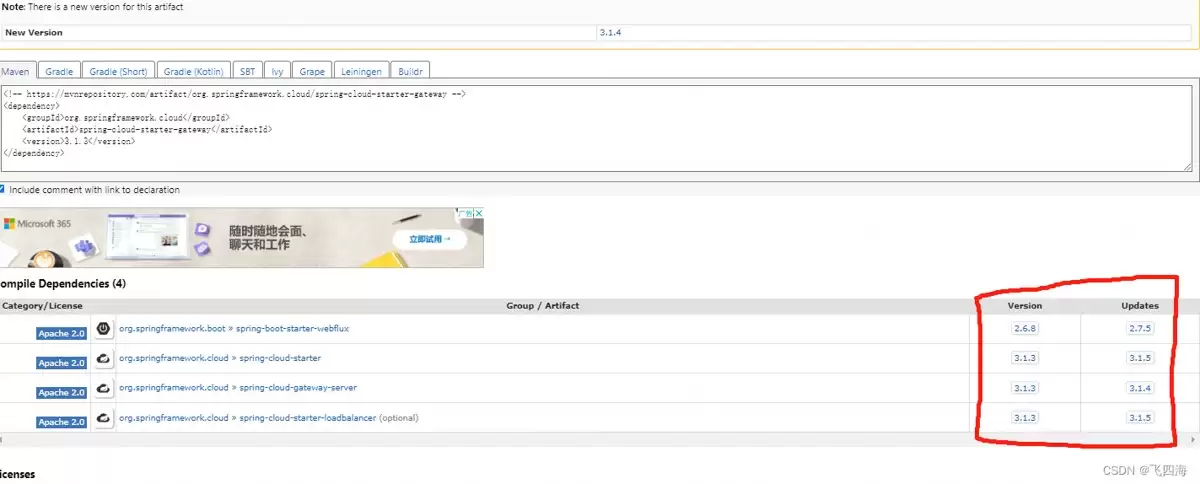
查看Ma ven中央仓库:除了官方JSON,还有一个更直观的途径,那就是直接访问Ma ven仓库。比如,打开 https://mvnrepository.com/artifact/org.springframework.cloud/,在对应组件的版本页面上,通常也会明确列出其兼容的Spring Boot版本范围。
总结
总的来说,掌握版本对应关系是保证Spring技术栈项目稳定性的第一步。上面介绍的两种方法——查询官方元数据和查看Ma ven仓库——都是经过验证的可靠途径,希望能为大家在技术选型和依赖管理时提供一个清晰的参考。

无需专业摄影棚,使用PixPix只需3步即可将白底商品图生成摄影级场景图。本文详解主体准备、提示词编写及局部修正技巧,帮助电商卖家快速制作高质量主图与详情页素材。

竖版短视频底部常有硬字幕,直接裁剪易破坏构图。本教程介绍在会声会影中利用裁剪工具、纯色覆盖层、分段剪辑及关键帧跟踪技术去除底部字幕的方法,适用于不同镜头运动场景,确保画面自然且无残留文字。

WPS表格单元格颜色边框太乱?教你用“清除格式”一键恢复默认外观,同时完整保留文字、数字和公式。注意区分清除内容与格式,避免误删数据。
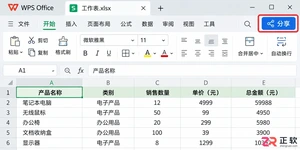
想知道WPS客户端表格如何多人协同编辑?本教程详解将本地表格转为云文档、通过分享链接设置可编辑权限、邀请成员协作及利用历史版本恢复数据的完整步骤,解决多人改表版本冲突难题。
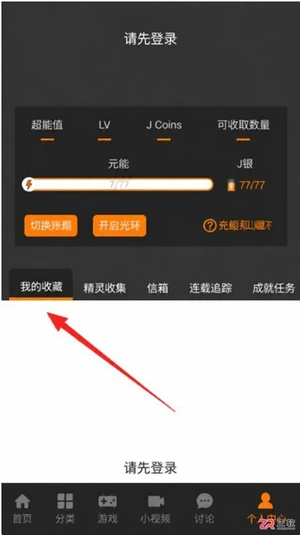
JM漫画app最新版入口是https://www.jmmanhua.top/,这里有免费观看、离线下载及极简操作优势。针对隐私保护需求,详细解析在设置中通过“隐私设置”与“我收藏的漫画”界面实现内容完全隐藏的具体步骤。同时解答新手关于操作流程、离线功能及适用性的常见疑问,帮助用户快速上手并享受无广告干扰的阅读体验。

面向希望获取丰富漫画资源并实现离线阅读的移动端用户,漫蛙3Manwa3(https://www.manwamh.top/)提供快速更新与多设备支持。针对网络不稳定或流量受限痛点,本文详解官方正版下载后的核心操作:包括通过详情页批量缓存章节、利用关键词与榜单精准检索韩漫、切换横竖屏及夜间模式优化体验,以及账号登录实现跨安卓设备进度同步,帮助用户高效管理本地资源库。
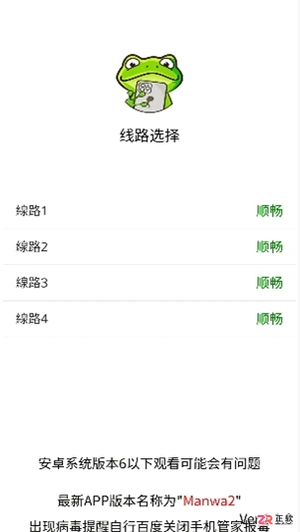
面向二次元漫画爱好者,漫蛙漫画(https://www.manwamh.top/)提供丰富的全彩漫画资源及多国语言阅读支持。针对用户寻找稳定入口、高效检索及舒适阅读的需求,本文介绍漫蛙漫画的线路选择、防走失网址收藏方法,详解从“最近更新”查找韩漫、一键搜索到离线下载的操作流程,并涵盖日间/夜间模式切换、书架管理等新手必备技巧,帮助用户快速上手享受流畅的追漫体验。

漫蛙Manwa3 APP最新版下载地址:https://www.manwamh.top/,这里包含核心功能与操作流程。针对账号注册、VIP开通及阅读设置等关键环节,本文详细梳理了从手机号注册登录、浏览热门榜单到开启高清无广告阅读的具体步骤。涵盖多语言切换、云同步、断点续传及多种阅读模式调整方法,帮助用户快速掌握软件用法,享受流畅的追漫体验。
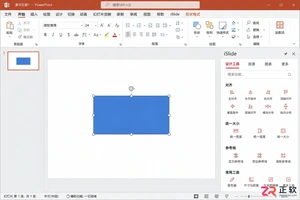
iSlide设计工具侧边栏不见了怎么办?本教程详解在Windows版PPT中通过【设计工具】按钮恢复侧边栏的方法,涵盖面板拖拽、模块隐藏检查及插件加载异常的处理,同时提供macOS用户的使用指引。
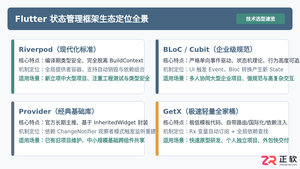
全面盘点Flutter主流状态管理框架,深度解析Provider、Riverpod、Bloc与GetX的核心机制、优缺点及适用场景,提供系统化的状态管理选型指南。




Postman是一套面向API全生命周期的开发与测试平台,可在Mac上发送和调试多种协议请求,管理集合、环境及认证信息,并完成脚本测试、模拟服务、监控、文档发布和团队协作。它适合开发、测试及运维人员使用,提供个人免费方案。

Docker Desktop 是 Docker 官方为 Mac 提供的容器开发环境,集成 Docker Engine、命令行工具、Compose、Build、Kubernetes 与图形化管理界面。

Android Studio 是 Google 面向安卓应用开发提供的官方集成开发环境,基于 IntelliJ IDEA 构建。它整合智能代码编辑、Gradle 构建、界面预览、设备模拟、性能分析、调试测试及 APK 分析等工具。

PixPix 是面向品牌、卖家和内容团队的在线 AI 图片视频创作平台,提供图视频 Agent、无限画布、图片生成、视频生成、自然语言编辑及商品套图、产品精修和带货视频等电商工具。

Postman 是面向 API 全生命周期的开发与协作平台。Windows 桌面版可用于构建和发送 HTTP、GraphQL、gRPC、WebSocket、MQTT 等请求,并提供环境变量、集合、脚本测试、模拟服务、监控、文档及团队工作区等

Docker Desktop 为 Windows 开发者提供集成式容器环境,内置 Docker Engine、命令行工具、Compose、Build 与 Kubernetes 等组件,可在本机完成镜像构建、容器运行、日志查看和资源管理。