

python什么时候用input_Python input 使用
Python 2与Python 3的输入函数:一个关键的语法差异 在Python的版本演进中,input函数的行为变化堪称一个经典的“坑”。不少从Python 2迁移到Python 3的开发者,都曾在这里栽过跟头。今天,我们就来彻底厘清这个差异,确保你的代码在不同版本间都能顺畅运行。 核心差异:in
Python 2与Python 3的输入函数:一个关键的语法差异
在Python的版本演进中,input函数的行为变化堪称一个经典的“坑”。不少从Python 2迁移到Python 3的开发者,都曾在这里栽过跟头。今天,我们就来彻底厘清这个差异,确保你的代码在不同版本间都能顺畅运行。
核心差异:input 与 raw_input
一句话概括:在Python 3中,input()函数完全取代了Python 2中的raw_input()。这意味着,Python 3的input()总是将用户的输入作为字符串(str)返回,而Python 2中的input()则有着完全不同的行为。
先来看一个Python 3.5中的标准用法:
1 #!C:\Program Files\Python35/bin
2 #-*- conding:utf-8 -*-
3 #author: Frank
4 user_input = input("please input your name:") #input 函数的使用
5 print("User input Msg:", user_input)6
7 #显示结果
8>>>please input your name: Frank9User input Msg:Frank
这段代码在Python 3中运行良好。用户输入“Frank”,程序将其作为字符串接收并打印出来。整个过程直观且符合预期。
Python 2.7中的陷阱
然而,如果把同样的思维带到Python 2.7,麻烦就来了。在Python 2.7的环境中,如果你错误地使用了input,会看到如下场景:
Python 2.7.12 (v2.7.12:d33e0cf91556, Jun 27 2016, 15:24:40) [MSC v.1500 64 bit (AMD64)] on win32
Type "help", "copyright", "credits" or "license" for more information.
>> user_input = input("your name:") # For python2.7 , 这是错误的写法
your name:is
Traceback (most recent call last):
File "", line 1, in
File "", line 1
is
^
SyntaxError: unexpected EOF while parsing
看到了吗?程序直接抛出了一个语法错误(SyntaxError)。这是因为Python 2中的input()函数会试图将用户的输入当作一个Python表达式来求值。当你输入“is”时,它试图将其解析为代码,自然就失败了。
那么,在Python 2.7中正确的打开方式是什么呢?答案是使用raw_input:
>> user_input = raw_input("your name:")# For python 2.7 , raw_input 是正确的.
your name: Frank
>> print user_input
Frank
raw_input才是那个老老实实把输入当作原始字符串返回的函数,这也正是Python 3中input函数的行为。
Python 3中的类型确认与常见错误
在python3.0 中, input 默认接受的都是 string。这是一个重要的安全特性,但也带来了新的注意事项:当你需要其他数据类型时,必须进行显式转换。
举个例子,下面的代码将出错:
# -*- conding:utf-8 -*-
# author: Frank
name = input("please input your name:")
age = input("please input your age:") # 注意,这里age是字符串!
job = input("please input your job:")
# 这里用了一个变量Msg,多行模式
Msg = '''
Information of user Frank:%s
------------------------
Name : %s
Age : %d # 格式化符号 %d 期待一个整数(decimal)
Job :%s
------------End---------
''' %(name,name, age, job)
print(Msg)
运行这段代码,结果会如何?
please input your name: frank bian
please input your age:34
please input your job:it
Traceback (most recent call last):
File "", line 16, in
TypeError: %d format: a number is required, not str
错误信息非常明确:TypeError: %d format: a number is required, not str。格式化字符串中的%d要求一个整数,但我们传递的age变量却是一个字符串。这正是因为Python 3的input()无论你输入什么数字,都会先把它变成字符串“34”,而不是整数34。
解决办法很简单:在需要数值的时候,使用int()或float()函数进行强制转换。例如:age = int(input(“please input your age:”))。
总结一下,这个差异看似微小,却直接影响代码的兼容性和健壮性。理解它,是编写跨版本Python代码的基本功之一。
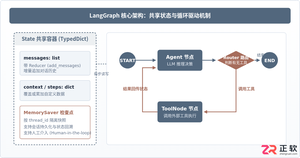
本篇LangGraph Python中文入门教程详解,系统梳理StateGraph状态机定义、节点编写、边与条件路由、检查点持久化(MemorySaver)等核心机制,提供从环境安装到完整循环智能体构建的代码示例与实操指导。
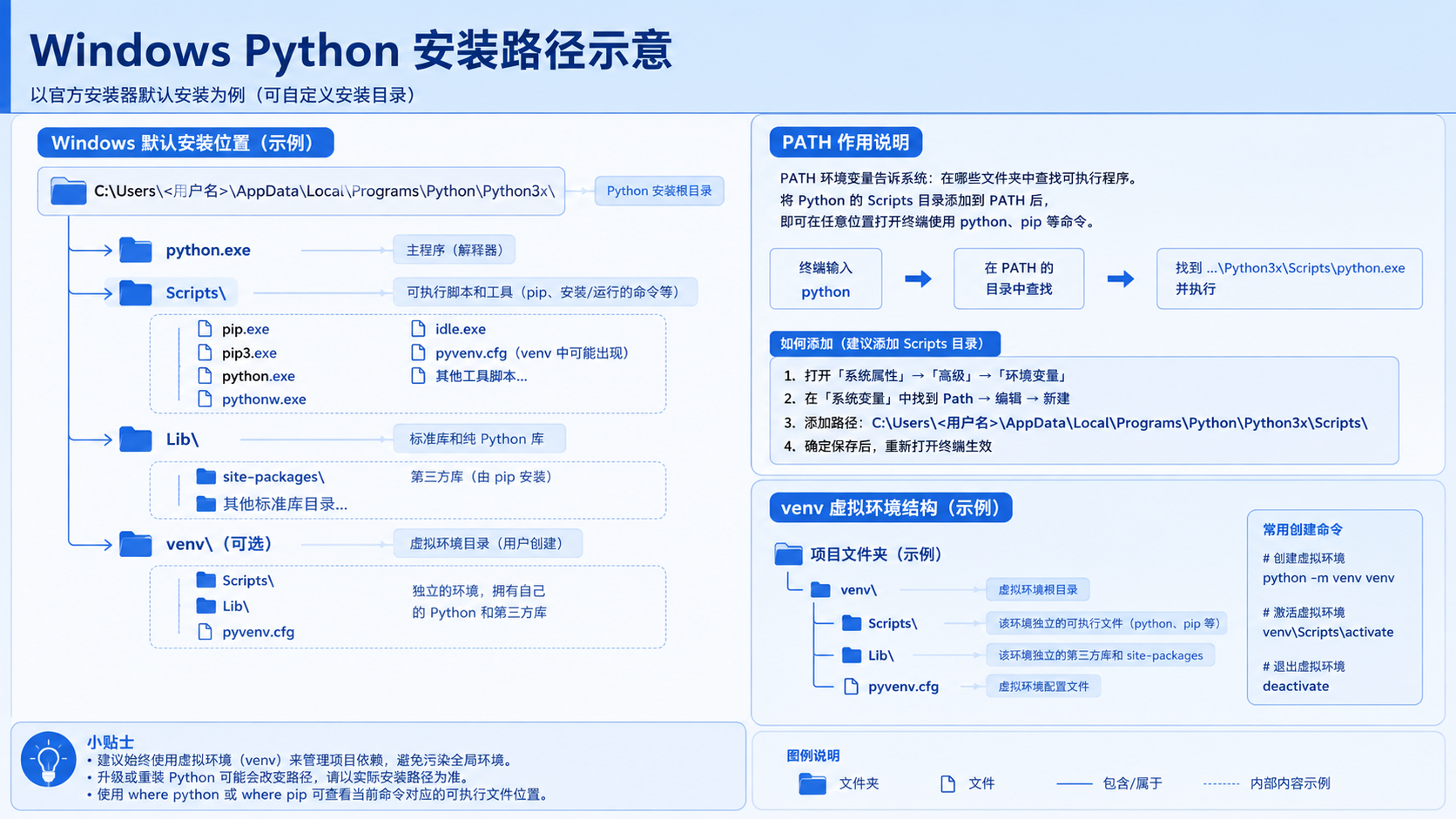
面向后端开发者,基于 Python 官方文档说明如何在 Windows 上安装 Python、创建 venv 虚拟环境及使用 pip 管理依赖。包含可复制命令、验证方法及工具选择边界,避免常见配置误区。
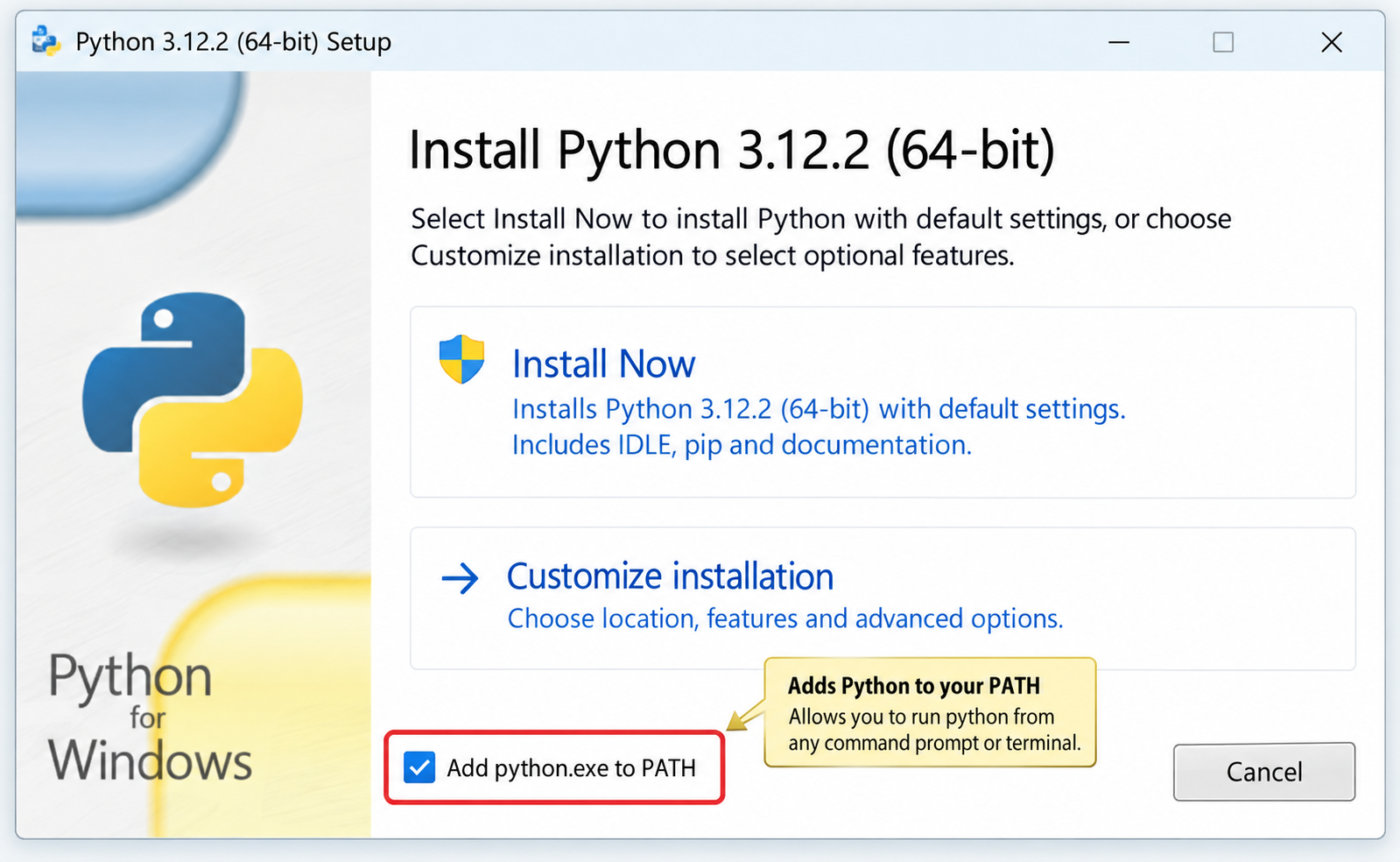
针对Windows初学者的Python安装实战指南。详细讲解如何从Python官网下载匹配架构的安装包,重点演示安装首屏勾选“Add python.exe to PATH”的关键操作,并提供使用python --version和py命令验证环境变量的具体步骤,帮助新手快速搭建开发环境并排查路径问题。
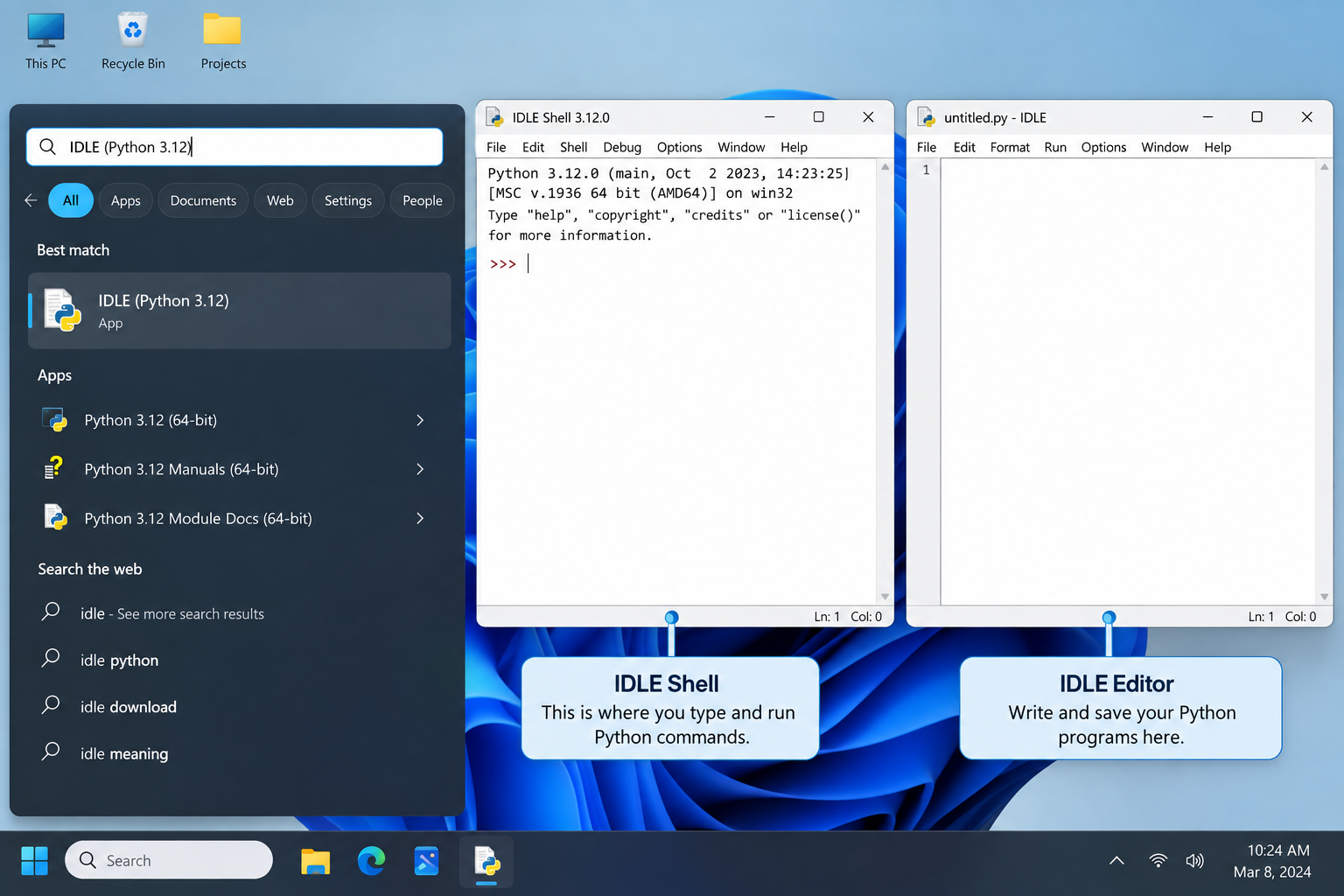
刚在Windows安装好Python却不知道如何启动?本文详细演示如何通过开始菜单找到并打开IDLE集成开发环境,以及如何在PowerShell或命令提示符中使用python和py命令启动交互式解释器、运行.py脚本文件。包含退出解释器的方法及常见启动问题排查,帮助初学者快速验证安装成功并开始编写代码。

了解Python编程领域中最好的就业行业导语:近年来,Python作为一种易学易用的编程语言,越来越受到企业和开发者的青睐。在Python编程领域中,有许多就业机会,涵盖了各个行业。本文将介绍一些Python编程领域中最好的就业行业,并提供相应的代码示例。数据科学和机器学习数据科学和机器学习是Python编程领域中最热门的行业之一。Python在数据科学和机
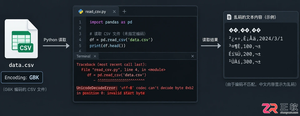
针对Python处理CSV文件时常见的编码报错、内存溢出和数据类型错误,本文对比标准库csv与Pandas库的适用场景,提供可复制的代码示例和因果排查思路,帮助开发者选择最优处理方案。
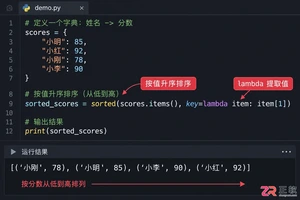
本文介绍如何使用Python的sorted函数对字典按值进行升序和降序排序,结合具体代码示例和应用场景,帮助读者理解排序逻辑及其在数据处理中的实际价值。
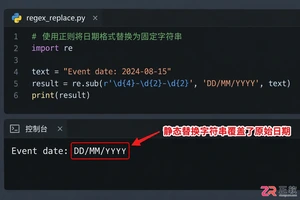
深入讲解Python中使用re.sub进行正则匹配与替换的技巧,涵盖基础语法、分组引用及回调函数应用,帮助开发者解决复杂字符串修改需求,提升代码效率与可维护性。
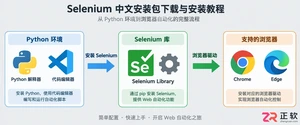
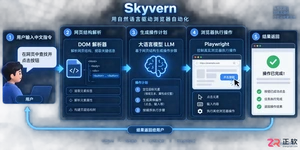
Skyvern是一款基于大语言模型的开源浏览器自动化框架,目前仅提供英文界面且无官方中文版。本文指导用户通过GitHub获取源码,使用Docker快速部署本地环境,并解释其如何通过DOM树解析与自然语言指令实现网页自动操作,同时提供针对中文用户的配置建议与替代方案。



Postman是一套面向API全生命周期的开发与测试平台,可在Mac上发送和调试多种协议请求,管理集合、环境及认证信息,并完成脚本测试、模拟服务、监控、文档发布和团队协作。它适合开发、测试及运维人员使用,提供个人免费方案。
Docker Desktop 是 Docker 官方为 Mac 提供的容器开发环境,集成 Docker Engine、命令行工具、Compose、Build、Kubernetes 与图形化管理界面。

Android Studio 是 Google 面向安卓应用开发提供的官方集成开发环境,基于 IntelliJ IDEA 构建。它整合智能代码编辑、Gradle 构建、界面预览、设备模拟、性能分析、调试测试及 APK 分析等工具。

PixPix 是面向品牌、卖家和内容团队的在线 AI 图片视频创作平台,提供图视频 Agent、无限画布、图片生成、视频生成、自然语言编辑及商品套图、产品精修和带货视频等电商工具。

Postman 是面向 API 全生命周期的开发与协作平台。Windows 桌面版可用于构建和发送 HTTP、GraphQL、gRPC、WebSocket、MQTT 等请求,并提供环境变量、集合、脚本测试、模拟服务、监控、文档及团队工作区等

Docker Desktop 为 Windows 开发者提供集成式容器环境,内置 Docker Engine、命令行工具、Compose、Build 与 Kubernetes 等组件,可在本机完成镜像构建、容器运行、日志查看和资源管理。