

nginx之php、php-fpm相关配置
想用nginx支持php项目?先搞定安装这关 要让Nginx顺利跑起PHP项目,第一步自然是安装Nginx本身,这个步骤比较常规,这里就不展开细说了。 咱们重点聊聊PHP和PHP-FPM的安装。这里有个经验之谈:尽量避免使用yum直接安装。为什么?因为通过yum安装后,你很可能找不到安装目录的具体位
想用nginx支持php项目?先搞定安装这关
要让Nginx顺利跑起PHP项目,第一步自然是安装Nginx本身,这个步骤比较常规,这里就不展开细说了。
咱们重点聊聊PHP和PHP-FPM的安装。这里有个经验之谈:尽量避免使用yum直接安装。为什么?因为通过yum安装后,你很可能找不到安装目录的具体位置,一旦安装过程出现问题,排查和后续调整会变得相当麻烦。
下面是一份经过整理的实操指南,供你参考:
1、下载PHP源码包
官方下载地址:http://www.php.net/downloads.php
2、安装PHP
tar -xvf php-5.5.13.tar.bz2
cd php-5.5.13
./configure --prefix=/usr/local/php --with-config-file-path=/etc --enable-inline-optimization --disable-debug --disable-rpath --enable-shared --enable-opcache --enable-fpm --with-fpm-user=www --with-fpm-group=www --with-mysql=mysqlnd --with-mysqli=mysqlnd --with-pdo-mysql=mysqlnd --with-gettext --enable-mbstring --with-iconv --with-mcrypt --with-mhash --with-openssl --enable-bcmath --enable-soap --with-libxml-dir --enable-pcntl --enable-shmop --enable-sysvmsg --enable-sysvsem --enable-sysvshm --enable-sockets --with-curl --with-zlib --enable-zip --with-bz2 --with-readline --without-sqlite3 --without-pdo-sqlite --with-pear
执行配置命令时,可能会遇到一些依赖缺失的错误,别慌,逐一解决就好:
错误: configure error: xml2-config not found.
解决办法: 执行命令安装依赖:sudo yum install libxml2-devel。安装后可以通过 find / -name "xml2-config" 来确认是否安装成功。
错误: configure error: Cannot find OpenSSL's
解决办法: 安装OpenSSL开发包并创建软链接:
yum install openssl openssl-devel
ln -s /usr/lib64/libssl.so /usr/lib/
错误: configure: error: Please reinstall the BZip2 distribution
解决办法: yum install bzip2 bzip2-devel
错误: configure: error: Please reinstall the libcurl distribution -easy.h should be in /include/curl/
解决办法: yum -y install curl-devel
错误: configure: error: mcrypt.h not found. Please reinstall libmcrypt.
解决办法: sudo yum install libmcrypt libmcrypt-devel mcrypt mhash
错误: configure: error: Please reinstall readline - I cannot find readline.h
解决办法: sudo yum install readline-devel
解决完所有依赖问题后,就可以开始编译安装了:
make
make install
3、添加PHP命令到环境变量
编辑配置文件:vim /etc/profile
在文件末尾加入以下两行:
PATH=$PATH:/usr/local/php/bin
export PATH要使改动立即生效,执行:. /etc/profile 或 source /etc/profile
可以分别通过以下命令查看环境变量和PHP版本,以验证是否成功:
echo $PATH
php -v成功的话,php -v会输出类似如下信息:
PHP 5.5.13 (cli) (built: Jun 20 2014 11:11:26)
Copyright (c) 1997-2014 The PHP Group
Zend Engine v2.5.0, Copyright (c) 1998-2014 Zend Technologies
4、配置并启动php-fpm
cd /usr/local/php/etc
cp php-fpm.conf.default php-fpm.conf
# 启动php-fpm
sudo /usr/local/php/sbin/php-fpm
5、修改Nginx配置文件以支持PHP
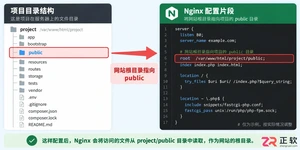
编辑Nginx的站点配置文件(例如:/etc/nginx/conf.d/default.conf),找到处理PHP请求的部分:
location / {
    root web根目录;
    index index.html index.htm index.php;
}

location ~ \.php$ {
    root html;
    fastcgi_pass 127.0.0.1:9000;
    fastcgi_index index.php;
    fastcgi_param SCRIPT_FILENAME web根目录$fastcgi_script_name;
    include fastcgi_params;
}
请注意: 务必将上述配置中的“web根目录”替换为你项目实际的根目录路径。
修改完成后,重启Nginx使配置生效:/etc/init.d/nginx restart
6、测试PHP解析
最后,在你的Web根目录下创建一个index.php文件,写入。然后在浏览器中访问你的服务器地址,如果能看到详细的PHP信息页面,恭喜你,Nginx已经成功支持PHP了。
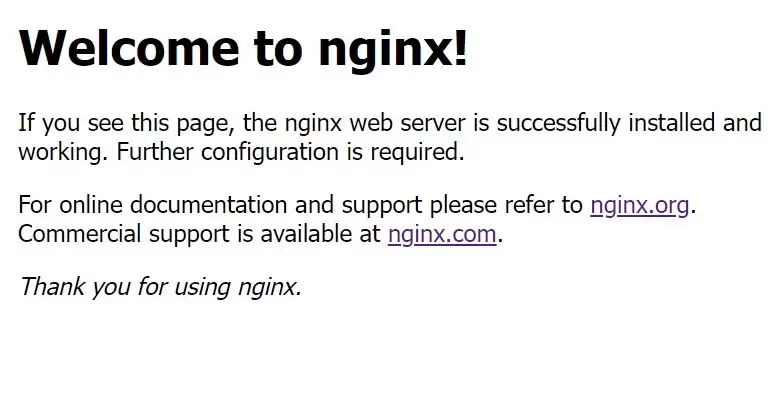
本教程针对Windows环境,详解Nginx稳定版(如1.24.0)的下载、解压、启动及验证流程。核心步骤包括:下载官方压缩包至英文目录,使用start nginx启动,通过localhost访问默认页面,并利用tasklist和nginx -t命令确认进程状态及配置语法。涵盖端口冲突排查、配置重载及停止服务的标准操作,适用于本地开发环境搭建与基础运维验证。
ngx_php这个模块,简单来说,就是给nginx插上PHP脚本的翅膀。它还有个更通俗的名字叫php-nginx-module,功能非常直观:让nginx能够直接嵌入PHP语言来处理请求。 环境兼容性 从PHP 5.3到5.6,ngx_php都支持得不错。nginx这边,从1.4.7到1.9.15这
配置LNMP环境(Linux + Nginx + MySQL + PHP)是很多后端开发者都会遇到的场景。这里以CentOS系统为例,演示如何通过编译安装的方式,将Nginx和PHP-FPM搭建起来。整个过程不依赖RPM包,适合需要定制化组件或对性能有更高要求的场景。下面直接上步骤。 (1) 编译安
从源码编译安装PHP并配置Nginx,需先安装libxml2依赖,然后下载并解压PHP源码,执行配置、编译与安装,复制php.ini配置文件到指定位置,安装并启动php-fpm,再编辑Nginx配置文件以添加PHP支持,使其指向fastcgi与9000端口,最后重启服务即可验证PHP运行。
在Ubuntu下搭建PHP环境时,先清理旧PHP包,添加OndřejSurý的PPA源,安装PHP5.6或7.1及常用扩展,再配置Nginxlocation块将PHP请求转发至对应版本php-fpmsocket,重启Nginx即可。
在CentOS7系统上部署LNMP环境,安装PHP语言及其扩展php-mysqlnd和php-fpm,修改php.ini配置文件中的cgi.fix_pathinfo参数为0,将php-fpm服务用户更改为nginx用户,启动php-fpm服务并设置开机自启动。配置Nginx服务器支持PHP解析处理,通过fastcgi_pass指令连接本机9000端口,重启N
在PHP开发环境中调试时,需在浏览器显示错误信息。首先编辑php.ini,将错误报告级别error_reporting设为E_ERROR(仅显示致命错误),并将display_errors设为On;若启用PHP-FPM,则还需在php-fpm.conf中设置php_flag[display_errors]为on,并重启服务。这样配置后可快速定位致命错误,避免
PHP-FPM是PHP的FastCGI进程管理器,新版已集成至官方核心,编译时加--enable-fpm参数即可开启。安装前需准备gcc、libmcrypt等依赖及oniguruma库,编译安装PHP后生成配置文件,并在nginx的server段添加FastCGI转发配置,测试通过浏览器访问index.php验证。




Postman是一套面向API全生命周期的开发与测试平台,可在Mac上发送和调试多种协议请求,管理集合、环境及认证信息,并完成脚本测试、模拟服务、监控、文档发布和团队协作。它适合开发、测试及运维人员使用,提供个人免费方案。
Docker Desktop 是 Docker 官方为 Mac 提供的容器开发环境,集成 Docker Engine、命令行工具、Compose、Build、Kubernetes 与图形化管理界面。

Android Studio 是 Google 面向安卓应用开发提供的官方集成开发环境,基于 IntelliJ IDEA 构建。它整合智能代码编辑、Gradle 构建、界面预览、设备模拟、性能分析、调试测试及 APK 分析等工具。

PixPix 是面向品牌、卖家和内容团队的在线 AI 图片视频创作平台,提供图视频 Agent、无限画布、图片生成、视频生成、自然语言编辑及商品套图、产品精修和带货视频等电商工具。

Postman 是面向 API 全生命周期的开发与协作平台。Windows 桌面版可用于构建和发送 HTTP、GraphQL、gRPC、WebSocket、MQTT 等请求,并提供环境变量、集合、脚本测试、模拟服务、监控、文档及团队工作区等

Docker Desktop 为 Windows 开发者提供集成式容器环境,内置 Docker Engine、命令行工具、Compose、Build 与 Kubernetes 等组件,可在本机完成镜像构建、容器运行、日志查看和资源管理。