

Android ARouter拦截器实现方法

Android Studio 是 Google 面向安卓应用开发提供的官方集成开发环境,基于 IntelliJ IDEA 构建。它整合智能代码编辑、Gradle 构建、界面预览、设备模拟、性能分析、调试测试及 APK 分析等工具。
使用ARouter框架,通过两个拦截器实现路由控制:优先级-1的日志拦截器记录路由详情,优先级1的登录拦截器检测需登录路径,未登录时重定向至登录页,登录后正常跳转个人中心。
之前做了个演示用的 Demo,这次拿它来测试一下 ARouter 的拦截器功能。先看看页面的实际效果:
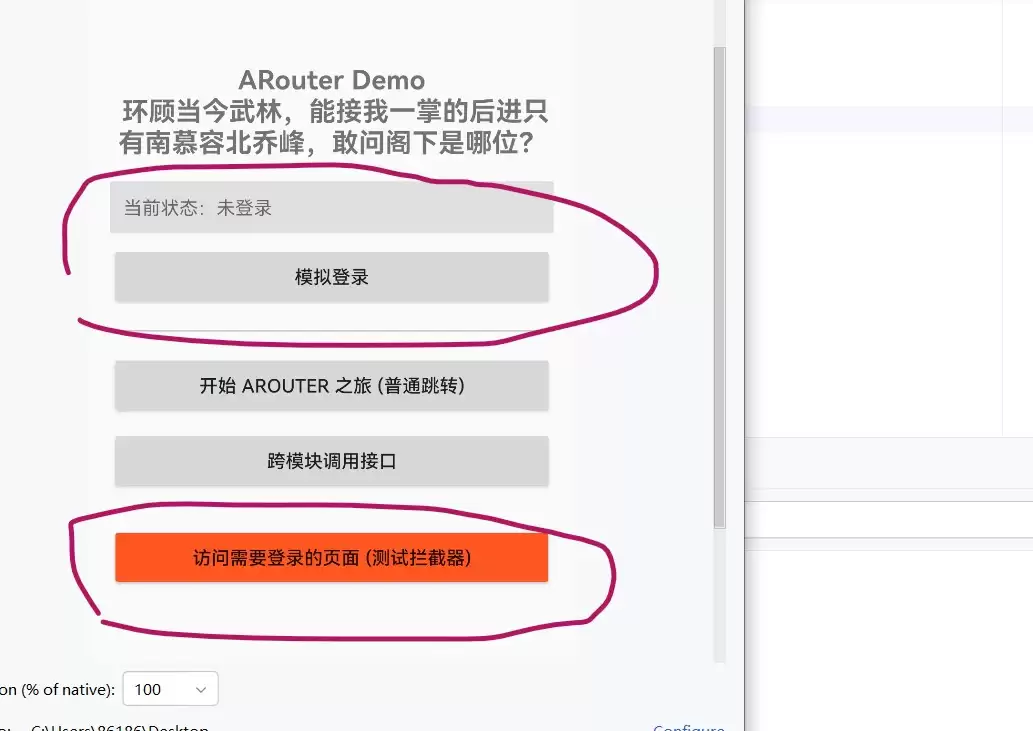
没登录的时候,点一下那个红色按钮,会跳转到登录页面:
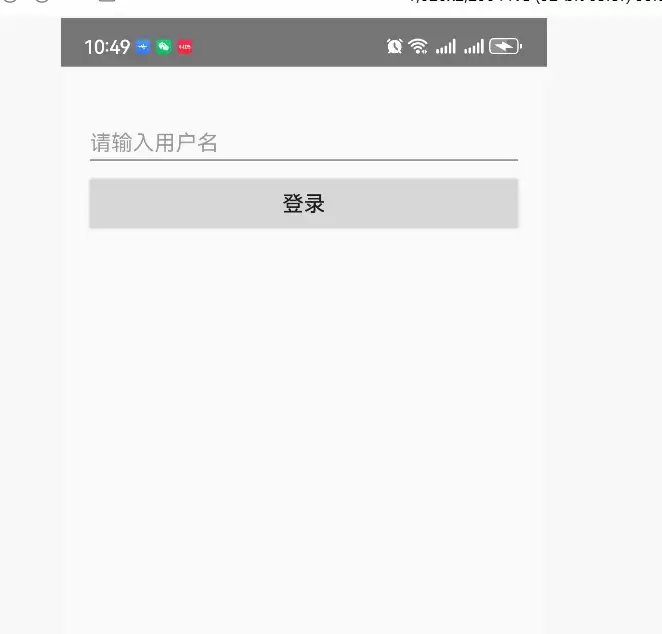
输入一个名字,点登录按钮,就跳转到了用户中心页面:

回到首页先退出登录,再点最下面的按钮,这次直接跳转到用户中心页面——因为已经处于登录状态了:

核心逻辑就这些,接下来看看代码是怎么实现的。
先在业务模块里新增 LoginActivity:
package com.example.module_2;
import android.os.Bundle;
import android.widget.Button;
import android.widget.EditText;
import android.widget.LinearLayout;
import android.widget.Toast;
import androidx.appcompat.app.AppCompatActivity;
import com.alibaba.android.arouter.facade.annotation.Autowired;
import com.alibaba.android.arouter.facade.annotation.Route;
import com.alibaba.android.arouter.launcher.ARouter;
import com.example.common.LoginService;
import com.example.module_2.R;
/**
 * 登录页面
 */
@Route(path = "/login/login")
public class LoginActivity extends AppCompatActivity {
    @Autowired(name = "goto_path")
    String gotoPath; // 登录成功后要跳转的路径
    private EditText etUsername;
    @Override
    protected void onCreate(Bundle sa vedInstanceState) {
        super.onCreate(sa vedInstanceState);
        // 注入参数
        ARouter.getInstance().inject(this);
        // 创建简单的 UI
        LinearLayout layout = new LinearLayout(this);
        layout.setOrientation(LinearLayout.VERTICAL);
        layout.setPadding(50, 100, 50, 100);
        etUsername = new EditText(this);
        etUsername.setHint("请输入用户名");
        etUsername.setTextSize(16);
        Button btnLogin = new Button(this);
        btnLogin.setText("登录");
        btnLogin.setTextSize(16);
        btnLogin.setPadding(20, 30, 20, 30);
        layout.addView(etUsername);
        layout.addView(btnLogin);
        setContentView(layout);
        // 设置登录按钮点击事件
        btnLogin.setOnClickListener(v -> {
            String username = etUsername.getText().toString().trim();
            if (username.isEmpty()) {
                Toast.makeText(this, "请输入用户名", Toast.LENGTH_SHORT).show();
                return;
            }
            // 执行登录
            LoginService.login(username);
            Toast.makeText(this, "登录成功!欢迎:" + username, Toast.LENGTH_LONG).show();
            if (gotoPath != null) {
                ARouter.getInstance().build(gotoPath).na vigation(); // 跳转到目标页面
                finish();
            } else {
                finish();
            }
        });
    }
}
个人中心页面:
package com.example.module_2;
import android.os.Bundle;
import android.widget.TextView;
import androidx.appcompat.app.AppCompatActivity;
import com.alibaba.android.arouter.facade.annotation.Route;
import com.example.common.LoginService;
/**
 * 需要登录才能访问的页面
 *
 * 路径以 /needlogin/ 开头,会被 LoginInterceptor 拦截检查
 */
@Route(path = "/needlogin/personal")
public class PersonalCenterActivity extends AppCompatActivity {
    @Override
    protected void onCreate(Bundle sa vedInstanceState) {
        super.onCreate(sa vedInstanceState);
        TextView textView = new TextView(this);
        textView.setText(String.format("个人中心页面nn %s", LoginService.getUsername()));
        textView.setTextSize(18);
        textView.setPadding(50, 100, 50, 100);
        setContentView(textView);
    }
}
拦截器也写在这个业务模块里,先看日志记录拦截器:
package com.example.module_2.interceptor;
import android.content.Context;
import android.util.Log;
import com.alibaba.android.arouter.facade.Postcard;
import com.alibaba.android.arouter.facade.annotation.Interceptor;
import com.alibaba.android.arouter.facade.callback.InterceptorCallback;
import com.alibaba.android.arouter.launcher.ARouter;
/**
 * 日志记录拦截器
 *
 * 作用:记录所有路由跳转的详细信息,调试用
 *
 * 优先级:数字小的优先级高,先执行
 */
@Interceptor(priority = -1, name = "日志记录拦截器")
public class LoggerInterceptor implements com.alibaba.android.arouter.facade.template.IInterceptor {
    private static final String TAG = "ARouter-Logger";
    @Override
    public void process(Postcard postcard, InterceptorCallback callback) {
        // 记录路由信息
        Log.d(TAG, "========================================");
        Log.d(TAG, ">>> 路由跳转开始");
        Log.d(TAG, ">>> 目标路径:" + postcard.getPath());
        // 打印所有参数
        if (postcard.getExtras() != null && !postcard.getExtras().isEmpty()) {
            Log.d(TAG, ">>> 携带参数:");
            for (String key : postcard.getExtras().keySet()) {
                Object value = postcard.getExtras().get(key);
                Log.d(TAG, "      " + key + " = " + value);
            }
        } else {
            Log.d(TAG, ">>> 无参数");
        }
        // 继续处理,传递自定义回调
        callback.onContinue(postcard); // 交给下一个拦截器处理
    }
    @Override
    public void init(Context context) {
        Log.d(TAG, ">>> LoggerInterceptor 初始化完成");
    }
}
然后是登录检查拦截器:
package com.example.module_2.interceptor;
import android.content.Context;
import android.util.Log;
import android.widget.Toast;
import com.alibaba.android.arouter.facade.Postcard;
import com.alibaba.android.arouter.facade.annotation.Interceptor;
import com.alibaba.android.arouter.facade.callback.InterceptorCallback;
import com.alibaba.android.arouter.launcher.ARouter;
import com.example.common.LoginService;
/**
 * 登录检查拦截器
 *
 * 作用:拦截所有需要登录的页面,如果未登录则跳转到登录页
 *
 */
@Interceptor(priority = 1, name = "登录检查拦截器")
public class LoginInterceptor implements com.alibaba.android.arouter.facade.template.IInterceptor {
    private static final String TAG = "LoginInterceptor";
    private Context context;
    @Override
    public void process(Postcard postcard, InterceptorCallback callback) {
        Log.d(TAG, ">>> LoginInterceptor 开始处理。 n 嘿嘿");
        // 获取目标路径
        String path = postcard.getPath();
        // 只拦截特定路径(以 /needlogin/ 开头的路径都需要登录)
        if (path != null && path.startsWith("/needlogin/")) {
            Log.d(TAG, "检测到需要登录的路径:" + path);
            // 检查是否已登录
            if (!LoginService.isLogin()) {
                Log.d(TAG, "用户未登录,准备跳转到登录页");
                // 保存原始请求信息
//                postcard.withString("goto_path", path); // 和47行路由传参一样,调用一处就行。
                // 重定向到登录页
                ARouter.getInstance()
                    .build("/login/login")
                    .withString("goto_path", path)
                    .na vigation();
                // 中断路由流程
                callback.onInterrupt(new RuntimeException("请先登录哈"));
                // 显示提示信息
                if (context != null) {
                    Toast.makeText(context, "请先登录哦", Toast.LENGTH_SHORT).show();
                }
                return;
            } else {
                Log.d(TAG, "用户已登录,允许通过");
            }
        } else {
            Log.d(TAG, "该路径不需要登录验证:" + path);
        }
        // 继续处理下一个拦截器或目标页面
        callback.onContinue(postcard);
    }
    @Override
    public void init(Context context) {
        this.context = context;
        Log.d(TAG, ">>> LoginInterceptor 初始化完成");
    }
}
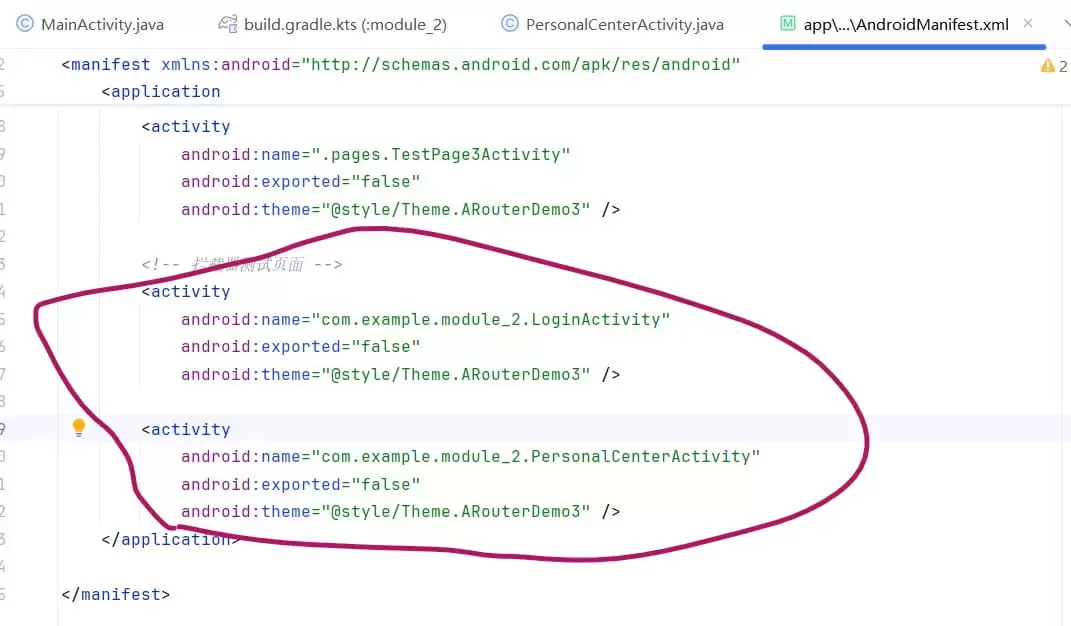
主模块需要注册业务模块的 Activity,配置如下:
主页 MainActivity 中关键代码——测试按钮触发跳转到需要登录的个人中心:
// 测试拦截器 - 访问需要登录的页面
        View btnNeedLogin = findViewById(R.id.btnNeedLogin);
        if (btnNeedLogin != null) {
            btnNeedLogin.setOnClickListener(v -> {
                Log.d("MainActivity", "准备访问需要登录的页面");
                ARouter.getInstance()
                    .build("/needlogin/personal")
                    .na vigation();
            });
        }
来看一下实际运行日志。未登录状态下,点击跳转个人中心,拦截器输出如下:

可以看到,日志拦截器先打印了路由信息,然后登录拦截器检测到用户未登录,直接重定向到了登录页面。
等用户在登录页成功登录后,再次跳转个人中心时,日志就变成了这样:

这次拦截器判断已登录,直接放行,成功跳转到了个人中心页面。
不得不说,拦截器这个机制确实挺实用的。像登录校验、埋点统计、页面权限控制这类公共功能,完全可以通过拦截器来统一处理,不用在每个页面的入口处重复写一堆判断代码。对于复杂业务来说,这是一种很清爽的架构方式。

想知道灵活计算器在手机和电脑上怎么用最高效?本文详解两端在输入节奏、布局整理及账号同步上的核心区别,助你避免数据丢失,建立顺畅的跨设备记账习惯。

遇到灵活计算器APK无法打开或解析错误?本文详解Android侧载安装的排查逻辑,涵盖来源验证、权限配置、空间清理及旧版本冲突处理,帮助用户安全解决安装问题并正确恢复会员权益。

XMind iOS版和安卓版都能完成完整的思维导图编辑,但在文件保存、导出格式及系统分享流程上存在差异。本文详解两端在实际使用中的不同点,帮助跨平台用户优化工作流。





火山引擎是字节跳动旗下企业级云与AI服务平台。聚焦大模型核心能力,依托字节自研豆包多模态大模型,凭借火山方舟一站式平台,提供模型精调、推理部署、智能应用搭建等全链路服务,结合高性能AI算力,助力各行业快速落地大模型数字化与智能化应用。



