

cpanm安装及Perl模块安装教程
cpanm是Perl模块安装工具,可自动解决依赖关系。安装方法为下载可执行文件并赋予权限。通过一行命令即可安装模块,支持镜像加速、强制安装等参数,并能高效处理缺失依赖问题。
cpanm 是 Perl 模块安装领域最趁手的工具,没有之一。它最大的好处就是自动处理依赖关系,把那些令人头疼的层层嵌套的依赖包一股脑儿搞定。不过,用传统 CPAN shell 或者手动下载源码包安装模块时,遇到大量依赖的滋味,相信不少人都尝过——那叫一个酸爽。下面这个场景,就很典型。
安装 MongoDB 模块
# perl Makefile.PL
Warning: prerequisite Class::Method::Modifiers 0 not found.
Warning: prerequisite Data::Types 0 not found.
Warning: prerequisite DateTime 0 not found.
Warning: prerequisite DateTime::Tiny 0 not found.
Warning: prerequisite ExtUtils::MakeMaker 6.59 not found. We ha ve 6.30.
Warning: prerequisite File::Slurp 0 not found.
Warning: prerequisite File::Temp 0.17 not found. We ha ve 0.16.
Warning: prerequisite JSON 0 not found.
Warning: prerequisite Moose 0 not found.
Warning: prerequisite Test::Exception 0 not found.
Warning: prerequisite Test::Warn 0 not found.
Warning: prerequisite Tie::IxHash 0 not found.
Warning: prerequisite Try::Tiny 0 not found.
Warning: prerequisite boolean 0 not found.
Writing Makefile for MongoDB
看到这一长串缺失的依赖警告,是不是头都大了?别急,cpanm 就是来解决这个问题的。
1. 安装 cpanm
cpanm 本质上就是一个可执行文件,下载到 bin 目录,加上执行权限,就齐活了。
# wget http://xrl.us/cpanm -O /usr/bin/cpanm; chmod +x /usr/bin/cpanm
2. 使用 cpanm 安装模块
cpanm 提供了丰富的参数选项,掌握几个常用的就能应付大部分场景:
# cpanm -h
-v,--verbose Turns on chatty output
-q,--quiet Turns off the most output
--interactive 开启交互配置(required for Task:: modules)
-f,--force 强制安装
-n,--notest Do not run unit tests
--test-only 只测试不安装
-S,--sudo sudo to run install commands
--installdeps 只安装依赖模块
--showdeps 只显示依赖信息
--reinstall 重新安装
--mirror 指定镜像url (e.g. http://cpan.cpantesters.org/)
--mirror-only 只从镜像下载
--prompt Prompt when configure/build/test fails
-l,--local-lib Specify the install base to install modules
-L,--local-lib-contained Specify the install base to install all non-core modules
--self-contained Install all non-core modules, even if they're already installed.
--auto-cleanup Number of days that cpanm's work directories expire in. Defaults to 7
Examples:
cpanm Test::More # install Test::More
cpanm MIYAGAWA/Plack-0.99_05.tar.gz # full distribution path
cpanm http://example.org/LDS/CGI.pm-3.20.tar.gz # install from URL
cpanm ~/dists/MyCompany-Enterprise-1.00.tar.gz # install from a local file
cpanm --interactive Task::Kensho # Configure interactively
cpanm . # install from local directory
cpanm --installdeps . # install all the deps for the current directory
cpanm -L extlib Plack # install Plack and all non-core deps into extlib
cpanm --mirror http://cpan.cpantesters.org/ DBI # use the fast-syncing mirror
参数名直接为模块名称。比如安装 MongoDB 模块,只需一行命令:
# cpanm MongoDB
--> Working on MongoDB
Fetching http://www.cpan.org/authors/id/F/FR/FRIEDO/MongoDB-0.702.0.tar.gz ... OK
Configuring MongoDB-0.702.0 ... OK
==> Found dependencies: DateTime, Tie::IxHash, Data::Types, DateTime::Tiny, Class::Method::Modifiers, boolean, Moose, File::Slurp, Try::Tiny, Test::Exception, ExtUtils::MakeMaker, Test::Warn, File::Temp, JSON
--> Working on DateTime
...... //自动解决依赖模块
为了加快下载速度,可以指定镜像并强制只从镜像下载:
# cpanm --mirror http://mirrors.163.com/cpan --mirror-only MongoDB
3. 删除模块
安装 App::pmuninstall 模块:
# cpanm App::pmuninstall
4. 删除模块
# pm-uninstall MongoDB

Perl子程序通过sub关键字定义,参数存于@_数组,支持签名特性增强可读性。错误处理包括die抛出异常、warn发出警告、eval块捕获异常并检查$@,系统错误由$!提供描述。条件判断if/unless及Carp模块可精准报告错误位置。
Perl是一种高级通用解释型动态语言,支持面向过程和面向对象编程,具有强悍字符串处理能力和丰富CPAN模块。交叉编译流程包括下载perl源码及perl-cross补丁,解压整合,指定交叉编译器,然后配置、编译并安装到目标平台。
Perl中print直接输出列表或文件,printf支持格式化输出,sprintf仅返回格式化字符串而不输出。三种函数均可指定文件句柄,省略时默认使用标准输出。sprintf可通过参数索引调整输出顺序,常用于变量赋值和字符串的拼接。
脚本遍历指定目录,用-h检测符号链接、-e判断目标文件是否存在,筛选失效链接并输出路径,结合xargsrm可批量清理,省去手动查找删除的麻烦。
Perl6采用可达性分析与垃圾收集替代Perl5的引用计数,解决了循环引用和多线程同步难题,但牺牲了及时销毁特性。它通过相位器管理外部资源,如END和LEAVE,确保程序退出或作用域结束时释放数据库句柄等有限资源,避免了引用计数固有的缺陷。

Perl正则表达式以核心元字符为基础,通过组合实现复杂匹配。实例涵盖IP地址、邮箱、数字、温度、空白行、版本号等常见模式。元字符如^、$、*、+、?、.、()、[]、\d、\s等详细说明,并给出匹配中文、URL、账号、电话、邮政编码等实用表达式。
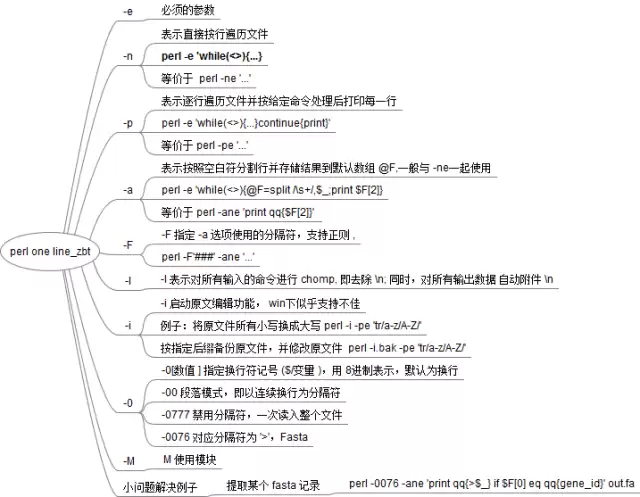
Perl单行命令是命令行文本处理的利器,利用核心参数如-a、-F、-l、-n、-e、-p可快速完成替换、统计、模块调用等任务。正则能力与极简语法使一行命令替代多行脚本,尤其适合临时文本处理场景,掌握这些参数能大幅提升效率。


使用Perl编写脚本,通过命令行参数控制密码的字符种类(大小写字母、数字、特殊符号)和长度,确保每种指定类型至少出现一次,并支持唯一字符模式避免重复,默认密码长度为9。




Postman是一套面向API全生命周期的开发与测试平台,可在Mac上发送和调试多种协议请求,管理集合、环境及认证信息,并完成脚本测试、模拟服务、监控、文档发布和团队协作。它适合开发、测试及运维人员使用,提供个人免费方案。
Docker Desktop 是 Docker 官方为 Mac 提供的容器开发环境,集成 Docker Engine、命令行工具、Compose、Build、Kubernetes 与图形化管理界面。

Android Studio 是 Google 面向安卓应用开发提供的官方集成开发环境,基于 IntelliJ IDEA 构建。它整合智能代码编辑、Gradle 构建、界面预览、设备模拟、性能分析、调试测试及 APK 分析等工具。

PixPix 是面向品牌、卖家和内容团队的在线 AI 图片视频创作平台,提供图视频 Agent、无限画布、图片生成、视频生成、自然语言编辑及商品套图、产品精修和带货视频等电商工具。

Postman 是面向 API 全生命周期的开发与协作平台。Windows 桌面版可用于构建和发送 HTTP、GraphQL、gRPC、WebSocket、MQTT 等请求,并提供环境变量、集合、脚本测试、模拟服务、监控、文档及团队工作区等

Docker Desktop 为 Windows 开发者提供集成式容器环境,内置 Docker Engine、命令行工具、Compose、Build 与 Kubernetes 等组件,可在本机完成镜像构建、容器运行、日志查看和资源管理。