Python操作Kubernetes集群的完全指南
介绍使用PythonKubernetes客户端库操作集群的方法,涵盖库安装、配置文件加载、集群连接,以及Pod、Deployment、Service、ConfigMap、Secret和自定义资源等资源的创建与管理,实现自动化部署与运维。
基础环境准备
1. 安装必要的包
动手之前,先把Python的Kubernetes客户端库装好,这是最基础的一步:

pip install kubernetes
pip install openshift # 可选,用于OpenShift集群
2. 配置文件准备
import os
from kubernetes import client, config

# 加载kubeconfig配置
config.load_kube_config()
Python Kubernetes客户端介绍
主要模块说明
from kubernetes import client, config, watch
from kubernetes.client import ApiClient
from kubernetes.client.rest import ApiException
核心模块的功能大致如下:
client: 各种API操作接口的集合config: 处理配置文件加载,相当于钥匙watch: 监控资源变化,很有用ApiClient: 底层API客户端,一般不需要直接碰ApiException: 异常处理,必须得重视
连接Kubernetes集群
示例1:基础连接配置
from kubernetes import client, config

def connect_kubernetes():
    try:
        # 加载本地kubeconfig
        config.load_kube_config()

        # 创建API客户端
        v1 = client.CoreV1Api()

        # 测试连接
        ret = v1.list_pod_for_all_namespaces(limit=1)
        print("连接成功!发现 {} 个Pod".format(len(ret.items)))
        return v1
    except Exception as e:
        print(f"连接失败:{str(e)}")
        return None

# 测试连接
api = connect_kubernetes()
示例2:多集群配置
def connect_multiple_clusters():
    clusters = {
        'prod': '/path/to/prod-kubeconfig',
        'dev': '/path/to/dev-kubeconfig'
    }

    apis = {}
    for cluster_name, config_file in clusters.items():
        try:
            config.load_kube_config(config_file=config_file)
            apis[cluster_name] = client.CoreV1Api()
            print(f"成功连接到{cluster_name}集群")
        except Exception as e:
            print(f"连接{cluster_name}集群失败:{str(e)}")

    return apis
Pod操作实战
示例3:创建Pod
from kubernetes import client, config

def create_pod(name, image, namespace="default"):
    # 创建Pod对象
    pod = client.V1Pod(
        metadata=client.V1ObjectMeta(name=name),
        spec=client.V1PodSpec(
            containers=[
                client.V1Container(
                    name=name,
                    image=image,
                    ports=[client.V1ContainerPort(container_port=80)]
                )
            ]
        )
    )

    # 获取API实例
    v1 = client.CoreV1Api()

    try:
        # 创建Pod
        api_response = v1.create_namespaced_pod(
            namespace=namespace,
            body=pod
        )
        print(f"Pod {name} 创建成功")
        return api_response
    except ApiException as e:
        print(f"Pod创建失败:{str(e)}")
        return None

# 使用示例
create_pod("nginx-pod", "nginx:latest")
示例4:查询Pod状态
def get_pod_status(name, namespace="default"):
    v1 = client.CoreV1Api()
    try:
        pod = v1.read_namespaced_pod(name=name, namespace=namespace)
        return {
            "name": pod.metadata.name,
            "status": pod.status.phase,
            "pod_ip": pod.status.pod_ip,
            "host_ip": pod.status.host_ip,
            "start_time": pod.status.start_time,
            "conditions": [
                {
                    "type": condition.type,
                    "status": condition.status
                }
                for condition in pod.status.conditions or []
            ]
        }
    except ApiException as e:
        print(f"获取Pod状态失败:{str(e)}")
        return None

# 使用示例
status = get_pod_status("nginx-pod")
print(status)
Deployment管理
示例5:创建Deployment
def create_deployment(name, image, replicas=3, namespace="default"):
    # 创建Deployment对象
    deployment = client.V1Deployment(
        metadata=client.V1ObjectMeta(name=name),
        spec=client.V1DeploymentSpec(
            replicas=replicas,
            selector=client.V1LabelSelector(
                match_labels={"app": name}
            ),
            template=client.V1PodTemplateSpec(
                metadata=client.V1ObjectMeta(
                    labels={"app": name}
                ),
                spec=client.V1PodSpec(
                    containers=[
                        client.V1Container(
                            name=name,
                            image=image,
                            ports=[client.V1ContainerPort(container_port=80)]
                        )
                    ]
                )
            )
        )
    )

    # 获取API实例
    apps_v1 = client.AppsV1Api()

    try:
        # 创建Deployment
        api_response = apps_v1.create_namespaced_deployment(
            namespace=namespace,
            body=deployment
        )
        print(f"Deployment {name} 创建成功")
        return api_response
    except ApiException as e:
        print(f"Deployment创建失败:{str(e)}")
        return None

# 使用示例
create_deployment("nginx-deployment", "nginx:latest")
示例6:更新Deployment
def update_deployment(name, new_image, namespace="default"):
    apps_v1 = client.AppsV1Api()

    try:
        # 获取现有deployment
        deployment = apps_v1.read_namespaced_deployment(name, namespace)

        # 更新镜像
        deployment.spec.template.spec.containers[0].image = new_image

        # 应用更新
        api_response = apps_v1.patch_namespaced_deployment(
            name=name,
            namespace=namespace,
            body=deployment
        )
        print(f"Deployment {name} 更新成功")
        return api_response
    except ApiException as e:
        print(f"Deployment更新失败:{str(e)}")
        return None

# 使用示例
update_deployment("nginx-deployment", "nginx:1.19")
Service资源操作
示例7:创建Service
def create_service(name, selector, port, target_port, namespace="default"):
    # 创建Service对象
    service = client.V1Service(
        metadata=client.V1ObjectMeta(name=name),
        spec=client.V1ServiceSpec(
            selector=selector,
            ports=[client.V1ServicePort(
                port=port,
                target_port=target_port
            )]
        )
    )

    v1 = client.CoreV1Api()

    try:
        # 创建Service
        api_response = v1.create_namespaced_service(
            namespace=namespace,
            body=service
        )
        print(f"Service {name} 创建成功")
        return api_response
    except ApiException as e:
        print(f"Service创建失败:{str(e)}")
        return None

# 使用示例
create_service(
    "nginx-service",
    {"app": "nginx-deployment"},
    80,
    80
)
ConfigMap和Secret管理
示例8:创建ConfigMap
def create_configmap(name, data, namespace="default"):
    # 创建ConfigMap对象
    configmap = client.V1ConfigMap(
        metadata=client.V1ObjectMeta(name=name),
        data=data
    )

    v1 = client.CoreV1Api()

    try:
        # 创建ConfigMap
        api_response = v1.create_namespaced_config_map(
            namespace=namespace,
            body=configmap
        )
        print(f"ConfigMap {name} 创建成功")
        return api_response
    except ApiException as e:
        print(f"ConfigMap创建失败:{str(e)}")
        return None

# 使用示例
config_data = {
    "app.properties": """
    app.name=myapp
    app.env=production
    """
}
create_configmap("app-config", config_data)
示例9:创建Secret
import base64

def create_secret(name, data, namespace="default"):
    # 编码数据
    encoded_data = {
        k: base64.b64encode(v.encode()).decode()
        for k, v in data.items()
    }

    # 创建Secret对象
    secret = client.V1Secret(
        metadata=client.V1ObjectMeta(name=name),
        type="Opaque",
        data=encoded_data
    )

    v1 = client.CoreV1Api()

    try:
        # 创建Secret
        api_response = v1.create_namespaced_secret(
            namespace=namespace,
            body=secret
        )
        print(f"Secret {name} 创建成功")
        return api_response
    except ApiException as e:
        print(f"Secret创建失败:{str(e)}")
        return None

# 使用示例
secret_data = {
    "username": "admin",
    "password": "secret123"
}
create_secret("app-secrets", secret_data)
自定义资源定义(CRD)操作
示例10:操作CRD资源
def create_custom_resource(group, version, plural, namespace, body):
    # 获取CustomObjectsApi
    custom_api = client.CustomObjectsApi()

    try:
        # 创建自定义资源
        api_response = custom_api.create_namespaced_custom_object(
            group=group,
            version=version,
            namespace=namespace,
            plural=plural,
            body=body
        )
        print(f"自定义资源创建成功")
        return api_response
    except ApiException as e:
        print(f"自定义资源创建失败:{str(e)}")
        return None

# 使用示例
custom_resource = {
    "apiVersion": "stable.example.com/v1",
    "kind": "CronTab",
    "metadata": {
        "name": "my-crontab"
    },
    "spec": {
        "cronSpec": "* * * * */5",
        "image": "my-cron-image"
    }
}

create_custom_resource(
    group="stable.example.com",
    version="v1",
    plural="crontabs",
    namespace="default",
    body=custom_resource
)
事件监听和Watch操作
示例11:监听Pod事件
from kubernetes import watch

def watch_pods(namespace="default"):
    v1 = client.CoreV1Api()
    w = watch.Watch()

    try:
        for event in w.stream(v1.list_namespaced_pod, namespace=namespace):
            pod = event['object']
            event_type = event['type']

            print(f"事件类型: {event_type}")
            print(f"Pod名称: {pod.metadata.name}")
            print(f"Pod状态: {pod.status.phase}")
            print("-------------------")

    except ApiException as e:
        print(f"监听失败:{str(e)}")
    except KeyboardInterrupt:
        w.stop()
        print("监听已停止")

# 使用示例
# watch_pods()  # 此函数会持续运行直到被中断
高级应用场景
示例12:批量操作和错误处理
def batch_create_resources(resources):
    results = {
        'success': [],
        'failed': []
    }

    for resource in resources:
        try:
            if resource['kind'] == 'Deployment':
                apps_v1 = client.AppsV1Api()
                response = apps_v1.create_namespaced_deployment(
                    namespace=resource['namespace'],
                    body=resource['spec']
                )
                results['success'].append({
                    'kind': 'Deployment',
                    'name': resource['spec'].metadata.name
                })
            elif resource['kind'] == 'Service':
                v1 = client.CoreV1Api()
                response = v1.create_namespaced_service(
                    namespace=resource['namespace'],
                    body=resource['spec']
                )
                results['success'].append({
                    'kind': 'Service',
                    'name': resource['spec'].metadata.name
                })
        except ApiException as e:
            results['failed'].append({
                'kind': resource['kind'],
                'name': resource['spec'].metadata.name,
                'error': str(e)
            })

    return results

# 使用示例
resources = [
    {
        'kind': 'Deployment',
        'namespace': 'default',
        'spec': client.V1Deployment(
            metadata=client.V1ObjectMeta(name="nginx-deployment"),
            spec=client.V1DeploymentSpec(
                replicas=3,
                selector=client.V1LabelSelector(
                    match_labels={"app": "nginx"}
                ),
                template=client.V1PodTemplateSpec(
                    metadata=client.V1ObjectMeta(
                        labels={"app": "nginx"}
                    ),
                    spec=client.V1PodSpec(
                        containers=[
                            client.V1Container(
                                name="nginx",
                                image="nginx:latest"
                            )
                        ]
                    )
                )
            )
        )
	}
]
示例13:资源清理和垃圾回收
def cleanup_resources(namespace="default", label_selector=None):
    """
    清理指定命名空间下的资源
    """
    v1 = client.CoreV1Api()
    apps_v1 = client.AppsV1Api()

    cleanup_results = {
        'pods': [],
        'deployments': [],
        'services': [],
        'errors': []
    }

    try:
        # 删除Pod
        pods = v1.list_namespaced_pod(
            namespace=namespace,
            label_selector=label_selector
        )
        for pod in pods.items:
            try:
                v1.delete_namespaced_pod(
                    name=pod.metadata.name,
                    namespace=namespace
                )
                cleanup_results['pods'].append(pod.metadata.name)
            except ApiException as e:
                cleanup_results['errors'].append(f"Pod {pod.metadata.name}: {str(e)}")

        # 删除Deployment
        deployments = apps_v1.list_namespaced_deployment(
            namespace=namespace,
            label_selector=label_selector
        )
        for deployment in deployments.items:
            try:
                apps_v1.delete_namespaced_deployment(
                    name=deployment.metadata.name,
                    namespace=namespace
                )
                cleanup_results['deployments'].append(deployment.metadata.name)
            except ApiException as e:
                cleanup_results['errors'].append(f"Deployment {deployment.metadata.name}: {str(e)}")

        # 删除Service
        services = v1.list_namespaced_service(
            namespace=namespace,
            label_selector=label_selector
        )
        for service in services.items:
            try:
                v1.delete_namespaced_service(
                    name=service.metadata.name,
                    namespace=namespace
                )
                cleanup_results['services'].append(service.metadata.name)
            except ApiException as e:
                cleanup_results['errors'].append(f"Service {service.metadata.name}: {str(e)}")

        return cleanup_results

    except ApiException as e:
        print(f"清理资源时发生错误:{str(e)}")
        return None

# 使用示例
cleanup_result = cleanup_resources(namespace="default", label_selector="app=nginx")
print("清理结果:", cleanup_result)
示例14:资源健康检查和自动修复
import time
from typing import Dict, List

class ResourceHealthChecker:
    def __init__(self, namespace: str = "default"):
        self.namespace = namespace
        self.v1 = client.CoreV1Api()
        self.apps_v1 = client.AppsV1Api()

    def check_pod_health(self) -> Dict[str, List[str]]:
        """
        检查Pod的健康状态
        """
        unhealthy_pods = []
        pending_pods = []

        try:
            pods = self.v1.list_namespaced_pod(namespace=self.namespace)

            for pod in pods.items:
                if pod.status.phase == 'Failed':
                    unhealthy_pods.append(pod.metadata.name)
                elif pod.status.phase == 'Pending':
                    pending_pods.append(pod.metadata.name)

            return {
                'unhealthy': unhealthy_pods,
                'pending': pending_pods
            }

        except ApiException as e:
            print(f"检查Pod健康状态时发生错误:{str(e)}")
            return None

    def check_deployment_health(self) -> Dict[str, List[str]]:
        """
        检查Deployment的健康状态
        """
        unhealthy_deployments = []

        try:
            deployments = self.apps_v1.list_namespaced_deployment(namespace=self.namespace)

            for deployment in deployments.items:
                if deployment.status.ready_replicas != deployment.status.replicas:
                    unhealthy_deployments.append(deployment.metadata.name)

            return {
                'unhealthy': unhealthy_deployments
            }

        except ApiException as e:
            print(f"检查Deployment健康状态时发生错误:{str(e)}")
            return None

    def auto_repair(self):
        """
        自动修复不健康的资源
        """
        repair_actions = []

        # 检查并修复Pod
        pod_health = self.check_pod_health()
        if pod_health:
            for unhealthy_pod in pod_health['unhealthy']:
                try:
                    self.v1.delete_namespaced_pod(
                        name=unhealthy_pod,
                        namespace=self.namespace
                    )
                    repair_actions.append(f"删除不健康的Pod: {unhealthy_pod}")
                except ApiException as e:
                    repair_actions.append(f"修复Pod {unhealthy_pod} 失败: {str(e)}")

        # 检查并修复Deployment
        deployment_health = self.check_deployment_health()
        if deployment_health:
            for unhealthy_deployment in deployment_health['unhealthy']:
                try:
                    # 重启Deployment
                    patch = {
                        "spec": {
                            "template": {
                                "metadata": {
                                    "annotations": {
                                        "kubectl.kubernetes.io/restartedAt": datetime.now().isoformat()
                                    }
                                }
                            }
                        }
                    }
                    self.apps_v1.patch_namespaced_deployment(
                        name=unhealthy_deployment,
                        namespace=self.namespace,
                        body=patch
                    )
                    repair_actions.append(f"重启Deployment: {unhealthy_deployment}")
                except ApiException as e:
                    repair_actions.append(f"修复Deployment {unhealthy_deployment} 失败: {str(e)}")

        return repair_actions

# 使用示例
health_checker = ResourceHealthChecker("default")
repair_results = health_checker.auto_repair()
print("修复操作:", repair_results)
示例15:自定义控制器实现
from kubernetes import watch
import threading
import queue

class CustomController:
    def __init__(self, namespace="default"):
        self.namespace = namespace
        self.v1 = client.CoreV1Api()
        self.apps_v1 = client.AppsV1Api()
        self.event_queue = queue.Queue()
        self.running = False

    def start(self):
        """
        启动控制器
        """
        self.running = True

        # 启动事件处理线程
        threading.Thread(target=self._process_events).start()

        # 启动资源监控
        threading.Thread(target=self._watch_pods).start()
        threading.Thread(target=self._watch_deployments).start()

    def stop(self):
        """
        停止控制器
        """
        self.running = False

    def _watch_pods(self):
        """
        监控Pod变化
        """
        w = watch.Watch()
        while self.running:
            try:
                for event in w.stream(
                    self.v1.list_namespaced_pod,
                    namespace=self.namespace
                ):
                    if not self.running:
                        break
                    self.event_queue.put(('Pod', event))
            except Exception as e:
                print(f"Pod监控异常:{str(e)}")
                if self.running:
                    time.sleep(5)  # 发生错误时等待后重试

    def _watch_deployments(self):
        """
        监控Deployment变化
        """
        w = watch.Watch()
        while self.running:
            try:
                for event in w.stream(
                    self.apps_v1.list_namespaced_deployment,
                    namespace=self.namespace
                ):
                    if not self.running:
                        break
                    self.event_queue.put(('Deployment', event))
            except Exception as e:
                print(f"Deployment监控异常:{str(e)}")
                if self.running:
                    time.sleep(5)

    def _process_events(self):
        """
        处理事件队列
        """
        while self.running:
            try:
                resource_type, event = self.event_queue.get(timeout=1)
                self._handle_event(resource_type, event)
            except queue.Empty:
                continue
            except Exception as e:
                print(f"事件处理异常:{str(e)}")

    def _handle_event(self, resource_type, event):
        """
        处理具体事件
        """
        event_type = event['type']
        obj = event['object']

        print(f"收到{resource_type}事件:")
        print(f"  类型: {event_type}")
        print(f"  名称: {obj.metadata.name}")

        if resource_type == 'Pod':
            self._handle_pod_event(event_type, obj)
        elif resource_type == 'Deployment':
            self._handle_deployment_event(event_type, obj)

    def _handle_pod_event(self, event_type, pod):
        """
        处理Pod事件
        """
        if event_type == 'MODIFIED':
            if pod.status.phase == 'Failed':
                print(f"检测到Pod {pod.metadata.name} 失败,尝试重启")
                try:
                    self.v1.delete_namespaced_pod(
                        name=pod.metadata.name,
                        namespace=self.namespace
                    )
                except ApiException as e:
                    print(f"重启Pod失败:{str(e)}")

    def _handle_deployment_event(self, event_type, deployment):
        """
        处理Deployment事件
        """
        if event_type == 'MODIFIED':
            if deployment.status.ready_replicas != deployment.status.replicas:
                print(f"检测到Deployment {deployment.metadata.name} 副本不一致")
                # 这里可以添加自定义的处理逻辑

# 使用示例
controller = CustomController("default")
controller.start()

# 运行一段时间后停止
# time.sleep(3600)
# controller.stop()
示例16:资源指标监控
from kubernetes.client import CustomObjectsApi
import time

class MetricsCollector:
    def __init__(self):
        self.custom_api = CustomObjectsApi()

    def get_node_metrics(self):
        """
        获取节点资源使用指标
        """
        try:
            metrics = self.custom_api.list_cluster_custom_object(
                group="metrics.k8s.io",
                version="v1beta1",
                plural="nodes"
            )

            node_metrics = {}
            for item in metrics['items']:
                node_name = item['metadata']['name']
                node_metrics[node_name] = {
                    'cpu': item['usage']['cpu'],
                    'memory': item['usage']['memory']
                }

            return node_metrics

        except ApiException as e:
            print(f"获取节点指标失败:{str(e)}")
            return None

    def get_pod_metrics(self, namespace="default"):
        """
        获取Pod资源使用指标
        """
        try:
            metrics = self.custom_api.list_namespaced_custom_object(
                group="metrics.k8s.io",
                version="v1beta1",
                namespace=namespace,
                plural="pods"
            )

            pod_metrics = {}
            for item in metrics['items']:
                pod_name = item['metadata']['name']
                containers = {}

                for container in item['containers']:
                    containers[container['name']] = {
                        'cpu': container['usage']['cpu'],
                        'memory': container['usage']['memory']
                    }

                pod_metrics[pod_name] = containers

            return pod_metrics

        except ApiException as e:
            print(f"获取Pod指标失败:{str(e)}")
            return None

    def monitor_resources(self, interval=30):
        """
        持续监控资源使用情况
        """
        while True:
            print("\n=== 资源使用情况 ===")

            # 获取节点指标
            node_metrics = self.get_node_metrics()
            if node_metrics:
                print("\n节点资源使用情况:")
                for node_name, metrics in node_metrics.items():
                    print(f"\n节点: {node_name}")
                    print(f"CPU使用: {metrics['cpu']}")
                    print(f"内存使用: {metrics['memory']}")

            # 获取Pod指标
            pod_metrics = self.get_pod_metrics()
            if pod_metrics:
                print("\nPod资源使用情况:")
                for pod_name, containers in pod_metrics.items():
                    print(f"\nPod: {pod_name}")
                    for container_name, metrics in containers.items():
                        print(f"容器: {container_name}")
                        print(f"CPU使用: {metrics['cpu']}")
                        print(f"内存使用: {metrics['memory']}")

            time.sleep(interval)

# 使用示例
collector = MetricsCollector()
# collector.monitor_resources()  # 持续监控
最佳实践和注意事项
1. 错误处理
- 始终用 try-except 块包裹 API 调用
- 实现重试机制应对临时故障
- 记录详细的错误信息,方便调试
2. 性能优化
- 能用批量操作就别一个个来
- 合理的缓存机制能减负不少
- 避免频繁的 API 调用,尤其在高并发场景
3. 安全考虑
- 遵循最小权限原则
- 密钥、证书这类敏感信息一定要保护好
- 认证和授权机制做到位
4. 可维护性
- 代码结构模块化
- 日志记录要完备
- 注释写清楚,方便后续维护
总结
这篇内容基本上覆盖了 Python 操作 Kubernetes 集群的核心环节:
- 基础环境配置
- 常见资源操作
- 高级应用场景
- 自动化运维实践
- 监控和告警实现
把这些示例和最佳实践用起来,完全可以构建出一套靠谱的 Kubernetes 自动化工具和运维系统。
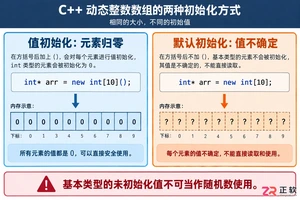
深入解析C++中动态数组的初始化机制,涵盖new操作符的不同用法、基本类型与类对象的初始化差异,以及为何在现代C++开发中应优先使用std::vector。
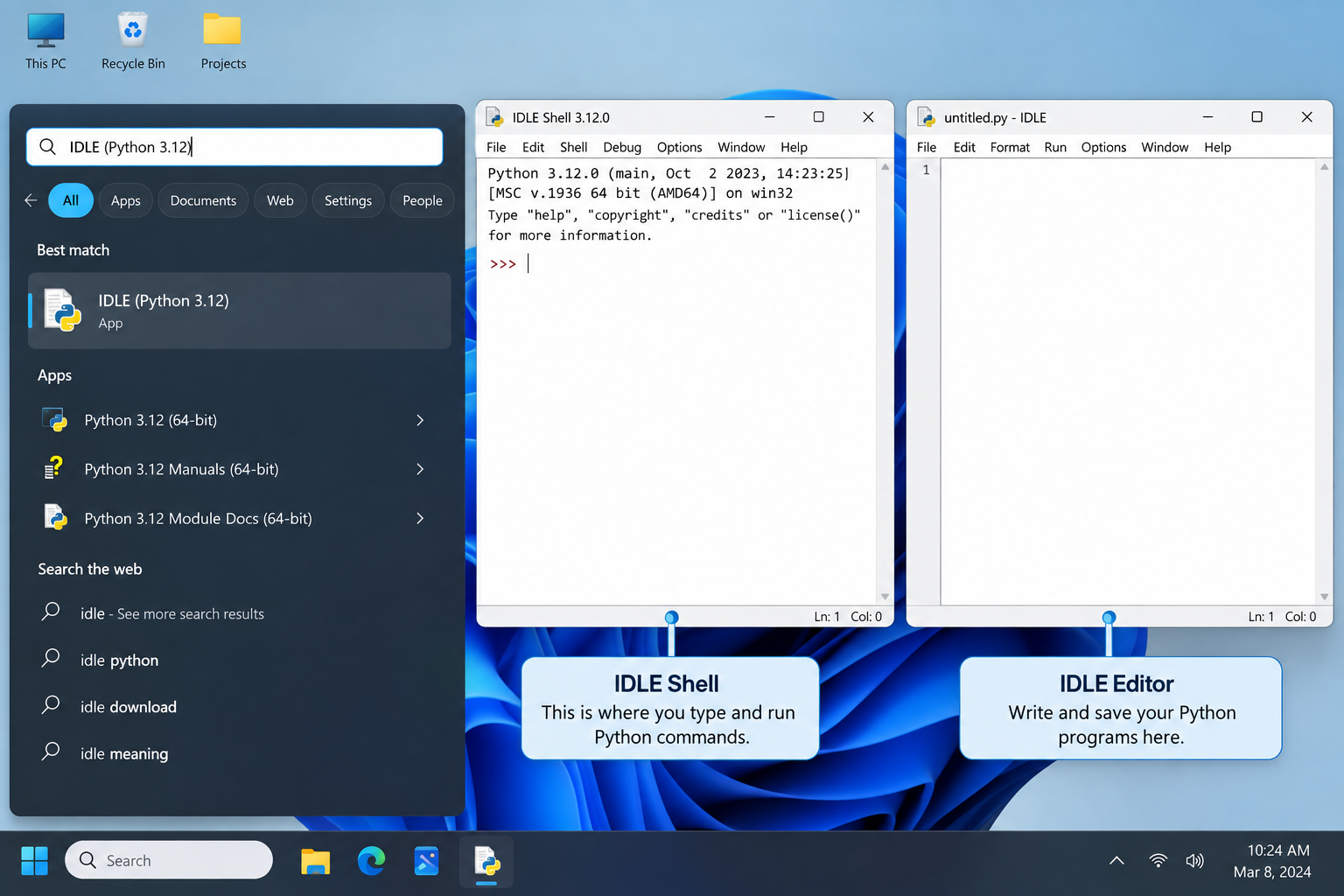
刚在Windows安装好Python却不知道如何启动?本文详细演示如何通过开始菜单找到并打开IDLE集成开发环境,以及如何在PowerShell或命令提示符中使用python和py命令启动交互式解释器、运行.py脚本文件。包含退出解释器的方法及常见启动问题排查,帮助初学者快速验证安装成功并开始编写代码。
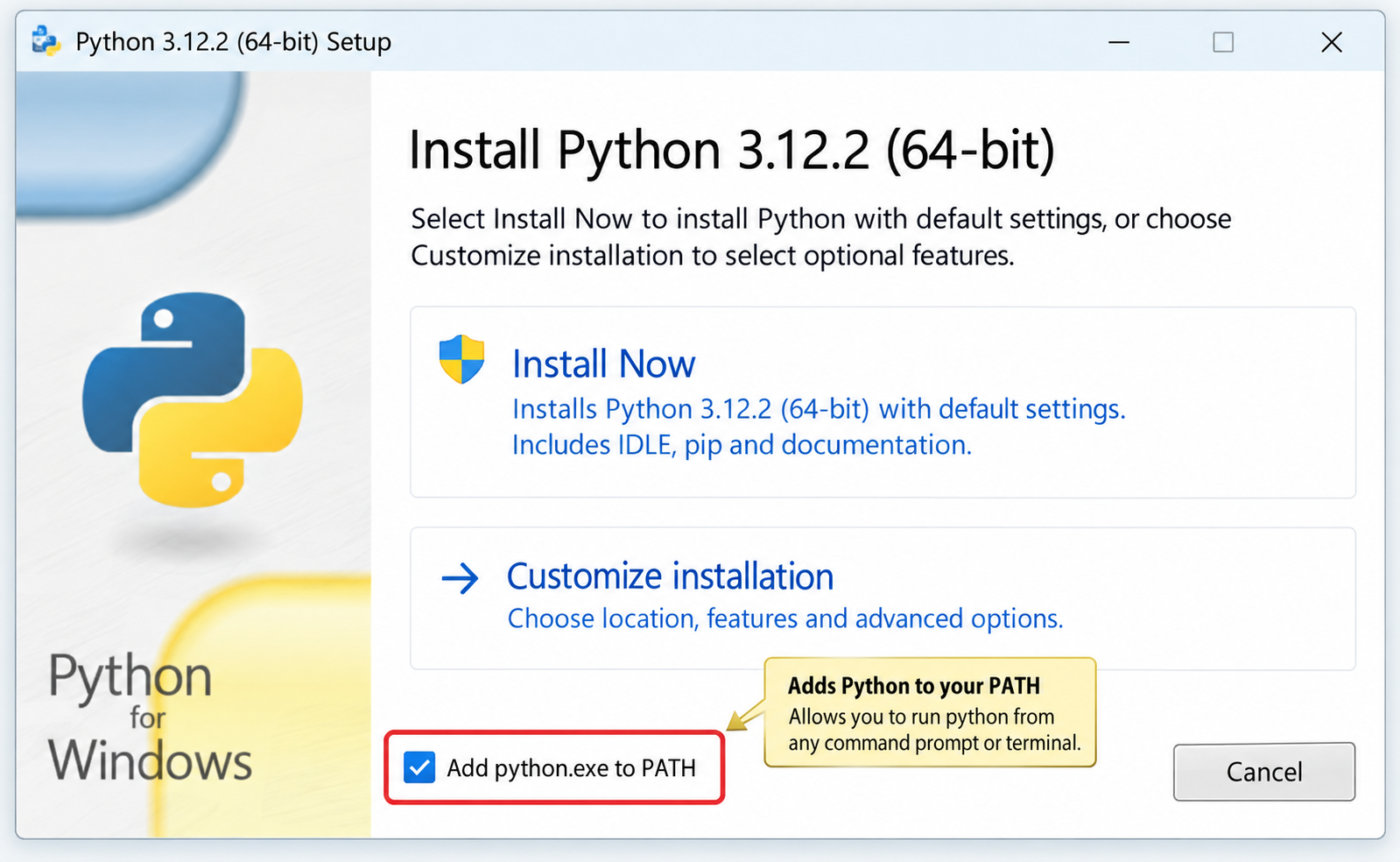
针对Windows初学者的Python安装实战指南。详细讲解如何从Python官网下载匹配架构的安装包,重点演示安装首屏勾选“Add python.exe to PATH”的关键操作,并提供使用python --version和py命令验证环境变量的具体步骤,帮助新手快速搭建开发环境并排查路径问题。

要想确认麒麟OS中Python程序的运行状态以及资源占用情况,我们可以这样做:用ps -ef | grep python来筛选进程;通过top命令,按P键排序查看实时负载;使用pgrep -f "script.py"精准获取PID;借助lsof -p PID验证文件打开状态。另外,还可以结合syst

在Debian系统上配置SSL证书通常涉及以下几个步骤:安装Web服务器:首先,你需要一个Web服务器,比如Apache或Nginx。这里以Apache为例。sudo apt updatesudo apt install apache2获取SSL证书:你可以从Let’s Encrypt免费获取SSL

要想让Python项目在统信UOS上正常运行,得先安装python3、python3-pip、python3-venv、python3-dev以及build-essential等组件。具体操作就是执行sudo apt install命令来一步到位完成安装,同时别忘了配置清华镜像源来给pip加速哦。在

在互联网上的各类网站中,无论大小,基本上都会有一个搜索框,用来给用户对内容进行搜索,小到站点搜索,大到搜索引擎搜索。从简单的来说,搜索功能确实很简单,一个简单的select语句就可以实现数据的搜索。而从复杂的来看,无论是搜索的精度还是搜索的效率,都是有很深的研究范围的。对于简单的搜索功能来说,一个s

立即在终端输入sudo shutdown -c取消倒计时关机,成功后显示“Shutdown cancelled”;若存在pmset重复任务,需再执行sudo pmset repeat cancel清除。Mac因Python脚本执行了os.system("sudo shutdown -h +10")或

之前写过一篇同步场景下用 Python 管理多个固定出口 IP 的实践(ExitPool + requests/httpx),覆盖了健康检查、故障转移和连接池复用。但在实际业务中,越来越多的场景用 asyncio 做高并发采集或批量接口调用——异步事件循环下多出口的管理方式和同步场景完全不同:单线程

写在前面:为什么静态出口 IP 不是"买了就行"不少团队在引入静态出口 IP 产品时,第一反应往往是:“地址配上去,这事就算完了。”可真到了真实业务里,静态出口 IP 真正能体现价值的地方,往往不在分配这一步,而在分配之后怎么管:地址有没有漂移,质量是否达标,某一条线路突然不可用时怎么切换,连接层又






Windows 10 是一款微软推出的经典操作系统,拥有硬件兼容性与多任务处理能力。它更偏向把系统状态查看和常用调节动作放在一起,适合需要持续观察和微调设备状态的场景。

极度公式是一款跨平台专业LaTeX公式识别编辑软件,支持OCR公式识别和多平台编辑。和使用说明,避免使用,享受完整功能与稳定支持。做扫描整理、文字提取和表格转换时,它能把识别后的处理步骤接得更顺,资料录入这类场景会省下不少时间。