

Java 中 Jar 包内资源路径加载失败的完整解决方案
Java程序在IDE中可正常加载资源,打包为Jar后getResource()返回null,原因是构建工具未将自定义目录资源包含进Jar包。通过在Maven的pom.xml中显式配置资源目录,并使用当前类加载器的getResourceAsStream()方法读取资源,可解决此问题。验证时可用jar-tf命令检查Jar内容。
IntelliJ 中能正常加载图片,但打包成 Jar 后 getResource() 返回 null?根本原因在于:资源未被正确包含进 Jar 包——IDE 的类路径配置 ≠ 构建工具的资源打包逻辑。本文详解 Ma ven 资源配置、路径获取最佳实践及常见陷阱。
先聊一个很常见的场景:你在 IntelliJ IDEA 里调试 Ja va 桌面应用(比如用 Jaylib 做个小游戏),加载图片、音频什么的都好好的,结果一打成可执行 Jar,程序直接崩了——getResource() 返回 null,或者日志里冒出一句 “No object found at location!”。别慌,这不是你的代码有 bug,问题出在构建流程和运行环境的差异上。
? 问题根源分析
IntelliJ 默认把 src/main/resources 以及你手动标记为 “Resources Root” 的目录自动加入 classpath,所以 getClass().getClassLoader().getResource("textures/player.png") 在 IDE 里能正常命中。但 Ma ven(或 Gradle)就不一样了——它默认只处理 src/main/resources 下的文件。如果你的图片放在 assets/、resources/images/ 或者其他自定义目录,并且没在 pom.xml 里明确声明,那这些文件根本不会跟着一起打进 Jar。
你给的堆栈里有个关键线索:
jdk.zipfs.ZipFileSystemProvider.getFileSystem(...) → Path.of(...) → ResourceLocation.getPath()
这说明程序已经进入了 Zip 文件系统(也就是 Jar 运行态),但 getResource() 还是返回 null——这几乎可以断定是资源缺失,不是路径写错了,而是资源压根就不在 Jar 里。
✅ 正确解决方案:显式配置 Ma ven 资源目录
在 pom.xml 的
            src/main/resources


            src/main/assets


                **/*.png
                **/*.jpg
                **/*.wa v


            .

                logo.png


            org.apache.ma ven.plugins
            ma ven-jar-plugin
            3.4.0


                        com.github.command17.mariomaker17.Main
⚠️ 注意:是相对于pom.xml所在目录的路径;务必确认该路径下真实存在目标文件(如src/main/assets/textures/player.png)。
?️ 代码层最佳实践:安全获取资源路径
你代码里用的 ClassLoader.getSystemClassLoader().getResource() 其实有点隐患——系统类加载器不一定能访问模块内的资源(尤其在模块化 JDK 环境下)。建议统一改成当前类的类加载器,并且加上空值校验和调试提示:
@Nullable
public String getPath() {
    URL resource = getClass().getClassLoader().getResource(this.location);
    if (resource == null) {
        LOGGER.error("Resource not found: '{}'. Check if it's included in JAR (run 'jar -tf target/your-app.jar | grep {}').",
                      this.location, this.location);
        return null;
    }
    try {
        // ⚠️ 关键:避免对 jar:// URL 使用 Path.of(URI) —— ZipFileSystem 不支持 URI 方案解析
        // 推荐:直接返回 URL 字符串,或使用 Files.readAllBytes(resource.openStream())
        return resource.toExternalForm(); // 如需文件系统路径,应解压到临时目录再处理
    } catch (IOException e) {
        LOGGER.error("Failed to read resource: {}", this.location, e);
        return null;
    }
}
✅ 更健壮的资源读取方式(推荐用于图像加载):
public BufferedImage loadImage() {
    try (InputStream is = getClass().getClassLoader().getResourceAsStream(this.location)) {
        if (is == null) {
            throw new RuntimeException("Resource not found: " + this.location);
        }
        return ImageIO.read(is); // Jaylib 通常也支持 InputStream 构造
    } catch (IOException e) {
        throw new RuntimeException("Failed to load image: " + this.location, e);
    }
}
? 验证与调试技巧
检查 Jar 内容:构建后执行
jar -tf target/mariomaker17-1.0.jar | grep "player.png"
确保输出包含对应路径(如
assets/textures/player.png)。IDEA 同步检查:修改
pom.xml后,点击右上角 Ma ven 工具栏 → Reload project,确保资源目录被识别。避免绝对路径陷阱:
this.location应为类路径相对路径(如"textures/player.png"),不要以 / 开头("/textures/player.png"会被ClassLoader.getResource()忽略前导/)。
✅ 总结
| 环节 | 正确做法 |
|---|---|
| 资源存放 | 统一置于 src/main/resources 或显式配置的 |
| 构建配置 | pom.xml 中 |
| 代码调用 | 使用 getClass().getClassLoader().getResourceAsStream() 替代 Path.of(URI) |
| 调试手段 | jar -tf 查看 Jar 内容 + 日志打印 getResource() 返回值 |
遵循以上步骤,就能彻底解决 “IDEA 能跑,Jar 报错” 这个老毛病,让你的应用在任何环境下都能稳稳加载资源。
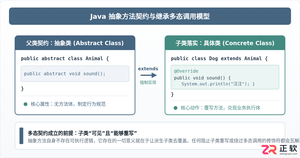
深入剖析Java中抽象方法为何严禁使用private和static修饰符。从面向对象契约规范、方法继承重写、JVM动态绑定(invokevirtual)与静态解析(invokestatic)等底层机制展开详细推导,结合编译报错示例与全景对比,彻底理清修饰符限制背后的设计逻辑。
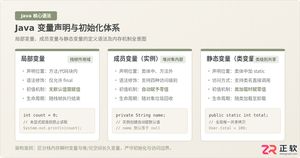
系统解析Java局部变量、成员变量与静态变量的定义语法、声明与初始化机制、生命周期及JVM内存驻留规则,结合图解与代码示例分析常见编译错误与认知误区。
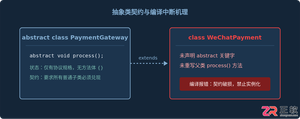
针对Java开发中常见的“子类未实现抽象方法”编译错误,深入分析报错原因,提供重写实现、声明抽象子类两种标准修复路径,并总结参数签名、访问修饰符等典型避坑要点。
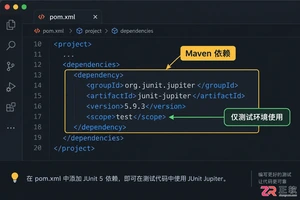
适合初学者的JUnit入门指南,详解如何配置环境、编写首个测试用例、使用断言验证结果,并分析单元测试的适用场景与例外情况。
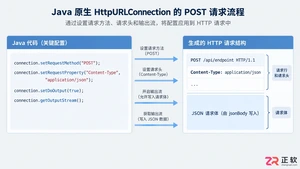
深入解析Java发送JSON格式POST请求的实现机制,对比原生API与第三方库的代码差异,提供可复制的代码示例,并探讨超时设置、编码处理及微服务场景下的例外情况。
百度官方在线入口最新版网页版直达官网是https://www.baidu.com/,界面简洁无干扰、多端同步体验一致、内容聚合维度丰富、语音与图像识别稳定、隐私控制机制可见。

谷歌浏览器Mac版官方安装指南 谷歌浏览器Mac版官方安装入口是https://www.google.com/chrome/,需macOS 12+系统、500MB空间,下载.dmg后拖入应用程序安装,支持多设备同步、性能优化与隐私保护功能。 苹果电脑Chrome的安装入口究竟在哪里?这个问题最近可是
Chrome中JavaScript未执行需依次检查:一、移除站点级禁用并添加允许域名;二、开启全局JavaScript开关;三、禁用干扰扩展;四、在开发者工具中启用JavaScript;五、重置内容设置为默认。 有时在Chrome里打开网页,会发现交互按钮点了没反应,数据加载不出来,页面仿佛“静止”
IE浏览器怀旧版在线网址:一次精准的技术时光回溯 最近,不少老用户和怀旧爱好者在反复搜索一个问题:那个经典的Internet Explorer,如今还能在哪里原汁原味地体验到?答案指向一个特定的地址:https://ie.microsoft.com/legacy/。 这个网站远不止是一个简单的“皮肤

火狐浏览器五大核心设置功能:解锁高效、安全与个性化体验 火狐浏览器功能强大,但如果不仔细挖掘,很多能大幅提升效率和安全性的设置可能就“藏着掖着”了。这就好比拥有一台高性能设备,却只用了基础模式。那么,如何把它调整到最顺手、最安全的状态?接下来,我们就聚焦于当前版本(截至2025年末)最关键的五大设置




Postman是一套面向API全生命周期的开发与测试平台,可在Mac上发送和调试多种协议请求,管理集合、环境及认证信息,并完成脚本测试、模拟服务、监控、文档发布和团队协作。它适合开发、测试及运维人员使用,提供个人免费方案。
Docker Desktop 是 Docker 官方为 Mac 提供的容器开发环境,集成 Docker Engine、命令行工具、Compose、Build、Kubernetes 与图形化管理界面。

Android Studio 是 Google 面向安卓应用开发提供的官方集成开发环境,基于 IntelliJ IDEA 构建。它整合智能代码编辑、Gradle 构建、界面预览、设备模拟、性能分析、调试测试及 APK 分析等工具。

PixPix 是面向品牌、卖家和内容团队的在线 AI 图片视频创作平台,提供图视频 Agent、无限画布、图片生成、视频生成、自然语言编辑及商品套图、产品精修和带货视频等电商工具。

Postman 是面向 API 全生命周期的开发与协作平台。Windows 桌面版可用于构建和发送 HTTP、GraphQL、gRPC、WebSocket、MQTT 等请求,并提供环境变量、集合、脚本测试、模拟服务、监控、文档及团队工作区等

Docker Desktop 为 Windows 开发者提供集成式容器环境,内置 Docker Engine、命令行工具、Compose、Build 与 Kubernetes 等组件,可在本机完成镜像构建、容器运行、日志查看和资源管理。