

c#获取特性的接口的实现
C#中获取特性依赖反射机制,主要通过三种方式:静态方法Attribute.GetCustomAttribute获取单个特性,MemberInfo.GetCustomAttributes实例方法获取多个特性,以及底层接口ICustomAttributeProvider。需注意inherit参数控制是否沿继承链查找,现代推荐使用泛型版本和模式匹配语法。
C#里其实并没有一个专门的“获取特性的接口”——别找了,没有类似IGetAttribute这样的东西可以直接调用。获取特性(Attributes)这件事,靠的是反射(Reflection)机制,核心依赖两个方向:
System.Attribute类提供的静态方法System.Reflection命名空间下的Type、MethodInfo、PropertyInfo等类型,它们都提供了GetCustomAttributes实例方法
那具体怎么操作?三种主流方式,按场景选就行。
1. 使用 Attribute.GetCustomAttribute —— 获取单个特性,首选
这是最传统、最直观的方法。什么时候用?当你明确只要一个特性,不想啰嗦的时候。调用后如果找到就返回特性实例,找不到就返回 null。值得注意的是,如果同一个元素上标记了多个同类型特性(并且 AllowMultiple=true),这个方法只会返回第一个。
using System;
using System.Reflection;

// 假设 MyClass 上有一个 [MyAttribute]
Type type = typeof(MyClass);

// 获取单个特性
var attr = (MyAttribute)Attribute.GetCustomAttribute(type, typeof(MyAttribute));
if (attr != null)
{
    Console.WriteLine(attr.Description);
}
泛型版本(.NET Core / .NET 5+ 更推荐):
// 语法更简洁,无需手动强制转换
var attr = Attribute.GetCustomAttribute(type);
2. 使用 MemberInfo.GetCustomAttributes —— 获取多个,更灵活
这是 Type、MethodInfo、PropertyInfo 等反射对象的实例方法。适合需要获取全部特性,或者不确定到底有几个同名特性的情况。返回值是一个数组(object[] 或泛型版本 T[])。
using System;
using System.Reflection;
using System.Linq;

Type type = typeof(MyClass);

// 获取该类型上所有的 MyAttribute 实例
var attrs = type.GetCustomAttributes(inherit: true).ToArray();
foreach (var attr in attrs)
{
    Console.WriteLine(attr.Description);
}

// 如果不指定泛型,返回的是 object[]
var allAttrs = type.GetCustomAttributes(inherit: true);
3. 认识 ICustomAttributeProvider 接口 —— 底层机制
虽然平时几乎不直接用它,但了解底层逻辑总没坏处。所有可以应用特性的元素——Type、Assembly、MethodInfo 等——都实现了 System.Reflection.ICustomAttributeProvider 接口。它定义了两个核心方法,前面说的 GetCustomAttributes 本质上就是调用的这里:
object[] GetCustomAttributes(bool inherit)object[] GetCustomAttributes(Type attributeType, bool inherit)
// Type 类实现了 ICustomAttributeProvider
ICustomAttributeProvider provider = typeof(MyClass);
var attrs = provider.GetCustomAttributes(typeof(MyAttribute), true);
这种写法通常在开发底层反射框架时才会用到,日常开发不必这么绕。
关键参数:inherit
调用 GetCustomAttributes 时经常会看到 bool inherit 这个参数。区别在于:
true:不仅检查当前元素,还会沿着继承链向上查找基类或基接口上的特性(前提是特性定义时设置了[AttributeUsage(Inherited = true)])。false:只看当前元素自己声明的特性,不管父类。
现代 C# 简洁写法(C# 7.0+)
实际开发中,配合 is 模式匹配可以让代码干净很多:
var method = typeof(MyClass).GetMethod("DoWork");

// 检查并获取
if (method.GetCustomAttribute() is ObsoleteAttribute obsAttr)
{
    Console.WriteLine($"该方法已过时: {obsAttr.Message}");
}

// 或者检查是否存在任意特性
if (method.GetCustomAttributes().Any())
{
    // 执行授权逻辑
}
这种方式在编码时非常顺手,尤其适合做条件判断和后续处理。
总结一下
| 需求 | 推荐方法 | 返回类型 |
|---|---|---|
| 获取单个特定特性 | Attribute.GetCustomAttribute | T(找不到为 null) |
| 获取所有特定特性 | member.GetCustomAttributes | IEnumerable |
| 获取所有特性(不限类型) | member.GetCustomAttributes() | object[] |
| 底层接口 | ICustomAttributeProvider | object[] |
最后多说一句:.NET 6 及更高版本引入了 System.Reflection.CustomAttributeExtensions,上面那些泛型方法大多数扩展自此类,性能上比旧的非泛型方法更优,日常开发建议优先使用泛型版本。
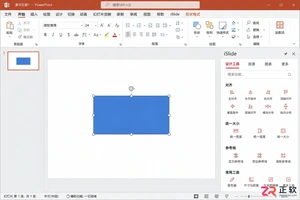
iSlide设计工具侧边栏不见了怎么办?本教程详解在Windows版PPT中通过【设计工具】按钮恢复侧边栏的方法,涵盖面板拖拽、模块隐藏检查及插件加载异常的处理,同时提供macOS用户的使用指引。
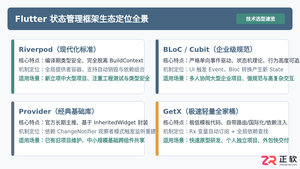
全面盘点Flutter主流状态管理框架,深度解析Provider、Riverpod、Bloc与GetX的核心机制、优缺点及适用场景,提供系统化的状态管理选型指南。
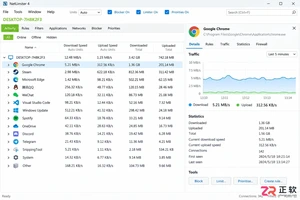
新手入门 NetLimiter 必读指南。详解 Activity 实时监控、DL/UL Limit 限速设置、Blocker 阻止规则及 Stats 流量统计功能。图文结合展示规则编辑器操作,助你轻松管理 Windows 应用网络带宽。
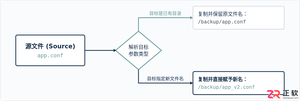
在Linux系统中,复制文件并改名并没有单独的独立命令,而是通过标准复制命令cp在指定目标路径时直接写上新文件名来完成。本文详解cp命令复制并重命名的操作语法、同目录与跨目录示例、常用安全参数及目录复制实践。
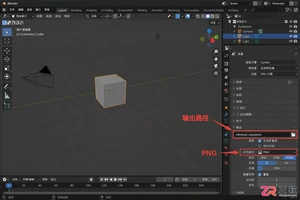
学习如何将Blender中的动态材质导出为图片序列。涵盖输出路径设置、PNG格式选择、帧范围确认及Image Sequence贴图的重新载入方法,适合需要保留透明通道或后期处理的动画贴图工作流。
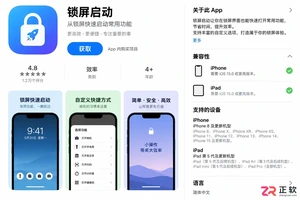
想在iPhone或iPad上实现锁屏一键直达?本文详解“锁屏启动”的安装前检查清单、系统权限配置步骤及小组件添加方法,解决组件不显示、点击无反应等常见问题,确保快捷指令、网页和App快速启动。

学习如何在Blender中使用HDRI进行渲染。通过World着色器连接Environment Texture节点,调整光照强度与环境方向,解决背景显示与曝光问题,快速提升场景真实感。
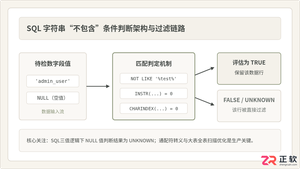
深入详解在SQL中进行条件判断字符串不包含某个子串的方法,涵盖标准NOT LIKE、各主流数据库(MySQL、PostgreSQL、SQL Server、Oracle)专有位置函数、正则表达式判断,剖析NULL值三值逻辑陷阱及全表扫描性能优化策略。
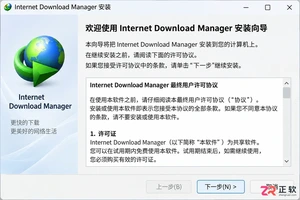
新手必读的IDM安装配置教程。从官方下载开始,逐步讲解如何完成Windows安装、启用Chrome/Edge/Firefox浏览器扩展、设置默认保存目录及调整连接线程,解决IDM不弹窗接管下载的常见问题。
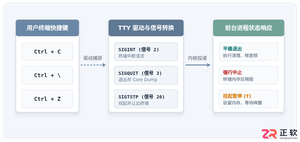
全面解析Linux终端中终止进程的核心快捷键(Ctrl+C、Ctrl+Z、Ctrl+\)的原理、区别与具体使用方法,附后台恢复与强制终止全流程指南。




Postman是一套面向API全生命周期的开发与测试平台,可在Mac上发送和调试多种协议请求,管理集合、环境及认证信息,并完成脚本测试、模拟服务、监控、文档发布和团队协作。它适合开发、测试及运维人员使用,提供个人免费方案。
Docker Desktop 是 Docker 官方为 Mac 提供的容器开发环境,集成 Docker Engine、命令行工具、Compose、Build、Kubernetes 与图形化管理界面。

Android Studio 是 Google 面向安卓应用开发提供的官方集成开发环境,基于 IntelliJ IDEA 构建。它整合智能代码编辑、Gradle 构建、界面预览、设备模拟、性能分析、调试测试及 APK 分析等工具。

PixPix 是面向品牌、卖家和内容团队的在线 AI 图片视频创作平台,提供图视频 Agent、无限画布、图片生成、视频生成、自然语言编辑及商品套图、产品精修和带货视频等电商工具。

Postman 是面向 API 全生命周期的开发与协作平台。Windows 桌面版可用于构建和发送 HTTP、GraphQL、gRPC、WebSocket、MQTT 等请求,并提供环境变量、集合、脚本测试、模拟服务、监控、文档及团队工作区等

Docker Desktop 为 Windows 开发者提供集成式容器环境,内置 Docker Engine、命令行工具、Compose、Build 与 Kubernetes 等组件,可在本机完成镜像构建、容器运行、日志查看和资源管理。