

Python使用正则表达式实现从日志中精准提取关键字段
引言 跟日志打交道多了,谁还没被海量信息折腾过?一行一行翻?不现实。今天这篇实战,就专门聊聊怎么用正则表达式把日志里那些关键字段精准揪出来。不管是请求方法、时间戳,还是异常堆栈,读完你就能上手,顺便还能搞定几个平时容易卡住的坑。 问题1:如何从HTTP访问日志中提取请求方法和URL? 答案其实很直接
引言
跟日志打交道多了,谁还没被海量信息折腾过?一行一行翻?不现实。今天这篇实战,就专门聊聊怎么用正则表达式把日志里那些关键字段精准揪出来。不管是请求方法、时间戳,还是异常堆栈,读完你就能上手,顺便还能搞定几个平时容易卡住的坑。

问题1:如何从HTTP访问日志中提取请求方法和URL?
答案其实很直接:用Python的re模块,写个正则把HTTP请求行里的方法和URL逮出来。
import re

# 示例日志行
log_line = '127.0.0.1 - - [10/Oct/2023:13:55:36 +0000] "GET /index.html HTTP/1.1" 200 4824'

# 正则表达式
pattern = r'"(GET|POST|PUT|DELETE) ([^\s]+)'

# 匹配
match = re.search(pattern, log_line)

if match:
    request_method = match.group(1)  # 提取请求方法
    url = match.group(2)            # 提取URL
    print(f"请求方法: {request_method}, URL: {url}")
关键点就两个:re.search对付单行匹配,group(1)和group(2)分别拿第一个和第二个括号捕获的内容。
问题2:如何提取包含特定关键词的日志行?
这个场景更常见——比如只想看POST请求或ERROR日志。用re.findall配合过滤,写起来很干净。
import re
# 示例日志列表
log_lines = [
    '127.0.0.1 - - [10/Oct/2023:13:55:36 +0000] "GET /index.html HTTP/1.1" 200 4824',
    '127.0.0.1 - - [10/Oct/2023:13:55:40 +0000] "POST /login HTTP/1.1" 302 552',
    '127.0.0.1 - - [10/Oct/2023:13:55:45 +0000] "GET /about.html HTTP/1.1" 200 2345'
]
# 正则表达式
pattern = r'POST'
# 过滤包含特定关键词的日志行
filtered_lines = [line for line in log_lines if re.search(pattern, line)]
for line in filtered_lines:
    print(line)
关键点:re.search判断是否命中,列表推导式一把梭,干净利落。
问题3:如何提取日志中的时间戳?
时间戳格式通常比较固定,像方括号包里那串。用括号捕获一下就出来了。
import re

# 示例日志行
log_line = '127.0.0.1 - - [10/Oct/2023:13:55:36 +0000] "GET /index.html HTTP/1.1" 200 4824'

# 正则表达式
pattern = r'\[(\d{2}/\w{3}/\d{4}:\d{2}:\d{2}:\d{2} [+\-]\d{4})\]'

# 匹配
match = re.search(pattern, log_line)

if match:
    timestamp = match.group(1)
    print(f"时间戳: {timestamp}")
关键点:时间戳格式有套路,大括号里的部分正好是我们要的。
问题4:如何处理多行日志并提取所需字段?
单行能搞定,多行也不怕。用re.finditer逐行迭代,每个match都能拿到所需字段。
import re

# 示例多行日志
log_data = '''127.0.0.1 - - [10/Oct/2023:13:55:36 +0000] "GET /index.html HTTP/1.1" 200 4824
127.0.0.1 - - [10/Oct/2023:13:55:40 +0000] "POST /login HTTP/1.1" 302 552
127.0.0.1 - - [10/Oct/2023:13:55:45 +0000] "GET /about.html HTTP/1.1" 200 2345'''

# 正则表达式
pattern = r'"(GET|POST|PUT|DELETE) ([^\s]+) \S+" (\d{3})'

# 处理多行日志
for match in re.finditer(pattern, log_data):
    request_method = match.group(1)
    url = match.group(2)
    status_code = match.group(3)
    print(f"请求方法: {request_method}, URL: {url}, 状态码: {status_code}")
关键点:re.finditer返回迭代器,不一次性加载全部,适合大日志文件。
问题5:如何从复杂的日志中提取特定格式的数据?
遇到那种字段特别多的日志,比如IP、时间、方法、URL、协议、状态码、响应大小、User-Agent全都挤在一行里,那就得把正则写得细一点。一个括号一个字段,清晰可控。
import re

# 示例复杂日志行
log_line = '127.0.0.1 - - [10/Oct/2023:13:55:36 +0000] "GET /api/v1/users/123?query=abc HTTP/1.1" 200 4824 - "Mozilla/5.0"'

# 正则表达式
pattern = r'(\d{1,3}\.\d{1,3}\.\d{1,3}\.\d{1,3}) - - \[(\d{2}/\w{3}/\d{4}:\d{2}:\d{2}:\d{2} [+\-]\d{4})\] "(\w+) (\S+)' \
          r'(\S+)" (\d{3}) (\d+) - "(.*)"'

# 匹配
match = re.match(pattern, log_line)

if match:
    ip_address = match.group(1)
    timestamp = match.group(2)
    request_method = match.group(3)
    request_url = match.group(4)
    request_protocol = match.group(5)
    status_code = match.group(6)
    response_size = match.group(7)
    user_agent = match.group(8)

    print(f"IP地址: {ip_address}, 时间戳: {timestamp}, 请求方法: {request_method}, 请求URL: {request_url}, "
          f"请求协议: {request_protocol}, 状态码: {status_code}, 响应大小: {response_size}, User-Agent: {user_agent}")
关键点:正则越详细,提取越精准。不过别忘了测试,日志格式一变就得跟着调。
问题6:如何提取日志中的异常信息?
生产日志里最怕看到ERROR,但真要分析时,往往需要把完整异常堆栈捞出来。一般异常日志开头有固定的关键字,比如“ERROR [时间戳] [线程] 异常描述...”,用正则把关键字之后的整段内容捕获就行。
import re

# 示例日志行
log_line = 'ERROR [10/Oct/2023:13:55:36 +0000] [Thread-2] Exception in thread "main" ja va.lang.NullPointerException: Cannot invoke "ja va.util.List.get(int)" because the return value of "ja va.util.List.stream()" is null'

# 正则表达式
pattern = r'ERROR \[(\d{2}/\w{3}/\d{4}:\d{2}:\d{2}:\d{2} [+\-]\d{4})\] \[(\w+)\] (.*)'

# 匹配
match = re.search(pattern, log_line)

if match:
    timestamp = match.group(1)
    thread = match.group(2)
    exception_info = match.group(3)
    print(f"时间戳: {timestamp}, 线程: {thread}, 异常信息: {exception_info}")
关键点:异常信息一般很长,正则里用(.*)捕获剩余全部内容,然后按需处理即可。
问题7:如何自动化日志处理任务?
如果日志每小时生成一次,甚至更频繁,手动跑脚本就不现实了。解决方案是把脚本挂到系统定时任务里,比如Linux的cron,或者Windows的任务计划程序。脚本可以封装成一个函数,用requests从远端拉取日志,再用我们前面写的正则提取字段。下面是一个示例,演示了从URL获取日志并逐行解析的流程。
import re
import requests

# 定义日志处理函数
def extract_log_data():
    # 从服务器获取日志数据
    log_data = requests.get('http://example.com/log.txt').text

    # 正则表达式
    pattern = r'(\d{1,3}\.\d{1,3}\.\d{1,3}\.\d{1,3}) - - \[(\d{2}/\w{3}/\d{4}:\d{2}:\d{2}:\d{2} [+\-]\d{4})\] "(\w+) (\S+)' \
              r'(\S+)" (\d{3}) (\d+) - "(.*)"'

    # 处理多行日志
    for match in re.finditer(pattern, log_data):
        ip_address = match.group(1)
        timestamp = match.group(2)
        request_method = match.group(3)
        request_url = match.group(4)
        request_protocol = match.group(5)
        status_code = match.group(6)
        response_size = match.group(7)
        user_agent = match.group(8)

        print(f"IP地址: {ip_address}, 时间戳: {timestamp}, 请求方法: {request_method}, 请求URL: {request_url}, "
              f"请求协议: {request_protocol}, 状态码: {status_code}, 响应大小: {response_size}, User-Agent: {user_agent}")

# 使用系统的定时任务工具(如cron)来周期性执行此脚本
# 例如,每5分钟运行一次:*/5 * * * * python3 /path/to/your/script.py

if __name__ == "__main__":
    extract_log_data()
关键点:把正则解析和网络请求封装成函数,然后扔给cron或任务计划程序定期跑,日志处理就完全自动了。
这几个实战案例基本涵盖了从简单到复杂的日志提取场景。只要你熟悉了正则的捕获组、搜索和迭代模式,不管是Apache访问日志还是自定义异常日志,都能快速写出对应的解析脚本。下次再面对堆积如山的日志文件,不用再头疼了——几行正则下去,关键数据直接到手。

详解如何在 Windows 电脑上通过 Microsoft Store 安装 Codex 桌面应用,包括启动登录、切换 Codex 模式、关联本地代码项目及终端环境配置的界面操作指引。
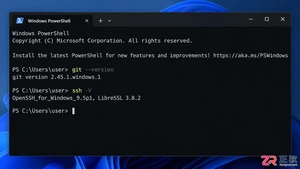
本文详解如何在Windows环境中使用PowerShell生成SSH密钥对,配置ssh-agent自动加载私钥,并将公钥安全添加至GitHub账户,最后通过git remote set-url切换为SSH地址,解决每次操作需输入账号密码的问题。
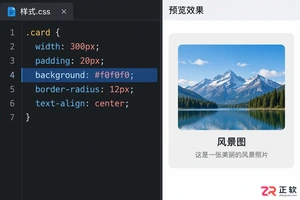
深入解析backdrop与background在网页开发及视觉设计中的区别。通过CSS代码示例,展示如何正确使用background设置元素背景,以及利用backdrop-filter创建弹窗遮罩模糊效果,避免概念混用。
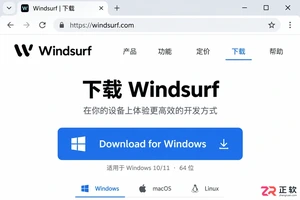
详解 Windsurf IDE 在 Windows 系统的下载来源、安装步骤及首次启动界面。指导用户如何导入编辑器设置、打开项目文件夹及使用终端与 AI 功能,适合初次接触该工具的开发者阅读。
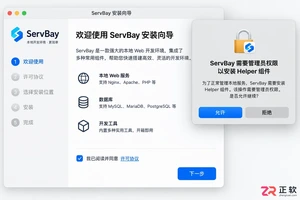
新手入门 ServBay 本地开发环境,详解安装包下载、Dashboard 状态监控、Packages 组件安装、Services 服务控制及 Websites 项目配置。掌握 .servbay.config 版本管理与日志排查技巧,快速搭建稳定的 PHP、Node.js 等多语言开发环境。

详解 CodeKit 在 macOS 下的安装步骤、项目导入方法、Sass与JavaScript编译设置及浏览器自动刷新功能,助您快速搭建高效的前端开发环境。
详解Windows环境下安装OpenAI Codex CLI的步骤,包括WSL环境检查、Node.js/npm配置、npm全局安装命令及首次启动验证,适合开发者快速上手。
学习如何配置 NativeRest REST API 客户端。涵盖 Windows/macOS/Linux 安装后的工作区创建、环境变量管理、请求编辑及响应查看步骤,帮助开发者快速完成基础环境搭建与连通性测试。
深入解析CSS中设置透明度的核心属性opacity,剖析子元素继承、事件穿透、层叠上下文等关键注意事项,并提供与rgba、hsla的实用选型对比。




WPS Office是一款面向macOS用户的综合办公套件,将文字处理、电子表格、演示文稿、PDF工具、模板与云协作整合在同一应用中。它兼容常见Microsoft Office格式,支持Intel及Apple芯片Mac,基础功能可免费使用,

Shapr3D是一款面向工业设计、机械工程、建筑概念和三维打印工作流的CAD软件。Mac版采用Parasolid建模内核,支持草图约束、实体建模、工程图、可视化渲染及常见CAD格式交换,并可通过账户在多台设备之间同步项目。

REAPER是Cockos开发的数字音频工作站,提供多轨音频与MIDI录制、剪辑、处理、混音和母带制作工具。Mac版兼容Intel与Apple芯片,支持AU、VST、VST3、CLAP等插件格式,并提供高度可定制的工作流程。

Adobe Photoshop 是面向摄影师、设计师和内容创作者的专业图像处理工具,可在 Windows 上完成照片修饰、选区抠图、图层合成、文字排版、绘画及生成式编辑。软件采用订阅授权,由 Creative Cloud 管理安装、更新与许

Adobe InDesign 是面向印刷与数字出版的专业页面排版工具,可制作书籍、杂志、宣传册、海报、交互式 PDF 和电子书。它提供精细的文字样式、多页面管理、印前检查及多格式输出能力,并能与 Photoshop、Illustrator

Adobe Illustrator 是用于绘制矢量图形、插画、图标、徽标和版式的专业设计工具。它以路径和锚点为核心,作品放大后仍能保持清晰,并提供画板、文字、渐变、图像描摹及精确变换等功能,适合品牌视觉、印刷物料、数字界面和商业插画创作。