

使用Python清洗问卷数据的实战方法
使用Python清洗问卷数据,通过检测直线作答、秒填、规律作答、矛盾回答及统计异常值等方法,识别并剔除无效样本,最终导出清洗后的有效数据及无效样本明细,从而大幅提升问卷数据质量与可靠性。
做问卷研究的人大概都有这种体会——好不容易收回来一批数据,打开一看,直线作答、秒填、规律选择、前后矛盾……各种问题接踵而至。这些“垃圾数据”如果不清理掉,分析结果会被严重污染,信效度也过不了关。

这篇教程就是手把手教你用 Python 从零开始搭建一套问卷数据清洗流程,覆盖最常见的无效样本类型。
适用场景: 毕业论文问卷、学术调研、市场研究、用户满意度调查等。
准备工作
你需要:
- Python 3.8+
pandas、numpy、matplotlib- 一份导出为 CSV 或 Excel 的问卷数据
pip install pandas numpy matplotlib openpyxl
问卷星导出的数据一般是这个结构(每行一份问卷,每列一个题目):
| 序号 | 提交时间 | Q1 | Q2 | Q3 | Q4 | Q5 |
|---|---|---|---|---|---|---|
| 1 | 2025-03-15 14:30:02 | 满意 | 一般 | 满意 | 满意 | 满意 |
| 2 | 2025-03-15 14:30:05 | 非常不满意 | 非常不满意 | 非常不满意 | 非常不满意 | 非常不满意 |
不用多说,第 2 行明显是垃圾数据。但实际场景里无效样本通常没这么明显。
第一步:加载数据
import pandas as pd
import numpy as np

# 问卷星导出通常是 Excel 或 CSV
df = pd.read_excel('问卷数据.xlsx')
# 或
# df = pd.read_csv('问卷数据.csv')

print(f"原始数据量: {len(df)} 份")
print(df.head())
通常问卷星导出的列名比较乱,先整理一下:
# 找出题目列(通常包含 "Q" 或题号)
question_cols = [c for c in df.columns if c.startswith('Q') or '第' in str(c)]
time_col = [c for c in df.columns if '时间' in str(c) or 'time' in str(c).lower()]

print(f"题目列: {question_cols}")
print(f"时间列: {time_col}")
第二步:检测直线作答(Straight-lining)
直线作答是最常见的无效模式——所有题目选了同一个选项。
def detect_straight_lining(df, question_cols):
    """检测所有题目答案完全一致的样本"""
    invalid_indices = []

    for idx, row in df.iterrows():
        answers = row[question_cols].dropna().tolist()
        if len(answers) < 3:
            continue
        # 如果所有答案都相同
        if len(set(answers)) == 1:
            invalid_indices.append(idx)

    return set(invalid_indices)

straight_lining = detect_straight_lining(df, question_cols)
print(f"直线作答: {len(straight_lining)} 份")
不过,直线作答也有误判的可能。比如 5 道题都是“满意”,也许是真实感受。所以可以加一个更严格的判断——不要求完全一致,而是 80% 以上选项相同:
def detect_near_straight_lining(df, question_cols, threshold=0.8):
    """检测接近直线作答(超过 threshold 比例的答案相同)"""
    invalid_indices = []

    for idx, row in df.iterrows():
        answers = row[question_cols].dropna().tolist()
        if len(answers) < 3:
            continue
        # 找出现最多的答案
        from collections import Counter
        counts = Counter(answers)
        most_common_ratio = counts.most_common(1)[0][1] / len(answers)
        if most_common_ratio >= threshold:
            invalid_indices.append(idx)

    return set(invalid_indices)

near_straight = detect_near_straight_lining(df, question_cols)
print(f"接近直线作答: {len(near_straight)} 份")
第三步:检测秒填(Speeders)
如果有人在 10 秒内“填完”了一份 20 题的问卷,大概率可以判定为无效数据。
def detect_speeders(df, time_col, min_seconds=10):
    """检测提交时间异常短的样本"""
    if not time_col:
        return set()

    time_data = pd.to_datetime(df[time_col[0]])

    # 按时间排序,计算相邻提交的时间差
    time_sorted = time_data.sort_values()
    time_diffs = time_sorted.diff().dt.total_seconds()

    # 方法1:如果数据里有"答题时长"字段,直接用
    duration_col = [c for c in df.columns if '时长' in str(c) or '用时' in str(c)]
    if duration_col:
        durations = pd.to_numeric(df[duration_col[0]], errors='coerce')
        speeder_indices = df[durations < min_seconds].index
        return set(speeder_indices)

    # 方法2:没有时长字段,用提交间隔估算(粗略)
    return set()

speeders = detect_speeders(df, time_col, min_seconds=15)
print(f"秒填样本: {len(speeders)} 份")
如果问卷星导出的数据里包含答题时长列,直接按阈值过滤就行。一般规则:
- 10 题以内的问卷:< 10 秒视为秒填
- 10-20 题:< 20 秒视为秒填
- 20 题以上:< 30 秒视为秒填
第四步:检测规律作答(Pattern Response)
有些人会按规律选:1-2-3-4-5-1-2-3-4-5,或者 5-4-3-2-1-5-4-3-2-1。
def detect_pattern_response(df, question_cols):
    """检测规律性作答(递增、递减、交替等模式)"""
    invalid_indices = []

    for idx, row in df.iterrows():
        answers = row[question_cols].dropna().tolist()
        if len(answers) < 5:
            continue

        # 把文字选项转为数字(如果是文字的话需要先编码)
        try:
            numeric = pd.to_numeric(answers)
        except:
            # 文字选项,检查是否完全交替(A-B-A-B)
            if len(answers) >= 6:
                half = len(answers) // 2
                first_half = answers[:half]
                second_half = answers[half:half*2]
                if first_half == second_half:
                    invalid_indices.append(idx)
            continue

        # 检测严格递增/递减
        diffs = np.diff(numeric)
        if np.all(diffs == diffs[0]) and diffs[0] != 0:
            invalid_indices.append(idx)
            continue

        # 检测交替模式(1-3-1-3-1-3)
        if len(numeric) >= 6:
            even_vals = numeric[::2]
            odd_vals = numeric[1::2]
            if len(set(even_vals)) == 1 and len(set(odd_vals)) == 1:
                invalid_indices.append(idx)

    return set(invalid_indices)

patterns = detect_pattern_response(df, question_cols)
print(f"规律作答: {len(patterns)} 份")
第五步:检测矛盾回答
如果 Q1 问“您是否使用过本产品”选了“否”,但 Q5 问“您对产品的哪些功能最满意”却填了具体内容,这就是明显的矛盾回答。
def detect_contradictions(df, filter_col, filter_value, check_col):
    """
    检测逻辑矛盾
    filter_col: 筛选题列(如"是否使用过")
    filter_value: 筛选值(如"否")
    check_col: 应该为空的列(如后续满意度题)
    """
    mask = df[filter_col] == filter_value
    should_be_empty = df.loc[mask, check_col]
    # 筛选了"否"的人,后续题不应该有内容
    contradictions = should_be_empty[should_be_empty.notna() & (should_be_empty != '')]
    return set(contradictions.index)

# 示例:选了"没使用过"但后面题有回答
# contradictions = detect_contradictions(df, 'Q1', '否', 'Q5')
这一步需要根据具体问卷逻辑来写,没有通用模板。
第六步:检测异常值(统计方法)
对于量表题(1-5 分或 1-7 分),可以用统计方法检测异常样本。
def detect_outliers_zscore(df, question_cols, threshold=3.0):
    """用 Z-score 检测每个样本的总分异常"""
    # 把题目转为数值
    numeric_df = df[question_cols].apply(pd.to_numeric, errors='coerce')
    row_means = numeric_df.mean(axis=1)

    z_scores = (row_means - row_means.mean()) / row_means.std()
    outlier_indices = df[abs(z_scores) > threshold].index

    return set(outlier_indices)

outliers = detect_outliers_zscore(df, question_cols)
print(f"统计异常: {len(outliers)} 份")
第七步:汇总所有无效样本
# 合并所有检测结果
all_invalid = straight_lining | near_straight | speeders | patterns | outliers

print(f"n{'='*50}")
print(f"原始数据: {len(df)} 份")
print(f"直线作答: {len(straight_lining)} 份")
print(f"接近直线: {len(near_straight)} 份")
print(f"秒填样本: {len(speeders)} 份")
print(f"规律作答: {len(patterns)} 份")
print(f"统计异常: {len(outliers)} 份")
print(f"总无效: {len(all_invalid)} 份")
print(f"有效率: {(1 - len(all_invalid)/len(df))*100:.1f}%")
print(f"{'='*50}")

# 标记无效样本
df['is_invalid'] = df.index.isin(all_invalid)
df['invalid_reason'] = ''
df.loc[df.index.isin(straight_lining), 'invalid_reason'] += '直线作答;'
df.loc[df.index.isin(near_straight), 'invalid_reason'] += '接近直线;'
df.loc[df.index.isin(speeders), 'invalid_reason'] += '秒填;'
df.loc[df.index.isin(patterns), 'invalid_reason'] += '规律作答;'
df.loc[df.index.isin(outliers), 'invalid_reason'] += '统计异常;'

# 导出清洗结果
clean_df = df[~df['is_invalid']].copy()
clean_df.to_excel('问卷数据_已清洗.xlsx', index=False)

# 导出无效样本明细(方便人工复核)
invalid_df = df[df['is_invalid']].copy()
invalid_df.to_excel('无效样本明细.xlsx', index=False)

print(f"n清洗后有效数据: {len(clean_df)} 份")
第八步:可视化清洗结果
import matplotlib.pyplot as plt
plt.rcParams['font.sans-serif'] = ['SimHei', 'Microsoft YaHei']
plt.rcParams['axes.unicode_minus'] = False

# 无效类型分布
reasons = {
    '直线作答': len(straight_lining),
    '接近直线': len(near_straight - straight_lining),
    '秒填': len(speeders),
    '规律作答': len(patterns),
    '统计异常': len(outliers),
}

fig, (ax1, ax2) = plt.subplots(1, 2, figsize=(12, 5))

# 左图:无效类型柱状图
ax1.bar(reasons.keys(), reasons.values(), color='#ff6b6b')
ax1.set_title('无效样本类型分布')
ax1.set_ylabel('份数')
for i, v in enumerate(reasons.values()):
    ax1.text(i, v + 0.5, str(v), ha='center')

# 右图:有效率饼图
valid = len(clean_df)
invalid = len(all_invalid) - valid + len(all_invalid)  # 避免双重计算
ax2.pie([len(clean_df), len(all_invalid)],
        labels=['有效样本', '无效样本'],
        autopct='%1.1f%%',
        colors=['#51cf66', '#ff6b6b'])
ax2.set_title(f'样本有效率 (总计 {len(df)} 份)')

plt.tight_layout()
plt.sa vefig('数据清洗报告.png', dpi=150)
plt.show()
完整代码(一键运行)
把上面的函数整合成一个类,方便复用:
import pandas as pd
import numpy as np
from collections import Counter

class SurveyDataCleaner:
    """问卷数据清洗工具"""

    def __init__(self, filepath: str, question_cols: list = None):
        if filepath.endswith('.xlsx'):
            self.df = pd.read_excel(filepath)
        else:
            self.df = pd.read_csv(filepath)
        self.question_cols = question_cols or self._auto_detect_questions()
        self.invalid_sets = {}

    def _auto_detect_questions(self):
        cols = [c for c in self.df.columns
                if any(k in str(c) for k in ['Q', '第', '题'])]
        return cols

    def run_all(self, min_seconds=15, z_threshold=3.0, straight_threshold=0.8):
        self.invalid_sets['直线作答'] = self._detect_straight()
        self.invalid_sets['接近直线'] = self._detect_near_straight(straight_threshold)
        self.invalid_sets['秒填'] = self._detect_speeders(min_seconds)
        self.invalid_sets['规律作答'] = self._detect_pattern()
        self.invalid_sets['统计异常'] = self._detect_outliers(z_threshold)
        return self

    def _detect_straight(self):
        invalid = set()
        for idx, row in self.df.iterrows():
            ans = row[self.question_cols].dropna().tolist()
            if len(ans) >= 3 and len(set(ans)) == 1:
                invalid.add(idx)
        return invalid

    def _detect_near_straight(self, threshold):
        invalid = set()
        for idx, row in self.df.iterrows():
            ans = row[self.question_cols].dropna().tolist()
            if len(ans) >= 3:
                counts = Counter(ans)
                if counts.most_common(1)[0][1] / len(ans) >= threshold:
                    invalid.add(idx)
        return invalid

    def _detect_speeders(self, min_seconds):
        duration_col = [c for c in self.df.columns
                       if '时长' in str(c) or '用时' in str(c)]
        if not duration_col:
            return set()
        durations = pd.to_numeric(self.df[duration_col[0]], errors='coerce')
        return set(self.df[durations < min_seconds].index)

    def _detect_pattern(self):
        invalid = set()
        for idx, row in self.df.iterrows():
            ans = row[self.question_cols].dropna().tolist()
            if len(ans) < 5:
                continue
            try:
                numeric = pd.array(ans, dtype='float')
                diffs = np.diff(numeric)
                if len(diffs) > 0 and np.all(diffs == diffs[0]) and diffs[0] != 0:
                    invalid.add(idx)
            except:
                pass
        return invalid

    def _detect_outliers(self, threshold):
        numeric_df = self.df[self.question_cols].apply(
            pd.to_numeric, errors='coerce')
        row_means = numeric_df.mean(axis=1)
        z_scores = (row_means - row_means.mean()) / row_means.std()
        return set(self.df[abs(z_scores) > threshold].index)

    @property
    def all_invalid(self):
        result = set()
        for s in self.invalid_sets.values():
            result |= s
        return result

    @property
    def clean_data(self):
        return self.df[~self.df.index.isin(self.all_invalid)].copy()

    def report(self):
        total = len(self.df)
        invalid_count = len(self.all_invalid)
        print(f"n{'='*50}")
        print(f"问卷数据清洗报告")
        print(f"{'='*50}")
        print(f"原始样本量: {total} 份")
        for reason, indices in self.invalid_sets.items():
            print(f"  {reason}: {len(indices)} 份")
        print(f"{'─'*50}")
        print(f"无效样本合计: {invalid_count} 份")
        print(f"有效样本: {total - invalid_count} 份")
        print(f"有效率: {(1 - invalid_count/total)*100:.1f}%")
        print(f"{'='*50}")

    def export(self, output_path='清洗结果'):
        clean = self.clean_data
        clean.to_excel(f'{output_path}_有效数据.xlsx', index=False)

        invalid_df = self.df[self.df.index.isin(self.all_invalid)].copy()
        invalid_df['无效原因'] = ''
        for reason, indices in self.invalid_sets.items():
            invalid_df.loc[invalid_df.index.isin(indices), '无效原因'] += f'{reason};'
        invalid_df.to_excel(f'{output_path}_无效样本.xlsx', index=False)


# 使用方法
if __name__ == '__main__':
    cleaner = SurveyDataCleaner('问卷数据.xlsx')
    cleaner.run_all(min_seconds=15, z_threshold=3.0)
    cleaner.report()
    cleaner.export()
关于样本质量的一个延伸
清洗完数据之后,很多人会发现一个问题:有效样本量不够了。
比如原本收了 300 份,洗完只剩 200 份,但你的论文需要 250 份以上的有效样本。这时候要么继续补数据,要么回头看看无效样本率是不是太高了。
如果无效样本率超过 20%,通常说明数据来源本身有问题——要么是分发渠道不合适,要么是激励方式导致乱填。
这也是为什么在做学术研究时,样本来源的选择很重要。相比在互填群里收回大量低质量数据,选择更可靠的真人分发渠道,无效样本率通常会更低,因为它走的是真实用户逐份填写,而不是批量自动化。当然,不管数据来源是什么,拿到手之后该做的清洗一步都不能少。上面的代码覆盖了最常见的清洗场景,如果需要做信效度分析(Cronbach’s Alpha、KMO 检验等),可以结合 factor_analyzer 库继续做。
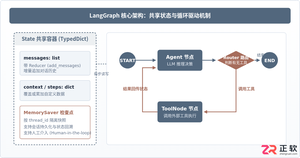
本篇LangGraph Python中文入门教程详解,系统梳理StateGraph状态机定义、节点编写、边与条件路由、检查点持久化(MemorySaver)等核心机制,提供从环境安装到完整循环智能体构建的代码示例与实操指导。
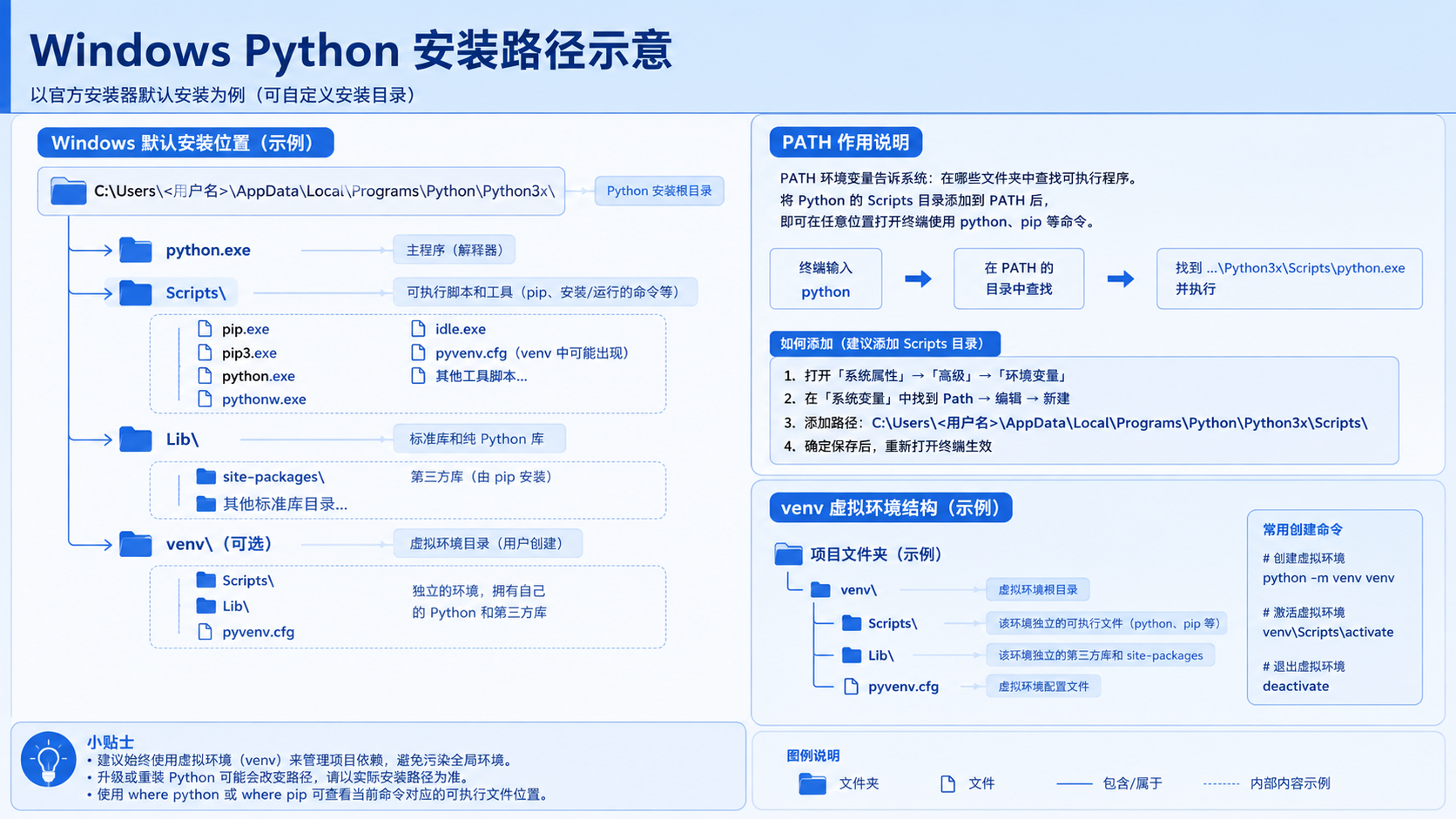
面向后端开发者,基于 Python 官方文档说明如何在 Windows 上安装 Python、创建 venv 虚拟环境及使用 pip 管理依赖。包含可复制命令、验证方法及工具选择边界,避免常见配置误区。
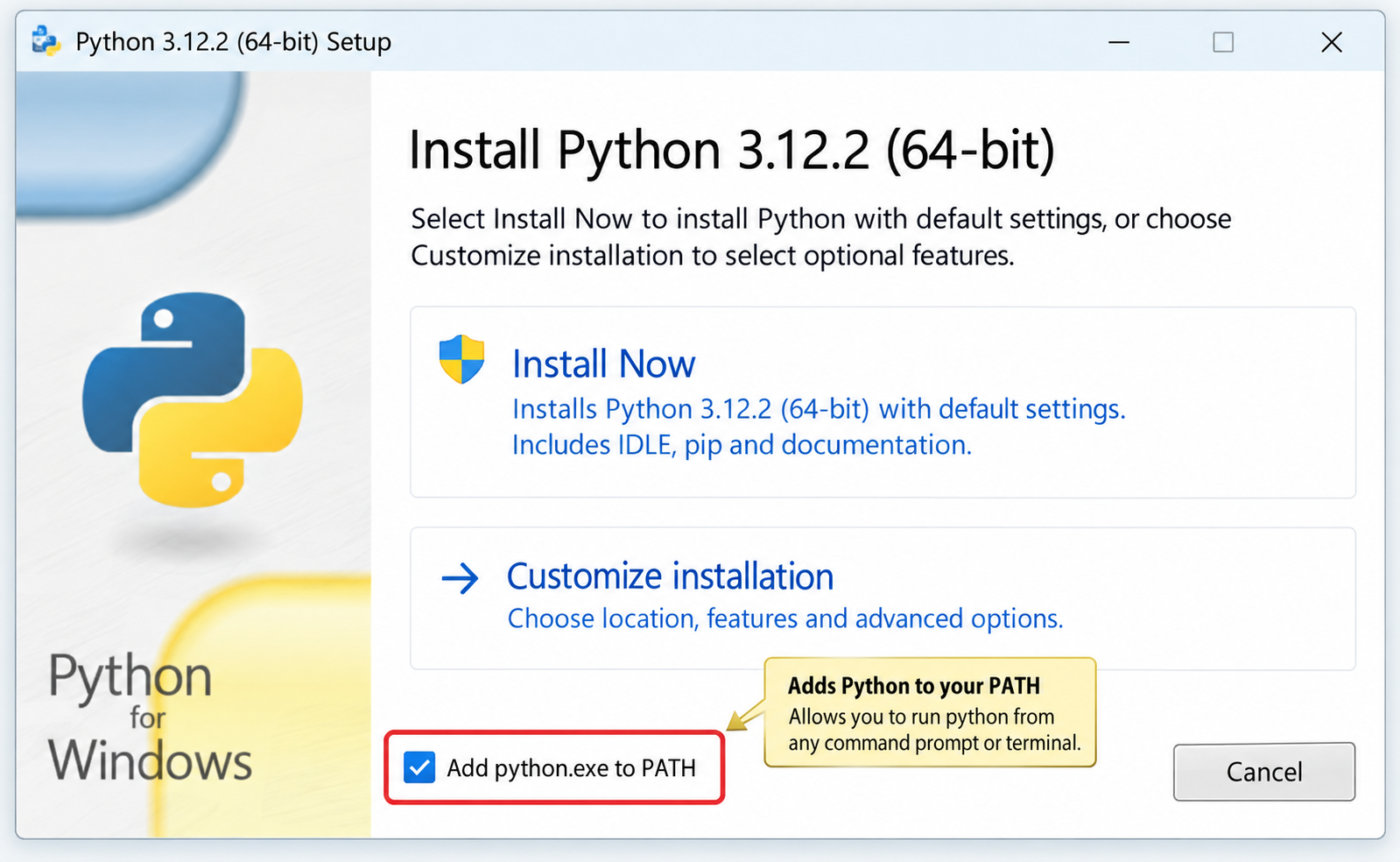
针对Windows初学者的Python安装实战指南。详细讲解如何从Python官网下载匹配架构的安装包,重点演示安装首屏勾选“Add python.exe to PATH”的关键操作,并提供使用python --version和py命令验证环境变量的具体步骤,帮助新手快速搭建开发环境并排查路径问题。
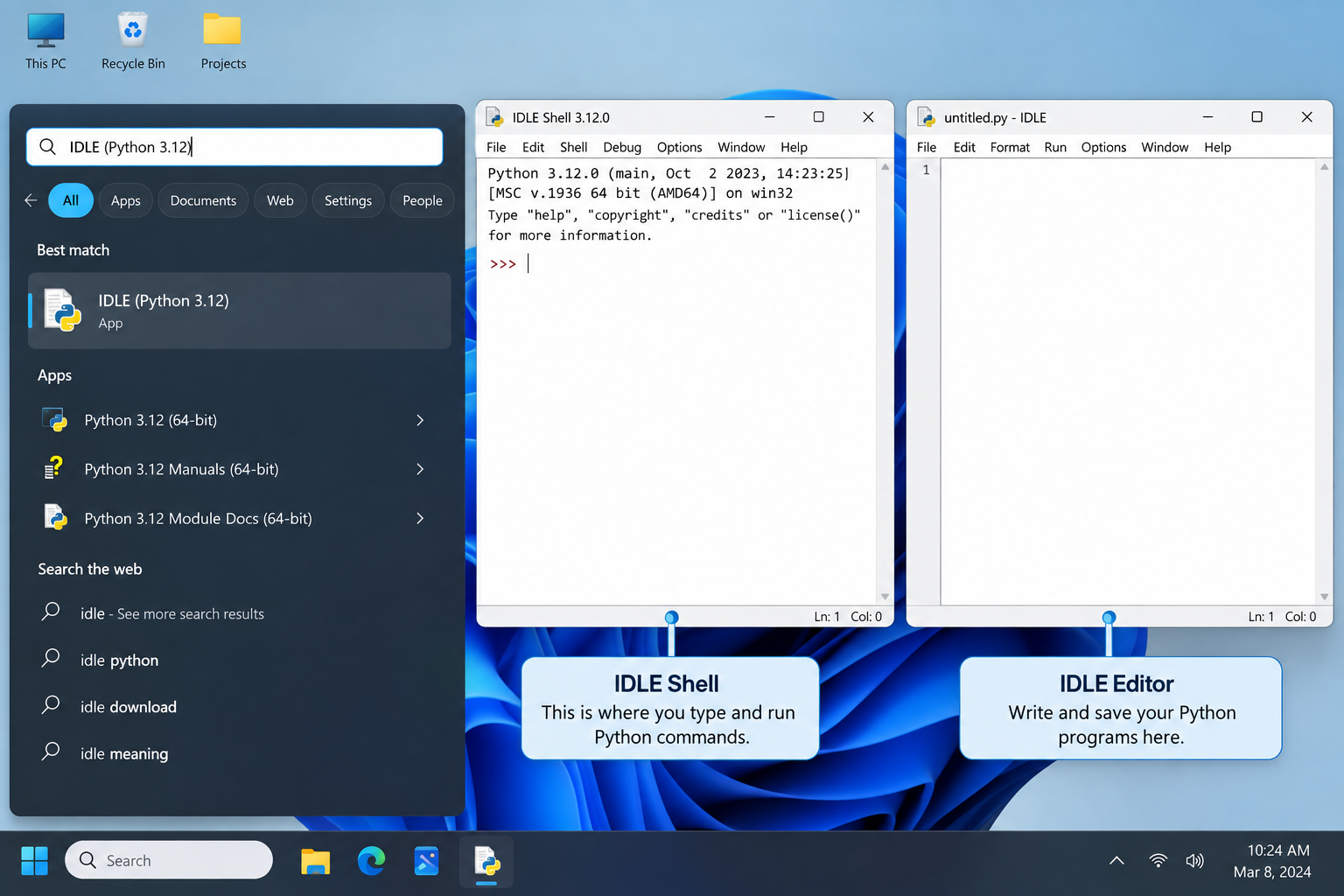
刚在Windows安装好Python却不知道如何启动?本文详细演示如何通过开始菜单找到并打开IDLE集成开发环境,以及如何在PowerShell或命令提示符中使用python和py命令启动交互式解释器、运行.py脚本文件。包含退出解释器的方法及常见启动问题排查,帮助初学者快速验证安装成功并开始编写代码。

了解Python编程领域中最好的就业行业导语:近年来,Python作为一种易学易用的编程语言,越来越受到企业和开发者的青睐。在Python编程领域中,有许多就业机会,涵盖了各个行业。本文将介绍一些Python编程领域中最好的就业行业,并提供相应的代码示例。数据科学和机器学习数据科学和机器学习是Python编程领域中最热门的行业之一。Python在数据科学和机
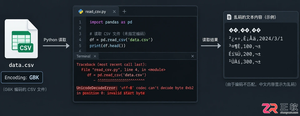
针对Python处理CSV文件时常见的编码报错、内存溢出和数据类型错误,本文对比标准库csv与Pandas库的适用场景,提供可复制的代码示例和因果排查思路,帮助开发者选择最优处理方案。
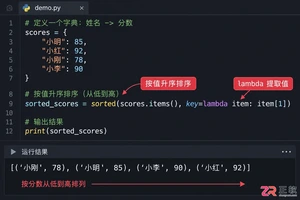
本文介绍如何使用Python的sorted函数对字典按值进行升序和降序排序,结合具体代码示例和应用场景,帮助读者理解排序逻辑及其在数据处理中的实际价值。
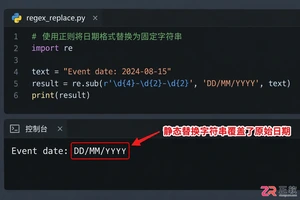
深入讲解Python中使用re.sub进行正则匹配与替换的技巧,涵盖基础语法、分组引用及回调函数应用,帮助开发者解决复杂字符串修改需求,提升代码效率与可维护性。


Skyvern是一款基于大语言模型的开源浏览器自动化框架,目前仅提供英文界面且无官方中文版。本文指导用户通过GitHub获取源码,使用Docker快速部署本地环境,并解释其如何通过DOM树解析与自然语言指令实现网页自动操作,同时提供针对中文用户的配置建议与替代方案。




Postman是一套面向API全生命周期的开发与测试平台,可在Mac上发送和调试多种协议请求,管理集合、环境及认证信息,并完成脚本测试、模拟服务、监控、文档发布和团队协作。它适合开发、测试及运维人员使用,提供个人免费方案。

Docker Desktop 是 Docker 官方为 Mac 提供的容器开发环境,集成 Docker Engine、命令行工具、Compose、Build、Kubernetes 与图形化管理界面。

Android Studio 是 Google 面向安卓应用开发提供的官方集成开发环境,基于 IntelliJ IDEA 构建。它整合智能代码编辑、Gradle 构建、界面预览、设备模拟、性能分析、调试测试及 APK 分析等工具。

PixPix 是面向品牌、卖家和内容团队的在线 AI 图片视频创作平台,提供图视频 Agent、无限画布、图片生成、视频生成、自然语言编辑及商品套图、产品精修和带货视频等电商工具。

Postman 是面向 API 全生命周期的开发与协作平台。Windows 桌面版可用于构建和发送 HTTP、GraphQL、gRPC、WebSocket、MQTT 等请求,并提供环境变量、集合、脚本测试、模拟服务、监控、文档及团队工作区等

Docker Desktop 为 Windows 开发者提供集成式容器环境,内置 Docker Engine、命令行工具、Compose、Build 与 Kubernetes 等组件,可在本机完成镜像构建、容器运行、日志查看和资源管理。