

C++ Linux下文件操作技巧
Linux下C++文件操作需包含头文件。创建ofstream、ifstream或fstream对象分别用于写、读或读写。打开文件时需指定模式(如ios::out),并检查是否成功打开,失败需处理。
在Linux环境下用C++做文件操作,其实是很多开发者日常绕不开的基础活。但别看它基础,真要写得稳、不出bug,还是有不少细节值得留意的。下面就把这些常见操作梳理一遍,算是给刚入门的朋友一份实用参考。
先说说最核心的头文件——
#include
#include
接下来是创建文件流对象。根据不同用途,有三个选择:
std::ofstream outFile;  // 写文件
std::ifstream inFile;   // 读文件
std::fstream file;      // 读写皆可
打开文件时,记得指定模式——是只写、只读,还是读写兼可:
outFile.open("example.txt", std::ios::out);
inFile.open("example.txt", std::ios::in);
file.open("example.txt", std::ios::in | std::ios::out);
打开之后别急着操作,先确认文件是否真的打开了。经验表明,很多诡异问题都出在打开失败却没检查:
if (!outFile.is_open()) {
    std::cerr << "Error opening file for writing!" << std::endl;
}
if (!inFile.is_open()) {
    std::cerr << "Error opening file for reading!" << std::endl;
}
写入文件很简单,和向控制台输出差不多:
outFile << "Hello, World!" << std::endl;
读取时,最常用的方式是按行读取:
std::string line;
while (std::getline(inFile, line)) {
    std::cout << line << std::endl;
}
操作完毕,记得关闭文件——这不是形式,而是释放系统资源的必要步骤:
outFile.close();
inFile.close();
file.close();
如果涉及二进制文件,比如读写图像或序列化数据,打开时加上std::ios::binary模式:
std::ofstream binaryOut("example.bin", std::ios::binary);
std::ifstream binaryIn("example.bin", std::ios::binary);
获取文件大小也是常见需求。可以用seekg和tellg组合实现,注意事后把读取位置重置回开头:
std::ifstream::pos_type fileSize = inFile.seekg(0, std::ios::end).tellg();
inFile.seekg(0, std::ios::beg);
如果想在文件内部随机跳转、读取特定位置的数据,可以用seekg配合read:
file.seekg(10, std::ios::beg);
int value;
file.read(reinterpret_cast(&value), sizeof(value));
判断是否读到文件末尾,可以用eof():
if (inFile.eof()) {
    std::cout << "Reached end of file." << std::endl;
}
当然,文件操作难免遇到异常情况。用fail()可以检查是否发生了读取错误:
if (inFile.fail()) {
    std::cerr << "An error occurred while reading the file." << std::endl;
}
以上这些就是C++文件操作最常用的基础技巧。在实际项目中,你可能还会遇到大文件处理、多线程并发访问等更复杂的场景。但无论如何,时刻检查文件流的状态、确保资源正确释放,都是贯穿始终的原则。
遇到Git合并冲突别慌张,本文详解冲突产生的原因及标准处理流程,涵盖查看冲突文件、理解标记含义、手动修改代码及完成合并提交的完整步骤,助你高效解决协作开发中的代码冲突问题。

深入对比Java中获取当前时间戳的两种主流方式:System.currentTimeMillis与java.time.Instant。分析二者的精度差异、API设计、时钟回拨影响与实际选型建议。
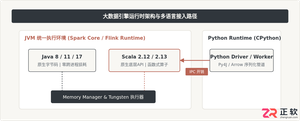
针对大数据工程场景,系统对比Java、Scala与Python在执行性能、生态结合、开发效率和维护成本上的核心差异,给出清晰的架构选型依据与落地方案。
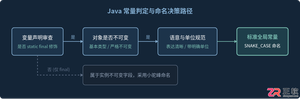
深入解析Java常量命名标准、大写下划线语义规则,剖析接口常量反模式的危害与本质原因,并提供枚举、不可实例化常量工具类等工业级最佳替代方案。
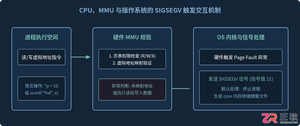
针对C语言常见的段错误(Segmentation fault)问题,详细剖析内存非法访问根因,提供结合GDB、Core Dump与AddressSanitizer的标准化排查解决步骤与预防方法。
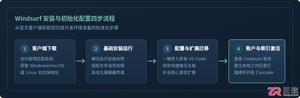
本文提供全面的Windsurf开发工具安装与使用详细教程,覆盖客户端下载安装、环境配置与VS Code插件迁移、Cascade核心协作中枢使用技巧、Chat与Write双模式实战及高效开发规范。
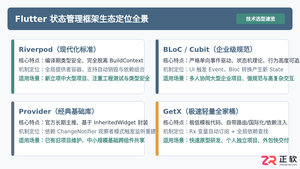
全面盘点Flutter主流状态管理框架,深度解析Provider、Riverpod、Bloc与GetX的核心机制、优缺点及适用场景,提供系统化的状态管理选型指南。
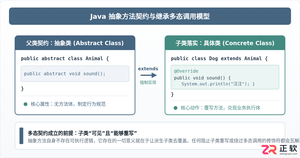
深入剖析Java中抽象方法为何严禁使用private和static修饰符。从面向对象契约规范、方法继承重写、JVM动态绑定(invokevirtual)与静态解析(invokestatic)等底层机制展开详细推导,结合编译报错示例与全景对比,彻底理清修饰符限制背后的设计逻辑。

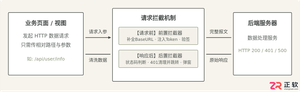
详细讲解uni-app中网络请求拦截的配置方法与实现路径,包含uni.addInterceptor原生API拦截与Promise二次封装方案、Token注入、全局错误处理及踩坑提醒。




IntelliJ IDEA 是 JetBrains 推出的专业集成开发环境,重点服务于 Java、Kotlin 与 JVM 项目开发。软件集成代码补全、静态检查、重构、调试、测试、版本控制及构建工具,并可借助插件扩展语言和框架支持。

JetBrains PyCharm 是面向 Python 开发者的集成开发环境,提供智能补全、代码检查、重构、调试、测试、版本控制及虚拟环境管理功能。Mac 版兼容 Intel 与 Apple 芯片,核心功能可免费使用。

JetBrains WebStorm 是面向 JavaScript、TypeScript 和现代 Web 技术的专业集成开发环境,可智能理解项目结构,提供代码补全、重构、错误检查、运行调试、测试及 Git 工具。

JetBrains IntelliJ IDEA 是以 Java、Kotlin 和 JVM 项目为核心的专业集成开发环境,提供智能补全、代码检查、安全重构、调试、测试、版本控制及构建工具集成。统一发行版的核心功能可免费用于商业和非商业项目,

PhpStorm 是 JetBrains 面向 PHP 与现代 Web 开发打造的专业集成开发环境,提供代码补全、静态检查、重构、调试、测试、数据库、版本控制及前端语言支持。Windows 用户可直接下载安装程序,

PyCharm 是 JetBrains 推出的 Python 集成开发环境,提供智能代码补全、错误检查、重构、调试、测试、Git、终端及 Jupyter Notebook 支持。统一版安装后可体验 30 天 Pro 功能,


