

Python基础指南之match-case模式匹配语句的使用教学
Python3.10引入的match-case语句支持结构化模式匹配,可匹配序列、映射和类实例,通过变量绑定、守卫条件和嵌套解构,支持通配符、常量匹配及类型检查,提供比传统switch更强大、更灵活且更易读的分支处理能力,显著增强Python控制流。
一、开篇:Python 3.10的里程碑特性
2021年10月,Python 3.10正式发布,其中最引人注目的新特性就是结构化模式匹配(Structural Pattern Matching)——也就是match-case语句。它绝不是switch的简单翻版,而是比switch强大得多的一种模式匹配工具。

先看看它长什么样:
# 经典的使用场景:根据状态码返回消息
def http_status_message(code):
    match code:
        case 200:
            return "OK"
        case 404:
            return "Not Found"
        case 500:
            return "Internal Server Error"
        case _:
            return "Unknown"
这段代码看起来确实像其他语言的switch-case。但match-case的能力远不止于此——它能够匹配数据结构、解构对象、使用守卫条件,甚至能匹配自定义类的实例。接下来,我们从基础到高级,全面拆解这个Python新利器。
版本要求
# match-case 需要 Python 3.10+
import sys
print(f"Python版本: {sys.version}")

# 检查是否支持match-case
if sys.version_info >= (3, 10):
    print("✅ 支持 match-case")
else:
    print("❌ 请升级到 Python 3.10 或更高版本")
二、match-case 基础语法
2.1 最简单的模式匹配
# 基本语法
# match subject:
#     case pattern1:
#         action1()
#     case pattern2:
#         action2()
#     case _:
#         default_action()

# 示例:星期几
def what_day(day):
    match day:
        case 1:
            return "星期一"
        case 2:
            return "星期二"
        case 3:
            return "星期三"
        case 4:
            return "星期四"
        case 5:
            return "星期五"
        case 6:
            return "星期六"
        case 7:
            return "星期日"
        case _:          # _ 是通配符,匹配任何值
            return "无效的日期数字"

print(what_day(1))    # 星期一
print(what_day(7))    # 星期日
print(what_day(0))    # 无效的日期数字

# 关于 _ 通配符
# _ 是一个特殊的"吸尘器"模式,匹配一切
# 不同于变量名(变量名会绑定值),_ 不会绑定
2.2 匹配多个值(OR模式)
# 使用 | 匹配多个值
def classify_number(n):
    match n:
        case 0:
            return "零"
        case 1 | 2 | 3:
            return "小数字(1-3)"
        case 4 | 5 | 6:
            return "中数字(4-6)"
        case 7 | 8 | 9:
            return "大数字(7-9)"
        case _:
            return "超出范围"

for i in range(11):
    print(f"{i}: {classify_number(i)}")

# 可用于合并相似的处理逻辑
def is_weekend(day):
    match day.lower():
        case "saturday" | "sunday":
            return True
        case "monday" | "tuesday" | "wednesday" | "thursday" | "friday":
            return False
        case _:
            return None
2.3 匹配时的变量绑定
这是match-case超越switch的关键特性之一:
# match-case可以在匹配时提取值
def process_command(command):
    match command.split():
        case ["quit"]:
            print("退出程序")
        case ["hello"]:
            print("你好!")
        case ["add", x]:           # x 绑定到第二个元素
            print(f"加上 {x}")
        case ["add", x, y]:        # x, y 分别绑定
            print(f"{x} + {y} = {int(x) + int(y)}")
        case _:
            print("未知命令")

process_command("quit")          # 退出程序
process_command("add 10")        # 加上 10
process_command("add 10 20")     # 10 + 20 = 30
process_command("unknown xyz")   # 未知命令
三、结构化模式匹配(核心特性)
3.1 匹配序列(列表/元组)
# 匹配不同长度和内容的序列
def analyze_sequence(seq):
    match seq:
        case []:
            return "空序列"
        case [x]:
            return f"单元素序列: {x}"
        case [x, y]:
            return f"两元素序列: {x}, {y}"
        case [x, y, z]:
            return f"三元素序列: {x}, {y}, {z}"
        case [first, *rest]:      # *rest 收集剩余元素
            return f"首元素: {first}, 剩余: {rest}"
        case _:
            return "不是序列"

print(analyze_sequence([]))               # 空序列
print(analyze_sequence([42]))             # 单元素序列: 42
print(analyze_sequence([1, 2]))           # 两元素序列: 1, 2
print(analyze_sequence([1, 2, 3, 4, 5])) # 首元素: 1, 剩余: [2, 3, 4, 5]

# * 也可以出现在中间
def extract_parts(seq):
    match seq:
        case [first, *middle, last]:
            return f"首={first}, 中={middle}, 尾={last}"
        case _:
            return "太短了"

print(extract_parts([1, 2, 3, 4, 5]))  # 首=1, 中=[2, 3, 4], 尾=5
print(extract_parts([1, 2]))           # 首=1, 中=[], 尾=2
print(extract_parts([1]))              # 太短了
3.2 匹配映射(字典)
# 匹配字典结构
def analyze_config(config):
    match config:
        case {"host": host, "port": port}:
            return f"服务器: {host}:{port}"
        case {"host": host, "port": port, "debug": debug}:
            return f"服务器: {host}:{port}, 调试={'开' if debug else '关'}"
        case {"database": db_config}:
            return f"数据库配置: {db_config}"
        case {}:
            return "空配置"
        case _:
            return "无效配置"

print(analyze_config({"host": "localhost", "port": 8080}))
# 服务器: localhost:8080

print(analyze_config({"host": "0.0.0.0", "port": 443, "debug": True}))
# 服务器: 0.0.0.0:443, 调试=开

# ⚠️ 注意匹配顺序!上面的例子有个bug:
# {"host": host, "port": port} 会先匹配,即使有debug键也会进入第一个case
# 应该把更具体的模式放前面

def analyze_config_fixed(config):
    match config:
        case {"host": host, "port": port, "debug": bool(debug)}:
            return f"服务器: {host}:{port}, 调试={'开' if debug else '关'}"
        case {"host": host, "port": int(port)}:
            return f"服务器: {host}:{port}"
        case {"database": db_config}:
            return f"数据库配置: {db_config}"
        case _:
            return "无效配置"
3.3 匹配类实例
# 匹配自定义类的实例
class Point:
    def __init__(self, x, y):
        self.x = x
        self.y = y

class Circle:
    def __init__(self, center, radius):
        self.center = center
        self.radius = radius

class Rectangle:
    def __init__(self, top_left, bottom_right):
        self.top_left = top_left
        self.bottom_right = bottom_right

def describe_shape(shape):
    match shape:
        case Point(x=0, y=0):
            return "原点"
        case Point(x=x, y=y):
            return f"点({x}, {y})"
        case Circle(center=Point(x=x, y=y), radius=r):
            return f"圆: 圆心({x}, {y}), 半径{r}"
        case Rectangle(top_left=Point(x=x1, y=y1), bottom_right=Point(x=x2, y=y2)):
            return f"矩形: ({x1},{y1}) 到 ({x2},{y2})"
        case _:
            return "未知形状"

# 使用
p1 = Point(0, 0)
p2 = Point(3, 4)
c = Circle(Point(1, 2), 5)
r = Rectangle(Point(0, 0), Point(10, 10))

print(describe_shape(p1))   # 原点
print(describe_shape(p2))   # 点(3, 4)
print(describe_shape(c))    # 圆: 圆心(1, 2), 半径5
print(describe_shape(r))    # 矩形: (0,0) 到 (10,10)
四、守卫条件(Guard)
守卫条件让你在模式匹配的基础上添加额外的判断:
# 使用 if 添加守卫条件
def classify_value(x):
    match x:
        case int(n) if n > 0:
            return f"正整数: {n}"
        case int(n) if n < 0:
            return f"负整数: {n}"
        case int(n):        # n == 0
            return "零"
        case float(f) if f > 0:
            return f"正浮点数: {f}"
        case float(f) if f < 0:
            return f"负浮点数: {f}"
        case float(f):
            return "浮点数零"
        case str(s) if len(s) > 10:
            return f"长字符串({len(s)}字符): {s[:10]}..."
        case str(s):
            return f"短字符串: {s}"
        case _:
            return "其他类型"

print(classify_value(42))           # 正整数: 42
print(classify_value(-3.14))        # 负浮点数: -3.14
print(classify_value("Hello"))      # 短字符串: Hello
print(classify_value("Hello World! This is Python"))  # 长字符串(28字符)

# 结合守卫和OR模式
def check_age(age):
    match age:
        case int(n) if n < 0 | n > 150:
            return "无效年龄"
        case int(n) if n < 18:
            return "未成年人"
        case int(n) if n < 65:
            return "成年人"
        case int(n):
            return "老年人"
        case _:
            return "非数字输入"
五、match-case vs if-elif-else
5.1 什么时候用match-case
# ✅ 适合match-case:基于值的多分支选择
def get_day_type(day):
    match day.lower():
        case "monday" | "tuesday" | "wednesday" | "thursday" | "friday":
            return "工作日"
        case "saturday" | "sunday":
            return "周末"
        case _:
            return "未知"

# ✅ 适合match-case:解构复杂数据结构
def process_api_response(response):
    match response:
        case {"status": "ok", "data": data}:
            return handle_data(data)
        case {"status": "error", "message": msg}:
            return f"错误: {msg}"
        case {"status": "error", "code": int(code)} if code >= 500:
            return f"服务器错误([code])"
        case {"status": "error", "code": int(code)}:
            return f"客户端错误([code])"
        case _:
            return "未知响应格式"

# ❌ 不适合match-case:需要复杂比较逻辑
# 这种情况下if-elif-else更合适
def analyze_score(score):
    # if-elif-else更合适
    if score >= 90:
        return "优秀"
    elif score >= 80:
        return "良好"
    elif score >= 70:
        return "中等"
    else:
        return "需要提升"
5.2 两者的混合使用
# match-case 和 if-elif-else 可以混合
def smart_classifier(obj):
    # 先用match-case按类型分大类
    match obj:
        case int(n):
            # 再用if-elif按范围细分
            if n < 0:
                return "负整数"
            elif n == 0:
                return "零"
            elif n < 10:
                return "小正整数"
            else:
                return "大正整数"

        case str(s):
            if len(s) == 0:
                return "空字符串"
            elif len(s) < 10:
                return "短字符串"
            else:
                return "长字符串"

        case list(items):
            if len(items) == 0:
                return "空列表"
            elif all(isinstance(i, int) for i in items):
                return "整数列表"
            else:
                return "混合列表"

        case _:
            return f"不支持的类型: {type(obj).__name__}"
六、实战案例
6.1 JSON数据验证与解析
def parse_user_data(data):
    """解析并验证用户数据"""
    match data:
        # 完整数据
        case {
            "name": str(name),
            "age": int(age),
            "email": str(email),
            **extra      # **extra 收集额外字段
        } if 0 < age < 150 and "@" in email:
            result = {
                "name": name,
                "age": age,
                "email": email,
                "valid": True,
            }
            if extra:
                result["extra_fields"] = list(extra.keys())
            return result

        # 缺少email但有name和age
        case {"name": str(name), "age": int(age)} if 0 < age < 150:
            return {
                "name": name,
                "age": age,
                "valid": True,
                "warnings": ["缺少邮箱地址"],
            }

        # 只有name
        case {"name": str(name)}:
            return {
                "name": name,
                "valid": False,
                "errors": ["缺少年龄和邮箱"],
            }

        # 空数据或格式不对
        case dict():
            return {"valid": False, "errors": ["数据格式不正确"]}

        case _:
            return {"valid": False, "errors": ["输入不是字典类型"]}

# 测试
test_cases = [
    {"name": "张三", "age": 25, "email": "zhangsan@example.com", "city": "北京"},
    {"name": "李四", "age": 30},
    {"name": "王五"},
    {"invalid": "data"},
    "not a dict",
]

for data in test_cases:
    result = parse_user_data(data)
    print(f"n输入: {data}")
    print(f"输出: {result}")
6.2 简易计算器
def calculator():
    """命令行计算器,展示match-case的模式匹配能力"""
    print("简易计算器(输入 'quit' 退出)")
    print("支持格式:<数字> <操作符> <数字>")
    print("示例:10 + 20, 3.14 * 2, 100 / 4")

    while True:
        user_input = input("n> ").strip()

        if not user_input:
            continue

        match user_input.split():
            case ["quit" | "exit" | "q"]:
                print("再见!")
                break

            case ["help" | "h" | "?"]:
                print("操作符: + (加), - (减), * (乘), / (除), ** (幂), % (取模)")
                print("输入 'quit' 退出, 'clear' 清零")

            case ["clear" | "c"]:
                print("计算器已重置")

            case [left, op, right]:
                try:
                    a, b = float(left), float(right)
                    match op:
                        case "+":
                            result = a + b
                        case "-":
                            result = a - b
                        case "*" | "×" | "x":
                            result = a * b
                        case "/" | "÷":
                            if b == 0:
                                print("❌ 除数不能为零!")
                                continue
                            result = a / b
                        case "**" | "^":
                            result = a ** b
                        case "%":
                            result = a % b
                        case _:
                            print(f"❌ 未知操作符: {op}")
                            continue
                    print(f"  {a} {op} {b} = {result}")
                except ValueError:
                    print("❌ 请输入有效的数字")

            case _:
                print("❌ 格式错误,请使用: <数字> <操作符> <数字>")

# 运行计算器(取消注释使用)
# calculator()
6.3 抽象语法树处理器
# 用match-case处理简单的表达式树
class Expr:
    pass

class Number(Expr):
    def __init__(self, value):
        self.value = value

class BinOp(Expr):
    def __init__(self, left, op, right):
        self.left = left
        self.op = op
        self.right = right

class UnaryOp(Expr):
    def __init__(self, op, operand):
        self.op = op
        self.operand = operand

def evaluate(expr):
    """递归计算表达式树的值"""
    match expr:
        case Number(value=n):
            return n

        case BinOp(left=l, op="+", right=r):
            return evaluate(l) + evaluate(r)

        case BinOp(left=l, op="-", right=r):
            return evaluate(l) - evaluate(r)

        case BinOp(left=l, op="*", right=r):
            return evaluate(l) * evaluate(r)

        case BinOp(left=l, op="/", right=r):
            divisor = evaluate(r)
            if divisor == 0:
                raise ZeroDivisionError("除数不能为零")
            return evaluate(l) / divisor

        case UnaryOp(op="-", operand=opd):
            return -evaluate(opd)

        case UnaryOp(op="+", operand=opd):
            return evaluate(opd)

        case _:
            raise ValueError(f"未知表达式: {expr}")

# 构建表达式: (-5 + 3) * 2
expr = BinOp(
    BinOp(UnaryOp("-", Number(5)), "+", Number(3)),
    "*",
    Number(2)
)
print(f"(-5 + 3) * 2 = {evaluate(expr)}")    # -4
七、本章小结
本文我们学习了Python 3.10的match-case模式匹配语句:
基本语法:match subject: case pattern: ... case _: ...,_是通配符。
OR模式:case 1 | 2 | 3: 匹配多个值。
变量绑定:case ["add", x, y]: 在匹配时提取值到变量。
结构化匹配(核心特性):
- 序列:
[first, *rest]、[first, *middle, last] - 映射:
{"key": value_pattern, **rest} - 类实例:
Point(x=x, y=y)
守卫条件:case pattern if condition: 在模式匹配基础上加条件。
选型建议:match-case适合值匹配和结构解构,if-elif-else适合范围比较。两者可以混合使用。
match-case是Python 3.10最重大的新特性。掌握了它,你处理复杂分支逻辑的能力将上升一个台阶。⌨️ 下一篇文章,我们将进入循环的世界——从while循环开始!
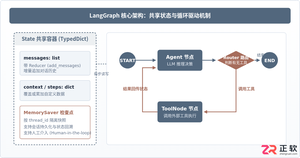
本篇LangGraph Python中文入门教程详解,系统梳理StateGraph状态机定义、节点编写、边与条件路由、检查点持久化(MemorySaver)等核心机制,提供从环境安装到完整循环智能体构建的代码示例与实操指导。
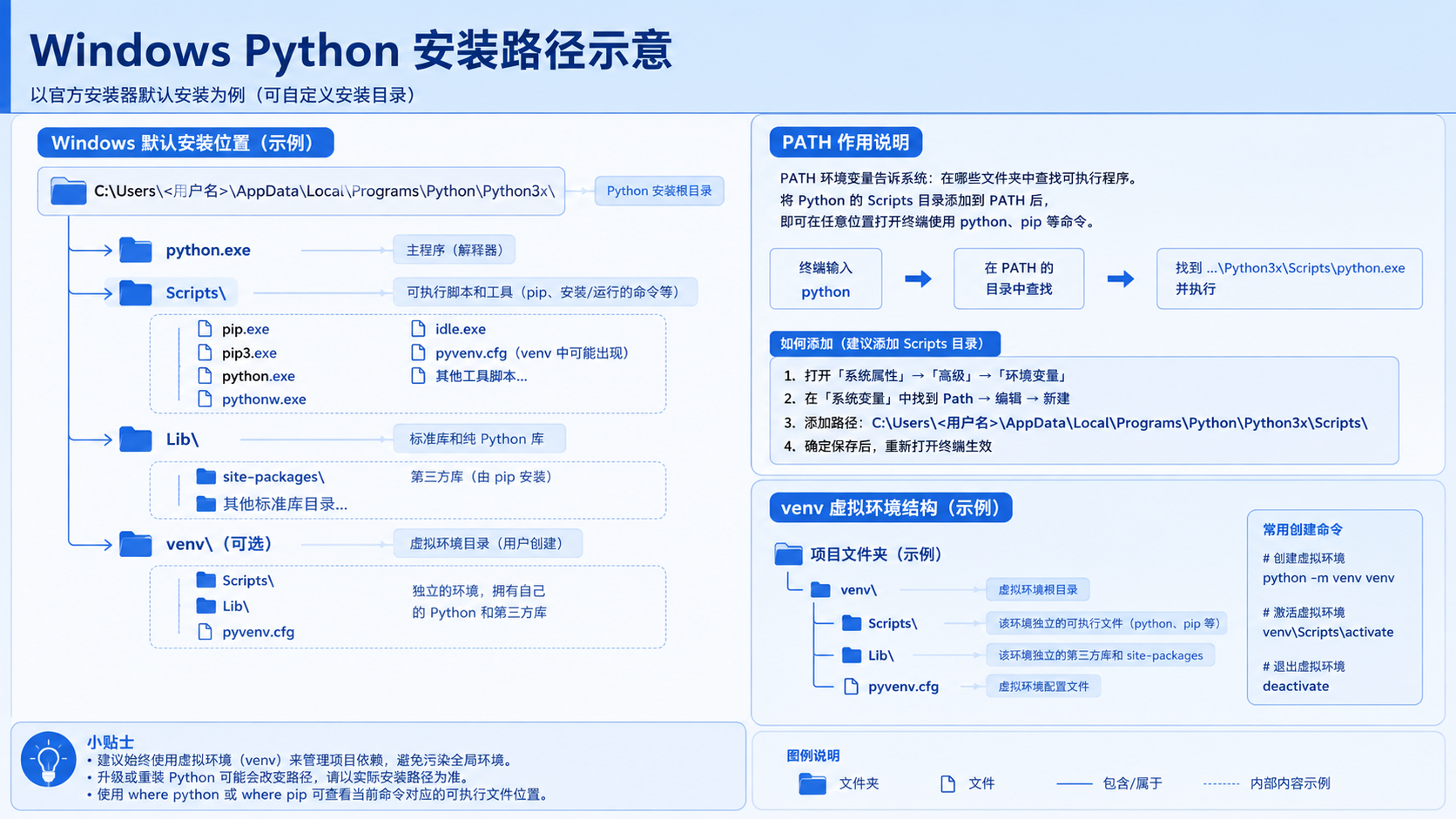
面向后端开发者,基于 Python 官方文档说明如何在 Windows 上安装 Python、创建 venv 虚拟环境及使用 pip 管理依赖。包含可复制命令、验证方法及工具选择边界,避免常见配置误区。
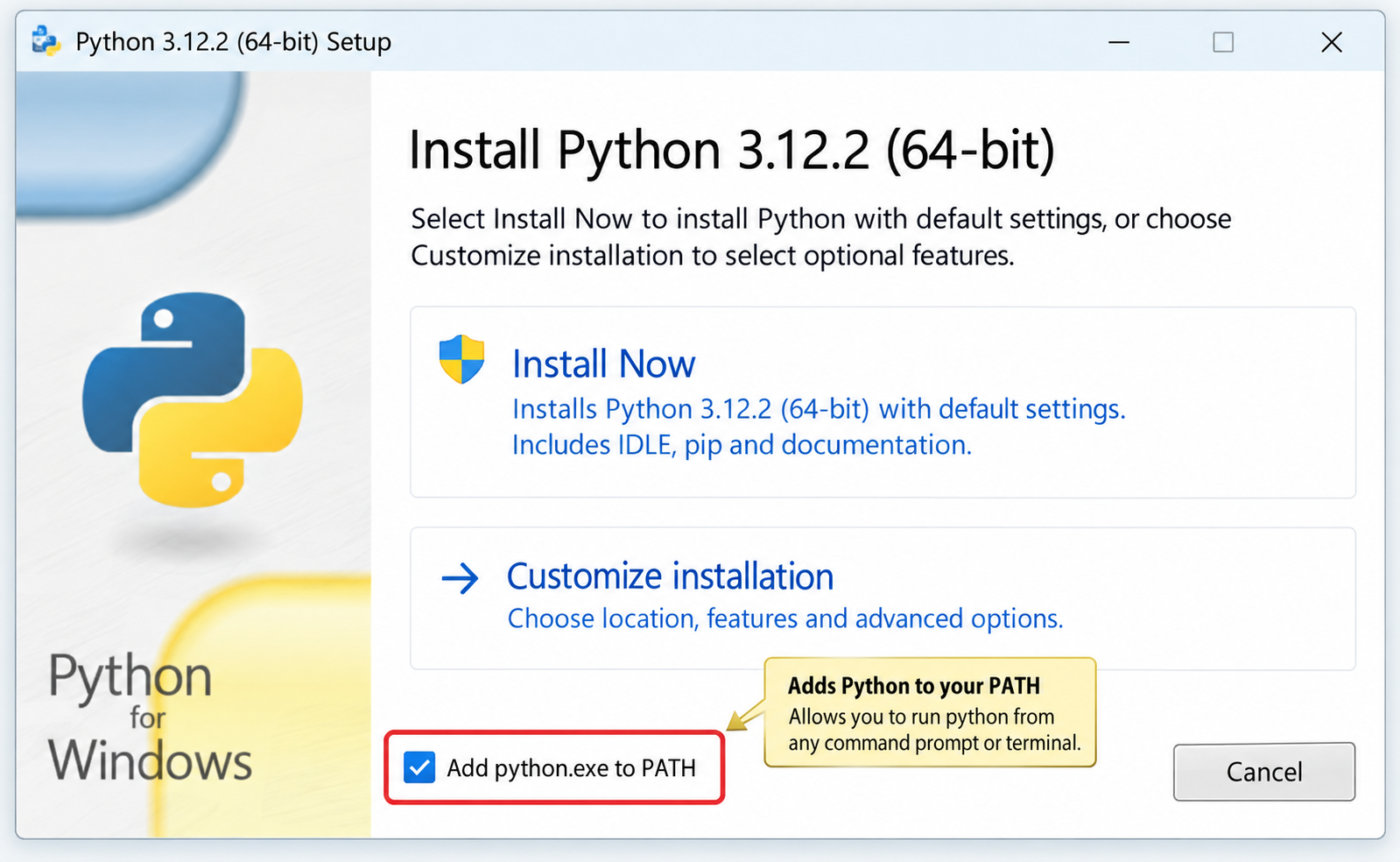
针对Windows初学者的Python安装实战指南。详细讲解如何从Python官网下载匹配架构的安装包,重点演示安装首屏勾选“Add python.exe to PATH”的关键操作,并提供使用python --version和py命令验证环境变量的具体步骤,帮助新手快速搭建开发环境并排查路径问题。
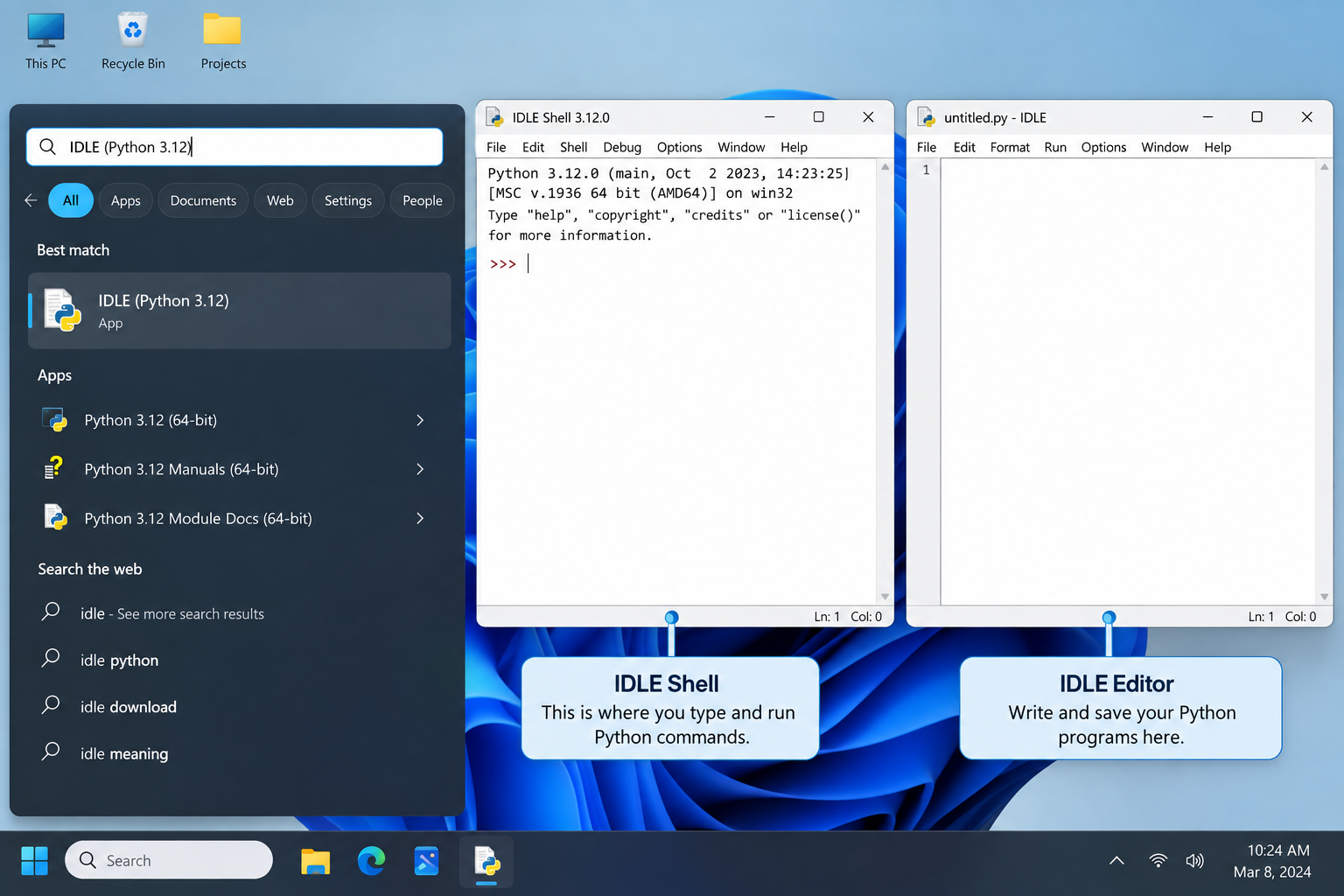
刚在Windows安装好Python却不知道如何启动?本文详细演示如何通过开始菜单找到并打开IDLE集成开发环境,以及如何在PowerShell或命令提示符中使用python和py命令启动交互式解释器、运行.py脚本文件。包含退出解释器的方法及常见启动问题排查,帮助初学者快速验证安装成功并开始编写代码。

了解Python编程领域中最好的就业行业导语:近年来,Python作为一种易学易用的编程语言,越来越受到企业和开发者的青睐。在Python编程领域中,有许多就业机会,涵盖了各个行业。本文将介绍一些Python编程领域中最好的就业行业,并提供相应的代码示例。数据科学和机器学习数据科学和机器学习是Python编程领域中最热门的行业之一。Python在数据科学和机
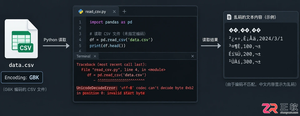
针对Python处理CSV文件时常见的编码报错、内存溢出和数据类型错误,本文对比标准库csv与Pandas库的适用场景,提供可复制的代码示例和因果排查思路,帮助开发者选择最优处理方案。
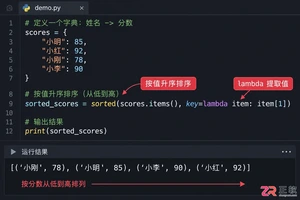
本文介绍如何使用Python的sorted函数对字典按值进行升序和降序排序,结合具体代码示例和应用场景,帮助读者理解排序逻辑及其在数据处理中的实际价值。
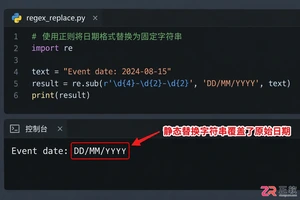
深入讲解Python中使用re.sub进行正则匹配与替换的技巧,涵盖基础语法、分组引用及回调函数应用,帮助开发者解决复杂字符串修改需求,提升代码效率与可维护性。


Skyvern是一款基于大语言模型的开源浏览器自动化框架,目前仅提供英文界面且无官方中文版。本文指导用户通过GitHub获取源码,使用Docker快速部署本地环境,并解释其如何通过DOM树解析与自然语言指令实现网页自动操作,同时提供针对中文用户的配置建议与替代方案。




Postman是一套面向API全生命周期的开发与测试平台,可在Mac上发送和调试多种协议请求,管理集合、环境及认证信息,并完成脚本测试、模拟服务、监控、文档发布和团队协作。它适合开发、测试及运维人员使用,提供个人免费方案。

Docker Desktop 是 Docker 官方为 Mac 提供的容器开发环境,集成 Docker Engine、命令行工具、Compose、Build、Kubernetes 与图形化管理界面。

Android Studio 是 Google 面向安卓应用开发提供的官方集成开发环境,基于 IntelliJ IDEA 构建。它整合智能代码编辑、Gradle 构建、界面预览、设备模拟、性能分析、调试测试及 APK 分析等工具。

PixPix 是面向品牌、卖家和内容团队的在线 AI 图片视频创作平台,提供图视频 Agent、无限画布、图片生成、视频生成、自然语言编辑及商品套图、产品精修和带货视频等电商工具。

Postman 是面向 API 全生命周期的开发与协作平台。Windows 桌面版可用于构建和发送 HTTP、GraphQL、gRPC、WebSocket、MQTT 等请求,并提供环境变量、集合、脚本测试、模拟服务、监控、文档及团队工作区等

Docker Desktop 为 Windows 开发者提供集成式容器环境,内置 Docker Engine、命令行工具、Compose、Build 与 Kubernetes 等组件,可在本机完成镜像构建、容器运行、日志查看和资源管理。