

如何在 PHP 中动态获取嵌套数组路径并提取目标值

PhpStorm 是 JetBrains 推出的专业 PHP 集成开发环境,可在 Mac 上完成代码编写、智能检查、重构、调试、测试和数据库管理。它支持主流 PHP 框架、Composer、Git、Docker 与远程解释器。
采用Laravel的data_get辅助函数,通过点号路径与动态遍历,可安全提取嵌套数组任意深度目标值,避免硬编码数字索引,有效应对厂商异构数据索引不一致问题,提升代码简洁性与健壮性。
本文介绍使用 Lara vel 的 data_get 辅助函数高效提取任意深度嵌套数组中指定键(如 'softwareversion')的值,并支持通配符式索引匹配,避免硬编码具体数字下标。
在实际开发中,处理来自不同厂商路由器的 TR-069 或类似设备配置数据时,常常会碰到结构相似但索引位置不一致的嵌套数组。比如:
$InternetGatewayDevice['DeviceInfo'][0]['SoftwareVersion'][1]['_value']// 或$InternetGatewayDevice['DeviceInfo'][1]['SoftwareVersion'][2]['_value']
两个写法语义相同,都是拿软件版本,但数字下标(0/1、1/2)因厂商而异,根本没法提前预测。如果手动拼接路径字符串,比如写成 'InternetGatewayDevice.DeviceInfo.0.SoftwareVersion.1._value',既脆弱又难维护,改一个厂商就得改代码。
✅ 推荐方案:使用 Lara vel data_get()(无需自定义递归函数)
Lara vel 内置的 data_get() 函数就是为解决这类问题而生的——它支持点号分隔的路径语法,并且天然兼容动态索引与通配逻辑(虽然不直接支持 * 通配符,但通过组合策略可以实现等效效果)。
1. 基础用法:固定路径提取
// 提取 DeviceInfo 下第 0 个元素的 SoftwareVersion 第 1 项的 _value$value = data_get($InternetGatewayDevice, 'DeviceInfo.0.SoftwareVersion.1._value');// 等价于原生写法(更安全,自动处理键不存在)// $value = $InternetGatewayDevice['DeviceInfo'][0]['SoftwareVersion'][1]['_value'] ?? null;
2. 动态路径构建(解决“任意索引”需求)
由于 data_get 不支持 DeviceInfo.*.SoftwareVersion.* 这类通配符,我们可以结合 array_filter() + data_get 实现柔性查找:
function getSoftwareVersion(array $data): ?string{ // 遍历 DeviceInfo 所有子项 foreach ($data['DeviceInfo'] ?? [] as $device) { // 尝试从每个 device 中提取 SoftwareVersion 的首个非空 _value $versions = $device['SoftwareVersion'] ?? []; foreach ($versions as $version) { if (isset($version['_value']) && is_string($version['_value'])) { return $version['_value']; } } } return null;}// 使用示例$version = getSoftwareVersion($InternetGatewayDevice);
3. 高级技巧:路径字符串生成(满足 getpath($array, "SoftwareVersion") 需求)
如果需要返回实际匹配路径(比如 'DeviceInfo.0.SoftwareVersion.1'),可以封装一个递归搜索:
function findPath(array $array, string $targetKey, string $currentPath = ''): ?string{ foreach ($array as $key => $value) { $path = $currentPath === '' ? $key : "$currentPath.$key"; if ($key === $targetKey && !is_array($value)) { return $path; // 找到目标键且其值非数组 → 路径终点 } if (is_array($value)) { $result = findPath($value, $targetKey, $path); if ($result !== null) { return $result; } } } return null;}// 示例调用$path = findPath($InternetGatewayDevice, 'SoftwareVersion'); // 返回类似 'DeviceInfo.0.SoftwareVersion' 或 'DeviceInfo.1.SoftwareVersion'
⚠️ 注意事项:
- data_get() 是 Lara vel 专属辅助函数;纯 PHP 项目可引入 lara vel/helpers Composer 包,或自行实现轻量版;
- 数字索引(如 [0])在路径中必须明确指定,data_get 不会自动遍历所有数字键;
- 对于多层不确定结构,优先采用 foreach + 条件判断,比硬编码路径更健壮;
- 生产环境建议始终配合 ?? null 或 data_get($arr, $path, $default) 设置默认值,防止 Notice 错误。
总的来说,data_get() 是处理这类嵌套数据最简洁、安全的 Lara vel 方案;配合动态遍历逻辑,就能优雅地应对厂商异构数据,彻底告别“猜索引”的困扰。
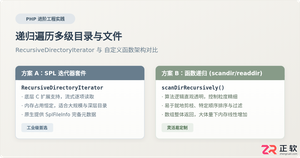
深入解析在PHP中递归遍历多级目录文件的两种核心方案:基于SPL标准库的RecursiveDirectoryIterator高效流式迭代,与基于scandir/opendir的自定义递归函数实现,剖析执行机制、内存表现与实战避坑指南。
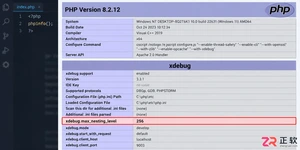
遇到PHP递归报错时,不要盲目调大max_nesting_level。本文教你区分Xdebug限制、内存耗尽和正则递归错误,提供代码级的终止条件优化与迭代替代方案,彻底解决栈溢出问题。
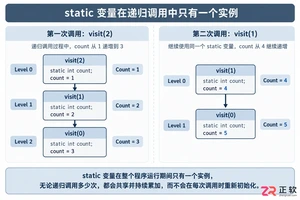
本文分析PHP递归中static变量导致的状态污染及引用传递引发的共享数据修改问题。提供具体的代码复现、缓存键设计建议及调试打印技巧,帮助开发者避免隐蔽的逻辑错误。
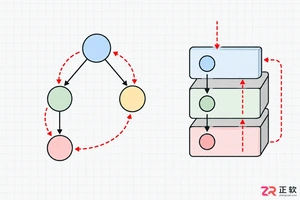
解析PHP递归函数在树形数据处理中的性能瓶颈,提供预加载数据消除I/O、使用显式栈替代深层递归的实战方案,帮助开发者在代码可读性与执行效率间做出合理取舍。
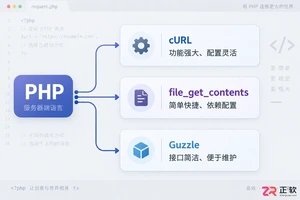
详解PHP中发送HTTP请求的常用方法,包括原生cURL配置、file_get_contents流操作及Guzzle库的使用,提供GET/POST请求的完整代码示例与注意事项。
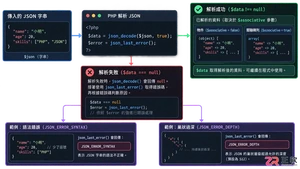
本文详解PHP中json_decode处理嵌套JSON数据的机制,对比对象与数组模式的取值差异,提供防止空指针错误的健壮代码示例,帮助开发者快速定位解析失败原因。
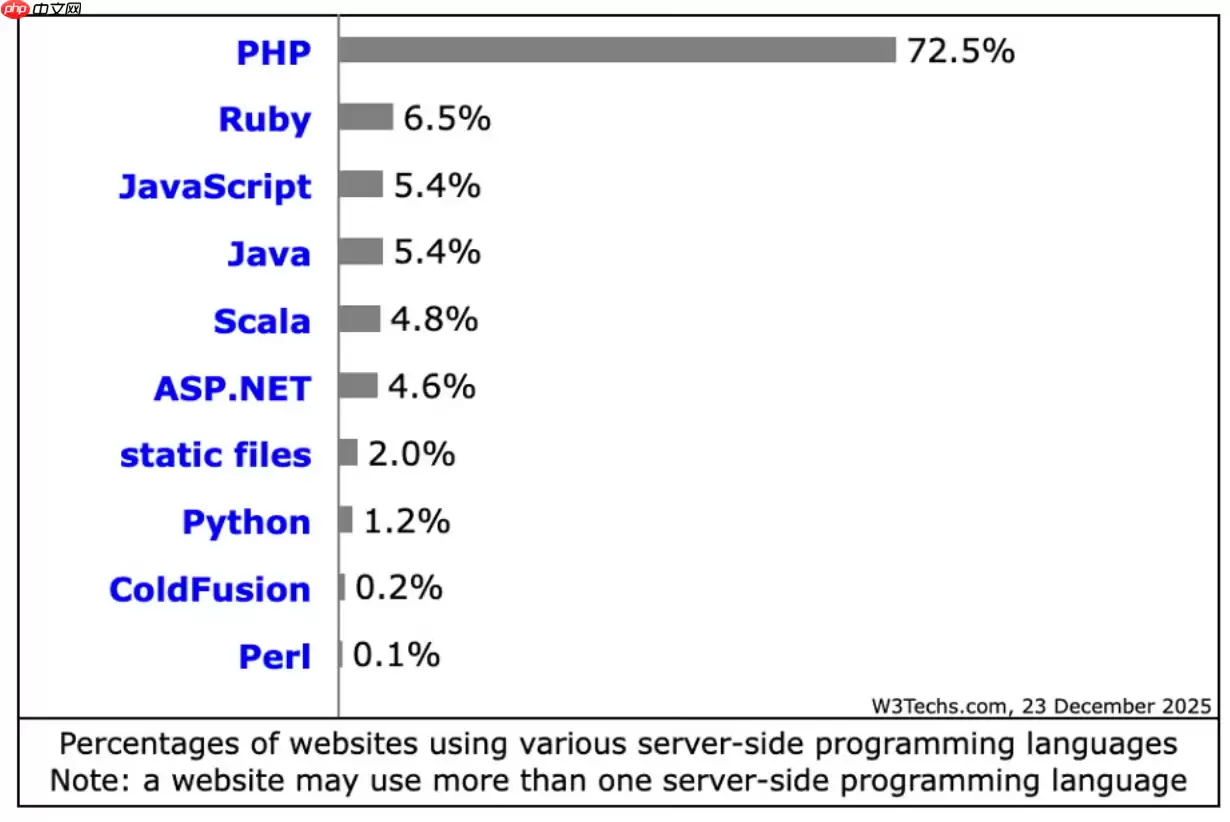
PHP在2026年仍适用于现代网站构建,在常规Web服务和内容密集型站点中较Python、Java等保持优势。其JIT编译优化性能,安全补丁及时,全面支持云原生,拥有成熟框架生态,整体成本较低。
在Debian系统上为PHP配置SSL加密,通常涉及以下几个步骤:安装SSL证书:首先,你需要一个SSL证书。你可以从Let’s Encrypt免费获取,或者购买一个商业证书。使用Let’s Encrypt:sudo apt updatesudo apt install certbotsudo ce
在Linux服务器上,若要使用ThinkPHP框架进行备份,一般会涉及到以下这些方面:数据库备份:使用mysqldump或mysql命令行工具来备份数据库。示例命令:mysqldump -u username -p database_name > backup_database.sql这将生成一个S




Postman是一套面向API全生命周期的开发与测试平台,可在Mac上发送和调试多种协议请求,管理集合、环境及认证信息,并完成脚本测试、模拟服务、监控、文档发布和团队协作。它适合开发、测试及运维人员使用,提供个人免费方案。
Docker Desktop 是 Docker 官方为 Mac 提供的容器开发环境,集成 Docker Engine、命令行工具、Compose、Build、Kubernetes 与图形化管理界面。

Android Studio 是 Google 面向安卓应用开发提供的官方集成开发环境,基于 IntelliJ IDEA 构建。它整合智能代码编辑、Gradle 构建、界面预览、设备模拟、性能分析、调试测试及 APK 分析等工具。

PixPix 是面向品牌、卖家和内容团队的在线 AI 图片视频创作平台,提供图视频 Agent、无限画布、图片生成、视频生成、自然语言编辑及商品套图、产品精修和带货视频等电商工具。

Postman 是面向 API 全生命周期的开发与协作平台。Windows 桌面版可用于构建和发送 HTTP、GraphQL、gRPC、WebSocket、MQTT 等请求,并提供环境变量、集合、脚本测试、模拟服务、监控、文档及团队工作区等
Docker Desktop 为 Windows 开发者提供集成式容器环境,内置 Docker Engine、命令行工具、Compose、Build 与 Kubernetes 等组件,可在本机完成镜像构建、容器运行、日志查看和资源管理。