

C#实现克隆Git仓库的功能(附代码)
C#实现克隆Git仓库的两种方案:使用LibGit2Sharp库可精细控制克隆、认证和进度;调用系统Git命令行则无需额外依赖,适合已有Git环境的简单场景。两种方案均支持自动化构建流程,如NuGet恢复和项目编译。
先来看一段C#代码,它可以自动完成从克隆仓库到构建项目的全流程。很多团队在搭建新环境时,会反复做这样的手动操作:git clone、dotnet restore、dotnet build。如果把这些步骤自动化,效率提升会非常明显。
功能说明
这段代码的核心能力很清晰:
- 检查目标目录是否存在,避免重复克隆
- 用git命令将指定仓库克隆到目标目录
- 用dotnet命令恢复NuGet包依赖
- 用dotnet命令构建解决方案
克隆Git仓库并配置调试环境
using System;
using System.Diagnostics;
using System.IO;

public class DebugEnvironmentCloner
{
    public void CloneAndSetup(string repoUrl, string targetDirectory)
    {
        if (Directory.Exists(targetDirectory))
        {
            Console.WriteLine($"目标目录已存在: {targetDirectory}");
            return;
        }

        CloneGitRepository(repoUrl, targetDirectory);
        RestoreNuGetPackages(targetDirectory);
        BuildSolution(targetDirectory);
    }

    private void CloneGitRepository(string repoUrl, string targetDirectory)
    {
        Console.WriteLine($"正在克隆仓库: {repoUrl}");
        var process = new Process
        {
            StartInfo = new ProcessStartInfo
            {
                FileName = "git",
                Arguments = $"clone {repoUrl} {targetDirectory}",
                RedirectStandardOutput = true,
                UseShellExecute = false,
                CreateNoWindow = true
            }
        };
        process.Start();
        process.WaitForExit();
        Console.WriteLine("仓库克隆完成");
    }

    private void RestoreNuGetPackages(string projectDirectory)
    {
        Console.WriteLine("正在恢复NuGet包");
        var process = new Process
        {
            StartInfo = new ProcessStartInfo
            {
                FileName = "dotnet",
                Arguments = "restore",
                WorkingDirectory = projectDirectory,
                RedirectStandardOutput = true,
                UseShellExecute = false,
                CreateNoWindow = true
            }
        };
        process.Start();
        process.WaitForExit();
        Console.WriteLine("NuGet包恢复完成");
    }

    private void BuildSolution(string projectDirectory)
    {
        Console.WriteLine("正在构建解决方案");
        var process = new Process
        {
            StartInfo = new ProcessStartInfo
            {
                FileName = "dotnet",
                Arguments = "build",
                WorkingDirectory = projectDirectory,
                RedirectStandardOutput = true,
                UseShellExecute = false,
                CreateNoWindow = true
            }
        };
        process.Start();
        process.WaitForExit();
        Console.WriteLine("解决方案构建完成");
    }
}

// 使用示例
var cloner = new DebugEnvironmentCloner();
cloner.CloneAndSetup("https://github.com/example/repo.git", @"C:\Projects\Repo");
扩展建议
如果面对更复杂的环境配置,不妨考虑加入以下能力:
- 先手动检查并安装必要的工具(比如git、.NET SDK等)
- 自动配置环境变量
- 设置调试器参数
- 最后还能顺手打开IDE(比如Visual Studio)
注意事项
- 确保运行环境已经安装了git和.NET Core SDK
- 构建命令可能需要根据实际项目结构调整
- 如果是私有仓库,必须加上认证处理
- 错误处理还可以更完善——比如检查每个步骤的退出代码
方法补充
具体实现上,业内主要有两种思路:一种是直接使用 LibGit2Sharp 库,通过API操作;另一种是调起系统的 Git 命令行。前者代码更干净,后者则不需要额外引入第三方库。细说起来,各自有各自的适用场景。
方案一:使用 LibGit2Sharp 库
LibGit2Sharp 是一个功能相当强大的 .NET 库。通过NuGet安装后,可以直接在代码里调用它的API来操作Git,完全不用依赖系统环境。
1. 安装 NuGet 包
dotnet add package LibGit2Sharp
注意:.NET 6+ 建议使用 v0.27.0 或更高版本。
2. 基础克隆示例 (HTTPS)
using LibGit2Sharp;
string repoUrl = "https://github.com/user/public-repo.git";
string localPath = @"C:\my-local-repo";
Repository.Clone(repoUrl, localPath);
这个操作下去,整个仓库的 .git 文件夹和工作区内容就会完整下载到你指定的本地路径里。
3. 带身份验证的克隆 (GitHub PAT)
对于私有仓库——比如GitHub上的——推荐使用个人访问令牌(PAT)进行身份验证,而不是直接甩密码。
var options = new CloneOptions
{
    CredentialsProvider = (url, user, cred) =>
        new UsernamePasswordCredentials
        {
            Username = "your-username",   // 你的 GitHub 用户名
            Password = "your-personal-access-token"  // 个人访问令牌
        }
};
Repository.Clone("https://github.com/private/repo.git", @"C:\private-repo", options);
这段代码会在克隆时自动完成认证。这里需要特别提醒:请用 PAT 令牌作为密码,而不是你的 GitHub 登录密码。
4. SSH 协议克隆
如果你的 SSH 密钥已经配置好,克隆起来就更简单了,连个密码都不用敲。
Repository.Clone("git@github.com:user/repo.git", @"C:\ssh-repo");
这种方式特别适合自动化脚本场景——代码里不用处理密码或令牌,干净利落。
5. 高级配置选项
CloneOptions 类提供了更多精细化的控制选项。
var options = new CloneOptions
{
    BranchName = "develop",         // 指定要克隆的分支
    Depth = 1,                      // 浅克隆(只下载最新的提交记录)
    CheckoutBranch = false,         // 是否检出工作文件(默认是 true)
    IsBare = true,                  // 创建裸仓库(没有工作区)
};
Repository.Clone(repoUrl, localPath, options);
方案二:使用 Process 类调用 Git 命令行
如果不想引入外部库,直接调用系统的 Git 命令行工具也是一个备选方案。前提是运行环境已经安装了 Git。
1. 同步调用
using System.Diagnostics;
string repoUrl = "https://github.com/user/repo.git";
string localPath = @"C:\my-repo";
var process = new Process
{
    StartInfo = new ProcessStartInfo
    {
        FileName = "git",
        Arguments = $"clone {repoUrl} {localPath}",
        UseShellExecute = false,
        CreateNoWindow = true
    }
};
process.Start();
process.WaitForExit();
2. 异步调用
public async Task CloneRepositoryAsync(string repoUrl, string localPath)
{
    var process = new Process
    {
        StartInfo = new ProcessStartInfo
        {
            FileName = "git",
            Arguments = $"clone {repoUrl} {localPath}",
            UseShellExecute = false,
            CreateNoWindow = true
        }
    };
    process.Start();
    await process.WaitForExitAsync();
}
需要留意的是:调用命令行时,我们无法精确控制克隆进度,而且可能遇到 Git 版本或者环境路径的问题。如果想在程序里更好地感知进度,还是推荐用 LibGit2Sharp。
方案对比与选择
| 特性 | LibGit2Sharp | Process 调用 Git |
|---|---|---|
| 依赖 | NuGet 包 | 系统需安装 Git |
| 跨平台 | 支持 (.NET Standard 2.0) | 依赖系统 Git,需分别测试 |
| 错误处理 | 异常机制,更友好 | 需解析标准输出/错误 |
| 进度报告 | 支持(CloneOptions.OnTransferProgress) | 无法直接获取,需要额外处理 |
| 认证支持 | 内置(PAT、SSH、用户名/密码) | 依赖系统凭证或命令行参数 |
| 代码复杂度 | 低,API 清晰 | 中,需处理进程启动和等待 |
| 适用场景 | 新项目、需精细控制 | 简单场景、已有 Git 环境 |
常见问题与解决方案
- 认证失败 (Authentication Failed):最常见的原因就是凭据不对。对 GitHub 而言,推荐使用 PAT 令牌,而不是直接使用密码。
- 目标目录非空 (Directory not empty):克隆前确保目标路径是空的,否则一定会抛出异常。
- 网络超时 (Network Timeout):对于大仓库或者网络不稳定的情况,可以使用浅克隆(Depth = 1)来大幅加快速度。
- LibGit2Sharp 找不到 libgit2:在 .NET Core 或 .NET 5+ 项目中,这个通常是自动处理的。如果遇到问题,检查一下 NuGet 包的依赖是否完整。
详解 CodeKit 在 macOS 下的安装步骤、项目导入方法、Sass与JavaScript编译设置及浏览器自动刷新功能,助您快速搭建高效的前端开发环境。
详解Windows环境下安装OpenAI Codex CLI的步骤,包括WSL环境检查、Node.js/npm配置、npm全局安装命令及首次启动验证,适合开发者快速上手。
学习如何配置 NativeRest REST API 客户端。涵盖 Windows/macOS/Linux 安装后的工作区创建、环境变量管理、请求编辑及响应查看步骤,帮助开发者快速完成基础环境搭建与连通性测试。
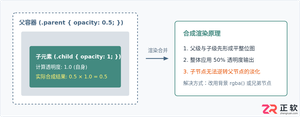
深入解析CSS中设置透明度的核心属性opacity,剖析子元素继承、事件穿透、层叠上下文等关键注意事项,并提供与rgba、hsla的实用选型对比。
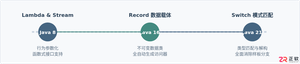
本文通过具体的旧版与新版代码对比,详细剖析Java 8引入的Lambda表达式、Java 14/16引入的Record类,以及Java 12至21逐步演进完善的Switch表达式与模式匹配,展示代码简化路径与避坑要点。
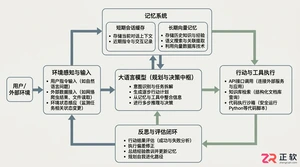
系统梳理AI智能体开发培训的核心知识模块、技术栈选型与典型实战项目,解析低代码平台与纯代码框架的差异,提供从零构建可落地智能体的完整学习与实施路径。
针对Java开发中常见的“子类未实现抽象方法”编译错误,深入分析报错原因,提供重写实现、声明抽象子类两种标准修复路径,并总结参数签名、访问修饰符等典型避坑要点。
遇到PHP递归报错时,不要盲目调大max_nesting_level。本文教你区分Xdebug限制、内存耗尽和正则递归错误,提供代码级的终止条件优化与迭代替代方案,彻底解决栈溢出问题。
本文分析PHP递归中static变量导致的状态污染及引用传递引发的共享数据修改问题。提供具体的代码复现、缓存键设计建议及调试打印技巧,帮助开发者避免隐蔽的逻辑错误。



Visual Studio Code 是微软提供的免费代码编辑器,支持 macOS,并为 Intel 与 Apple 芯片 Mac 提供适配版本。软件集代码编辑、调试、Git 源代码管理、集成终端和扩展市场于一体。

Photoshop 2026 是 Adobe 推出的专业图像处理与视觉设计软件,支持 Windows、macOS 和 iPad 等平台,广泛应用于摄影修图、电商设计、平面海报、数字绘画及视觉合成等创作场景。

Blender 是一款免费开源、跨平台的专业 3D 创作软件,集建模、动画、渲染、视频编辑与视觉合成等功能于一体,广泛应用于影视动画、游戏设计和建筑可视化等领域。软件支持 Cycles 物理渲染器与 Eevee 实时渲染引擎,并提供多边形建模、骨骼绑定、物理模拟等专业工具。Blender 兼容 Windows、macOS 和 Linux 系统,安装包轻巧、运行流畅,依托活跃的全球开发者社区持续更新,是从初学者到专业创作者都值得选择的正版 3D 创作工具。

Photoshop 2026 是 Adobe 推出的专业图像处理与视觉设计软件,支持 Windows、macOS 和 iPad 等平台,广泛应用于摄影修图、电商设计、平面海报、数字绘画及视觉合成等创作场景。
Blender 是一款免费开源、跨平台的专业 3D 创作软件,集建模、动画、渲染、视频编辑与视觉合成等功能于一体,广泛应用于影视动画、游戏设计和建筑可视化等领域。软件支持 Cycles 物理渲染器与 Eevee 实时渲染引擎,并提供多边形建模、骨骼绑定、物理模拟等专业工具。Blender 兼容 Windows、macOS 和 Linux 系统,安装包轻巧、运行流畅,依托活跃的全球开发者社区持续更新,是从初学者到专业创作者都值得选择的正版 3D 创作工具。