

Python实现批量图片转GIF动图(附源代码)
利用Python的PIL库实现批量图片合成GIF动图,支持PNG、JPG、BMP等格式,可配置帧率、循环次数与文件名排序,自动处理透明通道兼容问题,并提供尺寸缩放、颜色量化、帧优化等压缩功能,生成高质量动图。
自然引入,只在原文已有的标题层级基础上使用
,未额外添加模板化小标题。 ---
今天来聊聊如何用Python把一堆图片合成GIF动图。这事儿听起来简单,但真要上手,会遇到不少坑——图片格式不统一、透明通道导致背景变黑、文件名排序乱套、生成的GIF体积过大……这些问题,其实都可以用一套脚本搞定。下面分享两个版本:一个简洁版,适合快速上手;一个专业版,适合对画质和体积有要求的场景。
关键内容
- 支持 PNG/JPG/BMP 等主流图片格式,自动过滤非图片文件;
- 参数灵活配置——输入目录、输出路径、GIF 帧率(FPS)、图像名称顺序和循环次数;
- 自动处理图片格式兼容问题,并包含完善的异常提示;
- 多维度轻量化压缩,支持 0.1-1.0 缩放因子调整图片大小。
运行效果:
简洁版
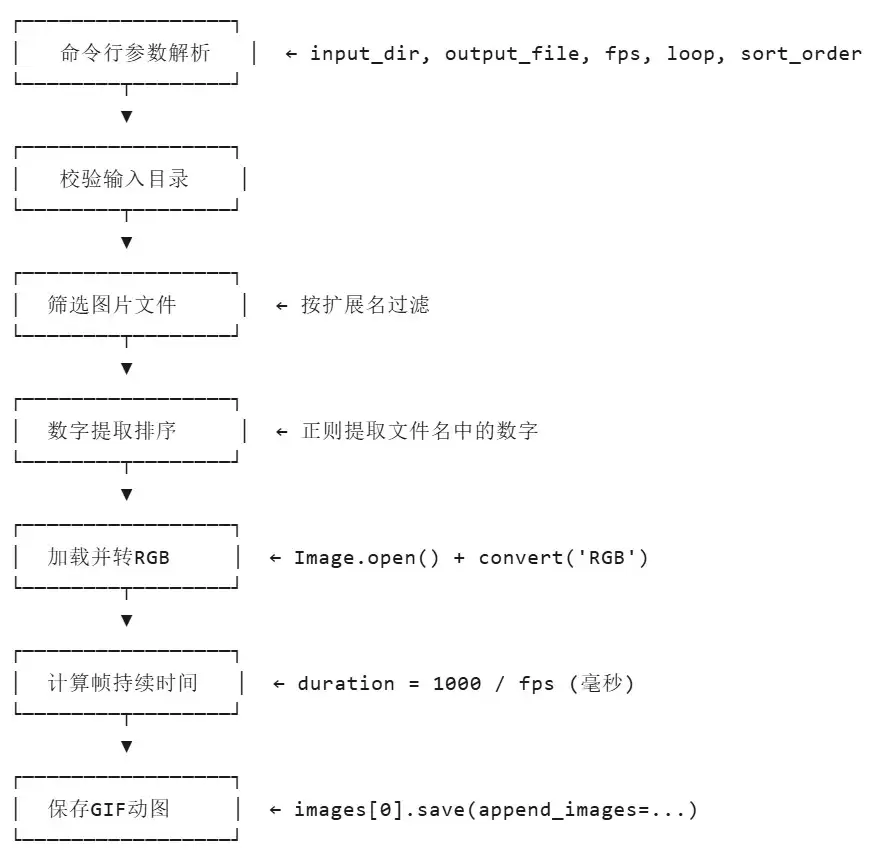
先看一个简洁版方案。这个脚本基于PIL库实现,核心逻辑就几步:读图片、排顺序、生成GIF。代码量不大,但该有的功能一个不少。
参数配置里,最关键的几个点如下:
| 阶段 | 关键操作 | 说明 |
|---|---|---|
| 参数解析 | argparse | 支持输入目录、输出路径、FPS、循环次数、排序方式 |
| 文件筛选 | os.listdir + 后缀过滤 | 仅保留支持的5种图片格式 |
| 智能排序 | re.search(r'\d+') | 提取文件名中的数字进行排序,处理如 frame_001.png |
| 图像处理 | Image.open → convert('RGB') | 统一转RGB,解决透明通道兼容问题 |
| GIF生成 | images[0].sa ve(sa ve_all=True) | 首帧保存,其余帧append |
| 目录处理 | os.makedirs(exist_ok=True) | 自动创建不存在的输出目录 |
思路流程:
源代码:
import os
import argparse
import re
from PIL import Image

def create_gif(image_folder, output_path, fps=10, loop=0, sort_order='asc'):
    """
    从指定目录的图片创建GIF动图
    参数:
    image_folder (str): 图片目录路径
    output_path (str): GIF输出路径
    fps (int/float): 每秒帧数,默认0.5
    loop (int): 循环次数(0=无限),默认0
    sort_order (str): 排序方式(asc=升序/desc=降序),默认asc
    """
    # 支持的图片格式
    IMAGE_EXTS = ('.png', '.jpg', '.jpeg', '.bmp', '.webp')

    # 筛选目录内的图片文件
    image_files = [
        os.path.join(image_folder, f)
        for f in os.listdir(image_folder)
        if f.lower().endswith(IMAGE_EXTS)
    ]

    if not image_files:
        raise ValueError(f"目录 '{image_folder}' 未找到图片文件")

    # 提取文件名中的数字作为排序依据
    def sort_key(filename):
        basename = os.path.basename(filename)
        match = re.search(r'\d+', basename)
        return int(match.group()) if match else basename

    # 根据参数切换升/降序排序
    reverse_flag = True if sort_order == 'desc' else False
    image_files.sort(key=sort_key, reverse=reverse_flag)

    # 打印排序后的图片列表
    print(f"找到 {len(image_files)} 张图片,排序方式: {sort_order}")
    for i, f in enumerate(image_files):
        print(f"  {i+1}. {os.path.basename(f)}")

    # 打开并处理图片(转RGB兼容透明通道)
    images = []
    for img_path in image_files:
        try:
            img = Image.open(img_path)
            img = img.convert('RGB')  # 统一转为RGB模式
            images.append(img)
        except Exception as e:
            print(f"警告: 无法打开图片 {img_path} - {e}")

    if not images:
        raise ValueError("无可用图片文件")

    # 计算每帧持续时间(毫秒)
    duration = 1000 / fps

    # 保存GIF
    images[0].sa ve(
        output_path,
        sa ve_all=True,
        append_images=images[1:],
        duration=duration,
        loop=loop
    )

    # 打印生成结果
    print(f"\nGIF已保存至: {output_path}")
    print(f"帧率: {fps} FPS | 图片数量: {len(images)} | 循环次数: {'无限' if loop == 0 else loop}")

def main():
    # 命令行参数解析
    parser = argparse.ArgumentParser(description='批量图片转GIF动图工具')
    parser.add_argument('--input_dir', default='./coco_test/', help='输入图片目录(默认: ./coco_test/)')
    parser.add_argument('--output_file', default='Output_GIF/coco_test-202601.gif', help='输出GIF文件路径')
    parser.add_argument('-f', '--fps', type=float, default=0.5, help='每秒帧数(默认: 0.5)')
    parser.add_argument('-l', '--loop', type=int, default=0, help='循环次数(0=无限,默认: 0)')
    parser.add_argument('-s', '--sort_order', choices=['asc', 'desc'], default='asc', help='排序方式(asc=升序/desc=降序,默认: asc)')

    args = parser.parse_args()

    # 校验输入目录是否存在
    if not os.path.isdir(args.input_dir):
        print(f"错误: 输入目录 '{args.input_dir}' 不存在")
        return

    # 自动补全GIF扩展名
    if not args.output_file.lower().endswith('.gif'):
        args.output_file += '.gif'

    # 自动创建输出目录(如果不存在)
    output_dir = os.path.dirname(args.output_file)
    if output_dir and not os.path.exists(output_dir):
        os.makedirs(output_dir, exist_ok=True)
        print(f"提示: 自动创建输出目录 '{output_dir}'")

    # 生成GIF
    try:
        create_gif(args.input_dir, args.output_file, args.fps, args.loop, args.sort_order)
    except Exception as e:
        print(f"错误: {e}")

if __name__ == "__main__":
    main()
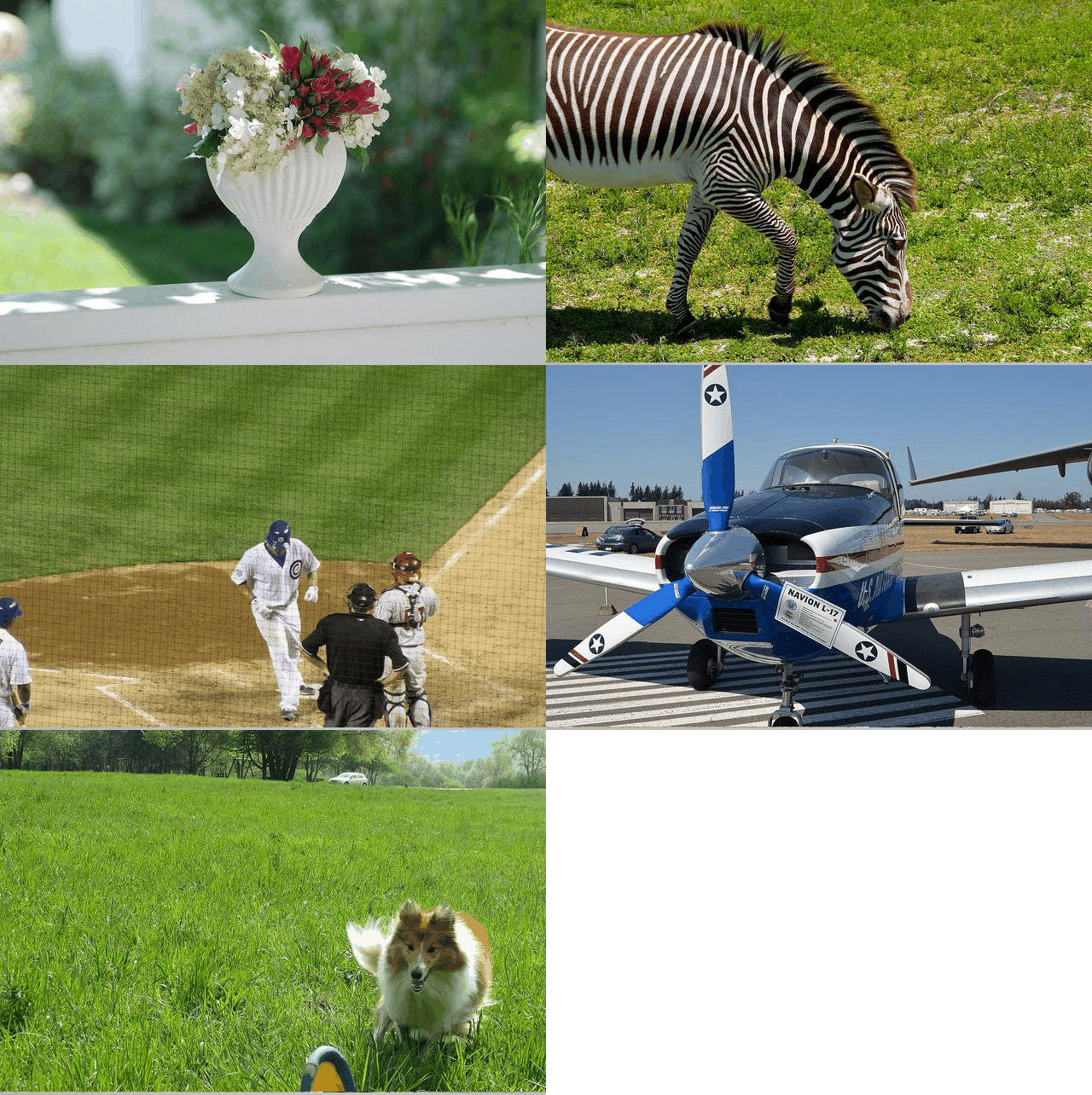
打印信息:
找到 5 张图片,排序方式: asc
1. 000000000030.jpg
2. 000000000034.jpg
3. 000000000192.jpg
4. 000000000247.jpg
5. 000000000307.jpg
GIF已保存至: Output_GIF/coco_test-202601.gif
帧率: 0.5 FPS | 图片数量: 5 | 循环次数: 无限
运行效果:
专业版
如果简洁版不够用,那就看看这个增强版。相比基础版,它新增了压缩优化、尺寸缩放、颜色量化等专业功能,适合对GIF质量有更高要求的场景。先看一个对比表,一目了然:
| 特性 | 基础版 | 增强版(本代码) |
|---|---|---|
| 图片转GIF | ✅ | ✅ |
| 智能数字排序 | ✅ | ✅ |
| 透明通道处理 | ❌(直接转RGB) | ✅(白色背景填充) |
| 尺寸缩放 | ❌ | ✅(LANCZOS重采样) |
| 颜色量化 | ❌ | ✅(MedianCut算法,1-256色) |
| 帧差异优化 | ❌ | ✅(optimize参数) |
| 压缩级别控制 | ❌ | ✅(0-9级) |
| 调色板质量 | ❌ | ✅(1-100) |
| 尺寸一致性校验 | ❌ | ✅(打印警告) |
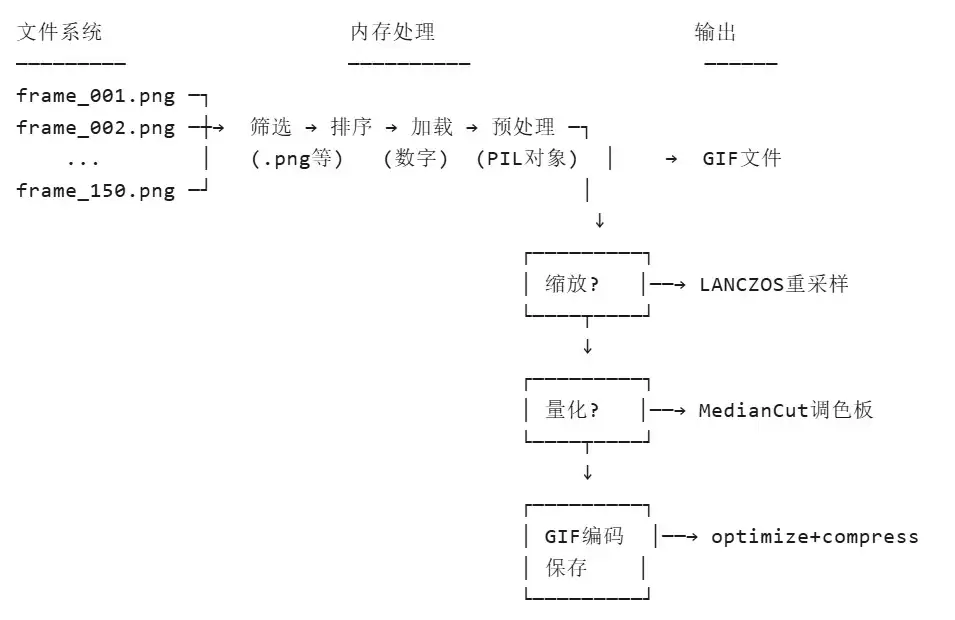
这版工具可以说是麻雀虽小五脏俱全,从图片预处理到GIF优化,一条龙搞定。核心能力可以拆成三块来看:
核心生成:灵活可控的GIF创建
- 读取指定目录下PNG/JPG/BMP/WebP等主流格式图片,支持通过
-s/--sort_order参数一键切换文件名升序/降序排序; - 自定义帧率(FPS)、循环次数(0 = 无限循环),满足不同播放节奏需求。
- 读取指定目录下PNG/JPG/BMP/WebP等主流格式图片,支持通过
预处理:智能兼容 & 规整图片
- 自动处理RGBA透明图片:将透明背景转为白色,避免GIF背景异常;
- 校验所有图片尺寸一致性,尺寸不符时给出明确警告,保障动图显示效果;
- 支持0.1-1.0缩放因子调整图片大小,平衡GIF清晰度与文件体积。
优化:多维度轻量化压缩
- 可选颜色数精简:通过中值切割算法限制最大颜色数(1-256),大幅降低GIF体积;
- 帧优化 + 多级压缩:启用帧差异编码、自定义压缩级别(0-9)、调色板质量(1-100),兼顾画质与压缩率;
- 内置Floyd-Steinberg抖动算法,减少颜色精简后的画面失真。
源代码:
import os
import argparse
import re
from PIL import Image
import numpy as np

def create_gif(image_folder, output_path, fps=10, loop=0,
               reduce_colors=True, max_colors=256,
               optimize_frames=True, resize_factor=1.0,
               compress_level=6, quality=85, sort_order='asc'):
    """
    从指定目录图片创建GIF动图(支持压缩/缩放/调色)
    参数:
    image_folder (str): 图片目录路径
    output_path (str): GIF输出路径
    fps (int/float): 每秒帧数,默认10
    loop (int): 循环次数(0=无限),默认0
    reduce_colors (bool): 是否减少颜色数,默认True
    max_colors (int): 最大颜色数(1-256),默认256
    optimize_frames (bool): 是否优化帧(差异编码),默认True
    resize_factor (float): 缩放因子(0.1-1.0),默认1.0(不缩放)
    compress_level (int): 压缩级别(0-9),默认6
    quality (int): 调色板质量(1-100),默认85
    sort_order (str): 排序方式(asc=升序/desc=降序),默认asc
    """
    # 支持的图片格式
    IMAGE_EXTS = ('.png', '.jpg', '.jpeg', '.bmp', '.webp')

    # 筛选目录内的图片文件
    image_files = [
        os.path.join(image_folder, f)
        for f in os.listdir(image_folder)
        if f.lower().endswith(IMAGE_EXTS)
    ]

    if not image_files:
        raise ValueError(f"目录 '{image_folder}' 未找到图片文件")

    # 提取文件名中的数字作为排序依据
    def sort_key(filename):
        basename = os.path.basename(filename)
        match = re.search(r'\d+', basename)
        return int(match.group()) if match else basename

    # 根据参数切换升/降序排序
    reverse = True if sort_order == 'desc' else False
    image_files.sort(key=sort_key, reverse=reverse)

    # 打印排序结果
    print(f"找到 {len(image_files)} 张图片,排序方式: {sort_order}")
    for i, f in enumerate(image_files):
        print(f"  {i+1}. {os.path.basename(f)}")

    # 加载并统一图片格式/尺寸
    images = []
    first_size = None

    for img_path in image_files:
        try:
            img = Image.open(img_path)

            # 校验图片尺寸一致性
            if first_size is None:
                first_size = img.size
                print(f"\n基准尺寸: {first_size[0]}x{first_size[1]}")
            elif img.size != first_size:
                print(f"警告: 图片 {os.path.basename(img_path)} 尺寸 {img.size} 与基准不一致")

            # 处理透明通道(转为白色背景)
            if img.mode == 'RGBA':
                background = Image.new('RGB', img.size, (255, 255, 255))
                background.paste(img, mask=img.split()[-1])
                img = background
            else:
                img = img.convert('RGB')

            images.append(img)

        except Exception as e:
            print(f"警告: 无法打开图片 {img_path} - {e}")

    if not images:
        raise ValueError("无可用图片文件")

    print(f"\n成功加载 {len(images)} 张图片")

    # 图片缩放(按需)
    if resize_factor != 1.0 and 0.1 <= resize_factor <= 1.0:
        new_size = (int(first_size[0] * resize_factor),
                   int(first_size[1] * resize_factor))
        print(f"缩放图片: {first_size} → {new_size} (缩放因子: {resize_factor})")

        for i in range(len(images)):
            images[i] = images[i].resize(new_size, Image.Resampling.LANCZOS)

    # 减少颜色数(按需)
    if reduce_colors and max_colors < 256:
        print(f"减少颜色数至 {max_colors} 色")

        for i in range(len(images)):
            images[i] = images[i].quantize(colors=max_colors,
                                           method=Image.Quantize.MEDIANCUT)
            images[i] = images[i].convert('RGB')

    # 计算每帧时长(毫秒)
    duration = 1000 / fps

    # 自动创建输出目录(不存在时)
    output_dir = os.path.dirname(os.path.abspath(output_path))
    if output_dir:
        os.makedirs(output_dir, exist_ok=True)
        print(f"\n输出目录已确保存在: {output_dir}")

    # 生成并保存GIF(带优化参数)
    print("正在生成GIF文件...")
    images[0].sa ve(
        output_path,
        sa ve_all=True,
        append_images=images[1:],
        duration=duration,
        loop=loop,
        optimize=optimize_frames,
        compress_level=compress_level,
        quality=quality,
        disposal=2,
        dither=Image.Dither.FLOYDSTEINBERG
    )

    # 输出生成结果
    file_size = os.path.getsize(output_path) / (1024 * 1024)
    print(f"\n✅ GIF已保存至: {output_path}")
    print(f"? 文件大小: {file_size:.2f} MB | ?️ 帧率: {fps} FPS (每帧 {duration:.1f}ms)")
    print(f"?️ 图片数量: {len(images)} | ? 循环次数: {'无限' if loop == 0 else loop}")
    if resize_factor != 1.0:
        print(f"? 缩放因子: {resize_factor}")
    if reduce_colors:
        print(f"? 颜色数限制: {max_colors}")
    print(f"?️ 压缩级别: {compress_level} | ? 质量设置: {quality}")

def main():
    # 命令行参数解析
    parser = argparse.ArgumentParser(description='GIF生成工具(支持压缩/缩放/调色/排序)')
    parser.add_argument('--input_dir', default='./THUD_Robot_data/', help='输入图片目录(默认: ./Gif_bev_Global_Graph_Range/)')
    parser.add_argument('--output_file', default='Output_GIF/THUD_Robot_data-test.gif', help='输出GIF文件路径')
    parser.add_argument('-f', '--fps', type=float, default=0.5, help='每秒帧数(默认: 0.5)')
    parser.add_argument('-l', '--loop', type=int, default=0, help='循环次数(0=无限,默认: 0)')
    parser.add_argument('-s', '--sort_order', choices=['asc', 'desc'], default='asc',help='排序方式(asc=升序/desc=降序,默认: asc)')

    # 压缩/优化相关参数
    parser.add_argument('--no-reduce-colors', action='store_false', default=True, dest='reduce_colors',help='不减少颜色数')
    parser.add_argument('--max-colors', type=int, default=256,help='最大颜色数(1-256),默认256')
    parser.add_argument('--resize', type=float, default=0.6,help='缩放因子(0.1-1.0),默认0.6')
    parser.add_argument('--compress', type=int, default=3, choices=range(0, 10),help='压缩级别(0-9),默认3')
    parser.add_argument('--quality', type=int, default=95,help='调色板质量(1-100),默认95')

    args = parser.parse_args()

    # 校验输入目录
    if not os.path.isdir(args.input_dir):
        print(f"❌ 错误: 输入目录 '{args.input_dir}' 不存在")
        return

    # 自动补全GIF扩展名
    if not args.output_file.lower().endswith('.gif'):
        args.output_file += '.gif'

    # 执行GIF生成
    try:
        create_gif(
            args.input_dir,
            args.output_file,
            args.fps,
            args.loop,
            reduce_colors=args.reduce_colors,
            max_colors=args.max_colors,
            resize_factor=args.resize,
            compress_level=args.compress,
            quality=args.quality,
            sort_order=args.sort_order
        )
    except Exception as e:
        print(f"\n❌ 错误: {e}")
        import traceback
        traceback.print_exc()

if __name__ == "__main__":
    main()
配置方面,所有参数都通过命令行传递,无需修改代码。自动补全.gif扩展名避免格式错误,生成后还会输出文件大小、帧率、颜色数等详细信息,方便你掌握结果。另外,程序会自动创建不存在的输出目录,遇到异常图片会跳过而不中断流程,整体容错性不错。
可视化结果:
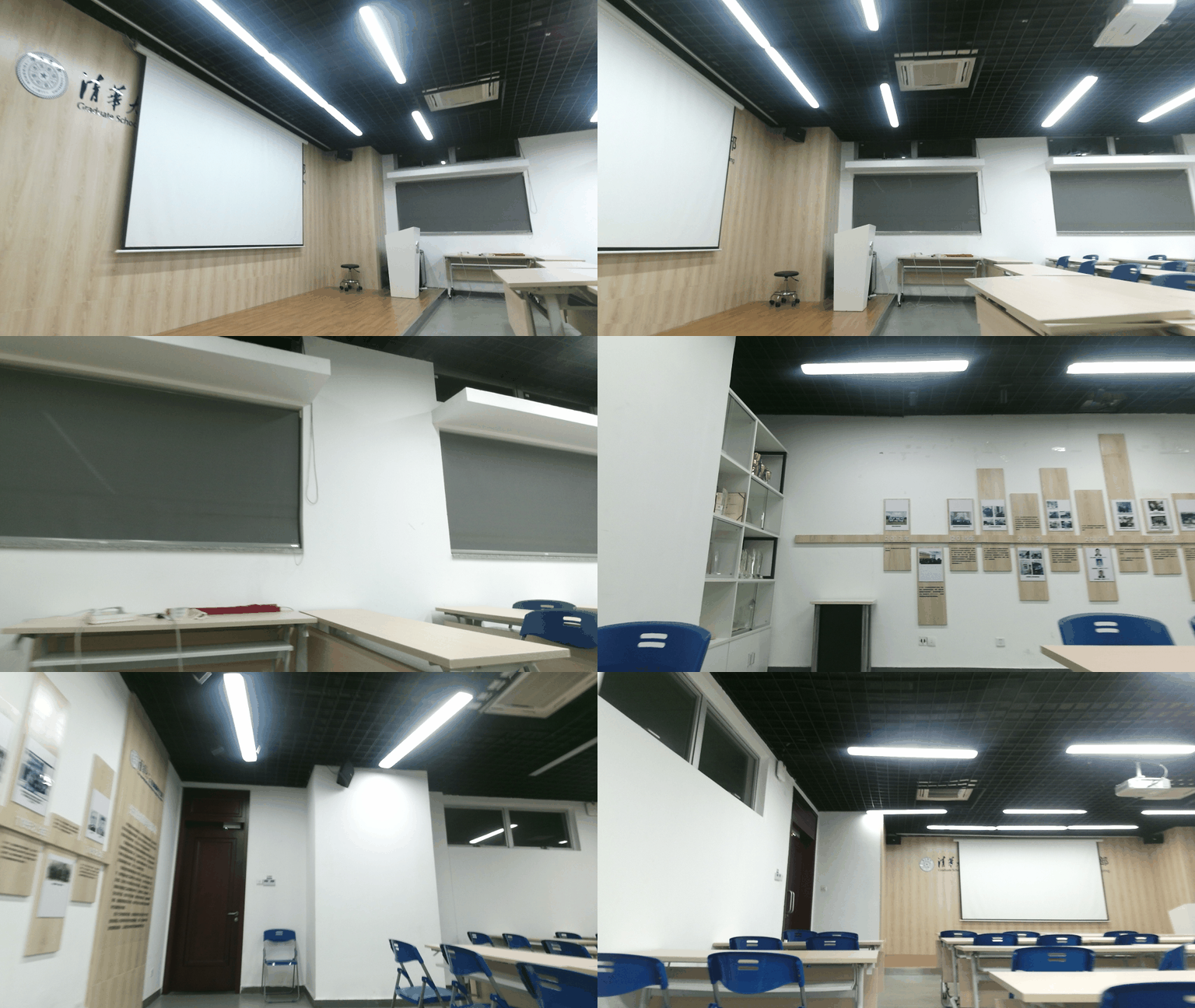
运行信息:
找到 7 张图片,排序方式: asc
1. frame-000010.color.png
2. frame-000019.color.png
3. frame-000039.color.png
4. frame-000046.color.png
5. frame-000066.color.png
6. frame-000086.color.png
7. frame-000109.color.png
基准尺寸: 960x540
成功加载 7 张图片
缩放图片: (960, 540) → (768, 432) (缩放因子: 0.8)
输出目录已确保存在: /home/user/lgp_dev/01_Gif_picture/Output_GIF
正在生成GIF文件...
✅ GIF已保存至: Output_GIF/THUD_Robot_data-test.gif
? 文件大小: 1.14 MB | ?️ 帧率: 0.5 FPS (每帧 2000.0ms)
?️ 图片数量: 7 | ? 循环次数: 无限
? 缩放因子: 0.8
? 颜色数限制: 256
?️ 压缩级别: 3 | ? 质量设置: 95
分析完成~
遇到PHP递归报错时,不要盲目调大max_nesting_level。本文教你区分Xdebug限制、内存耗尽和正则递归错误,提供代码级的终止条件优化与迭代替代方案,彻底解决栈溢出问题。
本文分析PHP递归中static变量导致的状态污染及引用传递引发的共享数据修改问题。提供具体的代码复现、缓存键设计建议及调试打印技巧,帮助开发者避免隐蔽的逻辑错误。
解析PHP递归函数在树形数据处理中的性能瓶颈,提供预加载数据消除I/O、使用显式栈替代深层递归的实战方案,帮助开发者在代码可读性与执行效率间做出合理取舍。

详细讲解在Java单元测试中如何使用Mockito模拟依赖对象,包括引入依赖、创建Mock、打桩返回值、行为验证以及Mock与Spy的核心差异和常见陷阱排查。

详细分析链表删除节点的时间复杂度,深入探讨单链表与双向链表在不同已知前提下的查找与删除开销,并结合完整代码与清晰图解进行对比总结。

想知道如何让AI写出的代码更贴合你的习惯?本文手把手教你在VS Code中调整Codex相关模型参数,通过修改配置文件优化温度值和令牌限制,解决代码建议不准确或响应慢的问题。

通过实测展示Claude Code在终端中如何理解自然语言指令、自动修改代码文件并处理复杂编程任务,帮助开发者评估其实际辅助能力。

本教程详细讲解如何使用Visual Studio创建WinForms项目,通过添加按钮和标签控件并编写点击事件代码,实现一个基础的计数器功能,适合C#初学者快速上手Windows窗体应用开发。

详解Cursor编辑器中自动补全功能的开启与优化设置,涵盖Tab触发机制、上下文窗口调整及模型切换,帮助开发者解决补全延迟、干扰大等问题,提升编码流畅度。

详解Pandas中数据格式转换的核心方法,包括astype强制转换、to_numeric容错处理及日期解析技巧,解决常见类型错误并提升数据处理效率。




Photoshop 2026 是 Adobe 推出的专业图像处理与视觉设计软件,支持 Windows、macOS 和 iPad 等平台,广泛应用于摄影修图、电商设计、平面海报、数字绘画及视觉合成等创作场景。

Blender 是一款免费开源、跨平台的专业 3D 创作软件,集建模、动画、渲染、视频编辑与视觉合成等功能于一体,广泛应用于影视动画、游戏设计和建筑可视化等领域。软件支持 Cycles 物理渲染器与 Eevee 实时渲染引擎,并提供多边形建模、骨骼绑定、物理模拟等专业工具。Blender 兼容 Windows、macOS 和 Linux 系统,安装包轻巧、运行流畅,依托活跃的全球开发者社区持续更新,是从初学者到专业创作者都值得选择的正版 3D 创作工具。


Photoshop 2026 是 Adobe 推出的专业图像处理与视觉设计软件,支持 Windows、macOS 和 iPad 等平台,广泛应用于摄影修图、电商设计、平面海报、数字绘画及视觉合成等创作场景。
Blender 是一款免费开源、跨平台的专业 3D 创作软件,集建模、动画、渲染、视频编辑与视觉合成等功能于一体,广泛应用于影视动画、游戏设计和建筑可视化等领域。软件支持 Cycles 物理渲染器与 Eevee 实时渲染引擎,并提供多边形建模、骨骼绑定、物理模拟等专业工具。Blender 兼容 Windows、macOS 和 Linux 系统,安装包轻巧、运行流畅,依托活跃的全球开发者社区持续更新,是从初学者到专业创作者都值得选择的正版 3D 创作工具。