

在Vue中实现页面状态保存的各种方法
前言:为什么需要保存页面状态? 作为前端开发者,你一定遇到过这样的场景:用户在一个复杂的表单页面填写了大量信息,不小心刷新了页面或点击了返回按钮,所有数据都消失了!用户只能无奈地重新填写…… 保存页面状态不仅仅是技术需求,更是提升用户体验的关键。今天就来深入聊聊在 Vue 中实现页面状态保存的各种方
前言:为什么需要保存页面状态?
作为前端开发者,你一定遇到过这样的场景:用户在一个复杂的表单页面填写了大量信息,不小心刷新了页面或点击了返回按钮,所有数据都消失了!用户只能无奈地重新填写……
保存页面状态不仅仅是技术需求,更是提升用户体验的关键。今天就来深入聊聊在 Vue 中实现页面状态保存的各种方法。
一、应用场景分析
先看看哪些场景需要状态保存:
- 复杂表单页面:用户填写了一半的表单
- 数据筛选页面:用户设置了复杂的筛选条件
- 分页列表:用户浏览到第5页,返回后希望还在第5页
- 多步骤流程:购物车结算流程、注册流程
- 用户偏好设置:主题、语言、布局等
二、技术方案对比
方案对比流程图
少量简单数据大量复杂数据临时会话数据需要服务端同步需要保存页面状态数据特点LocalStorageVuex/Pinia + 持久化SessionStorageIndexedDB + 后端API刷新/关闭后仍存在全局状态管理仅当前会话离线可用
三、具体实现方法
方法1:使用 localStorage 保存简单状态
适用场景:数据量小、结构简单的状态保存
用户信息表单
方法2:Vuex + 持久化插件方案
适用场景:大型应用,需要全局状态管理
第一步:安装必要依赖
npm install vuex-persistedstate
第二步:创建 Vuex Store 并配置持久化
// store/index.js
import Vue from 'vue'
import Vuex from 'vuex'
import createPersistedState from 'vuex-persistedstate'

Vue.use(Vuex)

export default new Vuex.Store({
  state: {
    userPreferences: {
      theme: 'light',
      language: 'zh-CN',
      fontSize: 14
    },
    shoppingCart: [],
    formStates: {} // 存储各个表单的状态
  },

  mutations: {
    SET_USER_PREFERENCE(state, { key, value }) {
      if (state.userPreferences.hasOwnProperty(key)) {
        state.userPreferences[key] = value
      }
    },

    ADD_TO_CART(state, product) {
      const existingItem = state.shoppingCart.find(item => item.id === product.id)
      if (existingItem) {
        existingItem.quantity += product.quantity || 1
      } else {
        state.shoppingCart.push({ ...product, quantity: product.quantity || 1 })
      }
    },

    SA VE_FORM_STATE(state, { formId, data }) {
      state.formStates[formId] = data
    },

    CLEAR_FORM_STATE(state, formId) {
      if (state.formStates[formId]) {
        delete state.formStates[formId]
      }
    }
  },

  actions: {
    sa veFormState({ commit }, payload) {
      commit('SA VE_FORM_STATE', payload)
    },

    // 清除过期数据(例如24小时前的数据)
    clearExpiredStates({ state, commit }) {
      const now = Date.now()
      const expirationTime = 24 * 60 * 60 * 1000 // 24小时

      Object.keys(state.formStates).forEach(formId => {
        const formData = state.formStates[formId]
        if (formData._timestamp && now - formData._timestamp > expirationTime) {
          commit('CLEAR_FORM_STATE', formId)
        }
      })
    }
  },

  getters: {
    getFormState: (state) => (formId) => {
      return state.formStates[formId] || null
    },

    cartTotalItems: state => {
      return state.shoppingCart.reduce((total, item) => total + item.quantity, 0)
    }
  },

  plugins: [
    createPersistedState({
      key: 'vuex-app-state',
      paths: [
        'userPreferences',
        'shoppingCart',
        'formStates'
      ],

      // 自定义存储方式,可以添加加密
      storage: {
        getItem: key => {
          const data = localStorage.getItem(key)
          try {
            // 这里可以添加解密逻辑
            return JSON.parse(data)
          } catch {
            return null
          }
        },
        setItem: (key, value) => {
          // 这里可以添加加密逻辑
          localStorage.setItem(key, JSON.stringify(value))
        },
        removeItem: key => localStorage.removeItem(key)
      },

      // 数据过滤,可以排除不需要持久化的数据
      reducer: (state) => {
        const { formStates, ...rest } = state

        // 过滤掉时间戳字段
        const filteredFormStates = {}
        Object.keys(formStates).forEach(key => {
          const { _timestamp, ...formData } = formStates[key]
          filteredFormStates[key] = formData
        })

        return {
          ...rest,
          formStates: filteredFormStates
        }
      }
    })
  ]
})
第三步:在组件中使用
商品列表
{{ product.name }}
价格: ¥{{ product.price }}
购物车 ({{ cartTotalItems }}件商品)
方法3:使用路由守卫保存页面状态
适用场景:基于路由的页面状态保存
// router/index.js
import Vue from 'vue'
import VueRouter from 'vue-router'

Vue.use(VueRouter)

const routes = [
  {
    path: '/form',
    name: 'FormPage',
    component: () => import('../views/FormPage.vue'),
    meta: {
      keepAlive: true, // 需要缓存
      sa veState: true  // 需要保存状态
    }
  },
  // ...其他路由
]

const router = new VueRouter({
  mode: 'history',
  routes
})

// 页面状态缓存对象
const pageStateCache = {}

// 全局前置守卫
router.beforeEach((to, from, next) => {
  // 离开需要保存状态的页面时,保存当前页面状态
  if (from.meta.sa veState) {
    sa vePageState(from)
  }

  next()
})

// 全局后置守卫
router.afterEach((to, from) => {
  // 进入需要恢复状态的页面时,恢复页面状态
  if (to.meta.sa veState) {
    restorePageState(to)
  }
})

/**
 * 保存页面状态
 */
function sa vePageState(route) {
  const pageKey = getPageKey(route)
  const stateToSa ve = {
    scrollPosition: window.pageYOffset,
    formData: getFormDataFromPage(),
    timestamp: Date.now()
  }

  pageStateCache[pageKey] = stateToSa ve
  localStorage.setItem(`pageState_${pageKey}`, JSON.stringify(stateToSa ve))
}

/**
 * 恢复页面状态
 */
function restorePageState(route) {
  const pageKey = getPageKey(route)
  let state

  // 先从内存缓存中获取
  if (pageStateCache[pageKey]) {
    state = pageStateCache[pageKey]
  } else {
    // 内存中没有则从localStorage获取
    const sa vedState = localStorage.getItem(`pageState_${pageKey}`)
    if (sa vedState) {
      try {
        state = JSON.parse(sa vedState)
      } catch (e) {
        console.error('恢复页面状态失败:', e)
      }
    }
  }

  if (state) {
    // 恢复滚动位置
    if (state.scrollPosition) {
      setTimeout(() => {
        window.scrollTo(0, state.scrollPosition)
      }, 100)
    }

    // 恢复表单数据
    if (state.formData) {
      restoreFormDataToPage(state.formData)
    }
  }
}

/**
 * 生成页面唯一标识
 */
function getPageKey(route) {
  return route.path + JSON.stringify(route.query) + JSON.stringify(route.params)
}

export default router
方法4:使用 keep-alive 组件缓存组件实例
四、高级方案:IndexedDB 存储大量数据
当需要存储大量数据或复杂对象时,IndexedDB 是更好的选择。
// utils/db.js
class StateDB {
  constructor(dbName = 'VueAppState', version = 1) {
    this.dbName = dbName
    this.version = version
    this.db = null
  }

  // 打开数据库
  open() {
    return new Promise((resolve, reject) => {
      const request = indexedDB.open(this.dbName, this.version)
      request.onerror = () => reject(request.error)
      request.onsuccess = () => {
        this.db = request.result
        resolve(this.db)
      }
      request.onupgradeneeded = (event) => {
        const db = event.target.result

        // 创建对象存储空间
        if (!db.objectStoreNames.contains('pageStates')) {
          const store = db.createObjectStore('pageStates', { keyPath: 'id' })
          store.createIndex('timestamp', 'timestamp', { unique: false })
        }

        if (!db.objectStoreNames.contains('userData')) {
          db.createObjectStore('userData', { keyPath: 'key' })
        }
      }
    })
  }

  // 保存页面状态
  async sa vePageState(pageId, state) {
    if (!this.db) await this.open()

    return new Promise((resolve, reject) => {
      const transaction = this.db.transaction(['pageStates'], 'readwrite')
      const store = transaction.objectStore('pageStates')

      const record = {
        id: pageId,
        state: state,
        timestamp: Date.now()
      }

      const request = store.put(record)

      request.onsuccess = () => resolve()
      request.onerror = () => reject(request.error)
    })
  }

  // 获取页面状态
  async getPageState(pageId) {
    if (!this.db) await this.open()

    return new Promise((resolve, reject) => {
      const transaction = this.db.transaction(['pageStates'], 'readonly')
      const store = transaction.objectStore('pageStates')
      const request = store.get(pageId)

      request.onsuccess = () => resolve(request.result?.state)
      request.onerror = () => reject(request.error)
    })
  }

  // 清理过期数据(超过7天)
  async cleanupOldStates() {
    if (!this.db) await this.open()

    const sevenDaysAgo = Date.now() - (7 * 24 * 60 * 60 * 1000)

    return new Promise((resolve, reject) => {
      const transaction = this.db.transaction(['pageStates'], 'readwrite')
      const store = transaction.objectStore('pageStates')
      const index = store.index('timestamp')
      const range = IDBKeyRange.upperBound(sevenDaysAgo)

      const request = index.openCursor(range)

      request.onsuccess = (event) => {
        const cursor = event.target.result
        if (cursor) {
          cursor.delete()
          cursor.continue()
        } else {
          resolve()
        }
      }

      request.onerror = () => reject(request.error)
    })
  }
}

// 创建单例实例
export const stateDB = new StateDB()

// 在 Vue 插件中使用
const StatePersistencePlugin = {
  install(Vue) {
    Vue.prototype.$stateDB = stateDB

    // 混入方法到所有组件
    Vue.mixin({
      methods: {
        async sa veComponentState(stateKey, data) {
          const componentId = this.$options.name || this.$route?.path || 'unknown'
          const fullKey = `${componentId}_${stateKey}`

          try {
            await this.$stateDB.sa vePageState(fullKey, {
              data,
              sa vedAt: new Date().toISOString()
            })
            console.log(`状态已保存: ${fullKey}`)
          } catch (error) {
            console.error('保存状态失败:', error)
          }
        },

        async loadComponentState(stateKey) {
          const componentId = this.$options.name || this.$route?.path || 'unknown'
          const fullKey = `${componentId}_${stateKey}`

          try {
            const state = await this.$stateDB.getPageState(fullKey)
            return state?.data || null
          } catch (error) {
            console.error('加载状态失败:', error)
            return null
          }
        }
      }
    })
  }
}

export default StatePersistencePlugin
五、最佳实践总结
1.分层存储策略
// 根据数据类型选择不同的存储方式
const storageStrategy = {
  // 用户设置:永久存储
  userPreferences: localStorage,

  // 购物车:IndexedDB + 服务端同步
  shoppingCart: {
    local: indexedDB,
    remote: 'api/cart'
  },

  // 表单草稿:sessionStorage(会话级)
  formDraft: sessionStorage,

  // 页面滚动位置:内存缓存
  scrollPosition: 'memory'
}
2.数据版本管理
// 添加版本控制,避免数据结构变化导致的问题
const sa veWithVersion = (key, data) => {
  const payload = {
    version: '1.0.0',
    sa vedAt: new Date().toISOString(),
    data: data
  }
  localStorage.setItem(key, JSON.stringify(payload))
}

const loadWithVersion = (key, currentVersion = '1.0.0') => {
  const sa ved = localStorage.getItem(key)
  if (!sa ved) return null

  try {
    const { version, data } = JSON.parse(sa ved)

    // 版本迁移逻辑
    if (version !== currentVersion) {
      return migrateData(data, version, currentVersion)
    }

    return data
  } catch {
    return null
  }
}
3.自动保存与防抖优化
import { debounce } from 'lodash'

export default {
  data() {
    return {
      formData: {},
      autoSa veEnabled: true
    }
  },

  created() {
    // 使用防抖避免频繁保存
    this.debouncedSa ve = debounce(this.sa veFormState, 1000)
  },

  watch: {
    formData: {
      deep: true,
      handler() {
        if (this.autoSa veEnabled) {
          this.debouncedSa ve()
        }
      }
    }
  },

  methods: {
    sa veFormState() {
      // 保存逻辑
    }
  }
}
六、安全注意事项
1. 敏感信息不要保存在客户端
- 密码、token等敏感信息避免本地存储
- 必要时使用加密存储
2. 数据清理机制
// 定期清理过期数据
setInterval(() => {
  const oneDayAgo = Date.now() - 24 * 60 * 60 * 1000
  Object.keys(localStorage).forEach(key => {
    if (key.startsWith('temp_')) {
      try {
        const item = JSON.parse(localStorage.getItem(key))
        if (item.timestamp && item.timestamp < oneDayAgo) {
          localStorage.removeItem(key)
        }
      } catch {}
    }
  })
}, 60 * 60 * 1000) // 每小时清理一次
结语
保存页面状态是提升 Vue 应用用户体验的关键技术。根据不同的场景需求,我们可以选择:
- 简单场景:使用 localStorage 或 sessionStorage
- 复杂应用:Vuex/Pinia + 持久化插件
- 大量数据:IndexedDB 存储
- 组件缓存:keep-alive + 路由守卫
记住,最好的方案是分层存储、按需使用。合理使用状态保存,让你的 Vue 应用更加友好和健壮!

针对Java开发者的实用大数据技术路线解析,深入梳理Hadoop生态存储与资源调度、Spark离线计算与内存模型、Flink低延迟流处理的核心技术要点及递进学习方法。

一份结构清晰、注重实操的Python爬取网页详细教程,涵盖环境搭建、HTTP请求发送、HTML解析、数据持久化存储与异常处理等完整步骤与代码实例。
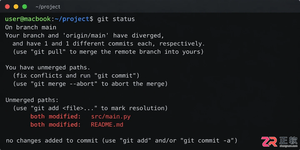
遇到Git合并冲突别慌张,本文详解冲突产生的原因及标准处理流程,涵盖查看冲突文件、理解标记含义、手动修改代码及完成合并提交的完整步骤,助你高效解决协作开发中的代码冲突问题。

深入对比Java中获取当前时间戳的两种主流方式:System.currentTimeMillis与java.time.Instant。分析二者的精度差异、API设计、时钟回拨影响与实际选型建议。

针对大数据工程场景,系统对比Java、Scala与Python在执行性能、生态结合、开发效率和维护成本上的核心差异,给出清晰的架构选型依据与落地方案。
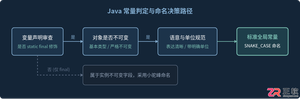
深入解析Java常量命名标准、大写下划线语义规则,剖析接口常量反模式的危害与本质原因,并提供枚举、不可实例化常量工具类等工业级最佳替代方案。
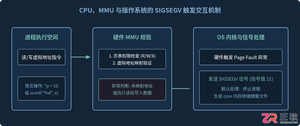
针对C语言常见的段错误(Segmentation fault)问题,详细剖析内存非法访问根因,提供结合GDB、Core Dump与AddressSanitizer的标准化排查解决步骤与预防方法。
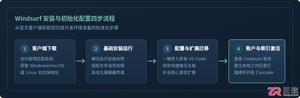
本文提供全面的Windsurf开发工具安装与使用详细教程,覆盖客户端下载安装、环境配置与VS Code插件迁移、Cascade核心协作中枢使用技巧、Chat与Write双模式实战及高效开发规范。
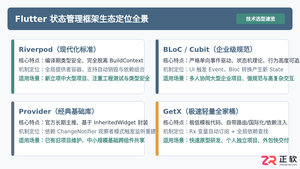
全面盘点Flutter主流状态管理框架,深度解析Provider、Riverpod、Bloc与GetX的核心机制、优缺点及适用场景,提供系统化的状态管理选型指南。
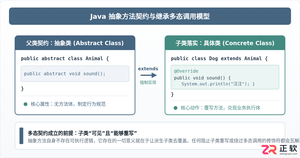
深入剖析Java中抽象方法为何严禁使用private和static修饰符。从面向对象契约规范、方法继承重写、JVM动态绑定(invokevirtual)与静态解析(invokestatic)等底层机制展开详细推导,结合编译报错示例与全景对比,彻底理清修饰符限制背后的设计逻辑。




IntelliJ IDEA 是 JetBrains 推出的专业集成开发环境,重点服务于 Java、Kotlin 与 JVM 项目开发。软件集成代码补全、静态检查、重构、调试、测试、版本控制及构建工具,并可借助插件扩展语言和框架支持。

JetBrains PyCharm 是面向 Python 开发者的集成开发环境,提供智能补全、代码检查、重构、调试、测试、版本控制及虚拟环境管理功能。Mac 版兼容 Intel 与 Apple 芯片,核心功能可免费使用。

JetBrains WebStorm 是面向 JavaScript、TypeScript 和现代 Web 技术的专业集成开发环境,可智能理解项目结构,提供代码补全、重构、错误检查、运行调试、测试及 Git 工具。

JetBrains IntelliJ IDEA 是以 Java、Kotlin 和 JVM 项目为核心的专业集成开发环境,提供智能补全、代码检查、安全重构、调试、测试、版本控制及构建工具集成。统一发行版的核心功能可免费用于商业和非商业项目,

PhpStorm 是 JetBrains 面向 PHP 与现代 Web 开发打造的专业集成开发环境,提供代码补全、静态检查、重构、调试、测试、数据库、版本控制及前端语言支持。Windows 用户可直接下载安装程序,

PyCharm 是 JetBrains 推出的 Python 集成开发环境,提供智能代码补全、错误检查、重构、调试、测试、Git、终端及 Jupyter Notebook 支持。统一版安装后可体验 30 天 Pro 功能,


